Where is W7 keeping the "Restore Points"?

ben07

New member
Power User
Local time
11:22 PM
Messages
111
The only way I know how to view Restore Points is to invoke System Restore and click Show me more points....and that's about it.

I allocated 5GB for System Restore and the last time I checked Windows was using less than 1GB out of the 5GB, however 2 restore points I created only few days ago are missing from the "Show me more points...", so now I'm trying to locate where exactly is W7 storing all those Restore points and hopefully I can copy/save to a different location/file as backup.

Thanks.

P/s I've gone thru all folders in C, but I couldn't locate the Restore Points folder!:(
 

My Computer My Computer

At a glance

Windows 7 Pro x64 RTMIntel
OS
Windows 7 Pro x64 RTM
CPU
Intel
You have run into a common problem with 7. For some reason Microsoft doesn't want you go back more than a week. Can't give you a reason why. Maybe someone where on the forums will be able to answer your question. Here is a web site explaining Windows 7 restore. This article gives you an extensive look into the Restore Feature. Maybe it will help you a little bit. :)
 

My Computer My Computer

At a glance

Win 7 Pro x64, VM Win XP, Win7 Pro Sandbox, K...AMD Athlon(tm) II X4 640 @ 3.0 Gbz12GB 1066MHz DDR3 SDRAM - 2x4GB, 2x2GBATI Radeon HD 4350 HD Graphics/Audio with 512MB
Computer Manufacturer/Model Number
HP Pavilion a4302f
OS
Win 7 Pro x64, VM Win XP, Win7 Pro Sandbox, Kubuntu 11
CPU
AMD Athlon(tm) II X4 640 @ 3.0 Gbz
Memory
12GB 1066MHz DDR3 SDRAM - 2x4GB, 2x2GB
Graphics Card(s)
ATI Radeon HD 4350 HD Graphics/Audio with 512MB
Sound Card
Realtek High Definition Audio
Monitor(s) Displays
1. Dell 23" SP2307, 2. Mitsublishi 40" HDTV, Hannspree 25"
Screen Resolution
1. 2048x1152, 2. 1920-1080, 3. 1920x1200
Hard Drives
Int: 1 120 Gig SSD i
1 - 2.5" 500 USB External HDD
1 -1 Tb USB External HDD
Case
Mid Tower
Cooling
Standard Fans - 5 fans (very quiet)
Keyboard
Microsoft Wireless 2000
Mouse
Microsoft Wireless Mouse 5000
Internet Speed
10 Mbit (realistically 500 Kbit - 1.2 Mbit)
Other Info
Speakers - Bose Desktop (Excellent Sound)
1 external CD|DVD\Blue-ray Recorders/Players (Sony)
Thanks Lee, for both the info and link!:geek:
 

My Computer My Computer

At a glance

Windows 7 Pro x64 RTMIntel
OS
Windows 7 Pro x64 RTM
CPU
Intel
Hmmm, I was hoping to find the initial question answered rather than skipped.

So anyone know where they lurk during the hours of daylight?
- I've cloned to a larger HDD, not realising that restore points are Not carried across.
Plan A - Locate them on the old drive (untouched) and try adding them to the new drive.
Plan B - get a plan B.
 
Last edited:

My Computer My Computer

At a glance

Windows 7 Home Premium 64bit3.30 gigahertz Intel Core i3-2120
Computer type
PC/Desktop
Computer Manufacturer/Model Number
Dell
OS
Windows 7 Home Premium 64bit
CPU
3.30 gigahertz Intel Core i3-2120
Motherboard
Alienware 06G6JW A00
Restore points are kept in Shadowstorage. If you want to know how your shadowstorage is used, issue this command:

vssadmin list shadowstorage

And if you want to see the restore points (at least their description), use this command:

vssadmin list shadows

And if you want to know what's inside each restore point, use Shadow Explorer

http://www.sevenforums.com/tutorials/132087-shadowexplorer-recover-lost-files-folders.html

And if you want to change the size of the shadowstorage, use this command:

vssadmin resize shadowstorage /For=C: /On=C: /MaxSize=20GB

20GB is only an example. You can use any number. You can also say /MaxSize=xx%
 

My Computer My Computer

At a glance

Vista, Windows7, Mint Mate, Zorin, Windows 8from 1.6GHz Duo to i7
Computer Manufacturer/Model Number
HP, Dell, Gateway, Toshiba - 4 laptops and 2 desktops
OS
Vista, Windows7, Mint Mate, Zorin, Windows 8
CPU
from 1.6GHz Duo to i7
Monitor(s) Displays
2x HP w2207
Hard Drives
5x HDD, 7x SSD, 12x Externals
Keyboard
with trackball - no mices
Mouse
Trackball mice
Internet Speed
DSL 6000
Excellent video Wolfgang.
 

My Computer My Computer

At a glance

Windows 10 Pro. 64/ version 1709 Windows 7 Pr...Intel i7-6800K @ 4.3Corsair Platinum 16 gig @2400EVGA GTX 1070 OC
Computer type
PC/Desktop
Computer Manufacturer/Model Number
Home made Desktop
OS
Windows 10 Pro. 64/ version 1709 Windows 7 Pro/64
CPU
Intel i7-6800K @ 4.3
Motherboard
ASUS X-99 Deluxe II
Memory
Corsair Platinum 16 gig @2400
Graphics Card(s)
EVGA GTX 1070 OC
Monitor(s) Displays
Asus 27" LED LCD/VE278Q
Screen Resolution
1920-1080 or 1280-720 HDMI
Hard Drives
INTEL SSD 730-240 Gb Sata 3.0/
PSU
EVGA Platium 1200W
Case
Phanteks Luxe Tempered Glass 8 fans/ one radiator
Cooling
XSPC/ Water Cooled CPU
Keyboard
Das 4 Professional
Mouse
Logitech M705/MX Anywhere 2-S
Internet Speed
100 mbits
Antivirus
Microsoft Security Essentials/ Malwarebytes Premium 3.0/ SAS
Browser
I.E. 11 default/Firefox/ ISP Time Warner Cable/Spectrum
Other Info
LG BluRay Burner/
Sound system-KLipsch-THX/
Icy Dock ssd Hot Swap bays.
Thanks Jack. I like video tuts because you can show better than with words what needs to be done.
 

My Computer My Computer

At a glance

Vista, Windows7, Mint Mate, Zorin, Windows 8from 1.6GHz Duo to i7
Computer Manufacturer/Model Number
HP, Dell, Gateway, Toshiba - 4 laptops and 2 desktops
OS
Vista, Windows7, Mint Mate, Zorin, Windows 8
CPU
from 1.6GHz Duo to i7
Monitor(s) Displays
2x HP w2207
Hard Drives
5x HDD, 7x SSD, 12x Externals
Keyboard
with trackball - no mices
Mouse
Trackball mice
Internet Speed
DSL 6000
Thanks for sharing your knowledge whs, it has added to my learning, however using ShadowExplorer I can now look Inside the restore points on my old HDD but it seems not actually activate a system restore point . . .

I'll paraphrase my post:
I wish to ACTUALLY FIND the restore points ie place a mouse cursor on the files and make them turn blue. Then drag them to the corresponding position on the Active HDD and make them do my bidding.

Reason: Restore Points were NOT cloned (despite sector-by-sector) and I now have a wish to use one to reset the OS to a previous point in time (entirely, totally and in full, Not just grab a random file). The only other option is refit the old HDD regress it and clone it again.
 

My Computer My Computer

At a glance

Windows 7 Home Premium 64bit3.30 gigahertz Intel Core i3-2120
Computer type
PC/Desktop
Computer Manufacturer/Model Number
Dell
OS
Windows 7 Home Premium 64bit
CPU
3.30 gigahertz Intel Core i3-2120
Motherboard
Alienware 06G6JW A00

My Computer My Computer

At a glance

Vista, Windows7, Mint Mate, Zorin, Windows 8from 1.6GHz Duo to i7
Computer Manufacturer/Model Number
HP, Dell, Gateway, Toshiba - 4 laptops and 2 desktops
OS
Vista, Windows7, Mint Mate, Zorin, Windows 8
CPU
from 1.6GHz Duo to i7
Monitor(s) Displays
2x HP w2207
Hard Drives
5x HDD, 7x SSD, 12x Externals
Keyboard
with trackball - no mices
Mouse
Trackball mice
Internet Speed
DSL 6000
Hmmm, Thanks once again. Been busy researching further and all things point to this very same answer. Can't say that I am surprised; the simple, the logical and the Bill Gates do not ever seem to co-exist. Sigh.

Perhaps I can get a result by imaging the old drive, which just might precede the issue I wish to eradicate.
Otherwise reinstall old and regress it.
Still annoyed about the non-cloning of restore points, my impression was that sector-by-sector gave an Absolute clone. It is not something that appeared in any of the advisories that I read (and there were many), otherwise I would have immediately set a restore point on the new drive as a fast fallback position.
 

My Computer My Computer

At a glance

Windows 7 Home Premium 64bit3.30 gigahertz Intel Core i3-2120
Computer type
PC/Desktop
Computer Manufacturer/Model Number
Dell
OS
Windows 7 Home Premium 64bit
CPU
3.30 gigahertz Intel Core i3-2120
Motherboard
Alienware 06G6JW A00
It is not that simple. Restore points are a very ingenious piece of art. Have you ever asked yourself how they manage to fit all the information of a 20GB OS into a restore point that is less than 1GB.
 

My Computer My Computer

At a glance

Vista, Windows7, Mint Mate, Zorin, Windows 8from 1.6GHz Duo to i7
Computer Manufacturer/Model Number
HP, Dell, Gateway, Toshiba - 4 laptops and 2 desktops
OS
Vista, Windows7, Mint Mate, Zorin, Windows 8
CPU
from 1.6GHz Duo to i7
Monitor(s) Displays
2x HP w2207
Hard Drives
5x HDD, 7x SSD, 12x Externals
Keyboard
with trackball - no mices
Mouse
Trackball mice
Internet Speed
DSL 6000
It is Art alright, sometimes it's the sort of art that you pay your money then walk in side to find an empty room.
 

My Computer My Computer

At a glance

Windows 7 Home Premium 64bit3.30 gigahertz Intel Core i3-2120
Computer type
PC/Desktop
Computer Manufacturer/Model Number
Dell
OS
Windows 7 Home Premium 64bit
CPU
3.30 gigahertz Intel Core i3-2120
Motherboard
Alienware 06G6JW A00
System volume information. Restore points could be invalid after if the volume definition has changed. e.g due to disk id collision, or file system resized.
 

My Computers My Computers

  • At a glance

    7 X64i5 84002x8gb 3200mhz
    Computer type
    PC/Desktop
    OS
    7 X64
    CPU
    i5 8400
    Motherboard
    gigabyte b365m ds3h
    Memory
    2x8gb 3200mhz
    Hard Drives
    various
    PSU
    pure power 11 400w cm
    Case
    Coolermaster
    Cooling
    cryorig m9i
  • At a glance

    7x64g54008gb ddr4 2400
    Computer type
    PC/Desktop
    OS
    7x64
    CPU
    g5400
    Motherboard
    ga b365m ds3h
    Memory
    8gb ddr4 2400
    PSU
    xfx pro 450w
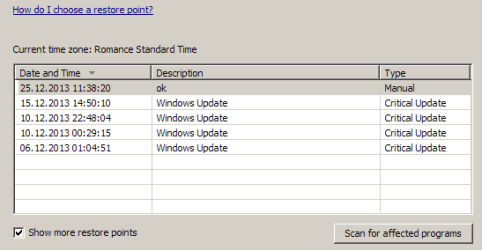
...For some reason Microsoft doesn't want you go back more than a week...

Hello, no time limit here, total allocated disk space is the only factor.
 

Attachments

  • rest.PNG
    rest.PNG
    4.9 KB · Views: 15

My Computer My Computer

At a glance

W7, W8.1
Computer type
Laptop
Computer Manufacturer/Model Number
Dell \ Lenovo\ HP \ Toshiba
OS
W7, W8.1
Antivirus
MSE, Malwarebytes
Browser
FF
...For some reason Microsoft doesn't want you go back more than a week...

Hello, no time limit here, total allocated disk space is the only factor.
You are right. There is no time limit - only a space limit. It's a FiFo system (first in, first out).
 

My Computer My Computer

At a glance

Vista, Windows7, Mint Mate, Zorin, Windows 8from 1.6GHz Duo to i7
Computer Manufacturer/Model Number
HP, Dell, Gateway, Toshiba - 4 laptops and 2 desktops
OS
Vista, Windows7, Mint Mate, Zorin, Windows 8
CPU
from 1.6GHz Duo to i7
Monitor(s) Displays
2x HP w2207
Hard Drives
5x HDD, 7x SSD, 12x Externals
Keyboard
with trackball - no mices
Mouse
Trackball mice
Internet Speed
DSL 6000
They are in the hidden System Volume Information folder on the drive FWIW. As mentioned, you can't copy them but you can manipulate the space they use with vssadmin.
 

My Computer My Computer

At a glance

Windows 10 Pro. EFI boot partition, full EFI ...i7 4770k 4.4GHz (44-44-43-43 turbo) @ 1.248V16GB (8GBx2) @2200 MHz G.skill Sniper 10-11-1...MSI GTX 970 Gaming 4G
Computer type
PC/Desktop
Computer Manufacturer/Model Number
Home built (GeneO industries)/Model 4
OS
Windows 10 Pro. EFI boot partition, full EFI boot
CPU
i7 4770k 4.4GHz (44-44-43-43 turbo) @ 1.248V
Motherboard
ASUS Maximus VI Hero
Memory
16GB (8GBx2) @2200 MHz G.skill Sniper 10-11-10-30-1, 1.6V
Graphics Card(s)
MSI GTX 970 Gaming 4G
Sound Card
Onboard SupremeFX Audio
Monitor(s) Displays
NEC Spectraview 2490WUXi-SV
Screen Resolution
1920 x 1200
Hard Drives
Samsung 850 Pro 256GB (OS), Samsung 2x 128GB 840 Pro SSD in RAID0, 3x WD Blue 6Gb/s 1TB RAID0, WD 2TB Black external USB 3.0, 2TB WD20EARS Green external USB 3.0, 2x 500GB Seagate and 1 750 GB external USB, 1x 350GB external USB3
PSU
Seasonic X-850 (2012 KM3 model)
Case
Fractal Design Define R4
Cooling
NH-D14, NF-F12, NF-A15; NF-P14, NF-P12,NF-A14, S12A PWM
Keyboard
Cooler Master Storm Quickfire Rapid - Brown
Mouse
Logitech G602
Internet Speed
126.4 Mb/s down, 24.3 Mb/s up
Other Info
USB 3.0 x8 , SATA III x8, eSATA, USB 2.0 x6. Samsung DVD R/W drive.

WEI: CPU 7.8, Memory 7.9, Graphics 7.9, Disk 7.9
Back
Top