Still unable to copy CD-ROM for Windows 7 Ultimate SP1 to blank DVD+R

Mrsjeffyg

New member
Local time
11:56 AM
Messages
12
Let's try this again. Below is the 1st thread, plus results of 3 attempts at the suggestions. So far, nothing has worked. I included the root directory list of the CD-ROM which I am trying to copy.
Please read this again and give me more detailed instructions. It is appreciated - I am trying, but I am running out of DVD+R.


I am not familiar with copying anything to a DVD.
I need to make a backup copy (exact copy) of my Windows 7 Ultimate 64-bit to another DVD+R.
What are the exact steps to do so? I have only 1 DVD drive. Is it possible to copy it?

Thank you for your suggestions, but I am not able to do it. I need to have super detailed instructions. When I tried to copy it, as suggested by Britton30, I never got a screen or anything to put the blank DVD+R in. Something is missing in the translation. I have rarely used the DVD or CD to record, so I do not know what to expect and when to do something.

I tried ImgBurn as suggested by WHS. It managed to copy the BOOT, AUTORUN.INF and BOOTMGR.

I then tried PowerISO from SWI2's instructions. This did not work either. I put the blank DVD+R disc and it cannot read it.

The disc I am trying to duplicate has the following on it:
Folders: BOOT EFI SOURCES SUPPORT UPGRADE
Files: AUTORUN.INF BOOTMGR SETUP.EXE

Do I need to copy all of these or do something else? It is actually for Windows 7 Ultimate SP1.

My DVD+R must end up being bootable. The disc is NOT rewriteable - it's one-time only.

Please give super-detailed instructions!
 

My Computer My Computer

At a glance

Windows 7 Ultimate x64
Computer type
Laptop
Computer Manufacturer/Model Number
Toshiba
OS
Windows 7 Ultimate x64

My Computer My Computer

At a glance

Windows 10 Pro x64 ; Xubuntu x64Intel i7 860 @ 2.80 GHz O/C'ed to 4.0GHz16GB Corsair Vengance DDR3 @ 661 MHz Dual Cha...EVGA NVidia GTX 560 1024MB
Computer type
PC/Desktop
Computer Manufacturer/Model Number
Golden Mk. I.4
OS
Windows 10 Pro x64 ; Xubuntu x64
CPU
Intel i7 860 @ 2.80 GHz O/C'ed to 4.0GHz
Motherboard
Gigabyte P55A-UD3R Rev.1. Award BIOS F13
Memory
16GB Corsair Vengance DDR3 @ 661 MHz Dual Channel (9-9-9-24)
Graphics Card(s)
EVGA NVidia GTX 560 1024MB
Sound Card
Realtek Integrated
Monitor(s) Displays
Dual Samsung SyncMaster 2494HS
Screen Resolution
1920*1080 and 1920*1080
Hard Drives
1*Samsung 840 EVO 120GB SSD;
1*OCZ Vertex 2 60GB SSD;
2*Samsung F3 SpinPoint 1TB in RAID0;
1*Samsung F1 SpinPoint 1TB;
2*Western Digital 1TB External USB 3.0
1*Western Digital 500GB External USB 3.0
1*Seagate 500GB External USB 2.0
PSU
Thermaltake ToughPower QFan 750W
Case
Thermaltake Element S VK60001W2Z
Cooling
Corsair H60 Water Cooling, 2*230mm and 2*80mm case fans
Keyboard
Logitech G110
Mouse
Logitech MX518
Unfortunately, Golden, this thread here is a restart of the one you answered with. As I stated at the beginning of this thread, this one is a repeat, but with more info and results. Everything I have tried is in this thread and nothing has yet worked. Please re-read this entire thread. Something is missing from the other threads for the same.
 

My Computer My Computer

At a glance

Windows 7 Ultimate x64
Computer type
Laptop
Computer Manufacturer/Model Number
Toshiba
OS
Windows 7 Ultimate x64
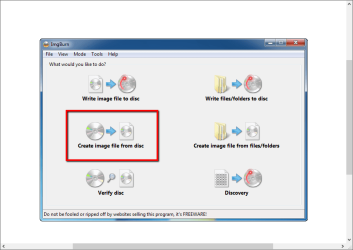
Use IMGBURN to extract the contents of the Windows 7 DVD to an ISO file. Report back once that's completed.

Capture.PNG
 

My Computer My Computer

At a glance

Windows 10 Pro x64 ; Xubuntu x64Intel i7 860 @ 2.80 GHz O/C'ed to 4.0GHz16GB Corsair Vengance DDR3 @ 661 MHz Dual Cha...EVGA NVidia GTX 560 1024MB
Computer type
PC/Desktop
Computer Manufacturer/Model Number
Golden Mk. I.4
OS
Windows 10 Pro x64 ; Xubuntu x64
CPU
Intel i7 860 @ 2.80 GHz O/C'ed to 4.0GHz
Motherboard
Gigabyte P55A-UD3R Rev.1. Award BIOS F13
Memory
16GB Corsair Vengance DDR3 @ 661 MHz Dual Channel (9-9-9-24)
Graphics Card(s)
EVGA NVidia GTX 560 1024MB
Sound Card
Realtek Integrated
Monitor(s) Displays
Dual Samsung SyncMaster 2494HS
Screen Resolution
1920*1080 and 1920*1080
Hard Drives
1*Samsung 840 EVO 120GB SSD;
1*OCZ Vertex 2 60GB SSD;
2*Samsung F3 SpinPoint 1TB in RAID0;
1*Samsung F1 SpinPoint 1TB;
2*Western Digital 1TB External USB 3.0
1*Western Digital 500GB External USB 3.0
1*Seagate 500GB External USB 2.0
PSU
Thermaltake ToughPower QFan 750W
Case
Thermaltake Element S VK60001W2Z
Cooling
Corsair H60 Water Cooling, 2*230mm and 2*80mm case fans
Keyboard
Logitech G110
Mouse
Logitech MX518
Ok here is my post's from the previous thread. I need this because there is a reason why what you are trying to do is not working and we are trying to figure that out.

If he doesn't have a dvd writer than all those dvd's that failed previously would be fine right?

Silly question, do you have a DVD-ROM or a DVD/R/RW?
I agree we are missing something very simple.

Here is something that might clear up our little dilemma.

Please go to (my computer) on desktop and right click it. Then click manage. Than in the left panel click device manager. In the center panel click DVD/CD-ROM drives. This will tell us the model of your dvd player and we can eliminate the concern weather it is a dvd-rom or dvd-rw

Thanks
And another post
Um here is another silly question (How many dvd's have you gone through?) Have you only had this one disk and have repeatedly tried burning to it or have you actually tried several but failed.

I am trying to understand exactly what is going on here.
Once we figure out why are instructions are not working in your case we will modify them (as best we can) to work in your case.

Thanks

P.S, Golden i suggest you read up on the previous post so you can understand what is going on. He seems to get an error or something every time he tries our suggestions.
http://www.sevenforums.com/general-...indows-7-ultimate-64-bit-dvd-rom-dvd-r-2.html
 

My Computer My Computer

At a glance

7 home premium 64 bitAMD Phenom II X6 1055TDDR3 1333 6144 MBytes each modual 2048 mbPower Color ATI R9 270x bluescreen edition
Computer type
PC/Desktop
Computer Manufacturer/Model Number
self build
OS
7 home premium 64 bit
CPU
AMD Phenom II X6 1055T
Motherboard
Asus M4A785TD-M EVO
Memory
DDR3 1333 6144 MBytes each modual 2048 mb
Graphics Card(s)
Power Color ATI R9 270x bluescreen edition
Sound Card
s/pdif part of my motherboard
Monitor(s) Displays
It is a 42" lcd tv :D
Screen Resolution
1920 X 1080
Hard Drives
Samsung 120gb SSD (EVO 840)
Hitachi 500gb 3gb\s sata hard drive, slow boring but gets the job done
PSU
Orion 585w psu Model# HP585D (updated to EVGA 600W)
Case
A shoebox
Cooling
Box fan....
Keyboard
I telepathically convay what I want said.
Mouse
Cat
Internet Speed
Loading...
Antivirus
A facial mask
Browser
Firefail, Internet Exploder
Other Info
I love my gaming rig, FreeCell and Solitaire never looked so good.
Have you made the image file from your windows dvd yet ?

And you are saying that when you drop the blank dvd in the drive, windows does not see it at all ?
 

My Computer My Computer

At a glance

Windows 10 Pro x64Intel Core i7 6700KGSkill TridentZ RGB 16GB 3600 16-16-16-36EVGA GTX 980 Ti SC x2
Computer type
PC/Desktop
Computer Manufacturer/Model Number
Skylake Special #666
OS
Windows 10 Pro x64
CPU
Intel Core i7 6700K
Motherboard
Asus Sabertooth Z170 Mark 1
Memory
GSkill TridentZ RGB 16GB 3600 16-16-16-36
Graphics Card(s)
EVGA GTX 980 Ti SC x2
Sound Card
Realtek High Definition
Monitor(s) Displays
AOC G2460PG
Screen Resolution
1920 x 1080 144Hz
Hard Drives
Samsung 860 Pro 256GB, Seagate Barracuda 4TB x2
PSU
EVGA 1000 P2, EVGA White Custom Braided Cables
Case
Corsair Vengeance C70 Gunmetal Black
Cooling
Corsair H100i v2, Corsair ML120 x2, Thermal Grizzly Kryonaut
Keyboard
Logitech G910 Orion Spectrum
Mouse
Logitech G700s
Internet Speed
Verizon Fios Quantum Gateway 75/75
Antivirus
Windows Defender, Malwarebytes Free 3.8.3
Browser
Chrome
Other Info
Corsair SP120 x4, LG Blu-ray Drive, Durabrand HT-395 100 Watt Dolby Digital Amp, Corsair H2100 Wireless 7.1 Headset
Ok here is my post's from the previous thread. I need this because there is a reason why what you are trying to do is not working and we are trying to figure that out.

If he doesn't have a dvd writer than all those dvd's that failed previously would be fine right?

Silly question, do you have a DVD-ROM or a DVD/R/RW?
I agree we are missing something very simple.

Here is something that might clear up our little dilemma.

Please go to (my computer) on desktop and right click it. Then click manage. Than in the left panel click device manager. In the center panel click DVD/CD-ROM drives. This will tell us the model of your dvd player and we can eliminate the concern weather it is a dvd-rom or dvd-rw

Thanks
And another post
Um here is another silly question (How many dvd's have you gone through?) Have you only had this one disk and have repeatedly tried burning to it or have you actually tried several but failed.

I am trying to understand exactly what is going on here.
Once we figure out why are instructions are not working in your case we will modify them (as best we can) to work in your case.

Thanks

P.S, Golden i suggest you read up on the previous post so you can understand what is going on. He seems to get an error or something every time he tries our suggestions.
http://www.sevenforums.com/general-...indows-7-ultimate-64-bit-dvd-rom-dvd-r-2.html

It's Mrsjefflyg again. Here are 3 responses to 3 replies.
1) I finished the copy to an .iso file - completed!
2) DVD RW Drive by TSSTcorp CDDVDW TS-L633C ATA
3) I have ruined about 8 DVD+R so far. This 9th one looks like I may be able to use it. How can you tell?
That's all for now.
 

My Computer My Computer

At a glance

Windows 7 Ultimate x64
Computer type
Laptop
Computer Manufacturer/Model Number
Toshiba
OS
Windows 7 Ultimate x64
Have you made the image file from your windows dvd yet ?

And you are saying that when you drop the blank dvd in the drive, windows does not see it at all ?

I created the ISO file from the CD-ROM. If I am able to copy this to the DVD+R, how will it be bootable? Will it come from the image or do I need to do something else? The disk is not a RW. It really is blank and is not able to be read.

The ISO file now has BOOT folder, AUTORUN.INF, etc., as listed at the beginning of this thread.
This is why I do not understand about having a bootable disc when I am done. Will having it in the .iso file affect the disc if I can make the disc bootable? This part is too hard to explain. Does anyone understand what I am trying to say just about the BOOT files in the .iso and having a bootable disc?
 
Last edited:

My Computer My Computer

At a glance

Windows 7 Ultimate x64
Computer type
Laptop
Computer Manufacturer/Model Number
Toshiba
OS
Windows 7 Ultimate x64
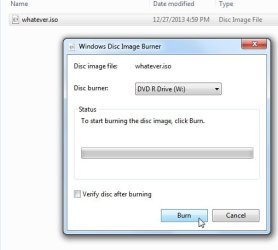
If you have an iso file, it needs to be burned as an image to dvd . That is different from copying.

If you already have the bootable .iso then windows has a built in image burner.

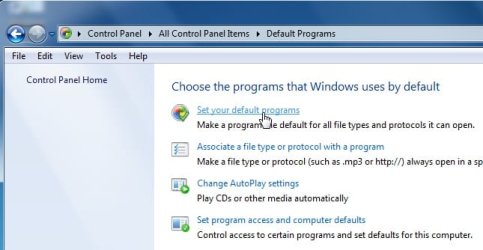
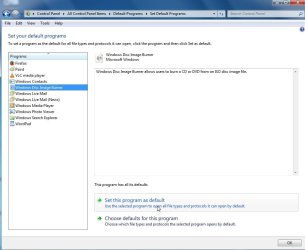
Go to control panel >default programs and set it as default.

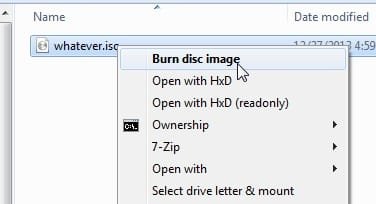
Then rt click the .iso and it will offer to burn it for you.

isoburn1.jpg

isoburn2.jpg

isoburn3.jpg

isoburn4.jpg

isoburn5.jpg
 

My Computers My Computers

  • At a glance

    7 X64i5 84002x8gb 3200mhz
    Computer type
    PC/Desktop
    OS
    7 X64
    CPU
    i5 8400
    Motherboard
    gigabyte b365m ds3h
    Memory
    2x8gb 3200mhz
    Hard Drives
    various
    PSU
    pure power 11 400w cm
    Case
    Coolermaster
    Cooling
    cryorig m9i
  • At a glance

    7x64g54008gb ddr4 2400
    Computer type
    PC/Desktop
    OS
    7x64
    CPU
    g5400
    Motherboard
    ga b365m ds3h
    Memory
    8gb ddr4 2400
    PSU
    xfx pro 450w
SIW2 - I was able to create a .iso file from the disc. I am not sure if I should really use it.
 

My Computer My Computer

At a glance

Windows 7 Ultimate x64
Computer type
Laptop
Computer Manufacturer/Model Number
Toshiba
OS
Windows 7 Ultimate x64
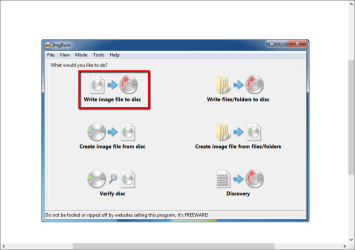
Go back to Golden's post #4 and once you have the .iso file, do the operation that is above the red box he marked.
 

My Computer My Computer

At a glance

Vista, Windows7, Mint Mate, Zorin, Windows 8from 1.6GHz Duo to i7
Computer Manufacturer/Model Number
HP, Dell, Gateway, Toshiba - 4 laptops and 2 desktops
OS
Vista, Windows7, Mint Mate, Zorin, Windows 8
CPU
from 1.6GHz Duo to i7
Monitor(s) Displays
2x HP w2207
Hard Drives
5x HDD, 7x SSD, 12x Externals
Keyboard
with trackball - no mices
Mouse
Trackball mice
Internet Speed
DSL 6000
SIW2 - I am trying to copy the .iso to a DVD+R.
All other replies to the thread:
My DVD is RW: TSSTcorp - CDDVDW TS-L633C ATA
Right now, I am using the 9th disc. I have 2 left. Reminder - these are NOT RW.
 

My Computer My Computer

At a glance

Windows 7 Ultimate x64
Computer type
Laptop
Computer Manufacturer/Model Number
Toshiba
OS
Windows 7 Ultimate x64
SIW2 - I was able to create a .iso file from the disc. I am not sure if I should really use it.

:shock: Thats exactly what you want to be doing, using it by....writing the ISO image to a DVD, thereby making it bootable.
 

My Computer My Computer

At a glance

Windows 10 Pro x64 ; Xubuntu x64Intel i7 860 @ 2.80 GHz O/C'ed to 4.0GHz16GB Corsair Vengance DDR3 @ 661 MHz Dual Cha...EVGA NVidia GTX 560 1024MB
Computer type
PC/Desktop
Computer Manufacturer/Model Number
Golden Mk. I.4
OS
Windows 10 Pro x64 ; Xubuntu x64
CPU
Intel i7 860 @ 2.80 GHz O/C'ed to 4.0GHz
Motherboard
Gigabyte P55A-UD3R Rev.1. Award BIOS F13
Memory
16GB Corsair Vengance DDR3 @ 661 MHz Dual Channel (9-9-9-24)
Graphics Card(s)
EVGA NVidia GTX 560 1024MB
Sound Card
Realtek Integrated
Monitor(s) Displays
Dual Samsung SyncMaster 2494HS
Screen Resolution
1920*1080 and 1920*1080
Hard Drives
1*Samsung 840 EVO 120GB SSD;
1*OCZ Vertex 2 60GB SSD;
2*Samsung F3 SpinPoint 1TB in RAID0;
1*Samsung F1 SpinPoint 1TB;
2*Western Digital 1TB External USB 3.0
1*Western Digital 500GB External USB 3.0
1*Seagate 500GB External USB 2.0
PSU
Thermaltake ToughPower QFan 750W
Case
Thermaltake Element S VK60001W2Z
Cooling
Corsair H60 Water Cooling, 2*230mm and 2*80mm case fans
Keyboard
Logitech G110
Mouse
Logitech MX518
I have had bad luck with DVD+R discs, DVD-R always work great for me. :rolleyes:
 

My Computer My Computer

At a glance

Win7 Enterprise, Win7 x86 (Ult 7600), Win7 x6...AMD fx8350 4ghz, AMD-32 2400mhz, AMD-64 3200m...2gb, 4gb on the Ult 7600, 4gb on Technet RTM,...Draw my own Graphics, several nVidia cards
Computer type
PC/Desktop
Computer Manufacturer/Model Number
Built them myself, Science Experiments !
OS
Win7 Enterprise, Win7 x86 (Ult 7600), Win7 x64 Ult 7600, TechNet RTM on AMD x64 (2.8Ghz)
CPU
AMD fx8350 4ghz, AMD-32 2400mhz, AMD-64 3200mhz, AMDx64 2.8G
Motherboard
SIS 755, ECS-K8M890M-M (Ult 7600), GigaByte & others
Memory
2gb, 4gb on the Ult 7600, 4gb on Technet RTM, 32gb on FX8350
Graphics Card(s)
Draw my own Graphics, several nVidia cards
Sound Card
on motherboard
Monitor(s) Displays
19" flat scr, 28" I-Inc widescr,22" Emprex Widescr, 23" Acer
Screen Resolution
1280 x 1024, 1440 x 900, 1920 x 1080
Hard Drives
6 pata Ide HD's & 2 Sata HD's
added 80gb external on Ult 7600 computer,
numerous extra 1tb, 2TB, 3Tb SATA HD's
A collection of ext HD Docks w/ HDs
PSU
430w, 550w, 600w, 700, 800, etc
Case
All Generic Full Towers
Cooling
Open Air & a few fans, some w/ colored LEDs
Keyboard
Compaq & Dell recycled from GoodWill
Mouse
Made in China Optical Wired Mouse
Internet Speed
Fast Cable InterNet
Antivirus
AVG Free on 24 different Desktops, NO Problems!
Browser
IE 8 is preferred, but use FireFox sometimes
Other Info
Linksys Routers, switches, & Hubs
Too Many USB Flash Drives to count, Biggest is 64GB !
Eight computers in my home network.
Sixteen computers at my business network.
Linked via TeamViewer !
Lots of old used spare computer parts everywhere!
This is going to sound stupid, but, Golden, what do you mean by, "Thats exactly what you want to be doing, using it by....writing the ISO image to a DVD, thereby making it bootable.". How does writing the ISO file to the DVD make it bootable?
 

My Computer My Computer

At a glance

Windows 7 Ultimate x64
Computer type
Laptop
Computer Manufacturer/Model Number
Toshiba
OS
Windows 7 Ultimate x64
I don't really know the difference between all the different CDs and DVDs, but I do have a huge stack of Memorex CD-R. I just don't understand how to use them since they're not formatted either. I don't get the instructions from Windows. How do I format and copy stuff to the discs? In this thread, it seems people only understand ISO. This is too foreign.
I thought about using XCOPY in DOS - yeah, I know how to do that (not showing my age, right?).
 

My Computer My Computer

At a glance

Windows 7 Ultimate x64
Computer type
Laptop
Computer Manufacturer/Model Number
Toshiba
OS
Windows 7 Ultimate x64
Your'e trying to create a bootable copy of the Windows 7 installation DVD. To do this you must:

1. Extract the contents of the DVD to an ISO -- you've done that now
2. Write the ISO to a blank DVD using software (plenty already recommended)

Once that is done, you have a bootable copy of your Windows 7 DVD.

If you like, use this option in IMGBURN to write the ISO to a blank DVD:

Capture.PNG
 

My Computer My Computer

At a glance

Windows 10 Pro x64 ; Xubuntu x64Intel i7 860 @ 2.80 GHz O/C'ed to 4.0GHz16GB Corsair Vengance DDR3 @ 661 MHz Dual Cha...EVGA NVidia GTX 560 1024MB
Computer type
PC/Desktop
Computer Manufacturer/Model Number
Golden Mk. I.4
OS
Windows 10 Pro x64 ; Xubuntu x64
CPU
Intel i7 860 @ 2.80 GHz O/C'ed to 4.0GHz
Motherboard
Gigabyte P55A-UD3R Rev.1. Award BIOS F13
Memory
16GB Corsair Vengance DDR3 @ 661 MHz Dual Channel (9-9-9-24)
Graphics Card(s)
EVGA NVidia GTX 560 1024MB
Sound Card
Realtek Integrated
Monitor(s) Displays
Dual Samsung SyncMaster 2494HS
Screen Resolution
1920*1080 and 1920*1080
Hard Drives
1*Samsung 840 EVO 120GB SSD;
1*OCZ Vertex 2 60GB SSD;
2*Samsung F3 SpinPoint 1TB in RAID0;
1*Samsung F1 SpinPoint 1TB;
2*Western Digital 1TB External USB 3.0
1*Western Digital 500GB External USB 3.0
1*Seagate 500GB External USB 2.0
PSU
Thermaltake ToughPower QFan 750W
Case
Thermaltake Element S VK60001W2Z
Cooling
Corsair H60 Water Cooling, 2*230mm and 2*80mm case fans
Keyboard
Logitech G110
Mouse
Logitech MX518
Thank you, please excuse me while I make sure the disc is going to work. I'll back to all of you later.
 

My Computer My Computer

At a glance

Windows 7 Ultimate x64
Computer type
Laptop
Computer Manufacturer/Model Number
Toshiba
OS
Windows 7 Ultimate x64
Win7 is to large to fit on a CD, so you must use a DVD or USB Flash drive (4gb or Larger) ;)
 

My Computer My Computer

At a glance

Win7 Enterprise, Win7 x86 (Ult 7600), Win7 x6...AMD fx8350 4ghz, AMD-32 2400mhz, AMD-64 3200m...2gb, 4gb on the Ult 7600, 4gb on Technet RTM,...Draw my own Graphics, several nVidia cards
Computer type
PC/Desktop
Computer Manufacturer/Model Number
Built them myself, Science Experiments !
OS
Win7 Enterprise, Win7 x86 (Ult 7600), Win7 x64 Ult 7600, TechNet RTM on AMD x64 (2.8Ghz)
CPU
AMD fx8350 4ghz, AMD-32 2400mhz, AMD-64 3200mhz, AMDx64 2.8G
Motherboard
SIS 755, ECS-K8M890M-M (Ult 7600), GigaByte & others
Memory
2gb, 4gb on the Ult 7600, 4gb on Technet RTM, 32gb on FX8350
Graphics Card(s)
Draw my own Graphics, several nVidia cards
Sound Card
on motherboard
Monitor(s) Displays
19" flat scr, 28" I-Inc widescr,22" Emprex Widescr, 23" Acer
Screen Resolution
1280 x 1024, 1440 x 900, 1920 x 1080
Hard Drives
6 pata Ide HD's & 2 Sata HD's
added 80gb external on Ult 7600 computer,
numerous extra 1tb, 2TB, 3Tb SATA HD's
A collection of ext HD Docks w/ HDs
PSU
430w, 550w, 600w, 700, 800, etc
Case
All Generic Full Towers
Cooling
Open Air & a few fans, some w/ colored LEDs
Keyboard
Compaq & Dell recycled from GoodWill
Mouse
Made in China Optical Wired Mouse
Internet Speed
Fast Cable InterNet
Antivirus
AVG Free on 24 different Desktops, NO Problems!
Browser
IE 8 is preferred, but use FireFox sometimes
Other Info
Linksys Routers, switches, & Hubs
Too Many USB Flash Drives to count, Biggest is 64GB !
Eight computers in my home network.
Sixteen computers at my business network.
Linked via TeamViewer !
Lots of old used spare computer parts everywhere!
Let's try this again. Below is the 1st thread, plus results of 3 attempts at the suggestions. So far, nothing has worked. I included the root directory list of the CD-ROM which I am trying to copy.
Please read this again and give me more detailed instructions. It is appreciated - I am trying, but I am running out of DVD+R.


I am not familiar with copying anything to a DVD.
I need to make a backup copy (exact copy) of my Windows 7 Ultimate 64-bit to another DVD+R.
What are the exact steps to do so? I have only 1 DVD drive. Is it possible to copy it?

Thank you for your suggestions, but I am not able to do it. I need to have super detailed instructions. When I tried to copy it, as suggested by Britton30, I never got a screen or anything to put the blank DVD+R in. Something is missing in the translation. I have rarely used the DVD or CD to record, so I do not know what to expect and when to do something.

I tried ImgBurn as suggested by WHS. It managed to copy the BOOT, AUTORUN.INF and BOOTMGR.

I then tried PowerISO from SWI2's instructions. This did not work either. I put the blank DVD+R disc and it cannot read it.

The disc I am trying to duplicate has the following on it:
Folders: BOOT EFI SOURCES SUPPORT UPGRADE
Files: AUTORUN.INF BOOTMGR SETUP.EXE

Do I need to copy all of these or do something else? It is actually for Windows 7 Ultimate SP1.

My DVD+R must end up being bootable. The disc is NOT rewriteable - it's one-time only.

Please give super-detailed instructions!
Hi Mrsjefflyg,

If you are having much trouble doing on-the-fly burning from source disc (your OS disc) to destination disc (your blank DVD+R), it is strongly suggested that you try the method below (as posted several times already):

http://www.sevenforums.com/general-...ltimate-64-bit-dvd-rom-dvd-r.html#post2637322

In this method, you just have to download the official ISO from Microsoft (which is essentially your physical disc) and burn that ISO to your DVD+R.

Windows 7 Ultimate SP1-U ISO x64 (Media Refresh)
File Name: en_windows_7_ultimate_with_sp1_x64_dvd_u_677332.iso
SHA1: 36AE90DEFBAD9D9539E649B193AE573B77A71C83
ISO/CRC: 992B8FCD
http://msft.digitalrivercontent.net/win/X17-59465.iso

1) Download ISO (right-click, Save Link As).
2) Download and install InfraRecorder or use ImgBurn (since you already have it).
3) Mount blank DVD+R to your computer's DVD drive.
4) Run InfraRecorder or ImgBurn and click "Write Image" or "Write image file to disc".

Should it ask you to locate the ISO file, just browse where you downloaded it.
Set your destination to your DVD drive and start burning.

Please report back if you have tried this method.
 
Last edited:

My Computer My Computer

At a glance

Windows 7 Professional SP1 x64 (OEM)Intel® Core™ i5 2430M/2410M ProcessorDDR3 1333 SODIMM (8GB)NVIDIA® GeForce® GT 555M (2GB)
Computer type
Laptop
Computer Manufacturer/Model Number
ASUS N45SF
OS
Windows 7 Professional SP1 x64 (OEM)
CPU
Intel® Core™ i5 2430M/2410M Processor
Motherboard
Intel® HM65 Express Chipset
Memory
DDR3 1333 SODIMM (8GB)
Graphics Card(s)
NVIDIA® GeForce® GT 555M (2GB)
Sound Card
Realtek High Definition Audio
Monitor(s) Displays
14.0" LED Backlight
Screen Resolution
16:9 HD (1366x768)
Hard Drives
640GB Seagate (internal), 1TB Toshiba Canvio Portable, 2TB x 2 WD My Book Essential (external)
Antivirus
Malwarebytes Anti-Malware Home (Premium)
Browser
Waterfox
Other Info
Optical Drive: Slimtype DVD A DS8A5SH (Super-Multi DVD);
Audio: Bang & Olufsen ICEpower®, SonicMaster
Back
Top