Safe removal of Vista partition on a Dual Boot.

PaulCH

New member
Local time
6:33 PM
Messages
31
There are plenty of threads that touch on this subject but I cannot find the answer to my specific concern:

I am running Seven on a dual boot and now wish to remove the Vista partition. I have the excellent Partition Wizard and I understand that I need to make the Seven Partition the active one before deleting the Vista Partition. However, I need to make the Vista Partition inactive before I am given the option of making the Seven Partition active and I get spooked by the warning message that displays when I instruct the Wizard to make Vista inactive.

Am I safe to go ahead and programme the Wizard to make Vista inactive and Seven active simultaneously?

Seven is designated as my C drive and Vista is D.

Many thanks.
 

My Computer My Computer

At a glance

Windows 7 Professional 64 bit2.13 Ghz Intel6 GB
Computer type
PC/Desktop
Computer Manufacturer/Model Number
Dell
OS
Windows 7 Professional 64 bit
CPU
2.13 Ghz Intel
Memory
6 GB
Hard Drives
300 GB
Antivirus
Microsoft Essentials
Browser
Chrome

My Computer My Computer

At a glance

Windows 10 Pro x64Intel Core i7 6700KGSkill TridentZ RGB 16GB 3600 16-16-16-36EVGA GTX 980 Ti SC x2
Computer type
PC/Desktop
Computer Manufacturer/Model Number
Skylake Special #666
OS
Windows 10 Pro x64
CPU
Intel Core i7 6700K
Motherboard
Asus Sabertooth Z170 Mark 1
Memory
GSkill TridentZ RGB 16GB 3600 16-16-16-36
Graphics Card(s)
EVGA GTX 980 Ti SC x2
Sound Card
Realtek High Definition
Monitor(s) Displays
AOC G2460PG
Screen Resolution
1920 x 1080 144Hz
Hard Drives
Samsung 860 Pro 256GB, Seagate Barracuda 4TB x2
PSU
EVGA 1000 P2, EVGA White Custom Braided Cables
Case
Corsair Vengeance C70 Gunmetal Black
Cooling
Corsair H100i v2, Corsair ML120 x2, Thermal Grizzly Kryonaut
Keyboard
Logitech G910 Orion Spectrum
Mouse
Logitech G700s
Internet Speed
Verizon Fios Quantum Gateway 75/75
Antivirus
Windows Defender, Malwarebytes Free 3.8.3
Browser
Chrome
Other Info
Corsair SP120 x4, LG Blu-ray Drive, Durabrand HT-395 100 Watt Dolby Digital Amp, Corsair H2100 Wireless 7.1 Headset
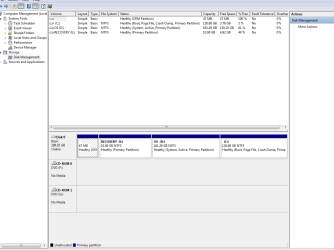
Thanks for the prompt reply. Screen print attached. I do have the installation disks for Seven.
 

Attachments

My Computer My Computer

At a glance

Windows 7 Professional 64 bit2.13 Ghz Intel6 GB
Computer type
PC/Desktop
Computer Manufacturer/Model Number
Dell
OS
Windows 7 Professional 64 bit
CPU
2.13 Ghz Intel
Memory
6 GB
Hard Drives
300 GB
Antivirus
Microsoft Essentials
Browser
Chrome
Last edited:

My Computer My Computer

At a glance

Windows 10 Pro x64Intel Core i7 6700KGSkill TridentZ RGB 16GB 3600 16-16-16-36EVGA GTX 980 Ti SC x2
Computer type
PC/Desktop
Computer Manufacturer/Model Number
Skylake Special #666
OS
Windows 10 Pro x64
CPU
Intel Core i7 6700K
Motherboard
Asus Sabertooth Z170 Mark 1
Memory
GSkill TridentZ RGB 16GB 3600 16-16-16-36
Graphics Card(s)
EVGA GTX 980 Ti SC x2
Sound Card
Realtek High Definition
Monitor(s) Displays
AOC G2460PG
Screen Resolution
1920 x 1080 144Hz
Hard Drives
Samsung 860 Pro 256GB, Seagate Barracuda 4TB x2
PSU
EVGA 1000 P2, EVGA White Custom Braided Cables
Case
Corsair Vengeance C70 Gunmetal Black
Cooling
Corsair H100i v2, Corsair ML120 x2, Thermal Grizzly Kryonaut
Keyboard
Logitech G910 Orion Spectrum
Mouse
Logitech G700s
Internet Speed
Verizon Fios Quantum Gateway 75/75
Antivirus
Windows Defender, Malwarebytes Free 3.8.3
Browser
Chrome
Other Info
Corsair SP120 x4, LG Blu-ray Drive, Durabrand HT-395 100 Watt Dolby Digital Amp, Corsair H2100 Wireless 7.1 Headset
Thanks - done that.

Have uploaded image as a png file.

My Windows 7 disk is a red Reinstallation DVD from a PC that was decommissioned. Is that okay?


LATER: I don't mind leaving the D partition in place, as long as I can transfer as much space as possible over to C.

Incidentally, I've found that I'm not allowed to save files to certain areas of the C drive now. Haven't researched this yet but can I be lazy and ask you for the solution.

Thank you for your help.
 

Attachments

  • doc1.png
    doc1.png
    23.2 KB · Views: 6

My Computer My Computer

At a glance

Windows 7 Professional 64 bit2.13 Ghz Intel6 GB
Computer type
PC/Desktop
Computer Manufacturer/Model Number
Dell
OS
Windows 7 Professional 64 bit
CPU
2.13 Ghz Intel
Memory
6 GB
Hard Drives
300 GB
Antivirus
Microsoft Essentials
Browser
Chrome
Very good, now you should be able to do what you want, just remember you will have to run startup repair up to 3x to get 7 booting again.

http://www.sevenforums.com/tutorials/105541-startup-repair-run-3-separate-times.html

By the way, how are you using Partition Wizard ? Do you have the software installed on 7 or Vista or are you using the boot cd ?

Which is the safest way to use it.

Partition Wizard Bootable CD allows user to manage partition directly with partition manager bootable CD.

This cd should be 1 of your top tools.
 

My Computer My Computer

At a glance

Windows 10 Pro x64Intel Core i7 6700KGSkill TridentZ RGB 16GB 3600 16-16-16-36EVGA GTX 980 Ti SC x2
Computer type
PC/Desktop
Computer Manufacturer/Model Number
Skylake Special #666
OS
Windows 10 Pro x64
CPU
Intel Core i7 6700K
Motherboard
Asus Sabertooth Z170 Mark 1
Memory
GSkill TridentZ RGB 16GB 3600 16-16-16-36
Graphics Card(s)
EVGA GTX 980 Ti SC x2
Sound Card
Realtek High Definition
Monitor(s) Displays
AOC G2460PG
Screen Resolution
1920 x 1080 144Hz
Hard Drives
Samsung 860 Pro 256GB, Seagate Barracuda 4TB x2
PSU
EVGA 1000 P2, EVGA White Custom Braided Cables
Case
Corsair Vengeance C70 Gunmetal Black
Cooling
Corsair H100i v2, Corsair ML120 x2, Thermal Grizzly Kryonaut
Keyboard
Logitech G910 Orion Spectrum
Mouse
Logitech G700s
Internet Speed
Verizon Fios Quantum Gateway 75/75
Antivirus
Windows Defender, Malwarebytes Free 3.8.3
Browser
Chrome
Other Info
Corsair SP120 x4, LG Blu-ray Drive, Durabrand HT-395 100 Watt Dolby Digital Amp, Corsair H2100 Wireless 7.1 Headset
Thanks for your help AddRAM

I am using the tool on my C Drive at present. Works fine. :)

Incidentally, I am not being allowed to save data to certain parts of my C drive. Can you point me in the right direction for an answer please?

Thanks again.
 

My Computer My Computer

At a glance

Windows 7 Professional 64 bit2.13 Ghz Intel6 GB
Computer type
PC/Desktop
Computer Manufacturer/Model Number
Dell
OS
Windows 7 Professional 64 bit
CPU
2.13 Ghz Intel
Memory
6 GB
Hard Drives
300 GB
Antivirus
Microsoft Essentials
Browser
Chrome
Can you say where it`s not letting you ? In certain folders ?
 

My Computer My Computer

At a glance

Windows 10 Pro x64Intel Core i7 6700KGSkill TridentZ RGB 16GB 3600 16-16-16-36EVGA GTX 980 Ti SC x2
Computer type
PC/Desktop
Computer Manufacturer/Model Number
Skylake Special #666
OS
Windows 10 Pro x64
CPU
Intel Core i7 6700K
Motherboard
Asus Sabertooth Z170 Mark 1
Memory
GSkill TridentZ RGB 16GB 3600 16-16-16-36
Graphics Card(s)
EVGA GTX 980 Ti SC x2
Sound Card
Realtek High Definition
Monitor(s) Displays
AOC G2460PG
Screen Resolution
1920 x 1080 144Hz
Hard Drives
Samsung 860 Pro 256GB, Seagate Barracuda 4TB x2
PSU
EVGA 1000 P2, EVGA White Custom Braided Cables
Case
Corsair Vengeance C70 Gunmetal Black
Cooling
Corsair H100i v2, Corsair ML120 x2, Thermal Grizzly Kryonaut
Keyboard
Logitech G910 Orion Spectrum
Mouse
Logitech G700s
Internet Speed
Verizon Fios Quantum Gateway 75/75
Antivirus
Windows Defender, Malwarebytes Free 3.8.3
Browser
Chrome
Other Info
Corsair SP120 x4, LG Blu-ray Drive, Durabrand HT-395 100 Watt Dolby Digital Amp, Corsair H2100 Wireless 7.1 Headset
Yes, it is letting me save in the Library Folders but not in the documents folders that I migrated from Vista. For example, the following path: C: Users\Paul\MyDocuments....
 

My Computer My Computer

At a glance

Windows 7 Professional 64 bit2.13 Ghz Intel6 GB
Computer type
PC/Desktop
Computer Manufacturer/Model Number
Dell
OS
Windows 7 Professional 64 bit
CPU
2.13 Ghz Intel
Memory
6 GB
Hard Drives
300 GB
Antivirus
Microsoft Essentials
Browser
Chrome

My Computer My Computer

At a glance

Windows 10 Pro x64Intel Core i7 6700KGSkill TridentZ RGB 16GB 3600 16-16-16-36EVGA GTX 980 Ti SC x2
Computer type
PC/Desktop
Computer Manufacturer/Model Number
Skylake Special #666
OS
Windows 10 Pro x64
CPU
Intel Core i7 6700K
Motherboard
Asus Sabertooth Z170 Mark 1
Memory
GSkill TridentZ RGB 16GB 3600 16-16-16-36
Graphics Card(s)
EVGA GTX 980 Ti SC x2
Sound Card
Realtek High Definition
Monitor(s) Displays
AOC G2460PG
Screen Resolution
1920 x 1080 144Hz
Hard Drives
Samsung 860 Pro 256GB, Seagate Barracuda 4TB x2
PSU
EVGA 1000 P2, EVGA White Custom Braided Cables
Case
Corsair Vengeance C70 Gunmetal Black
Cooling
Corsair H100i v2, Corsair ML120 x2, Thermal Grizzly Kryonaut
Keyboard
Logitech G910 Orion Spectrum
Mouse
Logitech G700s
Internet Speed
Verizon Fios Quantum Gateway 75/75
Antivirus
Windows Defender, Malwarebytes Free 3.8.3
Browser
Chrome
Other Info
Corsair SP120 x4, LG Blu-ray Drive, Durabrand HT-395 100 Watt Dolby Digital Amp, Corsair H2100 Wireless 7.1 Headset
Brian has given you excellent advice. I see you already converted C to Primary in the lastest picture, now you only need to Mark C Partition Active then run Startup Repair - Run 3 Separate Times
until Win7 starts and holds the System Active flags.

You can then delete all other partitions and resize C into the prime left-hand lower address of the HD which has faster reads since it is closer to where the disk reader parks. To do this use Partition Wizard boot CD to Resize Partition - Video Help. Only PW boot disk will not fail during resizing with data loss while all others can except Disk Mgmt. Your files should be backed up anyway, just in case.

If you copy your files into the respective User folders from Vista then there should be no issues of sharing or permissions. If so post back a screenshot of the error you're getting.
 
Thanks again AddRAM
 

My Computer My Computer

At a glance

Windows 7 Professional 64 bit2.13 Ghz Intel6 GB
Computer type
PC/Desktop
Computer Manufacturer/Model Number
Dell
OS
Windows 7 Professional 64 bit
CPU
2.13 Ghz Intel
Memory
6 GB
Hard Drives
300 GB
Antivirus
Microsoft Essentials
Browser
Chrome
Brian has given you excellent advice. I see you already converted C to Primary in the lastest picture, now you only need to Mark C Partition Active then run Startup Repair - Run 3 Separate Times
until Win7 starts and holds the System Active flags.

You can then delete all other partitions and resize C into the prime left-hand lower address of the HD which has faster reads since it is closer to where the disk reader parks. To do this use Partition Wizard boot CD to Resize Partition - Video Help. Only PW boot disk will not fail during resizing with data loss while all others can except Disk Mgmt. Your files should be backed up anyway, just in case.

If you copy your files into the respective User folders from Vista then there should be no issues of sharing or permissions. If so post back a screenshot of the error you're getting.


Thanks Greg

I had misunderstood Brian's earlier post. When he said that a Logical Drive couldn't be made Active I interpreted this as meaning "never". My error.

I'll do what you advise.

Regards.
 

My Computer My Computer

At a glance

Windows 7 Professional 64 bit2.13 Ghz Intel6 GB
Computer type
PC/Desktop
Computer Manufacturer/Model Number
Dell
OS
Windows 7 Professional 64 bit
CPU
2.13 Ghz Intel
Memory
6 GB
Hard Drives
300 GB
Antivirus
Microsoft Essentials
Browser
Chrome
Hi Greg

I've followed all the procedures in the various links, including making the C drive active, DISKPART, and run Startup Repair 4 times now. I keep getting the message.....

Startup Repair cannot repair this computer automatically.

Problem signature:
StrartupRepair Offline
Signature07: MissingBootManager

I've typed only what I feel is relevant for now. Getting very nervous as it took me many hours to get my settings and programs reinstalled under the new OS.

I've also followed the procedures in the tutorial: Startup Repair Infinite Loop Recovery, but without success.

If I do a System Restore will I wipe my files, etc?

The error message I get when I try a normal boot is: NTLDR is missing.
 
Last edited:

My Computer My Computer

At a glance

Windows 7 Professional 64 bit2.13 Ghz Intel6 GB
Computer type
PC/Desktop
Computer Manufacturer/Model Number
Dell
OS
Windows 7 Professional 64 bit
CPU
2.13 Ghz Intel
Memory
6 GB
Hard Drives
300 GB
Antivirus
Microsoft Essentials
Browser
Chrome
Can you reactivate Vista using Diskpart or Partition Wizard bootable CD to Set Active/Inactive partition -Partition Wizard Video Help. If so you can try moving the boot files using Bootmgr - Move to C:\ with EasyBCD - Windows 7 Forums. This does not do as complete a job as 3 Startup Repairs (e.g. will not rewrite Repair console to F8 menu) but you may have corruption that won't allow the repairs to work as usual.

If this fails download, extract and copy to C these View attachment 299209 manually to assist the repair function. YOu may need to enter Control Panel>Folder Options>View to unhide Hidden and SYstem files to see them in Windows. If you can't start Windows then you can Copy & Paste - in Windows Recovery Console

Confirm C is a Primary Partition and is marked Active, run Startup Repair up to 3 times to see if you can start Win7.

If it still won't start I would download Partition Wizard boot disk and burn to CD using Windows Image Burner. boot it to confirm using its map that C is Primary, Active, then run Rebuild MBR with Partition Wizard - Video Help. After applying steps, reboot. If Win7 won't start again run Startup Repair - Run 3 Separate Times .

If Win7 still won't start reactivate Vista using PW disk or DIskpart to start Win7 again. We can walk you through alternatives like shrinking Vista to create a Sytem Reserved boot partition for Win7, or deleting everything on Vista down to its boot files, shrinking it to make it the boot partition, sliding everything over to the left to make more room for C.

Earlier I said you could delete the first two partitions, however if you haven't already done this I would save the first OEM partition which on Dell will still run bootable diagnostics from the F12 menu when left on the drive after reinstall. Recovery will not run after native Vista is removed.
 
Hi Greg

I've reactivated the Vista partition and booted into my Seven desktop. I figured it would be a good idea to back up the system so I downloaded Paragon but this wouldn't work as Windows Installer was not available. I tried again with Acronis but same answer. In fact, I couldn't open Outlook either so my plans to do some important work before resuming my quest to reorganise my partitions went down the pan.

Anyway, I'm now in the process of backing up everything to an external hard drive using Windows Backup. When that is complete I'll try moving the boot files as you suggest.

I'll edit this post with progress.

Cheers.
 

My Computer My Computer

At a glance

Windows 7 Professional 64 bit2.13 Ghz Intel6 GB
Computer type
PC/Desktop
Computer Manufacturer/Model Number
Dell
OS
Windows 7 Professional 64 bit
CPU
2.13 Ghz Intel
Memory
6 GB
Hard Drives
300 GB
Antivirus
Microsoft Essentials
Browser
Chrome
Paul the performance problems you're now experiencing in Win7 could not have anything to do with moving the boot files from what we've seen unless something extra was done that damaged Win7 that is not in the steps I gave you.

However if you are experiencing such problems with a new install, besides the issues with trying to move the System boot files to remove Vista, a better option might be to do a new Clean Install Windows 7 during which you use the Drive Options pictured in Steps 7 and 8 to delete all partitions, except the Dell OEM partition which I would keep if it will indeed run Dell Hardware Diagnostics from F12 Menu - test that now to check over your hardware and see if the OEM partition is functional.

There are also tips, tools and methods compiled in Clean Reinstall - Factory OEM Windows 7 which if you follow will assure you'll get and keep a perfect install.

If you want to go ahead and move the boot files we will help you get that done one way or the other so that you can delete Vista and recover its space into Win7. However it's hardly worth the effort if you have an install which is defective to begin with, when you can get it perfect with our help at hand.
 
Hi Greg

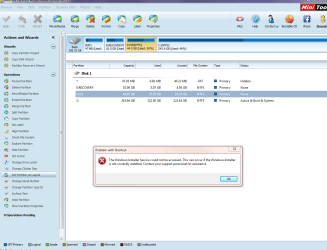
I've successfully backed-up and used EasyBCD to mark the C Drive as active and I am now ready to delete the other partitions. See attached. I haven't re-run Startup Repair.

However, before I do this I still have the new problem of my programs not opening (see error message on screenshot).

Is there an easy way to fix this or do you still recommend a clean install? If I can fix this problem and successfully delete remaining partitions then that would be my preference.
 

Attachments

  • Capture.PNG
    Capture.PNG
    50.4 KB · Views: 0

My Computer My Computer

At a glance

Windows 7 Professional 64 bit2.13 Ghz Intel6 GB
Computer type
PC/Desktop
Computer Manufacturer/Model Number
Dell
OS
Windows 7 Professional 64 bit
CPU
2.13 Ghz Intel
Memory
6 GB
Hard Drives
300 GB
Antivirus
Microsoft Essentials
Browser
Chrome
Yes I would reinstall with such serious problems so that you can get it perfect as detailed in Clean Reinstall - Factory OEM Windows 7.

First run Dell Hardware Diagnostics from F12 Menu to both test the hardware and confirm that you can keep the first 48mb partition since having those diagnostics is valuable.

Then delete all other partitions during the booted reinstall using the Drive Options shown in Steps 7/8 of Clean Install Windows 7. Create New partition(s) in the space allowing it to assign the 100mb System Reserved boot partition. If you don't want the 100mb partition you can delete and prepartition the OS partition using Partition Wizard CD.
 
OK, but I'm a bit edgy about doing this.

Will all of my browser bookmarks and Outlook data be in the full backup that I performed earlier?

How do I know if I need the latest Win7 installer? If I do, which download(s) do I need? My reinstallation DVD is for Professional 64-bit, but I still seem to have 5 downloads to choose from.

As I have now done the f12 diagnostic (it was nothing like the video on YouTube, but disk 0 came up as a "Pass") do I assume that I don't need to run Belarc?

It all looks to be riddled with pitfalls but if it's my only option then it must be done.
 
Last edited:

My Computer My Computer

At a glance

Windows 7 Professional 64 bit2.13 Ghz Intel6 GB
Computer type
PC/Desktop
Computer Manufacturer/Model Number
Dell
OS
Windows 7 Professional 64 bit
CPU
2.13 Ghz Intel
Memory
6 GB
Hard Drives
300 GB
Antivirus
Microsoft Essentials
Browser
Chrome
Back
Top