Deleting all files from a folder and its subfolders

Lord of Rings

New member
Member
Local time
11:06 PM
Messages
35
Hello everybody,

Can you tell me how can I delete all files from a folder and its subfolders in windows 7. While deleting I don't want to delete subfolders, just files.

The second thing that is important: I don't want to do it manually, but automatically. All files at once. I have large folders with many subfolders, and it would take long if I performed the task manually.

Thanks for help,
LOR
 

My Computer My Computer

At a glance

N/AN/AN/AN/A
Computer Manufacturer/Model Number
N/A
OS
N/A
CPU
N/A
Motherboard
N/A
Memory
N/A
Graphics Card(s)
N/A
Sound Card
N/A
Monitor(s) Displays
N/A
Hard Drives
N/A
PSU
N/A
Case
N/A
Cooling
N/A

My Computer My Computer

At a glance

Vista, Windows7, Mint Mate, Zorin, Windows 8from 1.6GHz Duo to i7
Computer Manufacturer/Model Number
HP, Dell, Gateway, Toshiba - 4 laptops and 2 desktops
OS
Vista, Windows7, Mint Mate, Zorin, Windows 8
CPU
from 1.6GHz Duo to i7
Monitor(s) Displays
2x HP w2207
Hard Drives
5x HDD, 7x SSD, 12x Externals
Keyboard
with trackball - no mices
Mouse
Trackball mice
Internet Speed
DSL 6000

My Computer My Computer

At a glance

Windows 7 Ultimate x64, & Mac OS X 10.9.2Intel Core i5 2500kCorsair Vengence 8gb 1866mhzNvidia GTX 770 OC
Computer type
PC/Desktop
Computer Manufacturer/Model Number
Built by badgers!!!
OS
Windows 7 Ultimate x64, & Mac OS X 10.9.2
CPU
Intel Core i5 2500k
Motherboard
Asus P8z68 LE
Memory
Corsair Vengence 8gb 1866mhz
Graphics Card(s)
Nvidia GTX 770 OC
Monitor(s) Displays
2x ASUS LED 22" IPS
Screen Resolution
3840x1080
Hard Drives
240GB Crucial M500 SSD
120gb Corsair Force 3 SSD
1TB Western Digital
PSU
Corsair HX650w Modular
Case
Corsair Air 540
Cooling
Corsair H60 Push/Pull
Keyboard
Corsair K70/ Logitech G27 wheel
Mouse
Saitek R.A.T 9
Internet Speed
Too slow!
Other Info
AMD fusion E350N Home server-Windows Home Server 2011 (also made by badgers!)
2011 Macbook 2.4ghz Core2Duo, 4gb ddr3, 120gb Ocz Vertex SSD
Hmm, now we have the same link twice, LOL
 

My Computer My Computer

At a glance

Vista, Windows7, Mint Mate, Zorin, Windows 8from 1.6GHz Duo to i7
Computer Manufacturer/Model Number
HP, Dell, Gateway, Toshiba - 4 laptops and 2 desktops
OS
Vista, Windows7, Mint Mate, Zorin, Windows 8
CPU
from 1.6GHz Duo to i7
Monitor(s) Displays
2x HP w2207
Hard Drives
5x HDD, 7x SSD, 12x Externals
Keyboard
with trackball - no mices
Mouse
Trackball mice
Internet Speed
DSL 6000
OK, thanks for trying to help. Is there a free utility that can show/delete all files in a folder and its subfolders? I am not very familiar with command prompt and batch scripts.

Thanks once again,
LOR
 

My Computer My Computer

At a glance

N/AN/AN/AN/A
Computer Manufacturer/Model Number
N/A
OS
N/A
CPU
N/A
Motherboard
N/A
Memory
N/A
Graphics Card(s)
N/A
Sound Card
N/A
Monitor(s) Displays
N/A
Hard Drives
N/A
PSU
N/A
Case
N/A
Cooling
N/A
No utility that I know of.
 

My Computer My Computer

At a glance

Vista, Windows7, Mint Mate, Zorin, Windows 8from 1.6GHz Duo to i7
Computer Manufacturer/Model Number
HP, Dell, Gateway, Toshiba - 4 laptops and 2 desktops
OS
Vista, Windows7, Mint Mate, Zorin, Windows 8
CPU
from 1.6GHz Duo to i7
Monitor(s) Displays
2x HP w2207
Hard Drives
5x HDD, 7x SSD, 12x Externals
Keyboard
with trackball - no mices
Mouse
Trackball mice
Internet Speed
DSL 6000
Bingo! I've found the solution. Total Commander can solve my problem in an easy way. Open Total Commander , choose Commands and then choose Branch View. What you get is a list of all files in a selected folder no matter if they are placed in a subfolder or not. Just a list of all files. That's it!!!
 

My Computer My Computer

At a glance

N/AN/AN/AN/A
Computer Manufacturer/Model Number
N/A
OS
N/A
CPU
N/A
Motherboard
N/A
Memory
N/A
Graphics Card(s)
N/A
Sound Card
N/A
Monitor(s) Displays
N/A
Hard Drives
N/A
PSU
N/A
Case
N/A
Cooling
N/A
  • Like
Reactions: whs
That sounds easy and I will retain it. Thanks for reporting back.
 

My Computer My Computer

At a glance

Vista, Windows7, Mint Mate, Zorin, Windows 8from 1.6GHz Duo to i7
Computer Manufacturer/Model Number
HP, Dell, Gateway, Toshiba - 4 laptops and 2 desktops
OS
Vista, Windows7, Mint Mate, Zorin, Windows 8
CPU
from 1.6GHz Duo to i7
Monitor(s) Displays
2x HP w2207
Hard Drives
5x HDD, 7x SSD, 12x Externals
Keyboard
with trackball - no mices
Mouse
Trackball mice
Internet Speed
DSL 6000
Bingo! I've found the solution. Total Commander can solve my problem in an easy way. Open Total Commander , choose Commands and then choose Branch View. What you get is a list of all files in a selected folder no matter if they are placed in a subfolder or not. Just a list of all files. That's it!!!
Interesting.

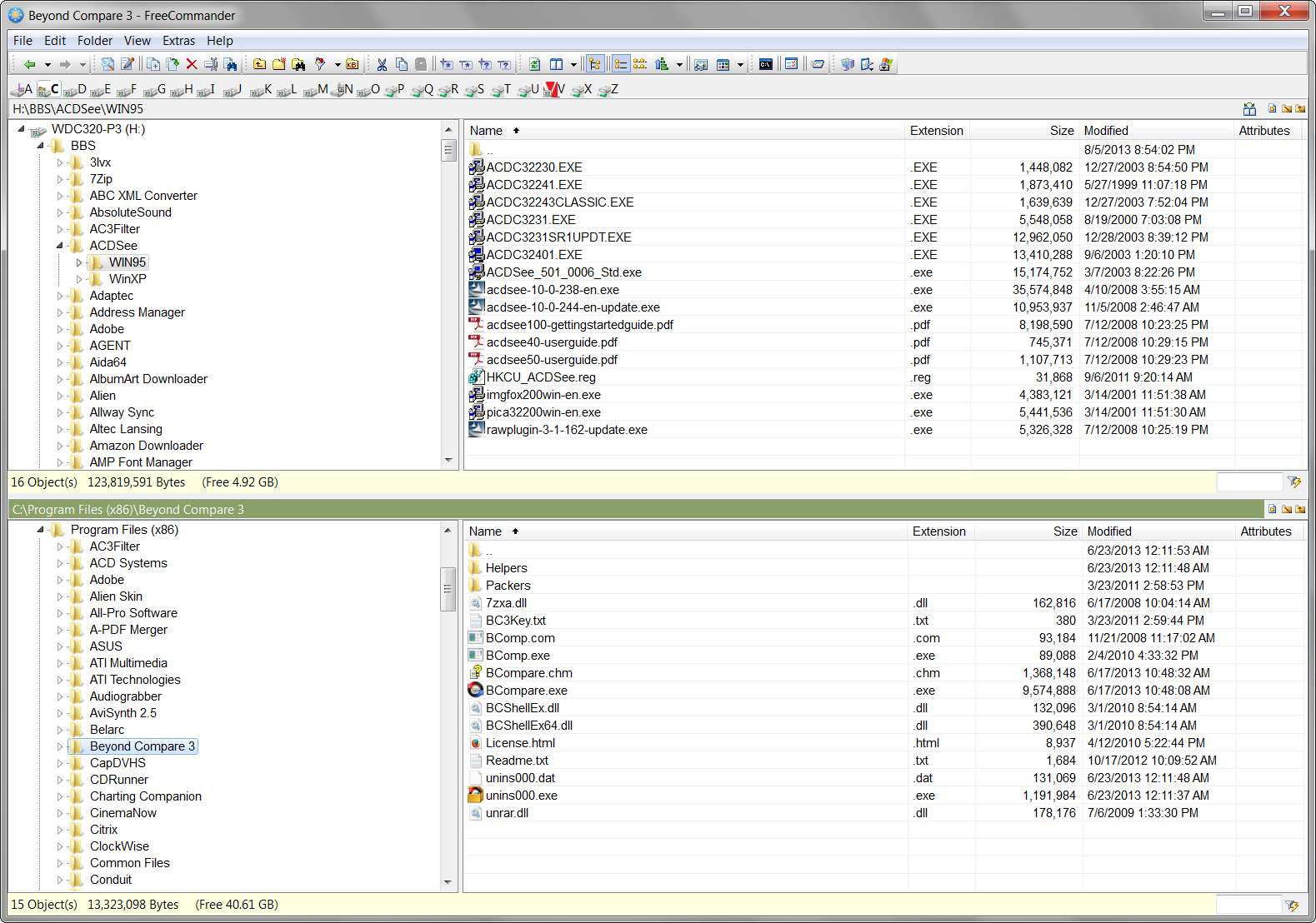
This Total Commander program looks very similar to FreeCommander which is what I've been using as my Windows Explorer replacement ever since going from WinXP to Win7 back in late 2009. I used to use Power File Gold in WinXP, but it dropped off into legacy status (no longer listed on the vendor's web site as a product) and was incompatible with Win7 in its final form.

FreeCommander does not have this "branch view", which while I can see its purpose have never actually had the need to use in quite that form. I installed Total Commander to try it out, but didn't spend enough time to learn all of its configuration and settings options.

I normally use FreeCommander in a 2-pane OVER/UNDER presentation, which gives me much wider column content (including the Explorer-tree pane on the left of top and bottom, so that there really are FOUR panes in view) in the top and bottom panes than would otherwise be possible in left/right side-by-side presentation. I couldn't find where one could do that in Total Commander. FreeCommander also has a button to toggle it into and out of SINGLE PANE mode (i.e. still with Explorer Tree on the left, so it's actually two-panes but only for a single folder) in case you want to use the whole screen to look at a single folder with no need to have two folders in view at one time. I didn't see where Total Commander had such a toggle between 1-pane and 2-pane mode.

In other words FreeCommander had over/under or left/right views (both with and without the Explorer Tree pane) for both of its supported presentations, which are either single-folder full-screen or two-folder half-screen formats.

3d4v.jpg


But there is another excellent Explorer-like two-pane side-by-side utility named Beyond Compare which is specifically designed to COMPARE two "supposedly parallel" directory structures including all of the files inside of them. It has a left/right 2-pane presentation and can show in "ALL" and "DIFFERENCES ONLY" mode. It also has a simple button to conveniently single-click "expand all folders" or "collapse all folder" from whatever are the top-level folders currently selected on the left and right side. This is sort of like Total Commander's "branch view" but it retains the folder-levels as visible breaks, showing both all folders and all files from that top level down. Obviously this is a different objective than just showing all files, but depending on your need this can also be exactly what you wanted or not.

t2xg.jpg


Above is (a) differences only, and also (b) "expand all", meaning it is showing only those folders which contained differences and fully expanding them and any lower-level sub-folders as well. The program uses color coding to visibly designate when things are equal or not equal, or equal other than for date/time differences and therefore which side is "newer", or which side might have an "orphan" that is not on the other side.

Beyond Compare has hugely convenient and intuitive capability to copy/move/update/mirror from left side to right side or vice versa, either selectively just per your selections or automatically according to common-sense needs. It can also compare not only folders/files based on a whole variety of comparison criteria (including taking into account time-zone differences in directory date/time stamps, etc.) but can also compare file-to-file for content, both in text and binary and for commonly known file types. File-to-file comparison presentations can also be in "all" or "differences only" mode. Very convenient for keeping INI or CFG files up-to-date with previous modifications when installing a new version of a program.

Many ways to skin that cat.

 

My Computer My Computer

At a glance

Windows 7 Pro x64 (1), Win7 Pro X64 (2)i5-3350p 3.1Ghz/6MB-cache (1); E8400 3.0Ghz/6...8GB PC3-12800 DDR3 (1); 4GB PC3-10600 DDR3 (2)ATI HD7750 (1), (see TV cards); ATI R7 250 (2)
Computer type
PC/Desktop
Computer Manufacturer/Model Number
Home-built, two systems (1) and (2)
OS
Windows 7 Pro x64 (1), Win7 Pro X64 (2)
CPU
i5-3350p 3.1Ghz/6MB-cache (1); E8400 3.0Ghz/6MB-cache (2)
Motherboard
ASUS P8Z77-V Pro (1); ASUS P5Q3 (2)
Memory
8GB PC3-12800 DDR3 (1); 4GB PC3-10600 DDR3 (2)
Graphics Card(s)
ATI HD7750 (1), (see TV cards); ATI R7 250 (2)
Sound Card
Realtek ALC892 HD Audio (1); Realtek ALC1200 HD Audio (2)
Monitor(s) Displays
Eizo HD2441W LCD, Eizo S2433W (1); Eizo 24" S2433W (2)
Screen Resolution
1920x1200, 1920x1200 (1); 1920x1200 (2)
Hard Drives
(1) 1TB SATA-II (7200RPM), 2x2TB SATA-III (7200RPM), 250GB SATA-III (10000RPM) for OS; 2x2TB external USB 3.0

(2) 320GB SATA-II (7200RPM), 750GB SATA-II (7200RPM), 150GB SATA-II (10000RPM) for OS; 2TB external USB 3.0
PSU
Nesteq ECS-6001 600W (1); Nesteq ECS-5001 500W (2)
Case
Acousti-Case 360 (1) and (2)
Cooling
Noctua NH-U12P SE2 for CPU, 2x120mm case fans (1) and (2)
Keyboard
IBM PS/2 (1) and (2)
Mouse
Logitech MX Revolution wireless (1); Microsoft wired (2)
Internet Speed
100mbps down / 10mbps up
Antivirus
Microsoft Security Essentials; Malwarebyte Anti-Malware Pro
Browser
Firefox
Other Info
Ceton InfiniTV 4-tuner cablecard-enabled TV card as well as Hauppauge HVR-2250 OTA/ATSC 2-tuner TV card in (1), running under Win7 WMC
~~~
Many ways to skin that cat.
Poor cat :-)

Without installing anything:


Use Windows (file) Explorer
Select top level folder of interest
Search on asterisk *
Select the detailed view - if need be
Sort the search results - if need be
Select the first file
Scroll to the last file
Press and hold the shift key and select the last file

Scroll back up and make sure no folders are selected
Delete the files.
 

My Computer My Computer

At a glance

W7 Pro SP1 64biti78GBIntel HD Graphics
Computer type
Laptop
Computer Manufacturer/Model Number
Employer provided Dell Latitude
OS
W7 Pro SP1 64bit
CPU
i7
Memory
8GB
Graphics Card(s)
Intel HD Graphics
Hard Drives
crappy SSD
Antivirus
Employer mandated Symantec Endpoint Protection
Browser
Pale Moon 64bit, IE11 64bit & Chrome 64bit
Back
Top