How to use UEFI boot to install windows 7?

If you want to install to UEFI then you would choose the choices which clearly say to use these for UEFI.

I asked you what the exact choices are for CSM. Is there a setting for "Both?" You would use this if you want to mix GPT and MBR disks. Otherwise use UEFI only to boot to UEFI and use only GPT disks, or Legacy choices if you want to Bypass UEFI to Install WIn7

What installation medium are you using, DVD or flash stick? If flash stick use Rufus in Option One of UEFI Bootable USB Flash Drive - Create in Windows or you'lll need to manually do the file edit in the other options.

O Thanks, the choices were
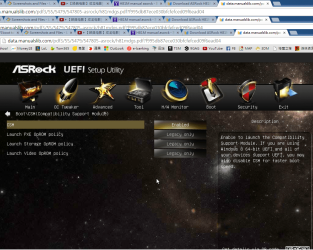
launch pxe oprom policy
launch storage oprom policy
launch video oprom policy

and and i can choose

1. Uefi only
2. Legacy only
3. both close
 

My Computer My Computer

At a glance

windows7 flagship 64bit
Computer type
PC/Desktop
OS
windows7 flagship 64bit
ASRock > H81M-GL
Page 66 = CSM.
Page 68 = Secure Boot, disable for Windows 7.
Page 69 = Load UEFI Defaults.

Sorry I dont understand, the load default button just reset all changes to default , doesnt help me UEFI boot

By using Load UEFI Defaults, you are in UEFI mode.

By DISABLING Secure Boot Windows 7 x64 DVD can boot & install Windows.

Ok thanks, that means I should
1. Enable CSM
2. Close Secure boot
3. Load UEFI default ?
I tried them but didnt tried them all at the same time
 

My Computer My Computer

At a glance

windows7 flagship 64bit
Computer type
PC/Desktop
OS
windows7 flagship 64bit
Have you checked your motherboard manual for steps necessary to enter UEFI?
 

My Computer My Computer

At a glance

Windows 10 Pro x64 ; Xubuntu x64Intel i7 860 @ 2.80 GHz O/C'ed to 4.0GHz16GB Corsair Vengance DDR3 @ 661 MHz Dual Cha...EVGA NVidia GTX 560 1024MB
Computer type
PC/Desktop
Computer Manufacturer/Model Number
Golden Mk. I.4
OS
Windows 10 Pro x64 ; Xubuntu x64
CPU
Intel i7 860 @ 2.80 GHz O/C'ed to 4.0GHz
Motherboard
Gigabyte P55A-UD3R Rev.1. Award BIOS F13
Memory
16GB Corsair Vengance DDR3 @ 661 MHz Dual Channel (9-9-9-24)
Graphics Card(s)
EVGA NVidia GTX 560 1024MB
Sound Card
Realtek Integrated
Monitor(s) Displays
Dual Samsung SyncMaster 2494HS
Screen Resolution
1920*1080 and 1920*1080
Hard Drives
1*Samsung 840 EVO 120GB SSD;
1*OCZ Vertex 2 60GB SSD;
2*Samsung F3 SpinPoint 1TB in RAID0;
1*Samsung F1 SpinPoint 1TB;
2*Western Digital 1TB External USB 3.0
1*Western Digital 500GB External USB 3.0
1*Seagate 500GB External USB 2.0
PSU
Thermaltake ToughPower QFan 750W
Case
Thermaltake Element S VK60001W2Z
Cooling
Corsair H60 Water Cooling, 2*230mm and 2*80mm case fans
Keyboard
Logitech G110
Mouse
Logitech MX518
Have you checked your motherboard manual for steps necessary to enter UEFI?

Yup I checked but it just simply explain the options
And I am not good in computer knowledge , so....
 

My Computer My Computer

At a glance

windows7 flagship 64bit
Computer type
PC/Desktop
OS
windows7 flagship 64bit
YOu have been able to get into BIOS setup by pressing your DEL key, correct?

You will definitely need to disable Secure BOot as it is only for Windows 8.

I've asked you repeatedly what settings you see in BIOS setup for CSM or Legacy BIOS. To see the choices click on each of them, or whatever your BIOS instructions tell you to do to expand the choices to choose a setting.

If you want to install in UEFI then you would NOT enable CSM or Legacy. But what other settings choices do those options give you?

Once you disable CSM or Legacy if they are enabled, boot the Win7 installer using the BIOS Boot menu key to trigger UEFI DVD drive or UEFI flash stick boot. Are those options given when you have the Win7 64 bit DVD in the drive, or have formatted the flash stick installer using Option One in UEFI Bootable USB Flash Drive - Create in Windows?

Please do not ignore any of my questions again if you want further help. I am not going to ask a fourth time.
 
YOu have been able to get into BIOS setup by pressing your DEL key, correct?

You will definitely need to disable Secure BOot as it is only for Windows 8.

I've asked you repeatedly what settings you see in BIOS setup for CSM or Legacy BIOS. To see the choices click on each of them, or whatever your BIOS instructions tell you to do to expand the choices to choose a setting.

If you want to install in UEFI then you would NOT enable CSM or Legacy. But what other settings choices do those options give you?

Once you disable CSM or Legacy if they are enabled, boot the Win7 installer using the BIOS Boot menu key to trigger UEFI DVD drive or UEFI flash stick boot. Are those options given when you have the Win7 64 bit DVD in the drive, or have formatted the flash stick installer using Option One in UEFI Bootable USB Flash Drive - Create in Windows?

Please do not ignore any of my questions again if you want further help. I am not going to ask a fourth time.

Yup when i press "esc" , i go to a page that it said i can boot by 2 options, which are

p0 harddisk
p5 dvd rom

Sorry I am idiot in computer, when you talk about bios set up, how can i get into it?

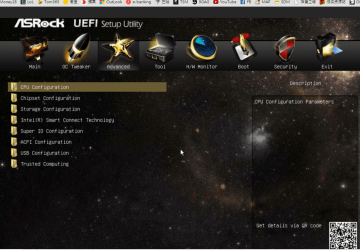
I press "F2" then i got into a menu like this
Main Screen - Asrock H81M-GL M?nual [Page 44]

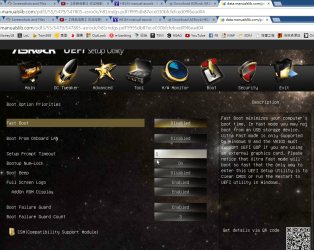
I click the boot tab i get into page like this
Boot Screen - Asrock H81M-GL M?nual [Page 69]

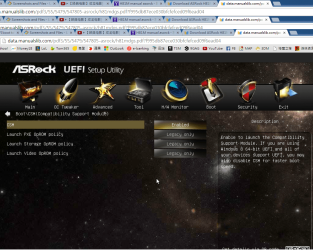
in the csm options , i can choose enable or diable it
under the csm options there are 3 options
launch pxe oprom
launch video oprom
launch storage oprom
and i can choose "uefi only" "legacy only" or "both disable" of each of them

I didnt have any usb flash drive, i use only window7 dvd drive, sorry I am really poor in computer knowledge , so when you ask me some question, I may not be answering properly, appreciated your patientness and many thanks
 

My Computer My Computer

At a glance

windows7 flagship 64bit
Computer type
PC/Desktop
OS
windows7 flagship 64bit
And I am going to buy a usb flash drive if it can make things easier
 

My Computer My Computer

At a glance

windows7 flagship 64bit
Computer type
PC/Desktop
OS
windows7 flagship 64bit
Post back screenshots of your BIOS Advanced and Boot tabs. Any obvious UEFI, CSM or Legacy BIOS settings should be expanded by clicking on them (or whatever the BIOS help tells you to do to expand them) so we can see the choices. If CMS or Legacy are easy to find then Disable them. Disable Secure Boot if this is a Win8 PC.

Attach your camera snaps this way: Screenshots and Files - Upload and Post in Seven Forums - Windows 7 Forums


Did you read the UEFI tutorial on the Main page of your BIOS?
 
Have you tried formatting your destination drive GPT before installation?
 

My Computer My Computer

At a glance

Windows 7x64 Home Premium SP1Intel i7 2600kG.Skill Ripjaws (DDR3-1600) 2x4GBNvidia GeForce GTS 450; Intel HD Graphics 300...
Computer type
PC/Desktop
Computer Manufacturer/Model Number
Own build
OS
Windows 7x64 Home Premium SP1
CPU
Intel i7 2600k
Motherboard
ASUS P8Z68 Deluxe
Memory
G.Skill Ripjaws (DDR3-1600) 2x4GB
Graphics Card(s)
Nvidia GeForce GTS 450; Intel HD Graphics 3000(GT2+)
Monitor(s) Displays
Dell Ultrasharp IPS panel U2311H, Samsung SyncMaster P2350
Screen Resolution
1920x1080
Hard Drives
Samsung 850 Pro SSD 256GB, Samsung SSD 840 120GB, Seagates 1TB Barracuda ST31000528AS x2
PSU
Seasonic M12II 520W
Case
Lian Li Lancool PC-K60
Cooling
Case: 1x120mm, 3x140mm CPU: Hyper 212+
Keyboard
Logitech MK520 (wireless)
Mouse
Logitech MK520
Internet Speed
6-7 Mbps
Antivirus
Norton Security Premium, Malwarebytes on 2 (MSE on 3rd PC)
Browser
FireFox
Other Info
Audio: Logitech Z523 2.1
Post back screenshots of your BIOS Advanced and Boot tabs. Any obvious UEFI, CSM or Legacy BIOS settings should be expanded by clicking on them (or whatever the BIOS help tells you to do to expand them) so we can see the choices. If CMS or Legacy are easy to find then Disable them. Disable Secure Boot if this is a Win8 PC.

Attach your camera snaps this way: Screenshots and Files - Upload and Post in Seven Forums - Windows 7 Forums


Did you read the UEFI tutorial on the Main page of your BIOS?

Thanks

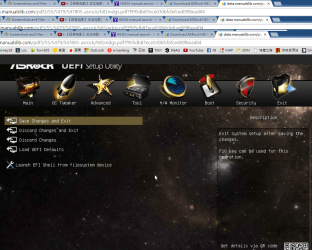
This is the boot meny when I press "F2" to get in
1.png

This is the options under "Advance" tab
2.png

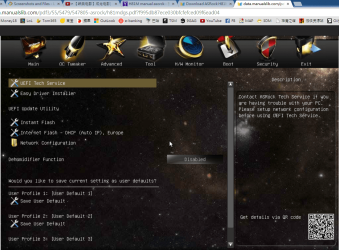
This is the options under "Tools" tab
3.png

This is the options under "Boot" tab
4.png

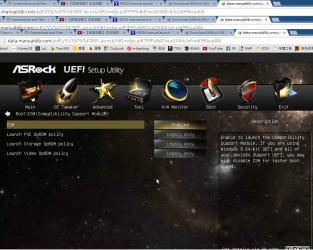
This is the options when I click CSM ( Compatibility support module) in "Boot" tab
5.png

This is the options under "Security" tab
6.png

This is the options under "Exit" tab
7.png

And when i choose "Load UEFI Defaults" , it just cimply reset all options to defaults.

Thanks for help
 

My Computer My Computer

At a glance

windows7 flagship 64bit
Computer type
PC/Desktop
OS
windows7 flagship 64bit
Sorry I dont know how to screen cap in boot mode, so I screen cap the maunal online. but its the exact same thing, Thanks!
 

My Computer My Computer

At a glance

windows7 flagship 64bit
Computer type
PC/Desktop
OS
windows7 flagship 64bit
Have you tried formatting your destination drive GPT before installation?

Hmm... I have no idea..
I think I have, before windows instaill, i press SHIFT+F10 and typed some command
 

My Computer My Computer

At a glance

windows7 flagship 64bit
Computer type
PC/Desktop
OS
windows7 flagship 64bit
You'll need to get the Win7 installation media to boot as a UEFI device. So far you have no such listings when you access the boot menu, correct?

To assure this try entering BIOS setup to disable CSM to see if it forces UEFI Boot options on your BIOS Boot Priority menu or one-time BIOS Boot menu. What are the other settings choices for this?

Edit: Increasingly BIOS firmware updates are requiring some level of CSM to install Win7 so I would try with it enabled first. The problem with this thread upon review is that OP didn't seem to be looking for UEFI boot options in BIOS Boot Priority order or on the one-time BIOS Boot menu triggered with a hotkey at boot.

So I'd reset the UEFI defaults again, which should disable CSM, but if not disable it and report back its other settings choices which I've now asked about several times.
 
Last edited:
I think you should convert MBR to GPT first. Especially the system partition
 

My Computer My Computer

At a glance

Windows 7
Computer type
PC/Desktop
OS
Windows 7
You'll need to get the Win7 installation media to boot as a UEFI device. So far you have no such listings when you access the boot menu, correct?

To assure this enter BIOS setup and disable CSM. What are the other settings choices for this? If you're not using an MBR booting OS then you don't need CSM, you need UEFI all the way.

So I'd reset the UEFI defaults again, which should disable CSM, but if not disable it and report back its other settings choices which I've now asked about several times.


Yes i have no such listings.

Sorry what are the setting choices for what? I mean I posted all the settings I can , I am not using MBR booting os, so should I diable CSM and set all 3 launch oprom to "UEFI only"?

When I reset UEFI defaults, the CSM potions will be enabled. and those 3 launch oprom were set as "Legacy only" like this
5.png

Sorry I dont know what other setting choices I can show you, because thats only setting choices I can find under Boot tab and CSM, Thanks
 

My Computer My Computer

At a glance

windows7 flagship 64bit
Computer type
PC/Desktop
OS
windows7 flagship 64bit
When you click on a setting to change it, then it will show you all available choices for it. If there is more than Enable or Disable, report back what they are.

You want to Disable Secure Boot and CSM, enable UEFI only. Then see if you get a UEFI DVD boot choice.
 
When you click on a setting to change it, then it will show you all available choices for it. If there is more than Enable or Disable, report back what they are.

You want to Disable Secure Boot and CSM, enable UEFI only. Then see if you get a UEFI DVD boot choice.

Ok Thanks, there were only enable or disable, no more options.

Yup I can diable secure boot and csm . but I dont know how to enable UEFI
When i diable CSM, the following 3 launch policy things will disappear
And the options for the 3 launch policy things were 1 Legacy only 2 UEFI only 3 Both disable
5.png
 

My Computer My Computer

At a glance

windows7 flagship 64bit
Computer type
PC/Desktop
OS
windows7 flagship 64bit
Or i should just buy a 2TB harddisk to install windows, and sue the 3TB harddisk for only storage? looks like things will get much easier i go this way
 

My Computer My Computer

At a glance

windows7 flagship 64bit
Computer type
PC/Desktop
OS
windows7 flagship 64bit
But did you get a UEFI boot choice for your DVD when you Disabled CSM? Will we ever find out? :huh:
 
To install W7 on GPT (UEFI boot) you will need Secure boot disabled, CSM enabled and option ROMs set to legacy.

Enable UEFI booting or both legacy and UEFI and use the BBS BIOS Boot Selection using the correct function button before BIOS post, F9 for instance, and select UEFI:DVD... or whatever your DVDROM is called.

Once W7 is installed if you have a GOP compliant graphics card you can change to full UEFI (no CSM) by first making sure your graphics driver is updated and other drivers such as RAID. Note RST RAID drivers before v11.5 are unsuitable.

Use the W8 bootmgr on the system partition instead of the W7 bootmgr.

Add the BCD option novesa to on.

Restart to BIOS setup and set option ROMs to UEFI and CSM disabled.
 

My Computer My Computer

At a glance

Windows 7 Home Premium 64bit
OS
Windows 7 Home Premium 64bit
Back
Top