Solved Windows 7 wont allow me to open an Excel spreadsheet

Ukdodger

New member
Member
VIP
Local time
5:59 AM
Messages
178
Location
Surrey England
Hi, I've got a similar problem. W7 wont allow me to open an Excel spreadsheet because it says it's already running. But it isnt. It's not shown in the task manager either. How can I find it and close it apart from rebooting?

This came about after I copied the the spreadsheet from a backup copy on a USB onto the desktop.

Thanks
 

My Computer My Computer

At a glance

Windows 7 home
Computer type
Laptop
OS
Windows 7 home
Check to see if you can "safely remove" the USB stick, by clicking on the little arrow on the RH edge of the task bar.

The cause is probably that Windows has not cleared the USB stick for safe removal. Shutting down & restarting should clear the problem.
 

My Computer My Computer

At a glance

Windows 7 Home Premium 64 bit sp1Intel i5 3570 3.4Ghz Ivy Bridge SKT 1155 quad...G-Skill Rip Jaws 16Gb (8x2) DDR3 -1600 PC3 12...Gigabyte NVIDIA GT610 1Gb DDR3 810/1200 PCI-E...
Computer type
PC/Desktop
Computer Manufacturer/Model Number
Self built using existing case
OS
Windows 7 Home Premium 64 bit sp1
CPU
Intel i5 3570 3.4Ghz Ivy Bridge SKT 1155 quad core
Motherboard
Gigabyte Z77-HD3 SKT 1155 2xSata 3, 4x USB 3.0
Memory
G-Skill Rip Jaws 16Gb (8x2) DDR3 -1600 PC3 12800 CL 10 red
Graphics Card(s)
Gigabyte NVIDIA GT610 1Gb DDR3 810/1200 PCI-E 2.0 Silent
Sound Card
NVIDIA High Definition & Realtech High Definition Audio
Monitor(s) Displays
2 x Philips 226V4L 16:9 aspect ratio
Screen Resolution
1920 x 1080 HD
Hard Drives
Samsung 840 Pro 256gb SSD, SATA 3.
Hitachi Touro Portable 1tb, USB 3.0 HDD used for image b/ups.
PSU
Corsair VS450
Case
Codeng
Cooling
PSU fan & CPU fan
Keyboard
Logitech
Mouse
Logitech Wireless trackball M570
Internet Speed
Wireless 3G. 3mg down & 550kb up.
Antivirus
Bitdefender Internet Security 2020
Browser
Opera (Current Version) & Firefox
Other Info
MS Office 2013 Pro. Davis weather station software. MGE Nova 600 avr UPS.
What version of Office are you working with?

Have you tried the Office repair feature?

What happens if you try to open Excel from the Start menu?
(Not by double clicking on an Excel file.)

Open Task Manager
Select the tab named Processes
Select the option to Show processes from all users
Sort the list of processes by the column named Image Name

Double click on any Excel file causing the problem.

If the error occurs, do not close the error. Reposition it on the screen (if need be) and make/post a screenshot of the error that you see. Include as many processes as you can fit into the screenshot - highlighting the Excel process if it is running.

If you are unsure what app is creating the message that tells you that Excel is already running, see this post.
 

My Computer My Computer

At a glance

W7 Pro SP1 64biti78GBIntel HD Graphics
Computer type
Laptop
Computer Manufacturer/Model Number
Employer provided Dell Latitude
OS
W7 Pro SP1 64bit
CPU
i7
Memory
8GB
Graphics Card(s)
Intel HD Graphics
Hard Drives
crappy SSD
Antivirus
Employer mandated Symantec Endpoint Protection
Browser
Pale Moon 64bit, IE11 64bit & Chrome 64bit
What version of Office are you working with?

Have you tried the Office repair feature?

What happens if you try to open Excel from the Start menu?
(Not by double clicking on an Excel file.)

Open Task Manager
Select the tab named Processes
Select the option to Show processes from all users
Sort the list of processes by the column named Image Name

Double click on any Excel file causing the problem.

If the error occurs, do not close the error. Reposition it on the screen (if need be) and make/post a screenshot of the error that you see. Include as many processes as you can fit into the screenshot - highlighting the Excel process if it is running.

If you are unsure what app is creating the message that tells you that Excel is already running, see this post.

Thanks for your help. There isnt any process associated with Excel except when it's running which you would expect. End it and it disappears. Tried the repair and it didnt work. The same thing happens when I try opening it from the start menu. It doesnt work. I get the same message.

Strangely if I just click on the Excel spreadsheet program itself and not on the specific spreadsheet I want it opens the spreadsheet I want without any problem. It's never done that before . Clicking on the program itself would normally open a blank spreadsheet.

The version is 2003. Thanks again.
 

My Computer My Computer

At a glance

Windows 7 home
Computer type
Laptop
OS
Windows 7 home
Check to see if you can "safely remove" the USB stick, by clicking on the little arrow on the RH edge of the task bar.

The cause is probably that Windows has not cleared the USB stick for safe removal. Shutting down & restarting should clear the problem.

Thanks but there isnt any little arrow anywhere on my taskbar.
 

My Computer My Computer

At a glance

Windows 7 home
Computer type
Laptop
OS
Windows 7 home
~~~
The same thing happens when I try opening it from the start menu. It doesnt work. I get the same message.
~~~
If the Office repair process failed to correct the issue of you not being able to start Excel from the Start menu, then you might need to re-install Office 2003.

Can you provide a screenshot of the error that you are seeing?
 

My Computer My Computer

At a glance

W7 Pro SP1 64biti78GBIntel HD Graphics
Computer type
Laptop
Computer Manufacturer/Model Number
Employer provided Dell Latitude
OS
W7 Pro SP1 64bit
CPU
i7
Memory
8GB
Graphics Card(s)
Intel HD Graphics
Hard Drives
crappy SSD
Antivirus
Employer mandated Symantec Endpoint Protection
Browser
Pale Moon 64bit, IE11 64bit & Chrome 64bit
Check to see if you can "safely remove" the USB stick, by clicking on the little arrow on the RH edge of the task bar.

The cause is probably that Windows has not cleared the USB stick for safe removal. Shutting down & restarting should clear the problem.

Thanks but there isnt any little arrow anywhere on my taskbar.
@Ranger4,
I think that the file in question was copied to the desktop from a USB device. I do not think that the USB device is connected to the computer when the OP is attempting to open the file.

@Ukdodger,
Am I correct in my guess: the USB device is no longer connected. But now that you have mentioned that Excel will not start from the Start menu - we should concentrate on that first. The fact that Excel will start when double clicking on some spreadsheets but not others might be indicative that only a part of Excel is messed up - perhaps the startup.xls file or macro handling.
 

My Computer My Computer

At a glance

W7 Pro SP1 64biti78GBIntel HD Graphics
Computer type
Laptop
Computer Manufacturer/Model Number
Employer provided Dell Latitude
OS
W7 Pro SP1 64bit
CPU
i7
Memory
8GB
Graphics Card(s)
Intel HD Graphics
Hard Drives
crappy SSD
Antivirus
Employer mandated Symantec Endpoint Protection
Browser
Pale Moon 64bit, IE11 64bit & Chrome 64bit
Check to see if you can "safely remove" the USB stick, by clicking on the little arrow on the RH edge of the task bar.

The cause is probably that Windows has not cleared the USB stick for safe removal. Shutting down & restarting should clear the problem.

Thanks but there isnt any little arrow anywhere on my taskbar.
@Ranger4,
I think that the file in question was copied to the desktop from a USB device. I do not think that the USB device is connected to the computer when the OP is attempting to open the file.

@Ukdodger,
Am I correct in my guess: the USB device is no longer connected. But now that you have mentioned that Excel will not start from the Start menu - we should concentrate on that first. The fact that Excel will start when double clicking on some spreadsheets but not others might be indicative that only a part of Excel is messed up - perhaps the startup.xls file or macro handling.

@UsernameIssues. Yes i think you are correct about the USB stick, I seemed to have assumed incorrectly.:o

To Ukdodger, have you got service pack 3 update installed for your Office 2003?. Apparently some problems can occur with office 2003 & Windows 7 if service pack 3 is not installed.
 
Last edited:

My Computer My Computer

At a glance

Windows 7 Home Premium 64 bit sp1Intel i5 3570 3.4Ghz Ivy Bridge SKT 1155 quad...G-Skill Rip Jaws 16Gb (8x2) DDR3 -1600 PC3 12...Gigabyte NVIDIA GT610 1Gb DDR3 810/1200 PCI-E...
Computer type
PC/Desktop
Computer Manufacturer/Model Number
Self built using existing case
OS
Windows 7 Home Premium 64 bit sp1
CPU
Intel i5 3570 3.4Ghz Ivy Bridge SKT 1155 quad core
Motherboard
Gigabyte Z77-HD3 SKT 1155 2xSata 3, 4x USB 3.0
Memory
G-Skill Rip Jaws 16Gb (8x2) DDR3 -1600 PC3 12800 CL 10 red
Graphics Card(s)
Gigabyte NVIDIA GT610 1Gb DDR3 810/1200 PCI-E 2.0 Silent
Sound Card
NVIDIA High Definition & Realtech High Definition Audio
Monitor(s) Displays
2 x Philips 226V4L 16:9 aspect ratio
Screen Resolution
1920 x 1080 HD
Hard Drives
Samsung 840 Pro 256gb SSD, SATA 3.
Hitachi Touro Portable 1tb, USB 3.0 HDD used for image b/ups.
PSU
Corsair VS450
Case
Codeng
Cooling
PSU fan & CPU fan
Keyboard
Logitech
Mouse
Logitech Wireless trackball M570
Internet Speed
Wireless 3G. 3mg down & 550kb up.
Antivirus
Bitdefender Internet Security 2020
Browser
Opera (Current Version) & Firefox
Other Info
MS Office 2013 Pro. Davis weather station software. MGE Nova 600 avr UPS.
Thanks for the replies guys. I appreciate your help. Just to get straight what's happening: I'm running W7 and Excel 2003. I have two Excel icons. One on the Desktop that is for the unique spreadsheet I use for housekeeping accounts and named 'Housekeeping'. The other icon is on the Taskbar and is for the Excel program itself. If I right click on the Taskbar icon it pops up a list of spreadsheets to choose from. Left clicking on the 'Housekeeping' one opens the 'Housekeeping' spreadsheet with the error message shown in the screen shot. The same thing happens if I try opening Excel from the Start menu and too if I double click on the Desktop icon.

However if I just left click on the Excel Taskbar icon (not on the 'housekeeping' spreadsheet that pops up after right clicking on the Taskbar icon) it opens the 'Housekeeping' spreadsheet without the error message. I can then work with the spreadsheet and it saves correctly.

I dont know if I have Service pack 3. But I have a Laptop with exactly the same software on and the spreadsheet works perfectly.


My Computer My Computer

At a glance

Windows 7 home
Computer type
Laptop
OS
Windows 7 home
~~~
...it opens the 'Housekeeping' spreadsheet without the error message. I can then work with the spreadsheet and it saves correctly.
~~~
What happens when you use Windows (file) Explorer to open Excel?
Please navigate to here...
"C:\Program Files (x86)\Microsoft Office\OFFICE11\EXCEL.EXE"
(Or wherever your Excel is located.)
...and double click on the EXCEL.EXE file.

Does a new/empty spreadsheet open?
Or does the last spreadsheet that you worked on open?

What do you see when you...
...right click on the pinned shortcut
...right click on the Excel shortcut
...select properties for that shortcut:

xl.png


Please post screenshots via this method:
http://www.sevenforums.com/tutorials/9733-screenshots-files-upload-post-seven-forums.html


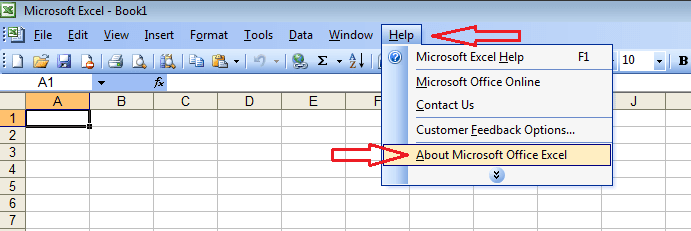
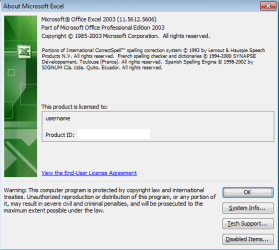
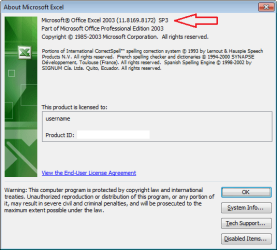
To check for SP3:

xl-about1.png

without SP3
xl-about-w-o-sp3.png

with SP3
xl-about-w-sp3.png
 

My Computer My Computer

At a glance

W7 Pro SP1 64biti78GBIntel HD Graphics
Computer type
Laptop
Computer Manufacturer/Model Number
Employer provided Dell Latitude
OS
W7 Pro SP1 64bit
CPU
i7
Memory
8GB
Graphics Card(s)
Intel HD Graphics
Hard Drives
crappy SSD
Antivirus
Employer mandated Symantec Endpoint Protection
Browser
Pale Moon 64bit, IE11 64bit & Chrome 64bit
Carry out all the suggestions that UsernameIssues has suggested.
It seems to me that when you copied your "Housekeeping" spreadsheet to the Desktop it has corrupted the Excel start up.

Do you keep your Excel spreadsheets in a folder located in the Documents Library. If so, see if your "Housekeeping" spreadsheet is there & if it is copy it to a USB stick. Check the files in the USB stick to make sure it is there. Remove the USB stick.
Now delete the "Housekeeping" spreadsheet from that document folder list & delete the short cut on the desktop.
It may be a good idea to restart your computer, then check if clicking on your Task bar Excel shortcut opens Excel as it should normally. If all seems normal, check that other spreadsheets work as they should.
If all is well, then copy your "Housekeeping" spreadsheet from the USB stick back to your spreadsheet document folder & not to the desktop.
When that is done remove the USB stick & double click on the newly copied "Housekeeping" spreadsheet & see if it opens normally, close it & see if Excel opens normally from the Task bar as well.
If that works, then open your spreadsheets folder again & right click on the "Housekeeping" spreadsheet & select "send to desktop" shortcut.
Finally check that the new desktop shortcut will open the "Housekeeping" spreadsheet.

Before doing anything just check that Excel is not set to start when you start your computer. Click on the Start button, then All Programs & scroll down to Startup, left click & see what's there. if Excel is there then it should be deleted.
A computer restart will be required, so Excel will close & not reopen when back up & running again.
 

My Computer My Computer

At a glance

Windows 7 Home Premium 64 bit sp1Intel i5 3570 3.4Ghz Ivy Bridge SKT 1155 quad...G-Skill Rip Jaws 16Gb (8x2) DDR3 -1600 PC3 12...Gigabyte NVIDIA GT610 1Gb DDR3 810/1200 PCI-E...
Computer type
PC/Desktop
Computer Manufacturer/Model Number
Self built using existing case
OS
Windows 7 Home Premium 64 bit sp1
CPU
Intel i5 3570 3.4Ghz Ivy Bridge SKT 1155 quad core
Motherboard
Gigabyte Z77-HD3 SKT 1155 2xSata 3, 4x USB 3.0
Memory
G-Skill Rip Jaws 16Gb (8x2) DDR3 -1600 PC3 12800 CL 10 red
Graphics Card(s)
Gigabyte NVIDIA GT610 1Gb DDR3 810/1200 PCI-E 2.0 Silent
Sound Card
NVIDIA High Definition & Realtech High Definition Audio
Monitor(s) Displays
2 x Philips 226V4L 16:9 aspect ratio
Screen Resolution
1920 x 1080 HD
Hard Drives
Samsung 840 Pro 256gb SSD, SATA 3.
Hitachi Touro Portable 1tb, USB 3.0 HDD used for image b/ups.
PSU
Corsair VS450
Case
Codeng
Cooling
PSU fan & CPU fan
Keyboard
Logitech
Mouse
Logitech Wireless trackball M570
Internet Speed
Wireless 3G. 3mg down & 550kb up.
Antivirus
Bitdefender Internet Security 2020
Browser
Opera (Current Version) & Firefox
Other Info
MS Office 2013 Pro. Davis weather station software. MGE Nova 600 avr UPS.
Chaps. Thanks so much for your help. You were right the file in XLSTART was buggered. Why I dont know but I deleted it and copied the file from the USB onto the Desktop and bingo it comes up with no error message from the Taskbar or the Desktop icon. It's odd that it boots straight up into the 'Housekeeping' spreadsheet though without it being in XLSTART. But it works..

Cheers for your time and your clear instructions. Now I can get my finance back in order.

:thumbsup:
 

My Computer My Computer

At a glance

Windows 7 home
Computer type
Laptop
OS
Windows 7 home
Glad that you got it sorted.

Make sure that you have SP3 installed for Office 2003.

You can mark this thread as solved.
 

My Computer My Computer

At a glance

W7 Pro SP1 64biti78GBIntel HD Graphics
Computer type
Laptop
Computer Manufacturer/Model Number
Employer provided Dell Latitude
OS
W7 Pro SP1 64bit
CPU
i7
Memory
8GB
Graphics Card(s)
Intel HD Graphics
Hard Drives
crappy SSD
Antivirus
Employer mandated Symantec Endpoint Protection
Browser
Pale Moon 64bit, IE11 64bit & Chrome 64bit
:ditto:
 

My Computer My Computer

At a glance

Windows 7 Home Premium 64 bit sp1Intel i5 3570 3.4Ghz Ivy Bridge SKT 1155 quad...G-Skill Rip Jaws 16Gb (8x2) DDR3 -1600 PC3 12...Gigabyte NVIDIA GT610 1Gb DDR3 810/1200 PCI-E...
Computer type
PC/Desktop
Computer Manufacturer/Model Number
Self built using existing case
OS
Windows 7 Home Premium 64 bit sp1
CPU
Intel i5 3570 3.4Ghz Ivy Bridge SKT 1155 quad core
Motherboard
Gigabyte Z77-HD3 SKT 1155 2xSata 3, 4x USB 3.0
Memory
G-Skill Rip Jaws 16Gb (8x2) DDR3 -1600 PC3 12800 CL 10 red
Graphics Card(s)
Gigabyte NVIDIA GT610 1Gb DDR3 810/1200 PCI-E 2.0 Silent
Sound Card
NVIDIA High Definition & Realtech High Definition Audio
Monitor(s) Displays
2 x Philips 226V4L 16:9 aspect ratio
Screen Resolution
1920 x 1080 HD
Hard Drives
Samsung 840 Pro 256gb SSD, SATA 3.
Hitachi Touro Portable 1tb, USB 3.0 HDD used for image b/ups.
PSU
Corsair VS450
Case
Codeng
Cooling
PSU fan & CPU fan
Keyboard
Logitech
Mouse
Logitech Wireless trackball M570
Internet Speed
Wireless 3G. 3mg down & 550kb up.
Antivirus
Bitdefender Internet Security 2020
Browser
Opera (Current Version) & Firefox
Other Info
MS Office 2013 Pro. Davis weather station software. MGE Nova 600 avr UPS.
Back
Top