Solved BSOD 0x3B and 0x1E

Had 2 BSOD's while using driver viewer although it may not be related. Eventually had to use Start up repair again then boot into Safe Mode with Networking. Uploading the requested driver View File and a current Grab all. Below is from WHoCrashed. Note: Weird occurrences on reboots such as MBAM disabled and instead of a home network internet conn I had a public one. Restarted MBAM manually and disabled the public network then restarted a Home network. I don't know if these are related to the issues but figured I would mention them. I am guessing this was because I used the restore option in Start up repair.

Driver Verifier is still running.

[FONT=Segoe UI, Arial]On Wed 1/1/2014 6:56:53 PM GMT your computer crashed
crash dump file: C:\Windows\Minidump\010114-21762-01.dmp
This was probably caused by the following module: [FONT=Segoe UI, Arial]mpfilter.sys[/FONT] (0xFFFFF88001019309)
Bugcheck code: 0x50 (0xFFFFF8A0281952D8, 0x0, 0xFFFFF88001019309, 0x2)
Error: [FONT=Segoe UI, Arial]PAGE_FAULT_IN_NONPAGED_AREA[/FONT]
file path: C:\Windows\system32\drivers\mpfilter.sys
product: [FONT=Segoe UI, Arial]Microsoft Malware Protection[/FONT]
company: [FONT=Segoe UI, Arial]Microsoft Corporation[/FONT]
description: Microsoft antimalware file system filter driver
Bug check description: This indicates that invalid system memory has been referenced.
This appears to be a typical software driver bug and is not likely to be caused by a hardware problem.
The crash took place in a standard Microsoft module. Your system configuration may be incorrect. Possibly this problem is caused by another driver on your system that cannot be identified at this time.


[/FONT]
[FONT=Segoe UI, Arial]On Wed 1/1/2014 6:47:41 PM GMT your computer crashed
crash dump file: C:\Windows\Minidump\010114-24538-01.dmp
This was probably caused by the following module: [FONT=Segoe UI, Arial]ntfs.sys[/FONT] (0xFFFFF8800124821C)
Bugcheck code: 0x50 (0xFFFFF10007874F48, 0x0, 0xFFFFF8800124821C, 0x7)
Error: [FONT=Segoe UI, Arial]PAGE_FAULT_IN_NONPAGED_AREA[/FONT]
file path: C:\Windows\system32\drivers\ntfs.sys
product: [FONT=Segoe UI, Arial]Microsoft® Windows® Operating System[/FONT]
company: [FONT=Segoe UI, Arial]Microsoft Corporation[/FONT]
description: NT File System Driver
Bug check description: This indicates that invalid system memory has been referenced.
This appears to be a typical software driver bug and is not likely to be caused by a hardware problem.
The crash took place in a standard Microsoft module. Your system configuration may be incorrect. Possibly this problem is caused by another driver on your system that cannot be identified at this time.
[/FONT]
 
Last edited:

My Computer My Computer

At a glance

Windows 7 Home Premium 64bit SP1Intel Core i5-4430 Haswell 3.0GHz LGA 11508 gigs (2x4g)PNY GeForce GTX 660 2GB
Computer type
PC/Desktop
Computer Manufacturer/Model Number
Custom Build
OS
Windows 7 Home Premium 64bit SP1
CPU
Intel Core i5-4430 Haswell 3.0GHz LGA 1150
Motherboard
MSI Z87-GD65 LGA 1150
Memory
8 gigs (2x4g)
Graphics Card(s)
PNY GeForce GTX 660 2GB
Sound Card
High Definition Audio Device
Monitor(s) Displays
Asus Monitor
Screen Resolution
1920x1080 64bit 60Hz
Hard Drives
Western Digital WD10EZEX-00BN5A0 ATA 1 Tera
Western Digital WD5000AAKS 00V1A0 500GB
PSU
CORSAIR HX Series HX750 750W ATX12V 2.3 Modular
Case
Rosewill BLACKHAWK ATX Mid Tower
Cooling
6 Bearing Fans
Keyboard
Natural Ergonomic Keyboard 4000
Mouse
Logitech Darkfield Performance MX
Internet Speed
Cable
Antivirus
Microsoft Essentials
Browser
Aurora
I think that the MpFilter.sys issue may be a glitch. But still we need to be totally cautious, as it is a continuing issue. Scan the system for possible virus infection with the following programs; for one more time please.

Also uninstall MSE. Download and install a fresh copy.

Though it is still the storage filter driver, from the part of MSE.

And the next one .... you notice the WhoCrashed output ... another ntfs error.

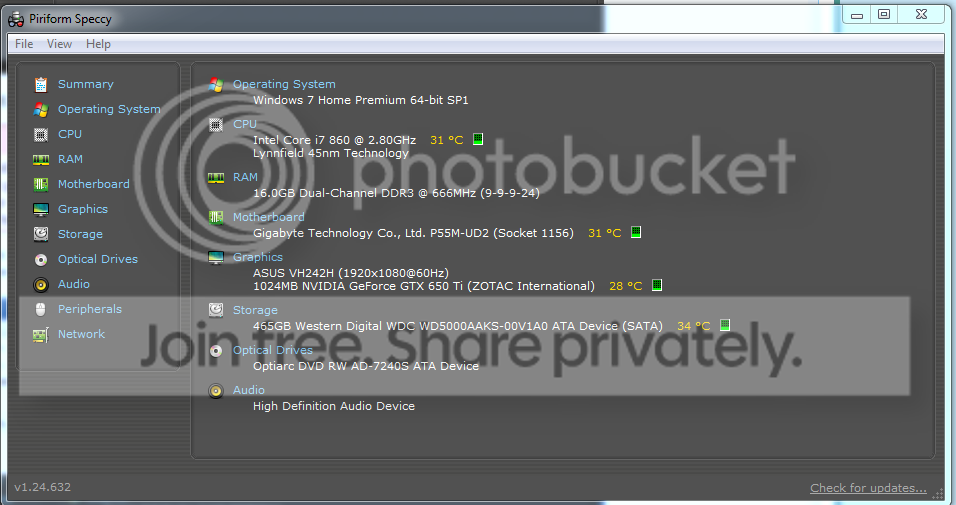
And here my question is ..... your motherboard is GA-P55M-UD2. Am I right???

If so, it is Intel® P55 Chipset. How this driver may come here????????
Code:
==================================================
[COLOR=Red]Driver Name       : amdxata.sys[/COLOR]
Address           : 00000000`010F5000
End Address       : 00000000`01100000
Size              : 0x0000b000
Load Count        : 1
Index             : 23
File Type         : System Driver
[COLOR=Red]Description       : Storage Filter Driver[/COLOR]
Version           : 1.1.2.5
[COLOR=Red]Company           : Advanced Micro Devices
Product Name      : Storage Filter Driver[/COLOR]
Modified Date     : 3/11/2011 12:41:12 AM
Created Date      : 12/28/2013 8:34:07 AM
[COLOR=Red]Filename          : C:\Windows\system32\drivers\amdxata.sys[/COLOR]
File Attributes   : A
[COLOR=Red]Service Name      : amdxata[/COLOR]
Service Display Name: 
Digital Signature : 
==================================================
And, I am seeing that it is running, too! It activates with every windows boot.
Code:
amdxata    amdxata    [B]c:\windows\system32\drivers\amdxata.sys [/B]   Kernel Driver   [B][COLOR=Red] Yes [/COLOR][/B]  [COLOR=Red][B] Boot[/B] [/COLOR]   [COLOR=Red][B]Running [/B][/COLOR]   OK    Normal    No    Yes
Sekita, I hope you understand it. There is no scope of having a Storage filter driver by AMD in a system which is having an Intel Chipset motherboard.

And it is the most bona fide reason of this continuous storage related issues.

I think you need start afresh. Do a http://www.sevenforums.com/tutorials/219487-clean-reinstall-factory-oem-windows-7-a.html .... the procedure works similarly for retail too.

Still, as it a situation I havent seen earlier, I think I need to consult with the members who are more experienced than me .... and who always guide me.
 

My Computer My Computer

At a glance

Microsoft Windows 10 Pro Insider Preview 64-bitIntel(R) Core(TM) i3-4130 CPU @ 3.40GHzCorsair Vengence 4GB x2 (8.00GB Dual-Channel ...2047MB GeForce GTS 450 (ZOTAC International)
Computer type
PC/Desktop
Computer Manufacturer/Model Number
Self Assembled
OS
Microsoft Windows 10 Pro Insider Preview 64-bit
CPU
Intel(R) Core(TM) i3-4130 CPU @ 3.40GHz
Motherboard
Gigabyte Technology Co., Ltd. B85M-D3H
Memory
Corsair Vengence 4GB x2 (8.00GB Dual-Channel DDR3 @ 798MHz)
Graphics Card(s)
2047MB GeForce GTS 450 (ZOTAC International)
Sound Card
Onboard (Realtek High Definition Audio)
Monitor(s) Displays
LG Flatron E2040T
Screen Resolution
1600x900
Hard Drives
Western Digital 1 TB
Seagate 500 GB
PSU
Corsair VS550
Case
Cooler Master K380
Cooling
Cooler Master Seidon 120V Plus
Keyboard
Logitech MK260r
Mouse
Logitech MK260r
Internet Speed
PMPL Broadband
Antivirus
Windows Defender + MBAM
Browser
Firefox
Other Info
Dell Studio 15" Laptop

My Computer My Computer

At a glance

Windows 10 Pro. 64/ version 1709 Windows 7 Pr...Intel i7-6800K @ 4.3Corsair Platinum 16 gig @2400EVGA GTX 1070 OC
Computer type
PC/Desktop
Computer Manufacturer/Model Number
Home made Desktop
OS
Windows 10 Pro. 64/ version 1709 Windows 7 Pro/64
CPU
Intel i7-6800K @ 4.3
Motherboard
ASUS X-99 Deluxe II
Memory
Corsair Platinum 16 gig @2400
Graphics Card(s)
EVGA GTX 1070 OC
Monitor(s) Displays
Asus 27" LED LCD/VE278Q
Screen Resolution
1920-1080 or 1280-720 HDMI
Hard Drives
INTEL SSD 730-240 Gb Sata 3.0/
PSU
EVGA Platium 1200W
Case
Phanteks Luxe Tempered Glass 8 fans/ one radiator
Cooling
XSPC/ Water Cooled CPU
Keyboard
Das 4 Professional
Mouse
Logitech M705/MX Anywhere 2-S
Internet Speed
100 mbits
Antivirus
Microsoft Security Essentials/ Malwarebytes Premium 3.0/ SAS
Browser
I.E. 11 default/Firefox/ ISP Time Warner Cable/Spectrum
Other Info
LG BluRay Burner/
Sound system-KLipsch-THX/
Icy Dock ssd Hot Swap bays.
Hi there Layback, I had already published a Speccy a few posts back but here is another.
*Removed*

I made the mistake of uninstalling MSE thinking it would reinstall, it won't. It won't install under limited loadout or Safe MOde. THIS makes me nervous.

[FONT=Segoe UI, Arial]On Thu 1/2/2014 12:56:39 AM GMT your computer crashed
crash dump file: C:\Windows\Minidump\010114-20638-01.dmp
This was probably caused by the following module: [FONT=Segoe UI, Arial]ntfs.sys[/FONT] (Ntfs+0x4688)
Bugcheck code: 0x24 (0x1904FB, 0xFFFFF88008C2EA18, 0xFFFFF88008C2E270, 0x0)
Error: [FONT=Segoe UI, Arial]NTFS_FILE_SYSTEM[/FONT]
file path: C:\Windows\system32\drivers\ntfs.sys
product: [FONT=Segoe UI, Arial]Microsoft® Windows® Operating System[/FONT]
company: [FONT=Segoe UI, Arial]Microsoft Corporation[/FONT]
description: NT File System Driver
Bug check description: This indicates a problem occurred in the NTFS file system.
The crash took place in a standard Microsoft module. Your system configuration may be incorrect. Possibly this problem is caused by another driver on your system that cannot be identified at this time.
[/FONT]
 
Last edited:

My Computer My Computer

At a glance

Windows 7 Home Premium 64bit SP1Intel Core i5-4430 Haswell 3.0GHz LGA 11508 gigs (2x4g)PNY GeForce GTX 660 2GB
Computer type
PC/Desktop
Computer Manufacturer/Model Number
Custom Build
OS
Windows 7 Home Premium 64bit SP1
CPU
Intel Core i5-4430 Haswell 3.0GHz LGA 1150
Motherboard
MSI Z87-GD65 LGA 1150
Memory
8 gigs (2x4g)
Graphics Card(s)
PNY GeForce GTX 660 2GB
Sound Card
High Definition Audio Device
Monitor(s) Displays
Asus Monitor
Screen Resolution
1920x1080 64bit 60Hz
Hard Drives
Western Digital WD10EZEX-00BN5A0 ATA 1 Tera
Western Digital WD5000AAKS 00V1A0 500GB
PSU
CORSAIR HX Series HX750 750W ATX12V 2.3 Modular
Case
Rosewill BLACKHAWK ATX Mid Tower
Cooling
6 Bearing Fans
Keyboard
Natural Ergonomic Keyboard 4000
Mouse
Logitech Darkfield Performance MX
Internet Speed
Cable
Antivirus
Microsoft Essentials
Browser
Aurora
SekitaLuna if you use the tutorial correctly you won't have to send us off the Forum to see the results.
For security reasons I don't care to go off site to see the results of Speccy.

View attachment 299910
 

My Computer My Computer

At a glance

Windows 10 Pro. 64/ version 1709 Windows 7 Pr...Intel i7-6800K @ 4.3Corsair Platinum 16 gig @2400EVGA GTX 1070 OC
Computer type
PC/Desktop
Computer Manufacturer/Model Number
Home made Desktop
OS
Windows 10 Pro. 64/ version 1709 Windows 7 Pro/64
CPU
Intel i7-6800K @ 4.3
Motherboard
ASUS X-99 Deluxe II
Memory
Corsair Platinum 16 gig @2400
Graphics Card(s)
EVGA GTX 1070 OC
Monitor(s) Displays
Asus 27" LED LCD/VE278Q
Screen Resolution
1920-1080 or 1280-720 HDMI
Hard Drives
INTEL SSD 730-240 Gb Sata 3.0/
PSU
EVGA Platium 1200W
Case
Phanteks Luxe Tempered Glass 8 fans/ one radiator
Cooling
XSPC/ Water Cooled CPU
Keyboard
Das 4 Professional
Mouse
Logitech M705/MX Anywhere 2-S
Internet Speed
100 mbits
Antivirus
Microsoft Security Essentials/ Malwarebytes Premium 3.0/ SAS
Browser
I.E. 11 default/Firefox/ ISP Time Warner Cable/Spectrum
Other Info
LG BluRay Burner/
Sound system-KLipsch-THX/
Icy Dock ssd Hot Swap bays.
I'm sorry Layback, I know you guys deal with 100's of people each day so I don't think about that sort of thing. I didn't realize Piriform was any sort of security risk. I will try and pay more attention to the tutorials on posting. Your post felt kinda snippy, but I can understand as you probably get frustrated. The time and effort put into the tutorials is a lot, and I didn't bother to read all of it. Apologies.

Speccy.png
 

My Computer My Computer

At a glance

Windows 7 Home Premium 64bit SP1Intel Core i5-4430 Haswell 3.0GHz LGA 11508 gigs (2x4g)PNY GeForce GTX 660 2GB
Computer type
PC/Desktop
Computer Manufacturer/Model Number
Custom Build
OS
Windows 7 Home Premium 64bit SP1
CPU
Intel Core i5-4430 Haswell 3.0GHz LGA 1150
Motherboard
MSI Z87-GD65 LGA 1150
Memory
8 gigs (2x4g)
Graphics Card(s)
PNY GeForce GTX 660 2GB
Sound Card
High Definition Audio Device
Monitor(s) Displays
Asus Monitor
Screen Resolution
1920x1080 64bit 60Hz
Hard Drives
Western Digital WD10EZEX-00BN5A0 ATA 1 Tera
Western Digital WD5000AAKS 00V1A0 500GB
PSU
CORSAIR HX Series HX750 750W ATX12V 2.3 Modular
Case
Rosewill BLACKHAWK ATX Mid Tower
Cooling
6 Bearing Fans
Keyboard
Natural Ergonomic Keyboard 4000
Mouse
Logitech Darkfield Performance MX
Internet Speed
Cable
Antivirus
Microsoft Essentials
Browser
Aurora

My Computer My Computer

At a glance

Windows 10 Pro. 64/ version 1709 Windows 7 Pr...Intel i7-6800K @ 4.3Corsair Platinum 16 gig @2400EVGA GTX 1070 OC
Computer type
PC/Desktop
Computer Manufacturer/Model Number
Home made Desktop
OS
Windows 10 Pro. 64/ version 1709 Windows 7 Pro/64
CPU
Intel i7-6800K @ 4.3
Motherboard
ASUS X-99 Deluxe II
Memory
Corsair Platinum 16 gig @2400
Graphics Card(s)
EVGA GTX 1070 OC
Monitor(s) Displays
Asus 27" LED LCD/VE278Q
Screen Resolution
1920-1080 or 1280-720 HDMI
Hard Drives
INTEL SSD 730-240 Gb Sata 3.0/
PSU
EVGA Platium 1200W
Case
Phanteks Luxe Tempered Glass 8 fans/ one radiator
Cooling
XSPC/ Water Cooled CPU
Keyboard
Das 4 Professional
Mouse
Logitech M705/MX Anywhere 2-S
Internet Speed
100 mbits
Antivirus
Microsoft Security Essentials/ Malwarebytes Premium 3.0/ SAS
Browser
I.E. 11 default/Firefox/ ISP Time Warner Cable/Spectrum
Other Info
LG BluRay Burner/
Sound system-KLipsch-THX/
Icy Dock ssd Hot Swap bays.
You are right about that! Some of the best written tutorials I have seen, and over the past month I have seen too many to count (sadly lol). You have EVERY right to be snippy, even if you weren't, as I know a lot of effort was put into those tutorials, and the least I could do is take the time to read it through and not just TL;DR *picture grazes*.

I was able to complete a system restore, and I am glad I am faithful about manually setting these whenever I uninstall something, and restored the computer to before I uninstalled MSE. It is currently running! This takes a big load off my shoulders.

AMD? Is amdxata.sys something I need to update, remove, or simply do more research on?
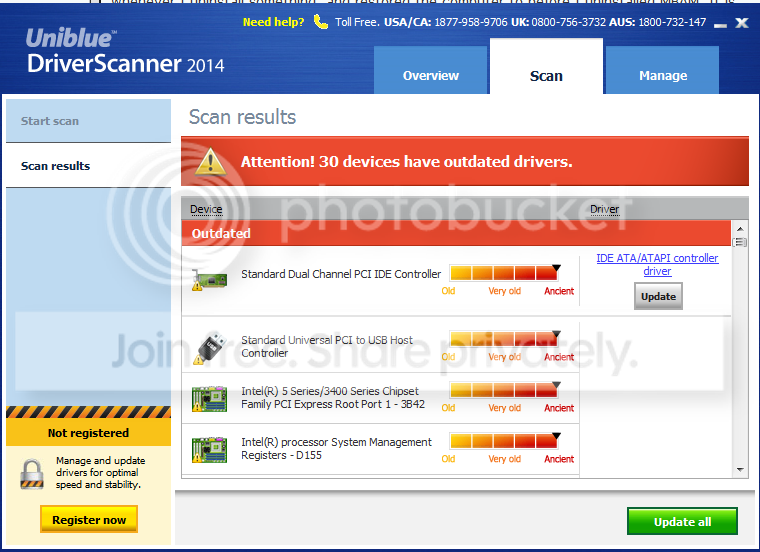
I have driverscanner installed already, and it does say I have 30 outdated drivers.

DriverScanner.png


A friend has suggested Driver Navigator.
 
Last edited:

My Computer My Computer

At a glance

Windows 7 Home Premium 64bit SP1Intel Core i5-4430 Haswell 3.0GHz LGA 11508 gigs (2x4g)PNY GeForce GTX 660 2GB
Computer type
PC/Desktop
Computer Manufacturer/Model Number
Custom Build
OS
Windows 7 Home Premium 64bit SP1
CPU
Intel Core i5-4430 Haswell 3.0GHz LGA 1150
Motherboard
MSI Z87-GD65 LGA 1150
Memory
8 gigs (2x4g)
Graphics Card(s)
PNY GeForce GTX 660 2GB
Sound Card
High Definition Audio Device
Monitor(s) Displays
Asus Monitor
Screen Resolution
1920x1080 64bit 60Hz
Hard Drives
Western Digital WD10EZEX-00BN5A0 ATA 1 Tera
Western Digital WD5000AAKS 00V1A0 500GB
PSU
CORSAIR HX Series HX750 750W ATX12V 2.3 Modular
Case
Rosewill BLACKHAWK ATX Mid Tower
Cooling
6 Bearing Fans
Keyboard
Natural Ergonomic Keyboard 4000
Mouse
Logitech Darkfield Performance MX
Internet Speed
Cable
Antivirus
Microsoft Essentials
Browser
Aurora
AMD? Is amdxata.sys something I need to update, remove, or simply so more research on?
I have driverscanner installed already, and it does say I have 30 outdated drivers.
amdxata.sys is the storage filter driver for AMD chipset motherboards. There is no logical reason for you to have that driver in your system, as yours is Intel chipset. Also when I noticed the place where this driver should be listed, it is not there under your storage controllers. I checked those controllers over and over, as it is an ongoing storage related issue.

Like all other storage controllers, it is also available as an windows update, but not for a system that is not AMD chipset.

It is not sure how you obtained it. But it should be removed. Only a deletion would not be enough, because some drivers are auto-configured at restart if the source is left; and for it we dont know th source. You need to format teh partition and perform a clean reinstall as I suggested earlier.

Thank you Layback Bear for all your valuable inputs :thumbsup:
 

My Computer My Computer

At a glance

Microsoft Windows 10 Pro Insider Preview 64-bitIntel(R) Core(TM) i3-4130 CPU @ 3.40GHzCorsair Vengence 4GB x2 (8.00GB Dual-Channel ...2047MB GeForce GTS 450 (ZOTAC International)
Computer type
PC/Desktop
Computer Manufacturer/Model Number
Self Assembled
OS
Microsoft Windows 10 Pro Insider Preview 64-bit
CPU
Intel(R) Core(TM) i3-4130 CPU @ 3.40GHz
Motherboard
Gigabyte Technology Co., Ltd. B85M-D3H
Memory
Corsair Vengence 4GB x2 (8.00GB Dual-Channel DDR3 @ 798MHz)
Graphics Card(s)
2047MB GeForce GTS 450 (ZOTAC International)
Sound Card
Onboard (Realtek High Definition Audio)
Monitor(s) Displays
LG Flatron E2040T
Screen Resolution
1600x900
Hard Drives
Western Digital 1 TB
Seagate 500 GB
PSU
Corsair VS550
Case
Cooler Master K380
Cooling
Cooler Master Seidon 120V Plus
Keyboard
Logitech MK260r
Mouse
Logitech MK260r
Internet Speed
PMPL Broadband
Antivirus
Windows Defender + MBAM
Browser
Firefox
Other Info
Dell Studio 15" Laptop
Arg! Alright, much as I hate to do a clean install, if you guys think its best then that's what I will do. I didn't think formatting was necessary with a Windows 7 fresh install. Do I need to format it anyway?
 

My Computer My Computer

At a glance

Windows 7 Home Premium 64bit SP1Intel Core i5-4430 Haswell 3.0GHz LGA 11508 gigs (2x4g)PNY GeForce GTX 660 2GB
Computer type
PC/Desktop
Computer Manufacturer/Model Number
Custom Build
OS
Windows 7 Home Premium 64bit SP1
CPU
Intel Core i5-4430 Haswell 3.0GHz LGA 1150
Motherboard
MSI Z87-GD65 LGA 1150
Memory
8 gigs (2x4g)
Graphics Card(s)
PNY GeForce GTX 660 2GB
Sound Card
High Definition Audio Device
Monitor(s) Displays
Asus Monitor
Screen Resolution
1920x1080 64bit 60Hz
Hard Drives
Western Digital WD10EZEX-00BN5A0 ATA 1 Tera
Western Digital WD5000AAKS 00V1A0 500GB
PSU
CORSAIR HX Series HX750 750W ATX12V 2.3 Modular
Case
Rosewill BLACKHAWK ATX Mid Tower
Cooling
6 Bearing Fans
Keyboard
Natural Ergonomic Keyboard 4000
Mouse
Logitech Darkfield Performance MX
Internet Speed
Cable
Antivirus
Microsoft Essentials
Browser
Aurora
Installations are of two types. Clean install and Repair install. You are suggested to perform a clean install; as the repair install will not cure your issue.

When you are on Step 8, you can format the disc/partition.

Read it a few times before you start. If needed, get a print out and start installing following step by step.
 
Last edited:

My Computer My Computer

At a glance

Microsoft Windows 10 Pro Insider Preview 64-bitIntel(R) Core(TM) i3-4130 CPU @ 3.40GHzCorsair Vengence 4GB x2 (8.00GB Dual-Channel ...2047MB GeForce GTS 450 (ZOTAC International)
Computer type
PC/Desktop
Computer Manufacturer/Model Number
Self Assembled
OS
Microsoft Windows 10 Pro Insider Preview 64-bit
CPU
Intel(R) Core(TM) i3-4130 CPU @ 3.40GHz
Motherboard
Gigabyte Technology Co., Ltd. B85M-D3H
Memory
Corsair Vengence 4GB x2 (8.00GB Dual-Channel DDR3 @ 798MHz)
Graphics Card(s)
2047MB GeForce GTS 450 (ZOTAC International)
Sound Card
Onboard (Realtek High Definition Audio)
Monitor(s) Displays
LG Flatron E2040T
Screen Resolution
1600x900
Hard Drives
Western Digital 1 TB
Seagate 500 GB
PSU
Corsair VS550
Case
Cooler Master K380
Cooling
Cooler Master Seidon 120V Plus
Keyboard
Logitech MK260r
Mouse
Logitech MK260r
Internet Speed
PMPL Broadband
Antivirus
Windows Defender + MBAM
Browser
Firefox
Other Info
Dell Studio 15" Laptop
I do agree with Arc. A clean install is the proper thing to do.
 

My Computer My Computer

At a glance

Windows 10 Pro. 64/ version 1709 Windows 7 Pr...Intel i7-6800K @ 4.3Corsair Platinum 16 gig @2400EVGA GTX 1070 OC
Computer type
PC/Desktop
Computer Manufacturer/Model Number
Home made Desktop
OS
Windows 10 Pro. 64/ version 1709 Windows 7 Pro/64
CPU
Intel i7-6800K @ 4.3
Motherboard
ASUS X-99 Deluxe II
Memory
Corsair Platinum 16 gig @2400
Graphics Card(s)
EVGA GTX 1070 OC
Monitor(s) Displays
Asus 27" LED LCD/VE278Q
Screen Resolution
1920-1080 or 1280-720 HDMI
Hard Drives
INTEL SSD 730-240 Gb Sata 3.0/
PSU
EVGA Platium 1200W
Case
Phanteks Luxe Tempered Glass 8 fans/ one radiator
Cooling
XSPC/ Water Cooled CPU
Keyboard
Das 4 Professional
Mouse
Logitech M705/MX Anywhere 2-S
Internet Speed
100 mbits
Antivirus
Microsoft Security Essentials/ Malwarebytes Premium 3.0/ SAS
Browser
I.E. 11 default/Firefox/ ISP Time Warner Cable/Spectrum
Other Info
LG BluRay Burner/
Sound system-KLipsch-THX/
Icy Dock ssd Hot Swap bays.
I have reinstalled (clean) twice in the past 3 weeks, and the problem resurfaces once I start installing Windows Updates. I spent yesterday gathering all my Keys and such. I will read thru the clean install. Setting up Clean Install with formatting and will see if this remedies the situation.
 
Last edited:

My Computer My Computer

At a glance

Windows 7 Home Premium 64bit SP1Intel Core i5-4430 Haswell 3.0GHz LGA 11508 gigs (2x4g)PNY GeForce GTX 660 2GB
Computer type
PC/Desktop
Computer Manufacturer/Model Number
Custom Build
OS
Windows 7 Home Premium 64bit SP1
CPU
Intel Core i5-4430 Haswell 3.0GHz LGA 1150
Motherboard
MSI Z87-GD65 LGA 1150
Memory
8 gigs (2x4g)
Graphics Card(s)
PNY GeForce GTX 660 2GB
Sound Card
High Definition Audio Device
Monitor(s) Displays
Asus Monitor
Screen Resolution
1920x1080 64bit 60Hz
Hard Drives
Western Digital WD10EZEX-00BN5A0 ATA 1 Tera
Western Digital WD5000AAKS 00V1A0 500GB
PSU
CORSAIR HX Series HX750 750W ATX12V 2.3 Modular
Case
Rosewill BLACKHAWK ATX Mid Tower
Cooling
6 Bearing Fans
Keyboard
Natural Ergonomic Keyboard 4000
Mouse
Logitech Darkfield Performance MX
Internet Speed
Cable
Antivirus
Microsoft Essentials
Browser
Aurora
I see no place in all this thread that you stated that you have done two clean installs before post #33.
I'm I missing something?

Where did you get your copy of Windows 7 to do the clean install?
 

My Computer My Computer

At a glance

Windows 10 Pro. 64/ version 1709 Windows 7 Pr...Intel i7-6800K @ 4.3Corsair Platinum 16 gig @2400EVGA GTX 1070 OC
Computer type
PC/Desktop
Computer Manufacturer/Model Number
Home made Desktop
OS
Windows 10 Pro. 64/ version 1709 Windows 7 Pro/64
CPU
Intel i7-6800K @ 4.3
Motherboard
ASUS X-99 Deluxe II
Memory
Corsair Platinum 16 gig @2400
Graphics Card(s)
EVGA GTX 1070 OC
Monitor(s) Displays
Asus 27" LED LCD/VE278Q
Screen Resolution
1920-1080 or 1280-720 HDMI
Hard Drives
INTEL SSD 730-240 Gb Sata 3.0/
PSU
EVGA Platium 1200W
Case
Phanteks Luxe Tempered Glass 8 fans/ one radiator
Cooling
XSPC/ Water Cooled CPU
Keyboard
Das 4 Professional
Mouse
Logitech M705/MX Anywhere 2-S
Internet Speed
100 mbits
Antivirus
Microsoft Security Essentials/ Malwarebytes Premium 3.0/ SAS
Browser
I.E. 11 default/Firefox/ ISP Time Warner Cable/Spectrum
Other Info
LG BluRay Burner/
Sound system-KLipsch-THX/
Icy Dock ssd Hot Swap bays.
Seems it doesn't matter what I am doing, I will get a BSOD after the computer has ran for a bit. It has crashed while playing flash games, Steam games, and just sitting and idling. I have pulled the computer apart and cleaned any dust in there just in case it was a dust insulated overheating issue. I have checked drivers, reinstalled drivers, reinstalled Windows and I am at my wits end on what to do.

Was in first post, although I did not specifically state I had reinstalled twice. My Comcast date usage limit was almost hit due to this. A reinstallation disc came with the computer as it was pre-built. I used this to do a "clean" install but the problems always resurfaced. I did not reformat before though as I had read that it was not necessary with Win 7. This time I made a Win 7 SP1 ISO image from heidoc.net. (Link was from Clean Install page Arc posted) I clicked the advanced options and formatted the partition, then reinstalled Win 7 SP1 from the ISO DVD.

Windows 7 Direct Download Links

Currently doing updates. I have installed MSE and MBAM but the first of the two installations (MSE) said "AMD" so I didn't use that one.

Everything seems to be going well. All updates going thru without a hitch.
 
Last edited:

My Computer My Computer

At a glance

Windows 7 Home Premium 64bit SP1Intel Core i5-4430 Haswell 3.0GHz LGA 11508 gigs (2x4g)PNY GeForce GTX 660 2GB
Computer type
PC/Desktop
Computer Manufacturer/Model Number
Custom Build
OS
Windows 7 Home Premium 64bit SP1
CPU
Intel Core i5-4430 Haswell 3.0GHz LGA 1150
Motherboard
MSI Z87-GD65 LGA 1150
Memory
8 gigs (2x4g)
Graphics Card(s)
PNY GeForce GTX 660 2GB
Sound Card
High Definition Audio Device
Monitor(s) Displays
Asus Monitor
Screen Resolution
1920x1080 64bit 60Hz
Hard Drives
Western Digital WD10EZEX-00BN5A0 ATA 1 Tera
Western Digital WD5000AAKS 00V1A0 500GB
PSU
CORSAIR HX Series HX750 750W ATX12V 2.3 Modular
Case
Rosewill BLACKHAWK ATX Mid Tower
Cooling
6 Bearing Fans
Keyboard
Natural Ergonomic Keyboard 4000
Mouse
Logitech Darkfield Performance MX
Internet Speed
Cable
Antivirus
Microsoft Essentials
Browser
Aurora
UPDATE:
Computer is now fully updated, have not had a problem as of yet. Will return in 24 hours or if I have a problem. Uploading a current Speccy and SF text. Thank you both Arc and Layback for all your helpful insight. I'm so glad I found this site.
SekitaSpeccy2.png
 

My Computer My Computer

At a glance

Windows 7 Home Premium 64bit SP1Intel Core i5-4430 Haswell 3.0GHz LGA 11508 gigs (2x4g)PNY GeForce GTX 660 2GB
Computer type
PC/Desktop
Computer Manufacturer/Model Number
Custom Build
OS
Windows 7 Home Premium 64bit SP1
CPU
Intel Core i5-4430 Haswell 3.0GHz LGA 1150
Motherboard
MSI Z87-GD65 LGA 1150
Memory
8 gigs (2x4g)
Graphics Card(s)
PNY GeForce GTX 660 2GB
Sound Card
High Definition Audio Device
Monitor(s) Displays
Asus Monitor
Screen Resolution
1920x1080 64bit 60Hz
Hard Drives
Western Digital WD10EZEX-00BN5A0 ATA 1 Tera
Western Digital WD5000AAKS 00V1A0 500GB
PSU
CORSAIR HX Series HX750 750W ATX12V 2.3 Modular
Case
Rosewill BLACKHAWK ATX Mid Tower
Cooling
6 Bearing Fans
Keyboard
Natural Ergonomic Keyboard 4000
Mouse
Logitech Darkfield Performance MX
Internet Speed
Cable
Antivirus
Microsoft Essentials
Browser
Aurora
I guess I am gonna suck it up and take the unit to a professional. I am SO frustrated at this point and I am ready to throw the tower across the room. 2 BSOD not long after I made the above post.

[FONT=Segoe UI, Arial]Crash dump directory: C:\Windows\Minidump[/FONT]

[FONT=Segoe UI, Arial]Crash dumps are enabled on your computer.
[/FONT]
[FONT=Segoe UI, Arial]On Fri 1/3/2014 3:41:06 AM GMT your computer crashed
crash dump file: C:\Windows\Minidump\010214-22744-01.dmp
This was probably caused by the following module: [FONT=Segoe UI, Arial]win32k.sys[/FONT] (win32k+0xA87B1)
Bugcheck code: 0x1000008E (0xFFFFFFFFC0000005, 0xFFFFFFFF93F187B1, 0xFFFFFFFFA6532C34, 0x0)
Error: [FONT=Segoe UI, Arial]KERNEL_MODE_EXCEPTION_NOT_HANDLED_M[/FONT]
file path: C:\Windows\system32\win32k.sys
product: [FONT=Segoe UI, Arial]Microsoft® Windows® Operating System[/FONT]
company: [FONT=Segoe UI, Arial]Microsoft Corporation[/FONT]
description: Multi-User Win32 Driver
Bug check description: This indicates that a kernel-mode program generated an exception which the error handler did not catch.
This appears to be a typical software driver bug and is not likely to be caused by a hardware problem.
The crash took place in a standard Microsoft module. Your system configuration may be incorrect. Possibly this problem is caused by another driver on your system that cannot be identified at this time.


[/FONT]
[FONT=Segoe UI, Arial]On Fri 1/3/2014 3:41:06 AM GMT your computer crashed
crash dump file: C:\Windows\memory.dmp
This was probably caused by the following module: [FONT=Segoe UI, Arial]win32k.sys[/FONT] (win32k!EngUnmapFontFileFD+0x1AA6D)
Bugcheck code: 0x8E (0xFFFFFFFFC0000005, 0xFFFFFFFF93F187B1, 0xFFFFFFFFA6532C34, 0x0)
Error: [FONT=Segoe UI, Arial]KERNEL_MODE_EXCEPTION_NOT_HANDLED[/FONT]
file path: C:\Windows\system32\win32k.sys
product: [FONT=Segoe UI, Arial]Microsoft® Windows® Operating System[/FONT]
company: [FONT=Segoe UI, Arial]Microsoft Corporation[/FONT]
description: Multi-User Win32 Driver
Bug check description: This bug check indicates that a kernel-mode application generated an exception that the error handler did not catch.
The crash took place in a standard Microsoft module. Your system configuration may be incorrect. Possibly this problem is caused by another driver on your system that cannot be identified at this time.


[/FONT]
[FONT=Segoe UI, Arial]On Fri 1/3/2014 3:34:31 AM GMT your computer crashed
crash dump file: C:\Windows\Minidump\010214-21637-01.dmp
This was probably caused by the following module: [FONT=Segoe UI, Arial]ntkrnlpa.exe[/FONT] (nt+0x40B7F)
Bugcheck code: 0xA (0xFFFFFFFF8BDA0008, 0x2, 0x1, 0xFFFFFFFF82CFC03D)
Error: [FONT=Segoe UI, Arial]IRQL_NOT_LESS_OR_EQUAL[/FONT]
file path: C:\Windows\system32\ntkrnlpa.exe
product: [FONT=Segoe UI, Arial]Microsoft® Windows® Operating System[/FONT]
company: [FONT=Segoe UI, Arial]Microsoft Corporation[/FONT]
description: NT Kernel & System
Bug check description: This indicates that Microsoft Windows or a kernel-mode driver accessed paged memory at DISPATCH_LEVEL or above.
This appears to be a typical software driver bug and is not likely to be caused by a hardware problem.
The crash took place in the Windows kernel. Possibly this problem is caused by another driver that cannot be identified at this time.
[/FONT]
 

My Computer My Computer

At a glance

Windows 7 Home Premium 64bit SP1Intel Core i5-4430 Haswell 3.0GHz LGA 11508 gigs (2x4g)PNY GeForce GTX 660 2GB
Computer type
PC/Desktop
Computer Manufacturer/Model Number
Custom Build
OS
Windows 7 Home Premium 64bit SP1
CPU
Intel Core i5-4430 Haswell 3.0GHz LGA 1150
Motherboard
MSI Z87-GD65 LGA 1150
Memory
8 gigs (2x4g)
Graphics Card(s)
PNY GeForce GTX 660 2GB
Sound Card
High Definition Audio Device
Monitor(s) Displays
Asus Monitor
Screen Resolution
1920x1080 64bit 60Hz
Hard Drives
Western Digital WD10EZEX-00BN5A0 ATA 1 Tera
Western Digital WD5000AAKS 00V1A0 500GB
PSU
CORSAIR HX Series HX750 750W ATX12V 2.3 Modular
Case
Rosewill BLACKHAWK ATX Mid Tower
Cooling
6 Bearing Fans
Keyboard
Natural Ergonomic Keyboard 4000
Mouse
Logitech Darkfield Performance MX
Internet Speed
Cable
Antivirus
Microsoft Essentials
Browser
Aurora
I went to make coffee and all hell broke loose with your computer.
Hang in there.
Arc is not online at the time to look at your BSOD.

I try to remember that their might be more than one problem that is hiding the other problem.
 

My Computer My Computer

At a glance

Windows 10 Pro. 64/ version 1709 Windows 7 Pr...Intel i7-6800K @ 4.3Corsair Platinum 16 gig @2400EVGA GTX 1070 OC
Computer type
PC/Desktop
Computer Manufacturer/Model Number
Home made Desktop
OS
Windows 10 Pro. 64/ version 1709 Windows 7 Pro/64
CPU
Intel i7-6800K @ 4.3
Motherboard
ASUS X-99 Deluxe II
Memory
Corsair Platinum 16 gig @2400
Graphics Card(s)
EVGA GTX 1070 OC
Monitor(s) Displays
Asus 27" LED LCD/VE278Q
Screen Resolution
1920-1080 or 1280-720 HDMI
Hard Drives
INTEL SSD 730-240 Gb Sata 3.0/
PSU
EVGA Platium 1200W
Case
Phanteks Luxe Tempered Glass 8 fans/ one radiator
Cooling
XSPC/ Water Cooled CPU
Keyboard
Das 4 Professional
Mouse
Logitech M705/MX Anywhere 2-S
Internet Speed
100 mbits
Antivirus
Microsoft Security Essentials/ Malwarebytes Premium 3.0/ SAS
Browser
I.E. 11 default/Firefox/ ISP Time Warner Cable/Spectrum
Other Info
LG BluRay Burner/
Sound system-KLipsch-THX/
Icy Dock ssd Hot Swap bays.
I went to make coffee and all hell broke loose with your computer.
Hang in there. .


ahahaha yea I have a cup as well. I just can't understand what the heck is wrong with my computer. I have ordered a new HDD and will probably order a new graphics card as well. I am seriously considering taking it to a shop tomorrow. I don't know what else to do. Thank you for making me laugh.. I needed it.

Edit: Just a thought, I had two partitions when I reinstalled Windows. One said system reserved, I didn't touch that one.
 

My Computer My Computer

At a glance

Windows 7 Home Premium 64bit SP1Intel Core i5-4430 Haswell 3.0GHz LGA 11508 gigs (2x4g)PNY GeForce GTX 660 2GB
Computer type
PC/Desktop
Computer Manufacturer/Model Number
Custom Build
OS
Windows 7 Home Premium 64bit SP1
CPU
Intel Core i5-4430 Haswell 3.0GHz LGA 1150
Motherboard
MSI Z87-GD65 LGA 1150
Memory
8 gigs (2x4g)
Graphics Card(s)
PNY GeForce GTX 660 2GB
Sound Card
High Definition Audio Device
Monitor(s) Displays
Asus Monitor
Screen Resolution
1920x1080 64bit 60Hz
Hard Drives
Western Digital WD10EZEX-00BN5A0 ATA 1 Tera
Western Digital WD5000AAKS 00V1A0 500GB
PSU
CORSAIR HX Series HX750 750W ATX12V 2.3 Modular
Case
Rosewill BLACKHAWK ATX Mid Tower
Cooling
6 Bearing Fans
Keyboard
Natural Ergonomic Keyboard 4000
Mouse
Logitech Darkfield Performance MX
Internet Speed
Cable
Antivirus
Microsoft Essentials
Browser
Aurora
I do believe when you do a format and clean install it cleans all the drive and then installs Windows. So I'm not understanding what exactly you are doing.

When was the last time you did the Clean Insatall with Format.
12 hours ago/1 day ago/ how long has it been?
 

My Computer My Computer

At a glance

Windows 10 Pro. 64/ version 1709 Windows 7 Pr...Intel i7-6800K @ 4.3Corsair Platinum 16 gig @2400EVGA GTX 1070 OC
Computer type
PC/Desktop
Computer Manufacturer/Model Number
Home made Desktop
OS
Windows 10 Pro. 64/ version 1709 Windows 7 Pro/64
CPU
Intel i7-6800K @ 4.3
Motherboard
ASUS X-99 Deluxe II
Memory
Corsair Platinum 16 gig @2400
Graphics Card(s)
EVGA GTX 1070 OC
Monitor(s) Displays
Asus 27" LED LCD/VE278Q
Screen Resolution
1920-1080 or 1280-720 HDMI
Hard Drives
INTEL SSD 730-240 Gb Sata 3.0/
PSU
EVGA Platium 1200W
Case
Phanteks Luxe Tempered Glass 8 fans/ one radiator
Cooling
XSPC/ Water Cooled CPU
Keyboard
Das 4 Professional
Mouse
Logitech M705/MX Anywhere 2-S
Internet Speed
100 mbits
Antivirus
Microsoft Security Essentials/ Malwarebytes Premium 3.0/ SAS
Browser
I.E. 11 default/Firefox/ ISP Time Warner Cable/Spectrum
Other Info
LG BluRay Burner/
Sound system-KLipsch-THX/
Icy Dock ssd Hot Swap bays.
Back
Top