Solved BSOD 0x3B and 0x1E

SekitaLuna

New member
Local time
3:32 PM
Messages
37
Location
At my computer
Seems it doesn't matter what I am doing, I will get a BSOD after the computer has ran for a bit. It has crashed while playing flash games, Steam games, and just sitting and idling. I have pulled the computer apart and cleaned any dust in there just in case it was a dust insulated overheating issue. I have checked drivers, reinstalled drivers, reinstalled Windows and I am at my wits end on what to do.

[FONT=Segoe UI, Arial]Crash dump directory: C:\Windows\Minidump[/FONT]

[FONT=Segoe UI, Arial]Crash dumps are enabled for your computer.
[/FONT]
[FONT=Segoe UI, Arial]On Sun 12/29/2013 5:30:34 PM GMT your computer crashed
crash dump file: C:\Windows\Minidump\122913-30404-01.dmp
This was probably caused by the following module: [FONT=Segoe UI, Arial]ntoskrnl.exe[/FONT] (nt+0x6F880)
Bugcheck code: 0x3B (0xC0000005, 0xFFFFF80002AC2AA5, 0xFFFFF88007298700, 0x0)
Error: [FONT=Segoe UI, Arial]SYSTEM_SERVICE_EXCEPTION[/FONT]
file path: C:\Windows\system32\ntoskrnl.exe
product: [FONT=Segoe UI, Arial]Microsoft® Windows® Operating System[/FONT]
company: [FONT=Segoe UI, Arial]Microsoft Corporation[/FONT]
description: NT Kernel & System
Bug check description: This indicates that an exception happened while executing a routine that transitions from non-privileged code to privileged code.
This appears to be a typical software driver bug and is not likely to be caused by a hardware problem.
The crash took place in the Windows kernel. Possibly this problem is caused by another driver that cannot be identified at this time.


[/FONT]
[FONT=Segoe UI, Arial]On Sun 12/29/2013 3:41:07 PM GMT your computer crashed
crash dump file: C:\Windows\Minidump\122913-25178-01.dmp
This was probably caused by the following module: [FONT=Segoe UI, Arial]ntoskrnl.exe[/FONT] (nt+0x6F850)
Bugcheck code: 0x1E (0x0, 0x0, 0x0, 0x0)
Error: [FONT=Segoe UI, Arial]KMODE_EXCEPTION_NOT_HANDLED[/FONT]
file path: C:\Windows\system32\ntoskrnl.exe
product: [FONT=Segoe UI, Arial]Microsoft® Windows® Operating System[/FONT]
company: [FONT=Segoe UI, Arial]Microsoft Corporation[/FONT]
description: NT Kernel & System
Bug check description: This indicates that a kernel-mode program generated an exception which the error handler did not catch.
This appears to be a typical software driver bug and is not likely to be caused by a hardware problem.
The crash took place in the Windows kernel. Possibly this problem is caused by another driver that cannot be identified at this time.


[/FONT]
[FONT=Segoe UI, Arial]On Sat 12/28/2013 7:59:27 AM GMT your computer crashed
crash dump file: C:\Windows\Minidump\122813-22152-01.dmp
This was probably caused by the following module: [FONT=Segoe UI, Arial]ntoskrnl.exe[/FONT] (nt+0x6F880)
Bugcheck code: 0x109 (0xA3A039D89844BA20, 0xB3B7465EEAC18C16, 0xFFFFF80002A6E5A0, 0x1)
Error: [FONT=Segoe UI, Arial]CRITICAL_STRUCTURE_CORRUPTION[/FONT]
file path: C:\Windows\system32\ntoskrnl.exe
product: [FONT=Segoe UI, Arial]Microsoft® Windows® Operating System[/FONT]
company: [FONT=Segoe UI, Arial]Microsoft Corporation[/FONT]
description: NT Kernel & System
Bug check description: This indicates that the kernel has detected critical kernel code or data corruption.
This might be a case of memory corruption. More often memory corruption happens because of software errors in buggy drivers, not because of faulty RAM modules.
The crash took place in the Windows kernel. Possibly this problem is caused by another driver that cannot be identified at this time.


[/FONT]
[FONT=Segoe UI, Arial]On Sat 12/28/2013 7:56:53 AM GMT your computer crashed
crash dump file: C:\Windows\Minidump\122813-22370-01.dmp
This was probably caused by the following module: [FONT=Segoe UI, Arial]ntoskrnl.exe[/FONT] (nt+0x6F880)
Bugcheck code: 0xFC (0xFFFFF880088A9800, 0x800000019C344963, 0xFFFFF880088A9600, 0x0)
Error: [FONT=Segoe UI, Arial]ATTEMPTED_EXECUTE_OF_NOEXECUTE_MEMORY[/FONT]
file path: C:\Windows\system32\ntoskrnl.exe
product: [FONT=Segoe UI, Arial]Microsoft® Windows® Operating System[/FONT]
company: [FONT=Segoe UI, Arial]Microsoft Corporation[/FONT]
description: NT Kernel & System
Bug check description: This indicates that an attempt was made to execute non-executable memory.
This might be a case of memory corruption. More often memory corruption happens because of software errors in buggy drivers, not because of faulty RAM modules. There is a possibility this problem was caused by a virus or other malware.
The crash took place in the Windows kernel. Possibly this problem is caused by another driver that cannot be identified at this time.
[/FONT]
 

My Computer My Computer

Computer type
PC/Desktop
Computer Manufacturer/Model Number
Custom Build
OS
Windows 7 Home Premium 64bit SP1
CPU
Intel Core i5-4430 Haswell 3.0GHz LGA 1150
Motherboard
MSI Z87-GD65 LGA 1150
Memory
8 gigs (2x4g)
Graphics Card(s)
PNY GeForce GTX 660 2GB
Sound Card
High Definition Audio Device
Monitor(s) Displays
Asus Monitor
Screen Resolution
1920x1080 64bit 60Hz
Hard Drives
Western Digital WD10EZEX-00BN5A0 ATA 1 Tera
Western Digital WD5000AAKS 00V1A0 500GB
PSU
CORSAIR HX Series HX750 750W ATX12V 2.3 Modular
Case
Rosewill BLACKHAWK ATX Mid Tower
Cooling
6 Bearing Fans
Keyboard
Natural Ergonomic Keyboard 4000
Mouse
Logitech Darkfield Performance MX
Internet Speed
Cable
Antivirus
Microsoft Essentials
Browser
Aurora
Hi SekitaLuna.

Event[4087]:
Log Name: System
Source: Ntfs
Date: 2013-12-29T03:08:40.622
Event ID: 55
Task: N/A
Level: Error
Opcode: N/A
Keyword: Classic
User: N/A
User Name: N/A
Computer: Sekita-PC
Description:
The file system structure on the disk is corrupt and unusable. Please run the chkdsk utility on the volume \Device\HarddiskVolume2.
Test the HDD using Data Lifeguard Diagnostic for Windows.

Also ....
Code:
fffff880`030cc950 fffff880`0101e242 [COLOR=Red]ataport[/COLOR]!IdeCompleteScsiIrp+0x62
fffff880`030cc980 fffff880`01018e32 [COLOR=Red]ataport[/COLOR]!IdeCommonCrbCompletion+0x5a
fffff880`030cc9b0 fffff880`010217ed [COLOR=Red]ataport[/COLOR]!IdeTranslateCompletedRequest+0x236
fffff880`030ccae0 fffff880`010210ec [COLOR=Red]ataport[/COLOR]!IdeProcessCompletedRequests+0x4d5
fffff880`030ccc10 fffff800`02a84f7c [COLOR=Red]ataport[/COLOR]!IdePortCompletionDpc+0x1a8
Scan the system for possible virus infection with the following programs.

Let us know the results.

Will decide the further steps after knowing these.
hardware
 

My Computer My Computer

Computer type
PC/Desktop
Computer Manufacturer/Model Number
Self Assembled
OS
Microsoft Windows 10 Pro Insider Preview 64-bit
CPU
Intel(R) Core(TM) i3-4130 CPU @ 3.40GHz
Motherboard
Gigabyte Technology Co., Ltd. B85M-D3H
Memory
Corsair Vengence 4GB x2 (8.00GB Dual-Channel DDR3 @ 798MHz)
Graphics Card(s)
2047MB GeForce GTS 450 (ZOTAC International)
Sound Card
Onboard (Realtek High Definition Audio)
Monitor(s) Displays
LG Flatron E2040T
Screen Resolution
1600x900
Hard Drives
Western Digital 1 TB
Seagate 500 GB
PSU
Corsair VS550
Case
Cooler Master K380
Cooling
Cooler Master Seidon 120V Plus
Keyboard
Logitech MK260r
Mouse
Logitech MK260r
Internet Speed
PMPL Broadband
Antivirus
Windows Defender + MBAM
Browser
Firefox
Other Info
Dell Studio 15" Laptop
Thanks!! will try these now and report on the outcome.
 
Last edited:

My Computer My Computer

Computer type
PC/Desktop
Computer Manufacturer/Model Number
Custom Build
OS
Windows 7 Home Premium 64bit SP1
CPU
Intel Core i5-4430 Haswell 3.0GHz LGA 1150
Motherboard
MSI Z87-GD65 LGA 1150
Memory
8 gigs (2x4g)
Graphics Card(s)
PNY GeForce GTX 660 2GB
Sound Card
High Definition Audio Device
Monitor(s) Displays
Asus Monitor
Screen Resolution
1920x1080 64bit 60Hz
Hard Drives
Western Digital WD10EZEX-00BN5A0 ATA 1 Tera
Western Digital WD5000AAKS 00V1A0 500GB
PSU
CORSAIR HX Series HX750 750W ATX12V 2.3 Modular
Case
Rosewill BLACKHAWK ATX Mid Tower
Cooling
6 Bearing Fans
Keyboard
Natural Ergonomic Keyboard 4000
Mouse
Logitech Darkfield Performance MX
Internet Speed
Cable
Antivirus
Microsoft Essentials
Browser
Aurora
Update:

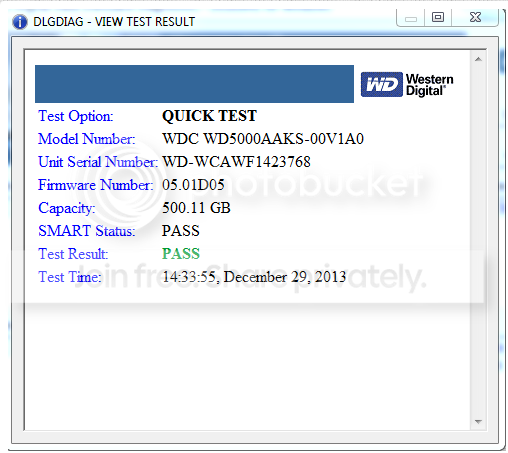
Data Lifeguard Quicktest:
Screenshot_1.png


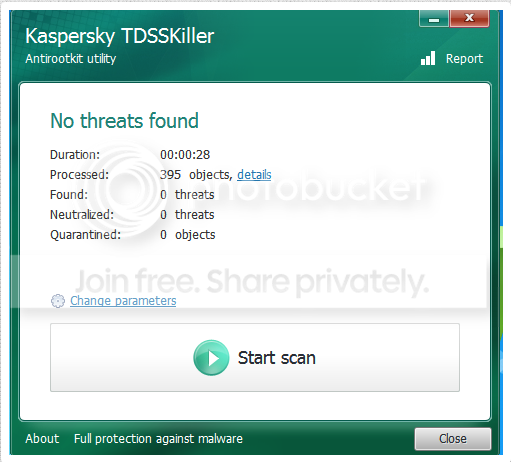
TDSSKiller:
Screenshot_2.png


Windows Defender Offline: Clean scan

Any more suggestions? Note: Running an Extended Test with Lifeguard.

Update: Extended Test Complete.

Screenshot_3.png
 
Last edited:

My Computer My Computer

Computer type
PC/Desktop
Computer Manufacturer/Model Number
Custom Build
OS
Windows 7 Home Premium 64bit SP1
CPU
Intel Core i5-4430 Haswell 3.0GHz LGA 1150
Motherboard
MSI Z87-GD65 LGA 1150
Memory
8 gigs (2x4g)
Graphics Card(s)
PNY GeForce GTX 660 2GB
Sound Card
High Definition Audio Device
Monitor(s) Displays
Asus Monitor
Screen Resolution
1920x1080 64bit 60Hz
Hard Drives
Western Digital WD10EZEX-00BN5A0 ATA 1 Tera
Western Digital WD5000AAKS 00V1A0 500GB
PSU
CORSAIR HX Series HX750 750W ATX12V 2.3 Modular
Case
Rosewill BLACKHAWK ATX Mid Tower
Cooling
6 Bearing Fans
Keyboard
Natural Ergonomic Keyboard 4000
Mouse
Logitech Darkfield Performance MX
Internet Speed
Cable
Antivirus
Microsoft Essentials
Browser
Aurora
Good to see that the Data Lifeguard test passed. It rectifies some errors.

Now use the computer normally and let us know how it is working.

If the issue repeats, we have to think about the physical parts.

Edit: Like that Cheshire Cat!
 
Last edited:

My Computer My Computer

Computer type
PC/Desktop
Computer Manufacturer/Model Number
Self Assembled
OS
Microsoft Windows 10 Pro Insider Preview 64-bit
CPU
Intel(R) Core(TM) i3-4130 CPU @ 3.40GHz
Motherboard
Gigabyte Technology Co., Ltd. B85M-D3H
Memory
Corsair Vengence 4GB x2 (8.00GB Dual-Channel DDR3 @ 798MHz)
Graphics Card(s)
2047MB GeForce GTS 450 (ZOTAC International)
Sound Card
Onboard (Realtek High Definition Audio)
Monitor(s) Displays
LG Flatron E2040T
Screen Resolution
1600x900
Hard Drives
Western Digital 1 TB
Seagate 500 GB
PSU
Corsair VS550
Case
Cooler Master K380
Cooling
Cooler Master Seidon 120V Plus
Keyboard
Logitech MK260r
Mouse
Logitech MK260r
Internet Speed
PMPL Broadband
Antivirus
Windows Defender + MBAM
Browser
Firefox
Other Info
Dell Studio 15" Laptop
System crashed while trying to do a start up repair. Beginning to think SOMETHING is dying.

Cheshire Cat has personality! Doing a grab all and adding it to this post.
 

My Computer My Computer

Computer type
PC/Desktop
Computer Manufacturer/Model Number
Custom Build
OS
Windows 7 Home Premium 64bit SP1
CPU
Intel Core i5-4430 Haswell 3.0GHz LGA 1150
Motherboard
MSI Z87-GD65 LGA 1150
Memory
8 gigs (2x4g)
Graphics Card(s)
PNY GeForce GTX 660 2GB
Sound Card
High Definition Audio Device
Monitor(s) Displays
Asus Monitor
Screen Resolution
1920x1080 64bit 60Hz
Hard Drives
Western Digital WD10EZEX-00BN5A0 ATA 1 Tera
Western Digital WD5000AAKS 00V1A0 500GB
PSU
CORSAIR HX Series HX750 750W ATX12V 2.3 Modular
Case
Rosewill BLACKHAWK ATX Mid Tower
Cooling
6 Bearing Fans
Keyboard
Natural Ergonomic Keyboard 4000
Mouse
Logitech Darkfield Performance MX
Internet Speed
Cable
Antivirus
Microsoft Essentials
Browser
Aurora
System crashed while trying to do a start up repair.
Two bad news in one.

First, there was a need to run a startup repair.

Second, it BSOD'd at a time when almost no drivers are active.

Test your RAM modules for possible errors.
How to Test and Diagnose RAM Issues with Memtest86+
Run memtest for at least 8 passes, preferably overnight.

If it start showing errors/red lines, stop testing. A single error is enough to determine that something is going bad there.

Stress test the CPU.
Hardware - Stress Test With Prime95

Try to update the BIOS to the latest (though that one is old, too) version F11 from GIGABYTE - Motherboard - Socket 1156 - GA-P55M-UD2 (rev. 1.1). Your installed version is F8.

Open the computer. Try to apply the SATA cable to an unused SATA port on the motherboard.

Check if the Power Supply Unit (PSU) supplying adequate power to the computer or not.
eXtreme Power Supply Calculator
Also let us know the wattage of the PSU.

Is the computer hot? Report us the heat of the computer after a couple of hours of your normal usage. Upload a screenshot of the summery tab of Speccy. Alternatively, you can publish a Speccy snapshot too: http://www.sevenforums.com/tutorials/311593-speccy-publish-snapshot-your-system-specs.html .
______________________________________________________________________________________
Code:
*******************************************************************************
*                                                                             *
*                        Bugcheck Analysis                                    *
*                                                                             *
*******************************************************************************

Use !analyze -v to get detailed debugging information.

BugCheck 50, {fffff8a02020fc40, 0, fffff8800124c30a, 2}


Could not read faulting driver name
Probably caused by : memory_corruption

Followup: memory_corruption
---------

5: kd> !analyze -v
*******************************************************************************
*                                                                             *
*                        Bugcheck Analysis                                    *
*                                                                             *
*******************************************************************************

PAGE_FAULT_IN_NONPAGED_AREA (50)
Invalid system memory was referenced.  This cannot be protected by try-except,
it must be protected by a Probe.  Typically the address is just plain bad or it
is pointing at freed memory.
Arguments:
Arg1: fffff8a02020fc40, memory referenced.
Arg2: 0000000000000000, value 0 = read operation, 1 = write operation.
Arg3: fffff8800124c30a, If non-zero, the instruction address which referenced the bad memory
    address.
Arg4: 0000000000000002, (reserved)

Debugging Details:
------------------


Could not read faulting driver name

READ_ADDRESS: GetPointerFromAddress: unable to read from fffff80002cc30e0
 fffff8a02020fc40 

FAULTING_IP: 
Ntfs!NtfsSnapshotScbInternal+10a
fffff880`0124c30a 8b8380000020    mov     eax,dword ptr [rbx+20000080h]

MM_INTERNAL_CODE:  2

CUSTOMER_CRASH_COUNT:  1

DEFAULT_BUCKET_ID:  CODE_CORRUPTION

BUGCHECK_STR:  0x50

PROCESS_NAME:  csrss.exe

CURRENT_IRQL:  0

TRAP_FRAME:  fffff88005610d30 -- (.trap 0xfffff88005610d30)
NOTE: The trap frame does not contain all registers.
Some register values may be zeroed or incorrect.
rax=7fffffffffffffff rbx=0000000000000000 rcx=fffffa80081ccdc8
rdx=fffff8a00020fbc0 rsi=0000000000000000 rdi=0000000000000000
rip=fffff8800124c30a rsp=fffff88005610ec0 rbp=0000000000000727
 r8=0000000000000000  r9=0000000000000000 r10=fffffa80081ccc70
r11=fffffa80081ccdc0 r12=0000000000000000 r13=0000000000000000
r14=0000000000000000 r15=0000000000000000
iopl=0         nv up ei pl zr na po cy
Ntfs!NtfsSnapshotScbInternal+0x10a:
fffff880`0124c30a 8b8380000020    mov     eax,dword ptr [rbx+20000080h] ds:00000000`20000080=????????
Resetting default scope

LAST_CONTROL_TRANSFER:  from fffff80002b0a072 to fffff80002a8b880

STACK_TEXT:  
fffff880`05610bc8 fffff800`02b0a072 : 00000000`00000050 fffff8a0`2020fc40 00000000`00000000 fffff880`05610d30 : nt!KeBugCheckEx
fffff880`05610bd0 fffff800`02a8996e : 00000000`00000000 fffff8a0`0020fbc0 00000000`00000000 00000000`00000000 : nt! ?? ::FNODOBFM::`string'+0x40440
fffff880`05610d30 fffff880`0124c30a : 00000000`00000000 fffff880`01249e49 00000000`00000001 fffffa80`077e2b40 : nt!KiPageFault+0x16e
fffff880`05610ec0 fffff880`012e300d : fffff8a0`0020fbc0 00000000`00000000 fffff8a0`0020fa90 fffffa80`07d47050 : Ntfs!NtfsSnapshotScbInternal+0x10a
fffff880`05610ef0 fffff880`012e985c : fffffa80`081ccc70 fffff8a0`0020fa90 00000000`00000000 fffffa80`08481fb0 : Ntfs!NtfsCreateScb+0x12d
fffff880`05610fb0 fffff880`012d7e65 : fffffa80`081ccc70 fffffa80`08481fb0 fffffa80`07912180 fffff8a0`0020fed0 : Ntfs!NtfsOpenAttribute+0xac
fffff880`056110c0 fffff880`012d474f : fffff880`05611880 fffff800`00001000 00000000`08afc000 00000000`00000012 : Ntfs!NtfsOpenExistingAttr+0x145
fffff880`05611180 fffff880`012d4f1f : fffffa80`081ccc70 fffffa80`08481c10 fffff8a0`0020fed0 fffff880`00000012 : Ntfs!NtfsOpenAttributeInExistingFile+0x50f
fffff880`05611310 fffff880`012e5dd6 : fffffa80`081ccc70 fffffa80`08481c10 fffff8a0`0020fed0 fffffa80`0797b801 : Ntfs!NtfsOpenExistingPrefixFcb+0x1ef
fffff880`05611400 fffff880`012e01ed : fffffa80`081ccc70 fffffa80`08481c10 fffff880`056115e0 fffff880`05611628 : Ntfs!NtfsFindStartingNode+0x5e6
fffff880`056114d0 fffff880`0124f06d : fffffa80`081ccc70 fffffa80`08481c10 fffff880`05611880 fffff880`00000000 : Ntfs!NtfsCommonCreate+0x3dd
fffff880`056116b0 fffff800`02a9b01a : fffff880`056117f0 fffff880`056118b8 fffff880`0561189c 00000000`00000000 : Ntfs!NtfsCommonCreateCallout+0x1d
fffff880`056116e0 fffff880`0124ef8f : fffff880`0124f050 fffff880`056117f0 00000000`00000000 fffff880`012eb28d : nt!KeExpandKernelStackAndCalloutEx+0xda
fffff880`056117c0 fffff880`012e6920 : 00000000`00000000 00000000`00000000 00000000`00000000 fffffa80`08481c10 : Ntfs!NtfsCommonCreateOnNewStack+0x4f
fffff880`05611820 fffff880`0108e3a2 : fffffa80`07912030 fffffa80`08481c10 fffffa80`0797b800 fffff880`6d4e6f49 : Ntfs!NtfsFsdCreate+0x1b0
fffff880`056119d0 fffff800`02d8aa45 : 00000000`00000060 fffff800`02d89560 fffffa80`0773d878 fffff8a0`00228430 : fltmgr!FltpCreate+0x392
fffff880`05611a80 fffff800`02d7f784 : fffffa80`076ce9d0 00000000`00000000 fffffa80`067569f0 fffff8a0`0192bb00 : nt!IopParseDevice+0x14f0
fffff880`05611be0 fffff800`02d8445d : fffffa80`067569f0 fffff880`05611d40 fffffa80`00000240 fffffa80`06734b40 : nt!ObpLookupObjectName+0x585
fffff880`05611ce0 fffff800`02d8c597 : fffff880`05611d88 00000000`00000001 00000000`00000000 00000000`00000000 : nt!ObOpenObjectByName+0x1cd
fffff880`05611d90 fffff800`02d2e88b : fffffa80`07d2c0e8 fffffa80`00100001 00000000`00000000 fffff880`05611f50 : nt!IopCreateFile+0x2b7
fffff880`05611e30 fffff880`01091dca : fffffa80`07d2c010 00000000`00000017 00000000`00000000 fffffa80`0773d878 : nt!IoCreateFileEx+0xfb
fffff880`05611ed0 fffff880`0109001e : fffffa80`0773d878 00000000`00000028 00000000`00000000 00000000`00000028 : fltmgr!FltpNormalizeNameComponent+0x16a
fffff880`05611fd0 fffff880`01091361 : fffffa80`00000032 00000000`00000032 00000000`00000029 00000000`00000000 : fltmgr!FltpExpandShortNames+0x14e
fffff880`05612030 fffff880`0109113e : fffffa80`07d2c010 fffff880`01080000 00000000`00000000 00000000`00000000 : fltmgr!FltpGetNormalizedFileNameWorker+0xc1
fffff880`05612070 fffff880`0107254b : fffffa80`075ca280 00000000`00000000 fffffa80`07dbf8e0 fffff880`05613000 : fltmgr!FltpCreateFileNameInformation+0xee
fffff880`056120d0 fffff880`0107dad4 : 00000000`00008000 fffffa80`07dbf8e0 00000000`00000000 00000000`00000401 : fltmgr!FltpGetFileNameInformation+0x26b
fffff880`05612150 fffff880`010c136b : fffffa80`07d2c010 fffff8a0`019300e0 00000000`00000001 fffff880`05612280 : fltmgr!FltGetFileNameInformation+0x184
fffff880`056121e0 fffff880`010bfbdb : fffff140`00de06a7 00000000`00000001 00000000`00000000 00000000`0000034a : fileinfo!FIStreamGetInfo+0x11f
fffff880`05612260 fffff880`01070242 : 00000000`00000000 fffff8a0`019300e0 fffffa80`08973fb0 00000000`00000000 : fileinfo!FIPostCreateCallback+0x1c7
fffff880`056122f0 fffff880`0106f38b : fffffa80`07912030 fffffa80`0840b5c0 fffffa80`0779dbb0 fffffa80`0779ddd0 : fltmgr!FltpPerformPostCallbacks+0x392
fffff880`056123c0 fffff880`0108e2b9 : fffffa80`08973c10 fffffa80`0797b800 fffffa80`08973c00 fffffa80`0771f8e0 : fltmgr!FltpLegacyProcessingAfterPreCallbacksCompleted+0x39b
fffff880`05612450 fffff800`02d8aa45 : 00000000`00000005 fffff800`02d89560 fffffa80`08462f20 00000000`00000000 : fltmgr!FltpCreate+0x2a9
fffff880`05612500 fffff800`02d7f784 : fffffa80`076ce9d0 00000000`00000000 fffffa80`07dbfb10 fffff8a0`00000200 : nt!IopParseDevice+0x14f0
fffff880`05612660 fffff800`02d8445d : fffffa80`07dbfb10 fffff880`056127c0 fffffa80`00000240 fffffa80`06734b40 : nt!ObpLookupObjectName+0x585
fffff880`05612760 fffff800`02d8c597 : 00000000`80000000 00000000`00000001 00000000`00000000 00000000`00052b3c : nt!ObOpenObjectByName+0x1cd
fffff880`05612810 fffff800`02d48f4a : fffff880`05612a48 fffff800`001200a9 00000000`000002d8 fffff880`056129c0 : nt!IopCreateFile+0x2b7
fffff880`056128b0 fffff960`000227f6 : fffffa80`00000021 fffff800`43465454 fffff880`04dace60 00000000`00000082 : nt!IoCreateFile+0x8a
fffff880`05612940 fffff960`00023327 : fffffa80`07eea610 00000000`00000000 00000000`00000000 00000000`0000004c : win32k!EngSaveFloatingPointState+0xe6
fffff880`05612a40 fffff960`0002561b : 00000000`000004e4 fffff880`000001b5 00000000`00000000 00000000`00000000 : win32k!InitFNTCache+0x227
fffff880`05612b30 fffff960`00025830 : fffffa80`08418b30 fffffa80`08418b30 fffffa80`08418b30 000007fe`fd99e740 : win32k!InitializeGreCSRSS+0x13b
fffff880`05612be0 fffff800`02a8aad3 : fffffa80`07dbdb60 00000000`001f0003 00000000`00000007 fffff880`05612c01 : win32k!NtUserInitialize+0xa0
fffff880`05612c20 000007fe`fd9333ea : 00000000`00000000 00000000`00000000 00000000`00000000 00000000`00000000 : nt!KiSystemServiceCopyEnd+0x13
00000000`0021fac8 00000000`00000000 : 00000000`00000000 00000000`00000000 00000000`00000000 00000000`00000000 : 0x7fe`fd9333ea


STACK_COMMAND:  kb

CHKIMG_EXTENSION: !chkimg -lo 50 -d !Ntfs
    fffff8800124c30f - Ntfs!NtfsSnapshotScbInternal+10f
    [ 00:20 ]
1 error : !Ntfs (fffff8800124c30f)

MODULE_NAME: memory_corruption

IMAGE_NAME:  memory_corruption

FOLLOWUP_NAME:  memory_corruption

DEBUG_FLR_IMAGE_TIMESTAMP:  0

MEMORY_CORRUPTOR:  ONE_BIT

FAILURE_BUCKET_ID:  X64_MEMORY_CORRUPTION_ONE_BIT

BUCKET_ID:  X64_MEMORY_CORRUPTION_ONE_BIT

Followup: memory_corruption
---------
 

My Computer My Computer

Computer type
PC/Desktop
Computer Manufacturer/Model Number
Self Assembled
OS
Microsoft Windows 10 Pro Insider Preview 64-bit
CPU
Intel(R) Core(TM) i3-4130 CPU @ 3.40GHz
Motherboard
Gigabyte Technology Co., Ltd. B85M-D3H
Memory
Corsair Vengence 4GB x2 (8.00GB Dual-Channel DDR3 @ 798MHz)
Graphics Card(s)
2047MB GeForce GTS 450 (ZOTAC International)
Sound Card
Onboard (Realtek High Definition Audio)
Monitor(s) Displays
LG Flatron E2040T
Screen Resolution
1600x900
Hard Drives
Western Digital 1 TB
Seagate 500 GB
PSU
Corsair VS550
Case
Cooler Master K380
Cooling
Cooler Master Seidon 120V Plus
Keyboard
Logitech MK260r
Mouse
Logitech MK260r
Internet Speed
PMPL Broadband
Antivirus
Windows Defender + MBAM
Browser
Firefox
Other Info
Dell Studio 15" Laptop
Used my Reinstallation DVD to successfully do a startup repair using system restore.
The wattage of the PSU is 700, and the Calculator says 422 BUT I don't know all the specs. I just put in what I knew.

*removed Speccy Link*

Downloaded and updated Bios using http://www.gigabyte.com/MicroSite/121/tech_a_bios.htm
Now need to power cycle.

Update: Successfully updated BIOS
Got a message after rebooting.. SATA running as (something) Change Y or N (Never seen this before)
 
Last edited:

My Computer My Computer

Computer type
PC/Desktop
Computer Manufacturer/Model Number
Custom Build
OS
Windows 7 Home Premium 64bit SP1
CPU
Intel Core i5-4430 Haswell 3.0GHz LGA 1150
Motherboard
MSI Z87-GD65 LGA 1150
Memory
8 gigs (2x4g)
Graphics Card(s)
PNY GeForce GTX 660 2GB
Sound Card
High Definition Audio Device
Monitor(s) Displays
Asus Monitor
Screen Resolution
1920x1080 64bit 60Hz
Hard Drives
Western Digital WD10EZEX-00BN5A0 ATA 1 Tera
Western Digital WD5000AAKS 00V1A0 500GB
PSU
CORSAIR HX Series HX750 750W ATX12V 2.3 Modular
Case
Rosewill BLACKHAWK ATX Mid Tower
Cooling
6 Bearing Fans
Keyboard
Natural Ergonomic Keyboard 4000
Mouse
Logitech Darkfield Performance MX
Internet Speed
Cable
Antivirus
Microsoft Essentials
Browser
Aurora
Got a message after rebooting.. SATA running as (something) Change Y or N (Never seen this before)
What have you done there?

Let us see ..... upload your MSINFO32.nfo file.

  1. Click on the start button
  2. Type "msinfo32" (without quotes) in the search bar of the start menu, click the resulting link. It will open the System Information window.
  3. File>Save. In the "File Name" filed, put "MSINFO32" (without Quote), give the save location to desktop, and click the "save" button.
  4. Give the time for processing, it will save a .nfo file on your desktop.
  5. Zip it, and upload it following the instruction.
Also perform the other tests too?
 

My Computer My Computer

Computer type
PC/Desktop
Computer Manufacturer/Model Number
Self Assembled
OS
Microsoft Windows 10 Pro Insider Preview 64-bit
CPU
Intel(R) Core(TM) i3-4130 CPU @ 3.40GHz
Motherboard
Gigabyte Technology Co., Ltd. B85M-D3H
Memory
Corsair Vengence 4GB x2 (8.00GB Dual-Channel DDR3 @ 798MHz)
Graphics Card(s)
2047MB GeForce GTS 450 (ZOTAC International)
Sound Card
Onboard (Realtek High Definition Audio)
Monitor(s) Displays
LG Flatron E2040T
Screen Resolution
1600x900
Hard Drives
Western Digital 1 TB
Seagate 500 GB
PSU
Corsair VS550
Case
Cooler Master K380
Cooling
Cooler Master Seidon 120V Plus
Keyboard
Logitech MK260r
Mouse
Logitech MK260r
Internet Speed
PMPL Broadband
Antivirus
Windows Defender + MBAM
Browser
Firefox
Other Info
Dell Studio 15" Laptop
I think it stated Run SATA as AHCI if I am not mistaken Y or N and counted down waiting for a response. It booted normally when no response was given. The mem test has been run multiple times (twice overnight with 9 passes) with no red lines.

I have not run the stress test as of yet.

Reviewing some of the stats of my computer I realized that SP1 was not installed, and was "hidden". It would not install via Windows Update, so I used a readiness tool and installed it manually.

Update: Stress test showed no issues after 2 hours of running.
 
Last edited:

My Computer My Computer

Computer type
PC/Desktop
Computer Manufacturer/Model Number
Custom Build
OS
Windows 7 Home Premium 64bit SP1
CPU
Intel Core i5-4430 Haswell 3.0GHz LGA 1150
Motherboard
MSI Z87-GD65 LGA 1150
Memory
8 gigs (2x4g)
Graphics Card(s)
PNY GeForce GTX 660 2GB
Sound Card
High Definition Audio Device
Monitor(s) Displays
Asus Monitor
Screen Resolution
1920x1080 64bit 60Hz
Hard Drives
Western Digital WD10EZEX-00BN5A0 ATA 1 Tera
Western Digital WD5000AAKS 00V1A0 500GB
PSU
CORSAIR HX Series HX750 750W ATX12V 2.3 Modular
Case
Rosewill BLACKHAWK ATX Mid Tower
Cooling
6 Bearing Fans
Keyboard
Natural Ergonomic Keyboard 4000
Mouse
Logitech Darkfield Performance MX
Internet Speed
Cable
Antivirus
Microsoft Essentials
Browser
Aurora
Before the BIOS update, your SATA controller mode was AHCI. I think it is AHCI still, otherwise windows wont boot normally.

Let us know about any event later.
 

My Computer My Computer

Computer type
PC/Desktop
Computer Manufacturer/Model Number
Self Assembled
OS
Microsoft Windows 10 Pro Insider Preview 64-bit
CPU
Intel(R) Core(TM) i3-4130 CPU @ 3.40GHz
Motherboard
Gigabyte Technology Co., Ltd. B85M-D3H
Memory
Corsair Vengence 4GB x2 (8.00GB Dual-Channel DDR3 @ 798MHz)
Graphics Card(s)
2047MB GeForce GTS 450 (ZOTAC International)
Sound Card
Onboard (Realtek High Definition Audio)
Monitor(s) Displays
LG Flatron E2040T
Screen Resolution
1600x900
Hard Drives
Western Digital 1 TB
Seagate 500 GB
PSU
Corsair VS550
Case
Cooler Master K380
Cooling
Cooler Master Seidon 120V Plus
Keyboard
Logitech MK260r
Mouse
Logitech MK260r
Internet Speed
PMPL Broadband
Antivirus
Windows Defender + MBAM
Browser
Firefox
Other Info
Dell Studio 15" Laptop
I have had the computer on all day without any BSOD! I am hoping the BIOS update and SP1 installation has solved the issue. Thank you so much Arc, for all your time and effort to help me. It is sincerely appreciated. Hopefully (fingers crossed) my computer will have no more hissy fits. If it does.. I know where to come for help!
 

My Computer My Computer

Computer type
PC/Desktop
Computer Manufacturer/Model Number
Custom Build
OS
Windows 7 Home Premium 64bit SP1
CPU
Intel Core i5-4430 Haswell 3.0GHz LGA 1150
Motherboard
MSI Z87-GD65 LGA 1150
Memory
8 gigs (2x4g)
Graphics Card(s)
PNY GeForce GTX 660 2GB
Sound Card
High Definition Audio Device
Monitor(s) Displays
Asus Monitor
Screen Resolution
1920x1080 64bit 60Hz
Hard Drives
Western Digital WD10EZEX-00BN5A0 ATA 1 Tera
Western Digital WD5000AAKS 00V1A0 500GB
PSU
CORSAIR HX Series HX750 750W ATX12V 2.3 Modular
Case
Rosewill BLACKHAWK ATX Mid Tower
Cooling
6 Bearing Fans
Keyboard
Natural Ergonomic Keyboard 4000
Mouse
Logitech Darkfield Performance MX
Internet Speed
Cable
Antivirus
Microsoft Essentials
Browser
Aurora
Good news :)

Let us know for any further issue.
 

My Computer My Computer

Computer type
PC/Desktop
Computer Manufacturer/Model Number
Self Assembled
OS
Microsoft Windows 10 Pro Insider Preview 64-bit
CPU
Intel(R) Core(TM) i3-4130 CPU @ 3.40GHz
Motherboard
Gigabyte Technology Co., Ltd. B85M-D3H
Memory
Corsair Vengence 4GB x2 (8.00GB Dual-Channel DDR3 @ 798MHz)
Graphics Card(s)
2047MB GeForce GTS 450 (ZOTAC International)
Sound Card
Onboard (Realtek High Definition Audio)
Monitor(s) Displays
LG Flatron E2040T
Screen Resolution
1600x900
Hard Drives
Western Digital 1 TB
Seagate 500 GB
PSU
Corsair VS550
Case
Cooler Master K380
Cooling
Cooler Master Seidon 120V Plus
Keyboard
Logitech MK260r
Mouse
Logitech MK260r
Internet Speed
PMPL Broadband
Antivirus
Windows Defender + MBAM
Browser
Firefox
Other Info
Dell Studio 15" Laptop
Alright, things went well all day yesterday, computer was shutdown last night, and within about an hour I had a BSOD.
Seems my comp is still having hissy fits.

[FONT=Segoe UI, Arial]On Tue 12/31/2013 4:31:41 PM GMT your computer crashed
crash dump file: C:\Windows\Minidump\123113-33727-01.dmp
This was probably caused by the following module: [FONT=Segoe UI, Arial]ntfs.sys[/FONT] (Ntfs+0xC30E)
Bugcheck code: 0x34 (0x50853, 0xFFFFF880033545B8, 0xFFFFF88003353E10, 0xFFFFF8800124730E)
Error: [FONT=Segoe UI, Arial]CACHE_MANAGER[/FONT]
file path: C:\Windows\system32\drivers\ntfs.sys
product: [FONT=Segoe UI, Arial]Microsoft® Windows® Operating System[/FONT]
company: [FONT=Segoe UI, Arial]Microsoft Corporation[/FONT]
description: NT File System Driver
Bug check description: This indicates that a problem occurred in the file system's cache manager.
This might be a case of memory corruption. More often memory corruption happens because of software errors in buggy drivers, not because of faulty RAM modules.
The crash took place in a standard Microsoft module. Your system configuration may be incorrect. Possibly this problem is caused by another driver on your system that cannot be identified at this time.

[/FONT]
[FONT=Segoe UI, Arial]On Tue 12/31/2013 3:47:44 PM GMT your computer crashed
crash dump file: C:\Windows\Minidump\123113-28345-01.dmp
This was probably caused by the following module: [FONT=Segoe UI, Arial]ntoskrnl.exe[/FONT] (nt+0x75BC0)
Bugcheck code: 0x19 (0x20, 0xFFFFF8A010523EB0, 0xFFFFF8A010524AF0, 0x4C4F940)
Error: [FONT=Segoe UI, Arial]BAD_POOL_HEADER[/FONT]
file path: C:\Windows\system32\ntoskrnl.exe
product: [FONT=Segoe UI, Arial]Microsoft® Windows® Operating System[/FONT]
company: [FONT=Segoe UI, Arial]Microsoft Corporation[/FONT]
description: NT Kernel & System
Bug check description: This indicates that a pool header is corrupt.
This appears to be a typical software driver bug and is not likely to be caused by a hardware problem. This might be a case of memory corruption. More often memory corruption happens because of software errors in buggy drivers, not because of faulty RAM modules.
The crash took place in the Windows kernel. Possibly this problem is caused by another driver that cannot be identified at this time.

[/FONT]
 

My Computer My Computer

Computer type
PC/Desktop
Computer Manufacturer/Model Number
Custom Build
OS
Windows 7 Home Premium 64bit SP1
CPU
Intel Core i5-4430 Haswell 3.0GHz LGA 1150
Motherboard
MSI Z87-GD65 LGA 1150
Memory
8 gigs (2x4g)
Graphics Card(s)
PNY GeForce GTX 660 2GB
Sound Card
High Definition Audio Device
Monitor(s) Displays
Asus Monitor
Screen Resolution
1920x1080 64bit 60Hz
Hard Drives
Western Digital WD10EZEX-00BN5A0 ATA 1 Tera
Western Digital WD5000AAKS 00V1A0 500GB
PSU
CORSAIR HX Series HX750 750W ATX12V 2.3 Modular
Case
Rosewill BLACKHAWK ATX Mid Tower
Cooling
6 Bearing Fans
Keyboard
Natural Ergonomic Keyboard 4000
Mouse
Logitech Darkfield Performance MX
Internet Speed
Cable
Antivirus
Microsoft Essentials
Browser
Aurora
It seems that something is somehow causing the disks fail. Which is interpreted as memory corruption in the dumps. So is it Page files? Cache?

Take another disc check ..... using Seatools For DOS: http://www.sevenforums.com/tutorials/313457-seatools-dos-windows-how-use.html

Also, enable Driver Verifier to monitor the drivers.
Driver Verifier - Enable and Disable
Run Driver Verifier for 24 hours or the occurrence of the next crash, whichever is earlier.

   Information
Why Driver Verifier:
It puts a stress on the drivers, ans so it makes the unstable drivers crash. Hopefully the driver that crashes is recorded in the memory dump.

How Can we know that DV is enabled:
It will make the system bit of slow, laggy.

   Warning
Before enabling DV, make it sure that you have earlier System restore points made in your computer. You can check it easily by using CCleaner looking at Tools > System Restore.

If there is no points, make a System Restore Point manually before enabling DV.

   Tip


Let us know the results, with the subsequent crash dumps, if any.
______________________________________________________________________________________
Code:
*******************************************************************************
*                                                                             *
*                        Bugcheck Analysis                                    *
*                                                                             *
*******************************************************************************

Use !analyze -v to get detailed debugging information.

BugCheck 34, {50853, fffff880033545b8, fffff88003353e10, fffff8800124730e}

Probably caused by : memory_corruption

Followup: memory_corruption
---------

4: kd> !analyze -v
*******************************************************************************
*                                                                             *
*                        Bugcheck Analysis                                    *
*                                                                             *
*******************************************************************************

CACHE_MANAGER (34)
    See the comment for FAT_FILE_SYSTEM (0x23)
Arguments:
Arg1: 0000000000050853
Arg2: fffff880033545b8
Arg3: fffff88003353e10
Arg4: fffff8800124730e

Debugging Details:
------------------


EXCEPTION_RECORD:  fffff880033545b8 -- (.exr 0xfffff880033545b8)
ExceptionAddress: fffff8800124730e (Ntfs!NtfsFsdRead+0x000000000000004e)
   ExceptionCode: c0000005 (Access violation)
  ExceptionFlags: 00000000
NumberParameters: 2
   Parameter[0]: 0000000000000001
   Parameter[1]: 0000000000000001
Attempt to write to address 0000000000000001

CONTEXT:  fffff88003353e10 -- (.cxr 0xfffff88003353e10)
rax=ffff0000021c09b5 rbx=fffffa8009d27c60 rcx=fffffa80079a6030
rdx=fffffa8009d278c0 rsi=fffffa8009eb32b0 rdi=0000000000000001
rip=fffff8800124730e rsp=fffff880033547f0 rbp=fffff88003354820
 r8=fffffa80075cb530  r9=0000000000000003 r10=fffffa8009eb32b0
r11=fffffa8009d278c0 r12=0000000000000000 r13=fffffa8007707de0
r14=fffffa8009d278c0 r15=0000000000000000
iopl=0         nv up ei pl zr na po nc
cs=0010  ss=0000  ds=002b  es=002b  fs=0053  gs=002b             efl=00010246
Ntfs!NtfsFsdRead+0x4e:
fffff880`0124730e 48ab            stos    qword ptr [rdi] ds:002b:00000000`00000001=????????????????
Resetting default scope

CUSTOMER_CRASH_COUNT:  1

PROCESS_NAME:  System

CURRENT_IRQL:  0

ERROR_CODE: (NTSTATUS) 0xc0000005 - The instruction at 0x%08lx referenced memory at 0x%08lx. The memory could not be %s.

EXCEPTION_CODE: (NTSTATUS) 0xc0000005 - The instruction at 0x%08lx referenced memory at 0x%08lx. The memory could not be %s.

EXCEPTION_PARAMETER1:  0000000000000001

EXCEPTION_PARAMETER2:  0000000000000001

WRITE_ADDRESS: GetPointerFromAddress: unable to read from fffff80002d03100
 0000000000000001 

FOLLOWUP_IP: 
Ntfs!NtfsFsdRead+4e
fffff880`0124730e 48ab            stos    qword ptr [rdi]

FAULTING_IP: 
Ntfs!NtfsFsdRead+4e
fffff880`0124730e 48ab            stos    qword ptr [rdi]

BUGCHECK_STR:  0x34

DEFAULT_BUCKET_ID:  CODE_CORRUPTION

LAST_CONTROL_TRANSFER:  from fffff88001131bcf to fffff8800124730e

STACK_TEXT:  
fffff880`033547f0 fffff880`01131bcf : fffffa80`09d27c60 fffffa80`09d278c0 fffffa80`09eb32b0 00000000`00000001 : Ntfs!NtfsFsdRead+0x4e
fffff880`033548a0 fffff880`011306df : fffffa80`07707de0 fffffa80`09d9b800 fffffa80`07707d00 fffffa80`09d278c0 : fltmgr!FltpLegacyProcessingAfterPreCallbacksCompleted+0x24f
fffff880`03354930 fffff800`02af2e15 : fffffa80`09d278e0 fffffa80`09e72930 fffffa80`09a969c0 fffff880`009b2180 : fltmgr!FltpDispatch+0xcf
fffff880`03354990 fffff800`02d69737 : fffffa80`09d9b800 fffffa80`09d9b800 fffffa80`09e72932 fffff800`02d3313f : nt!IoPageRead+0x255
fffff880`03354a20 fffff800`02d69831 : fffffa80`0967aca0 fffffa80`067a7b50 fffff880`03354b40 00000000`00000005 : nt!MiPfExecuteReadList+0xff
fffff880`03354a80 fffff800`02a78cd3 : fffffa80`0967aca0 00000000`00000000 00000000`00000000 fffff800`02c71280 : nt!MmPrefetchForCacheManager+0xb5
fffff880`03354ad0 fffff800`02b10b4e : fffffa80`09e72930 00000000`00000000 00000000`00000000 00000000`000007ff : nt!CcPerformReadAhead+0x2f3
fffff880`03354c00 fffff800`02ad5261 : fffffa80`067b5500 fffff800`02dc2101 fffff800`02cd2930 00000000`00000002 : nt!CcWorkerThread+0x21e
fffff880`03354cb0 fffff800`02d682ea : 00000000`00000000 fffffa80`067a7b50 00000000`00000080 fffffa80`0671f040 : nt!ExpWorkerThread+0x111
fffff880`03354d40 fffff800`02abc8e6 : fffff880`03186180 fffffa80`067a7b50 fffff880`031910c0 00000000`00000000 : nt!PspSystemThreadStartup+0x5a
fffff880`03354d80 00000000`00000000 : fffff880`03355000 fffff880`0334f000 fffff880`033549e0 00000000`00000000 : nt!KiStartSystemThread+0x16


[COLOR=Red]CHKIMG_EXTENSION: !chkimg -lo 50 -db !Ntfs[/COLOR]
[COLOR=Red]2 errors : !Ntfs (fffff8800124701f-fffff8800124730f)[/COLOR]
fffff88001247010  01  00  eb  04  8b  5c  24  5c  ba  e9  00  00  c0  8b  cb *ef .....\$\........
...
fffff88001247300  45  33  e4  4c  89  65  08  45  8b  fc  44  89  65  10  48 *ab E3.L.e.E..D.e.H.

MODULE_NAME: memory_corruption

IMAGE_NAME:  memory_corruption

FOLLOWUP_NAME:  memory_corruption

DEBUG_FLR_IMAGE_TIMESTAMP:  0

MEMORY_CORRUPTOR:  STRIDE

STACK_COMMAND:  .cxr 0xfffff88003353e10 ; kb

FAILURE_BUCKET_ID:  X64_MEMORY_CORRUPTION_STRIDE

BUCKET_ID:  X64_MEMORY_CORRUPTION_STRIDE

Followup: memory_corruption
---------
 

My Computer My Computer

Computer type
PC/Desktop
Computer Manufacturer/Model Number
Self Assembled
OS
Microsoft Windows 10 Pro Insider Preview 64-bit
CPU
Intel(R) Core(TM) i3-4130 CPU @ 3.40GHz
Motherboard
Gigabyte Technology Co., Ltd. B85M-D3H
Memory
Corsair Vengence 4GB x2 (8.00GB Dual-Channel DDR3 @ 798MHz)
Graphics Card(s)
2047MB GeForce GTS 450 (ZOTAC International)
Sound Card
Onboard (Realtek High Definition Audio)
Monitor(s) Displays
LG Flatron E2040T
Screen Resolution
1600x900
Hard Drives
Western Digital 1 TB
Seagate 500 GB
PSU
Corsair VS550
Case
Cooler Master K380
Cooling
Cooler Master Seidon 120V Plus
Keyboard
Logitech MK260r
Mouse
Logitech MK260r
Internet Speed
PMPL Broadband
Antivirus
Windows Defender + MBAM
Browser
Firefox
Other Info
Dell Studio 15" Laptop
Tried to manually set a restore point, and the system crashed into BSOD.

[FONT=Segoe UI, Arial]On Tue 12/31/2013 9:54:09 PM GMT your computer crashed
crash dump file: C:\Windows\Minidump\123113-45131-01.dmp
This was probably caused by the following module: [FONT=Segoe UI, Arial]ntfs.sys[/FONT] (Ntfs+0x4688)
Bugcheck code: 0x24 (0x1904FB, 0xFFFFF880094A5578, 0xFFFFF880094A4DD0, 0xFFFFF8800128D649)
Error: [FONT=Segoe UI, Arial]NTFS_FILE_SYSTEM[/FONT]
file path: C:\Windows\system32\drivers\ntfs.sys
product: [FONT=Segoe UI, Arial]Microsoft® Windows® Operating System[/FONT]
company: [FONT=Segoe UI, Arial]Microsoft Corporation[/FONT]
description: NT File System Driver
Bug check description: This indicates a problem occurred in the NTFS file system.
The crash took place in a standard Microsoft module. Your system configuration may be incorrect. Possibly this problem is caused by another driver on your system that cannot be identified at this time.

Gonna try the DV now
[/FONT]
 

My Computer My Computer

Computer type
PC/Desktop
Computer Manufacturer/Model Number
Custom Build
OS
Windows 7 Home Premium 64bit SP1
CPU
Intel Core i5-4430 Haswell 3.0GHz LGA 1150
Motherboard
MSI Z87-GD65 LGA 1150
Memory
8 gigs (2x4g)
Graphics Card(s)
PNY GeForce GTX 660 2GB
Sound Card
High Definition Audio Device
Monitor(s) Displays
Asus Monitor
Screen Resolution
1920x1080 64bit 60Hz
Hard Drives
Western Digital WD10EZEX-00BN5A0 ATA 1 Tera
Western Digital WD5000AAKS 00V1A0 500GB
PSU
CORSAIR HX Series HX750 750W ATX12V 2.3 Modular
Case
Rosewill BLACKHAWK ATX Mid Tower
Cooling
6 Bearing Fans
Keyboard
Natural Ergonomic Keyboard 4000
Mouse
Logitech Darkfield Performance MX
Internet Speed
Cable
Antivirus
Microsoft Essentials
Browser
Aurora
Alright, I am in Safe Mode with Networking and the DV crash is below.

[FONT=Segoe UI, Arial]On Tue 12/31/2013 10:08:42 PM GMT your computer crashed
crash dump file: C:\Windows\Minidump\123113-23368-01.dmp
This was probably caused by the following module: [FONT=Segoe UI, Arial]nvlddmkm.sys[/FONT] (nvlddmkm+0x9A879)
Bugcheck code: 0xC4 (0xF6, 0xAC, 0xFFFFFA800A35FB30, 0xFFFFF8800F14D879)
Error: [FONT=Segoe UI, Arial]DRIVER_VERIFIER_DETECTED_VIOLATION[/FONT]
file path: C:\Windows\system32\drivers\nvlddmkm.sys
product: [FONT=Segoe UI, Arial]NVIDIA Windows Kernel Mode Driver, Version 331.82 [/FONT]
company: [FONT=Segoe UI, Arial]NVIDIA Corporation[/FONT]
description: NVIDIA Windows Kernel Mode Driver, Version 331.82
Bug check description: This is the general bug check code for fatal errors found by Driver Verifier.
A driver references a user-mode handle as kernel mode. This appears to be a typical software driver bug and is not likely to be caused by a hardware problem.
A third party driver was identified as the probable root cause of this system error. It is suggested you look for an update for the following driver: nvlddmkm.sys (NVIDIA Windows Kernel Mode Driver, Version 331.82 , NVIDIA Corporation).
Google query: [FONT=Segoe UI, Arial]NVIDIA Corporation DRIVER_VERIFIER_DETECTED_VIOLATION

There was a Beta update for the Nvidia card, which I went ahead and installed. (via Nvidia Experience)

[/FONT]
[/FONT]
 
Last edited:

My Computer My Computer

Computer type
PC/Desktop
Computer Manufacturer/Model Number
Custom Build
OS
Windows 7 Home Premium 64bit SP1
CPU
Intel Core i5-4430 Haswell 3.0GHz LGA 1150
Motherboard
MSI Z87-GD65 LGA 1150
Memory
8 gigs (2x4g)
Graphics Card(s)
PNY GeForce GTX 660 2GB
Sound Card
High Definition Audio Device
Monitor(s) Displays
Asus Monitor
Screen Resolution
1920x1080 64bit 60Hz
Hard Drives
Western Digital WD10EZEX-00BN5A0 ATA 1 Tera
Western Digital WD5000AAKS 00V1A0 500GB
PSU
CORSAIR HX Series HX750 750W ATX12V 2.3 Modular
Case
Rosewill BLACKHAWK ATX Mid Tower
Cooling
6 Bearing Fans
Keyboard
Natural Ergonomic Keyboard 4000
Mouse
Logitech Darkfield Performance MX
Internet Speed
Cable
Antivirus
Microsoft Essentials
Browser
Aurora
The driver verifier caught the display driver.

Install the NVIDIA DRIVERS 314.22WHQL.

  • Uninstall All nvidia items in Control Panel > Programs and features
    • 3D Vision Control Driver
    • 3D Vision Driver
    • Graphics Driver
    • HD Audio Driver
    • PhysX
    • nvidia Update
    (Are you using nvidia chipset drivers? If so, dont uninstall anything other than those are listed).
  • Now follow Drivers - Clean Left over Files after Uninstalling
  • Download 314.22 WHQL. While installing, Select Custom (Advanced) install. In the next page, follow this settings:

But that is not the main stream of the issue. The issue is storage related, it is seen again.
Code:
*******************************************************************************
*                                                                             *
*                        Bugcheck Analysis                                    *
*                                                                             *
*******************************************************************************

Use !analyze -v to get detailed debugging information.

BugCheck 24, {1904fb, fffff880094a5578, fffff880094a4dd0, fffff8800128d649}

Probably caused by : Ntfs.sys ( Ntfs!NtfsFlushVolume+429 )

Followup: MachineOwner
---------
STOP 0x00000024: NTFS_FILE_SYSTEM http://carrona.org/bsodindx.html#top
Usual causes:
Disk corruption, insufficient physical memory, Device driver, Indexing, Resident antivirus, backup, defrag programs, Disk/Drive failing/failure

Let us see the situation.
 

My Computer My Computer

Computer type
PC/Desktop
Computer Manufacturer/Model Number
Self Assembled
OS
Microsoft Windows 10 Pro Insider Preview 64-bit
CPU
Intel(R) Core(TM) i3-4130 CPU @ 3.40GHz
Motherboard
Gigabyte Technology Co., Ltd. B85M-D3H
Memory
Corsair Vengence 4GB x2 (8.00GB Dual-Channel DDR3 @ 798MHz)
Graphics Card(s)
2047MB GeForce GTS 450 (ZOTAC International)
Sound Card
Onboard (Realtek High Definition Audio)
Monitor(s) Displays
LG Flatron E2040T
Screen Resolution
1600x900
Hard Drives
Western Digital 1 TB
Seagate 500 GB
PSU
Corsair VS550
Case
Cooler Master K380
Cooling
Cooler Master Seidon 120V Plus
Keyboard
Logitech MK260r
Mouse
Logitech MK260r
Internet Speed
PMPL Broadband
Antivirus
Windows Defender + MBAM
Browser
Firefox
Other Info
Dell Studio 15" Laptop
There is no defrag program installed on this comp other than the default program.

Uninstalled Nvidia drivers as listed and ran DDU in safe mode. After reboot, installed 314.22 graphics driver and PhysX, unchecking everything else and checking clean install. Rebooted again and once the windows loaded and the desktop came up the system went into another BSOD.

[FONT=Segoe UI, Arial]On Wed 1/1/2014 5:39:16 PM GMT your computer crashed
crash dump file: C:\Windows\Minidump\010114-45240-01.dmp
This was probably caused by the following module: [FONT=Segoe UI, Arial]ntoskrnl.exe[/FONT] (nt+0x75BC0)
Bugcheck code: 0x1A (0x41287, 0x1, 0x0, 0x0)
Error: [FONT=Segoe UI, Arial]MEMORY_MANAGEMENT[/FONT]
file path: C:\Windows\system32\ntoskrnl.exe
product: [FONT=Segoe UI, Arial]Microsoft® Windows® Operating System[/FONT]
company: [FONT=Segoe UI, Arial]Microsoft Corporation[/FONT]
description: NT Kernel & System
Bug check description: This indicates that a severe memory management error occurred.
This might be a case of memory corruption. More often memory corruption happens because of software errors in buggy drivers, not because of faulty RAM modules.
The crash took place in the Windows kernel. Possibly this problem is caused by another driver that cannot be identified at this time.

I have disabled indexing. Starting Driver verifier again.

UPDATE: Windows booted fine with Driver Verifier going this time.
[/FONT]
 

My Computer My Computer

Computer type
PC/Desktop
Computer Manufacturer/Model Number
Custom Build
OS
Windows 7 Home Premium 64bit SP1
CPU
Intel Core i5-4430 Haswell 3.0GHz LGA 1150
Motherboard
MSI Z87-GD65 LGA 1150
Memory
8 gigs (2x4g)
Graphics Card(s)
PNY GeForce GTX 660 2GB
Sound Card
High Definition Audio Device
Monitor(s) Displays
Asus Monitor
Screen Resolution
1920x1080 64bit 60Hz
Hard Drives
Western Digital WD10EZEX-00BN5A0 ATA 1 Tera
Western Digital WD5000AAKS 00V1A0 500GB
PSU
CORSAIR HX Series HX750 750W ATX12V 2.3 Modular
Case
Rosewill BLACKHAWK ATX Mid Tower
Cooling
6 Bearing Fans
Keyboard
Natural Ergonomic Keyboard 4000
Mouse
Logitech Darkfield Performance MX
Internet Speed
Cable
Antivirus
Microsoft Essentials
Browser
Aurora
The last BSOD that you reported means an illegal page fault occurred while holding working set synchronization.
Code:
*******************************************************************************
*                                                                             *
*                        Bugcheck Analysis                                    *
*                                                                             *
*******************************************************************************

Use !analyze -v to get detailed debugging information.

BugCheck 1A, {[COLOR=Red]41287[/COLOR], 1, 0, 0}

Probably caused by : ntkrnlmp.exe ( nt! ?? ::FNODOBFM::`string'+454f5 )

Followup: MachineOwner
---------
It may be caused by either a failing device driver or a failing RAM. You said you performed memtest twice; so RAM is not failing. It is a device driver.

We have driver verifier running to catch the driver that is causing this issue. In the mean time, let me have a look at the device drivers?

Upload the list of all the third party drivers Using NirSoft DriverView :

  • Download and execute Driverview
  • View > Hide Microsoft Drivers
  • Edit > Select all
  • File > Save Selected Items
  • In the Save dialog, Set the path to desktop, Put "Driverview" in the name field, and save.
  • Zip the .txt file and upload it.
I wonder why some of the earlier dumps indicated to storage section, but not this time; but it is good.
 

My Computer My Computer

Computer type
PC/Desktop
Computer Manufacturer/Model Number
Self Assembled
OS
Microsoft Windows 10 Pro Insider Preview 64-bit
CPU
Intel(R) Core(TM) i3-4130 CPU @ 3.40GHz
Motherboard
Gigabyte Technology Co., Ltd. B85M-D3H
Memory
Corsair Vengence 4GB x2 (8.00GB Dual-Channel DDR3 @ 798MHz)
Graphics Card(s)
2047MB GeForce GTS 450 (ZOTAC International)
Sound Card
Onboard (Realtek High Definition Audio)
Monitor(s) Displays
LG Flatron E2040T
Screen Resolution
1600x900
Hard Drives
Western Digital 1 TB
Seagate 500 GB
PSU
Corsair VS550
Case
Cooler Master K380
Cooling
Cooler Master Seidon 120V Plus
Keyboard
Logitech MK260r
Mouse
Logitech MK260r
Internet Speed
PMPL Broadband
Antivirus
Windows Defender + MBAM
Browser
Firefox
Other Info
Dell Studio 15" Laptop
Back
Top