Windows 7 USB/DVD Download Tool

How to Get and Use the Windows 7 USB/DVD Download Tool


Introduction
   Information
If you would like to burn your downloaded or converted .iso image to a DVD or create a bootable USB flash drive, this free Microsoft utility is for you.

In very little time this can be accomplished by even a novice, and in this tutorial I'm gonna show you how. I have seperated this tutorial into 2 sections: Part 1 covers how to burn a bootable DVD and Part 2 is on creating a bootable flash drive.

This is primarily going to be useful to XP and Vista users who do not have .iso burning software installed on their current HDD and wish to perform a clean install.
   Note
The Windows 7 USB/DVD Download Tool does not support using Windows XP .iso files.

If you do not have a Windows 7 with SP1 ISO, then you can download the latest official Windows 7 with SP1 ISO file here:

:ar: Microsoft Software Recovery

:ar: Microsoft: Windows 7 Direct Download Links


   Warning
The Windows 7 USB/DVD Download Tool does not work with UEFI.

To create a 64-bit Windows 7 or Windows 8 UEFI USB flash drive, see:

How to Create a Bootable UEFI USB Flash Drive for Installing Windows 7 and Windows 8


Here's How:

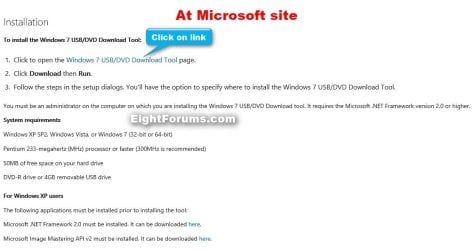
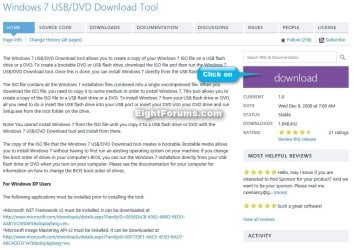
First visit the MS Store Website to download and install the Windows 7 USB/DVD download tool.

   Note
If the download links are broken at the sites below, then you can click on the blue Download button below to directly download an official copy of the Windows7-USB-DVD-tool.exe file below from here instead.


Download


USB-DVD_Download_Tool_Site.jpg

USB-DVD_Download_Tool_Site-2.jpg
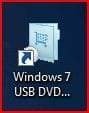
After you have successfully downloaded and installed the Windows 7 USB/DVD Download Tool, you should see its icon on your desktop. Double click to start the program.USB icon.JPG
PART 1 - How to Burn a bootable Windows 7 DVD

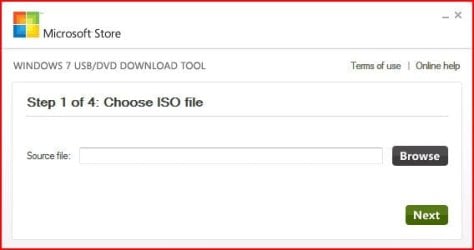
1) After you run the Windows 7 USB/DVD download tool, you will see the Step 1 of 4 dialog box. Here you will navigate to the location of your .iso file by clicking the Browse button. Once you have successfully located your iso file click Next to continue to step 2.USB DVD DL TOOL_1.JPG
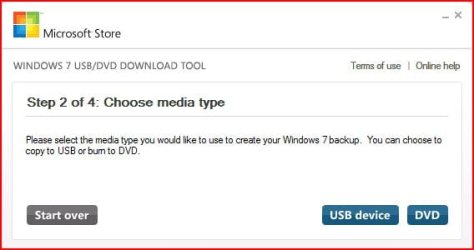
2) In step 2 of 4 you are given the choice of making a bootable DVD or a bootable USB flash. In this first section of my tutorial I show you how to burn a bootable DVD. So click DVD if that is what you want.USB DVD DL TOOL_2.JPG
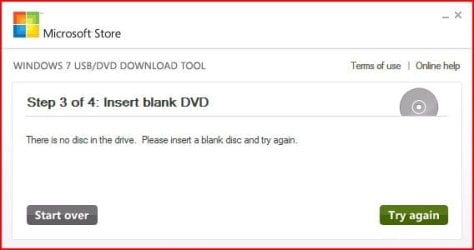
3) Make sure you have a blank DVD in your optical drive, or you may see this message.USB DVD DL TOOL_3.JPG
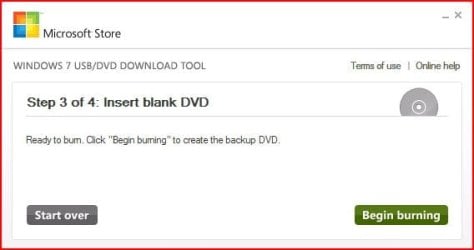
4) Once you have inserted a blank DVD you will see the folowing screen, click Begin burning to continue.USB DVD DL TOOL_4.JPG
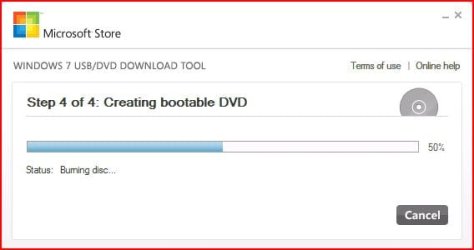
5) Once the burn starts, you should see the progress bar here at Step 4 of 4. Remember the amount of time it takes to complete the burn depends on many factors... be patient.USB DVD DL TOOL_5.JPG
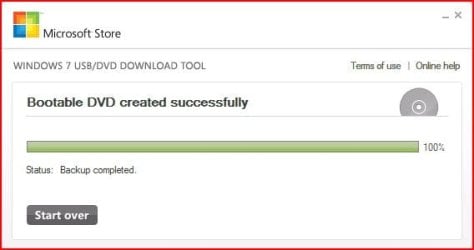
6) If all you wanted was a bootable DVD, you are finished when you see the image below, close the program or start over if you wish to make a 2nd copy.USB DVD DL TOOL_6.JPG
PART 2 - How to create a bootable Windows 7 USB Flash Drive


   Warning
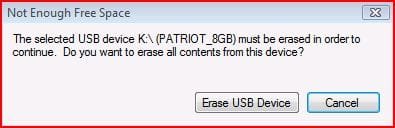
You need a USB flash drive with at least 4GB of free space, and the flash drive will be formattted to NTFS! So backup your data before creating this bootable USB, or you will lose all your data!


Follow the instructions in the Introduction at the beginning of tutorial and download and install the tool. The installation will add the program shortcut to your desktop, just double click to start.

1) After you launch the app, you will see the Step 1 of 4 dialog box. Here you will navigate to the location of your .iso file by clicking the Browse button. Once you have successfully located your iso file click Next to continue to step 2.USB DVD DL TOOL_1.JPG
2) In step 2 of 4 you are given the choice of making a bootable DVD or a bootable USB flash. Here in Part 2 of my tutorial I show you how to create a bootable USB Flash Drive. So click USB device if that is what you want.USB DVD DL TOOL_2.JPG
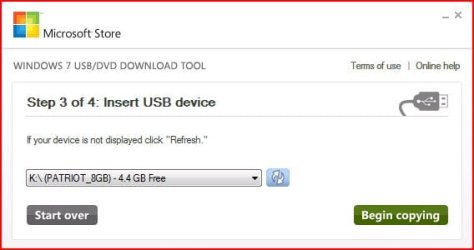
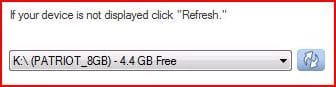
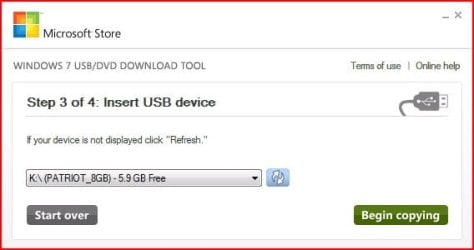
3) Here in step 3 of 4 you will select the USB flash drive of your choice by using the drop down list arrow. Once you have chosen the correct Drive, click the Begin copying button.USB DVD DL TOOL_USB1.JPG

USB DVD DL TOOL_USB4a.JPG
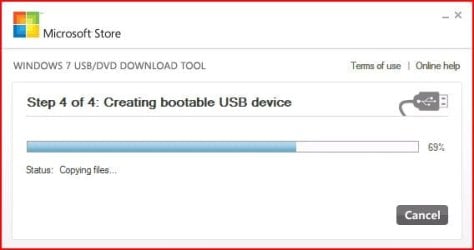
4) Here in step 4 of 4: Creating bootable USB device, you should see the progress bar move across the screen. As always your speed depends on many factors, have patience!USB DVD DL TOOL_USB4.JPG
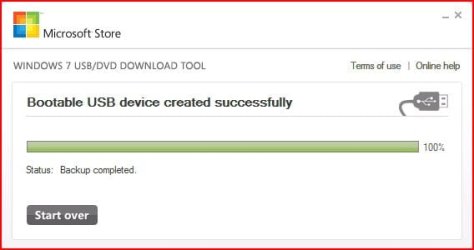
5) Once completed you should see the following dialog box.USB DVD DL TOOL_USB5.JPG
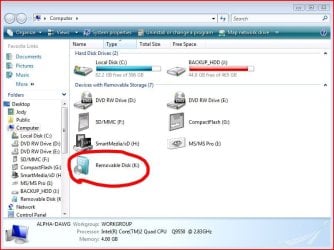
I found it interesting that the USB device icon in "Computer" now looks identical to that of the DVD!USB DVD DL TOOL_USB6.JPG
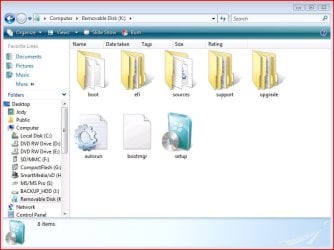
Here are the contents of the USB device after completion...USB DVD DL TOOL_USB_Contents.JPG
I hope this helps out some of you who are "stuck" when it comes to burning an iso to DVD or creating a bootable USB device.

Thanks!


Attachments

  • USB DVD DL TOOL_USB3.JPG
    USB DVD DL TOOL_USB3.JPG
    24.4 KB · Views: 123
  • USB DVD DL TOOL_USB2.JPG
    USB DVD DL TOOL_USB2.JPG
    16.6 KB · Views: 134
  • Windows7-USB-DVD-tool.zip
    Windows7-USB-DVD-tool.zip
    2.5 MB · Views: 61,475
Last edited by a moderator:

My Computer My Computer

Computer Manufacturer/Model Number
Custom Built
OS
Windows 7 Ultimate 32-Bit & Windows 7 Ultimate 64-Bit
CPU
Intel Core i7 CPU 950 @ 3.07GHz
Motherboard
ASUS P6T DELUXE V2
Memory
OCZ 6GB (3 x 2GB) 240-Pin DDR3 SDRAM DDR3 1600 OCZ3X1600R2
Graphics Card(s)
ATI Radeon HD 5700 Series
Sound Card
OnBoard
Hard Drives
WD6400AACS-00M3B0 (640GB SATA )
PSU
CORSAIR 850w
Case
NZXT LEXA
Cooling
Intel Stock Heatsink Fan
Keyboard
Microsoft Wireless Laser Keyboard 7000
Mouse
Microsoft Wireless Laser Mouse 7000
Hi Shawn

Thanks for your reply , I do not have a product key or a disc with my PC , it came already loaded , it is a genuine W7 on it , because I keep getting updates regulary on it .there was some discs with it when I bought it but they are for the motherboard drivers etc .

anyway thanks again for your help .

spike
 

My Computer My Computer

OS
Windows 7 home edition 32bit
CPU
3.4Mhz
Motherboard
Intel 845
Memory
1gig
Monitor(s) Displays
17"
You should have a product key label under neath the laptop if your laptop came with Windows 7 preinstalled
 

My Computer My Computer

Computer Manufacturer/Model Number
Custom Built
OS
Windows 7 Ultimate 32-Bit & Windows 7 Ultimate 64-Bit
CPU
Intel Core i7 CPU 950 @ 3.07GHz
Motherboard
ASUS P6T DELUXE V2
Memory
OCZ 6GB (3 x 2GB) 240-Pin DDR3 SDRAM DDR3 1600 OCZ3X1600R2
Graphics Card(s)
ATI Radeon HD 5700 Series
Sound Card
OnBoard
Hard Drives
WD6400AACS-00M3B0 (640GB SATA )
PSU
CORSAIR 850w
Case
NZXT LEXA
Cooling
Intel Stock Heatsink Fan
Keyboard
Microsoft Wireless Laser Keyboard 7000
Mouse
Microsoft Wireless Laser Mouse 7000
Hi, I found the official way to have that program make usb installers for 64-bit even from a 32-bit installation.
For the sake of not repeating myself, this post and a following one

Hope it's useful. ;)

It should work for the manual way of this tutorial as well.
 
Last edited:

My Computer My Computer

Computer type
PC/Desktop
Computer Manufacturer/Model Number
custom built
OS
Win 7 Pro 64-bit 7601
CPU
AMD Phenom 9650 QuadCore, revision DR-B3
Motherboard
ASUS M4A78
Memory
5 GB yes I run 2x 2GB and 1x 1GB, different brand, spank me.
Graphics Card(s)
NVIDIA GeForce 9800 GT 512 Mb, unknown manufacturer.
Sound Card
Crappy Realtek Integrated Audio
Monitor(s) Displays
Fujitsu Siemens P19-3P
Screen Resolution
1280 x 1024 x 32 bits @ 60 Hz Oh yeah, 4:3 rocks!
Hard Drives
(1) MAXTOR S TM3320613AS SATA Disk Device (2) STM35004 18AS SATA Disk Device (3) TOSHIBA USB 2.5"-HDD
PSU
whatever, around 450w
Case
Scavenged from old company PC, 10+ years old
Cooling
CPU fan, GPU fan, case fan, nothing fancy
Keyboard
Microsoft, PS/2, white.
Mouse
Optical, logitec.
Internet Speed
effective max speeds: 70-ish kB/s down 30-ish kB/s up
Antivirus
Avira, free edition.
Browser
Firefox with FXChrome to make it look like Google Chrome :P
Other Info
Was discarded by previous owner due to "horrible performance".
Was running Win Xp from a IDE drive. Yeah. Was a pain.
SATA II drive and Win7 and it zips away! Yay!

My Computer My Computer

Computer type
PC/Desktop
Computer Manufacturer/Model Number
Home Built Desktop By DataTech
OS
Windows 7 Ultimate X64 SP1
CPU
Intel i5-2550K, Differing ~4.4-4.8GHz No built in GPU
Motherboard
ASUS P8Z68-V PRO/GEN3
Memory
16GB G.Skill Sniper 1866MHz @ 2133MHz 2x8GB
Graphics Card(s)
ASUS GTX650TIB-DC2OC-2GD5, (650TI Boost)
Sound Card
Onboard Realtek 5-1
Monitor(s) Displays
Samsung P2570HD
Screen Resolution
1920x1080
Hard Drives
Samsung 840 Pro 256GB SSD for OS, 500GB Seagate Constellation (Enterprise drive) for Data
PSU
Corsair HX650W
Case
Inwin Dragon Rider
Cooling
Hyper 212 EVO w/two Noctua fans, push-pull, @1300 RPM
Keyboard
E-Z Eyes, bright yellow keys with large characters
Mouse
steelseries SENSEI Laser Pro Gaming
Internet Speed
48-51Mbs Mbs down, 11 Mbs up Xfinity Cable
Antivirus
Norton Internet Security 2013
Browser
IE 10, Opera, Pale Moon if needed
Other Info
4 case fans, LG BluRay-RE, ASUS DVD-RW, Mr. Fusion power supply, 1.21 gigawatts.
thanks for that tutorial.
 

My Computer My Computer

Computer type
PC/Desktop
Computer Manufacturer/Model Number
asus
OS
windows nome premium x86
Motherboard
asus
Memory
2
Hi,
can you help me to find the right window 7 for my laptop?
my laptop is sony vaio window 7 home premium oa, and product key is [REMOVED]
there are many window 7 home premium, i was confuse to choose the right one. i have try the first one is Windows 7 Home Premium x64 SP1 U (media refresh) and boot on my laptop. but it shows 482471_590682627667237_962658779_n.jpg
so i think i pick the wrong one
please help!!!!
thanks
 
Last edited by a moderator:

My Computer My Computer

Computer type
PC/Desktop
OS
windows 7 home premium

My Computer My Computer

Computer type
PC/Desktop
Computer Manufacturer/Model Number
Golden Mk. I.4
OS
Windows 10 Pro x64 ; Xubuntu x64
CPU
Intel i7 860 @ 2.80 GHz O/C'ed to 4.0GHz
Motherboard
Gigabyte P55A-UD3R Rev.1. Award BIOS F13
Memory
16GB Corsair Vengance DDR3 @ 661 MHz Dual Channel (9-9-9-24)
Graphics Card(s)
EVGA NVidia GTX 560 1024MB
Sound Card
Realtek Integrated
Monitor(s) Displays
Dual Samsung SyncMaster 2494HS
Screen Resolution
1920*1080 and 1920*1080
Hard Drives
1*Samsung 840 EVO 120GB SSD;
1*OCZ Vertex 2 60GB SSD;
2*Samsung F3 SpinPoint 1TB in RAID0;
1*Samsung F1 SpinPoint 1TB;
2*Western Digital 1TB External USB 3.0
1*Western Digital 500GB External USB 3.0
1*Seagate 500GB External USB 2.0
PSU
Thermaltake ToughPower QFan 750W
Case
Thermaltake Element S VK60001W2Z
Cooling
Corsair H60 Water Cooling, 2*230mm and 2*80mm case fans
Keyboard
Logitech G110
Mouse
Logitech MX518

My Computer My Computer

Computer type
PC/Desktop
Computer Manufacturer/Model Number
Golden Mk. I.4
OS
Windows 10 Pro x64 ; Xubuntu x64
CPU
Intel i7 860 @ 2.80 GHz O/C'ed to 4.0GHz
Motherboard
Gigabyte P55A-UD3R Rev.1. Award BIOS F13
Memory
16GB Corsair Vengance DDR3 @ 661 MHz Dual Channel (9-9-9-24)
Graphics Card(s)
EVGA NVidia GTX 560 1024MB
Sound Card
Realtek Integrated
Monitor(s) Displays
Dual Samsung SyncMaster 2494HS
Screen Resolution
1920*1080 and 1920*1080
Hard Drives
1*Samsung 840 EVO 120GB SSD;
1*OCZ Vertex 2 60GB SSD;
2*Samsung F3 SpinPoint 1TB in RAID0;
1*Samsung F1 SpinPoint 1TB;
2*Western Digital 1TB External USB 3.0
1*Western Digital 500GB External USB 3.0
1*Seagate 500GB External USB 2.0
PSU
Thermaltake ToughPower QFan 750W
Case
Thermaltake Element S VK60001W2Z
Cooling
Corsair H60 Water Cooling, 2*230mm and 2*80mm case fans
Keyboard
Logitech G110
Mouse
Logitech MX518
It can do....it depends on how you install
 

My Computer My Computer

Computer type
PC/Desktop
Computer Manufacturer/Model Number
Golden Mk. I.4
OS
Windows 10 Pro x64 ; Xubuntu x64
CPU
Intel i7 860 @ 2.80 GHz O/C'ed to 4.0GHz
Motherboard
Gigabyte P55A-UD3R Rev.1. Award BIOS F13
Memory
16GB Corsair Vengance DDR3 @ 661 MHz Dual Channel (9-9-9-24)
Graphics Card(s)
EVGA NVidia GTX 560 1024MB
Sound Card
Realtek Integrated
Monitor(s) Displays
Dual Samsung SyncMaster 2494HS
Screen Resolution
1920*1080 and 1920*1080
Hard Drives
1*Samsung 840 EVO 120GB SSD;
1*OCZ Vertex 2 60GB SSD;
2*Samsung F3 SpinPoint 1TB in RAID0;
1*Samsung F1 SpinPoint 1TB;
2*Western Digital 1TB External USB 3.0
1*Western Digital 500GB External USB 3.0
1*Seagate 500GB External USB 2.0
PSU
Thermaltake ToughPower QFan 750W
Case
Thermaltake Element S VK60001W2Z
Cooling
Corsair H60 Water Cooling, 2*230mm and 2*80mm case fans
Keyboard
Logitech G110
Mouse
Logitech MX518
The selected file is not a valid ISO file.

Hi, is there a "search this thread" function somewhere? Cannot find. I hope it was not yet answered (or maybe yes, so it is easier to solve!): I get the message on the title of my post. Not a valid ISO file. I am trying to burn the Comodo Rescue Disk ISO. Downloaded directly from them. Why should it not be a valid ISO file? Can somebody try with the same file? Thanks
 

My Computer My Computer

Computer type
Laptop
Computer Manufacturer/Model Number
Dell
OS
Windows 7 Home Premium x64
Hi, is there a "search this thread" function somewhere? Cannot find. I hope it was not yet answered (or maybe yes, so it is easier to solve!): I get the message on the title of my post. Not a valid ISO file. I am trying to burn the Comodo Rescue Disk ISO. Downloaded directly from them. Why should it not be a valid ISO file? Can somebody try with the same file? Thanks

Welcome to the forum,

I just gave that a try as well, came up with the same results. I would guess this tool is only for Windows 7 ISO's.

Are you trying to create a bootable USB?

There are other tools like this,

Rufus - Create bootable USB drives the easy way
 

My Computer My Computer

Computer type
PC/Desktop
Computer Manufacturer/Model Number
Self Built
OS
Win 10 Pro x64
CPU
Intel I5-2500K @3.3GHz
Motherboard
Asrock P67 Extreme4
Memory
16GB G.Skill Ripjaws X (4x4GB)
Graphics Card(s)
EVGA GeForce 750 Ti SC 2GB
Sound Card
ASUS Xonar DG 5.1 Channels 24-bit 96KHz PCI Interface Sound
Monitor(s) Displays
auria eq2367
Screen Resolution
1920 x 1080
Hard Drives
250GB Samsung 850 EVO SSD
1TB WD Blue
1TB Hitachi
PSU
SeaSonic X 650W 80 Plus Gold
Case
Corsair Obsidian 750D
Cooling
Corsair H60, Three 140mm case fans
Keyboard
Logitech Wireless Keyboard K520
Mouse
Logitech Wireless Mouse M310
Internet Speed
Wave Broadband ~ 100 dn 5 up
Antivirus
Windows Defender, Malwarebytes Premium
Browser
Edge, IE11, Chrome
Other Info
Laptop specs: HP g7-1365dx /
CPU: AMD A6-3420M APU with Radeon(tm) HD Graphics /
RAM: Crucial 8Gb (2x4Gb) /
SSD: Crucial M4-CT128M4SSD2 ATA Device/ FW 000F /
GFX: AMD Radeon HD 6520G /
OS: Windows 10 Pro x64
Hello Ben, and welcome to Seven Forums.

Yep, there's "Search this Tutorial" link towards the top right of tutorial pages.

Did you get the Comodo Rescue Disk ISO from the link below? It was 50.5 MB for me. You might see if downloading a new copy may work better if the first one was corrupted.

Comodo Rescue Disk for Windows, Download Rescue Disk Software

Hope this helps, :)
Shawn
 

My Computer My Computer

Computer type
PC/Desktop
Computer Manufacturer/Model Number
Self built custom
OS
64-bit Windows 11 Pro for Workstations
CPU
Intel i7-8700K OC'd to 5 GHz
Motherboard
ASUS ROG Maximus XI Formula Z390
Memory
64 GB (4x16GB) G.SKILL TridentZ RGB DDR4 3600 MHz
Graphics Card(s)
ASUS ROG-STRIX-GTX1080TI-O11G-GAMING
Sound Card
Integrated
Monitor(s) Displays
2 x Samsung Odyssey G7 27"
Screen Resolution
2560x1440
Hard Drives
1TB Samsung 990 PRO M.2,
4TB Samsung 990 PRO PRO M.2,
TerraMaster F8 SSD Plus NAS
PSU
Seasonic Prime Titanium 850W
Case
Thermaltake Core P3
Cooling
Corsair Hydro H115i
Keyboard
Logitech wireless K800
Mouse
Logitech MX Master 4
Internet Speed
2 Gb/s Download and 100 Mb/s Upload
Antivirus
Malwarebyte Anti-Malware Premium
Browser
Google Chrome
Other Info
Logitech Z625 speaker system,
Logitech BRIO 4K Pro webcam,
HP Color LaserJet Pro MFP M477fdn,
APC SMART-UPS RT 1000 XL - SURT1000XLI,
Galaxy S23 Plus phone
Hello Ben, and welcome to Seven Forums.

Yep, there's "Search this Tutorial" link towards the top right of tutorial pages.

Did you get the Comodo Rescue Disk ISO from the link below? It was 50.5 MB for me. You might see if downloading a new copy may work better if the first one was corrupted.

Comodo Rescue Disk for Windows, Download Rescue Disk Software

Hope this helps, :)
Shawn
Not trying to be a smart ass Shawn but there are more here (20) Comprehensive List of 26 Bootable Antivirus Rescue CDs for Offline Scanning ? Raymond.CC


and my favourite site
5 Bootable AntiVirus Rescue CD for Windows: Free Download cos it narrows them down a bit:)

John
 

My Computer My Computer

Computer type
PC/Desktop
Computer Manufacturer/Model Number
Own build (new) Desk1 / Asus ROG Win 7 / Desk2 1st build
OS
Desk1 7 Home Prem / Desk2 10 Pro / Main lap Asus ROG 10 Pro 2 laptop Toshiba 7 Pro Asus P2520 7 & 10
CPU
Desk1 i5 3750K / Laptop i7 GTX 860M / Desk2 i5 2500
Motherboard
Desk1 Asus P877-V / Desk2 Gigabyte H67 UD3H / Laptop ?
Memory
Desk1 8GB (1866) / Desk2 16GB (1333) / Laptop 8Gb DDR3
Graphics Card(s)
Desk 1& 2NVidia GTX 650 & Laptops on board Intel
Sound Card
Desk 1 & 2 -XONAR DG Realtek High Def audio Laptop
Monitor(s) Displays
Desk 1 Benq HD 2450 / Desk2 Philips 24" / Laptop 17.5"
Screen Resolution
1920x1080 D1 & D2 & Laptop 1
Hard Drives
Desk1 Samsung 120GB 830 SSD
Asus ROG 256GB 850 Pro SSD
Desk2 Samsung 840 256 SSD
Toshiba 120GB EVO
PSU
Desk 1 Corsair HX 1050/ Laptop ? / Desk 2 Corsair HX 650
Case
Desk 1 Cooler HAF XM ? Toshiba laptop / Desk2 Coolermaster
Cooling
Fans on all Desk1 -2 Desk2 - all Coolermasters 5 Laptop ?
Keyboard
Desk 1 MS Sidewinder X6 Desk 2 MS Sidewinder X 4
Mouse
Desk 1&2 - Gigabyte MS 900 gamer - laptop - Logitec wireless
Internet Speed
ADSL2+
Other Info
One other Desktop (tester) and spare Toshba laptop both with SSD's
Running Kaspersky 2016 ISS on all machines config'd identically
Logitec audio stereo systems on each machine (x3)
Canon MG5250MFC
Router/modem TP-Link running WPA2SK
No problem John. The more the merrier. :)
 

My Computer My Computer

Computer type
PC/Desktop
Computer Manufacturer/Model Number
Self built custom
OS
64-bit Windows 11 Pro for Workstations
CPU
Intel i7-8700K OC'd to 5 GHz
Motherboard
ASUS ROG Maximus XI Formula Z390
Memory
64 GB (4x16GB) G.SKILL TridentZ RGB DDR4 3600 MHz
Graphics Card(s)
ASUS ROG-STRIX-GTX1080TI-O11G-GAMING
Sound Card
Integrated
Monitor(s) Displays
2 x Samsung Odyssey G7 27"
Screen Resolution
2560x1440
Hard Drives
1TB Samsung 990 PRO M.2,
4TB Samsung 990 PRO PRO M.2,
TerraMaster F8 SSD Plus NAS
PSU
Seasonic Prime Titanium 850W
Case
Thermaltake Core P3
Cooling
Corsair Hydro H115i
Keyboard
Logitech wireless K800
Mouse
Logitech MX Master 4
Internet Speed
2 Gb/s Download and 100 Mb/s Upload
Antivirus
Malwarebyte Anti-Malware Premium
Browser
Google Chrome
Other Info
Logitech Z625 speaker system,
Logitech BRIO 4K Pro webcam,
HP Color LaserJet Pro MFP M477fdn,
APC SMART-UPS RT 1000 XL - SURT1000XLI,
Galaxy S23 Plus phone
Hello everybody!
Thanks for the welcome.
I do not have often problems so I am afraid we will not see each other often :)

Yes, I did download the ISO from that exact place. Did you try to pass it to USB and it worked for you?
I had read about Rufus and was about to try it when I saw another one called Universal Extractor I think, and I realized that WinRar can be associated to ISO, so I just gave it a try and well, I could "Extract File" with WinRar to the USB.

Unfortunately, I do not know why, it did not work out. I rebooted and chosen USB but not "operative system" was found on my portable USB drive (maybe because it is a Hard Drive and not a Flash USB?).

So I burned the ISO on a CD. I did not want to waste a CD for that (also because it was my only one and I am extremely lazy for buying CD, as I do not use them anymore).
It worked.
My PC is clean. I mean, it was already clean. Comodo has only found a supposed trojan in a exe on the Avira folder, a bar installator. I suppose it is a false positive but I removed it anyway.

Well, all those other options, are, many!

I think I am fine for now.
Just wanted to see if there was something which was not seen from Windows.
But had not really reasons to worry, I mean, my PC is going fine.

Cheers and thanks for the answers!
 

My Computer My Computer

Computer type
Laptop
Computer Manufacturer/Model Number
Dell
OS
Windows 7 Home Premium x64
USB/DVD

I'm trying to do this for a different laptop ...will this work on my dell if I created it on my HP? they both have the same operating system windows 7 ultimate 32 bit but my dell has no OS installed I formatted the drive after merging the partitions....
 

My Computer My Computer

Computer type
Laptop
Computer Manufacturer/Model Number
HP
OS
windows ultimate 32bit
Hello ill4rill, and welcome to Seven Forums.

Yes, as long as it's the same edition (ex: Ultimate) and 32-bit or 64-bit of the OS you wanted to use it on. :)
 

My Computer My Computer

Computer type
PC/Desktop
Computer Manufacturer/Model Number
Self built custom
OS
64-bit Windows 11 Pro for Workstations
CPU
Intel i7-8700K OC'd to 5 GHz
Motherboard
ASUS ROG Maximus XI Formula Z390
Memory
64 GB (4x16GB) G.SKILL TridentZ RGB DDR4 3600 MHz
Graphics Card(s)
ASUS ROG-STRIX-GTX1080TI-O11G-GAMING
Sound Card
Integrated
Monitor(s) Displays
2 x Samsung Odyssey G7 27"
Screen Resolution
2560x1440
Hard Drives
1TB Samsung 990 PRO M.2,
4TB Samsung 990 PRO PRO M.2,
TerraMaster F8 SSD Plus NAS
PSU
Seasonic Prime Titanium 850W
Case
Thermaltake Core P3
Cooling
Corsair Hydro H115i
Keyboard
Logitech wireless K800
Mouse
Logitech MX Master 4
Internet Speed
2 Gb/s Download and 100 Mb/s Upload
Antivirus
Malwarebyte Anti-Malware Premium
Browser
Google Chrome
Other Info
Logitech Z625 speaker system,
Logitech BRIO 4K Pro webcam,
HP Color LaserJet Pro MFP M477fdn,
APC SMART-UPS RT 1000 XL - SURT1000XLI,
Galaxy S23 Plus phone
Back
Top