
Solved System image larger than new drive?

SJMaye

New member
Member
VIP
Local time
8:33 AM
Messages
169
Hello,

I am in the process of upgrading to an SSD. My original HDD showed about 165GB, but the best I can tell in the Windows 7 backup image there was a file that is 289GB. I only bought a 250GB SSD, so I did not attempt to use the image for the new drive.


My questions
  • Is it normal for the system image to be much larger than the total contents of the original drive?
  • If I tried to use that system image on my 250GB SSD would it have installed back to the original drive size of about 165GB or would it fail because it is too large for the SSD?
  • Is there different software I should use so I don't run in to this problem in the future?
TIA for your help!
 

My Computer My Computer

Computer type
PC/Desktop
Computer Manufacturer/Model Number
Custom
OS
Microsoft Windows 7 Home Premium 64-bit 7601 Multiprocessor Free Service Pack 1
CPU
Intel(R) Core(TM) i7 CPU 860 @ 2.80GHz
Motherboard
ASRock P55 Pro
Memory
8.00 GB
Graphics Card(s)
NVIDIA GeForce GTX 670
Sound Card
(1) High Definition Audio Device (2) Logitech G930 Headset
Screen Resolution
1920 x 1080 x 32 bits (4294967296 colors) @ 60 Hz
Hard Drives
(1) Hitachi HDS5C3020ALA632 ATA Device (2) Samsung SSD 850 EVO 500GB ATA Device (3) EPSON Stylus Storage USB Device (4) (5) Generic- MS/MS-Pro USB Device (6) Generic- SD/MMC USB Device (7) Generic- SM/xD-Picture USB Device

My Computer My Computer

Computer type
PC/Desktop
Computer Manufacturer/Model Number
Skylake Special #666
OS
Windows 10 Pro x64
CPU
Intel Core i7 6700K
Motherboard
Asus Sabertooth Z170 Mark 1
Memory
GSkill TridentZ RGB 16GB 3600 16-16-16-36
Graphics Card(s)
EVGA GTX 980 Ti SC x2
Sound Card
Realtek High Definition
Monitor(s) Displays
AOC G2460PG
Screen Resolution
1920 x 1080 144Hz
Hard Drives
Samsung 860 Pro 256GB, Seagate Barracuda 4TB x2
PSU
EVGA 1000 P2, EVGA White Custom Braided Cables
Case
Corsair Vengeance C70 Gunmetal Black
Cooling
Corsair H100i v2, Corsair ML120 x2, Thermal Grizzly Kryonaut
Keyboard
Logitech G910 Orion Spectrum
Mouse
Logitech G700s
Internet Speed
Verizon Fios Quantum Gateway 75/75
Antivirus
Windows Defender, Malwarebytes Free 3.8.3
Browser
Chrome
Other Info
Corsair SP120 x4, LG Blu-ray Drive, Durabrand HT-395 100 Watt Dolby Digital Amp, Corsair H2100 Wireless 7.1 Headset
win7 built-in system image backup saves the partition layout as well (size and types of partitions). Win7 system image recovery checks if disk signature and partition layout is still the same when restoring. If not (in case you moved/deleted/resized/created partitions) it initializes and makes the partition layout just the way it was and restores. So indeed you're having problems.

To solve this: shrink the partition prior to backing up. This is of course just a workaround.

Old HDD is still working fine and attached to system? Post screenshot please of disk management http://www.sevenforums.com/tutorials/274797-disk-management-post-screen-capture-image.html

Use macrium reflect FREE instead to make and restore backups. It can shrink/extend on restore. Very easy to use and very flexible. http://www.sevenforums.com/tutorials/73828-imaging-free-macrium.html . It can also ALIGN partions on restore http://www.macrium.com/help/v5/partition_alignment.htm . Another handy feature is: you can mount the image as virtual drive: http://kb.macrium.com/KnowledgebaseArticle50080.aspx

It's quite easy to upgrade to SSD
 

My Computer My Computer

Computer type
Laptop
Computer Manufacturer/Model Number
ACER ASPIRE 5742G
OS
Microsoft Windows 7 Home Premium 64-bits 7601 Multiprocessor Free Service Pack 1
CPU
Intel(R) Core(TM) i3 CPU M 370 @ 2.40GHz
Motherboard
Acer Aspire 5742G
Memory
4,00 GB
Graphics Card(s)
ATI Mobility Radeon HD 5400 Series
Sound Card
(1) AMD High Definition Audio Device (2) Realtek High Defi
Screen Resolution
1366 x 768 x 32 bits (4294967296 colors) @ 60 Hz
Hard Drives
WDC WD5000BEVT-22ZAT0
Question #1 = No

Don`t put an image on the ssd, do a clean install.

http://www.sevenforums.com/tutorials/1649-clean-install-windows-7-a.html

Did you hook the ssd up to your system and align it yet ?

http://www.sevenforums.com/tutorials/113967-ssd-alignment.html

You could shrink your C partition down, then make the image, then put the image on the ssd.

http://www.sevenforums.com/tutorials/149969-ssd-install-transfer-operating-system.html


Since I did not think I could use my system image I did a clean install, but did not align the SSD. I have no problem starting over. I just want to get it right, do the install and get a good system image to be able to go back to.

So, the steps are to align, then do the clean install of Win7, then I will use Marcium as Kaktussoft as recommended?
 

My Computer My Computer

Computer type
PC/Desktop
Computer Manufacturer/Model Number
Custom
OS
Microsoft Windows 7 Home Premium 64-bit 7601 Multiprocessor Free Service Pack 1
CPU
Intel(R) Core(TM) i7 CPU 860 @ 2.80GHz
Motherboard
ASRock P55 Pro
Memory
8.00 GB
Graphics Card(s)
NVIDIA GeForce GTX 670
Sound Card
(1) High Definition Audio Device (2) Logitech G930 Headset
Screen Resolution
1920 x 1080 x 32 bits (4294967296 colors) @ 60 Hz
Hard Drives
(1) Hitachi HDS5C3020ALA632 ATA Device (2) Samsung SSD 850 EVO 500GB ATA Device (3) EPSON Stylus Storage USB Device (4) (5) Generic- MS/MS-Pro USB Device (6) Generic- SD/MMC USB Device (7) Generic- SM/xD-Picture USB Device
Check the alignment now, before you re install. If you install windows to a bare ssd it`s supposed to do it automatically.

The steps to check it are in the tutorial. Just 4 entries in command prompt. Here`s mine and you can see it`s aligned perfectly, the offset has to be divisable by 4 :)
 
Last edited:

My Computer My Computer

Computer type
PC/Desktop
Computer Manufacturer/Model Number
Skylake Special #666
OS
Windows 10 Pro x64
CPU
Intel Core i7 6700K
Motherboard
Asus Sabertooth Z170 Mark 1
Memory
GSkill TridentZ RGB 16GB 3600 16-16-16-36
Graphics Card(s)
EVGA GTX 980 Ti SC x2
Sound Card
Realtek High Definition
Monitor(s) Displays
AOC G2460PG
Screen Resolution
1920 x 1080 144Hz
Hard Drives
Samsung 860 Pro 256GB, Seagate Barracuda 4TB x2
PSU
EVGA 1000 P2, EVGA White Custom Braided Cables
Case
Corsair Vengeance C70 Gunmetal Black
Cooling
Corsair H100i v2, Corsair ML120 x2, Thermal Grizzly Kryonaut
Keyboard
Logitech G910 Orion Spectrum
Mouse
Logitech G700s
Internet Speed
Verizon Fios Quantum Gateway 75/75
Antivirus
Windows Defender, Malwarebytes Free 3.8.3
Browser
Chrome
Other Info
Corsair SP120 x4, LG Blu-ray Drive, Durabrand HT-395 100 Watt Dolby Digital Amp, Corsair H2100 Wireless 7.1 Headset
If you install win7 from dvd and you did let win7 CREATE the partition then it's fine. Win7 aligns the partitions by default on creation. But let's check. In http://www.sevenforums.com/tutorials/783-elevated-command-prompt.html
Code:
diskpart
list disk
select disk X (replace X with SSD disknumber)
list part (now you know the partition numbers)
select part Y (replace Y with 0, 1, 2 etc)
detail part
exit
What's the offset in bytes?

I recommend Macrium Reflect FREE, but it's your decision. Make a macrium recovery DVD as well and test if it can access the backup on external disk using usb3 port. If not use usb2 port.

Aligning can also be done afterwards. Partition Wizard a perfect FREE partition tool. Also recommended on this forum. Align All Partitions ? MiniTool Partition Wizard help. and How to align a specified partition ? MiniTool Partition Wizard help.
 

My Computer My Computer

Computer type
Laptop
Computer Manufacturer/Model Number
ACER ASPIRE 5742G
OS
Microsoft Windows 7 Home Premium 64-bits 7601 Multiprocessor Free Service Pack 1
CPU
Intel(R) Core(TM) i3 CPU M 370 @ 2.40GHz
Motherboard
Acer Aspire 5742G
Memory
4,00 GB
Graphics Card(s)
ATI Mobility Radeon HD 5400 Series
Sound Card
(1) AMD High Definition Audio Device (2) Realtek High Defi
Screen Resolution
1366 x 768 x 32 bits (4294967296 colors) @ 60 Hz
Hard Drives
WDC WD5000BEVT-22ZAT0
Kaktus, you are just too slow tonight LOL :D

But you take over, I gotta catch some zzzzzzzz :sleepy:
 

My Computer My Computer

Computer type
PC/Desktop
Computer Manufacturer/Model Number
Skylake Special #666
OS
Windows 10 Pro x64
CPU
Intel Core i7 6700K
Motherboard
Asus Sabertooth Z170 Mark 1
Memory
GSkill TridentZ RGB 16GB 3600 16-16-16-36
Graphics Card(s)
EVGA GTX 980 Ti SC x2
Sound Card
Realtek High Definition
Monitor(s) Displays
AOC G2460PG
Screen Resolution
1920 x 1080 144Hz
Hard Drives
Samsung 860 Pro 256GB, Seagate Barracuda 4TB x2
PSU
EVGA 1000 P2, EVGA White Custom Braided Cables
Case
Corsair Vengeance C70 Gunmetal Black
Cooling
Corsair H100i v2, Corsair ML120 x2, Thermal Grizzly Kryonaut
Keyboard
Logitech G910 Orion Spectrum
Mouse
Logitech G700s
Internet Speed
Verizon Fios Quantum Gateway 75/75
Antivirus
Windows Defender, Malwarebytes Free 3.8.3
Browser
Chrome
Other Info
Corsair SP120 x4, LG Blu-ray Drive, Durabrand HT-395 100 Watt Dolby Digital Amp, Corsair H2100 Wireless 7.1 Headset
Kaktus, you are just too slow tonight LOL :D

But you take over, I gotta catch some zzzzzzzz :sleepy:
LOL... it's morning here in europe. Sleep well
 

My Computer My Computer

Computer type
Laptop
Computer Manufacturer/Model Number
ACER ASPIRE 5742G
OS
Microsoft Windows 7 Home Premium 64-bits 7601 Multiprocessor Free Service Pack 1
CPU
Intel(R) Core(TM) i3 CPU M 370 @ 2.40GHz
Motherboard
Acer Aspire 5742G
Memory
4,00 GB
Graphics Card(s)
ATI Mobility Radeon HD 5400 Series
Sound Card
(1) AMD High Definition Audio Device (2) Realtek High Defi
Screen Resolution
1366 x 768 x 32 bits (4294967296 colors) @ 60 Hz
Hard Drives
WDC WD5000BEVT-22ZAT0
Check the alignment now, before you re install. If you install windows to a bare ssd it`s supposed to do it automatically.

The steps to check it are in the tutorial. Just 4 entries in command prompt. Here`s mine and you can see it`s aligned perfectly, the offset has to be divisable by 4 :)

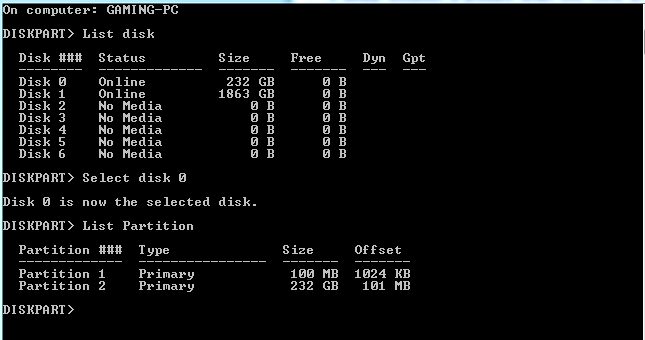
Good thing I checked. I think I am NOT OK. Help me make sure I did this right. What I see in the image below is that the 250GB SSD is Disk 0. My 2TB HDD is Disk 1. Thus I selected Disk 0. The offset listed for the large partition is 101MB. Not divisible by 4. A problem. Right?

nMYzfAh.png
 

My Computer My Computer

Computer type
PC/Desktop
Computer Manufacturer/Model Number
Custom
OS
Microsoft Windows 7 Home Premium 64-bit 7601 Multiprocessor Free Service Pack 1
CPU
Intel(R) Core(TM) i7 CPU 860 @ 2.80GHz
Motherboard
ASRock P55 Pro
Memory
8.00 GB
Graphics Card(s)
NVIDIA GeForce GTX 670
Sound Card
(1) High Definition Audio Device (2) Logitech G930 Headset
Screen Resolution
1920 x 1080 x 32 bits (4294967296 colors) @ 60 Hz
Hard Drives
(1) Hitachi HDS5C3020ALA632 ATA Device (2) Samsung SSD 850 EVO 500GB ATA Device (3) EPSON Stylus Storage USB Device (4) (5) Generic- MS/MS-Pro USB Device (6) Generic- SD/MMC USB Device (7) Generic- SM/xD-Picture USB Device
The offset must be divisible by 4kB (4096)
Still in diskpart and disk 0 selected:

select part 1
detail part
select part 2
detail part

Post output. It looks win7 install creted a 100MB partition, most likely labeled "system reserved". Remaining of disk is called C. Win7 install only makes the 100MB partition if there are no partitions on disk yet. So part1 and part2 have been created by win7 install.... so aligned automatically. But give me the screenshot.

Or maybe I'm wrong and you created them yourself manualy.

http://www.sevenforums.com/tutorials/113967-ssd-alignment.html
 

My Computer My Computer

Computer type
Laptop
Computer Manufacturer/Model Number
ACER ASPIRE 5742G
OS
Microsoft Windows 7 Home Premium 64-bits 7601 Multiprocessor Free Service Pack 1
CPU
Intel(R) Core(TM) i3 CPU M 370 @ 2.40GHz
Motherboard
Acer Aspire 5742G
Memory
4,00 GB
Graphics Card(s)
ATI Mobility Radeon HD 5400 Series
Sound Card
(1) AMD High Definition Audio Device (2) Realtek High Defi
Screen Resolution
1366 x 768 x 32 bits (4294967296 colors) @ 60 Hz
Hard Drives
WDC WD5000BEVT-22ZAT0
The offset must be divisible by 4kB (4096)
Still in diskpart and disk 0 selected:

select part 1
detail part
select part 2
detail part

Post output. It looks win7 install creted a 100MB partition, most likely labeled "system reserved". Remaining of disk is called C. Win7 install only makes the 100MB partition if there are no partitions on disk yet. So part1 and part2 have been created by win7 install.... so aligned automatically. But give me the screenshot.

Or maybe I'm wrong and you created them yourself manualy.

http://www.sevenforums.com/tutorials/113967-ssd-alignment.html

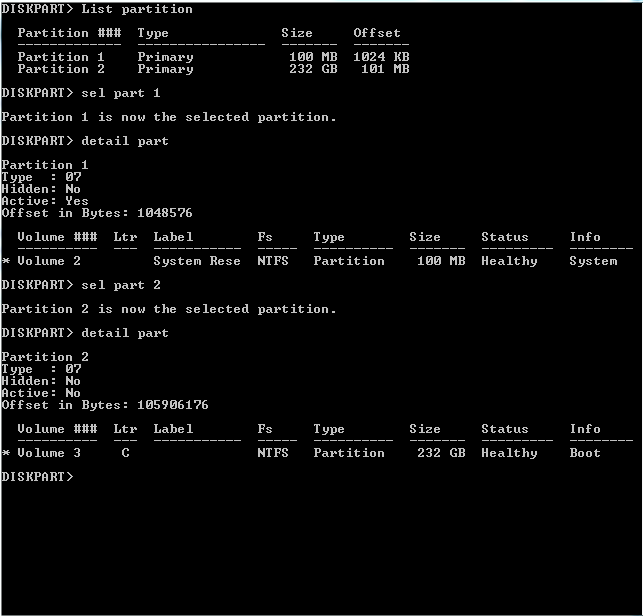
Here is what I have.

bJiG2AC.png
 

My Computer My Computer

Computer type
PC/Desktop
Computer Manufacturer/Model Number
Custom
OS
Microsoft Windows 7 Home Premium 64-bit 7601 Multiprocessor Free Service Pack 1
CPU
Intel(R) Core(TM) i7 CPU 860 @ 2.80GHz
Motherboard
ASRock P55 Pro
Memory
8.00 GB
Graphics Card(s)
NVIDIA GeForce GTX 670
Sound Card
(1) High Definition Audio Device (2) Logitech G930 Headset
Screen Resolution
1920 x 1080 x 32 bits (4294967296 colors) @ 60 Hz
Hard Drives
(1) Hitachi HDS5C3020ALA632 ATA Device (2) Samsung SSD 850 EVO 500GB ATA Device (3) EPSON Stylus Storage USB Device (4) (5) Generic- MS/MS-Pro USB Device (6) Generic- SD/MMC USB Device (7) Generic- SM/xD-Picture USB Device
1048576/4096=256 (actually exactly 1MB)
105906176/4096=25856 (actually exactly 101MB)

So all is fine! just what I did expect
 

My Computer My Computer

Computer type
Laptop
Computer Manufacturer/Model Number
ACER ASPIRE 5742G
OS
Microsoft Windows 7 Home Premium 64-bits 7601 Multiprocessor Free Service Pack 1
CPU
Intel(R) Core(TM) i3 CPU M 370 @ 2.40GHz
Motherboard
Acer Aspire 5742G
Memory
4,00 GB
Graphics Card(s)
ATI Mobility Radeon HD 5400 Series
Sound Card
(1) AMD High Definition Audio Device (2) Realtek High Defi
Screen Resolution
1366 x 768 x 32 bits (4294967296 colors) @ 60 Hz
Hard Drives
WDC WD5000BEVT-22ZAT0
If you install win7 from dvd and you did let win7 CREATE the partition then it's fine. Win7 aligns the partitions by default on creation.

I do not remember manually creating any partition. I booted to the Win7 install disk and did a custom install. Selected the new SSD, selected format, and installed. At least that is how I remember it. I simply do not remember consciously create a partition.
 

My Computer My Computer

Computer type
PC/Desktop
Computer Manufacturer/Model Number
Custom
OS
Microsoft Windows 7 Home Premium 64-bit 7601 Multiprocessor Free Service Pack 1
CPU
Intel(R) Core(TM) i7 CPU 860 @ 2.80GHz
Motherboard
ASRock P55 Pro
Memory
8.00 GB
Graphics Card(s)
NVIDIA GeForce GTX 670
Sound Card
(1) High Definition Audio Device (2) Logitech G930 Headset
Screen Resolution
1920 x 1080 x 32 bits (4294967296 colors) @ 60 Hz
Hard Drives
(1) Hitachi HDS5C3020ALA632 ATA Device (2) Samsung SSD 850 EVO 500GB ATA Device (3) EPSON Stylus Storage USB Device (4) (5) Generic- MS/MS-Pro USB Device (6) Generic- SD/MMC USB Device (7) Generic- SM/xD-Picture USB Device
Perfect. Thank you for your help.

Can we now step back to the Windows 7 system image I had created?
  • Is it clearly better to start fresh with a clean install? No problem. I will continue.
  • Or, can I use that image?
    • The image size on my secondary HDD is 276GB. Can this be installed on my 250GB SSD?
    • I have the OS and a few other programs loaded on the SSD now and it shows I am using only 68.5GB
What would you recommend?

Again, I sincerely appreciate your help.
 

My Computer My Computer

Computer type
PC/Desktop
Computer Manufacturer/Model Number
Custom
OS
Microsoft Windows 7 Home Premium 64-bit 7601 Multiprocessor Free Service Pack 1
CPU
Intel(R) Core(TM) i7 CPU 860 @ 2.80GHz
Motherboard
ASRock P55 Pro
Memory
8.00 GB
Graphics Card(s)
NVIDIA GeForce GTX 670
Sound Card
(1) High Definition Audio Device (2) Logitech G930 Headset
Screen Resolution
1920 x 1080 x 32 bits (4294967296 colors) @ 60 Hz
Hard Drives
(1) Hitachi HDS5C3020ALA632 ATA Device (2) Samsung SSD 850 EVO 500GB ATA Device (3) EPSON Stylus Storage USB Device (4) (5) Generic- MS/MS-Pro USB Device (6) Generic- SD/MMC USB Device (7) Generic- SM/xD-Picture USB Device
If you install win7 from dvd and you did let win7 CREATE the partition then it's fine. Win7 aligns the partitions by default on creation.

I do not remember manually creating any partition. I booted to the Win7 install disk and did a custom install. Selected the new SSD, selected format, and installed. At least that is how I remember it. I simply do not remember consciously create a partition.
It's aligned correctly mate. But as you wrote...."selected format"... so you did format a partition. But who and what did create that partition? Either win7 install DVD did created that partition and you didn't tell.... or it was already on SSD. In case it was already on disk, we don't know how it was created... so alignment was unknown to us.

But most disk manufacturers align them in factory ... why shouldn't they. No more questions? Mark thread as solved
 

My Computer My Computer

Computer type
Laptop
Computer Manufacturer/Model Number
ACER ASPIRE 5742G
OS
Microsoft Windows 7 Home Premium 64-bits 7601 Multiprocessor Free Service Pack 1
CPU
Intel(R) Core(TM) i3 CPU M 370 @ 2.40GHz
Motherboard
Acer Aspire 5742G
Memory
4,00 GB
Graphics Card(s)
ATI Mobility Radeon HD 5400 Series
Sound Card
(1) AMD High Definition Audio Device (2) Realtek High Defi
Screen Resolution
1366 x 768 x 32 bits (4294967296 colors) @ 60 Hz
Hard Drives
WDC WD5000BEVT-22ZAT0
Perfect. Thank you for your help.


Can we now step back to the Windows 7 system image I had created?
  • Is it clearly better to start fresh with a clean install? No problem. I will continue.
  • Or, can I use that image?
    • The image size on my secondary HDD is 276GB. Can this be installed on my 250GB SSD?
    • I have the OS and a few other programs loaded on the SSD now and it shows I am using only 68.5GB
What would you recommend?

Again, I sincerely appreciate your help.
The original HDD isn't available anymore?
What was the used space on C at time of backup. I assume you backupped C only?

I have to know to give you the best instructions
 

My Computer My Computer

Computer type
Laptop
Computer Manufacturer/Model Number
ACER ASPIRE 5742G
OS
Microsoft Windows 7 Home Premium 64-bits 7601 Multiprocessor Free Service Pack 1
CPU
Intel(R) Core(TM) i3 CPU M 370 @ 2.40GHz
Motherboard
Acer Aspire 5742G
Memory
4,00 GB
Graphics Card(s)
ATI Mobility Radeon HD 5400 Series
Sound Card
(1) AMD High Definition Audio Device (2) Realtek High Defi
Screen Resolution
1366 x 768 x 32 bits (4294967296 colors) @ 60 Hz
Hard Drives
WDC WD5000BEVT-22ZAT0
Perfect. Thank you for your help.


Can we now step back to the Windows 7 system image I had created?
  • Is it clearly better to start fresh with a clean install? No problem. I will continue.
  • Or, can I use that image?
    • The image size on my secondary HDD is 276GB. Can this be installed on my 250GB SSD?
    • I have the OS and a few other programs loaded on the SSD now and it shows I am using only 68.5GB
What would you recommend?

Again, I sincerely appreciate your help.
The original HDD isn't available anymore?
What was the used space on C at time of backup. I assume you backupped C only?

I have to know to give you the best instructions


My original C:\ HDD I am replacing is still there. Works fine. That is the drive I backed up using Windows Backup and Restore. I can reconnect this drive and use it if I need to.
 

My Computer My Computer

Computer type
PC/Desktop
Computer Manufacturer/Model Number
Custom
OS
Microsoft Windows 7 Home Premium 64-bit 7601 Multiprocessor Free Service Pack 1
CPU
Intel(R) Core(TM) i7 CPU 860 @ 2.80GHz
Motherboard
ASRock P55 Pro
Memory
8.00 GB
Graphics Card(s)
NVIDIA GeForce GTX 670
Sound Card
(1) High Definition Audio Device (2) Logitech G930 Headset
Screen Resolution
1920 x 1080 x 32 bits (4294967296 colors) @ 60 Hz
Hard Drives
(1) Hitachi HDS5C3020ALA632 ATA Device (2) Samsung SSD 850 EVO 500GB ATA Device (3) EPSON Stylus Storage USB Device (4) (5) Generic- MS/MS-Pro USB Device (6) Generic- SD/MMC USB Device (7) Generic- SM/xD-Picture USB Device
What I should do:
  1. reconnect old HDD
  2. make backup using macrium reflect free to external disk
  3. reconnect SSD
  4. restore using macrium reflect free recovery DVD (override old partitions)
Are you sure old HDD had C only? No system reserved?

Can you attach old HDD and SSD at the same time and boot from old HDD? Maybe cloning is easier.
 

My Computer My Computer

Computer type
Laptop
Computer Manufacturer/Model Number
ACER ASPIRE 5742G
OS
Microsoft Windows 7 Home Premium 64-bits 7601 Multiprocessor Free Service Pack 1
CPU
Intel(R) Core(TM) i3 CPU M 370 @ 2.40GHz
Motherboard
Acer Aspire 5742G
Memory
4,00 GB
Graphics Card(s)
ATI Mobility Radeon HD 5400 Series
Sound Card
(1) AMD High Definition Audio Device (2) Realtek High Defi
Screen Resolution
1366 x 768 x 32 bits (4294967296 colors) @ 60 Hz
Hard Drives
WDC WD5000BEVT-22ZAT0
What I should do:
  1. reconnect old HDD
  2. make backup using macrium reflect free to external disk
  3. reconnect SSD
  4. restore using macrium reflect free recovery DVD (override old partitions)
Are you sure old HDD had C only? No system reserved?

Can you attach old HDD and SSD at the same time and boot from old HDD? Maybe cloning is easier.


Sure. I can reconnect the old drive and back up with Macrium. On the backup, I am not sure about having or not having a system reserved. I simply had Windows backup my OS drive.

I guess I could do a clone, but I am not familiar with that process.
 

My Computer My Computer

Computer type
PC/Desktop
Computer Manufacturer/Model Number
Custom
OS
Microsoft Windows 7 Home Premium 64-bit 7601 Multiprocessor Free Service Pack 1
CPU
Intel(R) Core(TM) i7 CPU 860 @ 2.80GHz
Motherboard
ASRock P55 Pro
Memory
8.00 GB
Graphics Card(s)
NVIDIA GeForce GTX 670
Sound Card
(1) High Definition Audio Device (2) Logitech G930 Headset
Screen Resolution
1920 x 1080 x 32 bits (4294967296 colors) @ 60 Hz
Hard Drives
(1) Hitachi HDS5C3020ALA632 ATA Device (2) Samsung SSD 850 EVO 500GB ATA Device (3) EPSON Stylus Storage USB Device (4) (5) Generic- MS/MS-Pro USB Device (6) Generic- SD/MMC USB Device (7) Generic- SM/xD-Picture USB Device
First attach the old HDD to system. Boot from old HDD. Be sure you booted from old HDD. Post screenshot of disk management. Preferable with SSD also attached to system. Install macrium reflect free please Macrium Reflect FREE Edition - Information and download (so on old HDD).

Have to go maybe back in 8 hours
 

My Computer My Computer

Computer type
Laptop
Computer Manufacturer/Model Number
ACER ASPIRE 5742G
OS
Microsoft Windows 7 Home Premium 64-bits 7601 Multiprocessor Free Service Pack 1
CPU
Intel(R) Core(TM) i3 CPU M 370 @ 2.40GHz
Motherboard
Acer Aspire 5742G
Memory
4,00 GB
Graphics Card(s)
ATI Mobility Radeon HD 5400 Series
Sound Card
(1) AMD High Definition Audio Device (2) Realtek High Defi
Screen Resolution
1366 x 768 x 32 bits (4294967296 colors) @ 60 Hz
Hard Drives
WDC WD5000BEVT-22ZAT0
Back
Top