How to edit the Hosts file in 7

ashes

New member
Local time
4:53 PM
Messages
7
Hi people :)

I need help here, I have some older applications that wont work unless i change their 'update ip', (dont know what its called), in the hosts file.

I have found numerous ideas on how to edit in the hosts file, but none of them has worked so far.

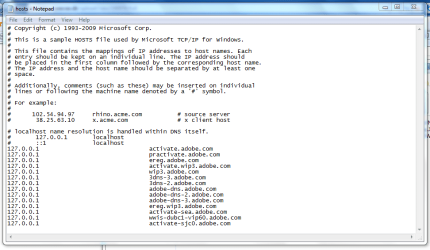
When I run Notepad as administrator, and from there > Open > Browse to 'C:\Windows\System32\drivers\etc\hosts' it only open a sample of the 'hosts' file. It wont let me open the real file for some reason. I am logged in as admin and additionally I run Notepad as admin too - Which should let me do what ever I want, - Right?


I have already read and tried these 'solutions' but none of them worked:

Edit hosts file in Windows 7 & Windows Vista | Windows Reference

How to: Edit Hosts File in Windows 7 | COMPUTELOGY - Tech, Tips n Reviews on Windows Linux Mac


Is there a work-around to this?

NB: I am using an OEM (dell) version of Win7
 

My Computer My Computer

At a glance

Windows 7Core 2 Quad Q9450OCZ Blade Series 3 x 2 GBGigabyte GV N285UD-2GI
OS
Windows 7
CPU
Core 2 Quad Q9450
Motherboard
Gigabyte GA-EX58-EXTREME
Memory
OCZ Blade Series 3 x 2 GB
Graphics Card(s)
Gigabyte GV N285UD-2GI
Sound Card
Creative Xi-Fi
Monitor(s) Displays
2 of Asus 24" 2ms
Hard Drives
300gb SSD (Raid)
PSU
Cougar 720W
Case
Lian Li PC-V1000B
Last edited:

My Computer My Computer

At a glance

64-bit Windows 8.1 ProCore(TM) i5 CPU 4330 Haswell @ 3.20GHz12.00 GBIntel(R) HD Graphics
Computer type
PC/Desktop
Computer Manufacturer/Model Number
LENOVO K450 @3.0GHZ
OS
64-bit Windows 8.1 Pro
CPU
Core(TM) i5 CPU 4330 Haswell @ 3.20GHz
Motherboard
LENOVO
Memory
12.00 GB
Graphics Card(s)
Intel(R) HD Graphics
Sound Card
Intel HD integtrated
Monitor(s) Displays
HP 25' ISP Monitor
Screen Resolution
1900/1020
Hard Drives
(1) ST1000DM003-1CH162 (2) Generic STORAGE DEVICE USB Device (3) Generic STORAGE DEVICE USB Device
Internet Speed
100mb down/10mb up
If you open the hosts file in the default location, and there is nothing in there....

then the instructions are lying to you and you need to find out where the IP is really being stored.

One thing - how long ago did the IP change? If recently, entering the command
Code:
ipconfig /flushdns
may help resolve this issue.
 

My Computers My Computers

  • At a glance

    Windows 11 21H2 Current buildAMD Ryzen 9 3950X4 * 32 GB - Corsair Vengeance 3600 MHzEVGA GeForce RTX 3080 Ti XC3 ULTRA GAMING (12...
    Computer type
    PC/Desktop
    Computer Manufacturer/Model Number
    The Beast Model A (homebrew)
    OS
    Windows 11 21H2 Current build
    CPU
    AMD Ryzen 9 3950X
    Motherboard
    MSI MEG X570 GODLIKE
    Memory
    4 * 32 GB - Corsair Vengeance 3600 MHz
    Graphics Card(s)
    EVGA GeForce RTX 3080 Ti XC3 ULTRA GAMING (12G-P5-3955-KR)
    Sound Card
    Realtek® ALC1220 Codec
    Monitor(s) Displays
    2x Eve Spectrum ES07D03 4K Gaming Monitor (Matte) | Eve Spec
    Screen Resolution
    3x 3840 x 2160
    Hard Drives
    3x Samsung 980 Pro NVMe PCIe 4 M.2 2 TB SSD (MZ-V8P2T0B/AM) } 3x Sabrent Rocket NVMe 4.0 1 TB SSD
    PSU
    PC Power & Cooling’s Silencer Series 1050 Watt, 80 Plus Plat
    Case
    Fractal Design Define 7 XL Dark ATX Full Tower Case
    Cooling
    SteelSeries Apex Pro Wired Gaming Keyboard
    Keyboard
    SteelSeries Apex Pro
    Mouse
    Logitech MX Master 3S | MX Master 3 for business
    Internet Speed
    AT&T LightSpeed Gigabit Duplex Ftth
    Antivirus
    Windows Defender + MB 3
    Browser
    Nightly (default) + Firefox (stable),Chrome, Edge
  • At a glance

    ChromeOS Flex Dev Channel (current)Intel(R) Core(TM) i5-6300U CPU @ 2.40GHz, 250...16 GBIntel(R) HD Graphics 520
    Computer type
    PC/Desktop
    System Manufacturer/Model Number
    Dell Latitude E5470
    OS
    ChromeOS Flex Dev Channel (current)
    CPU
    Intel(R) Core(TM) i5-6300U CPU @ 2.40GHz, 2501 Mhz, 2 Core(s), 4 Logical Processor(s)
    Motherboard
    Dell
    Memory
    16 GB
    Graphics Card(s)
    Intel(R) HD Graphics 520
    Sound Card
    Intel(R) HD Graphics 520 + RealTek Audio
    Monitor(s) Displays
    Dell laptop display 15"
    Screen Resolution
    1920 * 1080
    Hard Drives
    Toshiba 128GB M.2 22300 drive
    INTEL Cherryville 520 Series SSDSC2CW180A 180 GB SATA III SSD
    PSU
    Dell
    Case
    Dell
    Cooling
    Dell
    Keyboard
    Dell
    Mouse
    Logitech MX Master 3S (shared w. Sys 1) | Dell TouchPad
    Internet Speed
    AT&T LightSpeed Gigabit Duplex Ftth
What I do, drag a copy of the host file to my desktop, edit that, then drag the copy back to the rightful location. Done deal.
 

My Computer My Computer

At a glance

Windows 10 Pro (x64)Intel Core i7-3930K (3.2GHz - 4.5GHz)4x Samsung 4GB PC3-12800 DDR3 (16GB 1600MHz)Nvidia Geforce GTX 690
Computer type
PC/Desktop
Computer Manufacturer/Model Number
Alienware Aurora ALX R4
OS
Windows 10 Pro (x64)
CPU
Intel Core i7-3930K (3.2GHz - 4.5GHz)
Motherboard
Alienware Aurora-R4 x79
Memory
4x Samsung 4GB PC3-12800 DDR3 (16GB 1600MHz)
Graphics Card(s)
Nvidia Geforce GTX 690
Sound Card
SteelSeries Siberia Elite
Monitor(s) Displays
Dell UltraSharp U3011
Screen Resolution
2560x1600
Hard Drives
Samsung 850 Pro 256 GB, Seagate 1TB Desktop Hybrid HDD, 2x Western Digital 4TB Green HDD
PSU
875W Some Dell PSU <.<
Case
Alienware Aurora ALX
Cooling
Custom Liquid Cooling (EK CPU & GPU blocks) dual EK 480RAD
Keyboard
Logitech G710+ Mechanical
Mouse
Logitech G700s
Internet Speed
Verizon Fios (50 mbps average)
Other Info
Server: Intel NUC D54250WYK: i5-4250U, 16GB, 256 GB mSATA, Windows Server 2012 R2
@Tews - I just edited my hosts file without taking ownership - only ran Notepad as admin just as the OP stated.
 

My Computers My Computers

  • At a glance

    Windows 11 21H2 Current buildAMD Ryzen 9 3950X4 * 32 GB - Corsair Vengeance 3600 MHzEVGA GeForce RTX 3080 Ti XC3 ULTRA GAMING (12...
    Computer type
    PC/Desktop
    Computer Manufacturer/Model Number
    The Beast Model A (homebrew)
    OS
    Windows 11 21H2 Current build
    CPU
    AMD Ryzen 9 3950X
    Motherboard
    MSI MEG X570 GODLIKE
    Memory
    4 * 32 GB - Corsair Vengeance 3600 MHz
    Graphics Card(s)
    EVGA GeForce RTX 3080 Ti XC3 ULTRA GAMING (12G-P5-3955-KR)
    Sound Card
    Realtek® ALC1220 Codec
    Monitor(s) Displays
    2x Eve Spectrum ES07D03 4K Gaming Monitor (Matte) | Eve Spec
    Screen Resolution
    3x 3840 x 2160
    Hard Drives
    3x Samsung 980 Pro NVMe PCIe 4 M.2 2 TB SSD (MZ-V8P2T0B/AM) } 3x Sabrent Rocket NVMe 4.0 1 TB SSD
    PSU
    PC Power & Cooling’s Silencer Series 1050 Watt, 80 Plus Plat
    Case
    Fractal Design Define 7 XL Dark ATX Full Tower Case
    Cooling
    SteelSeries Apex Pro Wired Gaming Keyboard
    Keyboard
    SteelSeries Apex Pro
    Mouse
    Logitech MX Master 3S | MX Master 3 for business
    Internet Speed
    AT&T LightSpeed Gigabit Duplex Ftth
    Antivirus
    Windows Defender + MB 3
    Browser
    Nightly (default) + Firefox (stable),Chrome, Edge
  • At a glance

    ChromeOS Flex Dev Channel (current)Intel(R) Core(TM) i5-6300U CPU @ 2.40GHz, 250...16 GBIntel(R) HD Graphics 520
    Computer type
    PC/Desktop
    System Manufacturer/Model Number
    Dell Latitude E5470
    OS
    ChromeOS Flex Dev Channel (current)
    CPU
    Intel(R) Core(TM) i5-6300U CPU @ 2.40GHz, 2501 Mhz, 2 Core(s), 4 Logical Processor(s)
    Motherboard
    Dell
    Memory
    16 GB
    Graphics Card(s)
    Intel(R) HD Graphics 520
    Sound Card
    Intel(R) HD Graphics 520 + RealTek Audio
    Monitor(s) Displays
    Dell laptop display 15"
    Screen Resolution
    1920 * 1080
    Hard Drives
    Toshiba 128GB M.2 22300 drive
    INTEL Cherryville 520 Series SSDSC2CW180A 180 GB SATA III SSD
    PSU
    Dell
    Case
    Dell
    Cooling
    Dell
    Keyboard
    Dell
    Mouse
    Logitech MX Master 3S (shared w. Sys 1) | Dell TouchPad
    Internet Speed
    AT&T LightSpeed Gigabit Duplex Ftth
@Tews - I just edited my hosts file without taking ownership - only ran Notepad as admin just as the OP stated.


You must of changed something, by default you need to take ownership.
 

My Computer My Computer

At a glance

Windows 11
Computer type
PC/Desktop
OS
Windows 11
Tews>
Just tried out the 'Take Ownership', but as you see in the link below, it didnt work:

peecee.dk | Vis upload sniped1.PNG

johngalt>
I got this Dell laptop only days ago and reinstalled this OEM of Win7 yesterday. The applications I want to use are really old, but I have some old files that I need to open with them. - I dont think I know exactly what you mean by 'how long ago did the IP change?' or what the command might do for me, - I still need to change the app 'update IP' to another, otherwise everytime I open the application it wont let me continue. :S I used to be able to do this in XP and Vista, but in 7 it seems the hosts file is totally locked somehow?

logicearth>
I've already tried that, but you see - the hosts file that I copy still only shows as a sample no matter where I take it. Editing the sample wont do me anything I'm afraid :)
 

My Computer My Computer

At a glance

Windows 7Core 2 Quad Q9450OCZ Blade Series 3 x 2 GBGigabyte GV N285UD-2GI
OS
Windows 7
CPU
Core 2 Quad Q9450
Motherboard
Gigabyte GA-EX58-EXTREME
Memory
OCZ Blade Series 3 x 2 GB
Graphics Card(s)
Gigabyte GV N285UD-2GI
Sound Card
Creative Xi-Fi
Monitor(s) Displays
2 of Asus 24" 2ms
Hard Drives
300gb SSD (Raid)
PSU
Cougar 720W
Case
Lian Li PC-V1000B

My Computer My Computer

At a glance

Windows 7Core 2 Quad Q9450OCZ Blade Series 3 x 2 GBGigabyte GV N285UD-2GI
OS
Windows 7
CPU
Core 2 Quad Q9450
Motherboard
Gigabyte GA-EX58-EXTREME
Memory
OCZ Blade Series 3 x 2 GB
Graphics Card(s)
Gigabyte GV N285UD-2GI
Sound Card
Creative Xi-Fi
Monitor(s) Displays
2 of Asus 24" 2ms
Hard Drives
300gb SSD (Raid)
PSU
Cougar 720W
Case
Lian Li PC-V1000B
Just did a search for more entries of a/the hosts file in 7, and this came up -

peecee.dk | Vis upload sniped2.PNG

Do you think that any of the 2 other instances are the 'right' hosts file?
 

My Computer My Computer

At a glance

Windows 7Core 2 Quad Q9450OCZ Blade Series 3 x 2 GBGigabyte GV N285UD-2GI
OS
Windows 7
CPU
Core 2 Quad Q9450
Motherboard
Gigabyte GA-EX58-EXTREME
Memory
OCZ Blade Series 3 x 2 GB
Graphics Card(s)
Gigabyte GV N285UD-2GI
Sound Card
Creative Xi-Fi
Monitor(s) Displays
2 of Asus 24" 2ms
Hard Drives
300gb SSD (Raid)
PSU
Cougar 720W
Case
Lian Li PC-V1000B
C:\Windows\System32\Drivers\ETC\Hosts should be the default & correct location for the host file

I've just copied the file to Documents and opened it directly from there, no admin privliges needed. You should be able to edit it, save it, then copy it back to it original home. You will need to confirm a UAC notification....
 

My Computer My Computer

At a glance

Windows 7 Ultimate x64AMD Sempron Dual Core3GBNVIDIA GeForce 6150SE nForce 430
Computer Manufacturer/Model Number
Compaq Desktop
OS
Windows 7 Ultimate x64
CPU
AMD Sempron Dual Core
Memory
3GB
Graphics Card(s)
NVIDIA GeForce 6150SE nForce 430
Screen Resolution
1024x768
Hard Drives
150GB Sata
Type the following into start search and press enter

%windir%\System32\drivers\etc

Then right click on the hosts file and take ownership
 

My Computer My Computer

At a glance

Windows 11
Computer type
PC/Desktop
OS
Windows 11
The 3rd one should work, by the looks of it, it seems like you have the same host file in 3rd and 4th location by the size and date of modification.
 

My Computer My Computer

At a glance

Windows 7 Professional, Windows XPIntel Dual Core2GBIntel 82945G Express
Computer Manufacturer/Model Number
Intel
OS
Windows 7 Professional, Windows XP
CPU
Intel Dual Core
Motherboard
Intel D945GCNL
Memory
2GB
Graphics Card(s)
Intel 82945G Express
Monitor(s) Displays
HP Pavilion 1859m
Screen Resolution
1366x768
Hard Drives
Samsung 250GB SATA
Maxtor 80GB SATA
Case
High Tower
Cooling
Air
Keyboard
Delux
Mouse
A4Tech
Internet Speed
512kbps downlink and 128kbps uplink :(
Orbital Shark>
Believe me, I've tried that a dozen times now, - whenever i copy the hosts file, its still the sample that I open from the new location and not the original file. It says "this is a sample' just like on the snipe i posted here before...
 

My Computer My Computer

At a glance

Windows 7Core 2 Quad Q9450OCZ Blade Series 3 x 2 GBGigabyte GV N285UD-2GI
OS
Windows 7
CPU
Core 2 Quad Q9450
Motherboard
Gigabyte GA-EX58-EXTREME
Memory
OCZ Blade Series 3 x 2 GB
Graphics Card(s)
Gigabyte GV N285UD-2GI
Sound Card
Creative Xi-Fi
Monitor(s) Displays
2 of Asus 24" 2ms
Hard Drives
300gb SSD (Raid)
PSU
Cougar 720W
Case
Lian Li PC-V1000B
Heres the 'proof' that it doesnt help copying the file elsewhere:

peecee.dk | Vis upload sniped3.PNG

- As you see its still the sample and not the actual hosts file!!!
 

My Computer My Computer

At a glance

Windows 7Core 2 Quad Q9450OCZ Blade Series 3 x 2 GBGigabyte GV N285UD-2GI
OS
Windows 7
CPU
Core 2 Quad Q9450
Motherboard
Gigabyte GA-EX58-EXTREME
Memory
OCZ Blade Series 3 x 2 GB
Graphics Card(s)
Gigabyte GV N285UD-2GI
Sound Card
Creative Xi-Fi
Monitor(s) Displays
2 of Asus 24" 2ms
Hard Drives
300gb SSD (Raid)
PSU
Cougar 720W
Case
Lian Li PC-V1000B
That's what I get...

You need to add things underneath it like this....

Capture.PNG
 

My Computer My Computer

At a glance

Windows 7 Ultimate x64AMD Sempron Dual Core3GBNVIDIA GeForce 6150SE nForce 430
Computer Manufacturer/Model Number
Compaq Desktop
OS
Windows 7 Ultimate x64
CPU
AMD Sempron Dual Core
Memory
3GB
Graphics Card(s)
NVIDIA GeForce 6150SE nForce 430
Screen Resolution
1024x768
Hard Drives
150GB Sata
That's what I get...

You need to add things underneath it like this....

View attachment 27599
Adobe? You are so BUSTED!!!

But I think you are right. The OP is not understanding the SAMPLE text.

Ashes - ignore the wrod SAMPLE. The file is no longer a sample if you put something in it.

It belongs at %windir%\System32\drivers\etc

IGNORE all other copies.
 
C:\Windows\System32\Drivers\ETC\Hosts should be the default & correct location for the host file

I've just copied the file to Documents and opened it directly from there, no admin privliges needed. You should be able to edit it, save it, then copy it back to it original home. You will need to confirm a UAC notification....

This method worked for me. Thanks!
 

My Computer My Computer

At a glance

Windows 7 RTMIntel Core 2 6400 @ 2.13Ghz4GBNVIDIA 7600 GT
Computer Manufacturer/Model Number
Homebrew
OS
Windows 7 RTM
CPU
Intel Core 2 6400 @ 2.13Ghz
Motherboard
Asus P5B
Memory
4GB
Graphics Card(s)
NVIDIA 7600 GT
Sound Card
Stock
Monitor(s) Displays
ViewSonic VX900
Screen Resolution
1280x1024
Hard Drives
Western Digital WD2500KS 250GB
Seagate ST3500630AS 500GB
PSU
Antec Quiet/Cool
Case
Antec
Cooling
Zalman
Keyboard
IBM
Mouse
Microsoft
Internet Speed
15MBits/Sec (Roadrunner Turbo)
Ashes - ignore the wrod SAMPLE. The file is no longer a sample if you put something in it.

It belongs at %windir%\System32\drivers\etc

IGNORE all other copies.

This is short cuz this is all ado about nothing...

That IS the host file...ignore the phrase "sample"
 

My Computer My Computer

At a glance

WIN7Intel i7 9206GB DDR3 Triple ChannelNvidia 250 GTS
Computer Manufacturer/Model Number
Bumpus Did it!
OS
WIN7
CPU
Intel i7 920
Motherboard
Gigabyte EX58-UDR
Memory
6GB DDR3 Triple Channel
Graphics Card(s)
Nvidia 250 GTS
Sound Card
Realtek onboard
Monitor(s) Displays
Samsung 192n & 204b
Hard Drives
37gb WD Velociraptors (2) Raid 1 -
Seagate SATAII 1 tb -
WD SATAII 1tb -
WD SATAII Green 1.5tb
PSU
OCZ ModXStream Pro 600W
Case
Lian-Li V1000
Cooling
3 x 120mm
Keyboard
crap
Mouse
MS Intelimouse
Internet Speed
Uverse 12mbps
Other Info
TV (via Slingbox), Data backup & game box.

Hope it never blows up ;)
Please, don't anyone think that I'm promoting myself as a HOSTS expert, but I do have some experience with it.;)

I first ran into using the HOSTS file some time (years) ago when I needed to change the Server designation for my Anti-Virus program, to use the Professional Server instead of the FREE server.

Anyway, I just opened Win-7 and accessed my HOSTS file.
When I tried to edit it by adding another entry, it saved my work to Hosts.txt and not the main Hosts file itself. Hmmmmm!:huh:

My solution was to rename the main HOSTS file to HOSTS.bac and then rename the hosts.txt file to HOSTS (NO Extension).
That worked like a treat.

However, all this was only an effort to verify, for myself, what's being said here in this thread.
Actually, I never really needed to go through all those acrobatics to work with my hosts file. I use the "Hosts Manager" program from "abelhadigital(dot)com" and I use it weekly to keep my HOSTS file up to date. It lets me view and edit my hosts file at will.

I've been doing this for quite some time now and I share the HOSTS Manager program with many of my customers, so they can keep their own HOSTS file up to date. It's a great protection against your browser being redirected to a porn site, or worse.:mad:

HOSTS Manager is almost a "Must Have" when children are using the home PC. I won't set up a PC without it. It's just one more level of security.

Sorry, I didn't mean to rant or ramble.

Cheers Mates!
The Doctor :geek:
 

My Computer My Computer

At a glance

Windows XP-Pro-SP3, Windows 7AMD, 2X, Dual Core 5200+6 gig DDR2, Super TalentWinfast
Computer Manufacturer/Model Number
Home Made
OS
Windows XP-Pro-SP3, Windows 7
CPU
AMD, 2X, Dual Core 5200+
Motherboard
MSI K9N Platinum
Memory
6 gig DDR2, Super Talent
Graphics Card(s)
Winfast
Sound Card
On Board AC97
Monitor(s) Displays
19" Envision LCD
Screen Resolution
1024x768
Hard Drives
3x , Maxtor/Seagate SATA2 (160, 160, 200gig)
PSU
Antec Earthwatts 650
Case
Pac Man Mid-Tower
Cooling
11 fans
Keyboard
Generic
Mouse
MS digital
Internet Speed
5 Meg Cable
Back
Top