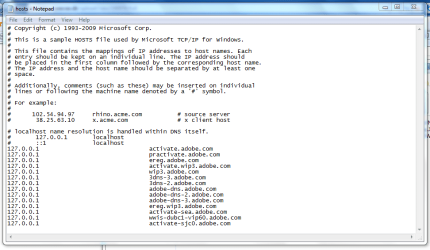
Hi people 
I need help here, I have some older applications that wont work unless i change their 'update ip', (dont know what its called), in the hosts file.
I have found numerous ideas on how to edit in the hosts file, but none of them has worked so far.
When I run Notepad as administrator, and from there > Open > Browse to 'C:\Windows\System32\drivers\etc\hosts' it only open a sample of the 'hosts' file. It wont let me open the real file for some reason. I am logged in as admin and additionally I run Notepad as admin too - Which should let me do what ever I want, - Right?
I have already read and tried these 'solutions' but none of them worked:
Edit hosts file in Windows 7 & Windows Vista | Windows Reference
How to: Edit Hosts File in Windows 7 | COMPUTELOGY - Tech, Tips n Reviews on Windows Linux Mac
Is there a work-around to this?
NB: I am using an OEM (dell) version of Win7
I need help here, I have some older applications that wont work unless i change their 'update ip', (dont know what its called), in the hosts file.
I have found numerous ideas on how to edit in the hosts file, but none of them has worked so far.
When I run Notepad as administrator, and from there > Open > Browse to 'C:\Windows\System32\drivers\etc\hosts' it only open a sample of the 'hosts' file. It wont let me open the real file for some reason. I am logged in as admin and additionally I run Notepad as admin too - Which should let me do what ever I want, - Right?
I have already read and tried these 'solutions' but none of them worked:
Edit hosts file in Windows 7 & Windows Vista | Windows Reference
How to: Edit Hosts File in Windows 7 | COMPUTELOGY - Tech, Tips n Reviews on Windows Linux Mac
Is there a work-around to this?
NB: I am using an OEM (dell) version of Win7
My Computer
At a glance
Windows 7Core 2 Quad Q9450OCZ Blade Series 3 x 2 GBGigabyte GV N285UD-2GI
- OS
- Windows 7
- CPU
- Core 2 Quad Q9450
- Motherboard
- Gigabyte GA-EX58-EXTREME
- Memory
- OCZ Blade Series 3 x 2 GB
- Graphics Card(s)
- Gigabyte GV N285UD-2GI
- Sound Card
- Creative Xi-Fi
- Monitor(s) Displays
- 2 of Asus 24" 2ms
- Hard Drives
- 300gb SSD (Raid)
- PSU
- Cougar 720W
- Case
- Lian Li PC-V1000B