Bad password? logging into hotmail account from WLM

Tipiford

New member
Member
Local time
2:32 AM
Messages
57
After setting-up a hotmail account in windows live mail, I'm getting a PW error, but I can log into the hotmail account from the web with the same PW. Any solution here?
 

My Computer My Computer

At a glance

Windows 7 pro 64 bit with XP Mode
OS
Windows 7 pro 64 bit with XP Mode
Hi Tipiford, access your Hotmail account settings & ensure POP is enabled.
 

My Computer My Computer

At a glance

Win7 H.Prem. 32bit+SP1
Computer Manufacturer/Model Number
Look in my Signature.
OS
Win7 H.Prem. 32bit+SP1
pop is set, deleted account in client, reinstalled and still getting the password box.
 

My Computer My Computer

At a glance

Windows 7 pro 64 bit with XP Mode
OS
Windows 7 pro 64 bit with XP Mode
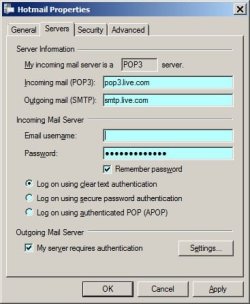
Check the General & Servers tabs for spelling / input errors.

Untitled.jpg
 

My Computer My Computer

At a glance

Win7 H.Prem. 32bit+SP1
Computer Manufacturer/Model Number
Look in my Signature.
OS
Win7 H.Prem. 32bit+SP1
Been through this numerous times, all is correct there, but still get the bad PW error.
 

My Computer My Computer

At a glance

Windows 7 pro 64 bit with XP Mode
OS
Windows 7 pro 64 bit with XP Mode
Sorry! can't think of anything else. Except, do you use WLM signed - in ?
 

My Computer My Computer

At a glance

Win7 H.Prem. 32bit+SP1
Computer Manufacturer/Model Number
Look in my Signature.
OS
Win7 H.Prem. 32bit+SP1
I can't sign in, bad password.
 

My Computer My Computer

At a glance

Windows 7 pro 64 bit with XP Mode
OS
Windows 7 pro 64 bit with XP Mode
Try changing your Hotmail password.
 

My Computer My Computer

At a glance

Win7 H.Prem. 32bit+SP1
Computer Manufacturer/Model Number
Look in my Signature.
OS
Win7 H.Prem. 32bit+SP1
Through Microsoft's bungling, I have had to change it 4 times now (the Microsoft account's), I think this is when this issue started. (I had to reinstall the OS on this machine; heretofore, WLM was sync'd to the hotmail account and working fine.) However, without MS's requiring another PW change, I did change it one more time and it's the same issue.
 

My Computer My Computer

At a glance

Windows 7 pro 64 bit with XP Mode
OS
Windows 7 pro 64 bit with XP Mode
That didn't work, but thanx for trying to help.
 

My Computer My Computer

At a glance

Windows 7 pro 64 bit with XP Mode
OS
Windows 7 pro 64 bit with XP Mode
I made the three insertions in the _oe file, and opening WLM there is no _hotmail, only the sign in link. Does this bit of code effect WLM 2009?
 

My Computer My Computer

At a glance

Windows 7 pro 64 bit with XP Mode
OS
Windows 7 pro 64 bit with XP Mode
It's just an account configuration file - not code.

If I was clear and you followed the instructions there should be an empty folder named _oeacts in the WEmail tree

Please see http://www.sevenforums.com/tutorials/9733-screenshots-files-upload-post-seven-forums.html for the preferred method of posting files and images on Sevenforums

Thanks
I made the three insertions in the _oe file, and opening WLM there is no _hotmail, only the sign in link. Does this bit of code effect WLM 2009?
 
Last edited:

My Computer My Computer

At a glance

x64 (6.3.9600) Win8.1 Pro & soon dual boot x6...AMD A6-3420M APU with Radeon(tm) HD Graphics6.00 GBAMD Radeon(TM) HD 6520G
Computer type
Laptop
Computer Manufacturer/Model Number
HP Pavilion dv6-6c10us
OS
x64 (6.3.9600) Win8.1 Pro & soon dual boot x64 (6.1.7601) Win7_SP1 HomePrem
CPU
AMD A6-3420M APU with Radeon(tm) HD Graphics
Motherboard
Hewlett-Packard 1805
Memory
6.00 GB
Graphics Card(s)
AMD Radeon(TM) HD 6520G
Sound Card
(1) AMD High Definition Audio Device (2) IDT High Definiti
Monitor(s) Displays
HP W2072a 20" LCD (1600 x 900) @ 60 Hz
Screen Resolution
1366 x 768 x 32 bits (4294967296 colors) @ 60 Hz
Hard Drives
ST640LM0 00 HM641JI SATA Disk Device
Keyboard
Logitech k520 wireless KB
Mouse
Logitech m320 wireless mouse (bundled with KB)
Internet Speed
15/5 | 54 MB Wireless 'n'
Antivirus
Realtime: Defender or Avast | On-demand: Malwarebytes, ESET
Browser
IE 11 on Win8, IE 10 on win 7
Other Info
Media: [Gimp, Audacity, VLC] || Comm: [WEmail 2012, Skype] || Productivity: [OpenOffice,| Textpad] || Utils: [Sysinternals, cCleaner, Speccy, Defraggler]
Ok, I think I resolved it... the file I'm attaching did create a new mail account in my WEmail
My best guess is that the DUMMY fields caused WEmail to ignore the configuration
   Warning
DO NOT edit the oeaccount file.
All configuration MUST be done inside WLM 2009

Zip file: OLcomOE attached
OLcomOE.zip contents: _oeacts folder
_oeacts folder contents: account{44DCDAED-52A4-41CB-9321-D2BC171779AF}.oeaccount

Exit WLM 2009
Download OLcomOe.zip to your downloads folder
Open OLcomOE.zip
Extract _oeacts folder
copy _oeacts folder to C:\Users\YOURLOGIN\AppData\Local\Microsoft\Windows Live Mail

Answer yes to replace if prompted

Check that C:\Users\YOURLOGIN\AppData\Local\Microsoft\Windows Live Mail\_oeacts folder exists and contains the new oeaccount file account{44DCDAED-52A4-41CB-9321-D2BC171779AF}.oeaccount

If everything is in place, launch WLM 2009
I changed the name of the new mail account to be OLcom
   Note
Right click on OLcom | slect properties | change ONLY the personal information (eMail address, Password, Diplay name, and Email Username-include full Email address in Email username)
I suggest Outlook.com instead of hotmail.com
 

Attachments

My Computer My Computer

At a glance

x64 (6.3.9600) Win8.1 Pro & soon dual boot x6...AMD A6-3420M APU with Radeon(tm) HD Graphics6.00 GBAMD Radeon(TM) HD 6520G
Computer type
Laptop
Computer Manufacturer/Model Number
HP Pavilion dv6-6c10us
OS
x64 (6.3.9600) Win8.1 Pro & soon dual boot x64 (6.1.7601) Win7_SP1 HomePrem
CPU
AMD A6-3420M APU with Radeon(tm) HD Graphics
Motherboard
Hewlett-Packard 1805
Memory
6.00 GB
Graphics Card(s)
AMD Radeon(TM) HD 6520G
Sound Card
(1) AMD High Definition Audio Device (2) IDT High Definiti
Monitor(s) Displays
HP W2072a 20" LCD (1600 x 900) @ 60 Hz
Screen Resolution
1366 x 768 x 32 bits (4294967296 colors) @ 60 Hz
Hard Drives
ST640LM0 00 HM641JI SATA Disk Device
Keyboard
Logitech k520 wireless KB
Mouse
Logitech m320 wireless mouse (bundled with KB)
Internet Speed
15/5 | 54 MB Wireless 'n'
Antivirus
Realtime: Defender or Avast | On-demand: Malwarebytes, ESET
Browser
IE 11 on Win8, IE 10 on win 7
Other Info
Media: [Gimp, Audacity, VLC] || Comm: [WEmail 2012, Skype] || Productivity: [OpenOffice,| Textpad] || Utils: [Sysinternals, cCleaner, Speccy, Defraggler]
This created the ol account, but I still couldn't sync with hotmail, using neither hotmail nor outlook.
 

My Computer My Computer

At a glance

Windows 7 pro 64 bit with XP Mode
OS
Windows 7 pro 64 bit with XP Mode
Ok, Launch WLM 2009
Right click OLcom
seelct properties
change outlook.com to hotmail.com on both the General and Server tabs
apply and OK out

Send / Rcv

This created the ol account, but I still couldn't sync with hotmail, using neither hotmail nor outlook.
 

My Computer My Computer

At a glance

x64 (6.3.9600) Win8.1 Pro & soon dual boot x6...AMD A6-3420M APU with Radeon(tm) HD Graphics6.00 GBAMD Radeon(TM) HD 6520G
Computer type
Laptop
Computer Manufacturer/Model Number
HP Pavilion dv6-6c10us
OS
x64 (6.3.9600) Win8.1 Pro & soon dual boot x64 (6.1.7601) Win7_SP1 HomePrem
CPU
AMD A6-3420M APU with Radeon(tm) HD Graphics
Motherboard
Hewlett-Packard 1805
Memory
6.00 GB
Graphics Card(s)
AMD Radeon(TM) HD 6520G
Sound Card
(1) AMD High Definition Audio Device (2) IDT High Definiti
Monitor(s) Displays
HP W2072a 20" LCD (1600 x 900) @ 60 Hz
Screen Resolution
1366 x 768 x 32 bits (4294967296 colors) @ 60 Hz
Hard Drives
ST640LM0 00 HM641JI SATA Disk Device
Keyboard
Logitech k520 wireless KB
Mouse
Logitech m320 wireless mouse (bundled with KB)
Internet Speed
15/5 | 54 MB Wireless 'n'
Antivirus
Realtime: Defender or Avast | On-demand: Malwarebytes, ESET
Browser
IE 11 on Win8, IE 10 on win 7
Other Info
Media: [Gimp, Audacity, VLC] || Comm: [WEmail 2012, Skype] || Productivity: [OpenOffice,| Textpad] || Utils: [Sysinternals, cCleaner, Speccy, Defraggler]
Let me be sure I understand you.

When you say sync - what do you mean?

POP3 protocol doesn't sync. It sends and recieves, the client keeps track of what it has rcv'd and keeps sent mail locally.
 

My Computer My Computer

At a glance

x64 (6.3.9600) Win8.1 Pro & soon dual boot x6...AMD A6-3420M APU with Radeon(tm) HD Graphics6.00 GBAMD Radeon(TM) HD 6520G
Computer type
Laptop
Computer Manufacturer/Model Number
HP Pavilion dv6-6c10us
OS
x64 (6.3.9600) Win8.1 Pro & soon dual boot x64 (6.1.7601) Win7_SP1 HomePrem
CPU
AMD A6-3420M APU with Radeon(tm) HD Graphics
Motherboard
Hewlett-Packard 1805
Memory
6.00 GB
Graphics Card(s)
AMD Radeon(TM) HD 6520G
Sound Card
(1) AMD High Definition Audio Device (2) IDT High Definiti
Monitor(s) Displays
HP W2072a 20" LCD (1600 x 900) @ 60 Hz
Screen Resolution
1366 x 768 x 32 bits (4294967296 colors) @ 60 Hz
Hard Drives
ST640LM0 00 HM641JI SATA Disk Device
Keyboard
Logitech k520 wireless KB
Mouse
Logitech m320 wireless mouse (bundled with KB)
Internet Speed
15/5 | 54 MB Wireless 'n'
Antivirus
Realtime: Defender or Avast | On-demand: Malwarebytes, ESET
Browser
IE 11 on Win8, IE 10 on win 7
Other Info
Media: [Gimp, Audacity, VLC] || Comm: [WEmail 2012, Skype] || Productivity: [OpenOffice,| Textpad] || Utils: [Sysinternals, cCleaner, Speccy, Defraggler]
Sync= signing in to the hotmail account and in doing so will download/and/or open the hotmail account.
 

My Computer My Computer

At a glance

Windows 7 pro 64 bit with XP Mode
OS
Windows 7 pro 64 bit with XP Mode
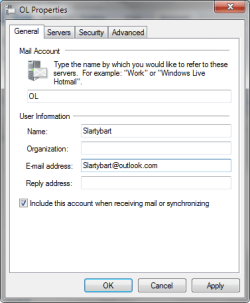
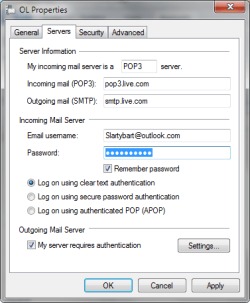
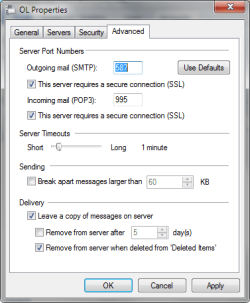
Here are screenshots of a working outlook.com account. The addresses have been changed for this post.

Please compare to your OLcom account.
 

Attachments

  • WEM_OLa.png
    WEM_OLa.png
    11.6 KB · Views: 8
  • WEM_OLb.png
    WEM_OLb.png
    12.9 KB · Views: 8
  • WEM_OLc.png
    WEM_OLc.png
    13.2 KB · Views: 8

My Computer My Computer

At a glance

x64 (6.3.9600) Win8.1 Pro & soon dual boot x6...AMD A6-3420M APU with Radeon(tm) HD Graphics6.00 GBAMD Radeon(TM) HD 6520G
Computer type
Laptop
Computer Manufacturer/Model Number
HP Pavilion dv6-6c10us
OS
x64 (6.3.9600) Win8.1 Pro & soon dual boot x64 (6.1.7601) Win7_SP1 HomePrem
CPU
AMD A6-3420M APU with Radeon(tm) HD Graphics
Motherboard
Hewlett-Packard 1805
Memory
6.00 GB
Graphics Card(s)
AMD Radeon(TM) HD 6520G
Sound Card
(1) AMD High Definition Audio Device (2) IDT High Definiti
Monitor(s) Displays
HP W2072a 20" LCD (1600 x 900) @ 60 Hz
Screen Resolution
1366 x 768 x 32 bits (4294967296 colors) @ 60 Hz
Hard Drives
ST640LM0 00 HM641JI SATA Disk Device
Keyboard
Logitech k520 wireless KB
Mouse
Logitech m320 wireless mouse (bundled with KB)
Internet Speed
15/5 | 54 MB Wireless 'n'
Antivirus
Realtime: Defender or Avast | On-demand: Malwarebytes, ESET
Browser
IE 11 on Win8, IE 10 on win 7
Other Info
Media: [Gimp, Audacity, VLC] || Comm: [WEmail 2012, Skype] || Productivity: [OpenOffice,| Textpad] || Utils: [Sysinternals, cCleaner, Speccy, Defraggler]
I double checked the server names and ports - they are correct for hotmail/outlook.com

I did find this little tidbit regarding WLM 2009, POP mail, and Hotmail/outlook.

It is really more of a question that a suggestion. Did you ever do what is described below?
If NO, then we're barking up the wrong tree.
If NO, then I suspect the account should be set up using HTTP server

If NO
DO NOT do it.​

Microsoft said:
Apps that support POP3 and SMTP
If your email app doesn’t support Exchange ActiveSync or IMAP, but supports POP3, first turn on POP for your Outlook.com account.
1.Sign in to your Outlook.com account.
2.Click the Options icon , and then click More mail settings.
3.Under Managing your account, click Connect devices and apps with POP.
4.Under POP, select Enable.
5.Click Save.

Then use the following settings in your email app.
Incoming (POP3) Server
Server address: pop-mail.outlook.com
Port: 995
Encrypted Connection: SSL

Outgoing (SMTP) Server
Server address: smtp-mail.outlook.com
Port: 25 (or 587 if 25 is blocked)
Authentication: Yes
Encrypted Connection: TLS

User name: Your email address
Password: Your password

If you don’t want email to be deleted from your Outlook.com inbox after it’s downloaded to your email app, select the Leave a copy of messages on the server option.

Even if you accidentally set up POP3 to delete messages after downloading them, Outlook.com will save a copy of the mail in a folder called POP until you verify the POP3 delete command.

Verify the POP3 delete command
1.Sign in to your Outlook.com account
2.Click the Options icon , and then click More mail settings.
3.Under Managing Your Account, click Connect devices and apps with POP.
4.Under POP, make sure Enable is selected.
5.Select Don't let devices or apps delete messages … to override any delete requests.
– Or –
Select Do what the device or app says … to allow devices and apps to delete messages from the inbox.
6.Click Save.

 

My Computer My Computer

At a glance

x64 (6.3.9600) Win8.1 Pro & soon dual boot x6...AMD A6-3420M APU with Radeon(tm) HD Graphics6.00 GBAMD Radeon(TM) HD 6520G
Computer type
Laptop
Computer Manufacturer/Model Number
HP Pavilion dv6-6c10us
OS
x64 (6.3.9600) Win8.1 Pro & soon dual boot x64 (6.1.7601) Win7_SP1 HomePrem
CPU
AMD A6-3420M APU with Radeon(tm) HD Graphics
Motherboard
Hewlett-Packard 1805
Memory
6.00 GB
Graphics Card(s)
AMD Radeon(TM) HD 6520G
Sound Card
(1) AMD High Definition Audio Device (2) IDT High Definiti
Monitor(s) Displays
HP W2072a 20" LCD (1600 x 900) @ 60 Hz
Screen Resolution
1366 x 768 x 32 bits (4294967296 colors) @ 60 Hz
Hard Drives
ST640LM0 00 HM641JI SATA Disk Device
Keyboard
Logitech k520 wireless KB
Mouse
Logitech m320 wireless mouse (bundled with KB)
Internet Speed
15/5 | 54 MB Wireless 'n'
Antivirus
Realtime: Defender or Avast | On-demand: Malwarebytes, ESET
Browser
IE 11 on Win8, IE 10 on win 7
Other Info
Media: [Gimp, Audacity, VLC] || Comm: [WEmail 2012, Skype] || Productivity: [OpenOffice,| Textpad] || Utils: [Sysinternals, cCleaner, Speccy, Defraggler]
Back
Top