Not sure how to describe this..HELP! Display Problem.

noyou

New member
Local time
4:05 PM
Messages
11
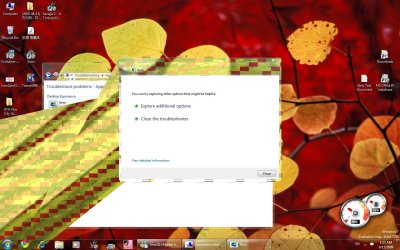
I'm not sure how to describe this. Just 'checkered tile'-like appearing. I'm in Windows 7 7100RC, was playing game [Savage2, fullscreen] and it just SUDDENLY happened. All of a sudden. I've tried system restore and it didn't work. I would give my system information [graphics card etc] but I can't because I can't read/see it due to this problem.

So anyways....please refer to the images and see if you know anything about it..
Thanks.

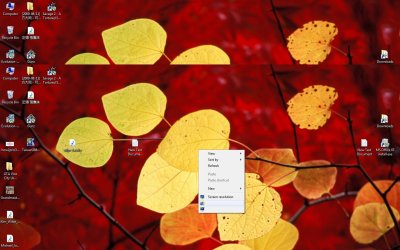
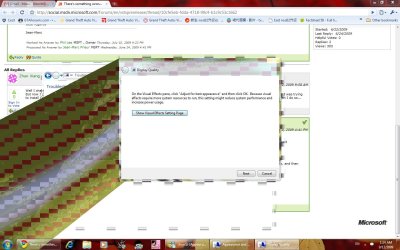
the pics show the checkered tile thing which covers part of the screen, it changes location randomly when i click around or drag around. Ingame, it covers the whole screen. it affects the taskbar too [probably because of transparency]
one of the pics show how text disappear when i hover mouse over it, and in some places makes text unreadable, or doesnt exist at all. somehow doesnt affect the internet.
Thanks, any help is appreciated.
 

Attachments
  • OMG.jpg
    OMG.jpg
    117.9 KB · Views: 51
  • OMG2.jpg
    OMG2.jpg
    142.6 KB · Views: 46
  • OMG3.jpg
    OMG3.jpg
    134.1 KB · Views: 40

My Computer My Computer

OS
Windows 7
Hi, go and get the latest drivers for you Video card and your Monitor and see if it fixes it.

Also check in Windows Update to see if you have any thing to install.
 

My Computer My Computer

Computer Manufacturer/Model Number
Self Build 64bit
OS
Vista Ult64, Win7600
CPU
Intel Core 2 Quad Q6600 @ 2400 MHz 64bit OS
Motherboard
Asus P5E3 Deluxe WiFi @p 64 bit OS
Memory
4096 MB DDR3-SDRAM
Graphics Card(s)
ATI Radeon HD 3870 Series x2 Crossfired
Sound Card
Realtek on board
Monitor(s) Displays
Samsung SyncMaster - 23 inches
Screen Resolution
1680x1050 pixels at 60 Hz in True Colors
Hard Drives
Hitachi (250 GB)/Samsung 750 GB. /Barracuda 160 GB.
My Book 1 TB external..
PSU
Cooler Master 1000w
Case
Cooler Master Cosmos 1000.
Cooling
Fans and fresh air,
Keyboard
Wireless
Mouse
Wireless
Internet Speed
Never fast enough
Other Info
I use a Magnum.
Also, if you go to

Control Panel -> System & Security -> Troubleshoot common computer problems (under Action Center) -> Troubleshoot. From here you can select 'Appearence & Personalization' and run both of the troubleshooters shown (Aero/Display Quality) and see if Windows displays any results
 

My Computer My Computer

Computer Manufacturer/Model Number
Compaq Desktop
OS
Windows 7 Ultimate x64
CPU
AMD Sempron Dual Core
Memory
3GB
Graphics Card(s)
NVIDIA GeForce 6150SE nForce 430
Screen Resolution
1024x768
Hard Drives
150GB Sata
Also.. Try reseating your Video Card..
 

My Computer My Computer

Computer type
PC/Desktop
Computer Manufacturer/Model Number
DELL VOSTRO 3650
OS
Windows 8.1 PRO
CPU
3rd Generation Intel Core i7‐3612QM CPU @ 2.10GHZ
Memory
8GB DDR3
Graphics Card(s)
NVIDIA GeForce GT 525M (128 bit), 1GB Grpahics
Screen Resolution
1920X1080
Hard Drives
750GB 5400RPM
Also.. Try reseating your Video Card..

+1

I've also seen a lot of this behaviour in an overheating GFX card, is the card being overclocked?
 

My Computer My Computer

Computer Manufacturer/Model Number
Compaq Desktop
OS
Windows 7 Ultimate x64
CPU
AMD Sempron Dual Core
Memory
3GB
Graphics Card(s)
NVIDIA GeForce 6150SE nForce 430
Screen Resolution
1024x768
Hard Drives
150GB Sata
From my observation it looks like he does not have any video drivers installed.

I know with ATI, when you right click on the desktop , you have a CCC option.

Not sure about Nvidia but I know you see something too..
 

My Computer My Computer

Computer type
PC/Desktop
Computer Manufacturer/Model Number
DELL VOSTRO 3650
OS
Windows 8.1 PRO
CPU
3rd Generation Intel Core i7‐3612QM CPU @ 2.10GHZ
Memory
8GB DDR3
Graphics Card(s)
NVIDIA GeForce GT 525M (128 bit), 1GB Grpahics
Screen Resolution
1920X1080
Hard Drives
750GB 5400RPM
I didn't mean physically walk to where you get the drivers from.:D
 

My Computer My Computer

Computer Manufacturer/Model Number
Self Build 64bit
OS
Vista Ult64, Win7600
CPU
Intel Core 2 Quad Q6600 @ 2400 MHz 64bit OS
Motherboard
Asus P5E3 Deluxe WiFi @p 64 bit OS
Memory
4096 MB DDR3-SDRAM
Graphics Card(s)
ATI Radeon HD 3870 Series x2 Crossfired
Sound Card
Realtek on board
Monitor(s) Displays
Samsung SyncMaster - 23 inches
Screen Resolution
1680x1050 pixels at 60 Hz in True Colors
Hard Drives
Hitachi (250 GB)/Samsung 750 GB. /Barracuda 160 GB.
My Book 1 TB external..
PSU
Cooler Master 1000w
Case
Cooler Master Cosmos 1000.
Cooling
Fans and fresh air,
Keyboard
Wireless
Mouse
Wireless
Internet Speed
Never fast enough
Other Info
I use a Magnum.
First of all, thanks for all the support!

I've tried troubleshooting aero/display, no luck.

I'm thinking it's possible it's overclocked, but I'm not sure how to reseat or reset my video card [both reseat and reset seems to make sense >.<]

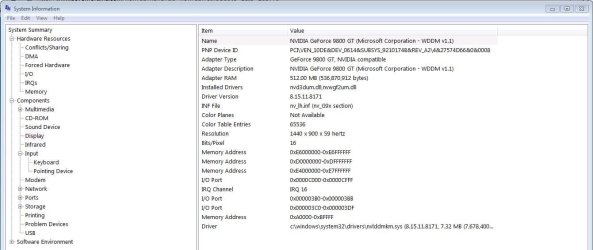
System information says I'm using 'NVIDIA GeForce 9800 GT', and how do I know if I have a video driver installed or not?

I'm currently running Windows Update, there were a few 'optional' things but I think might be related.

Also, I've been experimenting with [rightclickdesktop>screen resolution>advanced settings>list all modes] And it seems that either 32-bit, or True colours gives the worst result. 16-bit and High colour seems to be alright, just without the Aero-ness, but once I start up Savage 2 [game] there's no difference as before. Checkered tiles fill the screen and I can barely make out what is where in the game [but words cannot be read].

Thanks! I'll let yous know what happens after Windows Update, whether it fixes.
 

Attachments

  • display.JPG
    display.JPG
    78.5 KB · Views: 30

My Computer My Computer

OS
Windows 7
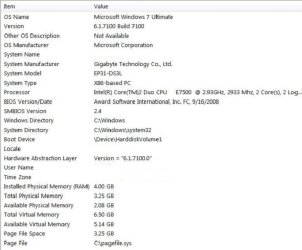
Ok can you tell us what the motherboard is, using the same "System Information" program.

Click System Summary.
 
Last edited:

My Computer My Computer

Computer Manufacturer/Model Number
Self Build 64bit
OS
Vista Ult64, Win7600
CPU
Intel Core 2 Quad Q6600 @ 2400 MHz 64bit OS
Motherboard
Asus P5E3 Deluxe WiFi @p 64 bit OS
Memory
4096 MB DDR3-SDRAM
Graphics Card(s)
ATI Radeon HD 3870 Series x2 Crossfired
Sound Card
Realtek on board
Monitor(s) Displays
Samsung SyncMaster - 23 inches
Screen Resolution
1680x1050 pixels at 60 Hz in True Colors
Hard Drives
Hitachi (250 GB)/Samsung 750 GB. /Barracuda 160 GB.
My Book 1 TB external..
PSU
Cooler Master 1000w
Case
Cooler Master Cosmos 1000.
Cooling
Fans and fresh air,
Keyboard
Wireless
Mouse
Wireless
Internet Speed
Never fast enough
Other Info
I use a Magnum.
Windows Update didn't fix the problem... ):
Can someone advise me where I can download drivers?
And how to reset my Video Card?

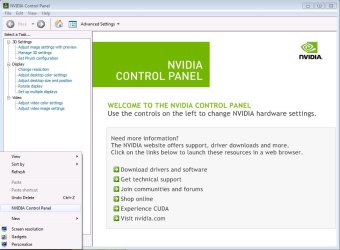
Also, in response to TGSoldier, I right clicked on my desktop and there was a NVIDIA Control Panel, please refer to the image, and advise me of what to look at?

Thanks
 

Attachments

  • SystemSummary.JPG
    SystemSummary.JPG
    44.3 KB · Views: 14
  • NVIDIAControl.jpg
    NVIDIAControl.jpg
    69.5 KB · Views: 15
Last edited:

My Computer My Computer

OS
Windows 7

My Computer My Computer

Computer Manufacturer/Model Number
Self Build 64bit
OS
Vista Ult64, Win7600
CPU
Intel Core 2 Quad Q6600 @ 2400 MHz 64bit OS
Motherboard
Asus P5E3 Deluxe WiFi @p 64 bit OS
Memory
4096 MB DDR3-SDRAM
Graphics Card(s)
ATI Radeon HD 3870 Series x2 Crossfired
Sound Card
Realtek on board
Monitor(s) Displays
Samsung SyncMaster - 23 inches
Screen Resolution
1680x1050 pixels at 60 Hz in True Colors
Hard Drives
Hitachi (250 GB)/Samsung 750 GB. /Barracuda 160 GB.
My Book 1 TB external..
PSU
Cooler Master 1000w
Case
Cooler Master Cosmos 1000.
Cooling
Fans and fresh air,
Keyboard
Wireless
Mouse
Wireless
Internet Speed
Never fast enough
Other Info
I use a Magnum.
http://www.gigabyte.com.tw/Support/Motherboard/Driver_List.aspx?Keyword=ep31
That's all there is, and they can't be downloaded either [missing or something]

I tried downloading the newest driver for my video card, didn't fix problem
I tried disabling, restart, and re-enabling my video card via Device Manager [safe mode], didn't fix problem
I tried Uninstalling and reinstalling my video card via Device Manager [safe mode as well] and it didn't fix the problem either.

Does that count as resetting my video card?
Any more advice?
Thanks.
 

My Computer My Computer

OS
Windows 7
reSEAT yor card. Take it out, put it back in, making sure that it sits flush and proper. Examine fan (if it has one) for spin, dirt or damage.
 

My Computer My Computer

Computer Manufacturer/Model Number
Self Build 64bit
OS
Vista Ult64, Win7600
CPU
Intel Core 2 Quad Q6600 @ 2400 MHz 64bit OS
Motherboard
Asus P5E3 Deluxe WiFi @p 64 bit OS
Memory
4096 MB DDR3-SDRAM
Graphics Card(s)
ATI Radeon HD 3870 Series x2 Crossfired
Sound Card
Realtek on board
Monitor(s) Displays
Samsung SyncMaster - 23 inches
Screen Resolution
1680x1050 pixels at 60 Hz in True Colors
Hard Drives
Hitachi (250 GB)/Samsung 750 GB. /Barracuda 160 GB.
My Book 1 TB external..
PSU
Cooler Master 1000w
Case
Cooler Master Cosmos 1000.
Cooling
Fans and fresh air,
Keyboard
Wireless
Mouse
Wireless
Internet Speed
Never fast enough
Other Info
I use a Magnum.
Download and install the latest driver for your Video card, and install it using, Compatibility Mode.


http://www.sevenforums.com/tutorials/316-compatibility-mode.html?ltr=C

It's already got the latest driver installed:confused:

I couldn't take the video card out entirely, there were no screws, and I pressed down the latch, but couldn't yank the thing out >.< it came out a little, and I pushed it back in and heard a click.
That didn't help, and I'm scared to break anything... And the fan was fine :confused:
 

Attachments

  • Untitled.jpg
    Untitled.jpg
    61.7 KB · Views: 10
Last edited:

My Computer My Computer

OS
Windows 7
Download and save the latest video driver for your machine to somewhere you can find it easily,
I suggest the Desktop.
Ok Just go into the Device Manager and click on your Display adapter, then right
Click on your video card, then click Update Driver Software, choose
Browse my computer for driver software, and then install the driver that is
On your Desktop.
 

My Computer My Computer

Computer Manufacturer/Model Number
Self Build 64bit
OS
Vista Ult64, Win7600
CPU
Intel Core 2 Quad Q6600 @ 2400 MHz 64bit OS
Motherboard
Asus P5E3 Deluxe WiFi @p 64 bit OS
Memory
4096 MB DDR3-SDRAM
Graphics Card(s)
ATI Radeon HD 3870 Series x2 Crossfired
Sound Card
Realtek on board
Monitor(s) Displays
Samsung SyncMaster - 23 inches
Screen Resolution
1680x1050 pixels at 60 Hz in True Colors
Hard Drives
Hitachi (250 GB)/Samsung 750 GB. /Barracuda 160 GB.
My Book 1 TB external..
PSU
Cooler Master 1000w
Case
Cooler Master Cosmos 1000.
Cooling
Fans and fresh air,
Keyboard
Wireless
Mouse
Wireless
Internet Speed
Never fast enough
Other Info
I use a Magnum.
Sorry for double post
But does anyone have any more pointers? Or should I just take it to someone to have a look at?

Has anyone seen this type of situation before?
Or know where else I can get help from?

Thanks.
 

My Computer My Computer

OS
Windows 7
Will you do as I ask in the post above you and you might get somewhere.
Do you think I am sitting here for the good of my health.

We need to get rid of the driver that you have installed at the moment, because there is something wrong with it.
 

My Computer My Computer

Computer Manufacturer/Model Number
Self Build 64bit
OS
Vista Ult64, Win7600
CPU
Intel Core 2 Quad Q6600 @ 2400 MHz 64bit OS
Motherboard
Asus P5E3 Deluxe WiFi @p 64 bit OS
Memory
4096 MB DDR3-SDRAM
Graphics Card(s)
ATI Radeon HD 3870 Series x2 Crossfired
Sound Card
Realtek on board
Monitor(s) Displays
Samsung SyncMaster - 23 inches
Screen Resolution
1680x1050 pixels at 60 Hz in True Colors
Hard Drives
Hitachi (250 GB)/Samsung 750 GB. /Barracuda 160 GB.
My Book 1 TB external..
PSU
Cooler Master 1000w
Case
Cooler Master Cosmos 1000.
Cooling
Fans and fresh air,
Keyboard
Wireless
Mouse
Wireless
Internet Speed
Never fast enough
Other Info
I use a Magnum.
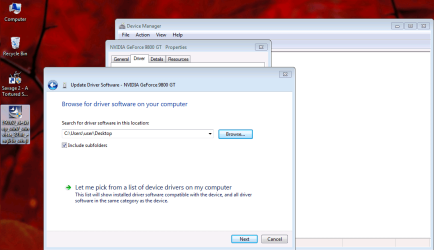
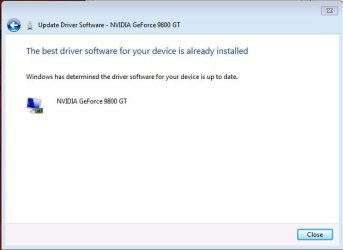
Ok I've done as jfar has suggested and its not really working, doesn't seem to 'delete' the existing one and replacing with the new one downloaded. It simply tells me to select the FOLDER where driver software is located, and when I click next, it simply says that 'Windows has determined the driver software for your device is up to date.' [In the attached pictures, it goes from the first pic to the second in like half a second without doing anything]

Also, sorry for the frustration and thank yous for the continued support and patience [and being nice]. Somehow I thought no one responded hence the 'double post' (which really wasn't a double post lol). I've just changed the setting to 'Instant email notification' :D

I really want to save reseating for last, because I'm not too confident about opening up the PC and can't seem to budge the video card despite holding down the latch etc. As well as still having warranty [which may have been voided now, but who knows ;P] but that'll be a lot of extra fuss.

Thanks again, please continue to support and tell me what I can do.
 

Attachments

  • ins.png
    ins.png
    49.9 KB · Views: 7
  • ins2.JPG
    ins2.JPG
    25.6 KB · Views: 9

My Computer My Computer

OS
Windows 7
Back
Top