HDD not showing after SSD Raid install

snadge

New member
Member
Local time
7:33 PM
Messages
87
Hi

I have just installed 2 x 120Gb Samsung EVO drives in RAID 0, after successfull install of windows it seems my 500Gb Seagate HDD is not showing in windows... it shows in disk manager as 'foreign' dynamic disk and has little yellow triangle on it, I have data on it I dont want too lose, but I could take it out and backup data from it then format it if needs be, I wanted the HDD to work alongside the SSD RAID as I use it as downloads folder etc.

can anyone tell me how to get it on?

It shows as a boot option in BIOS, I think something may have happened too the BIOS as some of the data is missing in MIT, i should re-flash, its running on F13a Beta (Gigabyte H77M-D3H v1.0)

thanks in advance
 

My Computer My Computer

At a glance

Windows 7 Pro x64Intel Core-i5 3470 @ 3.67Ghz (Ivy-Bridge)8Gb (2x4) 1616Mhz Crucial BallistixnVidia GTX650
Computer type
PC/Desktop
Computer Manufacturer/Model Number
GT1000
OS
Windows 7 Pro x64
CPU
Intel Core-i5 3470 @ 3.67Ghz (Ivy-Bridge)
Motherboard
Gigabyte H77M-D3H
Memory
8Gb (2x4) 1616Mhz Crucial Ballistix
Graphics Card(s)
nVidia GTX650
Sound Card
Via 2021T
Monitor(s) Displays
19" LG Flatron
Screen Resolution
1440x900
Hard Drives
2 x 120Gb Samsung 840 EVO in RAID '0' (1GB/s - 800MB/s - 140k IOPS)
500Gb Seagate Barracuda HDD
PSU
XFX 450 Pro Core Edition
Case
NXZT
Cooling
Arctic 7 Freezer Pro
Keyboard
Q-Connect Wi-Fi
Mouse
Q-Connect Wi-Fi
Internet Speed
16Mbps
Antivirus
(none) - Private Firewall + WinPatrol
Browser
Chrome
Other Info
Home-Built Computer
Set the BIOS to IDE or AHCI and your HDD should show up. Setting the SSDs in Raid does not really buy you much. I would not do that.
 

My Computer My Computer

At a glance

Vista, Windows7, Mint Mate, Zorin, Windows 8from 1.6GHz Duo to i7
Computer Manufacturer/Model Number
HP, Dell, Gateway, Toshiba - 4 laptops and 2 desktops
OS
Vista, Windows7, Mint Mate, Zorin, Windows 8
CPU
from 1.6GHz Duo to i7
Monitor(s) Displays
2x HP w2207
Hard Drives
5x HDD, 7x SSD, 12x Externals
Keyboard
with trackball - no mices
Mouse
Trackball mice
Internet Speed
DSL 6000
RAIDing my SSD's had doubled the speed (900Mb read / 160,000 IOPS AS SSD) , its what I wanted too do.

if I set to AHCI (would never use IDE) then it wont load windows as it wont recognize my install on the RAID array will it?

there must be a way to get the HDD active whilst using a RAID array - I refuse to believe that once you have a RAID array you can not use any other drives along side it?

thanks
 

My Computer My Computer

At a glance

Windows 7 Pro x64Intel Core-i5 3470 @ 3.67Ghz (Ivy-Bridge)8Gb (2x4) 1616Mhz Crucial BallistixnVidia GTX650
Computer type
PC/Desktop
Computer Manufacturer/Model Number
GT1000
OS
Windows 7 Pro x64
CPU
Intel Core-i5 3470 @ 3.67Ghz (Ivy-Bridge)
Motherboard
Gigabyte H77M-D3H
Memory
8Gb (2x4) 1616Mhz Crucial Ballistix
Graphics Card(s)
nVidia GTX650
Sound Card
Via 2021T
Monitor(s) Displays
19" LG Flatron
Screen Resolution
1440x900
Hard Drives
2 x 120Gb Samsung 840 EVO in RAID '0' (1GB/s - 800MB/s - 140k IOPS)
500Gb Seagate Barracuda HDD
PSU
XFX 450 Pro Core Edition
Case
NXZT
Cooling
Arctic 7 Freezer Pro
Keyboard
Q-Connect Wi-Fi
Mouse
Q-Connect Wi-Fi
Internet Speed
16Mbps
Antivirus
(none) - Private Firewall + WinPatrol
Browser
Chrome
Other Info
Home-Built Computer
RAIDing my SSD's had doubled the speed (900Mb read / 160,000 IOPS AS SSD) , its what I wanted too do
Nice nums on paper, but in real life they mean very little - especially for the OS.
 

My Computer My Computer

At a glance

Vista, Windows7, Mint Mate, Zorin, Windows 8from 1.6GHz Duo to i7
Computer Manufacturer/Model Number
HP, Dell, Gateway, Toshiba - 4 laptops and 2 desktops
OS
Vista, Windows7, Mint Mate, Zorin, Windows 8
CPU
from 1.6GHz Duo to i7
Monitor(s) Displays
2x HP w2207
Hard Drives
5x HDD, 7x SSD, 12x Externals
Keyboard
with trackball - no mices
Mouse
Trackball mice
Internet Speed
DSL 6000
RAIDing my SSD's had doubled the speed (900Mb read / 160,000 IOPS AS SSD) , its what I wanted too do
Nice nums on paper, but in real life they mean very little - especially for the OS.

do when im loading lots of large files from the drive...which I will be :)
 

My Computer My Computer

At a glance

Windows 7 Pro x64Intel Core-i5 3470 @ 3.67Ghz (Ivy-Bridge)8Gb (2x4) 1616Mhz Crucial BallistixnVidia GTX650
Computer type
PC/Desktop
Computer Manufacturer/Model Number
GT1000
OS
Windows 7 Pro x64
CPU
Intel Core-i5 3470 @ 3.67Ghz (Ivy-Bridge)
Motherboard
Gigabyte H77M-D3H
Memory
8Gb (2x4) 1616Mhz Crucial Ballistix
Graphics Card(s)
nVidia GTX650
Sound Card
Via 2021T
Monitor(s) Displays
19" LG Flatron
Screen Resolution
1440x900
Hard Drives
2 x 120Gb Samsung 840 EVO in RAID '0' (1GB/s - 800MB/s - 140k IOPS)
500Gb Seagate Barracuda HDD
PSU
XFX 450 Pro Core Edition
Case
NXZT
Cooling
Arctic 7 Freezer Pro
Keyboard
Q-Connect Wi-Fi
Mouse
Q-Connect Wi-Fi
Internet Speed
16Mbps
Antivirus
(none) - Private Firewall + WinPatrol
Browser
Chrome
Other Info
Home-Built Computer
Set the BIOS to IDE or AHCI and your HDD should show up. Setting the SSDs in Raid does not really buy you much. I would not do that.

If you have a Z68 or newer chip set and a Sandy Bridge or newer cpu setting up SSD's in RAID makes a significant improvement. Intel’s RAID controller enables SSDs to act as big hard drive caches. Intel's controller has supported this for the past 3-4 years as I recall.

If W7 is already installed changing BIOS from AHCI to IDE stops the system from starting. It well require a registry hack to recover.
 

My Computer My Computer

At a glance

Win8/8.1,Win7-U64, Vista U64, uncounted Linux...AMD and Intell, 9590, 8350, i5 3570kCorsair G SkillCrossfired Sapphire HD 7950 Vapor-X, ASUS R9 ...
Computer type
PC/Desktop
Computer Manufacturer/Model Number
Custom, Dell and Lenono LT's
OS
Win8/8.1,Win7-U64, Vista U64, uncounted Linux distor's
CPU
AMD and Intell, 9590, 8350, i5 3570k
Motherboard
CFVFZ, GA990FXA, Z77e-itx
Memory
Corsair G Skill
Graphics Card(s)
Crossfired Sapphire HD 7950 Vapor-X, ASUS R9 280X TOP
Sound Card
Realtek ALC889
Monitor(s) Displays
ViewSonic VX2770SMH 27" / ViewSonic VX2433 LCD 24"
Screen Resolution
1080i HD
Hard Drives
Samsung SSD 840 Pro
OCZ Agility 3's
OCZ Vector's
WD's Blue, red, green, Velociraptors
Seagate USB3 & Hybrid's
ASUS Blu-Ray
ASUS DVD
PSU
Corsair AX1200i, Seasonice 850 Gold
Case
Cooler Master HAF 922 & HAF 932, Lian Li Train case.
Cooling
Air, Glacer 240L expanded, custom EK loop with duel D5's
Keyboard
Microsoft SideWinder X4 USB Keyboard / Logitech 250 PS2
Mouse
Logitech G500 / MS wireless 5000
Internet Speed
Best of 5ms / 75+ dn / 12+ up More or less.
Antivirus
MS esentials-MalwareBytes
Browser
Firefox Chromebook

My Computer My Computer

At a glance

Win 7 Ultimate x64FX-8350 @ 4.6 GHz so farADATA XPG V1 Series Black 8GB DDR3 1600Sapphire R9 270x Dual-X
Computer type
PC/Desktop
Computer Manufacturer/Model Number
Me
OS
Win 7 Ultimate x64
CPU
FX-8350 @ 4.6 GHz so far
Motherboard
Asus M5A97 EVO
Memory
ADATA XPG V1 Series Black 8GB DDR3 1600
Graphics Card(s)
Sapphire R9 270x Dual-X
Sound Card
Xonar DGX w/ Corsair Vengence 1300
Monitor(s) Displays
Acer S232HL Abid
Screen Resolution
1920x1080
Hard Drives
120 GB OCZ Vertex 3
500 GB Seagate 7200.12
PSU
Antec Earthwatts 650W Green
Case
Antec Three Hundred
Cooling
Cooler Master 212 EVO
Keyboard
Logitech G510
Mouse
Logitech G500s
Internet Speed
35000/3000
that wont work stormy as it deletes everything on the disk and Iam trying depserately to recover the data, had I known this would have happened I would have disconnected the drive before creating the RAID on the SSD's

I have significant boot and load speeds since RAID'ing on H77 with Ivy-Bridge CPU, boot has gone from 16 seconds with single SSD to 10 seconds with RAID, application launches are instant and loading of large files really quick...so yeah its worth doing, ive tried both...

anyway, ive tried loading XP and Linux from USB stick and both can see but can not mount the volume saying it does not appear to be NTFS stream (possibly part of a RAID) - but it isnt part of a RAID?

Ive got the drive out and in a caddy and I still cant access the data? - I backed up all my important data to it before raiding the SSD's so I could restore from it later - no way should setting RAID on 2 SSD's cause this drive to stop working??

desperately need something that can just read the data and copy it onto another disk?

EDIT: Part Magic says it cannot convert it unless its a mirrored or simple volume? this is while its in caddy and seems to be less acceessible in windows than when in SATA port, I will put it back in SATA and retry
 

My Computer My Computer

At a glance

Windows 7 Pro x64Intel Core-i5 3470 @ 3.67Ghz (Ivy-Bridge)8Gb (2x4) 1616Mhz Crucial BallistixnVidia GTX650
Computer type
PC/Desktop
Computer Manufacturer/Model Number
GT1000
OS
Windows 7 Pro x64
CPU
Intel Core-i5 3470 @ 3.67Ghz (Ivy-Bridge)
Motherboard
Gigabyte H77M-D3H
Memory
8Gb (2x4) 1616Mhz Crucial Ballistix
Graphics Card(s)
nVidia GTX650
Sound Card
Via 2021T
Monitor(s) Displays
19" LG Flatron
Screen Resolution
1440x900
Hard Drives
2 x 120Gb Samsung 840 EVO in RAID '0' (1GB/s - 800MB/s - 140k IOPS)
500Gb Seagate Barracuda HDD
PSU
XFX 450 Pro Core Edition
Case
NXZT
Cooling
Arctic 7 Freezer Pro
Keyboard
Q-Connect Wi-Fi
Mouse
Q-Connect Wi-Fi
Internet Speed
16Mbps
Antivirus
(none) - Private Firewall + WinPatrol
Browser
Chrome
Other Info
Home-Built Computer
Set the BIOS to IDE or AHCI and your HDD should show up. Setting the SSDs in Raid does not really buy you much. I would not do that.

If you have a Z68 or newer chip set and a Sandy Bridge or newer cpu setting up SSD's in RAID makes a significant improvement. Intel’s RAID controller enables SSDs to act as big hard drive caches. Intel's controller has supported this for the past 3-4 years as I recall.

If W7 is already installed changing BIOS from AHCI to IDE stops the system from starting. It well require a registry hack to recover.
I realize that the measured numbers come out a lot better when you use an optimal setting. My point is that for the OS which uses mainly a 4K filesize and does not transfer massive amounts of data, the felt performance difference between an optimal setting and a so, so setting is rather marginal. The OS gets it's performance boost mainly from the short access time.

I run 6 PCs on SSDs - a couple are from 2007 and run on IDE. They all run great and I really do not notice a great difference.

That is, of course, a different matter when you do massive file transfers with large blocks of data like the OP suggests. In that case I can see that a faster transfer time is an argument - but only if you transfer from SSD to SSD because else you are being ruled by the 'other device' which is involved in the transfer. If e.g you transfer data from a HDD to a SSD, the speed of the HDD will rule. Even a very basic SSD setting can accomodate that.
 

My Computer My Computer

At a glance

Vista, Windows7, Mint Mate, Zorin, Windows 8from 1.6GHz Duo to i7
Computer Manufacturer/Model Number
HP, Dell, Gateway, Toshiba - 4 laptops and 2 desktops
OS
Vista, Windows7, Mint Mate, Zorin, Windows 8
CPU
from 1.6GHz Duo to i7
Monitor(s) Displays
2x HP w2207
Hard Drives
5x HDD, 7x SSD, 12x Externals
Keyboard
with trackball - no mices
Mouse
Trackball mice
Internet Speed
DSL 6000
This has nothing to do with RAID, and everything to do with the disk being dynamic. Means that the only thing that could read it was the OS it was on when the disk was set to dynamic.

Option 1 is the only one that will convert it back to a basic disk without losing the data that is on it. Even then it is not 100% guaranteed to work, but unless someone has a better idea it is also your only option for retrieving the data.
 

My Computer My Computer

At a glance

Win 7 Ultimate x64FX-8350 @ 4.6 GHz so farADATA XPG V1 Series Black 8GB DDR3 1600Sapphire R9 270x Dual-X
Computer type
PC/Desktop
Computer Manufacturer/Model Number
Me
OS
Win 7 Ultimate x64
CPU
FX-8350 @ 4.6 GHz so far
Motherboard
Asus M5A97 EVO
Memory
ADATA XPG V1 Series Black 8GB DDR3 1600
Graphics Card(s)
Sapphire R9 270x Dual-X
Sound Card
Xonar DGX w/ Corsair Vengence 1300
Monitor(s) Displays
Acer S232HL Abid
Screen Resolution
1920x1080
Hard Drives
120 GB OCZ Vertex 3
500 GB Seagate 7200.12
PSU
Antec Earthwatts 650W Green
Case
Antec Three Hundred
Cooling
Cooler Master 212 EVO
Keyboard
Logitech G510
Mouse
Logitech G500s
Internet Speed
35000/3000
sorted...simply reinstalled my old 840 (unplugged the 2x EVO's and set RAID to AHCI) and was back to where I was before RAID and currently backing up to USB drive :) I will then format the drive ready for use with my RAID

@ whs - I appreciate what you say... but trust me I have tried SSD's on IDE and AHCI and there is MASSIVE difference in performance between the two, once you install the Intel AHCI driver in windows (replacing the MS Ahci driver) its even quicker again, windows boots much quicker for me in both cases...again when I installed my RAID then installed the Intel RAID driver - if your running SSD's from 2007 then they are probably low performance SSD's and dont compare to SSD's of today, ive had a few SSD's and tried and benched them all in IDE and AHCI and AHCI outperforms IDE in every aspect, again with RAID the difference is even better...ive shaved my boot time down from 16 seconds to just 10 seconds (12 seconds if you include the RAID BIOS access screen that appears and waits 2 seconds for you too press CTRL+I which doesnt appear on non-raid setups...so isnt fair to include when benching)

1 x SSD with AHCI = 16 secs from pwr button to desktop
2 x SSD with RAID = 10 secs from pwr button to desktop

Applications are loading (and writing) much quicker than before with the single SSD, it is noticably different, only issue is I can not upgrade firmware online with Samsung Magician as it can not see the SSD's, but I can do this using a caddy. You may see it as negligable...others like me wont, I would rather pair my drives and boost speed than have them run side-by-side...I backup twice per week so if one fails I simply replace and restore ...or restore files to one drive.

thanks everyone who has helped :)
 

My Computer My Computer

At a glance

Windows 7 Pro x64Intel Core-i5 3470 @ 3.67Ghz (Ivy-Bridge)8Gb (2x4) 1616Mhz Crucial BallistixnVidia GTX650
Computer type
PC/Desktop
Computer Manufacturer/Model Number
GT1000
OS
Windows 7 Pro x64
CPU
Intel Core-i5 3470 @ 3.67Ghz (Ivy-Bridge)
Motherboard
Gigabyte H77M-D3H
Memory
8Gb (2x4) 1616Mhz Crucial Ballistix
Graphics Card(s)
nVidia GTX650
Sound Card
Via 2021T
Monitor(s) Displays
19" LG Flatron
Screen Resolution
1440x900
Hard Drives
2 x 120Gb Samsung 840 EVO in RAID '0' (1GB/s - 800MB/s - 140k IOPS)
500Gb Seagate Barracuda HDD
PSU
XFX 450 Pro Core Edition
Case
NXZT
Cooling
Arctic 7 Freezer Pro
Keyboard
Q-Connect Wi-Fi
Mouse
Q-Connect Wi-Fi
Internet Speed
16Mbps
Antivirus
(none) - Private Firewall + WinPatrol
Browser
Chrome
Other Info
Home-Built Computer
These are very good numbers. None of my numbers are that good but as long as boot is faster than the time the system is sitting on the BIOS splash screen, I am happy.

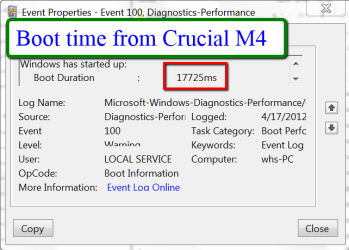
On this system here I boot in 17.7sec (event 100 in event viewer) from a single Crucial M4. But most of my systems I am running from an external SSD under VMware Player (Windows 8 and six Linux distros). There the boot time is slower - already because of the VMware overhead. But Windows 8 still manages in 30 seconds and most Linux are faster (except Zorin).
 

Attachments

  • 2012-04-17_2223.png
    2012-04-17_2223.png
    20.3 KB · Views: 7

My Computer My Computer

At a glance

Vista, Windows7, Mint Mate, Zorin, Windows 8from 1.6GHz Duo to i7
Computer Manufacturer/Model Number
HP, Dell, Gateway, Toshiba - 4 laptops and 2 desktops
OS
Vista, Windows7, Mint Mate, Zorin, Windows 8
CPU
from 1.6GHz Duo to i7
Monitor(s) Displays
2x HP w2207
Hard Drives
5x HDD, 7x SSD, 12x Externals
Keyboard
with trackball - no mices
Mouse
Trackball mice
Internet Speed
DSL 6000
your boot time does not include POST...my times do, stop watched on my phone from pressing power button too desktop appearing after logging in, you could probably add anywhere from 4-10 seconds on to your time depending on your POST

from window loading message appearing to desktop appearing is 6 seconds

how do I find that number you have in EV? - wouldnt mind seeing what mine says (when I put the RAID back in)
 

My Computer My Computer

At a glance

Windows 7 Pro x64Intel Core-i5 3470 @ 3.67Ghz (Ivy-Bridge)8Gb (2x4) 1616Mhz Crucial BallistixnVidia GTX650
Computer type
PC/Desktop
Computer Manufacturer/Model Number
GT1000
OS
Windows 7 Pro x64
CPU
Intel Core-i5 3470 @ 3.67Ghz (Ivy-Bridge)
Motherboard
Gigabyte H77M-D3H
Memory
8Gb (2x4) 1616Mhz Crucial Ballistix
Graphics Card(s)
nVidia GTX650
Sound Card
Via 2021T
Monitor(s) Displays
19" LG Flatron
Screen Resolution
1440x900
Hard Drives
2 x 120Gb Samsung 840 EVO in RAID '0' (1GB/s - 800MB/s - 140k IOPS)
500Gb Seagate Barracuda HDD
PSU
XFX 450 Pro Core Edition
Case
NXZT
Cooling
Arctic 7 Freezer Pro
Keyboard
Q-Connect Wi-Fi
Mouse
Q-Connect Wi-Fi
Internet Speed
16Mbps
Antivirus
(none) - Private Firewall + WinPatrol
Browser
Chrome
Other Info
Home-Built Computer
For the EV time, drill down this chain:

Eventvwr
Applications and Service Logs
Microsoft
Windows
Diagnostics - performance
Operational
Event ID 100
 

My Computer My Computer

At a glance

Vista, Windows7, Mint Mate, Zorin, Windows 8from 1.6GHz Duo to i7
Computer Manufacturer/Model Number
HP, Dell, Gateway, Toshiba - 4 laptops and 2 desktops
OS
Vista, Windows7, Mint Mate, Zorin, Windows 8
CPU
from 1.6GHz Duo to i7
Monitor(s) Displays
2x HP w2207
Hard Drives
5x HDD, 7x SSD, 12x Externals
Keyboard
with trackball - no mices
Mouse
Trackball mice
Internet Speed
DSL 6000
cheers

all I do is stop watch it from PWR button to desktop appearing as thats the perceived boot time
 

My Computer My Computer

At a glance

Windows 7 Pro x64Intel Core-i5 3470 @ 3.67Ghz (Ivy-Bridge)8Gb (2x4) 1616Mhz Crucial BallistixnVidia GTX650
Computer type
PC/Desktop
Computer Manufacturer/Model Number
GT1000
OS
Windows 7 Pro x64
CPU
Intel Core-i5 3470 @ 3.67Ghz (Ivy-Bridge)
Motherboard
Gigabyte H77M-D3H
Memory
8Gb (2x4) 1616Mhz Crucial Ballistix
Graphics Card(s)
nVidia GTX650
Sound Card
Via 2021T
Monitor(s) Displays
19" LG Flatron
Screen Resolution
1440x900
Hard Drives
2 x 120Gb Samsung 840 EVO in RAID '0' (1GB/s - 800MB/s - 140k IOPS)
500Gb Seagate Barracuda HDD
PSU
XFX 450 Pro Core Edition
Case
NXZT
Cooling
Arctic 7 Freezer Pro
Keyboard
Q-Connect Wi-Fi
Mouse
Q-Connect Wi-Fi
Internet Speed
16Mbps
Antivirus
(none) - Private Firewall + WinPatrol
Browser
Chrome
Other Info
Home-Built Computer
I go by what's in Event 100. That always gives me an apples to apples comparison. With Linux, I do the stopwatch method too because they do not record the boot time - at least I have not yet found it.

Here is a little recording of Windows 8 to Linux comparison. This is under VMware Player from an external SSD attached via USB3. You have to figure the time from when the logo appears to the desktop/start in W8. The time before is the VMware Player setup.

Booting Windows 8 and Mint - YouTube


My Computer My Computer

At a glance

Vista, Windows7, Mint Mate, Zorin, Windows 8from 1.6GHz Duo to i7
Computer Manufacturer/Model Number
HP, Dell, Gateway, Toshiba - 4 laptops and 2 desktops
OS
Vista, Windows7, Mint Mate, Zorin, Windows 8
CPU
from 1.6GHz Duo to i7
Monitor(s) Displays
2x HP w2207
Hard Drives
5x HDD, 7x SSD, 12x Externals
Keyboard
with trackball - no mices
Mouse
Trackball mice
Internet Speed
DSL 6000
Back
Top