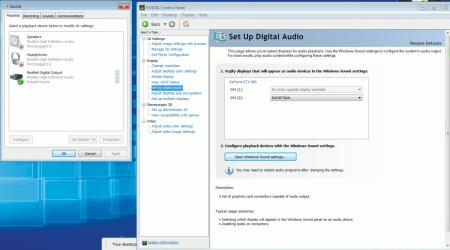
No HDMI audio shows in the panel?

sdowney717

New member
Power User
VIP
Local time
5:30 PM
Messages
705

Attachments

  • NoHDMIshowing.png
    NoHDMIshowing.png
    208.9 KB · Views: 3

My Computer My Computer

At a glance

Windows 7 Ultimate x64
OS
Windows 7 Ultimate x64
And I checked so everything that is there should show up.

How can Nvidia see the TV and show the sound control and windows does not know?
 

Attachments

  • HDMIs2.png
    HDMIs2.png
    54.3 KB · Views: 19

My Computer My Computer

At a glance

Windows 7 Ultimate x64
OS
Windows 7 Ultimate x64

My Computer My Computer

At a glance

Windows 7 Ultimate x64
OS
Windows 7 Ultimate x64
No, that did not help.
I DO have the special cable connected between MB and Video card, it is right from HP.
It cant plug any other way.
This card has 2 DVI ports. So I have a DVI to HDMI adapter.

DVI-I Dual link 24+5 Male to HDMI Standard Female Adapter

I tried 3 different HDMI cables.
 

My Computer My Computer

At a glance

Windows 7 Ultimate x64
OS
Windows 7 Ultimate x64
Absolutely NEVER. A DVI cable is for video only. There is NO AUDIO carried on a DVI cable.

Only HDMI cables (and Displayport cables) carry both audio and video, assuming they started at the video card end from a true HDMI or Displayport connector.

Furthermore, using a DVI-to-HDMI adapter or cable still will not provide audio at the HDMI end. There is simply NO AUDIO delivered out from the DVI connector on the video card. DVI connectors on video cards only provide video. You are simply going to get video-only out at the HDMI end of the DVI-to-HDMI transport.
 

My Computer My Computer

At a glance

Windows 7 Pro x64 (1), Win7 Pro X64 (2)i5-3350p 3.1Ghz/6MB-cache (1); E8400 3.0Ghz/6...8GB PC3-12800 DDR3 (1); 4GB PC3-10600 DDR3 (2)ATI HD7750 (1), (see TV cards); ATI R7 250 (2)
Computer type
PC/Desktop
Computer Manufacturer/Model Number
Home-built, two systems (1) and (2)
OS
Windows 7 Pro x64 (1), Win7 Pro X64 (2)
CPU
i5-3350p 3.1Ghz/6MB-cache (1); E8400 3.0Ghz/6MB-cache (2)
Motherboard
ASUS P8Z77-V Pro (1); ASUS P5Q3 (2)
Memory
8GB PC3-12800 DDR3 (1); 4GB PC3-10600 DDR3 (2)
Graphics Card(s)
ATI HD7750 (1), (see TV cards); ATI R7 250 (2)
Sound Card
Realtek ALC892 HD Audio (1); Realtek ALC1200 HD Audio (2)
Monitor(s) Displays
Eizo HD2441W LCD, Eizo S2433W (1); Eizo 24" S2433W (2)
Screen Resolution
1920x1200, 1920x1200 (1); 1920x1200 (2)
Hard Drives
(1) 1TB SATA-II (7200RPM), 2x2TB SATA-III (7200RPM), 250GB SATA-III (10000RPM) for OS; 2x2TB external USB 3.0

(2) 320GB SATA-II (7200RPM), 750GB SATA-II (7200RPM), 150GB SATA-II (10000RPM) for OS; 2TB external USB 3.0
PSU
Nesteq ECS-6001 600W (1); Nesteq ECS-5001 500W (2)
Case
Acousti-Case 360 (1) and (2)
Cooling
Noctua NH-U12P SE2 for CPU, 2x120mm case fans (1) and (2)
Keyboard
IBM PS/2 (1) and (2)
Mouse
Logitech MX Revolution wireless (1); Microsoft wired (2)
Internet Speed
100mbps down / 10mbps up
Antivirus
Microsoft Security Essentials; Malwarebyte Anti-Malware Pro
Browser
Firefox
Other Info
Ceton InfiniTV 4-tuner cablecard-enabled TV card as well as Hauppauge HVR-2250 OTA/ATSC 2-tuner TV card in (1), running under Win7 WMC
Absolutely NEVER. A DVI cable is for video only. There is NO AUDIO carried on a DVI cable.

Only HDMI cables (and Displayport cables) carry both audio and video, assuming they started at the video card end from a true HDMI or Displayport connector.

Furthermore, using a DVI-to-HDMI adapter or cable still will not provide audio at the HDMI end. There is simply NO AUDIO delivered out from the DVI connector on the video card. DVI connectors on video cards only provide video. You are simply going to get video-only out at the HDMI end of the DVI-to-HDMI transport.

The various links show you get sound out of a dvi connection to hdmi converter.
So how can you say that?
 

My Computer My Computer

At a glance

Windows 7 Ultimate x64
OS
Windows 7 Ultimate x64
Absolutely NEVER. A DVI cable is for video only. There is NO AUDIO carried on a DVI cable.

Only HDMI cables (and Displayport cables) carry both audio and video, assuming they started at the video card end from a true HDMI or Displayport connector.

Furthermore, using a DVI-to-HDMI adapter or cable still will not provide audio at the HDMI end. There is simply NO AUDIO delivered out from the DVI connector on the video card. DVI connectors on video cards only provide video. You are simply going to get video-only out at the HDMI end of the DVI-to-HDMI transport.

The various links show you get sound out of a dvi connection to hdmi converter.
So how can you say that?

That is a 2 wire set up HDMI does both with one line DVI does not also you are using Digital input that needs a direct line unless the Monitor in question has speakers already your set up is wrong

HDMI cable only will do the job
 

My Computer My Computer

At a glance

Windows 10 Home Premium 64bit sp1Intel I7-6700K @ 4.6 Ghz 1.344 volts everyday OC32GB G-Skill TridentZ 3200mhz 16-18-18-38 DDR4Sli Gigabyte Windforce GTX 980 G1
Computer type
PC/Desktop
Computer Manufacturer/Model Number
CoreI7-6700K MrFingerIII Special Builds
OS
Windows 10 Home Premium 64bit sp1
CPU
Intel I7-6700K @ 4.6 Ghz 1.344 volts everyday OC
Motherboard
Asrock Fatality K6 Z170 Socket 1151
Memory
32GB G-Skill TridentZ 3200mhz 16-18-18-38 DDR4
Graphics Card(s)
Sli Gigabyte Windforce GTX 980 G1
Sound Card
AC97 Creative Rage Tactic 3D Headphones Bluetooth
Monitor(s) Displays
27" Asus ROG Swift PG278Q G-Sync 48" Vizio Smart HD TV
Screen Resolution
2560x1440p 27"- 48" Currently Gaming at 2560x1440p Res 2K
Hard Drives
250GB Samsung Evo840SSD Seagate baracuda 500 GB WD Mybook 500Gb 1TB Seagate Barracuda
PSU
HX1050w Corsair Silver 80plus certified crosfire/sli
Case
Enthod Pro Full Tower
Cooling
Corsair H110i GT 280 mm High Performance WaterBlock
Keyboard
Logitech wireless keyboard
Mouse
Logitech wireless mouse
Internet Speed
Cox Cable 100+ mb
Antivirus
WebRoot Spysweeper with Antivirus
Browser
IE-10, Chrome, Opera
Other Info
My Other Rig is a AMD FX8320E @4.6Ghz 16GB Ballistic Sport Ram
Mobo Asrock Fatality 990FX 120GB OCZ SSD 1TB Seagate Barracuda Corsair H75 Cooling PSU Corsair CX750
GPU GTX Gigabyte 970G1
oh boy.

DVI carries video and CAN carry audio.
for example here regarding ATI
How to Carry Audio Over DVI Interfaces - Yahoo Voices - voices.yahoo.com
An example of one of the devices is the Radeon HD 4250. The Radeon HD 4250 is an integrated graphics processor that is usually built into AMD 880 motherboards. There are a few of these that have HDMI interfaces available, but a large number of these motherboards have only the DVI interface.

However, there are DVI-to-HDMI adapters that will convert the DVI to an HDMI interface. That means you will be able to use an HDMI cord from the DVI interface that should also deliver sound. To make this installation as smooth as possible it is recommended that you get a DVI to HDMI adapter that is made by ATI.
 

My Computer My Computer

At a glance

Windows 7 Ultimate x64
OS
Windows 7 Ultimate x64
For Nvidia
http://nvidia.custhelp.com/app/answers/detail/a_id/2562/related/1
If I am using a DVI-to-HDMI cable will audio be transmitted over this cable to the 3D TV?
Answer ID 2562 | Published 03/19/2010 12:27 PM | Updated 10/21/2010 12:50 PM
If I am using a DVI-to-HDMI cable to connect from by GPU to my TV, will audio be transmitted over this cable to the 3D TV?

The audio can be carried over DVI to HDMI cable depending on the graphics card. For newer GPUs, you just need to set the HDMI audio device in the Windows Sound control panel. Older GPUs need to use a digital audio S/PDIF cable to connect from the PC to the graphics board's on board S/PDIF connector. Please contact your graphics board manufacturer if you have questions on supporting HDMI audio over DVI.

I opened a tech support with Nvidia. They told me that my gtx260 can carry audio over the DVI port.

They told me for some unknown reason, my internal spdif cable to gtx260 sound port made into the card or my dvi to hdmi adapter has some problem preventing this from working like it is DESIGNED to work carrying the audio.

I may decide to test this sound idea again using a liveusb with ubuntu linux.
 

My Computer My Computer

At a glance

Windows 7 Ultimate x64
OS
Windows 7 Ultimate x64
For Nvidia
If I am using a DVI-to-HDMI cable will audio be transmitted over this cable to the 3D TV?
Answer ID 2562 | Published 03/19/2010 12:27 PM | Updated 10/21/2010 12:50 PM
If I am using a DVI-to-HDMI cable to connect from by GPU to my TV, will audio be transmitted over this cable to the 3D TV?
The audio can be carried over DVI to HDMI cable depending on the graphics card. For newer GPUs, you just need to set the HDMI audio device in the Windows Sound control panel. Older GPUs need to use a digital audio S/PDIF cable to connect from the PC to the graphics board's on board S/PDIF connector. Please contact your graphics board manufacturer if you have questions on supporting HDMI audio over DVI.
I opened a tech support with Nvidia. They told me that my gtx260 can carry audio over the DVI port.

They told me for some unknown reason, my internal spdif cable to gtx260 sound port made into the card or my dvi to hdmi adapter has some problem preventing this from working like it is DESIGNED to work carrying the audio.

I may decide to test this sound idea again using a liveusb with ubuntu linux.

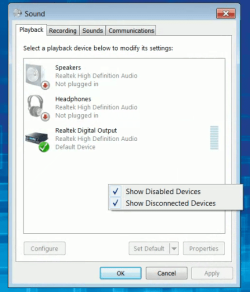
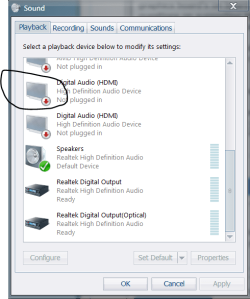
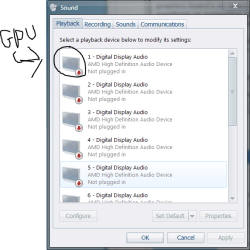
I understand where you are going with this but i can tell you in the screen shot it should show your GPU as the Default sound that is why it isn't working
 

Attachments

  • am.PNG
    am.PNG
    20.3 KB · Views: 13
  • am1.PNG
    am1.PNG
    27.4 KB · Views: 13

My Computer My Computer

At a glance

Windows 10 Home Premium 64bit sp1Intel I7-6700K @ 4.6 Ghz 1.344 volts everyday OC32GB G-Skill TridentZ 3200mhz 16-18-18-38 DDR4Sli Gigabyte Windforce GTX 980 G1
Computer type
PC/Desktop
Computer Manufacturer/Model Number
CoreI7-6700K MrFingerIII Special Builds
OS
Windows 10 Home Premium 64bit sp1
CPU
Intel I7-6700K @ 4.6 Ghz 1.344 volts everyday OC
Motherboard
Asrock Fatality K6 Z170 Socket 1151
Memory
32GB G-Skill TridentZ 3200mhz 16-18-18-38 DDR4
Graphics Card(s)
Sli Gigabyte Windforce GTX 980 G1
Sound Card
AC97 Creative Rage Tactic 3D Headphones Bluetooth
Monitor(s) Displays
27" Asus ROG Swift PG278Q G-Sync 48" Vizio Smart HD TV
Screen Resolution
2560x1440p 27"- 48" Currently Gaming at 2560x1440p Res 2K
Hard Drives
250GB Samsung Evo840SSD Seagate baracuda 500 GB WD Mybook 500Gb 1TB Seagate Barracuda
PSU
HX1050w Corsair Silver 80plus certified crosfire/sli
Case
Enthod Pro Full Tower
Cooling
Corsair H110i GT 280 mm High Performance WaterBlock
Keyboard
Logitech wireless keyboard
Mouse
Logitech wireless mouse
Internet Speed
Cox Cable 100+ mb
Antivirus
WebRoot Spysweeper with Antivirus
Browser
IE-10, Chrome, Opera
Other Info
My Other Rig is a AMD FX8320E @4.6Ghz 16GB Ballistic Sport Ram
Mobo Asrock Fatality 990FX 120GB OCZ SSD 1TB Seagate Barracuda Corsair H75 Cooling PSU Corsair CX750
GPU GTX Gigabyte 970G1
Yes, that is the problem, it never shows any hdmi devices for sound.
That part is controlled and setup by the Nvidia driver.
As soon as I plugged this cable into Nvidia card and rebooted, the nvidia control panel showed a new setup digital sound option, so it knows something is there.

Nvidia tech support said it should, but it does not and they dont know why.

Some forums have said AMD chip boards deliberately prevent Nvidia cards using DVI to HDMI adapters from working.

I dont know I am just going with what others say should happen.

The dual link 24+5 adapter is new, from an ebay seller.
I can buy from another but feel like it will be a waste of money.
The SPDIF cable is an OEM HP cable made for the motherboard, made to connect to video cards for this purpose.

Does anyone know if the internal spdif connection is the same as the one on the back of the mb?
I could rig a jumper to test output by running directly into the Sony receiver digital output just to test and see if any signal is there..
 

My Computer My Computer

At a glance

Windows 7 Ultimate x64
OS
Windows 7 Ultimate x64
One thing I would like to through out there, you will never see it show up as HDMI audio in the playback settings with that card. reason being is that there is no audio on the card at all, it is nothing more than SPDIF passthrough when using that cable from the video card to the motherboard/sound card.

What is the exact model number of your EVGA card?
 

My Computer My Computer

At a glance

Win 7 Ultimate x64FX-8350 @ 4.6 GHz so farADATA XPG V1 Series Black 8GB DDR3 1600Sapphire R9 270x Dual-X
Computer type
PC/Desktop
Computer Manufacturer/Model Number
Me
OS
Win 7 Ultimate x64
CPU
FX-8350 @ 4.6 GHz so far
Motherboard
Asus M5A97 EVO
Memory
ADATA XPG V1 Series Black 8GB DDR3 1600
Graphics Card(s)
Sapphire R9 270x Dual-X
Sound Card
Xonar DGX w/ Corsair Vengence 1300
Monitor(s) Displays
Acer S232HL Abid
Screen Resolution
1920x1080
Hard Drives
120 GB OCZ Vertex 3
500 GB Seagate 7200.12
PSU
Antec Earthwatts 650W Green
Case
Antec Three Hundred
Cooling
Cooler Master 212 EVO
Keyboard
Logitech G510
Mouse
Logitech G500s
Internet Speed
35000/3000
That adapter you bought, does the specs (or reviews even) for it say that it does audio? Reason for asking is there are DVI-HDMI adapters that will only pass video and not audio. If it is supposed to support audio, if you haven't yet try it on the other DVI port. I have a feeling that the DVI ports on that card are DVI-I (digital and analogue/VGA) and DVI-D (digital only).

If the adapter doesn't support audio, then you need to find either an adapter that does, or a DVI-HDMI cable something like this,

Kaybles HDMIDVI-6BK 6 ft. HDMI to DVI Cable with Gold Plated Connector M-M - Newegg.com
 

My Computer My Computer

At a glance

Win 7 Ultimate x64FX-8350 @ 4.6 GHz so farADATA XPG V1 Series Black 8GB DDR3 1600Sapphire R9 270x Dual-X
Computer type
PC/Desktop
Computer Manufacturer/Model Number
Me
OS
Win 7 Ultimate x64
CPU
FX-8350 @ 4.6 GHz so far
Motherboard
Asus M5A97 EVO
Memory
ADATA XPG V1 Series Black 8GB DDR3 1600
Graphics Card(s)
Sapphire R9 270x Dual-X
Sound Card
Xonar DGX w/ Corsair Vengence 1300
Monitor(s) Displays
Acer S232HL Abid
Screen Resolution
1920x1080
Hard Drives
120 GB OCZ Vertex 3
500 GB Seagate 7200.12
PSU
Antec Earthwatts 650W Green
Case
Antec Three Hundred
Cooling
Cooler Master 212 EVO
Keyboard
Logitech G510
Mouse
Logitech G500s
Internet Speed
35000/3000
yes, I tried both ports.
It is possible the adapter is a dud.
A dual link 24+5 DVI-I adapter is supposed to work and that is what it is.
 

My Computer My Computer

At a glance

Windows 7 Ultimate x64
OS
Windows 7 Ultimate x64
Have you confirmed that that adapter is capable of passing audio? Not all DFI to HDMI adapters can.
 

My Computer My Computer

At a glance

Win 7 Ultimate x64FX-8350 @ 4.6 GHz so farADATA XPG V1 Series Black 8GB DDR3 1600Sapphire R9 270x Dual-X
Computer type
PC/Desktop
Computer Manufacturer/Model Number
Me
OS
Win 7 Ultimate x64
CPU
FX-8350 @ 4.6 GHz so far
Motherboard
Asus M5A97 EVO
Memory
ADATA XPG V1 Series Black 8GB DDR3 1600
Graphics Card(s)
Sapphire R9 270x Dual-X
Sound Card
Xonar DGX w/ Corsair Vengence 1300
Monitor(s) Displays
Acer S232HL Abid
Screen Resolution
1920x1080
Hard Drives
120 GB OCZ Vertex 3
500 GB Seagate 7200.12
PSU
Antec Earthwatts 650W Green
Case
Antec Three Hundred
Cooling
Cooler Master 212 EVO
Keyboard
Logitech G510
Mouse
Logitech G500s
Internet Speed
35000/3000
One thing to try. Assuming the SPDIF cable has a 4 pin connector with two wires in it connected to the motherboard, pull the connector and reverse it.
 

My Computer My Computer

At a glance

Win 7 Ultimate x64FX-8350 @ 4.6 GHz so farADATA XPG V1 Series Black 8GB DDR3 1600Sapphire R9 270x Dual-X
Computer type
PC/Desktop
Computer Manufacturer/Model Number
Me
OS
Win 7 Ultimate x64
CPU
FX-8350 @ 4.6 GHz so far
Motherboard
Asus M5A97 EVO
Memory
ADATA XPG V1 Series Black 8GB DDR3 1600
Graphics Card(s)
Sapphire R9 270x Dual-X
Sound Card
Xonar DGX w/ Corsair Vengence 1300
Monitor(s) Displays
Acer S232HL Abid
Screen Resolution
1920x1080
Hard Drives
120 GB OCZ Vertex 3
500 GB Seagate 7200.12
PSU
Antec Earthwatts 650W Green
Case
Antec Three Hundred
Cooling
Cooler Master 212 EVO
Keyboard
Logitech G510
Mouse
Logitech G500s
Internet Speed
35000/3000
One thing to try. Assuming the SPDIF cable has a 4 pin connector with two wires in it connected to the motherboard, pull the connector and reverse it.

With this HP MSI board, it is only 3 pin and keyed end.

5v, ground, digital signal.

I was wondering is this a duplicate of the round spdif port on the back of the MB?
If so you could test for signal by running a wire pair from the end of the cable into the sony receiver and test for sound.

Is the internal spdif and the external spdif mirrored outputs?
 

My Computer My Computer

At a glance

Windows 7 Ultimate x64
OS
Windows 7 Ultimate x64
is this a duplicate of the round spdif port on the back of the MB?

As far as I know, yes.

it is only 3 pin and keyed end.

5v, ground, digital signal.

The 5V one doesn't do anything. The important ones are the ground and digital signal. How many wires are on the connector? It is possible that the wires in the connector are backwards to what is on the card (assuming it is only a two pin connector). Wouldn't be the first time I have seen where the wires need to be reversed for the audio to work. If that is what it is, don't worry about anything getting damaged, have never heard of that happening.
 

My Computer My Computer

At a glance

Win 7 Ultimate x64FX-8350 @ 4.6 GHz so farADATA XPG V1 Series Black 8GB DDR3 1600Sapphire R9 270x Dual-X
Computer type
PC/Desktop
Computer Manufacturer/Model Number
Me
OS
Win 7 Ultimate x64
CPU
FX-8350 @ 4.6 GHz so far
Motherboard
Asus M5A97 EVO
Memory
ADATA XPG V1 Series Black 8GB DDR3 1600
Graphics Card(s)
Sapphire R9 270x Dual-X
Sound Card
Xonar DGX w/ Corsair Vengence 1300
Monitor(s) Displays
Acer S232HL Abid
Screen Resolution
1920x1080
Hard Drives
120 GB OCZ Vertex 3
500 GB Seagate 7200.12
PSU
Antec Earthwatts 650W Green
Case
Antec Three Hundred
Cooling
Cooler Master 212 EVO
Keyboard
Logitech G510
Mouse
Logitech G500s
Internet Speed
35000/3000
Back
Top