Missing HDMI Audio Playback?

tdmanners

New member
Local time
2:23 PM
Messages
7
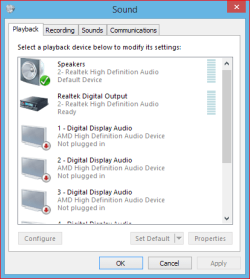
I have my tv and monitor connected with hdmi cables, both showing video, but my playback devices in sound management only shows one playback device that works. I want to switch audio playback between monitor and tv, but they share the same playback device. I noticed when I plug them in separate from each other that they use the same audio playback, "Digital Audio (HDMI)". So how can I get the sound to switch between tv and monitor?

Tried...
Testing default playback on all shown devices (only "Digital Audio (HDMI)" played sound and only on tv or monitor)
Displaying disabled/disconnected devices(no new devices are shown)
Installing/Reinstalling video and sound card multiple times (this would change the name for hdmi audio device to "ATI DP Audio Output" or "AMD Digital Audio" or "Digital Audio (HDMI), despite installing the same driver)

When I watched videos of people fixing sound issues I noticed their audio playback devices were named after the monitor, but for some reason mine isn't and it even shares the same audio playback name for both tv/monitor.

Windows 7 64bit
Video Card: Dual Radeon 5900s
Sound Card: AMD
 
Last edited:

My Computer

Computer type
PC/Desktop
OS
windows 7 ultimate x64
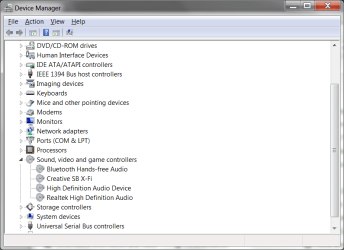
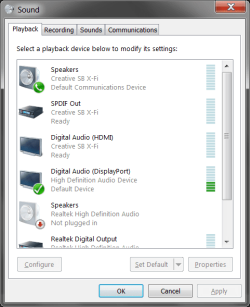
Can you post a picture of the Sound Panel Playback section and of the Device Manager, Sound section.

http://www.sevenforums.com/tutorials/9733-screenshots-files-upload-post-seven-forums.html

Normally, both are listed in the Sound Panel playback section, If an HDMI cable is plugged in it automatically sets the HDMI as the default audio playback device. If the HDMI cable is disconnected from the PC it will switch back to "Speakers" (the PC sound card). You should also be able to manually set the Speakers as the playback device with HDMI connected.
 

My Computer

Computer type
PC/Desktop
Computer Manufacturer/Model Number
My Own Build
OS
Windows 10 64 bit
CPU
Intel i7 6700K
Motherboard
ASUS ROG Maximus VIII Hero
Memory
16GB Corsair Dominator
Graphics Card(s)
Intel CPU Graphics
Sound Card
RealTek
Monitor(s) Displays
27" Dell S2719dgf
Screen Resolution
2560X1440
Hard Drives
1 TB Samsung 850 EVO SSD for Win 10 Pro
500GB Samsung 850 EVO SSD for Win 10 Insider
2 TB drive for backup
PSU
EVGA Supernova 750G2
Case
BeQuiet Silent Base 600
Cooling
Deepcool Captain 120EX
Keyboard
Microsoft Wireless 2000
Mouse
Microsoft wireless
Internet Speed
100 MB/sec (Cable)
Antivirus
Microsoft Defender and Malwarebytes
Browser
Edge/Firefox
Other Info
Cakewalk (Sonar) by BandLab and Studio One 4.1 Pro recording studio software. MOTU 896Mk3 Hybrid recording interface, Frontier Tranzport wireless control unit, Behringer X-Touch Control Surface.
Five USB connected optical drives for CD Audio production using Nero BurningROM
I just want to clarify I don't use speakers. I get my audio from my monitor/tv's built in speakers which come from the HDMI cable.
 

Attachments

  • Sound.png
    Sound.png
    24.8 KB · Views: 0
  • Playback.png
    Playback.png
    20.2 KB · Views: 19

My Computer

Computer type
PC/Desktop
OS
windows 7 ultimate x64
OK, sorry I missed that.

I see "Display Port", which I assume is your PC Monitor. I don't see an output for HDMI audio (other than SB Xfi which is not the HDMI audio).

Two things I see, (1) Disable the on-board audio in the BIOS when using a separate sound card (the SoundBlaster Xfi) to avoid any conflict. (2) I only see "High Definition Audio Device" for the Display port which suggests the correct driver is not installed for the Display Port and maybe HDMI audio. The "High Definition Audio Device" is only the generic, basic function, Windows installed driver. The correct driver for your CPU video or video card is needed (e.g. if you have an Intel CPU with the built in Video, you need the correct Intel CPU Video/HDMI Audio Driver.

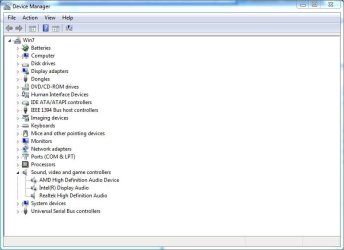
Here is my Device Manager/Sound section. Both my Video Card audio (AMD) and my Intel CPU (i7 3770) Intel Display Audio are listed (and my Realtek).
 

Attachments

  • device manager.JPG
    device manager.JPG
    46.2 KB · Views: 1

My Computer

Computer type
PC/Desktop
Computer Manufacturer/Model Number
My Own Build
OS
Windows 10 64 bit
CPU
Intel i7 6700K
Motherboard
ASUS ROG Maximus VIII Hero
Memory
16GB Corsair Dominator
Graphics Card(s)
Intel CPU Graphics
Sound Card
RealTek
Monitor(s) Displays
27" Dell S2719dgf
Screen Resolution
2560X1440
Hard Drives
1 TB Samsung 850 EVO SSD for Win 10 Pro
500GB Samsung 850 EVO SSD for Win 10 Insider
2 TB drive for backup
PSU
EVGA Supernova 750G2
Case
BeQuiet Silent Base 600
Cooling
Deepcool Captain 120EX
Keyboard
Microsoft Wireless 2000
Mouse
Microsoft wireless
Internet Speed
100 MB/sec (Cable)
Antivirus
Microsoft Defender and Malwarebytes
Browser
Edge/Firefox
Other Info
Cakewalk (Sonar) by BandLab and Studio One 4.1 Pro recording studio software. MOTU 896Mk3 Hybrid recording interface, Frontier Tranzport wireless control unit, Behringer X-Touch Control Surface.
Five USB connected optical drives for CD Audio production using Nero BurningROM
Edit: I did what you asked, but there still isn't a way to switch audio between my two screens. I am using duplicated screens by the way. When I disconnect the screen with audio the playback device says not plugged in and no other devices will give sound until I restart my computer then my screen will have sound.
 

Attachments

  • Playback.png
    Playback.png
    21.4 KB · Views: 17
Last edited:

My Computer

Computer type
PC/Desktop
OS
windows 7 ultimate x64
Exactly how are you connecting both HDMI screens?
 

My Computer

Computer type
PC/Desktop
Computer Manufacturer/Model Number
My Own Build
OS
Windows 10 64 bit
CPU
Intel i7 6700K
Motherboard
ASUS ROG Maximus VIII Hero
Memory
16GB Corsair Dominator
Graphics Card(s)
Intel CPU Graphics
Sound Card
RealTek
Monitor(s) Displays
27" Dell S2719dgf
Screen Resolution
2560X1440
Hard Drives
1 TB Samsung 850 EVO SSD for Win 10 Pro
500GB Samsung 850 EVO SSD for Win 10 Insider
2 TB drive for backup
PSU
EVGA Supernova 750G2
Case
BeQuiet Silent Base 600
Cooling
Deepcool Captain 120EX
Keyboard
Microsoft Wireless 2000
Mouse
Microsoft wireless
Internet Speed
100 MB/sec (Cable)
Antivirus
Microsoft Defender and Malwarebytes
Browser
Edge/Firefox
Other Info
Cakewalk (Sonar) by BandLab and Studio One 4.1 Pro recording studio software. MOTU 896Mk3 Hybrid recording interface, Frontier Tranzport wireless control unit, Behringer X-Touch Control Surface.
Five USB connected optical drives for CD Audio production using Nero BurningROM
I connect them through the hdmi port on the back of the computer.
 

My Computer

Computer type
PC/Desktop
OS
windows 7 ultimate x64
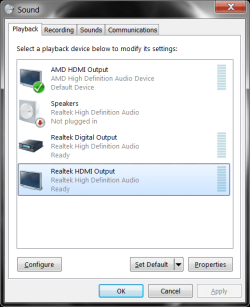
My AMD HDMI shows more than one HDMI output. Your screenshot only shows one. That may be the reason/problem(?)

Here is a screenshot of mine. I have an AMD Radeon 7770 Video Card.
 

Attachments

  • Capture.PNG
    Capture.PNG
    9.8 KB · Views: 14

My Computer

Computer type
PC/Desktop
Computer Manufacturer/Model Number
My Own Build
OS
Windows 10 64 bit
CPU
Intel i7 6700K
Motherboard
ASUS ROG Maximus VIII Hero
Memory
16GB Corsair Dominator
Graphics Card(s)
Intel CPU Graphics
Sound Card
RealTek
Monitor(s) Displays
27" Dell S2719dgf
Screen Resolution
2560X1440
Hard Drives
1 TB Samsung 850 EVO SSD for Win 10 Pro
500GB Samsung 850 EVO SSD for Win 10 Insider
2 TB drive for backup
PSU
EVGA Supernova 750G2
Case
BeQuiet Silent Base 600
Cooling
Deepcool Captain 120EX
Keyboard
Microsoft Wireless 2000
Mouse
Microsoft wireless
Internet Speed
100 MB/sec (Cable)
Antivirus
Microsoft Defender and Malwarebytes
Browser
Edge/Firefox
Other Info
Cakewalk (Sonar) by BandLab and Studio One 4.1 Pro recording studio software. MOTU 896Mk3 Hybrid recording interface, Frontier Tranzport wireless control unit, Behringer X-Touch Control Surface.
Five USB connected optical drives for CD Audio production using Nero BurningROM
Yes thats exactly my problem. Why is one missing? I have them both plugged in and both show video and are selectable in catalyst control center but only one sound playback device is shown. Also catalyst control center says both screens have no sound, despite the sound working on both of them when plugged in individually and on one of them when both plugged in.

Edit: I updated ccc and now it doesn't even have a audio option.
 
Last edited:

My Computer

Computer type
PC/Desktop
OS
windows 7 ultimate x64
Uninstall the AMD Video in the Device Manager, Including the Driver. Restart the PC and Windows will install a generic video driver. Then reinstall the AMD driver and see if that helps.

PC spec's, including Video card would help. Please fill in the "My System Spec's". Helps us to try and help you.
 

My Computer

Computer type
PC/Desktop
Computer Manufacturer/Model Number
My Own Build
OS
Windows 10 64 bit
CPU
Intel i7 6700K
Motherboard
ASUS ROG Maximus VIII Hero
Memory
16GB Corsair Dominator
Graphics Card(s)
Intel CPU Graphics
Sound Card
RealTek
Monitor(s) Displays
27" Dell S2719dgf
Screen Resolution
2560X1440
Hard Drives
1 TB Samsung 850 EVO SSD for Win 10 Pro
500GB Samsung 850 EVO SSD for Win 10 Insider
2 TB drive for backup
PSU
EVGA Supernova 750G2
Case
BeQuiet Silent Base 600
Cooling
Deepcool Captain 120EX
Keyboard
Microsoft Wireless 2000
Mouse
Microsoft wireless
Internet Speed
100 MB/sec (Cable)
Antivirus
Microsoft Defender and Malwarebytes
Browser
Edge/Firefox
Other Info
Cakewalk (Sonar) by BandLab and Studio One 4.1 Pro recording studio software. MOTU 896Mk3 Hybrid recording interface, Frontier Tranzport wireless control unit, Behringer X-Touch Control Surface.
Five USB connected optical drives for CD Audio production using Nero BurningROM
Still only showing one playback device, did this several times too. Do you think its because I'm using an hdmi to vga converter (came with my computer) to connect to the back of my computer? I'm also using a display port to mini display port converter (came with my monitor). The audio use to switch between screens depending on which screen was off/disconnected, but now I have to restart my computer to get sound on the other monitor or plug back in the monitor which had sound.
 

My Computer

Computer type
PC/Desktop
OS
windows 7 ultimate x64
What you have is probably the reason. VGA does not (normally) contain audio, only video. I'm not sure about the Display port.
 

My Computer

Computer type
PC/Desktop
Computer Manufacturer/Model Number
My Own Build
OS
Windows 10 64 bit
CPU
Intel i7 6700K
Motherboard
ASUS ROG Maximus VIII Hero
Memory
16GB Corsair Dominator
Graphics Card(s)
Intel CPU Graphics
Sound Card
RealTek
Monitor(s) Displays
27" Dell S2719dgf
Screen Resolution
2560X1440
Hard Drives
1 TB Samsung 850 EVO SSD for Win 10 Pro
500GB Samsung 850 EVO SSD for Win 10 Insider
2 TB drive for backup
PSU
EVGA Supernova 750G2
Case
BeQuiet Silent Base 600
Cooling
Deepcool Captain 120EX
Keyboard
Microsoft Wireless 2000
Mouse
Microsoft wireless
Internet Speed
100 MB/sec (Cable)
Antivirus
Microsoft Defender and Malwarebytes
Browser
Edge/Firefox
Other Info
Cakewalk (Sonar) by BandLab and Studio One 4.1 Pro recording studio software. MOTU 896Mk3 Hybrid recording interface, Frontier Tranzport wireless control unit, Behringer X-Touch Control Surface.
Five USB connected optical drives for CD Audio production using Nero BurningROM
The hdmi-vga converter came with the computer though and the hdmi-vga converter works with audio. When I have both monitors connected only the hdmi-vga converter will have audio and no way to switch audio between monitors besides disconnecting the hdmi and restarting the computer. The audio use to auto switch between monitors depending on which was turned on first or turned off.

Edit: I found a work around, but its extremely inconvenient. I have to disconnect both cables and plug in the monitor I want sound in first then plug in the second monitor. I usually have to do this multiple times because the audio playback device still thinks the monitor is connected and won't switch audio between monitors until it says "unplugged" and then reconnect the monitors

Edit2: They now have 2 different names in audio playback device; "AMD High Definition"(TV) and "AMD DP Output"(Monitor). They will never both show though and only way to change which shows is to fiddle with the cables.
 
Last edited:

My Computer

Computer type
PC/Desktop
OS
windows 7 ultimate x64
Back
Top