Solved Indexing and Searching broken

Understood about documents, but just so I'm clear

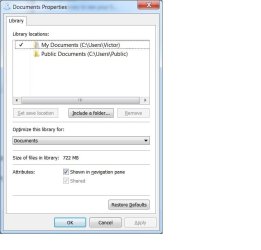
Please post a screen shot of the Documents Library properties
Right click Documents under Libraries (not the My Documents folder)
and select properties

Here
 

Attachments

  • DocProp.jpg
    DocProp.jpg
    34.8 KB · Views: 25

My Computer My Computer

At a glance

windows 7 home premium 64 bit
Computer type
Laptop
Computer Manufacturer/Model Number
Dell 1550
OS
windows 7 home premium 64 bit
Ok, that's what I thought.

You have loads of documents in your My Documents folder and don't want to mess around with them or risk losing your work.

I was referring to the Library, which doesn't actually hold anything, rather it references real folders and presents them in a view.

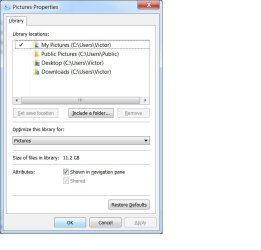
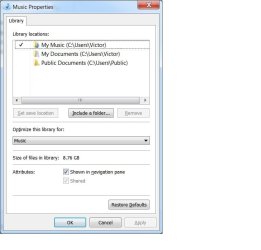
Could you check the other Libraries (Music, Pictures, Videos) - you don't have to post a screen shot, just take a look.
If they only have the My Folder (as with My Documents) and Public folder in them, I feel confident to take the next step re: Libraries.
If there are more folders linked to a library, let me know. you can post a screen shot of each Library if you want confirmation or aren't sure.

I'm running out of ideas re: search so I hope this might be the solution. We'll see
 

My Computer My Computer

At a glance

x64 (6.3.9600) Win8.1 Pro & soon dual boot x6...AMD A6-3420M APU with Radeon(tm) HD Graphics6.00 GBAMD Radeon(TM) HD 6520G
Computer type
Laptop
Computer Manufacturer/Model Number
HP Pavilion dv6-6c10us
OS
x64 (6.3.9600) Win8.1 Pro & soon dual boot x64 (6.1.7601) Win7_SP1 HomePrem
CPU
AMD A6-3420M APU with Radeon(tm) HD Graphics
Motherboard
Hewlett-Packard 1805
Memory
6.00 GB
Graphics Card(s)
AMD Radeon(TM) HD 6520G
Sound Card
(1) AMD High Definition Audio Device (2) IDT High Definiti
Monitor(s) Displays
HP W2072a 20" LCD (1600 x 900) @ 60 Hz
Screen Resolution
1366 x 768 x 32 bits (4294967296 colors) @ 60 Hz
Hard Drives
ST640LM0 00 HM641JI SATA Disk Device
Keyboard
Logitech k520 wireless KB
Mouse
Logitech m320 wireless mouse (bundled with KB)
Internet Speed
15/5 | 54 MB Wireless 'n'
Antivirus
Realtime: Defender or Avast | On-demand: Malwarebytes, ESET
Browser
IE 11 on Win8, IE 10 on win 7
Other Info
Media: [Gimp, Audacity, VLC] || Comm: [WEmail 2012, Skype] || Productivity: [OpenOffice,| Textpad] || Utils: [Sysinternals, cCleaner, Speccy, Defraggler]
Ok, that's what I thought.

You have loads of documents in your My Documents folder and don't want to mess around with them or risk losing your work.

I was referring to the Library, which doesn't actually hold anything, rather it references real folders and presents them in a view.

Could you check the other Libraries (Music, Pictures, Videos) - you don't have to post a screen shot, just take a look.
If they only have the My Folder (as with My Documents) and Public folder in them, I feel confident to take the next step re: Libraries.
If there are more folders linked to a library, let me know. you can post a screen shot of each Library if you want confirmation or aren't sure.

I'm running out of ideas re: search so I hope this might be the solution. We'll see
Pictures

Music
 

Attachments

  • pics.jpg
    pics.jpg
    37.6 KB · Views: 22
  • music.jpg
    music.jpg
    35.8 KB · Views: 22

My Computer My Computer

At a glance

windows 7 home premium 64 bit
Computer type
Laptop
Computer Manufacturer/Model Number
Dell 1550
OS
windows 7 home premium 64 bit

My Computer My Computer

At a glance

Windows 7 Ultimate X64 SP1Intel i5-2550K, Differing ~4.4-4.8GHz No buil...16GB G.Skill Sniper 1866MHz @ 2133MHz 2x8GBASUS GTX650TIB-DC2OC-2GD5, (650TI Boost)
Computer type
PC/Desktop
Computer Manufacturer/Model Number
Home Built Desktop By DataTech
OS
Windows 7 Ultimate X64 SP1
CPU
Intel i5-2550K, Differing ~4.4-4.8GHz No built in GPU
Motherboard
ASUS P8Z68-V PRO/GEN3
Memory
16GB G.Skill Sniper 1866MHz @ 2133MHz 2x8GB
Graphics Card(s)
ASUS GTX650TIB-DC2OC-2GD5, (650TI Boost)
Sound Card
Onboard Realtek 5-1
Monitor(s) Displays
Samsung P2570HD
Screen Resolution
1920x1080
Hard Drives
Samsung 840 Pro 256GB SSD for OS, 500GB Seagate Constellation (Enterprise drive) for Data
PSU
Corsair HX650W
Case
Inwin Dragon Rider
Cooling
Hyper 212 EVO w/two Noctua fans, push-pull, @1300 RPM
Keyboard
E-Z Eyes, bright yellow keys with large characters
Mouse
steelseries SENSEI Laser Pro Gaming
Internet Speed
48-51Mbs Mbs down, 11 Mbs up Xfinity Cable
Antivirus
Norton Internet Security 2013
Browser
IE 10, Opera, Pale Moon if needed
Other Info
4 case fans, LG BluRay-RE, ASUS DVD-RW, Mr. Fusion power supply, 1.21 gigawatts.
Thanks, that's not any trouble.

Anything in videos Library?

A few things I'd like to mention.
1) If I miss something - just post "Hey Bill - look at post# x" and I'll take a look. There is a post back up the thread where you asked some questions - I missed them.
re: change Index location -> one of the last things I was going to suggest
re: useful information -> yes it tells me that you found the search index location, and it tells me that the structure looks good. It doesn't give me much more on why this is happening though. I might look at that again - thanks for posting it.

2) Paint: I got tired of the extra white space when I first started using Paint to post images.
If you change the default properties in Paint to .5 width and .5 height it fixes that.
Click on the menu in the upper left hand area of Paint
Select Properties and set the width and height, I don't know if you have to close and save for the change to stick, but go ahead - make a small white box image - call it x or junk, the name doesn't matter
most images you paste into Paint are larger that that, so the extra canvas isn't there.

Just a tip - nothing important.
 

My Computer My Computer

At a glance

x64 (6.3.9600) Win8.1 Pro & soon dual boot x6...AMD A6-3420M APU with Radeon(tm) HD Graphics6.00 GBAMD Radeon(TM) HD 6520G
Computer type
Laptop
Computer Manufacturer/Model Number
HP Pavilion dv6-6c10us
OS
x64 (6.3.9600) Win8.1 Pro & soon dual boot x64 (6.1.7601) Win7_SP1 HomePrem
CPU
AMD A6-3420M APU with Radeon(tm) HD Graphics
Motherboard
Hewlett-Packard 1805
Memory
6.00 GB
Graphics Card(s)
AMD Radeon(TM) HD 6520G
Sound Card
(1) AMD High Definition Audio Device (2) IDT High Definiti
Monitor(s) Displays
HP W2072a 20" LCD (1600 x 900) @ 60 Hz
Screen Resolution
1366 x 768 x 32 bits (4294967296 colors) @ 60 Hz
Hard Drives
ST640LM0 00 HM641JI SATA Disk Device
Keyboard
Logitech k520 wireless KB
Mouse
Logitech m320 wireless mouse (bundled with KB)
Internet Speed
15/5 | 54 MB Wireless 'n'
Antivirus
Realtime: Defender or Avast | On-demand: Malwarebytes, ESET
Browser
IE 11 on Win8, IE 10 on win 7
Other Info
Media: [Gimp, Audacity, VLC] || Comm: [WEmail 2012, Skype] || Productivity: [OpenOffice,| Textpad] || Utils: [Sysinternals, cCleaner, Speccy, Defraggler]
Thanks Britton30,

We've cleared up some of the Index locations, but it might be worth a revisit after looking at Libraries.
We've rebuilt the index as well.

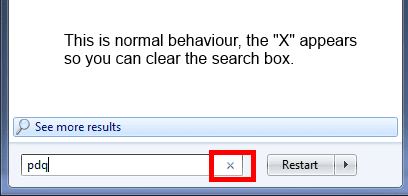
Maybe you can recall something about Indexing Completed, yet the Pause button is still 'active'
I think I had a similar issue quite a while ago on my machine.

Your explanation on 'x' clears that up for me. I misunderstood grandpavic's explanation and didn't see the 'x' when I tried a search on my machine.

Down to a few more things to try before I yell for help
Finish Libraires
Check Windows Search Service (RPC is reuired for it to start, but if that wasn't strated it would be appearant)
Move Index location - effectively stop and start Search and rule out any file corruption
 

My Computer My Computer

At a glance

x64 (6.3.9600) Win8.1 Pro & soon dual boot x6...AMD A6-3420M APU with Radeon(tm) HD Graphics6.00 GBAMD Radeon(TM) HD 6520G
Computer type
Laptop
Computer Manufacturer/Model Number
HP Pavilion dv6-6c10us
OS
x64 (6.3.9600) Win8.1 Pro & soon dual boot x64 (6.1.7601) Win7_SP1 HomePrem
CPU
AMD A6-3420M APU with Radeon(tm) HD Graphics
Motherboard
Hewlett-Packard 1805
Memory
6.00 GB
Graphics Card(s)
AMD Radeon(TM) HD 6520G
Sound Card
(1) AMD High Definition Audio Device (2) IDT High Definiti
Monitor(s) Displays
HP W2072a 20" LCD (1600 x 900) @ 60 Hz
Screen Resolution
1366 x 768 x 32 bits (4294967296 colors) @ 60 Hz
Hard Drives
ST640LM0 00 HM641JI SATA Disk Device
Keyboard
Logitech k520 wireless KB
Mouse
Logitech m320 wireless mouse (bundled with KB)
Internet Speed
15/5 | 54 MB Wireless 'n'
Antivirus
Realtime: Defender or Avast | On-demand: Malwarebytes, ESET
Browser
IE 11 on Win8, IE 10 on win 7
Other Info
Media: [Gimp, Audacity, VLC] || Comm: [WEmail 2012, Skype] || Productivity: [OpenOffice,| Textpad] || Utils: [Sysinternals, cCleaner, Speccy, Defraggler]
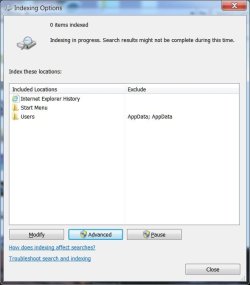
The index rebuild should list items indexed as it runs. I can't figure out why it won't run, it said 0 Items Indexed.
 

My Computer My Computer

At a glance

Windows 7 Ultimate X64 SP1Intel i5-2550K, Differing ~4.4-4.8GHz No buil...16GB G.Skill Sniper 1866MHz @ 2133MHz 2x8GBASUS GTX650TIB-DC2OC-2GD5, (650TI Boost)
Computer type
PC/Desktop
Computer Manufacturer/Model Number
Home Built Desktop By DataTech
OS
Windows 7 Ultimate X64 SP1
CPU
Intel i5-2550K, Differing ~4.4-4.8GHz No built in GPU
Motherboard
ASUS P8Z68-V PRO/GEN3
Memory
16GB G.Skill Sniper 1866MHz @ 2133MHz 2x8GB
Graphics Card(s)
ASUS GTX650TIB-DC2OC-2GD5, (650TI Boost)
Sound Card
Onboard Realtek 5-1
Monitor(s) Displays
Samsung P2570HD
Screen Resolution
1920x1080
Hard Drives
Samsung 840 Pro 256GB SSD for OS, 500GB Seagate Constellation (Enterprise drive) for Data
PSU
Corsair HX650W
Case
Inwin Dragon Rider
Cooling
Hyper 212 EVO w/two Noctua fans, push-pull, @1300 RPM
Keyboard
E-Z Eyes, bright yellow keys with large characters
Mouse
steelseries SENSEI Laser Pro Gaming
Internet Speed
48-51Mbs Mbs down, 11 Mbs up Xfinity Cable
Antivirus
Norton Internet Security 2013
Browser
IE 10, Opera, Pale Moon if needed
Other Info
4 case fans, LG BluRay-RE, ASUS DVD-RW, Mr. Fusion power supply, 1.21 gigawatts.
Britton30: This is a perplexing issue.
We're going through all the steps I can think of. The active Pause button is bugging me. But I can't recall the solution for that. I think it was one of those "Really? that's it" solutions.

If that old brain cell of mine that holds the key fires up, I'll offer it, but we're trying everything that I've run across.
The tutorials are a big help when an explanation or steps are needed
... ever try searching for search? :p

Thanks for pitching in.

Sorry grandpavic, Britton30 and I were just comparing notes.

I'm waiting for a reponse from you about the properties of the Videos Library.

edit: Maybe it's a different question -> Do you have a Videos Library?
 

My Computer My Computer

At a glance

x64 (6.3.9600) Win8.1 Pro & soon dual boot x6...AMD A6-3420M APU with Radeon(tm) HD Graphics6.00 GBAMD Radeon(TM) HD 6520G
Computer type
Laptop
Computer Manufacturer/Model Number
HP Pavilion dv6-6c10us
OS
x64 (6.3.9600) Win8.1 Pro & soon dual boot x64 (6.1.7601) Win7_SP1 HomePrem
CPU
AMD A6-3420M APU with Radeon(tm) HD Graphics
Motherboard
Hewlett-Packard 1805
Memory
6.00 GB
Graphics Card(s)
AMD Radeon(TM) HD 6520G
Sound Card
(1) AMD High Definition Audio Device (2) IDT High Definiti
Monitor(s) Displays
HP W2072a 20" LCD (1600 x 900) @ 60 Hz
Screen Resolution
1366 x 768 x 32 bits (4294967296 colors) @ 60 Hz
Hard Drives
ST640LM0 00 HM641JI SATA Disk Device
Keyboard
Logitech k520 wireless KB
Mouse
Logitech m320 wireless mouse (bundled with KB)
Internet Speed
15/5 | 54 MB Wireless 'n'
Antivirus
Realtime: Defender or Avast | On-demand: Malwarebytes, ESET
Browser
IE 11 on Win8, IE 10 on win 7
Other Info
Media: [Gimp, Audacity, VLC] || Comm: [WEmail 2012, Skype] || Productivity: [OpenOffice,| Textpad] || Utils: [Sysinternals, cCleaner, Speccy, Defraggler]
grandpavic: Think of Libraries in this fashion

You have a document that you have indexed and want to rewrite the index but not the document.
So you delete the index and make a new one
The document is intact and has a new updated index.

That's pretty much my plan for Libraies - in shorthand notes so you know where this is heading
You don't have to figure out what or when I'll give more details at the time you need it.

Delete the Library (the index) - not the documents, pictures, music or videos
See if you can rebuild the Search Index - this might complain without any Libraries
regardless of whether Rebuild Search Index works or fails
Restore default Libraies
Put the references back in the Libraries - I might suggest some changes on whcih folders to put in which library
Try rebuilding the Search Index

If search works, then Libraries caused it

If not, we'll try the next thing.

So as soon as you let me know about the Videos Library, we can start the process.
Ok?
 

My Computer My Computer

At a glance

x64 (6.3.9600) Win8.1 Pro & soon dual boot x6...AMD A6-3420M APU with Radeon(tm) HD Graphics6.00 GBAMD Radeon(TM) HD 6520G
Computer type
Laptop
Computer Manufacturer/Model Number
HP Pavilion dv6-6c10us
OS
x64 (6.3.9600) Win8.1 Pro & soon dual boot x64 (6.1.7601) Win7_SP1 HomePrem
CPU
AMD A6-3420M APU with Radeon(tm) HD Graphics
Motherboard
Hewlett-Packard 1805
Memory
6.00 GB
Graphics Card(s)
AMD Radeon(TM) HD 6520G
Sound Card
(1) AMD High Definition Audio Device (2) IDT High Definiti
Monitor(s) Displays
HP W2072a 20" LCD (1600 x 900) @ 60 Hz
Screen Resolution
1366 x 768 x 32 bits (4294967296 colors) @ 60 Hz
Hard Drives
ST640LM0 00 HM641JI SATA Disk Device
Keyboard
Logitech k520 wireless KB
Mouse
Logitech m320 wireless mouse (bundled with KB)
Internet Speed
15/5 | 54 MB Wireless 'n'
Antivirus
Realtime: Defender or Avast | On-demand: Malwarebytes, ESET
Browser
IE 11 on Win8, IE 10 on win 7
Other Info
Media: [Gimp, Audacity, VLC] || Comm: [WEmail 2012, Skype] || Productivity: [OpenOffice,| Textpad] || Utils: [Sysinternals, cCleaner, Speccy, Defraggler]
Take a look at http://www.sevenforums.com/general-...yourself-there-s-plenty-more.html#post1941881

I built a reference for myslef and others whne I was first learning Win7. Unfortunately almost every link to a Microsoft webpage has been replaced with Win8 inforamtion.

Luckily, I captured some of the information. When I get motivated, I might hunt down the reference and update the link.

I thought I might give you some more information on Libraries.

Bill
-
 

My Computer My Computer

At a glance

x64 (6.3.9600) Win8.1 Pro & soon dual boot x6...AMD A6-3420M APU with Radeon(tm) HD Graphics6.00 GBAMD Radeon(TM) HD 6520G
Computer type
Laptop
Computer Manufacturer/Model Number
HP Pavilion dv6-6c10us
OS
x64 (6.3.9600) Win8.1 Pro & soon dual boot x64 (6.1.7601) Win7_SP1 HomePrem
CPU
AMD A6-3420M APU with Radeon(tm) HD Graphics
Motherboard
Hewlett-Packard 1805
Memory
6.00 GB
Graphics Card(s)
AMD Radeon(TM) HD 6520G
Sound Card
(1) AMD High Definition Audio Device (2) IDT High Definiti
Monitor(s) Displays
HP W2072a 20" LCD (1600 x 900) @ 60 Hz
Screen Resolution
1366 x 768 x 32 bits (4294967296 colors) @ 60 Hz
Hard Drives
ST640LM0 00 HM641JI SATA Disk Device
Keyboard
Logitech k520 wireless KB
Mouse
Logitech m320 wireless mouse (bundled with KB)
Internet Speed
15/5 | 54 MB Wireless 'n'
Antivirus
Realtime: Defender or Avast | On-demand: Malwarebytes, ESET
Browser
IE 11 on Win8, IE 10 on win 7
Other Info
Media: [Gimp, Audacity, VLC] || Comm: [WEmail 2012, Skype] || Productivity: [OpenOffice,| Textpad] || Utils: [Sysinternals, cCleaner, Speccy, Defraggler]
Thanks, that's not any trouble.

Anything in videos Library?

A few things I'd like to mention.
1) If I miss something - just post "Hey Bill - look at post# x" and I'll take a look. There is a post back up the thread where you asked some questions - I missed them.
re: change Index location -> one of the last things I was going to suggest
re: useful information -> yes it tells me that you found the search index location, and it tells me that the structure looks good. It doesn't give me much more on why this is happening though. I might look at that again - thanks for posting it..

Could you look at that again .... there were two files with 0 bytes at the end of the listing


2) Paint: I got tired of the extra white space when I first started using Paint to post images.
If you change the default properties in Paint to .5 width and .5 height it fixes that.
Click on the menu in the upper left hand area of Paint
Select Properties and set the width and height, I don't know if you have to close and save for the change to stick, but go ahead - make a small white box image - call it x or junk, the name doesn't matter
most images you paste into Paint are larger that that, so the extra canvas isn't there.

Just a tip - nothing important

Done, thanx
 

My Computer My Computer

At a glance

windows 7 home premium 64 bit
Computer type
Laptop
Computer Manufacturer/Model Number
Dell 1550
OS
windows 7 home premium 64 bit

Attachments

  • video.jpg
    video.jpg
    33 KB · Views: 19

My Computer My Computer

At a glance

windows 7 home premium 64 bit
Computer type
Laptop
Computer Manufacturer/Model Number
Dell 1550
OS
windows 7 home premium 64 bit
Thanks, that's not any trouble.

Anything in videos Library?

A few things I'd like to mention.
1) If I miss something - just post "Hey Bill - look at post# x" and I'll take a look. There is a post back up the thread where you asked some questions - I missed them.
re: change Index location -> one of the last things I was going to suggest
re: useful information -> yes it tells me that you found the search index location, and it tells me that the structure looks good. It doesn't give me much more on why this is happening though. I might look at that again - thanks for posting it.

2) Paint: I got tired of the extra white space when I first started using Paint to post images.
If you change the default properties in Paint to .5 width and .5 height it fixes that.
Click on the menu in the upper left hand area of Paint
Select Properties and set the width and height, I don't know if you have to close and save for the change to stick, but go ahead - make a small white box image - call it x or junk, the name doesn't matter
most images you paste into Paint are larger that that, so the extra canvas isn't there.

Just a tip - nothing important.


I have another question. I can connect to a second computer on my home network. If I enter one of the Libraries there, should I be able to search the My Documents folder?
 

My Computer My Computer

At a glance

windows 7 home premium 64 bit
Computer type
Laptop
Computer Manufacturer/Model Number
Dell 1550
OS
windows 7 home premium 64 bit
Ok, great. No big project to reconstruct your Libraries.


Maybe I should add something...
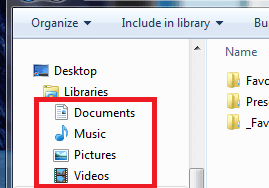
Do you have non-standard Libraries?
Ones you might have created... that are not the 4 we've discussed?

If the answer is "No, I only have the 4 standard Libraries" then please do the following
- if yes, post images so we can reconstruct them easily

In the navigation pane of a Windows Explorer
Right click each Library
Select delete from the menu

When there are no more Libraries under Library
try a search
regardless if search works or not Rebuild the Search Index
-> not sure if it will choke without the Libraries, but give it a shot
Still 0?
Still have an active Pause button (not opaque, but a clearly something you could push)
What happens if you push the Pause Button (just thought of trying that!)

Post the results of the Rebuild Index

You will Restore the default Libraries after we see what Rebuild Index did (or didn't do)
-> hold off on this part after you post the Rebuild Index results

Thanks.
 

Attachments

  • LibSel.PNG
    LibSel.PNG
    5.9 KB · Views: 19

My Computer My Computer

At a glance

x64 (6.3.9600) Win8.1 Pro & soon dual boot x6...AMD A6-3420M APU with Radeon(tm) HD Graphics6.00 GBAMD Radeon(TM) HD 6520G
Computer type
Laptop
Computer Manufacturer/Model Number
HP Pavilion dv6-6c10us
OS
x64 (6.3.9600) Win8.1 Pro & soon dual boot x64 (6.1.7601) Win7_SP1 HomePrem
CPU
AMD A6-3420M APU with Radeon(tm) HD Graphics
Motherboard
Hewlett-Packard 1805
Memory
6.00 GB
Graphics Card(s)
AMD Radeon(TM) HD 6520G
Sound Card
(1) AMD High Definition Audio Device (2) IDT High Definiti
Monitor(s) Displays
HP W2072a 20" LCD (1600 x 900) @ 60 Hz
Screen Resolution
1366 x 768 x 32 bits (4294967296 colors) @ 60 Hz
Hard Drives
ST640LM0 00 HM641JI SATA Disk Device
Keyboard
Logitech k520 wireless KB
Mouse
Logitech m320 wireless mouse (bundled with KB)
Internet Speed
15/5 | 54 MB Wireless 'n'
Antivirus
Realtime: Defender or Avast | On-demand: Malwarebytes, ESET
Browser
IE 11 on Win8, IE 10 on win 7
Other Info
Media: [Gimp, Audacity, VLC] || Comm: [WEmail 2012, Skype] || Productivity: [OpenOffice,| Textpad] || Utils: [Sysinternals, cCleaner, Speccy, Defraggler]
grandpavic asked: I have another question. I can connect to a second computer on my home network. If I enter one of the Libraries there, should I be able to search the My Documents folder?

Hmmm, that adds something to the equation. I'm not really up to speed on Homegroups and Sharing, but there is a relationship to Libraries (I think).

Let me answer with a question. Do you currently share or in the past shared the Libraires?
The only answer I can give you is "You can do that if Homegroups and sharing are setup and the proper access/security is established between the machines, users, and files"

At this point, I think you should proceed with the Library instructions - if you need to correct a share to the other computer, I'll get some help after you can search on the local machine.

Fair enough?
 
Last edited:

My Computer My Computer

At a glance

x64 (6.3.9600) Win8.1 Pro & soon dual boot x6...AMD A6-3420M APU with Radeon(tm) HD Graphics6.00 GBAMD Radeon(TM) HD 6520G
Computer type
Laptop
Computer Manufacturer/Model Number
HP Pavilion dv6-6c10us
OS
x64 (6.3.9600) Win8.1 Pro & soon dual boot x64 (6.1.7601) Win7_SP1 HomePrem
CPU
AMD A6-3420M APU with Radeon(tm) HD Graphics
Motherboard
Hewlett-Packard 1805
Memory
6.00 GB
Graphics Card(s)
AMD Radeon(TM) HD 6520G
Sound Card
(1) AMD High Definition Audio Device (2) IDT High Definiti
Monitor(s) Displays
HP W2072a 20" LCD (1600 x 900) @ 60 Hz
Screen Resolution
1366 x 768 x 32 bits (4294967296 colors) @ 60 Hz
Hard Drives
ST640LM0 00 HM641JI SATA Disk Device
Keyboard
Logitech k520 wireless KB
Mouse
Logitech m320 wireless mouse (bundled with KB)
Internet Speed
15/5 | 54 MB Wireless 'n'
Antivirus
Realtime: Defender or Avast | On-demand: Malwarebytes, ESET
Browser
IE 11 on Win8, IE 10 on win 7
Other Info
Media: [Gimp, Audacity, VLC] || Comm: [WEmail 2012, Skype] || Productivity: [OpenOffice,| Textpad] || Utils: [Sysinternals, cCleaner, Speccy, Defraggler]
I have another question. I can connect to a second computer on my home network. If I enter one of the Libraries there, should I be able to search the My Documents folder?
Yes, just like from your PC, if you have the target folder set to Share in its properties.
 

My Computer My Computer

At a glance

Windows 7 Ultimate X64 SP1Intel i5-2550K, Differing ~4.4-4.8GHz No buil...16GB G.Skill Sniper 1866MHz @ 2133MHz 2x8GBASUS GTX650TIB-DC2OC-2GD5, (650TI Boost)
Computer type
PC/Desktop
Computer Manufacturer/Model Number
Home Built Desktop By DataTech
OS
Windows 7 Ultimate X64 SP1
CPU
Intel i5-2550K, Differing ~4.4-4.8GHz No built in GPU
Motherboard
ASUS P8Z68-V PRO/GEN3
Memory
16GB G.Skill Sniper 1866MHz @ 2133MHz 2x8GB
Graphics Card(s)
ASUS GTX650TIB-DC2OC-2GD5, (650TI Boost)
Sound Card
Onboard Realtek 5-1
Monitor(s) Displays
Samsung P2570HD
Screen Resolution
1920x1080
Hard Drives
Samsung 840 Pro 256GB SSD for OS, 500GB Seagate Constellation (Enterprise drive) for Data
PSU
Corsair HX650W
Case
Inwin Dragon Rider
Cooling
Hyper 212 EVO w/two Noctua fans, push-pull, @1300 RPM
Keyboard
E-Z Eyes, bright yellow keys with large characters
Mouse
steelseries SENSEI Laser Pro Gaming
Internet Speed
48-51Mbs Mbs down, 11 Mbs up Xfinity Cable
Antivirus
Norton Internet Security 2013
Browser
IE 10, Opera, Pale Moon if needed
Other Info
4 case fans, LG BluRay-RE, ASUS DVD-RW, Mr. Fusion power supply, 1.21 gigawatts.
grandpavic asked: I have another question. I can connect to a second computer on my home network. If I enter one of the Libraries there, should I be able to search the My Documents folder?

Hmmm, that adds something to the equation. I'm not really up to speed on Homegroups and Sharing, but there is a relationship to Libraries (I think).

Let me answer with a question. Do you currently share or in the past shared the Libraires?
The only answer I can give you is "You can do that if Homegroups and sharing are setup and the proper access/security is established between the machines, users, and files"

At this point, I think you should proceed with the Library instructions - if you need to correct a share to the other computer, I'll get some help after you can search on the local machine.

Fair enough?

I would like to suggest a bit of a time out. An perhaps try a different tact.

The search function and index function are supported by a bunch of behind the scenes programs (they may have a more modern name, but that's what I call them). What happens if one or more pieces of software is corrupt or just plain missing (I don't know how that would happen).

I climbed on to my other machine and started to poke around. I found that I could search the folders on this machine over the network from my other machine.

When I went to find where the indices were stored on my other machine, the directory structure was the same, but the number of files (I presume these are the index file) on the other machine were much higher. If you go back to the screen shot of the terminal window that I posted to show that I had found the directories where the indices were stored, the last directory contains two files of 0 bytes. The same directory on my other machine had 256 files of various lengths.

So this poking around has led me to the suspicion that I have some kind of a software failure. How do we verify that my machine has a right bits and pieces to perform the indexing and searching tasks.
 

My Computer My Computer

At a glance

windows 7 home premium 64 bit
Computer type
Laptop
Computer Manufacturer/Model Number
Dell 1550
OS
windows 7 home premium 64 bit
Fair enough, we can poke around a bit. Taking a different tact is probably a bad idea at this point, I believe you are "this close" to getting Search to work on this machine.

It's your thread, your machine. I want you to feel comfortable doing these things.
Plus it will give me a chance to read through the thread and answer anything I might have missed.

Post 8: The Rebuild Index screen shows 0 Items Indexed / Indexing Completed
I expect the file(s) to be zero length.

Here's a list of the Search Index on my machine.
From C:\ProgramData\Microsoft I listed everything in the sub-folder Search and directed the output into a text file.
dir /a /s > c:\SrchIndx.txt

Code:
 Volume in drive C has no label.
 Volume Serial Number is 7603-9E3E
 Directory of C:\ProgramData\Microsoft\Search
04/15/2013  08:43    <DIR>          .
04/15/2013  08:43    <DIR>          ..
04/15/2013  08:43    <DIR>          Data
               0 File(s)              0 bytes
 Directory of C:\ProgramData\Microsoft\Search\Data
04/15/2013  08:43    <DIR>          .
04/15/2013  08:43    <DIR>          ..
12/13/2013  08:29    <DIR>          Applications
01/16/2014  03:20    <DIR>          Temp
               0 File(s)              0 bytes
 Directory of C:\ProgramData\Microsoft\Search\Data\Applications
12/13/2013  08:29    <DIR>          .
12/13/2013  08:29    <DIR>          ..
01/23/2014  20:50    <DIR>          Windows
               0 File(s)              0 bytes
 Directory of C:\ProgramData\Microsoft\Search\Data\Applications\Windows
01/23/2014  20:50    <DIR>          .
01/23/2014  20:50    <DIR>          ..
12/13/2013  08:29    <DIR>          Config
12/13/2013  08:29    <DIR>          GatherLogs
01/23/2014  21:32             8,192 MSS.chk
01/23/2014  20:50         1,048,576 MSS.log
01/23/2014  20:50         1,048,576 MSS0014B.log
12/13/2013  08:29         1,048,576 MSSres00001.jrs
12/13/2013  08:29         1,048,576 MSSres00002.jrs
01/23/2014  17:03         1,048,576 MSStmp.log
12/13/2013  08:29    <DIR>          Projects
01/16/2014  03:20         8,454,144 tmp.edb
01/16/2014  03:20        75,563,008 Windows.edb
               8 File(s)     89,268,224 bytes
 Directory of C:\ProgramData\Microsoft\Search\Data\Applications\Windows\Config
12/13/2013  08:29    <DIR>          .
12/13/2013  08:29    <DIR>          ..
               0 File(s)              0 bytes
 Directory of C:\ProgramData\Microsoft\Search\Data\Applications\Windows\GatherLogs
12/13/2013  08:29    <DIR>          .
12/13/2013  08:29    <DIR>          ..
01/24/2014  00:42    <DIR>          SystemIndex
               0 File(s)              0 bytes
 Directory of C:\ProgramData\Microsoft\Search\Data\Applications\Windows\GatherLogs\SystemIndex
01/24/2014  00:42    <DIR>          .
01/24/2014  00:42    <DIR>          ..
12/13/2013  19:12             5,532 SystemIndex.1.Crwl
12/22/2013  14:29               650 SystemIndex.10.Crwl
12/23/2013  10:35               650 SystemIndex.11.Crwl
12/24/2013  17:54             1,728 SystemIndex.12.Crwl
12/25/2013  09:00                 2 SystemIndex.13.Crwl
12/26/2013  18:59             3,534 SystemIndex.14.Crwl
12/28/2013  17:43             2,018 SystemIndex.15.Crwl
12/29/2013  18:00             1,346 SystemIndex.16.Crwl
12/30/2013  16:39             2,462 SystemIndex.17.Crwl
12/31/2013  23:59             1,570 SystemIndex.18.Crwl
01/01/2014  20:15             1,794 SystemIndex.19.Crwl
12/14/2013  17:23               866 SystemIndex.2.Crwl
01/02/2014  23:14             3,136 SystemIndex.20.Crwl
01/03/2014  21:05             1,570 SystemIndex.21.Crwl
01/04/2014  23:32             1,346 SystemIndex.22.Crwl
01/05/2014  18:15             4,040 SystemIndex.23.Crwl
01/06/2014  18:25             1,118 SystemIndex.24.Crwl
01/07/2014  22:14             2,466 SystemIndex.25.Crwl
01/08/2014  20:13             1,338 SystemIndex.26.Crwl
01/09/2014  23:23             2,462 SystemIndex.27.Crwl
01/10/2014  23:19             2,466 SystemIndex.28.Crwl
01/11/2014  23:43             2,018 SystemIndex.29.Crwl
12/15/2013  17:27             3,026 SystemIndex.3.Crwl
01/12/2014  19:42             1,794 SystemIndex.30.Crwl
01/13/2014  23:54               894 SystemIndex.31.Crwl
01/14/2014  20:03             1,122 SystemIndex.32.Crwl
01/15/2014  22:04             1,342 SystemIndex.33.Crwl
01/16/2014  21:56             2,690 SystemIndex.34.Crwl
01/17/2014  20:33             2,018 SystemIndex.35.Crwl
01/18/2014  18:34             2,016 SystemIndex.36.Crwl
01/19/2014  15:50             1,120 SystemIndex.37.Crwl
01/20/2014  12:44               674 SystemIndex.38.Crwl
01/20/2014  20:25            10,952 SystemIndex.38.gthr
01/21/2014  22:32             1,122 SystemIndex.39.Crwl
01/21/2014  22:32            10,382 SystemIndex.39.gthr
12/16/2013  13:49               218 SystemIndex.4.Crwl
01/22/2014  23:54             2,242 SystemIndex.40.Crwl
01/22/2014  23:54            24,574 SystemIndex.40.gthr
01/23/2014  21:32             1,570 SystemIndex.41.Crwl
01/23/2014  21:32             5,504 SystemIndex.41.gthr
01/24/2014  00:42                 0 SystemIndex.42.Crwl
01/24/2014  00:42                 0 SystemIndex.42.gthr
12/17/2013  16:03             1,946 SystemIndex.5.Crwl
12/18/2013  19:49             1,082 SystemIndex.6.Crwl
12/19/2013  15:16             1,946 SystemIndex.7.Crwl
12/20/2013  21:03             2,594 SystemIndex.8.Crwl
12/21/2013  13:29               434 SystemIndex.9.Crwl
              47 File(s)        125,374 bytes
 Directory of C:\ProgramData\Microsoft\Search\Data\Applications\Windows\Projects
12/13/2013  08:29    <DIR>          .
12/13/2013  08:29    <DIR>          ..
12/13/2013  08:29    <DIR>          SystemIndex
               0 File(s)              0 bytes
 Directory of C:\ProgramData\Microsoft\Search\Data\Applications\Windows\Projects\SystemIndex
12/13/2013  08:29    <DIR>          .
12/13/2013  08:29    <DIR>          ..
12/13/2013  08:29    <DIR>          Indexer
12/13/2013  08:29    <DIR>          PropMap
12/13/2013  08:29    <DIR>          SecStore
               0 File(s)              0 bytes
 Directory of C:\ProgramData\Microsoft\Search\Data\Applications\Windows\Projects\SystemIndex\Indexer
12/13/2013  08:29    <DIR>          .
12/13/2013  08:29    <DIR>          ..
01/23/2014  21:32    <DIR>          CiFiles
               0 File(s)              0 bytes
 Directory of C:\ProgramData\Microsoft\Search\Data\Applications\Windows\Projects\SystemIndex\Indexer\CiFiles
01/23/2014  21:32    <DIR>          .
01/23/2014  21:32    <DIR>          ..
01/23/2014  19:43            45,056 00010001.ci
01/23/2014  19:43             4,096 00010001.dir
01/23/2014  19:43            65,536 00010001.wid
01/23/2014  20:51            40,960 00010002.ci
01/23/2014  20:51             4,096 00010002.dir
01/23/2014  20:51            65,536 00010002.wid
01/23/2014  00:58            53,248 00010003.ci
01/23/2014  00:58             4,096 00010003.dir
01/23/2014  00:58            65,536 00010003.wid
01/23/2014  21:18            53,248 00010004.ci
01/23/2014  21:18             4,096 00010004.dir
01/23/2014  21:18            65,536 00010004.wid
01/23/2014  21:32            16,384 00010005.ci
01/23/2014  21:32             4,096 00010005.dir
01/23/2014  21:32            65,536 00010005.wid
01/23/2014  17:00           745,472 00010011.ci
01/23/2014  17:00            12,288 00010011.dir
01/23/2014  17:00            65,536 00010011.wid
01/23/2014  17:36           176,128 00010012.ci
01/23/2014  17:36             4,096 00010012.dir
01/23/2014  17:36            65,536 00010012.wid
01/23/2014  19:14           368,640 00010014.ci
01/23/2014  19:14             4,096 00010014.dir
01/23/2014  19:14            65,536 00010014.wid
01/22/2014  21:08        67,268,608 00010018.ci
01/22/2014  21:08           720,896 00010018.dir
01/22/2014  21:08            65,536 00010018.wid
01/22/2014  21:08            65,536 00010018.wsb
01/22/2014  21:08               240 CiAB0001.000
12/13/2013  09:47            65,536 CiAB0001.001
12/13/2013  09:47            65,536 CiAB0001.002
01/22/2014  21:08               240 CiAB0002.000
12/13/2013  09:47            65,536 CiAB0002.001
12/13/2013  09:47            65,536 CiAB0002.002
01/22/2014  21:08               240 CiAD0002.000
01/22/2014  21:08            65,536 CiAD0002.001
01/22/2014  21:08            65,536 CiAD0002.002
01/16/2014  00:55               240 INDEX.000
12/13/2013  08:29            65,536 INDEX.001
12/13/2013  08:29            65,536 INDEX.002
12/13/2013  08:29                 4 SETTINGS.DIA
              41 File(s)     70,710,212 bytes
 Directory of C:\ProgramData\Microsoft\Search\Data\Applications\Windows\Projects\SystemIndex\PropMap
12/13/2013  08:29    <DIR>          .
12/13/2013  08:29    <DIR>          ..
01/01/2014  02:24               240 CiPT0000.000
12/13/2013  08:29            65,536 CiPT0000.001
12/13/2013  08:29            65,536 CiPT0000.002
               3 File(s)        131,312 bytes
 Directory of C:\ProgramData\Microsoft\Search\Data\Applications\Windows\Projects\SystemIndex\SecStore
12/13/2013  08:29    <DIR>          .
12/13/2013  08:29    <DIR>          ..
12/30/2013  10:02               240 CiST0000.000
12/13/2013  08:29            65,536 CiST0000.001
12/13/2013  08:29            65,536 CiST0000.002
               3 File(s)        131,312 bytes
 Directory of C:\ProgramData\Microsoft\Search\Data\Temp
01/16/2014  03:20    <DIR>          .
01/16/2014  03:20    <DIR>          ..
01/16/2014  03:20    <DIR>          usgthrsvc
               0 File(s)              0 bytes
 Directory of C:\ProgramData\Microsoft\Search\Data\Temp\usgthrsvc
01/16/2014  03:20    <DIR>          .
01/16/2014  03:20    <DIR>          ..
               0 File(s)              0 bytes
     Total Files Listed:
             102 File(s)    160,366,434 bytes
              44 Dir(s)  85,988,450,304 bytes free

Comparing two machine's search indices doesn't tell you much - the number of files and directories that are indexed on the two machines will naturally be different. What we do see is that search hasn't indexed anythiing on the machine you're working on.

Post 15: Windows Search is started and set to automatic.

Post 18: Search troubleshooter didn't find any problems.
Yeah the amd64 confuses lots of people. AMD got the naming rights to the x64 architechture because they beat Intel releasing a 64 bit CPU.

The Toubleshooting report, your screenshot shows:
:info: User-reported problems
Problem Type: FileMissingProblem

That looks like there might be some file missing, but it is just the way the troubleshooter identifies what was ticked when it was started.
You ticked: "Files don't appear in results"

Post 31: You asked me to double check post 11, I did. I should have posted the following:
The Rebuild Index screen shows 0 Items Indexed / Indexing Completed
I expect the file(s) to be zero length.

After that we had a sideline discussion on Homegroups/sharing. I suggested we finish what we're doing and IF there is something to address on that we would address it after we fixed search.

If any of the files required to search were missing or corrupt, the Windows search service wouldn't start.
I can't think of anything else to tell you, everything you've done so far is by the book.
Remove C:\ and Program files from the index
Rebuild the Search Index
Run the Search troubleshooter
Run MS Fixit -Search not showing results
Verified Search in Start menu and Windows Explore doesn't work (sometimes one will and the other won't)
Checked Search other files and libraries -> search without public folders
verified Windows search was running
restored folder search options per Search Options - Change or Restore

Now we have a status of things as they stand.

Could you post a screen shot of Indexing Options - you said in Post 16 that it was greyed out. I just want to make sure words are getting in the way of communicating :)

Repairing Libraries is the next logical step, then if that fails to resolve it, try moving the earch index.

Your call, but I've given you what I think is the proper course.

Bill
 

My Computer My Computer

At a glance

x64 (6.3.9600) Win8.1 Pro & soon dual boot x6...AMD A6-3420M APU with Radeon(tm) HD Graphics6.00 GBAMD Radeon(TM) HD 6520G
Computer type
Laptop
Computer Manufacturer/Model Number
HP Pavilion dv6-6c10us
OS
x64 (6.3.9600) Win8.1 Pro & soon dual boot x64 (6.1.7601) Win7_SP1 HomePrem
CPU
AMD A6-3420M APU with Radeon(tm) HD Graphics
Motherboard
Hewlett-Packard 1805
Memory
6.00 GB
Graphics Card(s)
AMD Radeon(TM) HD 6520G
Sound Card
(1) AMD High Definition Audio Device (2) IDT High Definiti
Monitor(s) Displays
HP W2072a 20" LCD (1600 x 900) @ 60 Hz
Screen Resolution
1366 x 768 x 32 bits (4294967296 colors) @ 60 Hz
Hard Drives
ST640LM0 00 HM641JI SATA Disk Device
Keyboard
Logitech k520 wireless KB
Mouse
Logitech m320 wireless mouse (bundled with KB)
Internet Speed
15/5 | 54 MB Wireless 'n'
Antivirus
Realtime: Defender or Avast | On-demand: Malwarebytes, ESET
Browser
IE 11 on Win8, IE 10 on win 7
Other Info
Media: [Gimp, Audacity, VLC] || Comm: [WEmail 2012, Skype] || Productivity: [OpenOffice,| Textpad] || Utils: [Sysinternals, cCleaner, Speccy, Defraggler]
Ok, great. No big project to reconstruct your Libraries.

In the navigation pane of a Windows Explorer
Right click each Library
Select delete from the menu

When there are no more Libraries under Library
try a search


The four libraries have been deleted. The search doesn't work.


regardless if search works or not Rebuild the Search Index
-> not sure if it will choke without the Libraries, but give it a shot
Still 0?
Still have an active Pause button (not opaque, but a clearly something you could push)
What happens if you push the Pause Button (just thought of trying that!)

Post the results of the Rebuild Index

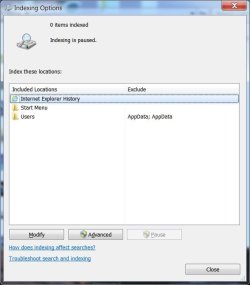
The indexing has been redone with the same result. I did not not push the Pause during the rebuilding exercise. After the rebuild had completed, the Pause button was still active so I gave it a push without any result. After about say 4 minutes, the Pause button became greyed out after the rebuild had completed.

See below:
 

Attachments

  • index1.jpg
    index1.jpg
    30.8 KB · Views: 14
  • index2.jpg
    index2.jpg
    29.9 KB · Views: 14
  • index3.jpg
    index3.jpg
    30.5 KB · Views: 14

My Computer My Computer

At a glance

windows 7 home premium 64 bit
Computer type
Laptop
Computer Manufacturer/Model Number
Dell 1550
OS
windows 7 home premium 64 bit
That's interesting....
the 2nd screen shot shows indexing complete with an 'active' pause button
pushing the pause button AFTER index complete took about 4 mins to 'inactivate' the pause button

I'm going to add one step to the plan and move restore libraries to the end

Indexing seems to be tripping over itself - might be from having the C:\drive and Program Files indexed - we fixed that early on.

Add step: clear the index of all entries, add them back one at a time once indexing settles down

On the Indexing Options dialog, click modify - that opens the indexed locations
click on show all locations
then click on Internet Explorer entry under summary of selected locations to show the checked locations
untick any checkbox that is ticked
you can scroll up and down the list - unticking as you go, or you can click an entry in the summary to go directly to that entry in the change slected locations.
as you untick , the entry in the summary should disappear.

The goal of this exercise is to clear out everything before moving the index to a new location.
When there are no entries shown in teh Summary, click OK
close Indexing options and restart you machine.

after the restart, rebuild the index
since there are no entries to be indexed, it should be realtively quick.
It does have to clean up the entries it already had, so it might take some time.
how long? It's impossible to say on your machine
- indexing is slow, but 4 mins to inactivate the pause button is a long time even for Search index.

When the rebuild shows completed, we'll switch gears and work on restoring the Libraries
That will be a breeze compared to all of the hoops of straightening out the Search Index
 

My Computer My Computer

At a glance

x64 (6.3.9600) Win8.1 Pro & soon dual boot x6...AMD A6-3420M APU with Radeon(tm) HD Graphics6.00 GBAMD Radeon(TM) HD 6520G
Computer type
Laptop
Computer Manufacturer/Model Number
HP Pavilion dv6-6c10us
OS
x64 (6.3.9600) Win8.1 Pro & soon dual boot x64 (6.1.7601) Win7_SP1 HomePrem
CPU
AMD A6-3420M APU with Radeon(tm) HD Graphics
Motherboard
Hewlett-Packard 1805
Memory
6.00 GB
Graphics Card(s)
AMD Radeon(TM) HD 6520G
Sound Card
(1) AMD High Definition Audio Device (2) IDT High Definiti
Monitor(s) Displays
HP W2072a 20" LCD (1600 x 900) @ 60 Hz
Screen Resolution
1366 x 768 x 32 bits (4294967296 colors) @ 60 Hz
Hard Drives
ST640LM0 00 HM641JI SATA Disk Device
Keyboard
Logitech k520 wireless KB
Mouse
Logitech m320 wireless mouse (bundled with KB)
Internet Speed
15/5 | 54 MB Wireless 'n'
Antivirus
Realtime: Defender or Avast | On-demand: Malwarebytes, ESET
Browser
IE 11 on Win8, IE 10 on win 7
Other Info
Media: [Gimp, Audacity, VLC] || Comm: [WEmail 2012, Skype] || Productivity: [OpenOffice,| Textpad] || Utils: [Sysinternals, cCleaner, Speccy, Defraggler]
Back
Top