Solved Indexing and Searching broken

There's no harm having an empty Search Index.

You've basically told Search Index not to store additional information in a DB for any file. The Index facilitates searching on attributes; as in the year an album was released, or the composer on the album.

When this is all said and done, the Index will start storing that information again.
 

My Computer My Computer

At a glance

x64 (6.3.9600) Win8.1 Pro & soon dual boot x6...AMD A6-3420M APU with Radeon(tm) HD Graphics6.00 GBAMD Radeon(TM) HD 6520G
Computer type
Laptop
Computer Manufacturer/Model Number
HP Pavilion dv6-6c10us
OS
x64 (6.3.9600) Win8.1 Pro & soon dual boot x64 (6.1.7601) Win7_SP1 HomePrem
CPU
AMD A6-3420M APU with Radeon(tm) HD Graphics
Motherboard
Hewlett-Packard 1805
Memory
6.00 GB
Graphics Card(s)
AMD Radeon(TM) HD 6520G
Sound Card
(1) AMD High Definition Audio Device (2) IDT High Definiti
Monitor(s) Displays
HP W2072a 20" LCD (1600 x 900) @ 60 Hz
Screen Resolution
1366 x 768 x 32 bits (4294967296 colors) @ 60 Hz
Hard Drives
ST640LM0 00 HM641JI SATA Disk Device
Keyboard
Logitech k520 wireless KB
Mouse
Logitech m320 wireless mouse (bundled with KB)
Internet Speed
15/5 | 54 MB Wireless 'n'
Antivirus
Realtime: Defender or Avast | On-demand: Malwarebytes, ESET
Browser
IE 11 on Win8, IE 10 on win 7
Other Info
Media: [Gimp, Audacity, VLC] || Comm: [WEmail 2012, Skype] || Productivity: [OpenOffice,| Textpad] || Utils: [Sysinternals, cCleaner, Speccy, Defraggler]
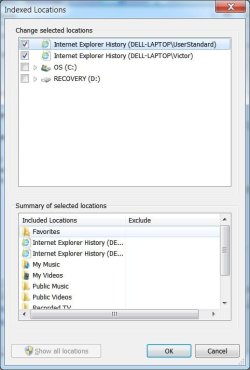
The goal of this exercise is to clear out everything before moving the index to a new location.
When there are no entries shown in teh Summary, click OK
close Indexing options and restart you machine.

It still wants to index the Start Menu --- how do I get rid of that


Figured it out!!
 
Last edited:

My Computer My Computer

At a glance

windows 7 home premium 64 bit
Computer type
Laptop
Computer Manufacturer/Model Number
Dell 1550
OS
windows 7 home premium 64 bit
That's interesting....
the 2nd screen shot shows indexing complete with an 'active' pause button
pushing the pause button AFTER index complete took about 4 mins to 'inactivate' the pause button

I'm going to add one step to the plan and move restore libraries to the end

Indexing seems to be tripping over itself - might be from having the C:\drive and Program Files indexed - we fixed that early on.

Add step: clear the index of all entries, add them back one at a time once indexing settles down

On the Indexing Options dialog, click modify - that opens the indexed locations
click on show all locations
then click on Internet Explorer entry under summary of selected locations to show the checked locations
untick any checkbox that is ticked
you can scroll up and down the list - unticking as you go, or you can click an entry in the summary to go directly to that entry in the change slected locations.
as you untick , the entry in the summary should disappear.

The goal of this exercise is to clear out everything before moving the index to a new location.
When there are no entries shown in teh Summary, click OK
close Indexing options and restart you machine.

after the restart, rebuild the index
since there are no entries to be indexed, it should be realtively quick.
It does have to clean up the entries it already had, so it might take some time.
how long? It's impossible to say on your machine
- indexing is slow, but 4 mins to inactivate the pause button is a long time even for Search index.

When the rebuild shows completed, we'll switch gears and work on restoring the Libraries
That will be a breeze compared to all of the hoops of straightening out the Search Index


done
 

Attachments

  • nothing to index.jpg
    nothing to index.jpg
    25 KB · Views: 25

My Computer My Computer

At a glance

windows 7 home premium 64 bit
Computer type
Laptop
Computer Manufacturer/Model Number
Dell 1550
OS
windows 7 home premium 64 bit
Sorry for the delay.

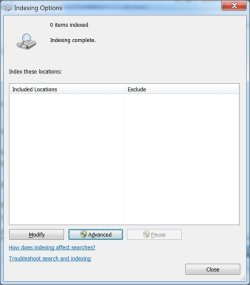
Alright, that looks promising - 0 items indexed (expected), Indexing complete and the pause button is inactive.

Libraries -> Right click on Libraries in the navigation pane of explorer
click Restore default libraries.

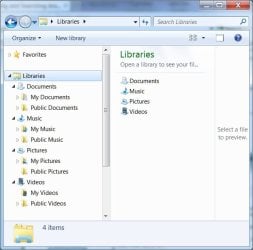
The 4 std Libraries (Documents, Music, Pictures, Videos) should now be available . There might/should be two locations in each library by default.

This one is always difficult to describe.
Your My folders that correspond to the library (Library Documents has My Documents, etc)
Plus the Public folders that correcpond to the Library.

It will be clear when you open any of the Libraries.

The next step is to discuss how Libraries can help and how they can not help.
Looking at the previous Library setup on your machine in post# 21, post# 23, and post# 32 shows that only Pictures and Music need some work. Documents and Videos Libraries are fine after teh Restor Library action.

I'll wait until you post that is what you see before putting anything back in the Libraies.

Bill
 

My Computer My Computer

At a glance

x64 (6.3.9600) Win8.1 Pro & soon dual boot x6...AMD A6-3420M APU with Radeon(tm) HD Graphics6.00 GBAMD Radeon(TM) HD 6520G
Computer type
Laptop
Computer Manufacturer/Model Number
HP Pavilion dv6-6c10us
OS
x64 (6.3.9600) Win8.1 Pro & soon dual boot x64 (6.1.7601) Win7_SP1 HomePrem
CPU
AMD A6-3420M APU with Radeon(tm) HD Graphics
Motherboard
Hewlett-Packard 1805
Memory
6.00 GB
Graphics Card(s)
AMD Radeon(TM) HD 6520G
Sound Card
(1) AMD High Definition Audio Device (2) IDT High Definiti
Monitor(s) Displays
HP W2072a 20" LCD (1600 x 900) @ 60 Hz
Screen Resolution
1366 x 768 x 32 bits (4294967296 colors) @ 60 Hz
Hard Drives
ST640LM0 00 HM641JI SATA Disk Device
Keyboard
Logitech k520 wireless KB
Mouse
Logitech m320 wireless mouse (bundled with KB)
Internet Speed
15/5 | 54 MB Wireless 'n'
Antivirus
Realtime: Defender or Avast | On-demand: Malwarebytes, ESET
Browser
IE 11 on Win8, IE 10 on win 7
Other Info
Media: [Gimp, Audacity, VLC] || Comm: [WEmail 2012, Skype] || Productivity: [OpenOffice,| Textpad] || Utils: [Sysinternals, cCleaner, Speccy, Defraggler]
Sorry for the delay.

Alright, that looks promising - 0 items indexed (expected), Indexing complete and the pause button is inactive.

Libraries -> Right click on Libraries in the navigation pane of explorer
click Restore default libraries.

The 4 std Libraries (Documents, Music, Pictures, Videos) should now be available . There might/should be two locations in each library by default.

This one is always difficult to describe.
Your My folders that correspond to the library (Library Documents has My Documents, etc)
Plus the Public folders that correcpond to the Library.

It will be clear when you open any of the Libraries.

The next step is to discuss how Libraries can help and how they can not help.
Looking at the previous Library setup on your machine in post# 21, post# 23, and post# 32 shows that only Pictures and Music need some work. Documents and Videos Libraries are fine after teh Restor Library action.

I'll wait until you post that is what you see before putting anything back in the Libraies.

Bill

Is this what you want to see. I am not sure how it go that way because I don't recall doing the restore!
 

Attachments

  • newlibraries.jpg
    newlibraries.jpg
    40.2 KB · Views: 23

My Computer My Computer

At a glance

windows 7 home premium 64 bit
Computer type
Laptop
Computer Manufacturer/Model Number
Dell 1550
OS
windows 7 home premium 64 bit
Excellent - thanks.

See if Indexing Options shows anything interesting. The number of files indexed... folders in the indexed locations.
You don't have to do anything other than check to see if it's getting populated.

If you want, post a screen shot.
 

My Computer My Computer

At a glance

x64 (6.3.9600) Win8.1 Pro & soon dual boot x6...AMD A6-3420M APU with Radeon(tm) HD Graphics6.00 GBAMD Radeon(TM) HD 6520G
Computer type
Laptop
Computer Manufacturer/Model Number
HP Pavilion dv6-6c10us
OS
x64 (6.3.9600) Win8.1 Pro & soon dual boot x64 (6.1.7601) Win7_SP1 HomePrem
CPU
AMD A6-3420M APU with Radeon(tm) HD Graphics
Motherboard
Hewlett-Packard 1805
Memory
6.00 GB
Graphics Card(s)
AMD Radeon(TM) HD 6520G
Sound Card
(1) AMD High Definition Audio Device (2) IDT High Definiti
Monitor(s) Displays
HP W2072a 20" LCD (1600 x 900) @ 60 Hz
Screen Resolution
1366 x 768 x 32 bits (4294967296 colors) @ 60 Hz
Hard Drives
ST640LM0 00 HM641JI SATA Disk Device
Keyboard
Logitech k520 wireless KB
Mouse
Logitech m320 wireless mouse (bundled with KB)
Internet Speed
15/5 | 54 MB Wireless 'n'
Antivirus
Realtime: Defender or Avast | On-demand: Malwarebytes, ESET
Browser
IE 11 on Win8, IE 10 on win 7
Other Info
Media: [Gimp, Audacity, VLC] || Comm: [WEmail 2012, Skype] || Productivity: [OpenOffice,| Textpad] || Utils: [Sysinternals, cCleaner, Speccy, Defraggler]
Excellent - thanks.

See if Indexing Options shows anything interesting. The number of files indexed... folders in the indexed locations.
You don't have to do anything other than check to see if it's getting populated.

If you want, post a screen shot.


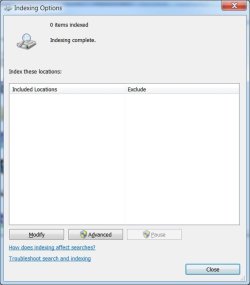
Is this what you expect?
 

Attachments

  • noindex.jpg
    noindex.jpg
    24.7 KB · Views: 22

My Computer My Computer

At a glance

windows 7 home premium 64 bit
Computer type
Laptop
Computer Manufacturer/Model Number
Dell 1550
OS
windows 7 home premium 64 bit
Not exactly, but most likely due to teh fact that there are no idexed locations configured.

A little background on Libraries and then we'll see if telling Search to index locations gets things straightened out.

Let's say you have a folder called Holiday and it contains pictures taken while on vacation somewhere on your machine.
The Holiday folder is not in the Indexed Locations
You then add the Holiday folder to your Pictures Library

By adding Holiday to the Pictures Library, they are indexed.
It's part of the way Libraries work.

So I half expected something in the summary list.

Alright, let's put some entries in the Indexed Locations.
Stick with the basic entires, Interent Explorer History, Start Menu, Your user.
Too many entries slows Indexing down and this might have been the cause of the problem. I don't know what casued the problem, but that's not important now.

On the Indexing Options windows
Click on modify which opens the Indexed Locations window.
then on the Indexed Locations window
click the show all locations button
tick Internet Explorer History
then expand C:\
then expand Users
:note: I only have my own user profile ticked - I don't ever search Public or Default
tick your user profile name
then expand that
remove the tick from Appdata

scroll teh list until C:\ is visible again and
expand Program Data
expand Microsoft
expand Windows
tick Start menu

then click the OK button

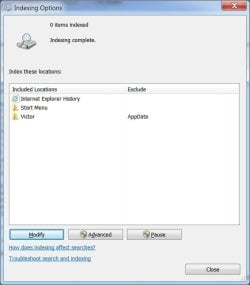
Post a screen shot of the Indexing Options window.

Thanks, we're almost there... I hope. I only have one trick left in the back after this.
 

My Computer My Computer

At a glance

x64 (6.3.9600) Win8.1 Pro & soon dual boot x6...AMD A6-3420M APU with Radeon(tm) HD Graphics6.00 GBAMD Radeon(TM) HD 6520G
Computer type
Laptop
Computer Manufacturer/Model Number
HP Pavilion dv6-6c10us
OS
x64 (6.3.9600) Win8.1 Pro & soon dual boot x64 (6.1.7601) Win7_SP1 HomePrem
CPU
AMD A6-3420M APU with Radeon(tm) HD Graphics
Motherboard
Hewlett-Packard 1805
Memory
6.00 GB
Graphics Card(s)
AMD Radeon(TM) HD 6520G
Sound Card
(1) AMD High Definition Audio Device (2) IDT High Definiti
Monitor(s) Displays
HP W2072a 20" LCD (1600 x 900) @ 60 Hz
Screen Resolution
1366 x 768 x 32 bits (4294967296 colors) @ 60 Hz
Hard Drives
ST640LM0 00 HM641JI SATA Disk Device
Keyboard
Logitech k520 wireless KB
Mouse
Logitech m320 wireless mouse (bundled with KB)
Internet Speed
15/5 | 54 MB Wireless 'n'
Antivirus
Realtime: Defender or Avast | On-demand: Malwarebytes, ESET
Browser
IE 11 on Win8, IE 10 on win 7
Other Info
Media: [Gimp, Audacity, VLC] || Comm: [WEmail 2012, Skype] || Productivity: [OpenOffice,| Textpad] || Utils: [Sysinternals, cCleaner, Speccy, Defraggler]
Not exactly, but most likely due to teh fact that there are no idexed locations configured.

A little background on Libraries and then we'll see if telling Search to index locations gets things straightened out.

Let's say you have a folder called Holiday and it contains pictures taken while on vacation somewhere on your machine.
The Holiday folder is not in the Indexed Locations
You then add the Holiday folder to your Pictures Library

By adding Holiday to the Pictures Library, they are indexed.
It's part of the way Libraries work.

So I half expected something in the summary list.

Alright, let's put some entries in the Indexed Locations.
Stick with the basic entires, Interent Explorer History, Start Menu, Your user.
Too many entries slows Indexing down and this might have been the cause of the problem. I don't know what casued the problem, but that's not important now.

On the Indexing Options windows
Click on modify which opens the Indexed Locations window.
then on the Indexed Locations window
click the show all locations button
tick Internet Explorer History
then expand C:\
then expand Users
:note: I only have my own user profile ticked - I don't ever search Public or Default
tick your user profile name
then expand that
remove the tick from Appdata

scroll teh list until C:\ is visible again and
expand Program Data
expand Microsoft
expand Windows
tick Start menu

then click the OK button

Post a screen shot of the Indexing Options window.

Thanks, we're almost there... I hope. I only have one trick left in the back after this.

Still showing 0
 

Attachments

  • not indexed.jpg
    not indexed.jpg
    28 KB · Views: 22

My Computer My Computer

At a glance

windows 7 home premium 64 bit
Computer type
Laptop
Computer Manufacturer/Model Number
Dell 1550
OS
windows 7 home premium 64 bit
Hmmm,

Did you rebuild the index? I might not have asked you to do that, but please do it now.
The searchindex crawler takes a while to populate the index. Rebuilding it speeds up that process.

While you're waiting for the Index to rebuild, please follow this tutorial: http://www.sevenforums.com/tutorials/92394-sf-diagnostic-tool-using-troubleshooting.html

I'll be able to read event logs and see what services are running.

Post the resulting output per the tutorial.

Thanks
 

My Computer My Computer

At a glance

x64 (6.3.9600) Win8.1 Pro & soon dual boot x6...AMD A6-3420M APU with Radeon(tm) HD Graphics6.00 GBAMD Radeon(TM) HD 6520G
Computer type
Laptop
Computer Manufacturer/Model Number
HP Pavilion dv6-6c10us
OS
x64 (6.3.9600) Win8.1 Pro & soon dual boot x64 (6.1.7601) Win7_SP1 HomePrem
CPU
AMD A6-3420M APU with Radeon(tm) HD Graphics
Motherboard
Hewlett-Packard 1805
Memory
6.00 GB
Graphics Card(s)
AMD Radeon(TM) HD 6520G
Sound Card
(1) AMD High Definition Audio Device (2) IDT High Definiti
Monitor(s) Displays
HP W2072a 20" LCD (1600 x 900) @ 60 Hz
Screen Resolution
1366 x 768 x 32 bits (4294967296 colors) @ 60 Hz
Hard Drives
ST640LM0 00 HM641JI SATA Disk Device
Keyboard
Logitech k520 wireless KB
Mouse
Logitech m320 wireless mouse (bundled with KB)
Internet Speed
15/5 | 54 MB Wireless 'n'
Antivirus
Realtime: Defender or Avast | On-demand: Malwarebytes, ESET
Browser
IE 11 on Win8, IE 10 on win 7
Other Info
Media: [Gimp, Audacity, VLC] || Comm: [WEmail 2012, Skype] || Productivity: [OpenOffice,| Textpad] || Utils: [Sysinternals, cCleaner, Speccy, Defraggler]
Just a random thought, may not help. Reboot the system and recheck.
 

My Computer My Computer

At a glance

Windows 7 Ultimate X64 SP1Intel i5-2550K, Differing ~4.4-4.8GHz No buil...16GB G.Skill Sniper 1866MHz @ 2133MHz 2x8GBASUS GTX650TIB-DC2OC-2GD5, (650TI Boost)
Computer type
PC/Desktop
Computer Manufacturer/Model Number
Home Built Desktop By DataTech
OS
Windows 7 Ultimate X64 SP1
CPU
Intel i5-2550K, Differing ~4.4-4.8GHz No built in GPU
Motherboard
ASUS P8Z68-V PRO/GEN3
Memory
16GB G.Skill Sniper 1866MHz @ 2133MHz 2x8GB
Graphics Card(s)
ASUS GTX650TIB-DC2OC-2GD5, (650TI Boost)
Sound Card
Onboard Realtek 5-1
Monitor(s) Displays
Samsung P2570HD
Screen Resolution
1920x1080
Hard Drives
Samsung 840 Pro 256GB SSD for OS, 500GB Seagate Constellation (Enterprise drive) for Data
PSU
Corsair HX650W
Case
Inwin Dragon Rider
Cooling
Hyper 212 EVO w/two Noctua fans, push-pull, @1300 RPM
Keyboard
E-Z Eyes, bright yellow keys with large characters
Mouse
steelseries SENSEI Laser Pro Gaming
Internet Speed
48-51Mbs Mbs down, 11 Mbs up Xfinity Cable
Antivirus
Norton Internet Security 2013
Browser
IE 10, Opera, Pale Moon if needed
Other Info
4 case fans, LG BluRay-RE, ASUS DVD-RW, Mr. Fusion power supply, 1.21 gigawatts.
Hmmm,

Did you rebuild the index? I might not have asked you to do that, but please do it now.
The searchindex crawler takes a while to populate the index. Rebuilding it speeds up that process.

While you're waiting for the Index to rebuild, please follow this tutorial: http://www.sevenforums.com/tutorials/92394-sf-diagnostic-tool-using-troubleshooting.html

I'll be able to read event logs and see what services are running.

Post the resulting output per the tutorial.

Thanks
Happy reading!!
 

Attachments

My Computer My Computer

At a glance

windows 7 home premium 64 bit
Computer type
Laptop
Computer Manufacturer/Model Number
Dell 1550
OS
windows 7 home premium 64 bit
Yeah, this is the fun part....system log analysis. I'll be a while.

Bill
 

My Computer My Computer

At a glance

x64 (6.3.9600) Win8.1 Pro & soon dual boot x6...AMD A6-3420M APU with Radeon(tm) HD Graphics6.00 GBAMD Radeon(TM) HD 6520G
Computer type
Laptop
Computer Manufacturer/Model Number
HP Pavilion dv6-6c10us
OS
x64 (6.3.9600) Win8.1 Pro & soon dual boot x64 (6.1.7601) Win7_SP1 HomePrem
CPU
AMD A6-3420M APU with Radeon(tm) HD Graphics
Motherboard
Hewlett-Packard 1805
Memory
6.00 GB
Graphics Card(s)
AMD Radeon(TM) HD 6520G
Sound Card
(1) AMD High Definition Audio Device (2) IDT High Definiti
Monitor(s) Displays
HP W2072a 20" LCD (1600 x 900) @ 60 Hz
Screen Resolution
1366 x 768 x 32 bits (4294967296 colors) @ 60 Hz
Hard Drives
ST640LM0 00 HM641JI SATA Disk Device
Keyboard
Logitech k520 wireless KB
Mouse
Logitech m320 wireless mouse (bundled with KB)
Internet Speed
15/5 | 54 MB Wireless 'n'
Antivirus
Realtime: Defender or Avast | On-demand: Malwarebytes, ESET
Browser
IE 11 on Win8, IE 10 on win 7
Other Info
Media: [Gimp, Audacity, VLC] || Comm: [WEmail 2012, Skype] || Productivity: [OpenOffice,| Textpad] || Utils: [Sysinternals, cCleaner, Speccy, Defraggler]
Just a random thought, may not help. Reboot the system and recheck.

Thanks Gary.

grandpavic: If you haven't already done so, please restart your system and try a search in
the start menu search box
an explorer search box
an explorer address bar

If they all fail, then we'll try moving the Index location
if any errors are reported, please post it/them
if any search succeeds do NOT move the Index location.


Help moving the location:
Navigate to C:\ProgramData\Microsoft
New folder: SrchIndex
>> answer UAC prompt

Open Indexing Options
Click advanced and type:
C:\ProgramData\Microsoft\SrchIndex
into the New Location text box
click OK
clcik close
Then restart your system

try a search again in all three locations as above.
 

My Computer My Computer

At a glance

x64 (6.3.9600) Win8.1 Pro & soon dual boot x6...AMD A6-3420M APU with Radeon(tm) HD Graphics6.00 GBAMD Radeon(TM) HD 6520G
Computer type
Laptop
Computer Manufacturer/Model Number
HP Pavilion dv6-6c10us
OS
x64 (6.3.9600) Win8.1 Pro & soon dual boot x64 (6.1.7601) Win7_SP1 HomePrem
CPU
AMD A6-3420M APU with Radeon(tm) HD Graphics
Motherboard
Hewlett-Packard 1805
Memory
6.00 GB
Graphics Card(s)
AMD Radeon(TM) HD 6520G
Sound Card
(1) AMD High Definition Audio Device (2) IDT High Definiti
Monitor(s) Displays
HP W2072a 20" LCD (1600 x 900) @ 60 Hz
Screen Resolution
1366 x 768 x 32 bits (4294967296 colors) @ 60 Hz
Hard Drives
ST640LM0 00 HM641JI SATA Disk Device
Keyboard
Logitech k520 wireless KB
Mouse
Logitech m320 wireless mouse (bundled with KB)
Internet Speed
15/5 | 54 MB Wireless 'n'
Antivirus
Realtime: Defender or Avast | On-demand: Malwarebytes, ESET
Browser
IE 11 on Win8, IE 10 on win 7
Other Info
Media: [Gimp, Audacity, VLC] || Comm: [WEmail 2012, Skype] || Productivity: [OpenOffice,| Textpad] || Utils: [Sysinternals, cCleaner, Speccy, Defraggler]
Just a random thought, may not help. Reboot the system and recheck.

Thanks Gary.

grandpavic: If you haven't already done so, please restart your system and try a search in
the start menu search box
an explorer search box
an explorer address bar

If they all fail, then we'll try moving the Index location
if any errors are reported, please post it/them
if any search succeeds do NOT move the Index location.


Help moving the location:
Navigate to C:\ProgramData\Microsoft
New folder: SrchIndex
>> answer UAC prompt

Open Indexing Options
Click advanced and type:
C:\ProgramData\Microsoft\SrchIndex
into the New Location text box
click OK
clcik close
Then restart your system

try a search again in all three locations as above.


See Event 1519 thru 1526 in the EventApp.txt file. The index gets loaded, but there is a problem accessing the items that have been indexed.

A search appears to work in the Explorer address bar but if there is no match, it throws the search criteria to IE and tries to find it as a url!!!
 

My Computer My Computer

At a glance

windows 7 home premium 64 bit
Computer type
Laptop
Computer Manufacturer/Model Number
Dell 1550
OS
windows 7 home premium 64 bit
Yeah, that's what I saw too. Error 3036 is a warning and research seems to indicate it is benign. there are some discussions about a files or files in the user profile being damaged, and other discussions point to Outlook or Live Mail. Do you use either?

There is one suggestion I found that I'll hold on until everything else is exhausted - it is a registry change. If you can fix this through normal Windows configuration as we've done through this thread, then that's always the best remedy.

Since it is reported on your user profile, I'm going to suggest that you create a new user and see if that user has the same problem. If the new user does not have the search problem, then we can figure out why your user profile does. You could move your current user profile to a new one, but I think that would just carry the problem over.

The explorer address bar results are interesting. Let me make sure I understand
>> if there are matches, they are displayed, if there aren't matches, the search looks on the Interent. That's the way it's supposed to work, so that's promising. I also want to be clear on when you got these results, prior to moving the Index location or after the Index location was moved?

Take a look at Indexing Options for me, what is the staus today?

Make a new user, standard is fine, and try the three search locations on that user.

Thanks for hanging in there through all of this minutae - you're giving me excellent feedback which makes this much easier.

Bill
-
 

My Computer My Computer

At a glance

x64 (6.3.9600) Win8.1 Pro & soon dual boot x6...AMD A6-3420M APU with Radeon(tm) HD Graphics6.00 GBAMD Radeon(TM) HD 6520G
Computer type
Laptop
Computer Manufacturer/Model Number
HP Pavilion dv6-6c10us
OS
x64 (6.3.9600) Win8.1 Pro & soon dual boot x64 (6.1.7601) Win7_SP1 HomePrem
CPU
AMD A6-3420M APU with Radeon(tm) HD Graphics
Motherboard
Hewlett-Packard 1805
Memory
6.00 GB
Graphics Card(s)
AMD Radeon(TM) HD 6520G
Sound Card
(1) AMD High Definition Audio Device (2) IDT High Definiti
Monitor(s) Displays
HP W2072a 20" LCD (1600 x 900) @ 60 Hz
Screen Resolution
1366 x 768 x 32 bits (4294967296 colors) @ 60 Hz
Hard Drives
ST640LM0 00 HM641JI SATA Disk Device
Keyboard
Logitech k520 wireless KB
Mouse
Logitech m320 wireless mouse (bundled with KB)
Internet Speed
15/5 | 54 MB Wireless 'n'
Antivirus
Realtime: Defender or Avast | On-demand: Malwarebytes, ESET
Browser
IE 11 on Win8, IE 10 on win 7
Other Info
Media: [Gimp, Audacity, VLC] || Comm: [WEmail 2012, Skype] || Productivity: [OpenOffice,| Textpad] || Utils: [Sysinternals, cCleaner, Speccy, Defraggler]

My Computer My Computer

At a glance

x64 (6.3.9600) Win8.1 Pro & soon dual boot x6...AMD A6-3420M APU with Radeon(tm) HD Graphics6.00 GBAMD Radeon(TM) HD 6520G
Computer type
Laptop
Computer Manufacturer/Model Number
HP Pavilion dv6-6c10us
OS
x64 (6.3.9600) Win8.1 Pro & soon dual boot x64 (6.1.7601) Win7_SP1 HomePrem
CPU
AMD A6-3420M APU with Radeon(tm) HD Graphics
Motherboard
Hewlett-Packard 1805
Memory
6.00 GB
Graphics Card(s)
AMD Radeon(TM) HD 6520G
Sound Card
(1) AMD High Definition Audio Device (2) IDT High Definiti
Monitor(s) Displays
HP W2072a 20" LCD (1600 x 900) @ 60 Hz
Screen Resolution
1366 x 768 x 32 bits (4294967296 colors) @ 60 Hz
Hard Drives
ST640LM0 00 HM641JI SATA Disk Device
Keyboard
Logitech k520 wireless KB
Mouse
Logitech m320 wireless mouse (bundled with KB)
Internet Speed
15/5 | 54 MB Wireless 'n'
Antivirus
Realtime: Defender or Avast | On-demand: Malwarebytes, ESET
Browser
IE 11 on Win8, IE 10 on win 7
Other Info
Media: [Gimp, Audacity, VLC] || Comm: [WEmail 2012, Skype] || Productivity: [OpenOffice,| Textpad] || Utils: [Sysinternals, cCleaner, Speccy, Defraggler]
Yeah, that's what I saw too. Error 3036 is a warning and research seems to indicate it is benign. there are some discussions about a files or files in the user profile being damaged, and other discussions point to Outlook or Live Mail. Do you use either?

There is one suggestion I found that I'll hold on until everything else is exhausted - it is a registry change. If you can fix this through normal Windows configuration as we've done through this thread, then that's always the best remedy.

Since it is reported on your user profile, I'm going to suggest that you create a new user and see if that user has the same problem. If the new user does not have the search problem, then we can figure out why your user profile does. You could move your current user profile to a new one, but I think that would just carry the problem over.

The explorer address bar results are interesting. Let me make sure I understand
>> if there are matches, they are displayed, if there aren't matches, the search looks on the Interent. That's the way it's supposed to work, so that's promising. I also want to be clear on when you got these results, prior to moving the Index location or after the Index location was moved?

Take a look at Indexing Options for me, what is the staus today?

Make a new user, standard is fine, and try the three search locations on that user.

Thanks for hanging in there through all of this minutae - you're giving me excellent feedback which makes this much easier.

Bill
-

I haven't tried moving the index to a new location yet. I will try that now.

Oh yes, I do have another regular user on the computer and I get the same search results as I do with my account.
 

My Computer My Computer

At a glance

windows 7 home premium 64 bit
Computer type
Laptop
Computer Manufacturer/Model Number
Dell 1550
OS
windows 7 home premium 64 bit
Make a new user, standard is fine, and try the three search locations on that user.

Thanks for hanging in there through all of this minutae - you're giving me excellent feedback which makes this much easier.

Bill
-

I was headed to change the index location when I discovered .... I had been in trying to do some searches in the second account and it appears that it has placed all of these things into the locations to be indexed.
 

Attachments

  • ILocations.jpg
    ILocations.jpg
    37.5 KB · Views: 0

My Computer My Computer

At a glance

windows 7 home premium 64 bit
Computer type
Laptop
Computer Manufacturer/Model Number
Dell 1550
OS
windows 7 home premium 64 bit
Hey, that looks normal... well more normal. Let's catch up to each other.

Did you fix the WMI 10 using MS Fixit in post 57?
No??
Please do - it will make reading the Event logs easier - it gets reported as Level: Error when it's a only a reporting bug MS introduced after SP1

Searches still don't work in either account. Correct?

In any of the three locations?

I thought that one the main account you got some kind of result and I asked for clarification.
>> Your statement "It searched the Internet when no match was found"
>> I wanted to know what it did otherwsie - did it ever find a match.... did you ever get a search result?

Have you moved the Index Location?

Perhaps we need to clean up this standard user account as well.
Let me think on this a bit.

Any more accounts?

Bill
-
 

My Computer My Computer

At a glance

x64 (6.3.9600) Win8.1 Pro & soon dual boot x6...AMD A6-3420M APU with Radeon(tm) HD Graphics6.00 GBAMD Radeon(TM) HD 6520G
Computer type
Laptop
Computer Manufacturer/Model Number
HP Pavilion dv6-6c10us
OS
x64 (6.3.9600) Win8.1 Pro & soon dual boot x64 (6.1.7601) Win7_SP1 HomePrem
CPU
AMD A6-3420M APU with Radeon(tm) HD Graphics
Motherboard
Hewlett-Packard 1805
Memory
6.00 GB
Graphics Card(s)
AMD Radeon(TM) HD 6520G
Sound Card
(1) AMD High Definition Audio Device (2) IDT High Definiti
Monitor(s) Displays
HP W2072a 20" LCD (1600 x 900) @ 60 Hz
Screen Resolution
1366 x 768 x 32 bits (4294967296 colors) @ 60 Hz
Hard Drives
ST640LM0 00 HM641JI SATA Disk Device
Keyboard
Logitech k520 wireless KB
Mouse
Logitech m320 wireless mouse (bundled with KB)
Internet Speed
15/5 | 54 MB Wireless 'n'
Antivirus
Realtime: Defender or Avast | On-demand: Malwarebytes, ESET
Browser
IE 11 on Win8, IE 10 on win 7
Other Info
Media: [Gimp, Audacity, VLC] || Comm: [WEmail 2012, Skype] || Productivity: [OpenOffice,| Textpad] || Utils: [Sysinternals, cCleaner, Speccy, Defraggler]
Back
Top