Computer locks up during certain games, event viewer included

MajorFoley

New member
Member
VIP
Local time
7:16 AM
Messages
254
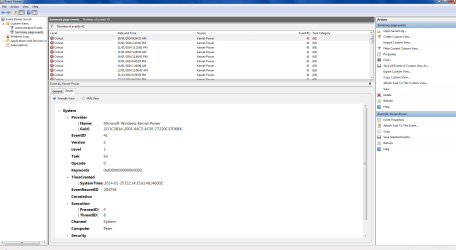
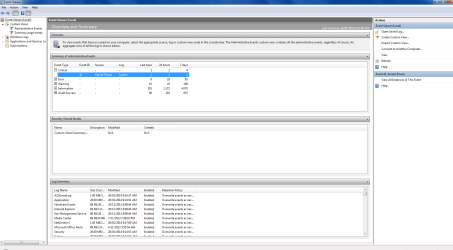
Hi guys, i was able to solve my BSOD issue regarding a couple of games on steam, however the lockup my computer sometimes receives has not yet been solved. it seems to be only happening with 1 game at the moment which is Company of Heroes 2. When i check the event viewer it comes up with this error but i have no idea on how to fix it. Its included in this post as a screenshot
 

Attachments
  • event viewer.png
    event viewer.png
    47.5 KB · Views: 21
  • event viewer 2.png
    event viewer 2.png
    49.7 KB · Views: 18
Last edited:

My Computer My Computer

Computer type
PC/Desktop
OS
windows 7 Ultimate Service pack 1 x64
CPU
intel i5 2500k
Motherboard
Asus p8z68-v motherboard
Memory
8gb Ram
Graphics Card(s)
Sapphire AMD 6950 2gb
Screen Resolution
1920x1080
Hard Drives
2x samsung hd103SJ
1x ST2000DL003-9VT166
PSU
Silverstone silver 850watt power supply (ST85F-P)
Case
silverstone raven RV02-E
Keyboard
microsoft side winder x4
Mouse
Razer death adder v2
Check and monitor your temps as well as the voltage coming from the psu. It is possible either your system is not getting enough ventilation; and or the psu is possibly on its way out. If you keep monitoring the voltages and they are slowly dropping little by little then yes your psu is probably slowly on its way out. Also; as for the temps; if your cpu fan and or any other fan is not getting the proper voltage to it; that also may cause freeze ups due to a possible heat issue. These 2 bits of info come from the info i just looked up via google. Especially if you are "taxing" the heck outta the cpu during game play. Doing that can cause a overheat issue if the fan(s) are not spinning high enough to vent the system heat as well as if the voltage is not proper going to the cpu fan and or any other fans.
 
Last edited:

My Computer My Computer

Computer type
PC/Desktop
Computer Manufacturer/Model Number
custom built
OS
Windows 7 ultimate 64-bit
CPU
Intel I7 2600K 3.4ghz
Motherboard
Asus Evo P8P67
Memory
Corsair 16gb ddr3 1600mhz
Graphics Card(s)
Nvidia Geforce gt 430
Sound Card
Sound Blaster Titanium x-fi pci express
Monitor(s) Displays
Dell E198WFP
Hard Drives
1 western digital 2TB drive.
PSU
Antec 1200 watt
Case
Inwin Dragon Rider
Cooling
6 case supplied cooling fans
Keyboard
logitech mk700
Mouse
logitech m705
Internet Speed
25-50mbps download; 10mbps upload(i think)
Antivirus
avg free 2014
Browser
mozilla firefox
Other Info
Also have a pretty bad speaker setup which is a klipsch promedia 5.1 surround speaker setup with huge subwoofer and lg blu ray player/writer. Also a hp officejet pro 8600 plus wireless all in one and a logitech s7500 webcam.
Check and monitor your temps as well as the voltage coming from the psu. It is possible either your system is not getting enough ventilation; and or the psu is possibly on its way out. If you keep monitoring the voltages and they are slowly dropping little by little then yes your psu is probably slowly on its way out. Also; as for the temps; if your cpu fan and or any other fan is not getting the proper voltage to it; that also may cause freeze ups due to a possible heat issue. These 2 bits of info come from the info i just looked up via google. Especially if you are "taxing" the heck outta the cpu during game play. Doing that can cause a overheat issue if the fan(s) are not spinning high enough to vent the system heat as well as if the voltage is not proper going to the cpu fan and or any other fans.

I don't think its a overheating issue, although i do need to dust this out a bit, im using a silverstone raven RV-02E case, which has 3 fans on the bottom of the case directing upwards both are currently at 700rpm (which i can set to 1200 via switches) and 1 exhaust fan going at 950rpm.
Im also using a silverstone strider power supply think it was either 750 or 850w
 

My Computer My Computer

Computer type
PC/Desktop
OS
windows 7 Ultimate Service pack 1 x64
CPU
intel i5 2500k
Motherboard
Asus p8z68-v motherboard
Memory
8gb Ram
Graphics Card(s)
Sapphire AMD 6950 2gb
Screen Resolution
1920x1080
Hard Drives
2x samsung hd103SJ
1x ST2000DL003-9VT166
PSU
Silverstone silver 850watt power supply (ST85F-P)
Case
silverstone raven RV02-E
Keyboard
microsoft side winder x4
Mouse
Razer death adder v2
It sounds like a heat issue is your problem more likely now. You definitely want your fans spinning faster than that most likely during game play. But before doing anything i would download and install something called a hardware monitor from the following link; and then monitor temps and voltages for a day or 2 and see if anything unusual catches the eye.

http://www.cpuid.com/softwares/hwmonitor.html
 

My Computer My Computer

Computer type
PC/Desktop
Computer Manufacturer/Model Number
custom built
OS
Windows 7 ultimate 64-bit
CPU
Intel I7 2600K 3.4ghz
Motherboard
Asus Evo P8P67
Memory
Corsair 16gb ddr3 1600mhz
Graphics Card(s)
Nvidia Geforce gt 430
Sound Card
Sound Blaster Titanium x-fi pci express
Monitor(s) Displays
Dell E198WFP
Hard Drives
1 western digital 2TB drive.
PSU
Antec 1200 watt
Case
Inwin Dragon Rider
Cooling
6 case supplied cooling fans
Keyboard
logitech mk700
Mouse
logitech m705
Internet Speed
25-50mbps download; 10mbps upload(i think)
Antivirus
avg free 2014
Browser
mozilla firefox
Other Info
Also have a pretty bad speaker setup which is a klipsch promedia 5.1 surround speaker setup with huge subwoofer and lg blu ray player/writer. Also a hp officejet pro 8600 plus wireless all in one and a logitech s7500 webcam.
It sounds like a heat issue is your problem more likely now. You definitely want your fans spinning faster than that most likely during game play. But before doing anything i would download and install something called a hardware monitor from the following link; and then monitor temps and voltages for a day or 2 and see if anything unusual catches the eye.

HWMonitor CPUID - System & hardware benchmark, monitoring, reporting
This issue started a week ago, before that i had no issues playing this game with the current settings i have

Uh... im not using 2 monitors so i dont believe i would be able to catch it when its likely going to lock up?
 

My Computer My Computer

Computer type
PC/Desktop
OS
windows 7 Ultimate Service pack 1 x64
CPU
intel i5 2500k
Motherboard
Asus p8z68-v motherboard
Memory
8gb Ram
Graphics Card(s)
Sapphire AMD 6950 2gb
Screen Resolution
1920x1080
Hard Drives
2x samsung hd103SJ
1x ST2000DL003-9VT166
PSU
Silverstone silver 850watt power supply (ST85F-P)
Case
silverstone raven RV02-E
Keyboard
microsoft side winder x4
Mouse
Razer death adder v2
Well it should post a event to the event viewer if something does happen which is how you will know.
 

My Computer My Computer

Computer type
PC/Desktop
Computer Manufacturer/Model Number
custom built
OS
Windows 7 ultimate 64-bit
CPU
Intel I7 2600K 3.4ghz
Motherboard
Asus Evo P8P67
Memory
Corsair 16gb ddr3 1600mhz
Graphics Card(s)
Nvidia Geforce gt 430
Sound Card
Sound Blaster Titanium x-fi pci express
Monitor(s) Displays
Dell E198WFP
Hard Drives
1 western digital 2TB drive.
PSU
Antec 1200 watt
Case
Inwin Dragon Rider
Cooling
6 case supplied cooling fans
Keyboard
logitech mk700
Mouse
logitech m705
Internet Speed
25-50mbps download; 10mbps upload(i think)
Antivirus
avg free 2014
Browser
mozilla firefox
Other Info
Also have a pretty bad speaker setup which is a klipsch promedia 5.1 surround speaker setup with huge subwoofer and lg blu ray player/writer. Also a hp officejet pro 8600 plus wireless all in one and a logitech s7500 webcam.
Well it should post a event to the event viewer if something does happen which is how you will know.
isnt that why i posted the event viewer screenshots just then?
 

My Computer My Computer

Computer type
PC/Desktop
OS
windows 7 Ultimate Service pack 1 x64
CPU
intel i5 2500k
Motherboard
Asus p8z68-v motherboard
Memory
8gb Ram
Graphics Card(s)
Sapphire AMD 6950 2gb
Screen Resolution
1920x1080
Hard Drives
2x samsung hd103SJ
1x ST2000DL003-9VT166
PSU
Silverstone silver 850watt power supply (ST85F-P)
Case
silverstone raven RV02-E
Keyboard
microsoft side winder x4
Mouse
Razer death adder v2
Well it should post a event to the event viewer if something does happen which is how you will know.
isnt that why i posted the event viewer screenshots just then?

Well I am talking more than just that. Because i looked up that kernel power error and it appears from what i could find that it is pointing to a psu issue and or heat issue. Also, you say you dont think its a heat issue; but do you have some sort of monitor such as the one that i posted the link to above to show the actual temps and allow you to adjust the fan speeds etc.
 

My Computer My Computer

Computer type
PC/Desktop
Computer Manufacturer/Model Number
custom built
OS
Windows 7 ultimate 64-bit
CPU
Intel I7 2600K 3.4ghz
Motherboard
Asus Evo P8P67
Memory
Corsair 16gb ddr3 1600mhz
Graphics Card(s)
Nvidia Geforce gt 430
Sound Card
Sound Blaster Titanium x-fi pci express
Monitor(s) Displays
Dell E198WFP
Hard Drives
1 western digital 2TB drive.
PSU
Antec 1200 watt
Case
Inwin Dragon Rider
Cooling
6 case supplied cooling fans
Keyboard
logitech mk700
Mouse
logitech m705
Internet Speed
25-50mbps download; 10mbps upload(i think)
Antivirus
avg free 2014
Browser
mozilla firefox
Other Info
Also have a pretty bad speaker setup which is a klipsch promedia 5.1 surround speaker setup with huge subwoofer and lg blu ray player/writer. Also a hp officejet pro 8600 plus wireless all in one and a logitech s7500 webcam.
On a separate note; one thing to also consider is its also possible there could be 1 or more ram modules that are bad. I would download memtest86+ at the following link and run several passes through it so it can double check for possible bad ram. Also, you can try taking all the ram modules out and one by one put them back in and see if any of them cause the bsod again. If it does; then you know its the ram module(s) that are at fault.

http://www.memtest.org/
 
Last edited:

My Computer My Computer

Computer type
PC/Desktop
Computer Manufacturer/Model Number
custom built
OS
Windows 7 ultimate 64-bit
CPU
Intel I7 2600K 3.4ghz
Motherboard
Asus Evo P8P67
Memory
Corsair 16gb ddr3 1600mhz
Graphics Card(s)
Nvidia Geforce gt 430
Sound Card
Sound Blaster Titanium x-fi pci express
Monitor(s) Displays
Dell E198WFP
Hard Drives
1 western digital 2TB drive.
PSU
Antec 1200 watt
Case
Inwin Dragon Rider
Cooling
6 case supplied cooling fans
Keyboard
logitech mk700
Mouse
logitech m705
Internet Speed
25-50mbps download; 10mbps upload(i think)
Antivirus
avg free 2014
Browser
mozilla firefox
Other Info
Also have a pretty bad speaker setup which is a klipsch promedia 5.1 surround speaker setup with huge subwoofer and lg blu ray player/writer. Also a hp officejet pro 8600 plus wireless all in one and a logitech s7500 webcam.
On a separate note; one thing to also consider is its also possible there could be 1 or more ram modules that are bad. I would download memtest86+ at the following link and run several passes through it so it can double check for possible bad ram. Also, you can try taking all the ram modules out and one by one put them back in and see if any of them cause the bsod again. If it does; then you know its the ram module(s) that are at fault.

Memtest86+ - Advanced Memory Diagnostic Tool

Look ill try out that hwmonitor, but im gonna say again it isnt a BSOD :D its a lockup. ill try running the game with that in the background and see if there are any changes.
 

My Computer My Computer

Computer type
PC/Desktop
OS
windows 7 Ultimate Service pack 1 x64
CPU
intel i5 2500k
Motherboard
Asus p8z68-v motherboard
Memory
8gb Ram
Graphics Card(s)
Sapphire AMD 6950 2gb
Screen Resolution
1920x1080
Hard Drives
2x samsung hd103SJ
1x ST2000DL003-9VT166
PSU
Silverstone silver 850watt power supply (ST85F-P)
Case
silverstone raven RV02-E
Keyboard
microsoft side winder x4
Mouse
Razer death adder v2
On a separate note; one thing to also consider is its also possible there could be 1 or more ram modules that are bad. I would download memtest86+ at the following link and run several passes through it so it can double check for possible bad ram. Also, you can try taking all the ram modules out and one by one put them back in and see if any of them cause the bsod again. If it does; then you know its the ram module(s) that are at fault.

Memtest86+ - Advanced Memory Diagnostic Tool

Look ill try out that hwmonitor, but im gonna say again it isnt a BSOD :D its a lockup. ill try running the game with that in the background and see if there are any changes.

Well; I will tell ya that there are some things i am not a 100% expert in figuring out(at least not yet; but I am still learning little by little as i go along) when it comes to certain errors, etc.; But!; the reason i mentioned the above about the bad ram possibly being a issue; is because of some info and insight so to speak ive gained from reading other posts on other forums etc that were posted via links from google I do research the errors etc to try and pinpoint what or where the problem may lay at so i can try and remember for future reference.
 

My Computer My Computer

Computer type
PC/Desktop
Computer Manufacturer/Model Number
custom built
OS
Windows 7 ultimate 64-bit
CPU
Intel I7 2600K 3.4ghz
Motherboard
Asus Evo P8P67
Memory
Corsair 16gb ddr3 1600mhz
Graphics Card(s)
Nvidia Geforce gt 430
Sound Card
Sound Blaster Titanium x-fi pci express
Monitor(s) Displays
Dell E198WFP
Hard Drives
1 western digital 2TB drive.
PSU
Antec 1200 watt
Case
Inwin Dragon Rider
Cooling
6 case supplied cooling fans
Keyboard
logitech mk700
Mouse
logitech m705
Internet Speed
25-50mbps download; 10mbps upload(i think)
Antivirus
avg free 2014
Browser
mozilla firefox
Other Info
Also have a pretty bad speaker setup which is a klipsch promedia 5.1 surround speaker setup with huge subwoofer and lg blu ray player/writer. Also a hp officejet pro 8600 plus wireless all in one and a logitech s7500 webcam.
On a separate note; one thing to also consider is its also possible there could be 1 or more ram modules that are bad. I would download memtest86+ at the following link and run several passes through it so it can double check for possible bad ram. Also, you can try taking all the ram modules out and one by one put them back in and see if any of them cause the bsod again. If it does; then you know its the ram module(s) that are at fault.

Memtest86+ - Advanced Memory Diagnostic Tool

Look ill try out that hwmonitor, but im gonna say again it isnt a BSOD :D its a lockup. ill try running the game with that in the background and see if there are any changes.

Well; I will tell ya that there are some things i am not a 100% expert in figuring out(at least not yet; but I am still learning little by little as i go along) when it comes to certain errors, etc.; But!; the reason i mentioned the above about the bad ram possibly being a issue; is because of some info and insight so to speak ive gained from reading other posts on other forums etc that were posted via links from google I do research the errors etc to try and pinpoint what or where the problem may lay at so i can try and remember for future reference.

I try that but when i cant find a solution i come here to post
 

My Computer My Computer

Computer type
PC/Desktop
OS
windows 7 Ultimate Service pack 1 x64
CPU
intel i5 2500k
Motherboard
Asus p8z68-v motherboard
Memory
8gb Ram
Graphics Card(s)
Sapphire AMD 6950 2gb
Screen Resolution
1920x1080
Hard Drives
2x samsung hd103SJ
1x ST2000DL003-9VT166
PSU
Silverstone silver 850watt power supply (ST85F-P)
Case
silverstone raven RV02-E
Keyboard
microsoft side winder x4
Mouse
Razer death adder v2
well the only thing at this point that comes to mind is a possible lack of available ram. That will definitely cause a lockup if there is not enough available ram for windows to function properly. You should have at least 4gb; but preferably at least 8 for windows to run optimally on a system that is in good order.
 

My Computer My Computer

Computer type
PC/Desktop
Computer Manufacturer/Model Number
custom built
OS
Windows 7 ultimate 64-bit
CPU
Intel I7 2600K 3.4ghz
Motherboard
Asus Evo P8P67
Memory
Corsair 16gb ddr3 1600mhz
Graphics Card(s)
Nvidia Geforce gt 430
Sound Card
Sound Blaster Titanium x-fi pci express
Monitor(s) Displays
Dell E198WFP
Hard Drives
1 western digital 2TB drive.
PSU
Antec 1200 watt
Case
Inwin Dragon Rider
Cooling
6 case supplied cooling fans
Keyboard
logitech mk700
Mouse
logitech m705
Internet Speed
25-50mbps download; 10mbps upload(i think)
Antivirus
avg free 2014
Browser
mozilla firefox
Other Info
Also have a pretty bad speaker setup which is a klipsch promedia 5.1 surround speaker setup with huge subwoofer and lg blu ray player/writer. Also a hp officejet pro 8600 plus wireless all in one and a logitech s7500 webcam.
well the only thing at this point that comes to mind is a possible lack of available ram. That will definitely cause a lockup if there is not enough available ram for windows to function properly. You should have at least 4gb; but preferably at least 8 for windows to run optimally on a system that is in good order.
Thats incorrect - systems will function perfectly fine on 4GB, and sometimes less. MajorFoley has 8GB which is a huge amount.
 

My Computer My Computer

Computer type
PC/Desktop
Computer Manufacturer/Model Number
Golden Mk. I.4
OS
Windows 10 Pro x64 ; Xubuntu x64
CPU
Intel i7 860 @ 2.80 GHz O/C'ed to 4.0GHz
Motherboard
Gigabyte P55A-UD3R Rev.1. Award BIOS F13
Memory
16GB Corsair Vengance DDR3 @ 661 MHz Dual Channel (9-9-9-24)
Graphics Card(s)
EVGA NVidia GTX 560 1024MB
Sound Card
Realtek Integrated
Monitor(s) Displays
Dual Samsung SyncMaster 2494HS
Screen Resolution
1920*1080 and 1920*1080
Hard Drives
1*Samsung 840 EVO 120GB SSD;
1*OCZ Vertex 2 60GB SSD;
2*Samsung F3 SpinPoint 1TB in RAID0;
1*Samsung F1 SpinPoint 1TB;
2*Western Digital 1TB External USB 3.0
1*Western Digital 500GB External USB 3.0
1*Seagate 500GB External USB 2.0
PSU
Thermaltake ToughPower QFan 750W
Case
Thermaltake Element S VK60001W2Z
Cooling
Corsair H60 Water Cooling, 2*230mm and 2*80mm case fans
Keyboard
Logitech G110
Mouse
Logitech MX518
Go over your install thoroughly using the Troubleshooting Steps for Windows 7
starting with the hardware tests.

Almost everyone will find the problem's cause if all the steps are worked through. Take all the time you need, ask back any questions or post results of steps for more suggestions.
 
Go over your install thoroughly using the Troubleshooting Steps for Windows 7
starting with the hardware tests.

Almost everyone will find the problem's cause if all the steps are worked through. Take all the time you need, ask back any questions or post results of steps for more suggestions.

Thanks i will follow that now, i just finished a mem test so it doesnt seem to be my ram, as it came up with no errors. However if it IS my computer overheating, i just realized i havent cleaned out my case in a good while and the dust could cause an overheat, could this be a likely cause?
 

My Computer My Computer

Computer type
PC/Desktop
OS
windows 7 Ultimate Service pack 1 x64
CPU
intel i5 2500k
Motherboard
Asus p8z68-v motherboard
Memory
8gb Ram
Graphics Card(s)
Sapphire AMD 6950 2gb
Screen Resolution
1920x1080
Hard Drives
2x samsung hd103SJ
1x ST2000DL003-9VT166
PSU
Silverstone silver 850watt power supply (ST85F-P)
Case
silverstone raven RV02-E
Keyboard
microsoft side winder x4
Mouse
Razer death adder v2
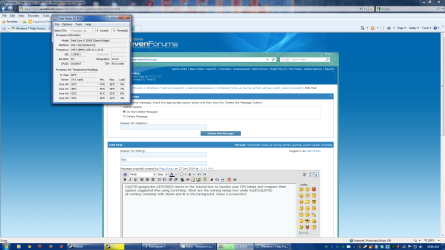
It shows in the tutorial how to monitor your CPU temps and compare them against suggested Max using CoreTemp. What are the running temps now under load?
 
It shows in the tutorial how to monitor your CPU temps and compare them against suggested Max using CoreTemp. What are the running temps now under load?
ok running coretemp with steam and IE in the background, heres a screenshot.
 

Attachments

  • core temp.png
    core temp.png
    162 KB · Views: 26

My Computer My Computer

Computer type
PC/Desktop
OS
windows 7 Ultimate Service pack 1 x64
CPU
intel i5 2500k
Motherboard
Asus p8z68-v motherboard
Memory
8gb Ram
Graphics Card(s)
Sapphire AMD 6950 2gb
Screen Resolution
1920x1080
Hard Drives
2x samsung hd103SJ
1x ST2000DL003-9VT166
PSU
Silverstone silver 850watt power supply (ST85F-P)
Case
silverstone raven RV02-E
Keyboard
microsoft side winder x4
Mouse
Razer death adder v2
They're about half the max temp shown there for your CPU, so no worries.

What's hideous is all of the freeloaders you have starting with Windows in the System Tray. None of those except your AV need to be starting with Windows. So follow the tutorial's critical step to establish a Clean Boot.
 
They're about half the max temp shown there for your CPU, so no worries.

What's hideous is all of the freeloaders you have starting with Windows in the System Tray. None of those except your AV need to be starting with Windows. So follow the tutorial's critical step to establish a Clean Boot.

I know it will make my comp boot faster but really cause lock ups to occur during games?
i guess i can clean up the boot, i plan on installing this SSD i won at PAX soon enough as well but i dont wanna wipe my computer just yet. But i dont see how disabling all those at the start willl prevent the lock ups im having
 

My Computer My Computer

Computer type
PC/Desktop
OS
windows 7 Ultimate Service pack 1 x64
CPU
intel i5 2500k
Motherboard
Asus p8z68-v motherboard
Memory
8gb Ram
Graphics Card(s)
Sapphire AMD 6950 2gb
Screen Resolution
1920x1080
Hard Drives
2x samsung hd103SJ
1x ST2000DL003-9VT166
PSU
Silverstone silver 850watt power supply (ST85F-P)
Case
silverstone raven RV02-E
Keyboard
microsoft side winder x4
Mouse
Razer death adder v2
Back
Top