TEST -Update 7 installation media

About to give up on this. Tried it several times and keep running into the same error with the Windows install saying corrupted installer when trying to install the iso from a USB device. Tried this several times. Tried it also with a DVD. The second time I went with less options selected for Windows Update. Went with the bare minimum. Not sure what gives. I am sure, I am doing something wrong. Followed the guide to a T! I am going to just do it the normal way with the standard Win 7 iso.
 

My Computer My Computer

Computer type
PC/Desktop
OS
Windows 7
About to give up on this. Tried it several times and keep running into the same error with the Windows install saying corrupted installer when trying to install the iso from a USB device. Tried this several times. Tried it also with a DVD. The second time I went with less options selected for Windows Update. Went with the bare minimum. Not sure what gives. I am sure, I am doing something wrong. Followed the guide to a T! I am going to just do it the normal way with the standard Win 7 iso.
Hello and welcome maddog try this mate just make sure you pick the correct edition form the list anything with an "N" doesn't contain WMP and watch out for the language and "old"

http://www.sevenforums.com/tutorials/219487-clean-reinstall-factory-oem-windows-7-a.html
 

My Computer My Computer

Computer type
PC/Desktop
Computer Manufacturer/Model Number
Own build (new) Desk1 / Asus ROG Win 7 / Desk2 1st build
OS
Desk1 7 Home Prem / Desk2 10 Pro / Main lap Asus ROG 10 Pro 2 laptop Toshiba 7 Pro Asus P2520 7 & 10
CPU
Desk1 i5 3750K / Laptop i7 GTX 860M / Desk2 i5 2500
Motherboard
Desk1 Asus P877-V / Desk2 Gigabyte H67 UD3H / Laptop ?
Memory
Desk1 8GB (1866) / Desk2 16GB (1333) / Laptop 8Gb DDR3
Graphics Card(s)
Desk 1& 2NVidia GTX 650 & Laptops on board Intel
Sound Card
Desk 1 & 2 -XONAR DG Realtek High Def audio Laptop
Monitor(s) Displays
Desk 1 Benq HD 2450 / Desk2 Philips 24" / Laptop 17.5"
Screen Resolution
1920x1080 D1 & D2 & Laptop 1
Hard Drives
Desk1 Samsung 120GB 830 SSD
Asus ROG 256GB 850 Pro SSD
Desk2 Samsung 840 256 SSD
Toshiba 120GB EVO
PSU
Desk 1 Corsair HX 1050/ Laptop ? / Desk 2 Corsair HX 650
Case
Desk 1 Cooler HAF XM ? Toshiba laptop / Desk2 Coolermaster
Cooling
Fans on all Desk1 -2 Desk2 - all Coolermasters 5 Laptop ?
Keyboard
Desk 1 MS Sidewinder X6 Desk 2 MS Sidewinder X 4
Mouse
Desk 1&2 - Gigabyte MS 900 gamer - laptop - Logitec wireless
Internet Speed
ADSL2+
Other Info
One other Desktop (tester) and spare Toshba laptop both with SSD's
Running Kaspersky 2016 ISS on all machines config'd identically
Logitec audio stereo systems on each machine (x3)
Canon MG5250MFC
Router/modem TP-Link running WPA2SK
Thanks ICit2lol. I tried just the base iso X17-58997. Got the same error with just the base install. I am thinking the iso is corrupted. I am downloading from a different source.
 

My Computer My Computer

Computer type
PC/Desktop
OS
Windows 7
I will post an updated version to take account of ie11.
 

My Computers My Computers

System One System Two

  • Computer type
    PC/Desktop
    OS
    7 X64
    CPU
    i5 8400
    Motherboard
    gigabyte b365m ds3h
    Memory
    2x8gb 3200mhz
    Hard Drives
    various
    PSU
    pure power 11 400w cm
    Case
    Coolermaster
    Cooling
    cryorig m9i
  • Computer type
    PC/Desktop
    OS
    7x64
    CPU
    g5400
    Motherboard
    ga b365m ds3h
    Memory
    8gb ddr4 2400
    PSU
    xfx pro 450w
Well Done

Thank you for such Fantastic post, am a guy loves Images made me fell know what am doing!
............................Thank you for ur succesful post!..........................................

squirtmph
 

My Computer My Computer

Computer type
Laptop
Computer Manufacturer/Model Number
Azure Blade 15.6
OS
Windows 10 Pro Version 22H2 64-bit Edition
CPU
Intel(R) Core(TM) i7-10875H CPU @ 2.30GHz 2.30 GHz
Memory
2.0 GB (31.8 GB usable)
Monitor(s) Displays
4K UHD OLED TOUCH
Screen Resolution
3840 x 2160
Hard Drives
1 TB
Mouse
Logitech MX Master 3S
Antivirus
Windows Security
Browser
Google Chrome
Other Info
______________________________________________


______________________________________________
I will post an updated version to take account of ie11.

Have you had the chance to do so / have you done so and I'm just not seeing it?

BTW, thank you for this excellent and oh so easy "DIY SP2"... so easy even a NOOB like me can't screw it up :confused:
 

My Computer My Computer

Computer type
Laptop
Computer Manufacturer/Model Number
MSI PE60 6QE
OS
Win 10 Pro x64, Win 7 Pro x64
CPU
Intel Core i7-6700HQ Skylake
Motherboard
MSI MS-16J5
Memory
16gb Crucial DDR4
Graphics Card(s)
NVIDIA GeForce GTX 960M 2 GB
Screen Resolution
1920 x 1080
Hard Drives
Samsung 850 EVO 250 GB M.2 SSD (MZ-N5E250BW)
HGST 1TB @7200 RPM HTS721010A9E630
Case
Plastic
Keyboard
Got one...
Mouse
Yep, one of those too.
Internet Speed
FIOS 75/75
Antivirus
Defender
Browser
Chrome/FFox/Ex-PLODE-r/(L)Edge
Other Info
Defender, Custom Hosts, uBlock, regular backups w/ Macrium (Free)
I know we can replace Updated Sources folder onto a flash stick, but can you drill down to specify folders from Sources which contain these Updates to avoid having to copy the whole thing?

THis has worked great for me for dozens of installs now. I only wish that the changes of the default Search page, shutting Hibernate and UAC off, plus any other unadvertised customizations could have been left up to us. It's a pain to have to mount the .wim just to change those back.
 
but can you drill down to specify folders from Sources which contain these Updates to avoid having to copy the whole thing?

Yes, it is only install.wim that is affected by the updates.

You can avoid the "tweaks" by renaming the .reg files in the BIN folder. Just rename them adm.reg.old, def.reg.old etc or something . They won't then be included. Or you can edit what is in those reg files to put in your own tweaks.
 

My Computers My Computers

System One System Two

  • Computer type
    PC/Desktop
    OS
    7 X64
    CPU
    i5 8400
    Motherboard
    gigabyte b365m ds3h
    Memory
    2x8gb 3200mhz
    Hard Drives
    various
    PSU
    pure power 11 400w cm
    Case
    Coolermaster
    Cooling
    cryorig m9i
  • Computer type
    PC/Desktop
    OS
    7x64
    CPU
    g5400
    Motherboard
    ga b365m ds3h
    Memory
    8gb ddr4 2400
    PSU
    xfx pro 450w
Thanks, Si. And Happy New Year to you.

Many of the Windows 7 installation and repair fixes which are now Best Practices were developed by you here during beta, and in large part responsible for this staying the top tech site in history for almost 5 years now.

I am proud to be your student.
 
Happy New Year, Greg. :D
 

My Computers My Computers

System One System Two

  • Computer type
    PC/Desktop
    OS
    7 X64
    CPU
    i5 8400
    Motherboard
    gigabyte b365m ds3h
    Memory
    2x8gb 3200mhz
    Hard Drives
    various
    PSU
    pure power 11 400w cm
    Case
    Coolermaster
    Cooling
    cryorig m9i
  • Computer type
    PC/Desktop
    OS
    7x64
    CPU
    g5400
    Motherboard
    ga b365m ds3h
    Memory
    8gb ddr4 2400
    PSU
    xfx pro 450w
Si, when updating another version x64 can I use the same files I extracted for the previous version updated x64?

And can I similarly overwrite those files for all versions if I've renamed the Reg Files in Bin to comment out the reg tweaks?

Thanks.
 
Yes.
 

My Computers My Computers

System One System Two

  • Computer type
    PC/Desktop
    OS
    7 X64
    CPU
    i5 8400
    Motherboard
    gigabyte b365m ds3h
    Memory
    2x8gb 3200mhz
    Hard Drives
    various
    PSU
    pure power 11 400w cm
    Case
    Coolermaster
    Cooling
    cryorig m9i
  • Computer type
    PC/Desktop
    OS
    7x64
    CPU
    g5400
    Motherboard
    ga b365m ds3h
    Memory
    8gb ddr4 2400
    PSU
    xfx pro 450w
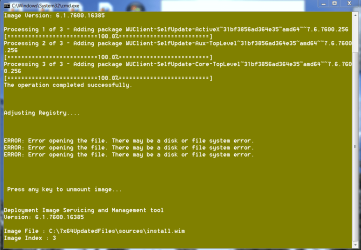
After all Updates are slipped in, I get three Errors updating the registry, then it wants to unmount image. Are these to be expected since I renamed the Reg file tweaks in Bin folder?
 

Attachments

  • Capture.PNG
    Capture.PNG
    26 KB · Views: 3
All those errors relate to the Windows Update Agent client v256 - which doesn't have a legal independent download.
Be very careful!
 

My Computer My Computer

Computer type
Laptop
Computer Manufacturer/Model Number
Asus K52F or Lenovo B51-80
OS
Win 7 x64 Home Premium (and x86 VirtualBox VM)/Win10
CPU
i3 370M/i7 6500U
Motherboard
Asus/Lenovo
Memory
8GB - finally :)/8GB
Graphics Card(s)
it's an i3, dude!/dual Intel&nVidia
Sound Card
onboard
Monitor(s) Displays
15.6" built-in
Screen Resolution
1366x768/1920x1080
Hard Drives
750GB Seagate internal
Sundry external drives attached to other computers on the local network
1TB SSD on the Lenovo
PSU
n/a
Internet Speed
as much as I can get - usually on a dongle/phone, so <1MB/s
Antivirus
MSE/Defender
Browser
IE11/12/Edge/Chrome/FF(if I must)
What am I to be careful about?

I've never had those errors before in a dozen times running the Updater, until I edited out the tweaks by renaming the Registry files in Bin folder. How would that trigger WUD Agent Client, and what exactly tells us that is the cause when there is no error number?
 
Those are fine.

It is just telling you it can't find the reg tweaks files.

Therefore they won't be added in.

Nothing to worry about.

Are these to be expected since I renamed the Reg file tweaks in Bin folder?

Yes.
 

My Computers My Computers

System One System Two

  • Computer type
    PC/Desktop
    OS
    7 X64
    CPU
    i5 8400
    Motherboard
    gigabyte b365m ds3h
    Memory
    2x8gb 3200mhz
    Hard Drives
    various
    PSU
    pure power 11 400w cm
    Case
    Coolermaster
    Cooling
    cryorig m9i
  • Computer type
    PC/Desktop
    OS
    7x64
    CPU
    g5400
    Motherboard
    ga b365m ds3h
    Memory
    8gb ddr4 2400
    PSU
    xfx pro 450w
If I plan on doing a reinstall, with allowing for the recommended updates upon installation (next to last screen on install) is this still relevant or can I still experiment with it? Also my image drive seems to be on the fritz so i'l be doing the clean install from usb
 

My Computer My Computer

Computer type
PC/Desktop
OS
Microsoft Windows 7 Professional 64-bit SP1
CPU
Intel(R) Core(TM) i5 CPU M 520 @ 2.40GHz
Motherboard
Dell Inc. 0K42JR
Memory
8.00 GB
Graphics Card(s)
NVIDIA NVS 3100M
Sound Card
(1) NVIDIA High Definition Audio (2) IDT High Definition A
Monitor(s) Displays
1
Screen Resolution
1440 x 900 x 32 bits (4294967296 colors) @ 59 Hz
Hard Drives
Samsung SSD 840 PRO Series ATA Device
to clarify my previous question this is the quote form Windows 7 Direct download ISO

After clearing their servers in January 2014, most images were not accessible for a few days. It seems though that all downloads on all servers have come back by now.

Whereas there are already a lot of websites providing download links to Windows 7 RTM DVD ISO images, the links for the updated versions that have an integrated Service Pack 1 are brand new. Using a scraping script to browse the files on the Digital River servers, we came across these new ISO images more or less by a lucky guess. The advantage of the new images is an up to date Windows installation right after the initial setup, without the need to download and install hundreds of updates afterwards. If you just need the downloads, you can scroll down. If you need further information, please read on here.

Microsoft released updated media refresh images in May 2011. They have the post SP1 hotfix KB2534111 integrated as well. The original versions of the SP1 integrated DVDs don't allow any non ASCII characters when assigning the computer name, which has been fixed with this update.
 

My Computer My Computer

Computer type
PC/Desktop
OS
Microsoft Windows 7 Professional 64-bit SP1
CPU
Intel(R) Core(TM) i5 CPU M 520 @ 2.40GHz
Motherboard
Dell Inc. 0K42JR
Memory
8.00 GB
Graphics Card(s)
NVIDIA NVS 3100M
Sound Card
(1) NVIDIA High Definition Audio (2) IDT High Definition A
Monitor(s) Displays
1
Screen Resolution
1440 x 900 x 32 bits (4294967296 colors) @ 59 Hz
Hard Drives
Samsung SSD 840 PRO Series ATA Device
Last edited:

My Computer My Computer

Computer type
Laptop
Computer Manufacturer/Model Number
Acer Aspire 5552
OS
Windows 7 Home Premium X64
CPU
AMD Athlon(tm) II P320 Dual-Core Processor, 2100 Mhz, 2 Core
Motherboard
Acer JE51_DN
Memory
2Gb
Graphics Card(s)
ATI Mobility Radeon HD 4250 Driver Version 8.713.3.3000
Hard Drives
Hitachi HTS545025B9A300 ATA Device (Standard disk drives)
Media Type Fixed hard disk
Partitions 3
SCSI Bus 0
SCSI Logical Unit 0
SCSI Port 0
SCSI Target ID 0

Size 232.88 GB (250,056,737,280 bytes)

Partition Disk #0, Partition #0
Antivirus
Avast Free
Browser
Chrome
Quick Questions

SIW2, derekimo suggested I reach out to you with these questions:

I have read this guide and several others as well as guides on other software out there like BuClean. I have a few questions. First off I am working with a 7 AIO x86/64. I also have images for most versions(xp/vista/7, starter/home/pro, x64/86) if needed.

Can one integrate updates(hot fixes, etc) into a hybrid AIO Win 7 ISO that has both architecture types? If so, how? Would it be best just to keep the x86/64 AIO ISOs separate?

What is the difference between the 'build current image' and 're-build all images' options? The tutorial touches on this but it'd be great to get some clarity on this.

The tutorial suggests you can create an AIO from a single image by selecting the rebuild all images option, is this true? If so, in the example, Shawn uses a 64 bit ISO yet the screenshot he uses results in an x86 AIO, is this just a typo?

Thanks in advance!
 

My Computer My Computer

Computer type
PC/Desktop
OS
Windows 7 Pro x64
Back
Top