Solved Indexing and Searching broken

Hey, that looks normal... well more normal. Let's catch up to each other.

Did you fix the WMI 10 using MS Fixit in post 57?
No??
Please do - it will make reading the Event logs easier - it gets reported as Level: Error when it's a only a reporting bug MS introduced after SP1
-
Yes I ran the Fix.

Searches still don't work in either account. Correct?

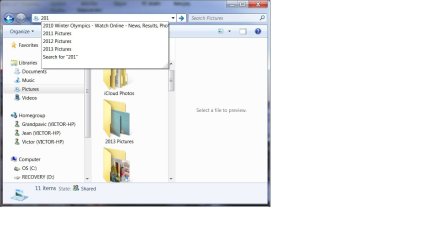
The only searches that appear to work are the ones in the Explorer address bar

Searches work in MS Media Player.

In any of the three locations?

I thought that one the main account you got some kind of result and I asked for clarification.
>> Your statement "It searched the Internet when no match was found"
>> I wanted to know what it did otherwsie - did it ever find a match.... did you ever get a search result?

In the Explorer address bar, if a search fails, it throws the search contents to IE.

So if I key "nuts" it invokes http://nuts/ in IE and of course it doesn't find the web page

Have you moved the Index Location?

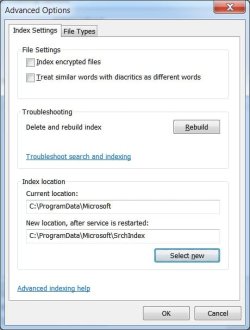
I tried. But as far as I can determine, it won't let me do that. I have the folder C:\ProgramData\Microsoft\SrchIndex, but as far as I can determine, the index never gets placed there.

Perhaps we need to clean up this standard user account as well.
Let me think on this a bit.

I only have two accounts. The administrator account that I run from all the time and new restricted account that I set up a few days ago. I have only been into this new account in the last day.

There are no other accounts.

Any more accounts?

Bill
 

My Computer My Computer

At a glance

windows 7 home premium 64 bit
Computer type
Laptop
Computer Manufacturer/Model Number
Dell 1550
OS
windows 7 home premium 64 bit
Ok, WMI 10 - fixed

Can you post a screen shot of an IE address bar search that succeeds and doesn't throw it to IE?
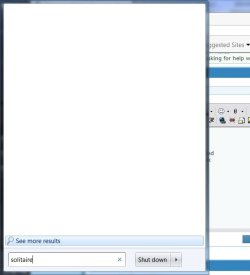
try typing solitaire in the explorer address bar and post a screen shot - thanks

Media player seacrhes work - hmmm I think it employs a different search engine, it would be interesting to know.

Let me look up "move index location" maybe I gave you bad instructions.

only two accounts - ok, good

I've been helping other members so give me a little bit to gather my thoughts re: your thread.
 

My Computer My Computer

At a glance

x64 (6.3.9600) Win8.1 Pro & soon dual boot x6...AMD A6-3420M APU with Radeon(tm) HD Graphics6.00 GBAMD Radeon(TM) HD 6520G
Computer type
Laptop
Computer Manufacturer/Model Number
HP Pavilion dv6-6c10us
OS
x64 (6.3.9600) Win8.1 Pro & soon dual boot x64 (6.1.7601) Win7_SP1 HomePrem
CPU
AMD A6-3420M APU with Radeon(tm) HD Graphics
Motherboard
Hewlett-Packard 1805
Memory
6.00 GB
Graphics Card(s)
AMD Radeon(TM) HD 6520G
Sound Card
(1) AMD High Definition Audio Device (2) IDT High Definiti
Monitor(s) Displays
HP W2072a 20" LCD (1600 x 900) @ 60 Hz
Screen Resolution
1366 x 768 x 32 bits (4294967296 colors) @ 60 Hz
Hard Drives
ST640LM0 00 HM641JI SATA Disk Device
Keyboard
Logitech k520 wireless KB
Mouse
Logitech m320 wireless mouse (bundled with KB)
Internet Speed
15/5 | 54 MB Wireless 'n'
Antivirus
Realtime: Defender or Avast | On-demand: Malwarebytes, ESET
Browser
IE 11 on Win8, IE 10 on win 7
Other Info
Media: [Gimp, Audacity, VLC] || Comm: [WEmail 2012, Skype] || Productivity: [OpenOffice,| Textpad] || Utils: [Sysinternals, cCleaner, Speccy, Defraggler]
How attached are you to the new account "UserStandard"?

How about we take that account out of the equation?
http://www.sevenforums.com/tutorials/181036-user-account-delete.html
OPTION ONE: To Delete an User Account in Control Panel "User Accounts"

You'll have to be logged in on your main account.

When we're done with Search, you can create another Std User account if you want.

When you get the chance, I'd like you to change the properties on C:\

Right click on C:\
Select Properties
Untick "Allow files on this drive to have contents indexed...."
click Apply
Select "This folder, subfolders, and files" in the drop down box
OK
This will take a while and there might be some popups re: can't change the properties on XYZ file. These are protected system files, so that's ok. Click continue or OK

Head back over to Indexing Options in Control Panel

Let's reduce the Index by unticking your User Profile
Modify button
clcik on your profile in the summary
untick your profile
That should leave only IE History and Start menu
OK

Clcik the Advanced Button
Don't type anything in the New Location Box
Click the Select New Button
Expand C:\ProgramData\Microsoft\
Select SrchIndex
Click OK

You should see
C:\ProgramData\Microsoft\SrchIndex
in the New Location box

Windows seaarch automatically restarts (it's supposed to anyway), it shouldn't take too long, but it does have some things to do in the background. The busy mouse circle will spin until it is finished.

Click close when finished moving.


My Computer My Computer

At a glance

x64 (6.3.9600) Win8.1 Pro & soon dual boot x6...AMD A6-3420M APU with Radeon(tm) HD Graphics6.00 GBAMD Radeon(TM) HD 6520G
Computer type
Laptop
Computer Manufacturer/Model Number
HP Pavilion dv6-6c10us
OS
x64 (6.3.9600) Win8.1 Pro & soon dual boot x64 (6.1.7601) Win7_SP1 HomePrem
CPU
AMD A6-3420M APU with Radeon(tm) HD Graphics
Motherboard
Hewlett-Packard 1805
Memory
6.00 GB
Graphics Card(s)
AMD Radeon(TM) HD 6520G
Sound Card
(1) AMD High Definition Audio Device (2) IDT High Definiti
Monitor(s) Displays
HP W2072a 20" LCD (1600 x 900) @ 60 Hz
Screen Resolution
1366 x 768 x 32 bits (4294967296 colors) @ 60 Hz
Hard Drives
ST640LM0 00 HM641JI SATA Disk Device
Keyboard
Logitech k520 wireless KB
Mouse
Logitech m320 wireless mouse (bundled with KB)
Internet Speed
15/5 | 54 MB Wireless 'n'
Antivirus
Realtime: Defender or Avast | On-demand: Malwarebytes, ESET
Browser
IE 11 on Win8, IE 10 on win 7
Other Info
Media: [Gimp, Audacity, VLC] || Comm: [WEmail 2012, Skype] || Productivity: [OpenOffice,| Textpad] || Utils: [Sysinternals, cCleaner, Speccy, Defraggler]
How attached are you to the new account "UserStandard"?

How about we take that account out of the equation?
http://www.sevenforums.com/tutorials/181036-user-account-delete.html
OPTION ONE: To Delete an User Account in Control Panel "User Accounts"

You'll have to be logged in on your main account.

When we're done with Search, you can create another Std User account if you want.

The account is gone. There is actually a Guest account that is disabled and never used. I don't have the need for a second account.

When you get the chance, I'd like you to change the properties on C:\

Right click on C:\
Select Properties
Untick "Allow files on this drive to have contents indexed...."
click Apply
Select "This folder, subfolders, and files" in the drop down box
OK
This will take a while and there might be some popups re: can't change the properties on XYZ file. These are protected system files, so that's ok. Click continue or OK


Done

Head back over to Indexing Options in Control Panel

Let's reduce the Index by unticking your User Profile
Modify button
clcik on your profile in the summary
untick your profile
That should leave only IE History and Start menu
OK

Clcik the Advanced Button
Don't type anything in the New Location Box
Click the Select New Button
Expand C:\ProgramData\Microsoft\
Select SrchIndex
Click OK

You should see
C:\ProgramData\Microsoft\SrchIndex
in the New Location box

Windows seaarch automatically restarts (it's supposed to anyway), it shouldn't take too long, but it does have some things to do in the background. The busy mouse circle will spin until it is finished.

Click close when finished moving.


still don't know if index got moved
Search in Start still doesn't work


Search that works


Search that doesn't work
 

Attachments

  • one.jpg
    one.jpg
    34.7 KB · Views: 17
  • two.jpg
    two.jpg
    26.5 KB · Views: 17
  • three.jpg
    three.jpg
    51.2 KB · Views: 2
  • four.jpg
    four.jpg
    18.8 KB · Views: 17

My Computer My Computer

At a glance

windows 7 home premium 64 bit
Computer type
Laptop
Computer Manufacturer/Model Number
Dell 1550
OS
windows 7 home premium 64 bit
Ok great information - thanks.

I just lost a descriptive post (my fault, back arrow) so I'll just hit on a few key points

1) Search doesn't work in any location. What you're seeing is auto-fill in the explorer bar.
That makes me acratch my head less.

2) Move Index Location is still a question. Let's skip that for now - it's not getting you anywhere.

Everything else is understood - thanks.


Go to services (gears icon)
Control Panel\All Control Panel Items\Administrative Tools\Services

Scroll down to Windows Search, select it, and click "Stop the service" option (upper left)

Let me know when the mouse stops spinning and the options show "Start this service"
Don't start the Service though
- I mentioned the option so you would know when the Search Svc had stopped.
 
Last edited:

My Computer My Computer

At a glance

x64 (6.3.9600) Win8.1 Pro & soon dual boot x6...AMD A6-3420M APU with Radeon(tm) HD Graphics6.00 GBAMD Radeon(TM) HD 6520G
Computer type
Laptop
Computer Manufacturer/Model Number
HP Pavilion dv6-6c10us
OS
x64 (6.3.9600) Win8.1 Pro & soon dual boot x64 (6.1.7601) Win7_SP1 HomePrem
CPU
AMD A6-3420M APU with Radeon(tm) HD Graphics
Motherboard
Hewlett-Packard 1805
Memory
6.00 GB
Graphics Card(s)
AMD Radeon(TM) HD 6520G
Sound Card
(1) AMD High Definition Audio Device (2) IDT High Definiti
Monitor(s) Displays
HP W2072a 20" LCD (1600 x 900) @ 60 Hz
Screen Resolution
1366 x 768 x 32 bits (4294967296 colors) @ 60 Hz
Hard Drives
ST640LM0 00 HM641JI SATA Disk Device
Keyboard
Logitech k520 wireless KB
Mouse
Logitech m320 wireless mouse (bundled with KB)
Internet Speed
15/5 | 54 MB Wireless 'n'
Antivirus
Realtime: Defender or Avast | On-demand: Malwarebytes, ESET
Browser
IE 11 on Win8, IE 10 on win 7
Other Info
Media: [Gimp, Audacity, VLC] || Comm: [WEmail 2012, Skype] || Productivity: [OpenOffice,| Textpad] || Utils: [Sysinternals, cCleaner, Speccy, Defraggler]
How attached are you to the new account "UserStandard"?

How about we take that account out of the equation?
http://www.sevenforums.com/tutorials/181036-user-account-delete.html
OPTION ONE: To Delete an User Account in Control Panel "User Accounts"

You'll have to be logged in on your main account.

When we're done with Search, you can create another Std User account if you want.

When you get the chance, I'd like you to change the properties on C:\

Right click on C:\
Select Properties
Untick "Allow files on this drive to have contents indexed...."
click Apply
Select "This folder, subfolders, and files" in the drop down box
OK
This will take a while and there might be some popups re: can't change the properties on XYZ file. These are protected system files, so that's ok. Click continue or OK

Head back over to Indexing Options in Control Panel

Let's reduce the Index by unticking your User Profile
Modify button
clcik on your profile in the summary
untick your profile
That should leave only IE History and Start menu
OK

Clcik the Advanced Button
Don't type anything in the New Location Box
Click the Select New Button
Expand C:\ProgramData\Microsoft\
Select SrchIndex
Click OK

You should see
C:\ProgramData\Microsoft\SrchIndex
in the New Location box

Windows seaarch automatically restarts (it's supposed to anyway), it shouldn't take too long, but it does have some things to do in the background. The busy mouse circle will spin until it is finished.

Click close when finished moving.

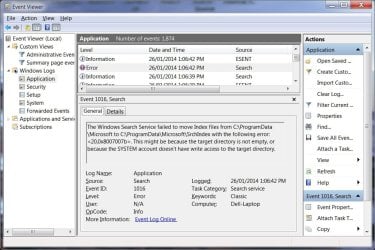
This may be useful information about why the index didn't get moved
 

Attachments

  • moveinfo.jpg
    moveinfo.jpg
    106.1 KB · Views: 1

My Computer My Computer

At a glance

windows 7 home premium 64 bit
Computer type
Laptop
Computer Manufacturer/Model Number
Dell 1550
OS
windows 7 home premium 64 bit
Yes it is - very useful. I'll look it up, but seeing it I think the move index location wants to create the folder. We pre-allocated one.

While I was working through other possible solutions, I asked a member to test one for me.

I'm confident that the process works, I just don't know if it solves the issue.

Before I post it could you bring me up to speed on how you share between the two machines? (I recall we discussed sharing earlier and put it on the back burner)

My thinking is that the share might contribute to the search issue. It might be easiest to unshare the two machines and share them again after search works. Process of elimination, eh wot!

Please post some images of your homegroup and what gets shared. I'm weak on this and don't have anything set up here that I can examine in comparison. I have a fundemental understanding though, so I can work it through given the information.

Thanks for hanging in there, this issue has been quite a battle.

Bill
 

My Computer My Computer

At a glance

x64 (6.3.9600) Win8.1 Pro & soon dual boot x6...AMD A6-3420M APU with Radeon(tm) HD Graphics6.00 GBAMD Radeon(TM) HD 6520G
Computer type
Laptop
Computer Manufacturer/Model Number
HP Pavilion dv6-6c10us
OS
x64 (6.3.9600) Win8.1 Pro & soon dual boot x64 (6.1.7601) Win7_SP1 HomePrem
CPU
AMD A6-3420M APU with Radeon(tm) HD Graphics
Motherboard
Hewlett-Packard 1805
Memory
6.00 GB
Graphics Card(s)
AMD Radeon(TM) HD 6520G
Sound Card
(1) AMD High Definition Audio Device (2) IDT High Definiti
Monitor(s) Displays
HP W2072a 20" LCD (1600 x 900) @ 60 Hz
Screen Resolution
1366 x 768 x 32 bits (4294967296 colors) @ 60 Hz
Hard Drives
ST640LM0 00 HM641JI SATA Disk Device
Keyboard
Logitech k520 wireless KB
Mouse
Logitech m320 wireless mouse (bundled with KB)
Internet Speed
15/5 | 54 MB Wireless 'n'
Antivirus
Realtime: Defender or Avast | On-demand: Malwarebytes, ESET
Browser
IE 11 on Win8, IE 10 on win 7
Other Info
Media: [Gimp, Audacity, VLC] || Comm: [WEmail 2012, Skype] || Productivity: [OpenOffice,| Textpad] || Utils: [Sysinternals, cCleaner, Speccy, Defraggler]
Aftre I get the sharing information from you and have a chance to wrap my head around it and the search index relationship I'll try to determine the best path and order.

Severe the share relationship and let Search create it's index from the ground up
or
let Search create it's index from the ground up and see if the share affects Rebuilding the Index

It's not a matter of right or wrong, it's more we want to get to the end in the least number of steps (there's been so many already, although much of the work will benefit your system - the 5 or 6 Index Rebuilds really didn't do much that would benefit your system).

So I'll wait on the sharing information.

Bill
-
 

My Computer My Computer

At a glance

x64 (6.3.9600) Win8.1 Pro & soon dual boot x6...AMD A6-3420M APU with Radeon(tm) HD Graphics6.00 GBAMD Radeon(TM) HD 6520G
Computer type
Laptop
Computer Manufacturer/Model Number
HP Pavilion dv6-6c10us
OS
x64 (6.3.9600) Win8.1 Pro & soon dual boot x64 (6.1.7601) Win7_SP1 HomePrem
CPU
AMD A6-3420M APU with Radeon(tm) HD Graphics
Motherboard
Hewlett-Packard 1805
Memory
6.00 GB
Graphics Card(s)
AMD Radeon(TM) HD 6520G
Sound Card
(1) AMD High Definition Audio Device (2) IDT High Definiti
Monitor(s) Displays
HP W2072a 20" LCD (1600 x 900) @ 60 Hz
Screen Resolution
1366 x 768 x 32 bits (4294967296 colors) @ 60 Hz
Hard Drives
ST640LM0 00 HM641JI SATA Disk Device
Keyboard
Logitech k520 wireless KB
Mouse
Logitech m320 wireless mouse (bundled with KB)
Internet Speed
15/5 | 54 MB Wireless 'n'
Antivirus
Realtime: Defender or Avast | On-demand: Malwarebytes, ESET
Browser
IE 11 on Win8, IE 10 on win 7
Other Info
Media: [Gimp, Audacity, VLC] || Comm: [WEmail 2012, Skype] || Productivity: [OpenOffice,| Textpad] || Utils: [Sysinternals, cCleaner, Speccy, Defraggler]
Before I post it could you bring me up to speed on how you share between the two machines? (I recall we discussed sharing earlier and put it on the back burner)

My thinking is that the share might contribute to the search issue. It might be easiest to unshare the two machines and share them again after search works. Process of elimination, eh wot!

Please post some images of your homegroup and what gets shared. I'm weak on this and don't have anything set up here that I can examine in comparison. I have a fundemental understanding though, so I can work it through given the information.

Thanks for hanging in there, this issue has been quite a battle.

Bill
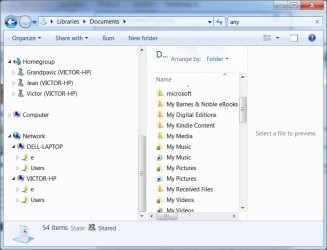
The sharing is done in two ways. First through the homegroup. To share in this manner you use the homegroup menu system and indicate (among other things) which libraries (and printer) that you want to share. (This sharing method is not working on this computer at the moment for reasons that I don't understand)
The second manner in which to share is to turn on sharing in the folders that you want to share.

Here is what my sharing looks like at this particular moment.
 

Attachments

  • share1.jpg
    share1.jpg
    51.2 KB · Views: 0

My Computer My Computer

At a glance

windows 7 home premium 64 bit
Computer type
Laptop
Computer Manufacturer/Model Number
Dell 1550
OS
windows 7 home premium 64 bit
Bear with me if I ask the question the wrong way - reading a little bit, I think a homegroup is created on one machine and other machines join the homegroup

Which machine was the homegroup created; Dell-Laptop or the other one?

I touched on this earlier in the thread, and we've reached the point where I can ask: How attached are you to the homegroup as it is set up now. (I know you said it's not working) Could you leave the homegroup?
http://www.sevenforums.com/tutorials/43980-homegroup-leave.html
edit: take a look at the related tutorials at the bottom of this one to get an idea of what's over in the tutorial section on Homegroups.

We can put it back and perhaps correct the issue of why it isn't working along the way.
There are some good tutorials on Sevenforums, a few are about homegroups.

I'm wondering if the two issues aren't related.
 
Last edited:

My Computer My Computer

At a glance

x64 (6.3.9600) Win8.1 Pro & soon dual boot x6...AMD A6-3420M APU with Radeon(tm) HD Graphics6.00 GBAMD Radeon(TM) HD 6520G
Computer type
Laptop
Computer Manufacturer/Model Number
HP Pavilion dv6-6c10us
OS
x64 (6.3.9600) Win8.1 Pro & soon dual boot x64 (6.1.7601) Win7_SP1 HomePrem
CPU
AMD A6-3420M APU with Radeon(tm) HD Graphics
Motherboard
Hewlett-Packard 1805
Memory
6.00 GB
Graphics Card(s)
AMD Radeon(TM) HD 6520G
Sound Card
(1) AMD High Definition Audio Device (2) IDT High Definiti
Monitor(s) Displays
HP W2072a 20" LCD (1600 x 900) @ 60 Hz
Screen Resolution
1366 x 768 x 32 bits (4294967296 colors) @ 60 Hz
Hard Drives
ST640LM0 00 HM641JI SATA Disk Device
Keyboard
Logitech k520 wireless KB
Mouse
Logitech m320 wireless mouse (bundled with KB)
Internet Speed
15/5 | 54 MB Wireless 'n'
Antivirus
Realtime: Defender or Avast | On-demand: Malwarebytes, ESET
Browser
IE 11 on Win8, IE 10 on win 7
Other Info
Media: [Gimp, Audacity, VLC] || Comm: [WEmail 2012, Skype] || Productivity: [OpenOffice,| Textpad] || Utils: [Sysinternals, cCleaner, Speccy, Defraggler]
Bear with me if I ask the question the wrong way - reading a little bit, I think a homegroup is created on one machine and other machines join the homegroup

Which machine was the homegroup created; Dell-Laptop or the other one?

I touched on this earlier in the thread, and we've reached the point where I can ask: How attached are you to the homegroup as it is set up now. (I know you said it's not working) Could you leave the homegroup?
http://www.sevenforums.com/tutorials/43980-homegroup-leave.html
edit: take a look at the related tutorials at the bottom of this one to get an idea of what's over in the tutorial section on Homegroups.


Do you still think I should go and turn off the Windows Search service
We can put it back and perhaps correct the issue of why it isn't working along the way.
There are some good tutorials on Sevenforums, a few are about homegroups.

I'm wondering if the two issues aren't related.

I have turned off homegroup sharing on my computer and left. I am no longer a member of the homegroup.

Network sharing is accomplished by turning on share on individual folders. I have turned off the network sharing on all of the folders that had.

So I can no longer be seen in the homegroup and I can no longer be seen sharing folders over the network.

I have rebuilt the index and it still shows 0 files indexed. The searches do not work.

I did have home group working and I am sure that I could get that started again. I think the sharing of files through the Network works better than homegroup anyway.
 
Last edited:

My Computer My Computer

At a glance

windows 7 home premium 64 bit
Computer type
Laptop
Computer Manufacturer/Model Number
Dell 1550
OS
windows 7 home premium 64 bit
Let's try this....

I had asked you to stop the Windows Search Svc in post 65

Check Services

If Windows Search is stopped, start it
Any change to the Indexing Options screen?
  • If the number of items is increasing, let it cook until it says Indexing Complete
    • Test Search in the Start Menu search box - any results?
      • Yes? Search is working, we can start putting things back together one piece at a time keeping an eye on how it affects search.
      • No? Rebuild the Index, wait until it says Indexing Complete
        and test search again.
If it is already started, then restart your machine
You'll need to stop Windows Search for the next step
See post# 65 (below the fold) for those instructions

In Explorer, navigate to
C:\ProgramData\Microsoft
rename the Search folder to _xSearch
then start the Windows Search Svc (click Start instead of stop in post# 65 instructions)

That's good for now, I'll read your next status post

Bill
-
 

My Computer My Computer

At a glance

x64 (6.3.9600) Win8.1 Pro & soon dual boot x6...AMD A6-3420M APU with Radeon(tm) HD Graphics6.00 GBAMD Radeon(TM) HD 6520G
Computer type
Laptop
Computer Manufacturer/Model Number
HP Pavilion dv6-6c10us
OS
x64 (6.3.9600) Win8.1 Pro & soon dual boot x64 (6.1.7601) Win7_SP1 HomePrem
CPU
AMD A6-3420M APU with Radeon(tm) HD Graphics
Motherboard
Hewlett-Packard 1805
Memory
6.00 GB
Graphics Card(s)
AMD Radeon(TM) HD 6520G
Sound Card
(1) AMD High Definition Audio Device (2) IDT High Definiti
Monitor(s) Displays
HP W2072a 20" LCD (1600 x 900) @ 60 Hz
Screen Resolution
1366 x 768 x 32 bits (4294967296 colors) @ 60 Hz
Hard Drives
ST640LM0 00 HM641JI SATA Disk Device
Keyboard
Logitech k520 wireless KB
Mouse
Logitech m320 wireless mouse (bundled with KB)
Internet Speed
15/5 | 54 MB Wireless 'n'
Antivirus
Realtime: Defender or Avast | On-demand: Malwarebytes, ESET
Browser
IE 11 on Win8, IE 10 on win 7
Other Info
Media: [Gimp, Audacity, VLC] || Comm: [WEmail 2012, Skype] || Productivity: [OpenOffice,| Textpad] || Utils: [Sysinternals, cCleaner, Speccy, Defraggler]
Let's try this....

I had asked you to stop the Windows Search Svc in post 65

Check Services

If Windows Search is stopped, start it


Any change to the Indexing Options screen?
  • If the number of items is increasing, let it cook until it says Indexing Complete
    • Test Search in the Start Menu search box - any results?
      • Yes? Search is working, we can start putting things back together one piece at a time keeping an eye on how it affects search.
      • No? Rebuild the Index, wait until it says Indexing Complete
        and test search again.
-

No joy in any of the above.


If it is already started, then restart your machine
You'll need to stop Windows Search for the next step
See post# 65 (below the fold) for those instructions

In Explorer, navigate to
C:\ProgramData\Microsoft
rename the Search folder to _xSearch
then start the Windows Search Svc (click Start instead of stop in post# 65 instructions)
I tried this last evening, but I am going to try it again and report the result.


That's good for now, I'll read your next status post
Bill
 

My Computer My Computer

At a glance

windows 7 home premium 64 bit
Computer type
Laptop
Computer Manufacturer/Model Number
Dell 1550
OS
windows 7 home premium 64 bit
Search will create the folder in ProgramData, set the proper access, and should build the underlying structure.

You can look in the C:\ProgramData\Microsoft\Search folder to see if there's anything there.
 

My Computer My Computer

At a glance

x64 (6.3.9600) Win8.1 Pro & soon dual boot x6...AMD A6-3420M APU with Radeon(tm) HD Graphics6.00 GBAMD Radeon(TM) HD 6520G
Computer type
Laptop
Computer Manufacturer/Model Number
HP Pavilion dv6-6c10us
OS
x64 (6.3.9600) Win8.1 Pro & soon dual boot x64 (6.1.7601) Win7_SP1 HomePrem
CPU
AMD A6-3420M APU with Radeon(tm) HD Graphics
Motherboard
Hewlett-Packard 1805
Memory
6.00 GB
Graphics Card(s)
AMD Radeon(TM) HD 6520G
Sound Card
(1) AMD High Definition Audio Device (2) IDT High Definiti
Monitor(s) Displays
HP W2072a 20" LCD (1600 x 900) @ 60 Hz
Screen Resolution
1366 x 768 x 32 bits (4294967296 colors) @ 60 Hz
Hard Drives
ST640LM0 00 HM641JI SATA Disk Device
Keyboard
Logitech k520 wireless KB
Mouse
Logitech m320 wireless mouse (bundled with KB)
Internet Speed
15/5 | 54 MB Wireless 'n'
Antivirus
Realtime: Defender or Avast | On-demand: Malwarebytes, ESET
Browser
IE 11 on Win8, IE 10 on win 7
Other Info
Media: [Gimp, Audacity, VLC] || Comm: [WEmail 2012, Skype] || Productivity: [OpenOffice,| Textpad] || Utils: [Sysinternals, cCleaner, Speccy, Defraggler]
In Explorer, navigate to
C:\ProgramData\Microsoft
rename the Search folder to _xSearch
then start the Windows Search Svc (click Start instead of stop in post# 65 instructions)

That's good for now, I'll read your next status post

Bill
-
Well I think that I may have screwed up!

I did this last evening (search didn't work) and because I was looking in the wrong place I thought that _xSearch had not been created. (It had)

So this morning I tried to create it again. It said the folder already existed.

Anyway there is still no joy with the search. When I look at the directory structure under _xSearch, the structure looks correct, however, it doesn't look to me that the indexing data is being loaded there. So should I delete _xSearch and all of children and try again? (the indexing thing has been run at least twice since I created _xSearch).
 

My Computer My Computer

At a glance

windows 7 home premium 64 bit
Computer type
Laptop
Computer Manufacturer/Model Number
Dell 1550
OS
windows 7 home premium 64 bit
I think you're alright, no harm.

Let's forget about _xSearch, I might need to compare some properties, so leave it just sit there.

Is there a Search folder in C:\ProgramData\Microsoft?
edit: No is ok, yes is ok too.
 

My Computer My Computer

At a glance

x64 (6.3.9600) Win8.1 Pro & soon dual boot x6...AMD A6-3420M APU with Radeon(tm) HD Graphics6.00 GBAMD Radeon(TM) HD 6520G
Computer type
Laptop
Computer Manufacturer/Model Number
HP Pavilion dv6-6c10us
OS
x64 (6.3.9600) Win8.1 Pro & soon dual boot x64 (6.1.7601) Win7_SP1 HomePrem
CPU
AMD A6-3420M APU with Radeon(tm) HD Graphics
Motherboard
Hewlett-Packard 1805
Memory
6.00 GB
Graphics Card(s)
AMD Radeon(TM) HD 6520G
Sound Card
(1) AMD High Definition Audio Device (2) IDT High Definiti
Monitor(s) Displays
HP W2072a 20" LCD (1600 x 900) @ 60 Hz
Screen Resolution
1366 x 768 x 32 bits (4294967296 colors) @ 60 Hz
Hard Drives
ST640LM0 00 HM641JI SATA Disk Device
Keyboard
Logitech k520 wireless KB
Mouse
Logitech m320 wireless mouse (bundled with KB)
Internet Speed
15/5 | 54 MB Wireless 'n'
Antivirus
Realtime: Defender or Avast | On-demand: Malwarebytes, ESET
Browser
IE 11 on Win8, IE 10 on win 7
Other Info
Media: [Gimp, Audacity, VLC] || Comm: [WEmail 2012, Skype] || Productivity: [OpenOffice,| Textpad] || Utils: [Sysinternals, cCleaner, Speccy, Defraggler]
I think you're alright, no harm.

Let's forget about _xSearch, I might need to compare some properties, so leave it just sit there.

Is there a Search folder in C:\ProgramData\Microsoft?
edit: No is ok, yes is ok too.


Yes
 

My Computer My Computer

At a glance

windows 7 home premium 64 bit
Computer type
Laptop
Computer Manufacturer/Model Number
Dell 1550
OS
windows 7 home premium 64 bit
check that the windows search svc is running, ok?
 

My Computer My Computer

At a glance

x64 (6.3.9600) Win8.1 Pro & soon dual boot x6...AMD A6-3420M APU with Radeon(tm) HD Graphics6.00 GBAMD Radeon(TM) HD 6520G
Computer type
Laptop
Computer Manufacturer/Model Number
HP Pavilion dv6-6c10us
OS
x64 (6.3.9600) Win8.1 Pro & soon dual boot x64 (6.1.7601) Win7_SP1 HomePrem
CPU
AMD A6-3420M APU with Radeon(tm) HD Graphics
Motherboard
Hewlett-Packard 1805
Memory
6.00 GB
Graphics Card(s)
AMD Radeon(TM) HD 6520G
Sound Card
(1) AMD High Definition Audio Device (2) IDT High Definiti
Monitor(s) Displays
HP W2072a 20" LCD (1600 x 900) @ 60 Hz
Screen Resolution
1366 x 768 x 32 bits (4294967296 colors) @ 60 Hz
Hard Drives
ST640LM0 00 HM641JI SATA Disk Device
Keyboard
Logitech k520 wireless KB
Mouse
Logitech m320 wireless mouse (bundled with KB)
Internet Speed
15/5 | 54 MB Wireless 'n'
Antivirus
Realtime: Defender or Avast | On-demand: Malwarebytes, ESET
Browser
IE 11 on Win8, IE 10 on win 7
Other Info
Media: [Gimp, Audacity, VLC] || Comm: [WEmail 2012, Skype] || Productivity: [OpenOffice,| Textpad] || Utils: [Sysinternals, cCleaner, Speccy, Defraggler]
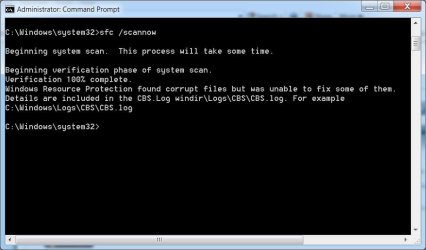
I've been looking at the system logs you sent before and saw something I either forgot about or missed before. The process below will give me more information and it might find some things to fix.

Follow OPTION TWO and OPTION THREE in this tutorial: http://www.sevenforums.com/tutorials/1538-sfc-scannow-command-system-file-checker.html
SFC /scannow

When you're done let me know if SFC found any integrity errors (displayed in the Command Prompt window) or if it did not.
Also, please attach sfcdetails.txt from OPTION THREE to your next post

Thanks
 

My Computer My Computer

At a glance

x64 (6.3.9600) Win8.1 Pro & soon dual boot x6...AMD A6-3420M APU with Radeon(tm) HD Graphics6.00 GBAMD Radeon(TM) HD 6520G
Computer type
Laptop
Computer Manufacturer/Model Number
HP Pavilion dv6-6c10us
OS
x64 (6.3.9600) Win8.1 Pro & soon dual boot x64 (6.1.7601) Win7_SP1 HomePrem
CPU
AMD A6-3420M APU with Radeon(tm) HD Graphics
Motherboard
Hewlett-Packard 1805
Memory
6.00 GB
Graphics Card(s)
AMD Radeon(TM) HD 6520G
Sound Card
(1) AMD High Definition Audio Device (2) IDT High Definiti
Monitor(s) Displays
HP W2072a 20" LCD (1600 x 900) @ 60 Hz
Screen Resolution
1366 x 768 x 32 bits (4294967296 colors) @ 60 Hz
Hard Drives
ST640LM0 00 HM641JI SATA Disk Device
Keyboard
Logitech k520 wireless KB
Mouse
Logitech m320 wireless mouse (bundled with KB)
Internet Speed
15/5 | 54 MB Wireless 'n'
Antivirus
Realtime: Defender or Avast | On-demand: Malwarebytes, ESET
Browser
IE 11 on Win8, IE 10 on win 7
Other Info
Media: [Gimp, Audacity, VLC] || Comm: [WEmail 2012, Skype] || Productivity: [OpenOffice,| Textpad] || Utils: [Sysinternals, cCleaner, Speccy, Defraggler]
I've been looking at the system logs you sent before and saw something I either forgot about or missed before. The process below will give me more information and it might find some things to fix.

Follow OPTION TWO and OPTION THREE in this tutorial: http://www.sevenforums.com/tutorials/1538-sfc-scannow-command-system-file-checker.html
SFC /scannow

When you're done let me know if SFC found any integrity errors (displayed in the Command Prompt window) or if it did not.
Also, please attach sfcdetails.txt from OPTION THREE to your next post

Thanks
option two
 

Attachments

  • opttwo.jpg
    opttwo.jpg
    40.7 KB · Views: 0
Last edited:

My Computer My Computer

At a glance

windows 7 home premium 64 bit
Computer type
Laptop
Computer Manufacturer/Model Number
Dell 1550
OS
windows 7 home premium 64 bit
Back
Top