Solved Indexing and Searching broken

My Computer My Computer

At a glance

Windows 10 ProAMD Ryzen 5 2400G Processor with Radeon RX Ve...G.SKILL Ripjaws V Series 16GB (2 x 8GB) 288-P...2047MB NVIDIA GeForce GTX 1060 6GB (EVGA)
Computer type
PC/Desktop
Computer Manufacturer/Model Number
Custom Built
OS
Windows 10 Pro
CPU
AMD Ryzen 5 2400G Processor with Radeon RX Vega 11 Graphics
Motherboard
ASRock X470 Master SLI/AC AM4 AMD Promontory X470 SATA 6Gb/s
Memory
G.SKILL Ripjaws V Series 16GB (2 x 8GB) 288-Pin DDR4 SDRAM D
Graphics Card(s)
2047MB NVIDIA GeForce GTX 1060 6GB (EVGA)
Sound Card
Motherboard Built in
Monitor(s) Displays
Acer R240HY bidx 23.8-Inch IPS HDMI DVI VGA (1920 x 1080) Wi
Screen Resolution
1920 x 1080
Hard Drives
1TB Sandisk SSD PLUS (Main drive)
500 GB Seagate 7200 RPM (Games)
500 GB Western Digital 7200 RPM (Virtual Machines)
PSU
CORSAIR TX Series TX650M 650W 80+ Gold Modular Power Supply
Case
CORSAIR CARBIDE SPEC-02 Mid-Tower Gaming Case, Red LED Fan
Cooling
220mm, two 120mm, and four 60mm fans
Keyboard
Wired Dell keyboard
Mouse
Wireless Logitech mouse
Internet Speed
250mb down, 30mb up
Antivirus
Panda Cloud Antivirus
Browser
Chrome-ish x64
Other Info
Your awesome for reading this.
SFC & SF Diagnostic output

Thanks, I'm going to ask for some help on this. The members who do this all the time are quicker at it. I'd have to look up an error and find a solution.

Putting out the call.

edit: Now we wait for the big SFC guns.
I've asked Tom982 and NoelDP to take a look at the SFC output.
There's also output from the SF diagnostic tool.

CBS.zip (see sfcdetails.txt attached to this post)
SF_25-01-2014.zip

Screen shot of SFC results in Command Prompt Window
-
 

Attachments

Last edited:

My Computer My Computer

At a glance

x64 (6.3.9600) Win8.1 Pro & soon dual boot x6...AMD A6-3420M APU with Radeon(tm) HD Graphics6.00 GBAMD Radeon(TM) HD 6520G
Computer type
Laptop
Computer Manufacturer/Model Number
HP Pavilion dv6-6c10us
OS
x64 (6.3.9600) Win8.1 Pro & soon dual boot x64 (6.1.7601) Win7_SP1 HomePrem
CPU
AMD A6-3420M APU with Radeon(tm) HD Graphics
Motherboard
Hewlett-Packard 1805
Memory
6.00 GB
Graphics Card(s)
AMD Radeon(TM) HD 6520G
Sound Card
(1) AMD High Definition Audio Device (2) IDT High Definiti
Monitor(s) Displays
HP W2072a 20" LCD (1600 x 900) @ 60 Hz
Screen Resolution
1366 x 768 x 32 bits (4294967296 colors) @ 60 Hz
Hard Drives
ST640LM0 00 HM641JI SATA Disk Device
Keyboard
Logitech k520 wireless KB
Mouse
Logitech m320 wireless mouse (bundled with KB)
Internet Speed
15/5 | 54 MB Wireless 'n'
Antivirus
Realtime: Defender or Avast | On-demand: Malwarebytes, ESET
Browser
IE 11 on Win8, IE 10 on win 7
Other Info
Media: [Gimp, Audacity, VLC] || Comm: [WEmail 2012, Skype] || Productivity: [OpenOffice,| Textpad] || Utils: [Sysinternals, cCleaner, Speccy, Defraggler]
Follow OPTION TWO and OPTION THREE in this tutorial: http://www.sevenforums.com/tutorials/1538-sfc-scannow-command-system-file-checker.html

Also, please attach sfcdetails.txt from OPTION THREE to your next post

Thanks

Could you please do this as well? This way we can read the log and attempt to fix your corrupted instillation of windows 7.

This is most likely why you are having problems.
where do I find the sfcdetails.txt file?
 

My Computer My Computer

At a glance

windows 7 home premium 64 bit
Computer type
Laptop
Computer Manufacturer/Model Number
Dell 1550
OS
windows 7 home premium 64 bit
It's in Option 3 as told.
How to See and Read Only the "SFC" Scan Results from the CBS.LOG
NOTE: When SFC runs, it logs it's actions into the C:\Windows\Logs\CBS\CBS.log. The steps in this option will show you how to see only the specific SFC entries with the [SR] tags in this CBS.log. This can be helpful to show you what files SFC could not fix automatically if you wanted to try and manually replace them.
1. Open an "elevated command prompt" (right click -> Run as administrator).

2. In the elevated command prompt, copy and paste the command below, and press Enter. (See screenshot below)
NOTE: This will place a sfcdetails.txt file on your desktop with only the SFC scan result details from the CBS.LOG in it.
Code:
findstr /c:"[SR]" %windir%\Logs\CBS\CBS.log >"%userprofile%\Desktop\sfcdetails.txt"
3. Close the elevated command prompt.

4. Open the sfcdetails.txt file on your desktop to see the SFC scan details in the CBS.LOG.

5. You can safely delete the sfcdetails.txt file afterwards if you like.
 

My Computer My Computer

At a glance

Windows 7 Ultimate X64 SP1Intel i5-2550K, Differing ~4.4-4.8GHz No buil...16GB G.Skill Sniper 1866MHz @ 2133MHz 2x8GBASUS GTX650TIB-DC2OC-2GD5, (650TI Boost)
Computer type
PC/Desktop
Computer Manufacturer/Model Number
Home Built Desktop By DataTech
OS
Windows 7 Ultimate X64 SP1
CPU
Intel i5-2550K, Differing ~4.4-4.8GHz No built in GPU
Motherboard
ASUS P8Z68-V PRO/GEN3
Memory
16GB G.Skill Sniper 1866MHz @ 2133MHz 2x8GB
Graphics Card(s)
ASUS GTX650TIB-DC2OC-2GD5, (650TI Boost)
Sound Card
Onboard Realtek 5-1
Monitor(s) Displays
Samsung P2570HD
Screen Resolution
1920x1080
Hard Drives
Samsung 840 Pro 256GB SSD for OS, 500GB Seagate Constellation (Enterprise drive) for Data
PSU
Corsair HX650W
Case
Inwin Dragon Rider
Cooling
Hyper 212 EVO w/two Noctua fans, push-pull, @1300 RPM
Keyboard
E-Z Eyes, bright yellow keys with large characters
Mouse
steelseries SENSEI Laser Pro Gaming
Internet Speed
48-51Mbs Mbs down, 11 Mbs up Xfinity Cable
Antivirus
Norton Internet Security 2013
Browser
IE 10, Opera, Pale Moon if needed
Other Info
4 case fans, LG BluRay-RE, ASUS DVD-RW, Mr. Fusion power supply, 1.21 gigawatts.
where do I find the sfcdetails.txt file?
Don't worry about it, you already posted the CBS.zip file in post# 80
I ran the findstr command on it when I looked at it. All of the files needed for now are on post# 82
 

My Computer My Computer

At a glance

x64 (6.3.9600) Win8.1 Pro & soon dual boot x6...AMD A6-3420M APU with Radeon(tm) HD Graphics6.00 GBAMD Radeon(TM) HD 6520G
Computer type
Laptop
Computer Manufacturer/Model Number
HP Pavilion dv6-6c10us
OS
x64 (6.3.9600) Win8.1 Pro & soon dual boot x64 (6.1.7601) Win7_SP1 HomePrem
CPU
AMD A6-3420M APU with Radeon(tm) HD Graphics
Motherboard
Hewlett-Packard 1805
Memory
6.00 GB
Graphics Card(s)
AMD Radeon(TM) HD 6520G
Sound Card
(1) AMD High Definition Audio Device (2) IDT High Definiti
Monitor(s) Displays
HP W2072a 20" LCD (1600 x 900) @ 60 Hz
Screen Resolution
1366 x 768 x 32 bits (4294967296 colors) @ 60 Hz
Hard Drives
ST640LM0 00 HM641JI SATA Disk Device
Keyboard
Logitech k520 wireless KB
Mouse
Logitech m320 wireless mouse (bundled with KB)
Internet Speed
15/5 | 54 MB Wireless 'n'
Antivirus
Realtime: Defender or Avast | On-demand: Malwarebytes, ESET
Browser
IE 11 on Win8, IE 10 on win 7
Other Info
Media: [Gimp, Audacity, VLC] || Comm: [WEmail 2012, Skype] || Productivity: [OpenOffice,| Textpad] || Utils: [Sysinternals, cCleaner, Speccy, Defraggler]
Here's the important bits from the log...
Code:
 Line 67779: 2014-01-28 15:09:47, Info                  CSI    00000631 [SR] Repairing 2 components
 Line 67780: 2014-01-28 15:09:47, Info                  CSI    00000632 [SR] Beginning Verify and Repair transaction
 Line 67783: 2014-01-28 15:09:57, Info                  CSI    00000634 [SR] Cannot repair member file [l:38{19}]"NlsLexicons0009.dll" of Microsoft-Windows-NaturalLanguage6, Version = 6.1.7601.17514, pA = PROCESSOR_ARCHITECTURE_AMD64 (9), Culture neutral, VersionScope = 1 nonSxS, PublicKeyToken = {l:8 b:31bf3856ad364e35}, Type neutral, TypeName neutral, PublicKey neutral in the store, hash mismatch
 Line 67786: 2014-01-28 15:10:00, Info                  CSI    00000636 [SR] Cannot repair member file [l:38{19}]"NlsLexicons0024.dll" of Microsoft-Windows-NaturalLanguage6, Version = 6.1.7601.17514, pA = PROCESSOR_ARCHITECTURE_AMD64 (9), Culture neutral, VersionScope = 1 nonSxS, PublicKeyToken = {l:8 b:31bf3856ad364e35}, Type neutral, TypeName neutral, PublicKey neutral in the store, hash mismatch
 Line 67789: 2014-01-28 15:10:01, Info                  CSI    00000638 [SR] Cannot repair member file [l:24{12}]"M1033DSK.CSD" of Microsoft-Windows-MulanTTSVoiceENUDsk, Version = 6.1.7600.16385, pA = PROCESSOR_ARCHITECTURE_IA32_ON_WIN64 (10), Culture neutral, VersionScope = 1 nonSxS, PublicKeyToken = {l:8 b:31bf3856ad364e35}, Type neutral, TypeName neutral, PublicKey neutral in the store, hash mismatch

I'll post a fix a bit later....
 

My Computer My Computer

At a glance

Win 7 x64 Home Premium (and x86 VirtualBox VM...i3 370M/i7 6500U8GB - finally :)/8GBit's an i3, dude!/dual Intel&nVidia
Computer type
Laptop
Computer Manufacturer/Model Number
Asus K52F or Lenovo B51-80
OS
Win 7 x64 Home Premium (and x86 VirtualBox VM)/Win10
CPU
i3 370M/i7 6500U
Motherboard
Asus/Lenovo
Memory
8GB - finally :)/8GB
Graphics Card(s)
it's an i3, dude!/dual Intel&nVidia
Sound Card
onboard
Monitor(s) Displays
15.6" built-in
Screen Resolution
1366x768/1920x1080
Hard Drives
750GB Seagate internal
Sundry external drives attached to other computers on the local network
1TB SSD on the Lenovo
PSU
n/a
Internet Speed
as much as I can get - usually on a dongle/phone, so <1MB/s
Antivirus
MSE/Defender
Browser
IE11/12/Edge/Chrome/FF(if I must)
I've uploaded a file - gpcaa.zip - to my SkyDrive at Noel's SkyDrive
Please download and save it.

Right-click on the saved file and select Extract all...
Change the target to C:\ and click on Extract
Close all windows (it would be a good idea to print these instructions!)
Now reboot to the Repair Environment - as soon as the machine restarts, start tapping F8 - this should bring up the Advanced Boot Menu, at the top of which should be the option 'Repair my Computer'
Pick that
You'll have to log in with your username and password.

Pick the option to use a Command Prompt
At the prompt type
DIR C:\gpcaa
hit the enter key - if you get a 'Not Found' error try
DIR D:\gpcaa
or
DIR E:\gpcaa


The drive letter in use when you find the folder will need to be substituted (for<drive>) into the following command...

XCOPY <drive>:\gpcaa <drive>:\windows\winsxs /y /i /s /v /h

(e.g. XCOPY P:\wfire P:\windows\winsxs /y /i /s /v /h )

run the command (it should take almost no time)and when the prompt returns, type
EXIT
and hit the Enter key to exit Command Prompt - reboot to Normal Mode Windows.

Now run SFC /SCANNOW in an Elevated Command Prompt
then reboot and upload the new CBS.log file to your reply.


My Computer My Computer

At a glance

Win 7 x64 Home Premium (and x86 VirtualBox VM...i3 370M/i7 6500U8GB - finally :)/8GBit's an i3, dude!/dual Intel&nVidia
Computer type
Laptop
Computer Manufacturer/Model Number
Asus K52F or Lenovo B51-80
OS
Win 7 x64 Home Premium (and x86 VirtualBox VM)/Win10
CPU
i3 370M/i7 6500U
Motherboard
Asus/Lenovo
Memory
8GB - finally :)/8GB
Graphics Card(s)
it's an i3, dude!/dual Intel&nVidia
Sound Card
onboard
Monitor(s) Displays
15.6" built-in
Screen Resolution
1366x768/1920x1080
Hard Drives
750GB Seagate internal
Sundry external drives attached to other computers on the local network
1TB SSD on the Lenovo
PSU
n/a
Internet Speed
as much as I can get - usually on a dongle/phone, so <1MB/s
Antivirus
MSE/Defender
Browser
IE11/12/Edge/Chrome/FF(if I must)
I've uploaded a file - gpcaa.zip - to my SkyDrive at Noel's SkyDrive
Please download and save it.
Right-click on the saved file and select Extract all...
Change the target to C:\ and click on Extract
Close all windows (it would be a good idea to print these instructions!)
Now reboot to the Repair Environment - as soon as the machine restarts, start tapping F8 - this should bring up the Advanced Boot Menu, at the top of which should be the option 'Repair my Computer'
Pick that
You'll have to log in with your username and password.
Pick the option to use a Command Prompt
At the prompt type
DIR C:\gpcaa
hit the enter key - if you get a 'Not Found' error try
DIR D:\gpcaa
or
DIR E:\gpcaa

The drive letter in use when you find the folder will need to be substituted (for<drive>) into the following command...

XCOPY <drive>:\gpcaa <drive>:\windows\winsxs /y /i /s /v /h

(e.g.XCOPY P:\wfire P:\windows\winsxs /y /i /s /v /h )

run the command (it should take almost no time)and when the prompt returns, type
EXIT
and hit the Enter key to exit Command Prompt - reboot to Normal Mode Windows.
Now run SFC /SCANNOW in an Elevated Command Prompt
then reboot and upload the new CBS.log file to your reply.

I think that all of the above worked -- THANK YOU

I have attached the log file (cbs.zip)
 

My Computer My Computer

At a glance

windows 7 home premium 64 bit
Computer type
Laptop
Computer Manufacturer/Model Number
Dell 1550
OS
windows 7 home premium 64 bit
Post-patch sfcdetails.txt - looks good

Do you mean search is working now? That would be really good news.

There are some things left to do regarding search. Things we changed in the process of troubleshooting need to be changed back.

I'll go through the CBS log and see if there's more to do with SFC.

Bill

edit: The SFC log looks good. There are some minor things still reported (NLS / Speechengine) but these might be known issues. I'll do some research, but I'm confident that they can be ignored for now. These entries are not critical.
 

Attachments

Last edited:

My Computer My Computer

At a glance

x64 (6.3.9600) Win8.1 Pro & soon dual boot x6...AMD A6-3420M APU with Radeon(tm) HD Graphics6.00 GBAMD Radeon(TM) HD 6520G
Computer type
Laptop
Computer Manufacturer/Model Number
HP Pavilion dv6-6c10us
OS
x64 (6.3.9600) Win8.1 Pro & soon dual boot x64 (6.1.7601) Win7_SP1 HomePrem
CPU
AMD A6-3420M APU with Radeon(tm) HD Graphics
Motherboard
Hewlett-Packard 1805
Memory
6.00 GB
Graphics Card(s)
AMD Radeon(TM) HD 6520G
Sound Card
(1) AMD High Definition Audio Device (2) IDT High Definiti
Monitor(s) Displays
HP W2072a 20" LCD (1600 x 900) @ 60 Hz
Screen Resolution
1366 x 768 x 32 bits (4294967296 colors) @ 60 Hz
Hard Drives
ST640LM0 00 HM641JI SATA Disk Device
Keyboard
Logitech k520 wireless KB
Mouse
Logitech m320 wireless mouse (bundled with KB)
Internet Speed
15/5 | 54 MB Wireless 'n'
Antivirus
Realtime: Defender or Avast | On-demand: Malwarebytes, ESET
Browser
IE 11 on Win8, IE 10 on win 7
Other Info
Media: [Gimp, Audacity, VLC] || Comm: [WEmail 2012, Skype] || Productivity: [OpenOffice,| Textpad] || Utils: [Sysinternals, cCleaner, Speccy, Defraggler]
  1. Does Search work in all three location?
  2. Does the Search Index show X items indexed, indexing complete?
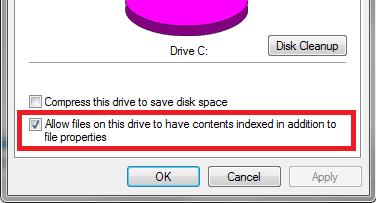
  3. The properties of C:\ need to include "Allow Files on this drive to have..."
    - This folder and all sub foilder/file
    --> it will complain about changing attributes on some files.
    This is not a problem.
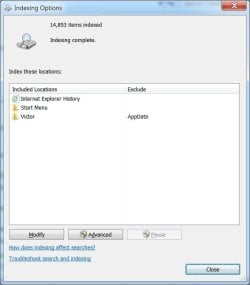
  4. The Indexed Locations are currently IE History and Start Menu
    - this needs to be expanded to include c:\users [excluding AppData from your profile]
That's a good start.
Let me know if you have any questions before you begin any step, I typed them in abbreviated form and will expand the step if you ask for help. I think you've been in all of the areas and have a good idea of what to do.
 

My Computer My Computer

At a glance

x64 (6.3.9600) Win8.1 Pro & soon dual boot x6...AMD A6-3420M APU with Radeon(tm) HD Graphics6.00 GBAMD Radeon(TM) HD 6520G
Computer type
Laptop
Computer Manufacturer/Model Number
HP Pavilion dv6-6c10us
OS
x64 (6.3.9600) Win8.1 Pro & soon dual boot x64 (6.1.7601) Win7_SP1 HomePrem
CPU
AMD A6-3420M APU with Radeon(tm) HD Graphics
Motherboard
Hewlett-Packard 1805
Memory
6.00 GB
Graphics Card(s)
AMD Radeon(TM) HD 6520G
Sound Card
(1) AMD High Definition Audio Device (2) IDT High Definiti
Monitor(s) Displays
HP W2072a 20" LCD (1600 x 900) @ 60 Hz
Screen Resolution
1366 x 768 x 32 bits (4294967296 colors) @ 60 Hz
Hard Drives
ST640LM0 00 HM641JI SATA Disk Device
Keyboard
Logitech k520 wireless KB
Mouse
Logitech m320 wireless mouse (bundled with KB)
Internet Speed
15/5 | 54 MB Wireless 'n'
Antivirus
Realtime: Defender or Avast | On-demand: Malwarebytes, ESET
Browser
IE 11 on Win8, IE 10 on win 7
Other Info
Media: [Gimp, Audacity, VLC] || Comm: [WEmail 2012, Skype] || Productivity: [OpenOffice,| Textpad] || Utils: [Sysinternals, cCleaner, Speccy, Defraggler]
SFC is clear - just look at the last 5 lines of the SFCdetails file - it found nothing that needed repairing. :)

I'll leave you two to beat Search into submission :devil:
 

My Computer My Computer

At a glance

Win 7 x64 Home Premium (and x86 VirtualBox VM...i3 370M/i7 6500U8GB - finally :)/8GBit's an i3, dude!/dual Intel&nVidia
Computer type
Laptop
Computer Manufacturer/Model Number
Asus K52F or Lenovo B51-80
OS
Win 7 x64 Home Premium (and x86 VirtualBox VM)/Win10
CPU
i3 370M/i7 6500U
Motherboard
Asus/Lenovo
Memory
8GB - finally :)/8GB
Graphics Card(s)
it's an i3, dude!/dual Intel&nVidia
Sound Card
onboard
Monitor(s) Displays
15.6" built-in
Screen Resolution
1366x768/1920x1080
Hard Drives
750GB Seagate internal
Sundry external drives attached to other computers on the local network
1TB SSD on the Lenovo
PSU
n/a
Internet Speed
as much as I can get - usually on a dongle/phone, so <1MB/s
Antivirus
MSE/Defender
Browser
IE11/12/Edge/Chrome/FF(if I must)
  1. Does Search work in all three location?

Yes


  1. [*]Does the Search Index show X items indexed, indexing complete?
    [*]
Yes
  1. [*]The properties of C:\ need to include "Allow Files on this drive to have..."
    [*]
    ]--> it will complain about changing attributes on some files.
    This is not a problem.
    [*]
I'm not sure what you are describing here. Do I need to go back and allow certain folders to be indexed?
  1. [*]The Indexed Locations are currently IE History and Start Menu
    - this needs to be expanded to include c:\users [excluding AppData from your profile]
    [*]
I had actually added my profile back into the index at some point so it is already there


That's a good start.
Let me know if you have any questions before you begin any step, I typed them in abbreviated form and will expand the step if you ask for help. I think you've been in all of the areas and have a good idea of what to do.
 
Last edited:

My Computer My Computer

At a glance

windows 7 home premium 64 bit
Computer type
Laptop
Computer Manufacturer/Model Number
Dell 1550
OS
windows 7 home premium 64 bit
Ok, #3 - we removed the checkmark from the C:\ drive that told Search that it could index file contents on that drive, now we want to put the checkmark back.

This only sets an attrbibute on the files it doesn't actually index anything.
What gets indexed is controlled by the Index Locations.

edit: It is a bad idea to put C:\ in the Index Locations.

I like all of those Yes's
Bill
 

Attachments

  • cdrivechkd.png
    cdrivechkd.png
    4.8 KB · Views: 13

My Computer My Computer

At a glance

x64 (6.3.9600) Win8.1 Pro & soon dual boot x6...AMD A6-3420M APU with Radeon(tm) HD Graphics6.00 GBAMD Radeon(TM) HD 6520G
Computer type
Laptop
Computer Manufacturer/Model Number
HP Pavilion dv6-6c10us
OS
x64 (6.3.9600) Win8.1 Pro & soon dual boot x64 (6.1.7601) Win7_SP1 HomePrem
CPU
AMD A6-3420M APU with Radeon(tm) HD Graphics
Motherboard
Hewlett-Packard 1805
Memory
6.00 GB
Graphics Card(s)
AMD Radeon(TM) HD 6520G
Sound Card
(1) AMD High Definition Audio Device (2) IDT High Definiti
Monitor(s) Displays
HP W2072a 20" LCD (1600 x 900) @ 60 Hz
Screen Resolution
1366 x 768 x 32 bits (4294967296 colors) @ 60 Hz
Hard Drives
ST640LM0 00 HM641JI SATA Disk Device
Keyboard
Logitech k520 wireless KB
Mouse
Logitech m320 wireless mouse (bundled with KB)
Internet Speed
15/5 | 54 MB Wireless 'n'
Antivirus
Realtime: Defender or Avast | On-demand: Malwarebytes, ESET
Browser
IE 11 on Win8, IE 10 on win 7
Other Info
Media: [Gimp, Audacity, VLC] || Comm: [WEmail 2012, Skype] || Productivity: [OpenOffice,| Textpad] || Utils: [Sysinternals, cCleaner, Speccy, Defraggler]
Let's see, what else did we rip apart?

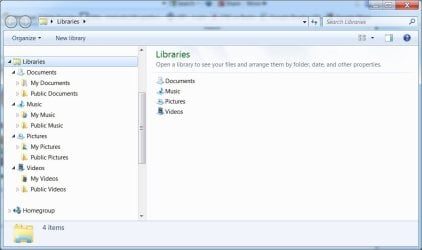
Libraries. Restored is a better word.
I recall that you had your documents folder in both the Documents Library and the Pictures Library.
That might cause Search a little extra work, so if there was a reason you had it set up that way, I'd like to see if we can set indexing options a little differently to avoid entries in the index with two types (docs with pics type and pics with doc types.) I'm not certain that's the way it works, but I'd like to go over it with you.

Bill
 

My Computer My Computer

At a glance

x64 (6.3.9600) Win8.1 Pro & soon dual boot x6...AMD A6-3420M APU with Radeon(tm) HD Graphics6.00 GBAMD Radeon(TM) HD 6520G
Computer type
Laptop
Computer Manufacturer/Model Number
HP Pavilion dv6-6c10us
OS
x64 (6.3.9600) Win8.1 Pro & soon dual boot x64 (6.1.7601) Win7_SP1 HomePrem
CPU
AMD A6-3420M APU with Radeon(tm) HD Graphics
Motherboard
Hewlett-Packard 1805
Memory
6.00 GB
Graphics Card(s)
AMD Radeon(TM) HD 6520G
Sound Card
(1) AMD High Definition Audio Device (2) IDT High Definiti
Monitor(s) Displays
HP W2072a 20" LCD (1600 x 900) @ 60 Hz
Screen Resolution
1366 x 768 x 32 bits (4294967296 colors) @ 60 Hz
Hard Drives
ST640LM0 00 HM641JI SATA Disk Device
Keyboard
Logitech k520 wireless KB
Mouse
Logitech m320 wireless mouse (bundled with KB)
Internet Speed
15/5 | 54 MB Wireless 'n'
Antivirus
Realtime: Defender or Avast | On-demand: Malwarebytes, ESET
Browser
IE 11 on Win8, IE 10 on win 7
Other Info
Media: [Gimp, Audacity, VLC] || Comm: [WEmail 2012, Skype] || Productivity: [OpenOffice,| Textpad] || Utils: [Sysinternals, cCleaner, Speccy, Defraggler]
Let's see, what else did we rip apart?

Libraries. Restored is a better word.
I recall that you had your documents folder in both the Documents Library and the Pictures Library.
That might cause Search a little extra work, so if there was a reason you had it set up that way, I'd like to see if we can set indexing options a little differently to avoid entries in the index with two types (docs with pics type and pics with doc types.) I'm not certain that's the way it works, but I'd like to go over it with you.

Bill

The indexing thing is done from the previous message.

Here are what the libraries look like now
 

Attachments

  • libs.jpg
    libs.jpg
    48 KB · Views: 0

My Computer My Computer

At a glance

windows 7 home premium 64 bit
Computer type
Laptop
Computer Manufacturer/Model Number
Dell 1550
OS
windows 7 home premium 64 bit
That looks great. I must have been tired because I looked back at post ## and that's the way they were then.
Good no change required.

You know what? I think that's it. I'll take a stroll down memory lane and review the thread to see if there is something else, but I think we're done.

We did change Homegroups but if I recall they eren't working and you thought you might just network share.
I think I pointed you to soem Homegroup tutorials, so they're in your thread or you can search the tutorial section for Homegroups.

I was looking for something myself and I noticed that you were in tutorials too. I'm glad when members take the initiative and start looking over there themselves. A lot of this side is pointing to a tutorial anyway.

If you want we can go over Homegroups, but it's not a strong point of mine.

I'll post anything else I find after reviewing the thread. Leave the thread open for a few days and see if Search behaes, then when you're satisfied please mark it solved.

Thanks, it's been my pleasure working with you on this.

Bill
 

My Computer My Computer

At a glance

x64 (6.3.9600) Win8.1 Pro & soon dual boot x6...AMD A6-3420M APU with Radeon(tm) HD Graphics6.00 GBAMD Radeon(TM) HD 6520G
Computer type
Laptop
Computer Manufacturer/Model Number
HP Pavilion dv6-6c10us
OS
x64 (6.3.9600) Win8.1 Pro & soon dual boot x64 (6.1.7601) Win7_SP1 HomePrem
CPU
AMD A6-3420M APU with Radeon(tm) HD Graphics
Motherboard
Hewlett-Packard 1805
Memory
6.00 GB
Graphics Card(s)
AMD Radeon(TM) HD 6520G
Sound Card
(1) AMD High Definition Audio Device (2) IDT High Definiti
Monitor(s) Displays
HP W2072a 20" LCD (1600 x 900) @ 60 Hz
Screen Resolution
1366 x 768 x 32 bits (4294967296 colors) @ 60 Hz
Hard Drives
ST640LM0 00 HM641JI SATA Disk Device
Keyboard
Logitech k520 wireless KB
Mouse
Logitech m320 wireless mouse (bundled with KB)
Internet Speed
15/5 | 54 MB Wireless 'n'
Antivirus
Realtime: Defender or Avast | On-demand: Malwarebytes, ESET
Browser
IE 11 on Win8, IE 10 on win 7
Other Info
Media: [Gimp, Audacity, VLC] || Comm: [WEmail 2012, Skype] || Productivity: [OpenOffice,| Textpad] || Utils: [Sysinternals, cCleaner, Speccy, Defraggler]
the only thing I saw left hanging around is C:\ProgramDat\Microsoft\_xSearch
You can delete that folder so it doesn't confuse anyone in the future.

Could you post a final screenshot of Indexed Options?

We're good!

Thanks again,

bill
 

My Computer My Computer

At a glance

x64 (6.3.9600) Win8.1 Pro & soon dual boot x6...AMD A6-3420M APU with Radeon(tm) HD Graphics6.00 GBAMD Radeon(TM) HD 6520G
Computer type
Laptop
Computer Manufacturer/Model Number
HP Pavilion dv6-6c10us
OS
x64 (6.3.9600) Win8.1 Pro & soon dual boot x64 (6.1.7601) Win7_SP1 HomePrem
CPU
AMD A6-3420M APU with Radeon(tm) HD Graphics
Motherboard
Hewlett-Packard 1805
Memory
6.00 GB
Graphics Card(s)
AMD Radeon(TM) HD 6520G
Sound Card
(1) AMD High Definition Audio Device (2) IDT High Definiti
Monitor(s) Displays
HP W2072a 20" LCD (1600 x 900) @ 60 Hz
Screen Resolution
1366 x 768 x 32 bits (4294967296 colors) @ 60 Hz
Hard Drives
ST640LM0 00 HM641JI SATA Disk Device
Keyboard
Logitech k520 wireless KB
Mouse
Logitech m320 wireless mouse (bundled with KB)
Internet Speed
15/5 | 54 MB Wireless 'n'
Antivirus
Realtime: Defender or Avast | On-demand: Malwarebytes, ESET
Browser
IE 11 on Win8, IE 10 on win 7
Other Info
Media: [Gimp, Audacity, VLC] || Comm: [WEmail 2012, Skype] || Productivity: [OpenOffice,| Textpad] || Utils: [Sysinternals, cCleaner, Speccy, Defraggler]
That looks great. I must have been tired because I looked back at post ## and that's the way they were then.
Good no change required.

You know what? I think that's it. I'll take a stroll down memory lane and review the thread to see if there is something else, but I think we're done.

We did change Homegroups but if I recall they eren't working and you thought you might just network share.
I think I pointed you to soem Homegroup tutorials, so they're in your thread or you can search the tutorial section for Homegroups.

I was looking for something myself and I noticed that you were in tutorials too. I'm glad when members take the initiative and start looking over there themselves. A lot of this side is pointing to a tutorial anyway.

If you want we can go over Homegroups, but it's not a strong point of mine.

I'll post anything else I find after reviewing the thread. Leave the thread open for a few days and see if Search behaes, then when you're satisfied please mark it solved.

Thanks, it's been my pleasure working with you on this.

Bill

Bill,
thanks for your help, patience, and perseverance to get this problem solved. I learned and perhaps we learned together. Before you came along I was considering loading up Windows 8! I don't really want to do that.
 

My Computer My Computer

At a glance

windows 7 home premium 64 bit
Computer type
Laptop
Computer Manufacturer/Model Number
Dell 1550
OS
windows 7 home premium 64 bit
the only thing I saw left hanging around is C:\ProgramDat\Microsoft\_xSearch
You can delete that folder so it doesn't confuse anyone in the future.

Could you post a final screenshot of Indexed Options?

We're good!

Thanks again,

bill

I have deleted the x_Search.

Here is a picture of the Index Options.

I would like to go out and smell the roses for awhile but its -20C and there is 50 cm. of snow on the front lawn. So I guess I'll start a new thread with my other problem!
 

Attachments

  • finalindexopts.jpg
    finalindexopts.jpg
    28 KB · Views: 11
Last edited:

My Computer My Computer

At a glance

windows 7 home premium 64 bit
Computer type
Laptop
Computer Manufacturer/Model Number
Dell 1550
OS
windows 7 home premium 64 bit
Back
Top