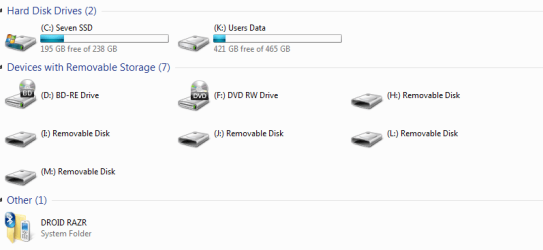
disk drive shown in explorer, i dont have connected

skizmox

New member
Local time
8:16 PM
Messages
7
hey guys i need some help so i thought that you could have helped me.
so i just reinstalled windows 7, everything went flawlessly. but now when i go to my computer there is shown a drive that i have not even connected and windows itself is also kinda laggy, and should be because of the specs you know...
and also when i delete a file it dissappears only after i refresh, so i think that we have a problem with explorer.

Capture.PNG

thanks
 

My Computer My Computer

Computer type
PC/Desktop
Computer Manufacturer/Model Number
custom built
OS
Windows Ultimate 64 bit
CPU
intel quad core i7 3770k @4,2 ghz
Motherboard
MSI Z77 MPOWER
Memory
16 gb 1600 mhz goodram
Graphics Card(s)
MSI gtx 680 twin frozr 3
Hard Drives
2 tb seagate hdd
120 gb ocz ssd
Antivirus
avast internet security

My Computer My Computer

Computer type
PC/Desktop
Computer Manufacturer/Model Number
Own build (new) Desk1 / Asus ROG Win 7 / Desk2 1st build
OS
Desk1 7 Home Prem / Desk2 10 Pro / Main lap Asus ROG 10 Pro 2 laptop Toshiba 7 Pro Asus P2520 7 & 10
CPU
Desk1 i5 3750K / Laptop i7 GTX 860M / Desk2 i5 2500
Motherboard
Desk1 Asus P877-V / Desk2 Gigabyte H67 UD3H / Laptop ?
Memory
Desk1 8GB (1866) / Desk2 16GB (1333) / Laptop 8Gb DDR3
Graphics Card(s)
Desk 1& 2NVidia GTX 650 & Laptops on board Intel
Sound Card
Desk 1 & 2 -XONAR DG Realtek High Def audio Laptop
Monitor(s) Displays
Desk 1 Benq HD 2450 / Desk2 Philips 24" / Laptop 17.5"
Screen Resolution
1920x1080 D1 & D2 & Laptop 1
Hard Drives
Desk1 Samsung 120GB 830 SSD
Asus ROG 256GB 850 Pro SSD
Desk2 Samsung 840 256 SSD
Toshiba 120GB EVO
PSU
Desk 1 Corsair HX 1050/ Laptop ? / Desk 2 Corsair HX 650
Case
Desk 1 Cooler HAF XM ? Toshiba laptop / Desk2 Coolermaster
Cooling
Fans on all Desk1 -2 Desk2 - all Coolermasters 5 Laptop ?
Keyboard
Desk 1 MS Sidewinder X6 Desk 2 MS Sidewinder X 4
Mouse
Desk 1&2 - Gigabyte MS 900 gamer - laptop - Logitec wireless
Internet Speed
ADSL2+
Other Info
One other Desktop (tester) and spare Toshba laptop both with SSD's
Running Kaspersky 2016 ISS on all machines config'd identically
Logitec audio stereo systems on each machine (x3)
Canon MG5250MFC
Router/modem TP-Link running WPA2SK

My Computer My Computer

Computer type
PC/Desktop
Computer Manufacturer/Model Number
custom built
OS
Windows Ultimate 64 bit
CPU
intel quad core i7 3770k @4,2 ghz
Motherboard
MSI Z77 MPOWER
Memory
16 gb 1600 mhz goodram
Graphics Card(s)
MSI gtx 680 twin frozr 3
Hard Drives
2 tb seagate hdd
120 gb ocz ssd
Antivirus
avast internet security

My Computer My Computer

Computer type
PC/Desktop
Computer Manufacturer/Model Number
custom built
OS
Windows Ultimate 64 bit
CPU
intel quad core i7 3770k @4,2 ghz
Motherboard
MSI Z77 MPOWER
Memory
16 gb 1600 mhz goodram
Graphics Card(s)
MSI gtx 680 twin frozr 3
Hard Drives
2 tb seagate hdd
120 gb ocz ssd
Antivirus
avast internet security
It's completely normal mate. It's probably a smart card slot with no card in it or a USB reader on an attached printer. Here's mine.

disks.PNG

Try rebooting to get the files to disappear, mine does that too after being up for 3-4 hours without a reboot.
 

My Computer My Computer

Computer type
PC/Desktop
Computer Manufacturer/Model Number
Home Built Desktop By DataTech
OS
Windows 7 Ultimate X64 SP1
CPU
Intel i5-2550K, Differing ~4.4-4.8GHz No built in GPU
Motherboard
ASUS P8Z68-V PRO/GEN3
Memory
16GB G.Skill Sniper 1866MHz @ 2133MHz 2x8GB
Graphics Card(s)
ASUS GTX650TIB-DC2OC-2GD5, (650TI Boost)
Sound Card
Onboard Realtek 5-1
Monitor(s) Displays
Samsung P2570HD
Screen Resolution
1920x1080
Hard Drives
Samsung 840 Pro 256GB SSD for OS, 500GB Seagate Constellation (Enterprise drive) for Data
PSU
Corsair HX650W
Case
Inwin Dragon Rider
Cooling
Hyper 212 EVO w/two Noctua fans, push-pull, @1300 RPM
Keyboard
E-Z Eyes, bright yellow keys with large characters
Mouse
steelseries SENSEI Laser Pro Gaming
Internet Speed
48-51Mbs Mbs down, 11 Mbs up Xfinity Cable
Antivirus
Norton Internet Security 2013
Browser
IE 10, Opera, Pale Moon if needed
Other Info
4 case fans, LG BluRay-RE, ASUS DVD-RW, Mr. Fusion power supply, 1.21 gigawatts.
It's completely normal mate. It's probably a smart card slot with no card in it or a USB reader on an attached printer. Here's mine.

View attachment 306596

Try rebooting to get the files to disappear, mine does that too after being up for 3-4 hours without a reboot.

maybe but since windows shows that drive my computer got so damn slow thats the problem
 

My Computer My Computer

Computer type
PC/Desktop
Computer Manufacturer/Model Number
custom built
OS
Windows Ultimate 64 bit
CPU
intel quad core i7 3770k @4,2 ghz
Motherboard
MSI Z77 MPOWER
Memory
16 gb 1600 mhz goodram
Graphics Card(s)
MSI gtx 680 twin frozr 3
Hard Drives
2 tb seagate hdd
120 gb ocz ssd
Antivirus
avast internet security

My Computer My Computer

Computer type
PC/Desktop
Computer Manufacturer/Model Number
Own build (new) Desk1 / Asus ROG Win 7 / Desk2 1st build
OS
Desk1 7 Home Prem / Desk2 10 Pro / Main lap Asus ROG 10 Pro 2 laptop Toshiba 7 Pro Asus P2520 7 & 10
CPU
Desk1 i5 3750K / Laptop i7 GTX 860M / Desk2 i5 2500
Motherboard
Desk1 Asus P877-V / Desk2 Gigabyte H67 UD3H / Laptop ?
Memory
Desk1 8GB (1866) / Desk2 16GB (1333) / Laptop 8Gb DDR3
Graphics Card(s)
Desk 1& 2NVidia GTX 650 & Laptops on board Intel
Sound Card
Desk 1 & 2 -XONAR DG Realtek High Def audio Laptop
Monitor(s) Displays
Desk 1 Benq HD 2450 / Desk2 Philips 24" / Laptop 17.5"
Screen Resolution
1920x1080 D1 & D2 & Laptop 1
Hard Drives
Desk1 Samsung 120GB 830 SSD
Asus ROG 256GB 850 Pro SSD
Desk2 Samsung 840 256 SSD
Toshiba 120GB EVO
PSU
Desk 1 Corsair HX 1050/ Laptop ? / Desk 2 Corsair HX 650
Case
Desk 1 Cooler HAF XM ? Toshiba laptop / Desk2 Coolermaster
Cooling
Fans on all Desk1 -2 Desk2 - all Coolermasters 5 Laptop ?
Keyboard
Desk 1 MS Sidewinder X6 Desk 2 MS Sidewinder X 4
Mouse
Desk 1&2 - Gigabyte MS 900 gamer - laptop - Logitec wireless
Internet Speed
ADSL2+
Other Info
One other Desktop (tester) and spare Toshba laptop both with SSD's
Running Kaspersky 2016 ISS on all machines config'd identically
Logitec audio stereo systems on each machine (x3)
Canon MG5250MFC
Router/modem TP-Link running WPA2SK

My Computer My Computer

Computer type
PC/Desktop
Computer Manufacturer/Model Number
custom built
OS
Windows Ultimate 64 bit
CPU
intel quad core i7 3770k @4,2 ghz
Motherboard
MSI Z77 MPOWER
Memory
16 gb 1600 mhz goodram
Graphics Card(s)
MSI gtx 680 twin frozr 3
Hard Drives
2 tb seagate hdd
120 gb ocz ssd
Antivirus
avast internet security
Hi skizmox,

I would think a fresh reinstall will be a better proposition.

Please remove all other internal drives, external HDDs/pendrives/printers/ card readers etc., - and yes nothing else but for the Keyboard, mouse and monitor, even your optical drive should be empty ( if you are installing from a pen drive :)).

Also run diskpart clean all from your Windows Media on boot and start with a clean disk.

(Well, I presume you had some reason for the reinstall. What may it be?:))
 

My Computer My Computer

OS
Windows 7 Home Premium 32 bit
Hi skizmox,

I would think a fresh reinstall will be a better proposition.

Please remove all other internal drives, external HDDs/pendrives/printers/ card readers etc., - and yes nothing else but for the Keyboard, mouse and monitor, even your optical drive should be empty ( if you are installing from a pen drive :)).

Also run diskpart clean all from your Windows Media on boot and start with a clean disk.

(Well, I presume you had some reason for the reinstall. What may it be?:))

well i was dualbooting mac and windows (hackintosh), i decided to do an fresh install again so i deleted all partitions ( so i cleaned up everything) and installed windows on my ssd. after that this problem occures
 

My Computer My Computer

Computer type
PC/Desktop
Computer Manufacturer/Model Number
custom built
OS
Windows Ultimate 64 bit
CPU
intel quad core i7 3770k @4,2 ghz
Motherboard
MSI Z77 MPOWER
Memory
16 gb 1600 mhz goodram
Graphics Card(s)
MSI gtx 680 twin frozr 3
Hard Drives
2 tb seagate hdd
120 gb ocz ssd
Antivirus
avast internet security

My Computer My Computer

Computer type
PC/Desktop
Computer Manufacturer/Model Number
Home Built Desktop By DataTech
OS
Windows 7 Ultimate X64 SP1
CPU
Intel i5-2550K, Differing ~4.4-4.8GHz No built in GPU
Motherboard
ASUS P8Z68-V PRO/GEN3
Memory
16GB G.Skill Sniper 1866MHz @ 2133MHz 2x8GB
Graphics Card(s)
ASUS GTX650TIB-DC2OC-2GD5, (650TI Boost)
Sound Card
Onboard Realtek 5-1
Monitor(s) Displays
Samsung P2570HD
Screen Resolution
1920x1080
Hard Drives
Samsung 840 Pro 256GB SSD for OS, 500GB Seagate Constellation (Enterprise drive) for Data
PSU
Corsair HX650W
Case
Inwin Dragon Rider
Cooling
Hyper 212 EVO w/two Noctua fans, push-pull, @1300 RPM
Keyboard
E-Z Eyes, bright yellow keys with large characters
Mouse
steelseries SENSEI Laser Pro Gaming
Internet Speed
48-51Mbs Mbs down, 11 Mbs up Xfinity Cable
Antivirus
Norton Internet Security 2013
Browser
IE 10, Opera, Pale Moon if needed
Other Info
4 case fans, LG BluRay-RE, ASUS DVD-RW, Mr. Fusion power supply, 1.21 gigawatts.
Did you have only the SSD connected during the install as jumanji suggested?

Please post a screenshot of your Disk Management window.
http://www.sevenforums.com/tutorial...nt-post-screen-capture-image.html#post2261610

i installed it on my ssd, but while installing i hadnt connected my hdd to my motherboard.
i cant get into the disk manager cuz its stuck at connecting to the virtyual disk service. its weird that this problem occured after dualbooting mac and windows when i was just singlebooting windows this wasnt happening. and now after i formated all the drives it still occures as then dual booting
 

My Computer My Computer

Computer type
PC/Desktop
Computer Manufacturer/Model Number
custom built
OS
Windows Ultimate 64 bit
CPU
intel quad core i7 3770k @4,2 ghz
Motherboard
MSI Z77 MPOWER
Memory
16 gb 1600 mhz goodram
Graphics Card(s)
MSI gtx 680 twin frozr 3
Hard Drives
2 tb seagate hdd
120 gb ocz ssd
Antivirus
avast internet security
Back
Top