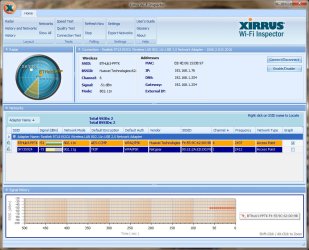
Hi people,
I'm trying to summarise my issue:
I used TP-Link TL-WN722N 150Mbps wireless adapters for years, but while it was fast, the driver occasionally froze (and only worked again after reboot) and sometimes it caused BSOD. My partner got a Win7 x64 PC as well, and my BSODs got so regular that I decided I needed a new adapter, so as I assumed it was just my PC's or my specific adapter's problem, we bought new ones of the same model. But these ones' driver froze both PCs every couple of days and the BSODs continued. So I assumed this was a general TP-Link problem (as it occurred with about 3-4 different adapters of the same model and on 2 separate computers with the same OS) and bought two Bolse 300Mbps High Gain adapters (it had the 2nd best rating/price ratio on Amazon behind that TP-Link model).
What I immediately noticed it that these allegedly twice as fast adapters were noticeably slower than the TP-Link ones, but at least the drivers don't freeze any more (except occasionally when my PC is waking up from Sleep, and I got one BSOD but it's not clear if it was due to the adapter, it didn't say the driver name as with the TP-Link one, just "DRIVER_POWER_STATE_FAILURE").
However maybe a week after getting the new adapters our download speed plummeted, it wasn't anywhere near the theoretical maximum 76-80 Mbps download speed we're paying for (BT Infinity 2) even before, but at least it was possible to stream videos on 3 separate machines without having to wait for buffer, but now it is VERY slow, I measured it three times over a couple of days with download speed results of 0.82-0.87 Mbps and upload speed of 4.80-5.48 Mbps.
Also tried to contact BT Support, but they were saying they couldn't locate any problem with our network and will get back to us. They also said it would be best to test the speed with a wire vs. the wireless but we don't have any at home. I could wait for BT to try to sort this out, but the Amazon return deadline for the Bolse adaptors is within a week (so it's kinda urgent) and basically what I'd like to ask is if you people think this is a problem with incompatible adaptors again or some other unrelated (or BT-related) issue? Should I return the adaptors and look for some other model? If yes, do you have any recommendations for cheap and good ones that work on Win7 x64 PCs? (Basically like the TP-Link one but without the driver freezing and BSODs.)
Thank you!
-----
The Basic Requirements topic questions:
1. Is this a wired or wireless connection issue?
Wireless - we have a BT Home HUB with 3-4 PCs and a printer connected to it wirelessly (+ occasional Kindle and smartphone), from these usually only 2-3 PCs are in use
2. Who is your Internet Service Provider (ISP)?
BT
3. What type of Broadband connection are you using?
Unlimited BT Infinity 2 (fibre optic broadband)
4. What is the exact Make and Model of your Modem, Router or Modem/Router Combo
BT Home Hub 3.0 - Type B
Router: Huawei EchoLife HG612
Wireless Adapters: Bolse BO-N1559
5. What is the Name of the Anti-Virus, Security or Firewall Software installed from the problematic computer
Kaspersky Internet Security 2013 (on 2 of the PCs, the most frequently used ones)
Avira (on 2 others)
6. IPCONFIG
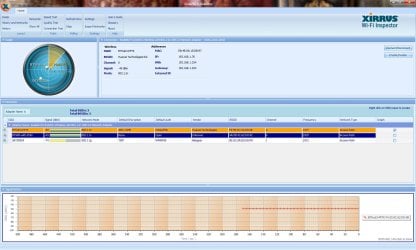
I'm trying to summarise my issue:
I used TP-Link TL-WN722N 150Mbps wireless adapters for years, but while it was fast, the driver occasionally froze (and only worked again after reboot) and sometimes it caused BSOD. My partner got a Win7 x64 PC as well, and my BSODs got so regular that I decided I needed a new adapter, so as I assumed it was just my PC's or my specific adapter's problem, we bought new ones of the same model. But these ones' driver froze both PCs every couple of days and the BSODs continued. So I assumed this was a general TP-Link problem (as it occurred with about 3-4 different adapters of the same model and on 2 separate computers with the same OS) and bought two Bolse 300Mbps High Gain adapters (it had the 2nd best rating/price ratio on Amazon behind that TP-Link model).
What I immediately noticed it that these allegedly twice as fast adapters were noticeably slower than the TP-Link ones, but at least the drivers don't freeze any more (except occasionally when my PC is waking up from Sleep, and I got one BSOD but it's not clear if it was due to the adapter, it didn't say the driver name as with the TP-Link one, just "DRIVER_POWER_STATE_FAILURE").
However maybe a week after getting the new adapters our download speed plummeted, it wasn't anywhere near the theoretical maximum 76-80 Mbps download speed we're paying for (BT Infinity 2) even before, but at least it was possible to stream videos on 3 separate machines without having to wait for buffer, but now it is VERY slow, I measured it three times over a couple of days with download speed results of 0.82-0.87 Mbps and upload speed of 4.80-5.48 Mbps.
Also tried to contact BT Support, but they were saying they couldn't locate any problem with our network and will get back to us. They also said it would be best to test the speed with a wire vs. the wireless but we don't have any at home. I could wait for BT to try to sort this out, but the Amazon return deadline for the Bolse adaptors is within a week (so it's kinda urgent) and basically what I'd like to ask is if you people think this is a problem with incompatible adaptors again or some other unrelated (or BT-related) issue? Should I return the adaptors and look for some other model? If yes, do you have any recommendations for cheap and good ones that work on Win7 x64 PCs? (Basically like the TP-Link one but without the driver freezing and BSODs.)
Thank you!
-----
The Basic Requirements topic questions:
1. Is this a wired or wireless connection issue?
Wireless - we have a BT Home HUB with 3-4 PCs and a printer connected to it wirelessly (+ occasional Kindle and smartphone), from these usually only 2-3 PCs are in use
2. Who is your Internet Service Provider (ISP)?
BT
3. What type of Broadband connection are you using?
Unlimited BT Infinity 2 (fibre optic broadband)
4. What is the exact Make and Model of your Modem, Router or Modem/Router Combo
BT Home Hub 3.0 - Type B
Router: Huawei EchoLife HG612
Wireless Adapters: Bolse BO-N1559
5. What is the Name of the Anti-Virus, Security or Firewall Software installed from the problematic computer
Kaspersky Internet Security 2013 (on 2 of the PCs, the most frequently used ones)
Avira (on 2 others)
6. IPCONFIG
Windows IP Configuration
Host Name . . . . . . . . . . . . : Nathan
Primary Dns Suffix . . . . . . . :
Node Type . . . . . . . . . . . . : Hybrid
IP Routing Enabled. . . . . . . . : No
WINS Proxy Enabled. . . . . . . . : No
DNS Suffix Search List. . . . . . : home
Wireless LAN adapter Wireless Network Connection 3:
Media State . . . . . . . . . . . : Media disconnected
Connection-specific DNS Suffix . :
Description . . . . . . . . . . . : Microsoft Virtual WiFi Miniport Adapter
Physical Address. . . . . . . . . : E8-4E-06-15-DB-97
DHCP Enabled. . . . . . . . . . . : Yes
Autoconfiguration Enabled . . . . : Yes
Wireless LAN adapter Wireless Network Connection:
Connection-specific DNS Suffix . : home
Description . . . . . . . . . . . : Realtek RTL8192CU Wireless LAN 802.11n USB 2.0 Network Adapter
Physical Address. . . . . . . . . : E8-4E-06-15-DB-97
DHCP Enabled. . . . . . . . . . . : Yes
Autoconfiguration Enabled . . . . : Yes
IPv4 Address. . . . . . . . . . . : 192.168.1.76(Preferred)
Subnet Mask . . . . . . . . . . . : 255.255.255.0
Lease Obtained. . . . . . . . . . : 16 February 2014 09:33:00
Lease Expires . . . . . . . . . . : 17 February 2014 18:45:15
Default Gateway . . . . . . . . . : 192.168.1.254
DHCP Server . . . . . . . . . . . : 192.168.1.254
DNS Servers . . . . . . . . . . . : 192.168.1.254
192.168.1.254
NetBIOS over Tcpip. . . . . . . . : Enabled
Ethernet adapter K rtya-WAN:
Media State . . . . . . . . . . . : Media disconnected
Connection-specific DNS Suffix . :
Description . . . . . . . . . . . : Realtek RTL8139/810x Family Fast Ethernet NIC #2
Physical Address. . . . . . . . . : 00-1D-0F-C2-21-9D
DHCP Enabled. . . . . . . . . . . : No
Autoconfiguration Enabled . . . . : Yes
Ethernet adapter Integr lt-LAN:
Media State . . . . . . . . . . . : Media disconnected
Connection-specific DNS Suffix . :
Description . . . . . . . . . . . : Realtek PCIe GBE Family Controller
Physical Address. . . . . . . . . : 1C-6F-65-C8-BE-29
DHCP Enabled. . . . . . . . . . . : No
Autoconfiguration Enabled . . . . : Yes
My Computer
- Computer type
- PC/Desktop
- Computer Manufacturer/Model Number
- custom
- OS
- Windows 7 Professional x64
- CPU
- QuadCore Intel Core i5-2500, 3400 MHz (34 x 100)
- Motherboard
- Gigabyte GA-PH67A-UD3-B3
- Memory
- 8176 MB - 4x Corsair CMX8GX3M4A1333C9
- Graphics Card(s)
- AMD Radeon HD 6800 Series (1024 MB)
- Sound Card
- Realtek ALC889
- Monitor(s) Displays
- Samsung SyncMaster T200(G)
- Screen Resolution
- 1680 x 1050
- Hard Drives
- HDT722525DLA380 ATA Device (250 GB, 7200 RPM, SATA-II)
Maxtor 6L300S0 ATA Device (300 GB, 7200 RPM, SATA)
Maxtor 6V250F0 ATA Device (250 GB, 7200 RPM, SATA-II)
ST925031 5AS USB Device (250 GB, 5400 RPM, SATA-II)
- Internet Speed
- theoretically 76-80 MB, practically less than 1MB...
- Antivirus
- Kaspersky Internet Security 2013
- Browser
- Mozilla Firefox / Google Chrome (the newest stable release)