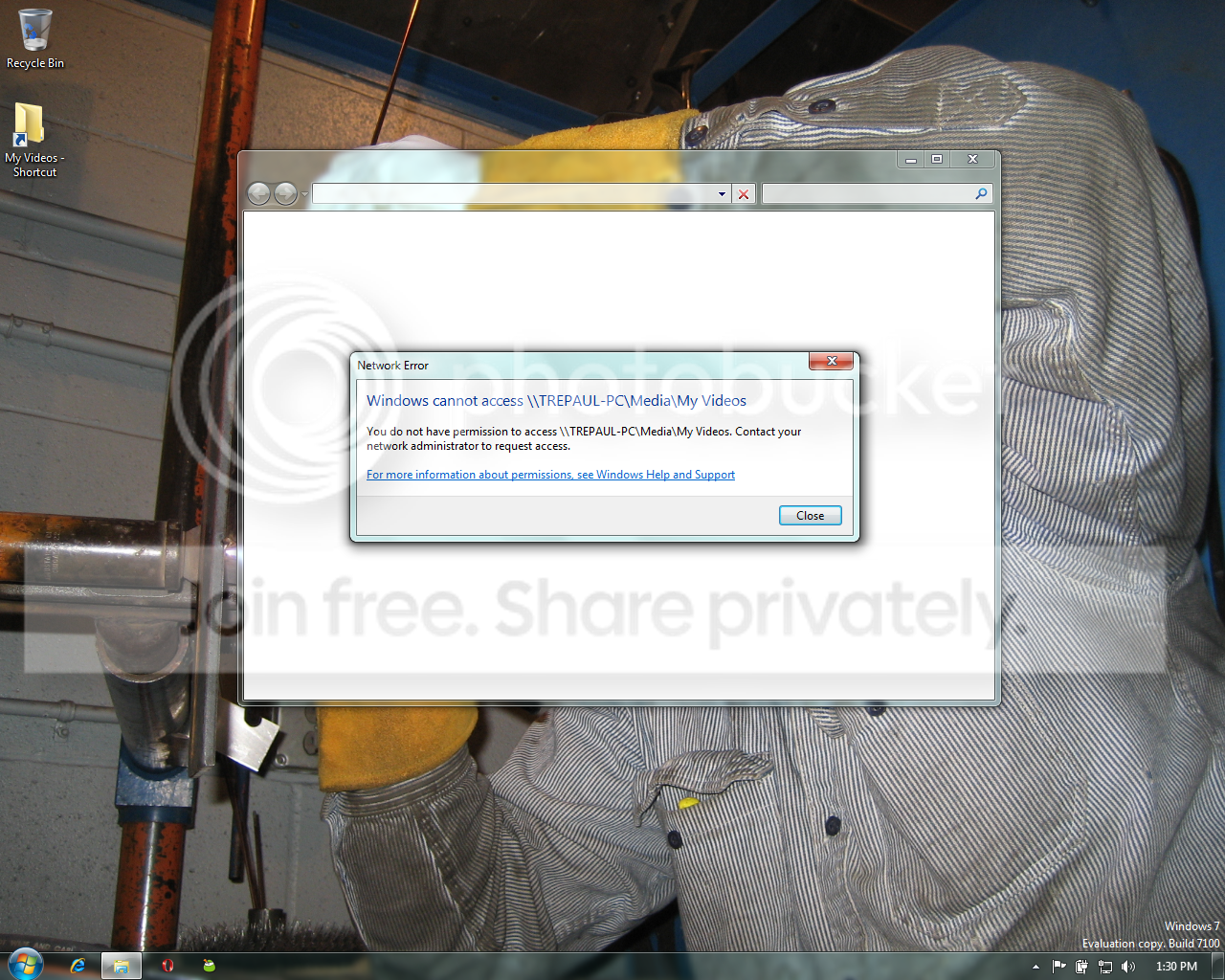
Lost privillages...

TrePaul86

New member
Local time
11:02 AM
Messages
42
I can't figure this one out. Maybe someone else can.

I have quite of media on my External HDD attached to my zd8000. I use my smaller dv1000 attached to my 42in panasonic to stream media across my network like movies and shows and what not.

It's been working fine forever, I've been doing it like that since I figured out how to do it about 5 years ago. Anyways, out of no where, I can access everything on the HDD on from the dv1000 EXCEPT for the Folder that has all my shows and movies. It's the weirdest thing.

My zd8000 was hard wired and I was for awhile running wireless and just streaming that way. Had no problems, but I was trying to go through the process of elimination on this problem, and I hard wired the dv1000 now too. Still no dice. It's weird because I can access anything but that "My Videos" folder on my External HDD from the dv1000. I can still use it on the zd8000, obviously. But I'm stumped.

Says I don't permission to access it. I have been able to use it like that forever, then outta nowhere last night, I can't use it anymore and nothing has changed. Only thing I've done since the last movie I watched was get Mobility Center working with my Omnia through Outlook. I don't see that being a problem though.

Anything helps guys. Thanks.
 

My Computer

OS
Win7 Ultimate

My Computer

Computer Manufacturer/Model Number
HP Pavillion dv-7 1005 Tx
OS
Win 8 Release candidate 8400
CPU
[email protected]
Memory
4 gigs
Graphics Card(s)
Nvidia 9600M
Sound Card
HD built-in
Monitor(s) Displays
17" Wxga
Screen Resolution
1440x900
Cooling
none
Internet Speed
45Mb down 5Mb up
Which computer needs to have that ownership reg file? I put it on the computer with the ext HDD and I don't know what I need to do from there...

I went over to my dv1000 and it still won't let me access the Video folder where all my movies and shows are, but I can still access everything else.

I haven't done a reset on either computer, so I dont know what's wrong....
 

My Computer

OS
Win7 Ultimate
the take ownership reg file is run in the OS and will appear on you right click menu.

like in this picture
 
Last edited:

My Computer

Computer Manufacturer/Model Number
HP Pavillion dv-7 1005 Tx
OS
Win 8 Release candidate 8400
CPU
[email protected]
Memory
4 gigs
Graphics Card(s)
Nvidia 9600M
Sound Card
HD built-in
Monitor(s) Displays
17" Wxga
Screen Resolution
1440x900
Cooling
none
Internet Speed
45Mb down 5Mb up
Ok in doing that right now! I'll update if that doesn't work. Thanks guys.
 

My Computer

OS
Win7 Ultimate
no problem. That might cure your immediate problem but we need to do some other things to get you back to 100%

Ken
 

My Computer

Computer Manufacturer/Model Number
HP Pavillion dv-7 1005 Tx
OS
Win 8 Release candidate 8400
CPU
[email protected]
Memory
4 gigs
Graphics Card(s)
Nvidia 9600M
Sound Card
HD built-in
Monitor(s) Displays
17" Wxga
Screen Resolution
1440x900
Cooling
none
Internet Speed
45Mb down 5Mb up
Ok so I did that to the video folder on my ext HDD on my zd800 (where it's connected to) restarted both comps, went to my dv1000 that's hooked up to my TV, tried to open that folder and it's still the same message:

Error.png


How did this all happen? I mean it all happened within like 2 days. I don't get it.
 

My Computer

OS
Win7 Ultimate
You need to kill WMP and the wmpnetwk service first

check in task manager (right click task bar) to see if its running
 

My Computer

Computer Manufacturer/Model Number
HP Pavillion dv-7 1005 Tx
OS
Win 8 Release candidate 8400
CPU
[email protected]
Memory
4 gigs
Graphics Card(s)
Nvidia 9600M
Sound Card
HD built-in
Monitor(s) Displays
17" Wxga
Screen Resolution
1440x900
Cooling
none
Internet Speed
45Mb down 5Mb up
Neither one of them is running on both comps.

Edit the wmp service is running, but I can't stop it. Access denied
 

My Computer

OS
Win7 Ultimate
Neither one of them is running on both comps.

Edit the wmp service is running, but I can't stop it. Access denied


You cant open task manager and right click WMP sharing and click kill process?
 

My Computer

Computer Manufacturer/Model Number
HP Pavillion dv-7 1005 Tx
OS
Win 8 Release candidate 8400
CPU
[email protected]
Memory
4 gigs
Graphics Card(s)
Nvidia 9600M
Sound Card
HD built-in
Monitor(s) Displays
17" Wxga
Screen Resolution
1440x900
Cooling
none
Internet Speed
45Mb down 5Mb up
When I right click on it I have the option to select "Stop service" and I click on it, and an error pops up saying Access denied. I have no idea what's going on.
 

My Computer

OS
Win7 Ultimate
which computer is my videos on? Are you owner of the folder on that machine?

Ken
 

My Computer

Computer Manufacturer/Model Number
HP Pavillion dv-7 1005 Tx
OS
Win 8 Release candidate 8400
CPU
[email protected]
Memory
4 gigs
Graphics Card(s)
Nvidia 9600M
Sound Card
HD built-in
Monitor(s) Displays
17" Wxga
Screen Resolution
1440x900
Cooling
none
Internet Speed
45Mb down 5Mb up
The videos are on the zd8000's external maxtor HDD I have hooked up to it.
 

My Computer

OS
Win7 Ultimate
are you still running the old version of the beta that you have listed in your profile? If you are, get at least the RC. If noit, then update your profile please.
 

My Computer

Computer Manufacturer/Model Number
Black_Box (homebuilt)
OS
windows 7 RTM x64
CPU
Phenom II 965 Quad Core 3.4Ghz
Motherboard
Asus M4A79T Deluxe
Memory
Mushkin Blackline 8GB (4x2gb)
Graphics Card(s)
XFX Radeon 5970 Black Edition
Sound Card
onboard
Monitor(s) Displays
Dell 2408WPF-main Dell E248WFP-secondary
Screen Resolution
1920x1200-main 1920x1200-secondary
Hard Drives
OCZ Vertex Limited Edition 100GB (OS)
x1 WD Black Edition 500GB drive (Storage)
PSU
XFX 850w Black Edition (Modular)
Case
Mountian Mods H2go
Cooling
CoolITSystems ECO A.L.C.
Keyboard
Logitech MX 5500 wireless keyboard
Mouse
Razor Copperhead
Internet Speed
16Mb down/2Mb up Wowway Cable Internet
Sorry, I haven't updated that... But I will... I am running 7100RC on both comps.
 

My Computer

OS
Win7 Ultimate
It's not letting me kill it though. It's saying access denied, how do I get around that?
 

My Computer

OS
Win7 Ultimate
Back
Top