How To Update Windows Defender Offline's Virus Definitions Manually

ZaphodBeeblbrox

New member
Local time
3:44 AM
Messages
13
Location
Thailand
I tried to run Windows Defender Offline 64 bit on a friend's laptop using WDO installed on a USB stick, but it refused to scan the disk because it insisted on getting Updates to its definitions before scanning.

So either the definitions on the USB stick were too old or not present at all or WDO couldn't find them. I had not run WDO from that USB stick before.

But the laptop had just a Wi-Fi connection and WDO doesn't work over Wi-Fi.

I have successfully used the 32 bit WDO USB stick on my own Desktop without such a problem, probably because my Desktop is connected to the Internet via a LAN.

I checked another thread on this subject on SevenForums, here:

http://www.sevenforums.com/system-s...cause-no-internet-connection.html#post1913545

I disagree with the statement by karlsnooks that WDO does not need an Internet connection. This was confirmed here:

defender offline cannot update no internet connection - Microsoft Community

However, if someone knows how to manually download the virus definitions and copy them to a USB stick, I would be very interested.

I suppose I could download and create another WDO ISO file on my hard drive and see what's in it, try to identify the definitions and update the equivalent files on the USB stick... but that would be very much trial and error. If someone has actually done it, please let me know.
 

My Computer My Computer

At a glance

XP SP3Intel Core i5 3550 @ 3.30GHz4.00GB Single-Channel DDR3 @ 667MHz (9-9-9-24)S24B370 (1920x1080@60Hz) 1024MB ATI AMD Radeo...
Computer type
PC/Desktop
Computer Manufacturer/Model Number
Custom Build
OS
XP SP3
CPU
Intel Core i5 3550 @ 3.30GHz
Motherboard
Gigabyte Technology Co., Ltd. Z77X-UD3H (Intel Core i5-3550
Memory
4.00GB Single-Channel DDR3 @ 667MHz (9-9-9-24)
Graphics Card(s)
S24B370 (1920x1080@60Hz) 1024MB ATI AMD Radeon HD 6670
Hard Drives
1863GB Western Digital WDC WD20EARX-00PASB0 (SATA)
466GB Western Digital WDC WD5003AZEX-00RKKA0 (SATA)
1397GB Western Digital WDC WD15EARS-00Z5B1 (SATA)
1863GB Western Digital WDC WD20EARX-00MMMB0 (SATA)
1863GB Western Digital WDC WD2002FAEX-007B
Antivirus
Microsoft MSE
Browser
Firefox

My Computer My Computer

At a glance

XP SP3Intel Core i5 3550 @ 3.30GHz4.00GB Single-Channel DDR3 @ 667MHz (9-9-9-24)S24B370 (1920x1080@60Hz) 1024MB ATI AMD Radeo...
Computer type
PC/Desktop
Computer Manufacturer/Model Number
Custom Build
OS
XP SP3
CPU
Intel Core i5 3550 @ 3.30GHz
Motherboard
Gigabyte Technology Co., Ltd. Z77X-UD3H (Intel Core i5-3550
Memory
4.00GB Single-Channel DDR3 @ 667MHz (9-9-9-24)
Graphics Card(s)
S24B370 (1920x1080@60Hz) 1024MB ATI AMD Radeon HD 6670
Hard Drives
1863GB Western Digital WDC WD20EARX-00PASB0 (SATA)
466GB Western Digital WDC WD5003AZEX-00RKKA0 (SATA)
1397GB Western Digital WDC WD15EARS-00Z5B1 (SATA)
1863GB Western Digital WDC WD20EARX-00MMMB0 (SATA)
1863GB Western Digital WDC WD2002FAEX-007B
Antivirus
Microsoft MSE
Browser
Firefox
Hi there ... It did mention about WDO ... I have never used the Program .. But i thought it might have used the same definitions as Defender could well be wrong though ...
 

My Computer My Computer

At a glance

windows 7 home 64bitINTEL-CORE I716GB
Computer Manufacturer/Model Number
W530-3630QM1
OS
windows 7 home 64bit
CPU
INTEL-CORE I7
Memory
16GB
Hard Drives
750GB
Browser
Chrome
Can the laptop you are trying to update get online at all? If not; it might be a lot easier if you can get it to get online first which will make updating a heck of a lot easier. If it wont update because of a connection/network issue then post in that forum and we can go from there. If not; try downloading them using a computer that has a working connection then update them. Also; try looking at the following link and see if it helps ya out:

http://windows.microsoft.com/en-us/windows/windows-defender-offline-faq
 

My Computer My Computer

At a glance

Windows 7 ultimate 64-bitIntel I7 2600K 3.4ghzCorsair 16gb ddr3 1600mhzNvidia Geforce gt 430
Computer type
PC/Desktop
Computer Manufacturer/Model Number
custom built
OS
Windows 7 ultimate 64-bit
CPU
Intel I7 2600K 3.4ghz
Motherboard
Asus Evo P8P67
Memory
Corsair 16gb ddr3 1600mhz
Graphics Card(s)
Nvidia Geforce gt 430
Sound Card
Sound Blaster Titanium x-fi pci express
Monitor(s) Displays
Dell E198WFP
Hard Drives
1 western digital 2TB drive.
PSU
Antec 1200 watt
Case
Inwin Dragon Rider
Cooling
6 case supplied cooling fans
Keyboard
logitech mk700
Mouse
logitech m705
Internet Speed
25-50mbps download; 10mbps upload(i think)
Antivirus
avg free 2014
Browser
mozilla firefox
Other Info
Also have a pretty bad speaker setup which is a klipsch promedia 5.1 surround speaker setup with huge subwoofer and lg blu ray player/writer. Also a hp officejet pro 8600 plus wireless all in one and a logitech s7500 webcam.
Hi there ... It did mention about WDO ... I have never used the Program .. But i thought it might have used the same definitions as Defender could well be wrong though ...

Yes, the "Defender" there is not the "Windows Defender Offline" that you burn onto a CD or a thumb drive.

Microsoft have really run out of ideas on what to call their anti-virus programs and it confuses the heck out of most people. There is a massively long article on the history of Windows Defender, MSE and Antispyware on Wikipedia - which is worth reading if you are a masochist: Windows Defender - Wikipedia, the free encyclopedia

I was hoping to somehow get hold of the actual files that should be somewhere on the bootable USB version of WDO and simply update them because my 64 bit version of WDO on a bootable thumb drive simply won't scan the disk because the virus definition files are either out of date or missing. But the thumb drive was created using the .ISO file downloaded from Microsoft!

I probably need to run the USB on a 64 bit machine that has a LAN connection in order to update the definition files. Then it should work OK on a laptop that doesn't have a LAN connection.

The fact that WDO can't make an Internet connection over Wi-Fi shows what a disastrous state Microsoft have got themselves into. Oh, how the mighty have fallen!

Apple, anyone?

:)
 

My Computer My Computer

At a glance

XP SP3Intel Core i5 3550 @ 3.30GHz4.00GB Single-Channel DDR3 @ 667MHz (9-9-9-24)S24B370 (1920x1080@60Hz) 1024MB ATI AMD Radeo...
Computer type
PC/Desktop
Computer Manufacturer/Model Number
Custom Build
OS
XP SP3
CPU
Intel Core i5 3550 @ 3.30GHz
Motherboard
Gigabyte Technology Co., Ltd. Z77X-UD3H (Intel Core i5-3550
Memory
4.00GB Single-Channel DDR3 @ 667MHz (9-9-9-24)
Graphics Card(s)
S24B370 (1920x1080@60Hz) 1024MB ATI AMD Radeon HD 6670
Hard Drives
1863GB Western Digital WDC WD20EARX-00PASB0 (SATA)
466GB Western Digital WDC WD5003AZEX-00RKKA0 (SATA)
1397GB Western Digital WDC WD15EARS-00Z5B1 (SATA)
1863GB Western Digital WDC WD20EARX-00MMMB0 (SATA)
1863GB Western Digital WDC WD2002FAEX-007B
Antivirus
Microsoft MSE
Browser
Firefox
Can the laptop you are trying to update get online at all? If not; it might be a lot easier if you can get it to get online first which will make updating a heck of a lot easier. If it wont update because of a connection/network issue then post in that forum and we can go from there. If not; try downloading them using a computer that has a working connection then update them. Also; try looking at the following link and see if it helps ya out:

Windows Defender Offline: frequently asked questions

Hi matts. Yes, the laptop can get online using Wi-Fi, and I did try - but failed - to get online by connecting its LAN port to the router's LAN port via an Ethernet cable. The location was in a local shop and the Wi-Fi router was the shop's, so I couldn't mess around too much.

Regarding posting in the forum about getting online over Wi-Fi, I'm sure that the Microsoft MVP is correct in the article I linked to ( defender offline cannot update no internet connection - Microsoft Community ) that WDO cannot connect over Wi-Fi.

Your idea of updating on a 64 bit machine with a LAN connection is a good one and I think that's my best bet.

re. the link you posted - not much help there, I'm afraid.

I think I need to make sure my Ethernet cable gets the laptop online OK at the shop, before I try to boot WDO from the USB. If I can do that, then the Internet link should work and WDO should download the definition files OK.

My own router doesn't care if the Ethernet cable is a cross-over or not. Maybe the router in the shop does. I'll be checking the cable on Sunday when I go to my "Computer Club" meeting.

Thanks for all your suggestions.

- ZB
 

My Computer My Computer

At a glance

XP SP3Intel Core i5 3550 @ 3.30GHz4.00GB Single-Channel DDR3 @ 667MHz (9-9-9-24)S24B370 (1920x1080@60Hz) 1024MB ATI AMD Radeo...
Computer type
PC/Desktop
Computer Manufacturer/Model Number
Custom Build
OS
XP SP3
CPU
Intel Core i5 3550 @ 3.30GHz
Motherboard
Gigabyte Technology Co., Ltd. Z77X-UD3H (Intel Core i5-3550
Memory
4.00GB Single-Channel DDR3 @ 667MHz (9-9-9-24)
Graphics Card(s)
S24B370 (1920x1080@60Hz) 1024MB ATI AMD Radeon HD 6670
Hard Drives
1863GB Western Digital WDC WD20EARX-00PASB0 (SATA)
466GB Western Digital WDC WD5003AZEX-00RKKA0 (SATA)
1397GB Western Digital WDC WD15EARS-00Z5B1 (SATA)
1863GB Western Digital WDC WD20EARX-00MMMB0 (SATA)
1863GB Western Digital WDC WD2002FAEX-007B
Antivirus
Microsoft MSE
Browser
Firefox
WDO updates

Zaphod...below:

"Now you can boot up using the media and you’ll get the familiar Windows Defender screen. Note that all the definition files are downloaded when you use the install tool. You don’t need an Internet connection or anything in order to update the definition files. If you need to run the tool again at a later time, you need to create the media again because it will download the latest files and then create the bootable media."

Use Windows Defender Offline Tool to Fix an Infected PC


kinda sucks, but at least answers your question. F secure rescue disk will do what you are looking for with updates and a usb drive to an existing rescue cd.
 

My Computer My Computer

At a glance

Windows 7 Ultimate x64
Computer type
PC/Desktop
OS
Windows 7 Ultimate x64
Zaphod...below:

"Now you can boot up using the media and you’ll get the familiar Windows Defender screen. Note that all the definition files are downloaded when you use the install tool. You don’t need an Internet connection or anything in order to update the definition files. If you need to run the tool again at a later time, you need to create the media again because it will download the latest files and then create the bootable media."

Use Windows Defender Offline Tool to Fix an Infected PC


kinda sucks, but at least answers your question. F secure rescue disk will do what you are looking for with updates and a usb drive to an existing rescue cd.

Interesting... thanks very much, Babel Fish. The quote you included is from here:
Use Windows Defender Offline Tool to Fix an Infected PC

But this sentence is misleading, IMO:

"You don’t need an Internet connection or anything in order to update the definition files."

What he should have said was:

"You cannot update the definition files over Wi-Fi. If you need to run the tool again at a later time you have to update it over a LAN, or create the media again on a LAN-enabled PC. That will also allow you to use it on a non-LAN-enabled PC."

If MS would just allow WDO to update the files via Wi-Fi this problem would be averted.

I've just downloaded the "F-Secure" rescue disk .ISO and have added it to my YUMI bootable USB drive. It worked fine and scanned my Netbook, but took 4 1/2 hours!

When it first ran, it said it could download its definition files over Wi-Fi, but I did it over the LAN as I have no Wi-Fi. Hopefully, I'll be able to do that at another time.

So thanks again for the F-Secure info.
 

My Computer My Computer

At a glance

XP SP3Intel Core i5 3550 @ 3.30GHz4.00GB Single-Channel DDR3 @ 667MHz (9-9-9-24)S24B370 (1920x1080@60Hz) 1024MB ATI AMD Radeo...
Computer type
PC/Desktop
Computer Manufacturer/Model Number
Custom Build
OS
XP SP3
CPU
Intel Core i5 3550 @ 3.30GHz
Motherboard
Gigabyte Technology Co., Ltd. Z77X-UD3H (Intel Core i5-3550
Memory
4.00GB Single-Channel DDR3 @ 667MHz (9-9-9-24)
Graphics Card(s)
S24B370 (1920x1080@60Hz) 1024MB ATI AMD Radeon HD 6670
Hard Drives
1863GB Western Digital WDC WD20EARX-00PASB0 (SATA)
466GB Western Digital WDC WD5003AZEX-00RKKA0 (SATA)
1397GB Western Digital WDC WD15EARS-00Z5B1 (SATA)
1863GB Western Digital WDC WD20EARX-00MMMB0 (SATA)
1863GB Western Digital WDC WD2002FAEX-007B
Antivirus
Microsoft MSE
Browser
Firefox
No problem ZB

You inspired the moniker as well, I am new. Also, have you used Sardu before? I love it and its an excellent way to manage ISOs. You can update the definitions of WDO and burn a new cd rather effeciently. I have it on my laptop when I am onsite and I can create an updated CD or bootable flash drive quickly and then not worry about network connectivity for the downed pc. Check it out if you are not currently using it.
 

My Computer My Computer

At a glance

Windows 7 Ultimate x64
Computer type
PC/Desktop
OS
Windows 7 Ultimate x64
Zaph,

I just reread your post and you use YUMI. Not sure if my previous content would be very helpful.
 

My Computer My Computer

At a glance

Windows 7 Ultimate x64
Computer type
PC/Desktop
OS
Windows 7 Ultimate x64
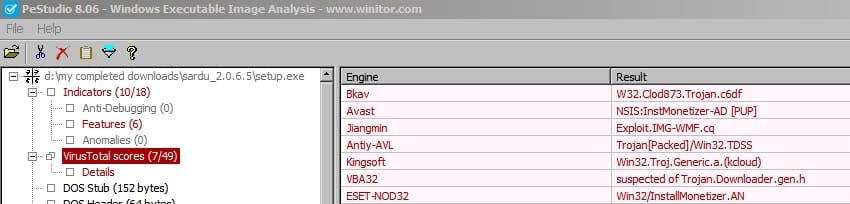
Sardu is bundled with Babylon Toolbar

SARDU - good as it is, is currently bundled with an installer for Babylon Toolbar. I was lucky enough to install SARDU before the developer added this monetizer.

Babylon toolbar : General

I can say that it's pretty tricky to opt out of the Babylon Toolbar installation no matter what the developer says.

Just a heads up to any members who decide to try installing SARDU.

Report on latest version setup file:

SARDU.jpg

Strangely scanning the same with MBAM reveals nothing. Reports it as clean. It will only detect after it's actually been installed.
 

My Computer My Computer

At a glance

Microsoft Windows 7 Home Premium 64-bit 7601 ...AMD C-60 APU with Radeon(tm) HD Graphics4.00 GBAMD Radeon HD 6290 Graphics
Computer type
Laptop
Computer Manufacturer/Model Number
ASUS
OS
Microsoft Windows 7 Home Premium 64-bit 7601 Multiprocessor Free Service Pack 1
CPU
AMD C-60 APU with Radeon(tm) HD Graphics
Motherboard
ASUSTeK COMPUTER INC. X501U
Memory
4.00 GB
Graphics Card(s)
AMD Radeon HD 6290 Graphics
Sound Card
(1) AMD High Definition Audio Device (2) Realtek High Defi
Screen Resolution
1366 x 768 x 32 bits (4294967296 colors) @ 60 Hz
Hard Drives
Hitachi HTS545050A7E380 SATA Disk Device
Antivirus
Comodo CIS & FW, SecureAplus App Whitelisting, Threatfire
Browser
Cyberfox 64bit, Opera 64bit, Airfox
Other Info
Spy-The-Spy, HitmanPro.Alert, Norton Connect Safe, MJRegWatcher, BitDefender TrafficLight, Voodoo Shield, Zemana AntiMalware
No problem ZB

You inspired the moniker as well, I am new. Also, have you used Sardu before? I love it and its an excellent way to manage ISOs. You can update the definitions of WDO and burn a new cd rather effeciently. I have it on my laptop when I am onsite and I can create an updated CD or bootable flash drive quickly and then not worry about network connectivity for the downed pc. Check it out if you are not currently using it.

Hi Babel Fish,

All we need now is for Slartibartfast to log in... :)

Thanks for the info re. Sardu - looks like another good one.

Edit:

I didn't see your post on page 2 or Callender's until after I posted this reply.

I did notice that PendriveLinux warned about the Adware in Sardu ( SARDU ? Multiboot USB Creator (Windows) | USB Pen Drive Linux ) and, as I have about 15 .ISO's on my YUMI drive, I won't be trying Sardu as it appears to do the same job as Yumi.

But thanks for the link as I hadn't seen that there are so many different multi-boot USB creators.
 

My Computer My Computer

At a glance

XP SP3Intel Core i5 3550 @ 3.30GHz4.00GB Single-Channel DDR3 @ 667MHz (9-9-9-24)S24B370 (1920x1080@60Hz) 1024MB ATI AMD Radeo...
Computer type
PC/Desktop
Computer Manufacturer/Model Number
Custom Build
OS
XP SP3
CPU
Intel Core i5 3550 @ 3.30GHz
Motherboard
Gigabyte Technology Co., Ltd. Z77X-UD3H (Intel Core i5-3550
Memory
4.00GB Single-Channel DDR3 @ 667MHz (9-9-9-24)
Graphics Card(s)
S24B370 (1920x1080@60Hz) 1024MB ATI AMD Radeon HD 6670
Hard Drives
1863GB Western Digital WDC WD20EARX-00PASB0 (SATA)
466GB Western Digital WDC WD5003AZEX-00RKKA0 (SATA)
1397GB Western Digital WDC WD15EARS-00Z5B1 (SATA)
1863GB Western Digital WDC WD20EARX-00MMMB0 (SATA)
1863GB Western Digital WDC WD2002FAEX-007B
Antivirus
Microsoft MSE
Browser
Firefox
Back
Top