Unable to Access SAMBA Share from Windows 7

lukedevon

New member
Local time
5:26 AM
Messages
2
Hi All ,

I wanted to access some content which have been shared with the network in a SAMBA server. SAMBA server is working fine. I am able to access SMABA shared folder from my Windows XP box.

1. SAMBA server is in FEDORA 14 box and connected to wired LAN. (Broadband switch)
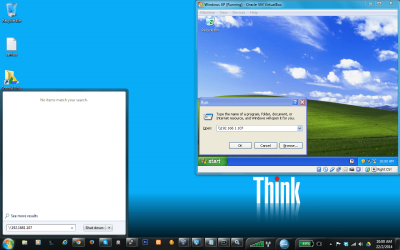
2. Windows OS's are running in my laptop. Host OS is Windows 7 and I have installed Windows XP as a guest OS in the Virtual BOX.
3. So , my Laptop access the network via WiFi.
4. All PC are in a common IP network. (192.168.1.*)
5. Fedora - 192.168.1.107 , Win 7 - 192.168.1.106 , Win XP - 192.168.1.105

Test Results

1. I am able to access the SAMBA share from Windows XP ( Installed in a Virtual Box )
2. But unable to access SAMBA share from Windows 7 ( which is my laptop's OS )

Please find attached image of the same.

I googled and found so many articles regarding this issue. But non of them are helped me to solve this issue.

Could you please help me to resolve this SAMBA share access issue from Windows 7 ?

Many Thanks
Luke.
 

Attachments
  • 1.png
    1.png
    145.7 KB · Views: 3
  • 3.png
    3.png
    137 KB · Views: 3

My Computer My Computer

At a glance

Windows 7 64 bit
Computer type
PC/Desktop
OS
Windows 7 64 bit

My Computer My Computer

At a glance

Windows 7 Ult, Windows 8.1 Pro,Q9650-4.275GHz, E8600 4.5GHz, E6750-3.8GHzG.Skill PC2 9600 1200Mhz 5 5 5 15 2TGTX480
Computer type
PC/Desktop
Computer Manufacturer/Model Number
Home built
OS
Windows 7 Ult, Windows 8.1 Pro,
CPU
Q9650-4.275GHz, E8600 4.5GHz, E6750-3.8GHz
Motherboard
Evga 780i FTW
Memory
G.Skill PC2 9600 1200Mhz 5 5 5 15 2T
Graphics Card(s)
GTX480
Sound Card
Asus Xonar D2
Monitor(s) Displays
HannsG
Screen Resolution
1680X1050
Hard Drives
GSkill Phoenix Pro 120GB SSD
PSU
ThermalTake Toughpower 1000Watt modular
Case
ThermalTake XaserV
Cooling
Xigmatek S1283
Keyboard
Logitech G15
Mouse
Logitech G9
Internet Speed
T1
Hi Chev65,

I followed the guide on the link you gave me . But still the same. I am unable to access the SAMBA share in my Fedora box.

I am getting following message :

Error code:0x80070035
The network path was not found.

Thanks for your support.

Luke.
 

My Computer My Computer

At a glance

Windows 7 64 bit
Computer type
PC/Desktop
OS
Windows 7 64 bit
Hi Chev65,

I followed the guide on the link you gave me . But still the same. I am unable to access the SAMBA share in my Fedora box.

I am getting following message :

Error code:0x80070035
The network path was not found.

Thanks for your support.

Luke.

Ok try this.

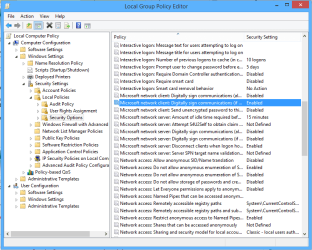
In the Local Group Policy Editor, go to: Start>run>type gpedit.msc

Local Computer Policy->Computer Configuration->Windows Settings->Security Settings->Local Policies->Security Options

Find the policy:

Microsoft network client: Digitally sign communications (always)

If this setting is enabled, change it to Disabled then hit the Apply button. On my Windows 8 machine this setting is Disabled by Default but that may not be so on Windows 7.

There may also be another setting for this "highlighted in blue" that shows "if server agrees" in the picture which may need to be disabled as well. You must reboot both the server and the client after making the adjustments.

Another possible solution if the first one doesn't work: Computer Policy->Computer Configuration->Windows Settings->Security Settings->Local Policies->Security Options

Network security: Restrict NTLM: Outgoing NTLM traffic to remote servers ALLOW ALL
:)
 

Attachments

  • GPO Digitally Sign Communications Disable for Samba-Linux Sharing.PNG
    GPO Digitally Sign Communications Disable for Samba-Linux Sharing.PNG
    27.4 KB · Views: 3
Last edited:

My Computer My Computer

At a glance

Windows 7 Ult, Windows 8.1 Pro,Q9650-4.275GHz, E8600 4.5GHz, E6750-3.8GHzG.Skill PC2 9600 1200Mhz 5 5 5 15 2TGTX480
Computer type
PC/Desktop
Computer Manufacturer/Model Number
Home built
OS
Windows 7 Ult, Windows 8.1 Pro,
CPU
Q9650-4.275GHz, E8600 4.5GHz, E6750-3.8GHz
Motherboard
Evga 780i FTW
Memory
G.Skill PC2 9600 1200Mhz 5 5 5 15 2T
Graphics Card(s)
GTX480
Sound Card
Asus Xonar D2
Monitor(s) Displays
HannsG
Screen Resolution
1680X1050
Hard Drives
GSkill Phoenix Pro 120GB SSD
PSU
ThermalTake Toughpower 1000Watt modular
Case
ThermalTake XaserV
Cooling
Xigmatek S1283
Keyboard
Logitech G15
Mouse
Logitech G9
Internet Speed
T1
I had the "0x80070035 network path not found" symptom and the solution was rather mundane: A firmware update or something I did had reset the share setup as seen in
"Network Place(Samba) Share / Cloud Disk" section of the ASUS router GUI.

And I could not get around this error UNTIL I created a new folder in this share name via the Asus GUI. This folder has R/W permissions and any share access must be to the folder - it cannot be just to the share name as I had thought.
Doh!
 

My Computer My Computer

At a glance

Windows 7 various 64 and 32 bit
Computer type
Laptop
Computer Manufacturer/Model Number
Lenovo
OS
Windows 7 various 64 and 32 bit
I am having exactly the same problem. Trying to access a Ubuntu shared folder from Win 7 Home Premium. I have tried everything suggested in this thread. I have no problem accessing the Ubuntu shared folder from two XP's and a Windows 8 box on the same LAN. Just instrumented it with Wireshark. The Windows 7 box is trying to establish a connection to TCP port 80 on the Ubuntu box, which seems wrong. The XP box (successfully) establishes a connection to TCP port 445, then negotiates the SMB connection.

Suggestions ?
 

My Computer My Computer

At a glance

Windows 7 Home Premium 64 bt
Computer type
PC/Desktop
OS
Windows 7 Home Premium 64 bt
Back
Top