Dreaded "Unidentified Network" after BSOD; No fix seems to work

IRosmarin

New member
Local time
12:29 PM
Messages
6
Dreaded "Unidentified Network" after BSOD; No fix seems to work

Hey Guys.

Sorry to just come in here and post a new thread about what I'm sure is a common problem, but I've searched the internet to no avail and am at my wit's end.

Quick info: Windows 7, 64-bit. I forget if I have Pro or Home Premium. I have an Asus Striker Extreme (not Striker Extreme 2. This is an older rig) which has 2 onboard LAN ports (nVidia networking).

I had gotten 2 BSODs recently. I searched what was going on and it looked like it was due to a memory leak in the neworking stack. Unfortunately, before I could do anything about it, I got a third BSOD, and this time when I rebooted I got the dreaded "Unidentified Network". I couldn't get any communication to my router.

I tried everything I could find - route delete 0.0.0.0; netsh int ip reset; netsh wins reset; etc etc. Downloaded updated drivers, nothing. I connected my wife's Macbook to the ethernet cable, and instant connection ... Eventually I just bought a new NIC - a TP-Link TG-3468 PCIE Gigabit Ethernet controller. I plugged that in, installed the drivers ... still no connection.

I tried booting into Ubuntu using a CD, and it didn't have drivers for the new NIC, and I still didn't have connection with the onboard lan. Then I remembered that when I installed Win7 from XP that I had installed to a new HD, so I booted to XP (Win XP 64 Pro) on my secondary drive. I installed the drivers for the new NIC, and BOOM - internet. The onboard LAN ports were still dead. At least I knew the NIC worked.

I disabled the onboard LAN in the BIOS just in case it caused a problem and booted back to Win7. Still no connection to the router. I know the hardware is good - I get internet everytime I boot into WinXP. No internet ever booting into Win7.

My network setup:
Comcast -> Belkin router -> TP-Link TLSG1016D 16port switch -> PC's NIC
All cabling is Cat5e (Full copper, no CCA).

(All other devices on the network work fine, and this machine works fine in XP on this NIC.)

This computer usually gets a static IP of 192.168.2.50. (My DHCP range for this network is 192.168.2.100 - 192.168.2.254.)

If I set the IP address to DHCP, I get the 169.x.x.x "GFY" address. If I set the address to a static address (.2.50, gateway .2.1), I get "communication" in that I see incoming packets, but not many of them and they come in slowly. "ping 192.168.2.1" sometimes reports "no response" and sometimes reports "no route to host found".

Firewall is disabled. Antivirus is AVG; all internet/network "protection" is disabled. I have no Bonjour anywhere on my machine that I can see (checked services, etc).

Things I've tried (multiple times and in combinations):
  • "Diagnose problems with this connection" (LOL)
  • Buy a new NIC (see above)
  • Router reboot (Multiple times)
  • Different ports on the switch.
  • Direct connection to the router.
  • Direct connection to the cable modem.
  • netsh int ip reset
  • netsh wins ip reset
  • ipconfig /flushdns
  • disabling IPv6
  • disabling "network sharing discovery"
  • all permissions on public networks
  • set this network to my "home network"
  • force set Speed/Duplex (tried 10/full, 100/full, 100/half, and 1Gb/full)
  • tried multiple static IPs (.2.53, .2.80)
  • deleted all networks from registry
  • add reg key *NVis... something - kept it from showing in Network Center, but didn't help
  • clean boot (msconfig - disable all non-MS services)


The last two items on my list:
1. Uninstall AVG (required for my work ... if this works I'll need to deep dive it :()
2. Clean Windows install (/sadpanda)


Before I do that, I was wondering if anyone else had any suggestions. It really looks to me like my onboard LAN died so hard it took Windows networking with it ...

Thanks in advance.

ipconfig /all
Code:
Windows IP Configuration

   Host Name . . . . . . . . . . . . : Viper
   Primary Dns Suffix  . . . . . . . : 
   Node Type . . . . . . . . . . . . : Hybrid
   IP Routing Enabled. . . . . . . . : No
   WINS Proxy Enabled. . . . . . . . : No

Ethernet adapter Local Area Connection 3:

   Connection-specific DNS Suffix  . : 
   Description . . . . . . . . . . . : Gigabit PCI Express Network Adapter
   Physical Address. . . . . . . . . : 64-66-B3-03-65-C3
   DHCP Enabled. . . . . . . . . . . : No
   Autoconfiguration Enabled . . . . : Yes
   IPv4 Address. . . . . . . . . . . : 192.168.2.50(Preferred) 
   Subnet Mask . . . . . . . . . . . : 255.255.255.0
   Default Gateway . . . . . . . . . : 192.168.2.1
   DNS Servers . . . . . . . . . . . : 8.8.8.8
                                       8.8.4.4
   NetBIOS over Tcpip. . . . . . . . : Enabled

Tunnel adapter isatap.{683AB3EE-541E-4935-B962-9E121B2B2B68}:

   Media State . . . . . . . . . . . : Media disconnected
   Connection-specific DNS Suffix  . : 
   Description . . . . . . . . . . . : Microsoft ISATAP Adapter
   Physical Address. . . . . . . . . : 00-00-00-00-00-00-00-E0
   DHCP Enabled. . . . . . . . . . . : No
   Autoconfiguration Enabled . . . . : Yes

Tunnel adapter Local Area Connection* 9:

   Media State . . . . . . . . . . . : Media disconnected
   Connection-specific DNS Suffix  . : 
   Description . . . . . . . . . . . : Teredo Tunneling Pseudo-Interface
   Physical Address. . . . . . . . . : 00-00-00-00-00-00-00-E0
   DHCP Enabled. . . . . . . . . . . : No
   Autoconfiguration Enabled . . . . : Yes

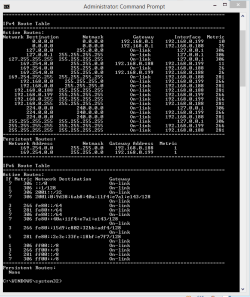
route print
Code:
===========================================================================
Interface List
 15...64 66 b3 03 65 c3 ......Gigabit PCI Express Network Adapter
  1...........................Software Loopback Interface 1
 11...00 00 00 00 00 00 00 e0 Microsoft ISATAP Adapter
 13...00 00 00 00 00 00 00 e0 Teredo Tunneling Pseudo-Interface
===========================================================================

IPv4 Route Table
===========================================================================
Active Routes:
Network Destination        Netmask          Gateway       Interface  Metric
        127.0.0.0        255.0.0.0         On-link         127.0.0.1    306
        127.0.0.1  255.255.255.255         On-link         127.0.0.1    306
  127.255.255.255  255.255.255.255         On-link         127.0.0.1    306
      192.168.2.0    255.255.255.0         On-link      192.168.2.50    266
     192.168.2.50  255.255.255.255         On-link      192.168.2.50    266
    192.168.2.255  255.255.255.255         On-link      192.168.2.50    266
        224.0.0.0        240.0.0.0         On-link         127.0.0.1    306
        224.0.0.0        240.0.0.0         On-link      192.168.2.50    266
  255.255.255.255  255.255.255.255         On-link         127.0.0.1    306
  255.255.255.255  255.255.255.255         On-link      192.168.2.50    266
===========================================================================
Persistent Routes:
  None

IPv6 Route Table
===========================================================================
Active Routes:
 If Metric Network Destination      Gateway
  1    306 ::1/128                  On-link
  1    306 ff00::/8                 On-link
===========================================================================
Persistent Routes:
  None

tl;dr:
Used to have network; now I don't. Network works fine in XP. No fix seems to work. WHAT DO?

note: I'm at work now, but will update this once I get home with more information.

Also, I don't know what the forum's policy on images is, but I uploaded a picture to imagur at bzneLdw, which shows the status with a static IP and no commuincation, despite packets going out and coming in.

Thanks!
 

My Computer My Computer

At a glance

Windows 7 Professional x64Intel Core 2 Quad Q66006GB
Computer type
PC/Desktop
Computer Manufacturer/Model Number
Homemade :D
OS
Windows 7 Professional x64
CPU
Intel Core 2 Quad Q6600
Motherboard
Asus Striker Extreme
Memory
6GB
Antivirus
AVG
Browser
Chrome / IE / Firefox
I don't see it on here but have you tried performing a system file scan to check for corrupted system files? This is a typical problem after multiple BSOD's.

Just run the standard sfc /scannow command in an elevated command prompt and see what it says, if it can't fix the problem on the first pass then just reboot the machine and run the same scan twice more with reboots after each scan and see if it can fix the problem.

Code:
sfc /scannow
 

My Computer My Computer

At a glance

Windows 7 Ult, Windows 8.1 Pro,Q9650-4.275GHz, E8600 4.5GHz, E6750-3.8GHzG.Skill PC2 9600 1200Mhz 5 5 5 15 2TGTX480
Computer type
PC/Desktop
Computer Manufacturer/Model Number
Home built
OS
Windows 7 Ult, Windows 8.1 Pro,
CPU
Q9650-4.275GHz, E8600 4.5GHz, E6750-3.8GHz
Motherboard
Evga 780i FTW
Memory
G.Skill PC2 9600 1200Mhz 5 5 5 15 2T
Graphics Card(s)
GTX480
Sound Card
Asus Xonar D2
Monitor(s) Displays
HannsG
Screen Resolution
1680X1050
Hard Drives
GSkill Phoenix Pro 120GB SSD
PSU
ThermalTake Toughpower 1000Watt modular
Case
ThermalTake XaserV
Cooling
Xigmatek S1283
Keyboard
Logitech G15
Mouse
Logitech G9
Internet Speed
T1
Good thought. I hadn't tried that. No success, though.

I've done uninstalled avg and AutoCAD (just in case) and all my nvidia drivers. No dice. I think I may just have to rebuild my win install.

Windows 7 problems make me a sad panda.
 

My Computer My Computer

At a glance

Windows 7 Professional x64Intel Core 2 Quad Q66006GB
Computer type
PC/Desktop
Computer Manufacturer/Model Number
Homemade :D
OS
Windows 7 Professional x64
CPU
Intel Core 2 Quad Q6600
Motherboard
Asus Striker Extreme
Memory
6GB
Antivirus
AVG
Browser
Chrome / IE / Firefox
Just an FYI, you need to re-add the default route of 0.0.0.0 mask 0.0.0.0 in order to get internet connectivity. This is used as a "catch all" for connecting to networks outside of your LAN. Since Windows tests DNS connectivity to verify internet connectivity this may be the reason why it is showing as unidentified. Without it won't be getting any internet connectivity via IPv4 even if other configurations are correct.

Follow this tutorial to re add it - http://www.sevenforums.com/tutorials/320978-static-routes-create-remove.html

At step 2 the statement should be :

Code:
route add -p 0.0.0.0 mask 0.0.0.0 192.168.2.1

That is what I would do first :geek:

Hope This Helps,
Josh :)
 

My Computer My Computer

At a glance

Windows 7 Professional x64 SP1 ; Windows Serv...Intel Core i5 2400 @ 3.10GHz8.0GB DDR3 @ 665MHz (2GBx4)AMD Radeon HD 6870
Computer type
PC/Desktop
Computer Manufacturer/Model Number
Custom Built
OS
Windows 7 Professional x64 SP1 ; Windows Server 2012 R2 Standard
CPU
Intel Core i5 2400 @ 3.10GHz
Motherboard
Foxconn H67MP-S/-V/H67MP
Memory
8.0GB DDR3 @ 665MHz (2GBx4)
Graphics Card(s)
AMD Radeon HD 6870
Sound Card
Realtek High Definition Audio
Monitor(s) Displays
AOC 2243W & SMB1930NW
Screen Resolution
1440x900 & 1920x1080
Hard Drives
977GB Seagate ST31000524AS ATA Drive (SATA)
250GB WD iSCSI attached Drive
PSU
750W Gaming PSU
Case
Novatech Night
Cooling
Fan
Keyboard
Dell Standard PS/2 Keyboard
Mouse
R.A.T 07 Gaming Mouse
Internet Speed
Download: 10 Mbps Ping: 30ms Upload: 0.81 Mbps
Browser
Google Chrome
Other Info
Optiarc DVD RW AD-5260S ATA Device
Just an FYI, you need to re-add the default route of 0.0.0.0 mask 0.0.0.0 in order to get internet connectivity. This is used as a "catch all" for connecting to networks outside of your LAN. Since Windows tests DNS connectivity to verify internet connectivity this may be the reason why it is showing as unidentified. Without it won't be getting any internet connectivity via IPv4 even if other configurations are correct.

Follow this tutorial to re add it - http://www.sevenforums.com/tutorials/320978-static-routes-create-remove.html

At step 2 the statement should be :

Code:
route add -p 0.0.0.0 mask 0.0.0.0 192.168.2.1

That is what I would do first :geek:

Hope This Helps,
Josh :)

I didn't even notice that Shadow but you are correct.

After I compared the route print results to my own the default route is missing. I'm wondering if the BSOD caused this problem to occur or maybe it was something else.

It should look more like the route print below with the default routes showing up, of course with mine you can see the wireless and the wired persistent route's because they are both connected at start up via Group Policy.
 

Attachments

  • Route Print Add route 0.0.0.0.PNG
    Route Print Add route 0.0.0.0.PNG
    10.8 KB · Views: 1

My Computer My Computer

At a glance

Windows 7 Ult, Windows 8.1 Pro,Q9650-4.275GHz, E8600 4.5GHz, E6750-3.8GHzG.Skill PC2 9600 1200Mhz 5 5 5 15 2TGTX480
Computer type
PC/Desktop
Computer Manufacturer/Model Number
Home built
OS
Windows 7 Ult, Windows 8.1 Pro,
CPU
Q9650-4.275GHz, E8600 4.5GHz, E6750-3.8GHz
Motherboard
Evga 780i FTW
Memory
G.Skill PC2 9600 1200Mhz 5 5 5 15 2T
Graphics Card(s)
GTX480
Sound Card
Asus Xonar D2
Monitor(s) Displays
HannsG
Screen Resolution
1680X1050
Hard Drives
GSkill Phoenix Pro 120GB SSD
PSU
ThermalTake Toughpower 1000Watt modular
Case
ThermalTake XaserV
Cooling
Xigmatek S1283
Keyboard
Logitech G15
Mouse
Logitech G9
Internet Speed
T1
Added that route back in. No dice.

I still can't ping my router ... "Destination host unreachable." ...
 

My Computer My Computer

At a glance

Windows 7 Professional x64Intel Core 2 Quad Q66006GB
Computer type
PC/Desktop
Computer Manufacturer/Model Number
Homemade :D
OS
Windows 7 Professional x64
CPU
Intel Core 2 Quad Q6600
Motherboard
Asus Striker Extreme
Memory
6GB
Antivirus
AVG
Browser
Chrome / IE / Firefox
Added that route back in. No dice.

I still can't ping my router ... "Destination host unreachable." ...

Hmm very strange, I wonder how the default route was removed in the first place.

We can try the more direct approach which is to reset the entire network stack and go from there.

Unzip and run the file below, it will reset winsock, TCP/ip, flush the DNS, reset the IP, the machine will reboot itself etc.
 

Attachments

My Computer My Computer

At a glance

Windows 7 Ult, Windows 8.1 Pro,Q9650-4.275GHz, E8600 4.5GHz, E6750-3.8GHzG.Skill PC2 9600 1200Mhz 5 5 5 15 2TGTX480
Computer type
PC/Desktop
Computer Manufacturer/Model Number
Home built
OS
Windows 7 Ult, Windows 8.1 Pro,
CPU
Q9650-4.275GHz, E8600 4.5GHz, E6750-3.8GHz
Motherboard
Evga 780i FTW
Memory
G.Skill PC2 9600 1200Mhz 5 5 5 15 2T
Graphics Card(s)
GTX480
Sound Card
Asus Xonar D2
Monitor(s) Displays
HannsG
Screen Resolution
1680X1050
Hard Drives
GSkill Phoenix Pro 120GB SSD
PSU
ThermalTake Toughpower 1000Watt modular
Case
ThermalTake XaserV
Cooling
Xigmatek S1283
Keyboard
Logitech G15
Mouse
Logitech G9
Internet Speed
T1
Added that route back in. No dice.

I still can't ping my router ... "Destination host unreachable." ...

Hmm very strange, I wonder how the default route was removed in the first place.

We can try the more direct approach which is to reset the entire network stack and go from there.

Unzip and run the file below, it will reset winsock, TCP/ip, flush the DNS, reset the IP, the machine will reboot itself etc.

Hi Chev.

The route was deleted when I removed it - several posts seem to indicate that it could cause problems. (I mentioned that in my first post, but I didn't include it in my bulleted list).

As you can see in my above post, i have reset all those things already (and done so multiple times). I don't feel comfortable just running an .exe that i've downloaded off the web unless i can see the source and compile it myself - especially now that i've disabled my antivirus, etc, etc.

I've in fact just done a full nets int ip reset; nets wins reset, ipconfig /flushdns; ipconfig /release; ipconfig /renew; and no dice.


I think at this point it's time to "repair windows" and see if that helps; if not, i don't know where i'll go next. Probably "format c:\".
 

My Computer My Computer

At a glance

Windows 7 Professional x64Intel Core 2 Quad Q66006GB
Computer type
PC/Desktop
Computer Manufacturer/Model Number
Homemade :D
OS
Windows 7 Professional x64
CPU
Intel Core 2 Quad Q6600
Motherboard
Asus Striker Extreme
Memory
6GB
Antivirus
AVG
Browser
Chrome / IE / Firefox
Added that route back in. No dice.

I still can't ping my router ... "Destination host unreachable." ...

Hmm very strange, I wonder how the default route was removed in the first place.

We can try the more direct approach which is to reset the entire network stack and go from there.

Unzip and run the file below, it will reset winsock, TCP/ip, flush the DNS, reset the IP, the machine will reboot itself etc.

Hi Chev.

The route was deleted when I removed it - several posts seem to indicate that it could cause problems. (I mentioned that in my first post, but I didn't include it in my bulleted list).

As you can see in my above post, i have reset all those things already (and done so multiple times). I don't feel comfortable just running an .exe that i've downloaded off the web unless i can see the source and compile it myself - especially now that i've disabled my antivirus, etc, etc.

I've in fact just done a full nets int ip reset; nets wins reset, ipconfig /flushdns; ipconfig /release; ipconfig /renew; and no dice.


I think at this point it's time to "repair windows" and see if that helps; if not, i don't know where i'll go next. Probably "format c:\".

We don't post .exe's here unless they are safe, in fact anyone who committed such an act would be tossed from this forum immediately. I converted the .exe from a .bat file myself.

Who ever gave the advice to delete the default route was clearly misinformed.

You might try using the repair install option but you would need to back up first etc.
:)

http://www.sevenforums.com/tutorials/3413-repair-install.html

As for AVG, it sometimes required to use the special uninstall tool so that it's completely removed from the system. You can find the tool in the link> http://www.avg.com/ww-en/faq.num-4416
 

My Computer My Computer

At a glance

Windows 7 Ult, Windows 8.1 Pro,Q9650-4.275GHz, E8600 4.5GHz, E6750-3.8GHzG.Skill PC2 9600 1200Mhz 5 5 5 15 2TGTX480
Computer type
PC/Desktop
Computer Manufacturer/Model Number
Home built
OS
Windows 7 Ult, Windows 8.1 Pro,
CPU
Q9650-4.275GHz, E8600 4.5GHz, E6750-3.8GHz
Motherboard
Evga 780i FTW
Memory
G.Skill PC2 9600 1200Mhz 5 5 5 15 2T
Graphics Card(s)
GTX480
Sound Card
Asus Xonar D2
Monitor(s) Displays
HannsG
Screen Resolution
1680X1050
Hard Drives
GSkill Phoenix Pro 120GB SSD
PSU
ThermalTake Toughpower 1000Watt modular
Case
ThermalTake XaserV
Cooling
Xigmatek S1283
Keyboard
Logitech G15
Mouse
Logitech G9
Internet Speed
T1
God, this problem gets worse and worse.

I tried repairing Windows and nothing changed.

I reinstalled Windows 7 (not formatting the drive, but a "clean" install, not a repair). Interesting note: on the first power on after install, I got a BSOD for "Memory manager" problems. After reboot, I still have no connection. However, I get some new, interesting problems.

(First: I crimped a new ethernet cable, just in case there was a problem with the cable. No change; both cables checked out fine on my network tester.)


I have a Belkin wireless router with 4 wired ports. I connected 1 port to my macbook and 2 others to my PC - one in

the onboard LAN port and one in the PCI-E NIC.

Macbook got connection fine. I was able to connect to and control the router.

On the PC, I had both connections set to DHCP. This is what happened:

Code:
Windows IP Configuration

   Host Name . . . . . . . . . . . . : Rafiki
   Primary Dns Suffix  . . . . . . . : 
   Node Type . . . . . . . . . . . . : Hybrid
   IP Routing Enabled. . . . . . . . : No
   WINS Proxy Enabled. . . . . . . . : No
   DNS Suffix Search List. . . . . . : Salembear

Ethernet adapter Local Area Connection 3:

   Media State . . . . . . . . . . . : Media disconnected
   Connection-specific DNS Suffix  . : 
   Description . . . . . . . . . . . : NVIDIA nForce Networking Controller #2
   Physical Address. . . . . . . . . : 00-1A-92-38-AB-04
   DHCP Enabled. . . . . . . . . . . : Yes
   Autoconfiguration Enabled . . . . : Yes

Ethernet adapter Local Area Connection 2:

   Connection-specific DNS Suffix  . : 
   Description . . . . . . . . . . . : NVIDIA nForce Networking Controller
   Physical Address. . . . . . . . . : 00-1A-92-38-B0-E0
   DHCP Enabled. . . . . . . . . . . : Yes
   Autoconfiguration Enabled . . . . : Yes
   Link-local IPv6 Address . . . . . : fe80::94f7:5081:609b:8134%18(Preferred) 
   Autoconfiguration IPv4 Address. . : 169.254.129.52(Preferred) 
   Subnet Mask . . . . . . . . . . . : 255.255.0.0
   Default Gateway . . . . . . . . . : 
   DHCPv6 IAID . . . . . . . . . . . : 301996690
   DHCPv6 Client DUID. . . . . . . . : 00-01-00-01-1A-9C-F6-AE-64-66-B3-03-65-C3
   DNS Servers . . . . . . . . . . . : fec0:0:0:ffff::1%1
                                       fec0:0:0:ffff::2%1
                                       fec0:0:0:ffff::3%1
   NetBIOS over Tcpip. . . . . . . . : Enabled

Ethernet adapter Local Area Connection:

   Connection-specific DNS Suffix  . : Salembear
   Description . . . . . . . . . . . : Gigabit PCI Express Network Adapter
   Physical Address. . . . . . . . . : 64-66-B3-03-65-C3
   DHCP Enabled. . . . . . . . . . . : Yes
   Autoconfiguration Enabled . . . . : Yes
   Link-local IPv6 Address . . . . . : fe80::64a4:2f19:18c8:ca4%11(Preferred) 
   IPv4 Address. . . . . . . . . . . : 192.168.2.102(Preferred) 
   Subnet Mask . . . . . . . . . . . : 255.255.255.0
   Lease Obtained. . . . . . . . . . : Monday, February 24, 2014 8:05:26 AM
   Lease Expires . . . . . . . . . . : Monday, March 10, 2014 8:05:25 AM
   Default Gateway . . . . . . . . . : 192.168.2.1
   DHCP Server . . . . . . . . . . . : 192.168.2.1
   DHCPv6 IAID . . . . . . . . . . . : 241460915
   DHCPv6 Client DUID. . . . . . . . : 00-01-00-01-1A-9C-F6-AE-64-66-B3-03-65-C3
   DNS Servers . . . . . . . . . . . : 192.168.2.1
   NetBIOS over Tcpip. . . . . . . . : Enabled

Tunnel adapter isatap.Salembear:

   Media State . . . . . . . . . . . : Media disconnected
   Connection-specific DNS Suffix  . : Salembear
   Description . . . . . . . . . . . : Microsoft ISATAP Adapter
   Physical Address. . . . . . . . . : 00-00-00-00-00-00-00-E0
   DHCP Enabled. . . . . . . . . . . : No
   Autoconfiguration Enabled . . . . : Yes

Tunnel adapter isatap.{2A0C2AE3-DF93-4531-8DCD-736067BE51AD}:

   Media State . . . . . . . . . . . : Media disconnected
   Connection-specific DNS Suffix  . : 
   Description . . . . . . . . . . . : Microsoft ISATAP Adapter #2
   Physical Address. . . . . . . . . : 00-00-00-00-00-00-00-E0
   DHCP Enabled. . . . . . . . . . . : No
   Autoconfiguration Enabled . . . . : Yes

Tunnel adapter isatap.{DCFDD449-3A60-4003-93A4-16281597F33D}:

   Media State . . . . . . . . . . . : Media disconnected
   Connection-specific DNS Suffix  . : 
   Description . . . . . . . . . . . : Microsoft ISATAP Adapter #3
   Physical Address. . . . . . . . . : 00-00-00-00-00-00-00-E0
   DHCP Enabled. . . . . . . . . . . : No
   Autoconfiguration Enabled . . . . : Yes

(For those keeping track, I renamed my computer to Rafiki; "Salembear" is my network's SSID.) As you can see, one of the ports got a 169.x.x.x BS no-connect IP, but the PCI-E NIC connected to the router and successfully got an IP address. However, Windows still says "Unidentified Network". I manually set the DNS servers to 8.8.8.8 and 8.8.4.4 (Google's DNS servers), but that didn't fix anything, and I am still unable to ping my router:

Code:
Pinging 192.168.2.1 with 32 bytes of data:
Reply from 192.168.2.102: Destination host unreachable.
Request timed out.
Reply from 192.168.2.102: Destination host unreachable.

Ping statistics for 192.168.2.1:
    Packets: Sent = 4, Received = 3, Lost = 1 (25% loss),

ARG.

I did an ipconfig /release; ipconfig /renew. After that, this is what I got:

Code:
Windows IP Configuration

   Host Name . . . . . . . . . . . . : Rafiki
   Primary Dns Suffix  . . . . . . . : 
   Node Type . . . . . . . . . . . . : Hybrid
   IP Routing Enabled. . . . . . . . : No
   WINS Proxy Enabled. . . . . . . . : No

Ethernet adapter Local Area Connection 3:

   Media State . . . . . . . . . . . : Media disconnected
   Connection-specific DNS Suffix  . : 
   Description . . . . . . . . . . . : NVIDIA nForce Networking Controller #2
   Physical Address. . . . . . . . . : 00-1A-92-38-AB-04
   DHCP Enabled. . . . . . . . . . . : Yes
   Autoconfiguration Enabled . . . . : Yes

Ethernet adapter Local Area Connection 2:

   Connection-specific DNS Suffix  . : 
   Description . . . . . . . . . . . : NVIDIA nForce Networking Controller
   Physical Address. . . . . . . . . : 00-1A-92-38-B0-E0
   DHCP Enabled. . . . . . . . . . . : Yes
   Autoconfiguration Enabled . . . . : Yes
   Link-local IPv6 Address . . . . . : fe80::94f7:5081:609b:8134%18(Preferred) 
   Autoconfiguration IPv4 Address. . : 169.254.129.52(Preferred) 
   Subnet Mask . . . . . . . . . . . : 255.255.0.0
   Default Gateway . . . . . . . . . : 
   DHCPv6 IAID . . . . . . . . . . . : 301996690
   DHCPv6 Client DUID. . . . . . . . : 00-01-00-01-1A-9C-F6-AE-64-66-B3-03-65-C3
   DNS Servers . . . . . . . . . . . : fec0:0:0:ffff::1%1
                                       fec0:0:0:ffff::2%1
                                       fec0:0:0:ffff::3%1
   NetBIOS over Tcpip. . . . . . . . : Enabled

Ethernet adapter Local Area Connection:

   Connection-specific DNS Suffix  . : 
   Description . . . . . . . . . . . : Gigabit PCI Express Network Adapter
   Physical Address. . . . . . . . . : 64-66-B3-03-65-C3
   DHCP Enabled. . . . . . . . . . . : Yes
   Autoconfiguration Enabled . . . . : Yes
   Link-local IPv6 Address . . . . . : fe80::64a4:2f19:18c8:ca4%11(Preferred) 
   Autoconfiguration IPv4 Address. . : 169.254.12.164(Preferred) 
   Subnet Mask . . . . . . . . . . . : 255.255.0.0
   Default Gateway . . . . . . . . . : 
   DHCPv6 IAID . . . . . . . . . . . : 241460915
   DHCPv6 Client DUID. . . . . . . . : 00-01-00-01-1A-9C-F6-AE-64-66-B3-03-65-C3
   DNS Servers . . . . . . . . . . . : 8.8.8.8
                                       8.8.4.4
   NetBIOS over Tcpip. . . . . . . . : Enabled

Tunnel adapter isatap.{2A0C2AE3-DF93-4531-8DCD-736067BE51AD}:

   Media State . . . . . . . . . . . : Media disconnected
   Connection-specific DNS Suffix  . : 
   Description . . . . . . . . . . . : Microsoft ISATAP Adapter
   Physical Address. . . . . . . . . : 00-00-00-00-00-00-00-E0
   DHCP Enabled. . . . . . . . . . . : No
   Autoconfiguration Enabled . . . . : Yes

Tunnel adapter isatap.{94B91B06-3CF8-4CE2-A59D-977245A5CEB7}:

   Media State . . . . . . . . . . . : Media disconnected
   Connection-specific DNS Suffix  . : 
   Description . . . . . . . . . . . : Microsoft ISATAP Adapter #2
   Physical Address. . . . . . . . . : 00-00-00-00-00-00-00-E0
   DHCP Enabled. . . . . . . . . . . : No
   Autoconfiguration Enabled . . . . : Yes

Tunnel adapter isatap.{DCFDD449-3A60-4003-93A4-16281597F33D}:

   Media State . . . . . . . . . . . : Media disconnected
   Connection-specific DNS Suffix  . : 
   Description . . . . . . . . . . . : Microsoft ISATAP Adapter #3
   Physical Address. . . . . . . . . : 00-00-00-00-00-00-00-E0
   DHCP Enabled. . . . . . . . . . . : No
   Autoconfiguration Enabled . . . . : Yes

After that, BOTH connections have crapped out to 169.x.x.x addresses.

I disabled both and then re-enabled them, and my PCI-E card properly renegotiated an ip:
Code:
Windows IP Configuration

   Host Name . . . . . . . . . . . . : Rafiki
   Primary Dns Suffix  . . . . . . . : 
   Node Type . . . . . . . . . . . . : Hybrid
   IP Routing Enabled. . . . . . . . : No
   WINS Proxy Enabled. . . . . . . . : No
   DNS Suffix Search List. . . . . . : Salembear

Ethernet adapter Local Area Connection 3:

   Media State . . . . . . . . . . . : Media disconnected
   Connection-specific DNS Suffix  . : 
   Description . . . . . . . . . . . : NVIDIA nForce Networking Controller #2
   Physical Address. . . . . . . . . : 00-1A-92-38-AB-04
   DHCP Enabled. . . . . . . . . . . : Yes
   Autoconfiguration Enabled . . . . : Yes

Ethernet adapter Local Area Connection 2:

   Connection-specific DNS Suffix  . : 
   Description . . . . . . . . . . . : NVIDIA nForce Networking Controller
   Physical Address. . . . . . . . . : 00-1A-92-38-B0-E0
   DHCP Enabled. . . . . . . . . . . : Yes
   Autoconfiguration Enabled . . . . : Yes
   Link-local IPv6 Address . . . . . : fe80::94f7:5081:609b:8134%18(Preferred) 
   Autoconfiguration IPv4 Address. . : 169.254.129.52(Preferred) 
   Subnet Mask . . . . . . . . . . . : 255.255.0.0
   Default Gateway . . . . . . . . . : 
   DHCPv6 IAID . . . . . . . . . . . : 301996690
   DHCPv6 Client DUID. . . . . . . . : 00-01-00-01-1A-9C-F6-AE-64-66-B3-03-65-C3
   DNS Servers . . . . . . . . . . . : fec0:0:0:ffff::1%1
                                       fec0:0:0:ffff::2%1
                                       fec0:0:0:ffff::3%1
   NetBIOS over Tcpip. . . . . . . . : Enabled

Ethernet adapter Local Area Connection:

   Connection-specific DNS Suffix  . : Salembear
   Description . . . . . . . . . . . : Gigabit PCI Express Network Adapter
   Physical Address. . . . . . . . . : 64-66-B3-03-65-C3
   DHCP Enabled. . . . . . . . . . . : Yes
   Autoconfiguration Enabled . . . . : Yes
   Link-local IPv6 Address . . . . . : fe80::64a4:2f19:18c8:ca4%11(Preferred) 
   IPv4 Address. . . . . . . . . . . : 192.168.2.102(Preferred) 
   Subnet Mask . . . . . . . . . . . : 255.255.255.0
   Lease Obtained. . . . . . . . . . : Monday, February 24, 2014 8:05:26 AM
   Lease Expires . . . . . . . . . . : Monday, March 10, 2014 8:05:25 AM
   Default Gateway . . . . . . . . . : 192.168.2.1
   DHCP Server . . . . . . . . . . . : 192.168.2.1
   DHCPv6 IAID . . . . . . . . . . . : 241460915
   DHCPv6 Client DUID. . . . . . . . : 00-01-00-01-1A-9C-F6-AE-64-66-B3-03-65-C3
   DNS Servers . . . . . . . . . . . : 8.8.8.8
                                       8.8.4.4
   NetBIOS over Tcpip. . . . . . . . : Enabled

Tunnel adapter isatap.Salembear:

   Media State . . . . . . . . . . . : Media disconnected
   Connection-specific DNS Suffix  . : Salembear
   Description . . . . . . . . . . . : Microsoft ISATAP Adapter
   Physical Address. . . . . . . . . : 00-00-00-00-00-00-00-E0
   DHCP Enabled. . . . . . . . . . . : No
   Autoconfiguration Enabled . . . . : Yes

Tunnel adapter isatap.{2A0C2AE3-DF93-4531-8DCD-736067BE51AD}:

   Media State . . . . . . . . . . . : Media disconnected
   Connection-specific DNS Suffix  . : 
   Description . . . . . . . . . . . : Microsoft ISATAP Adapter #2
   Physical Address. . . . . . . . . : 00-00-00-00-00-00-00-E0
   DHCP Enabled. . . . . . . . . . . : No
   Autoconfiguration Enabled . . . . : Yes

Tunnel adapter isatap.{DCFDD449-3A60-4003-93A4-16281597F33D}:

   Media State . . . . . . . . . . . : Media disconnected
   Connection-specific DNS Suffix  . : 
   Description . . . . . . . . . . . : Microsoft ISATAP Adapter #3
   Physical Address. . . . . . . . . : 00-00-00-00-00-00-00-E0
   DHCP Enabled. . . . . . . . . . . : No
   Autoconfiguration Enabled . . . . : Yes

192.168.2.102 is back ... but still no connection.


Note: This is a BRAND NEW INSTALL. Firewall and Windows defender are disabled. I did NOT restore any settings.

I think at this point I may need expert help. netsh and ipconfig are not gonna be helping me here, I don't think.
 

My Computer My Computer

At a glance

Windows 7 Professional x64Intel Core 2 Quad Q66006GB
Computer type
PC/Desktop
Computer Manufacturer/Model Number
Homemade :D
OS
Windows 7 Professional x64
CPU
Intel Core 2 Quad Q6600
Motherboard
Asus Striker Extreme
Memory
6GB
Antivirus
AVG
Browser
Chrome / IE / Firefox
It looks like the handshake between the router and this PC is failing for some reason.

Have you tried a hard reset on the router or installing the latest firmware?
 

My Computer My Computer

At a glance

Windows 7 Ult, Windows 8.1 Pro,Q9650-4.275GHz, E8600 4.5GHz, E6750-3.8GHzG.Skill PC2 9600 1200Mhz 5 5 5 15 2TGTX480
Computer type
PC/Desktop
Computer Manufacturer/Model Number
Home built
OS
Windows 7 Ult, Windows 8.1 Pro,
CPU
Q9650-4.275GHz, E8600 4.5GHz, E6750-3.8GHz
Motherboard
Evga 780i FTW
Memory
G.Skill PC2 9600 1200Mhz 5 5 5 15 2T
Graphics Card(s)
GTX480
Sound Card
Asus Xonar D2
Monitor(s) Displays
HannsG
Screen Resolution
1680X1050
Hard Drives
GSkill Phoenix Pro 120GB SSD
PSU
ThermalTake Toughpower 1000Watt modular
Case
ThermalTake XaserV
Cooling
Xigmatek S1283
Keyboard
Logitech G15
Mouse
Logitech G9
Internet Speed
T1
Hi Chev.

Yes, I have. I've unplugged/replugged the router (with about 60 seconds in between); i've updated to the latest firmware; i've downgraded to the previous rev of firmware; i've restored factory default settings. No dice.

As an aside, the Macbook connected fine in all of those situations with the router.


Additional updated info: Windows XP seems to freeze (not BSOD, but stops responding to input; numlock won't toggle, etc, etc) after I do a lot of stuff on the internet. In addition, i haven't gotten Ubuntu up and running yet but it seems like it has to do with the Realtek drivers for the card; i've found new drivers that i'm going to try to install tonight. I'll see if i can get more info then.


This is driving me crazy. I don't want to have to buy a new machine, but it looks like that's where I'm heading. AND ALL BECAUSE MY NETWORK WON'T CONNECT.
 

My Computer My Computer

At a glance

Windows 7 Professional x64Intel Core 2 Quad Q66006GB
Computer type
PC/Desktop
Computer Manufacturer/Model Number
Homemade :D
OS
Windows 7 Professional x64
CPU
Intel Core 2 Quad Q6600
Motherboard
Asus Striker Extreme
Memory
6GB
Antivirus
AVG
Browser
Chrome / IE / Firefox
Back
Top