
Laptop wired connection starts with "multiple networks", no Internet
Need help to resolve this long-standing mystery.
My Lenovo W530 laptop runs perfectly in both wired and wireless environments, at home as well as "on the road".
But when it is connected wired when fresh booting to Windows it always comes up with "multiple networks" showing as connected, but neither has Internet access. One network is truly my LAN, and the other shows as "unidentified network":
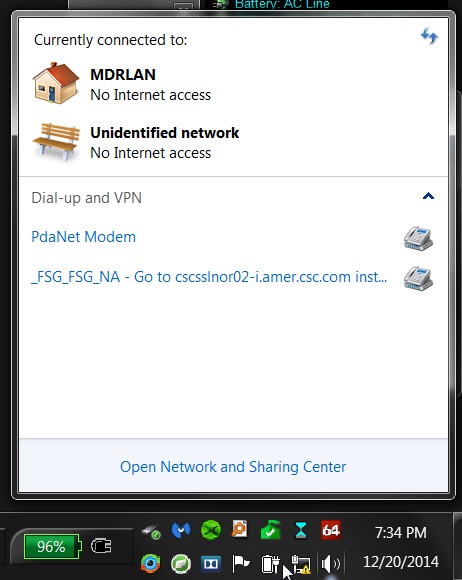
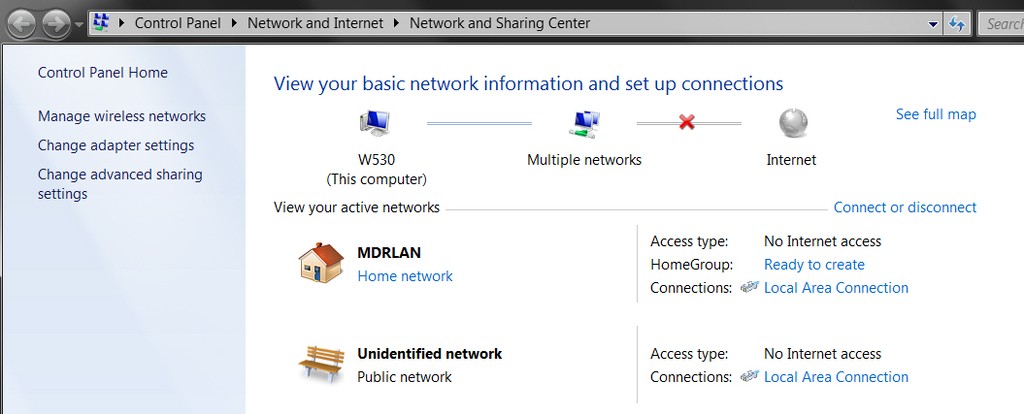
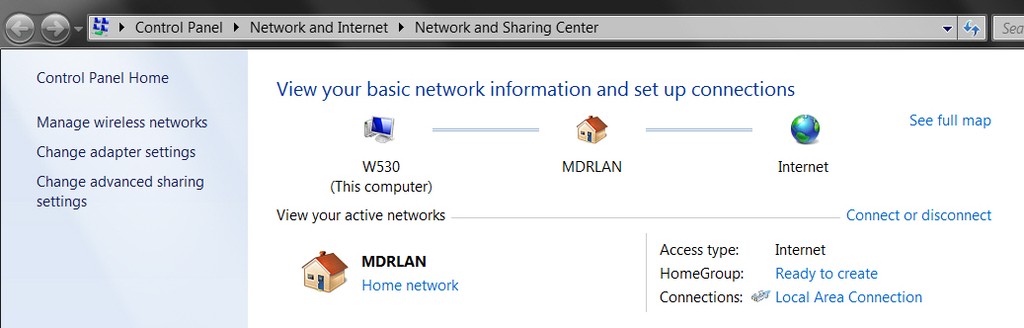
Network and Sharing Center shows both of these networks:
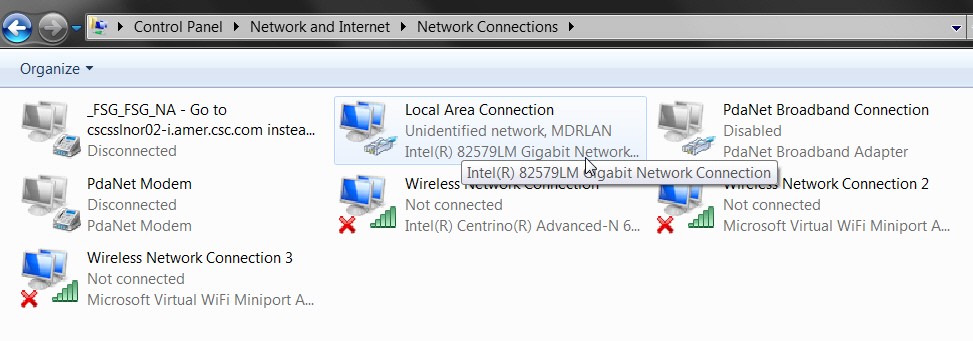
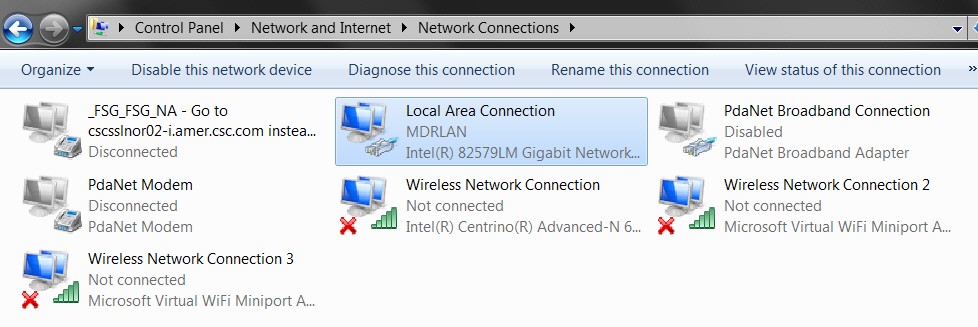
and both of these networks are associated with the Intel wired LAN ethernet adapter in my laptop:
Here is the corresponding boot-time output from "route print" (note the TWO network destinations of 0.0.0.0):
and here is the corresponding boot-time output from "ipconfig /all" (note that "default gateway" shows TWO items, both 192.168.1.1 which is my router as well as 0.0.0.0 which is extraneous):
At this point (right after boot when connected wired to my home LAN router) I don't have Internet access. But the following two-step approach restores it to proper correct working state, with only my home LAN network now in use. The "unidentified network" has disappeared entirely.
(1) First step is in the GUI for local area connection where I right-click on my Intel wired ethernet LAN adapter and select DISABLE. It now shows "disconnected", and a red "X" appears over the network icon in the system tray. This is all perfectly as expected.
At this point the output from "route print" looks as follows" (note the disappearance of the TWO 0.0.0.0. network destinations in the active routes list):
and the output of "ipconfig /all" looks as follows (note the disappearance of the connected Intel wired ethernet LAN adapter):
(2) Second step (with the Intel wired ethernet LAN adapter now in a DISABLED state) I again right-click on the adapter object, and this select ENABLE.
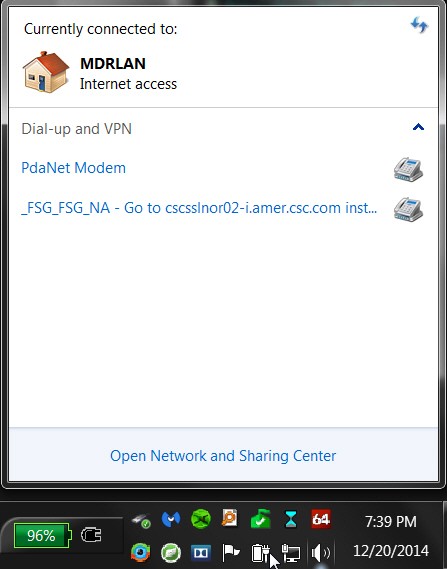
Sure enough the wired adapter GUI object now comes back to life and shows "connected" with just my one home LAN network name in it, and the red "X" over the network icon in the system tray disappears. And everything is now working perfectly, with just the one network and full normal Internet access.
And here is the output from "route print" (note only one 0.0.0.0 route now):
and here is the output from "ipconfig /all" (note just one 192.168.1.1 as default gateway):
So, my question is simply what is responsible for the second "unidentified network" that always appears when I boot with my wired connection in effect?
This doesn't happen when I operate in wireless mode. I only get the correct and nearest/strongest single wireless network established at boot time (i.e. virtually always the most recent one I connected to). It's only in wired mode that this happens.
As you can see, going through a very quick DISABLE/ENABLE process always gets things operating correctly. But I'd sure like to know what I've done that is responsible, and what I might try to repair things so that "unidentified network" never again shows up.
Any thoughts? Questions? Diagnostic actions to provide additional diagnostic output clues you might want to look at?
Many thanks in advance for any help you can provide. This has been driving me crazy for a long time.
(note: I do have two VPN software products installed for connection to customer host machines, but these are not active at boot time. Also, I do have drivers/software from PDANet+ installed that in theory allows my Samsung Galaxy S4 to act as an Internet provider through USB tethering, but again this is not active at boot time.)
Need help to resolve this long-standing mystery.
My Lenovo W530 laptop runs perfectly in both wired and wireless environments, at home as well as "on the road".
But when it is connected wired when fresh booting to Windows it always comes up with "multiple networks" showing as connected, but neither has Internet access. One network is truly my LAN, and the other shows as "unidentified network":
Network and Sharing Center shows both of these networks:
and both of these networks are associated with the Intel wired LAN ethernet adapter in my laptop:
Here is the corresponding boot-time output from "route print" (note the TWO network destinations of 0.0.0.0):
Code:
C:\Users\Darryl Sperber>route print
===========================================================================
Interface List
 19...3c 97 0e 83 51 56 ......Intel(R) 82579LM Gigabit Network Connection
 18...00 ff f0 b8 97 0c ......Juniper Network Connect Virtual Adapter
 14...84 3a 4b ad 25 e1 ......Microsoft Virtual WiFi Miniport Adapter #2
 13...84 3a 4b ad 25 e1 ......Microsoft Virtual WiFi Miniport Adapter
 12...84 3a 4b ad 25 e0 ......Intel(R) Centrino(R) Advanced-N 6205
  1...........................Software Loopback Interface 1
===========================================================================

IPv4 Route Table
===========================================================================
Active Routes:
Network Destination        Netmask          Gateway       Interface  Metric
          0.0.0.0          0.0.0.0         On-link       192.168.1.4     20
          0.0.0.0          0.0.0.0      192.168.1.1      192.168.1.4     10
        127.0.0.0        255.0.0.0         On-link         127.0.0.1    306
        127.0.0.1  255.255.255.255         On-link         127.0.0.1    306
  127.255.255.255  255.255.255.255         On-link         127.0.0.1    306
      169.254.0.0      255.255.0.0         On-link       192.168.1.4     30
  169.254.255.255  255.255.255.255         On-link       192.168.1.4    266
      192.168.1.0    255.255.255.0         On-link       192.168.1.4    266
      192.168.1.4  255.255.255.255         On-link       192.168.1.4    266
    192.168.1.255  255.255.255.255         On-link       192.168.1.4    266
        224.0.0.0        240.0.0.0         On-link         127.0.0.1    306
        224.0.0.0        240.0.0.0         On-link       192.168.1.4    266
  255.255.255.255  255.255.255.255         On-link         127.0.0.1    306
  255.255.255.255  255.255.255.255         On-link       192.168.1.4    266
===========================================================================
Persistent Routes:
  None

IPv6 Route Table
===========================================================================
Active Routes:
 If Metric Network Destination      Gateway
  1    306 ::1/128                  On-link
  1    306 ff00::/8                 On-link
===========================================================================
Persistent Routes:
  None
Code:
C:\Users\Darryl Sperber>ipconfig /all

Windows IP Configuration

   Host Name . . . . . . . . . . . . : W530
   Primary Dns Suffix  . . . . . . . :
   Node Type . . . . . . . . . . . . : Hybrid
   IP Routing Enabled. . . . . . . . : No
   WINS Proxy Enabled. . . . . . . . : No

Ethernet adapter Local Area Connection:

   Connection-specific DNS Suffix  . :
   Description . . . . . . . . . . . : Intel(R) 82579LM Gigabit Network Connection
   Physical Address. . . . . . . . . : 3C-97-0E-83-51-56
   DHCP Enabled. . . . . . . . . . . : Yes
   Autoconfiguration Enabled . . . . : Yes
   IPv4 Address. . . . . . . . . . . : 192.168.1.4(Preferred)
   Subnet Mask . . . . . . . . . . . : 255.255.255.0
   Lease Obtained. . . . . . . . . . : Saturday, December 20, 2014 7:29:28 PM
   Lease Expires . . . . . . . . . . : Sunday, December 21, 2014 7:29:28 PM
   Default Gateway . . . . . . . . . : 0.0.0.0
                                       192.168.1.1
   DHCP Server . . . . . . . . . . . : 192.168.1.1
   DNS Servers . . . . . . . . . . . : 192.168.1.1
   NetBIOS over Tcpip. . . . . . . . : Enabled

Ethernet adapter Local Area Connection* 12:

   Media State . . . . . . . . . . . : Media disconnected
   Connection-specific DNS Suffix  . :
   Description . . . . . . . . . . . : Juniper Network Connect Virtual Adapter
   Physical Address. . . . . . . . . : 00-FF-F0-B8-97-0C
   DHCP Enabled. . . . . . . . . . . : Yes
   Autoconfiguration Enabled . . . . : Yes

Wireless LAN adapter Wireless Network Connection 3:

   Media State . . . . . . . . . . . : Media disconnected
   Connection-specific DNS Suffix  . :
   Description . . . . . . . . . . . : Microsoft Virtual WiFi Miniport Adapter #2
   Physical Address. . . . . . . . . : 84-3A-4B-AD-25-E1
   DHCP Enabled. . . . . . . . . . . : Yes
   Autoconfiguration Enabled . . . . : Yes

Wireless LAN adapter Wireless Network Connection 2:

   Media State . . . . . . . . . . . : Media disconnected
   Connection-specific DNS Suffix  . :
   Description . . . . . . . . . . . : Microsoft Virtual WiFi Miniport Adapter
   Physical Address. . . . . . . . . : 84-3A-4B-AD-25-E1
   DHCP Enabled. . . . . . . . . . . : Yes
   Autoconfiguration Enabled . . . . : Yes

Wireless LAN adapter Wireless Network Connection:

   Media State . . . . . . . . . . . : Media disconnected
   Connection-specific DNS Suffix  . :
   Description . . . . . . . . . . . : Intel(R) Centrino(R) Advanced-N 6205
   Physical Address. . . . . . . . . : 84-3A-4B-AD-25-E0
   DHCP Enabled. . . . . . . . . . . : Yes
Autoconfiguration Enabled . . . . : Yes(1) First step is in the GUI for local area connection where I right-click on my Intel wired ethernet LAN adapter and select DISABLE. It now shows "disconnected", and a red "X" appears over the network icon in the system tray. This is all perfectly as expected.
At this point the output from "route print" looks as follows" (note the disappearance of the TWO 0.0.0.0. network destinations in the active routes list):
Code:
C:\Users\Darryl Sperber>route print
===========================================================================
Interface List
 18...00 ff f0 b8 97 0c ......Juniper Network Connect Virtual Adapter
 14...84 3a 4b ad 25 e1 ......Microsoft Virtual WiFi Miniport Adapter #2
 13...84 3a 4b ad 25 e1 ......Microsoft Virtual WiFi Miniport Adapter
 12...84 3a 4b ad 25 e0 ......Intel(R) Centrino(R) Advanced-N 6205
  1...........................Software Loopback Interface 1
===========================================================================

IPv4 Route Table
===========================================================================
Active Routes:
Network Destination        Netmask          Gateway       Interface  Metric
        127.0.0.0        255.0.0.0         On-link         127.0.0.1    306
        127.0.0.1  255.255.255.255         On-link         127.0.0.1    306
  127.255.255.255  255.255.255.255         On-link         127.0.0.1    306
        224.0.0.0        240.0.0.0         On-link         127.0.0.1    306
  255.255.255.255  255.255.255.255         On-link         127.0.0.1    306
===========================================================================
Persistent Routes:
  None

IPv6 Route Table
===========================================================================
Active Routes:
 If Metric Network Destination      Gateway
  1    306 ::1/128                  On-link
  1    306 ff00::/8                 On-link
===========================================================================
Persistent Routes:
  None
Code:
C:\Users\Darryl Sperber>ipconfig /all

Windows IP Configuration

   Host Name . . . . . . . . . . . . : W530
   Primary Dns Suffix  . . . . . . . :
   Node Type . . . . . . . . . . . . : Hybrid
   IP Routing Enabled. . . . . . . . : No
   WINS Proxy Enabled. . . . . . . . : No

Ethernet adapter Local Area Connection* 12:

   Media State . . . . . . . . . . . : Media disconnected
   Connection-specific DNS Suffix  . :
   Description . . . . . . . . . . . : Juniper Network Connect Virtual Adapter
   Physical Address. . . . . . . . . : 00-FF-F0-B8-97-0C
   DHCP Enabled. . . . . . . . . . . : Yes
   Autoconfiguration Enabled . . . . : Yes

Wireless LAN adapter Wireless Network Connection 3:

   Media State . . . . . . . . . . . : Media disconnected
   Connection-specific DNS Suffix  . :
   Description . . . . . . . . . . . : Microsoft Virtual WiFi Miniport Adapter #2
   Physical Address. . . . . . . . . : 84-3A-4B-AD-25-E1
   DHCP Enabled. . . . . . . . . . . : Yes
   Autoconfiguration Enabled . . . . : Yes

Wireless LAN adapter Wireless Network Connection 2:

   Media State . . . . . . . . . . . : Media disconnected
   Connection-specific DNS Suffix  . :
   Description . . . . . . . . . . . : Microsoft Virtual WiFi Miniport Adapter
   Physical Address. . . . . . . . . : 84-3A-4B-AD-25-E1
   DHCP Enabled. . . . . . . . . . . : Yes
   Autoconfiguration Enabled . . . . : Yes

Wireless LAN adapter Wireless Network Connection:

   Media State . . . . . . . . . . . : Media disconnected
   Connection-specific DNS Suffix  . :
   Description . . . . . . . . . . . : Intel(R) Centrino(R) Advanced-N 6205
   Physical Address. . . . . . . . . : 84-3A-4B-AD-25-E0
   DHCP Enabled. . . . . . . . . . . : Yes
Autoconfiguration Enabled . . . . : YesSure enough the wired adapter GUI object now comes back to life and shows "connected" with just my one home LAN network name in it, and the red "X" over the network icon in the system tray disappears. And everything is now working perfectly, with just the one network and full normal Internet access.
And here is the output from "route print" (note only one 0.0.0.0 route now):
Code:
C:\Users\Darryl Sperber>route print
===========================================================================
Interface List
 19...3c 97 0e 83 51 56 ......Intel(R) 82579LM Gigabit Network Connection
 18...00 ff 80 36 94 0c ......Juniper Network Connect Virtual Adapter
 14...84 3a 4b ad 25 e1 ......Microsoft Virtual WiFi Miniport Adapter #2
 13...84 3a 4b ad 25 e1 ......Microsoft Virtual WiFi Miniport Adapter
 12...84 3a 4b ad 25 e0 ......Intel(R) Centrino(R) Advanced-N 6205
  1...........................Software Loopback Interface 1
===========================================================================

IPv4 Route Table
===========================================================================
Active Routes:
Network Destination        Netmask          Gateway       Interface  Metric
          0.0.0.0          0.0.0.0      192.168.1.1      192.168.1.4     10
        127.0.0.0        255.0.0.0         On-link         127.0.0.1    306
        127.0.0.1  255.255.255.255         On-link         127.0.0.1    306
  127.255.255.255  255.255.255.255         On-link         127.0.0.1    306
      169.254.0.0      255.255.0.0         On-link       192.168.1.4     30
  169.254.255.255  255.255.255.255         On-link       192.168.1.4    266
      192.168.1.0    255.255.255.0         On-link       192.168.1.4    266
      192.168.1.4  255.255.255.255         On-link       192.168.1.4    266
    192.168.1.255  255.255.255.255         On-link       192.168.1.4    266
        224.0.0.0        240.0.0.0         On-link         127.0.0.1    306
        224.0.0.0        240.0.0.0         On-link       192.168.1.4    266
  255.255.255.255  255.255.255.255         On-link         127.0.0.1    306
  255.255.255.255  255.255.255.255         On-link       192.168.1.4    266
===========================================================================
Persistent Routes:
  None

IPv6 Route Table
===========================================================================
Active Routes:
 If Metric Network Destination      Gateway
  1    306 ::1/128                  On-link
  1    306 ff00::/8                 On-link
===========================================================================
Persistent Routes:
  None
and here is the output from "ipconfig /all" (note just one 192.168.1.1 as default gateway):
Code:
C:\Users\Darryl Sperber>ipconfig /all

Windows IP Configuration

   Host Name . . . . . . . . . . . . : W530
   Primary Dns Suffix  . . . . . . . :
   Node Type . . . . . . . . . . . . : Hybrid
   IP Routing Enabled. . . . . . . . : No
   WINS Proxy Enabled. . . . . . . . : No

Ethernet adapter Local Area Connection:

   Connection-specific DNS Suffix  . :
   Description . . . . . . . . . . . : Intel(R) 82579LM Gigabit Network Connection
   Physical Address. . . . . . . . . : 3C-97-0E-83-51-56
   DHCP Enabled. . . . . . . . . . . : Yes
   Autoconfiguration Enabled . . . . : Yes
   IPv4 Address. . . . . . . . . . . : 192.168.1.4(Preferred)
   Subnet Mask . . . . . . . . . . . : 255.255.255.0
   Lease Obtained. . . . . . . . . . : Saturday, December 20, 2014 7:10:43 PM
   Lease Expires . . . . . . . . . . : Sunday, December 21, 2014 7:10:43 PM
   Default Gateway . . . . . . . . . : 192.168.1.1
   DHCP Server . . . . . . . . . . . : 192.168.1.1
   DNS Servers . . . . . . . . . . . : 192.168.1.1
   NetBIOS over Tcpip. . . . . . . . : Enabled

Ethernet adapter Local Area Connection* 12:

   Media State . . . . . . . . . . . : Media disconnected
   Connection-specific DNS Suffix  . :
   Description . . . . . . . . . . . : Juniper Network Connect Virtual Adapter
   Physical Address. . . . . . . . . : 00-FF-80-36-94-0C
   DHCP Enabled. . . . . . . . . . . : Yes
   Autoconfiguration Enabled . . . . : Yes

Wireless LAN adapter Wireless Network Connection 3:

   Media State . . . . . . . . . . . : Media disconnected
   Connection-specific DNS Suffix  . :
   Description . . . . . . . . . . . : Microsoft Virtual WiFi Miniport Adapter #2
   Physical Address. . . . . . . . . : 84-3A-4B-AD-25-E1
   DHCP Enabled. . . . . . . . . . . : Yes
   Autoconfiguration Enabled . . . . : Yes

Wireless LAN adapter Wireless Network Connection 2:

   Media State . . . . . . . . . . . : Media disconnected
   Connection-specific DNS Suffix  . :
   Description . . . . . . . . . . . : Microsoft Virtual WiFi Miniport Adapter
   Physical Address. . . . . . . . . : 84-3A-4B-AD-25-E1
   DHCP Enabled. . . . . . . . . . . : Yes
   Autoconfiguration Enabled . . . . : Yes

Wireless LAN adapter Wireless Network Connection:

   Media State . . . . . . . . . . . : Media disconnected
   Connection-specific DNS Suffix  . :
   Description . . . . . . . . . . . : Intel(R) Centrino(R) Advanced-N 6205
   Physical Address. . . . . . . . . : 84-3A-4B-AD-25-E0
   DHCP Enabled. . . . . . . . . . . : Yes
   Autoconfiguration Enabled . . . . : Yes
So, my question is simply what is responsible for the second "unidentified network" that always appears when I boot with my wired connection in effect?
This doesn't happen when I operate in wireless mode. I only get the correct and nearest/strongest single wireless network established at boot time (i.e. virtually always the most recent one I connected to). It's only in wired mode that this happens.
As you can see, going through a very quick DISABLE/ENABLE process always gets things operating correctly. But I'd sure like to know what I've done that is responsible, and what I might try to repair things so that "unidentified network" never again shows up.
Any thoughts? Questions? Diagnostic actions to provide additional diagnostic output clues you might want to look at?
Many thanks in advance for any help you can provide. This has been driving me crazy for a long time.
(note: I do have two VPN software products installed for connection to customer host machines, but these are not active at boot time. Also, I do have drivers/software from PDANet+ installed that in theory allows my Samsung Galaxy S4 to act as an Internet provider through USB tethering, but again this is not active at boot time.)
My Computer
At a glance
Windows 7 Pro x64 (1), Win7 Pro X64 (2)i5-3350p 3.1Ghz/6MB-cache (1); E8400 3.0Ghz/6...8GB PC3-12800 DDR3 (1); 4GB PC3-10600 DDR3 (2)ATI HD7750 (1), (see TV cards); ATI R7 250 (2)
- Computer type
- PC/Desktop
- Computer Manufacturer/Model Number
- Home-built, two systems (1) and (2)
- OS
- Windows 7 Pro x64 (1), Win7 Pro X64 (2)
- CPU
- i5-3350p 3.1Ghz/6MB-cache (1); E8400 3.0Ghz/6MB-cache (2)
- Motherboard
- ASUS P8Z77-V Pro (1); ASUS P5Q3 (2)
- Memory
- 8GB PC3-12800 DDR3 (1); 4GB PC3-10600 DDR3 (2)
- Graphics Card(s)
- ATI HD7750 (1), (see TV cards); ATI R7 250 (2)
- Sound Card
- Realtek ALC892 HD Audio (1); Realtek ALC1200 HD Audio (2)
- Monitor(s) Displays
- Eizo HD2441W LCD, Eizo S2433W (1); Eizo 24" S2433W (2)
- Screen Resolution
- 1920x1200, 1920x1200 (1); 1920x1200 (2)
- Hard Drives
- (1) 1TB SATA-II (7200RPM), 2x2TB SATA-III (7200RPM), 250GB SATA-III (10000RPM) for OS; 2x2TB external USB 3.0
(2) 320GB SATA-II (7200RPM), 750GB SATA-II (7200RPM), 150GB SATA-II (10000RPM) for OS; 2TB external USB 3.0
- PSU
- Nesteq ECS-6001 600W (1); Nesteq ECS-5001 500W (2)
- Case
- Acousti-Case 360 (1) and (2)
- Cooling
- Noctua NH-U12P SE2 for CPU, 2x120mm case fans (1) and (2)
- Keyboard
- IBM PS/2 (1) and (2)
- Mouse
- Logitech MX Revolution wireless (1); Microsoft wired (2)
- Internet Speed
- 100mbps down / 10mbps up
- Antivirus
- Microsoft Security Essentials; Malwarebyte Anti-Malware Pro
- Browser
- Firefox
- Other Info
- Ceton InfiniTV 4-tuner cablecard-enabled TV card as well as Hauppauge HVR-2250 OTA/ATSC 2-tuner TV card in (1), running under Win7 WMC

