ie4uinit.exe missing after using Autorun, I have IE11, not 10

CarwashGuru

New member
Local time
2:57 PM
Messages
5
Location
Houston, TX
When I ran Autoruns it shows that ie4uinit.exe is missing from C:\Windows\System32\. It is under the section of HKLM\SOFTWARE\Wow6432Node\Microsoft\Active Setup\Installed Components. How can I fix this problem when all I see in forum is about IE10, I have IE11. My system break down is in my System Spec Folder.

Thanks for ANY help!!!:(
 

My Computer My Computer

At a glance

Windows 7 Professional SP1 64bitIntel i5-2500k8GB DDR-3ASUS HD7770 1GB
Computer type
PC/Desktop
Computer Manufacturer/Model Number
custom build
OS
Windows 7 Professional SP1 64bit
CPU
Intel i5-2500k
Motherboard
Intel 1155 H61BE
Memory
8GB DDR-3
Graphics Card(s)
ASUS HD7770 1GB
Hard Drives
240Gb Extreme SANDISK 3 SSD
1Tb WD SE SATA6 7200RPM 64MB
PSU
Cooler Master GX 750wt 1 Fan 80Plus
Case
Thermaltake Mid Tower V4
Cooling
2-Case Fans
Keyboard
MS Wireless 2000
Mouse
MS Wireless 2000
Internet Speed
35Gb/sec
Antivirus
Norton
Browser
IE 11
Welcome to the Seven Forums.

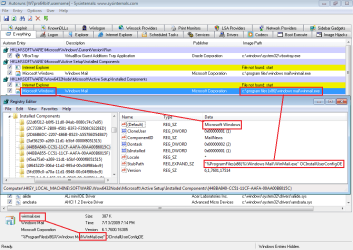
Let's start with what I see for a "good" entry shown in Autoruns and the registry:

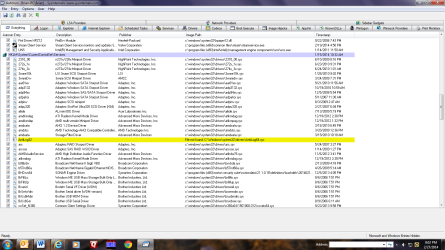
The important part of the first screenshot shown below is at the very the bottom - the path to winmail.exe. That is the exe that the registry says should be on the hard drive. Since Autoruns found that exe, it showed the line in Autoruns as okay.

ar1.png


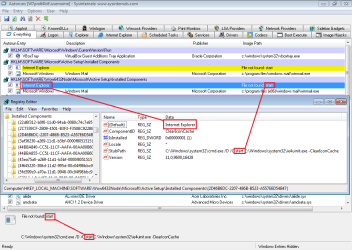
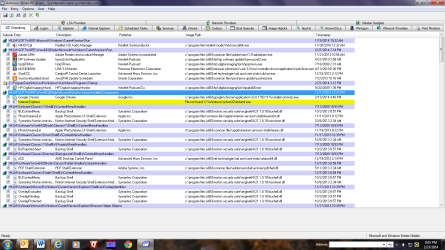
For whatever reason, Autoruns thinks that there should be a program named start; but when Autoruns cannot find start on the hard drive, it marks that row in yellow and declares File not found.

ar2.png


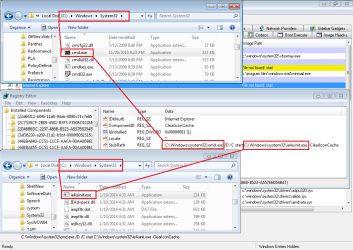
C:\Windows\system32\cmd.exe and C:\Windows\system32\ie4uinit.exe are clearly present on the hard drive.
ar3.png


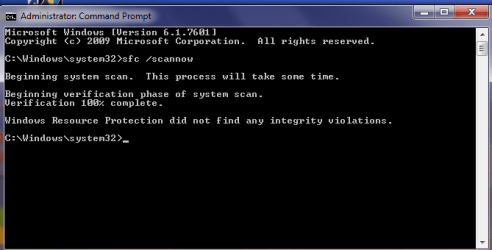
If you do not find ie4uinit.exe in the location shown above, please run:
http://www.sevenforums.com/tutorials/1538-sfc-scannow-command-system-file-checker.html
ie4uinit.exe is one of the files that SFC replaces when it can.


If you are seeing something different that what those screenshots show, please post a screenshot of what you see. The info about MS Paint in this post might help. At the bottom of that post about using MS Paint is a link that details how to upload screenshot files to this forum.
 

My Computer My Computer

At a glance

W7 Pro SP1 64biti78GBIntel HD Graphics
Computer type
Laptop
Computer Manufacturer/Model Number
Employer provided Dell Latitude
OS
W7 Pro SP1 64bit
CPU
i7
Memory
8GB
Graphics Card(s)
Intel HD Graphics
Hard Drives
crappy SSD
Antivirus
Employer mandated Symantec Endpoint Protection
Browser
Pale Moon 64bit, IE11 64bit & Chrome 64bit
ie4uinit.exe, like many files in \Windows and \system32 is a hardlink:

C:\Windows\System32>fsutil hardlink list ie4uinit.exe
\Windows\System32\ie4uinit.exe
\Windows\WinSxS\amd64_microsoft-windows-ie-setup-support_31bf3856ad364e35_10.0.9200.16798_none_64f833a59cebd08d\ie4uinit.exe

so some programs will not show it actually exists. For instance Everything Search does not show it. Most likely Autoruns will not show it either.
 

My Computer My Computer

At a glance

Windows 10 Pro X64Intel Quad Core i7-4770 @ 3.4Ghz16.0GB PC3-12800 DDR3 SDRAM 1600 MHzIntel Integrated HD Graphics
Computer type
PC/Desktop
Computer Manufacturer/Model Number
Lenovo IdeaCenter 450
OS
Windows 10 Pro X64
CPU
Intel Quad Core i7-4770 @ 3.4Ghz
Memory
16.0GB PC3-12800 DDR3 SDRAM 1600 MHz
Graphics Card(s)
Intel Integrated HD Graphics
Sound Card
Realtek HD Audio
Monitor(s) Displays
HP 22" LCD
Screen Resolution
1680 x 1050
Hard Drives
250GB Samsung EVO SATA-3 SSD
2TB Seagate ST2000DM001 SATA-2
1.5TB Seagate ST3150041AS SATA
Keyboard
Dell USB
Mouse
Lenovo USB
Internet Speed
Cable via Road Runner 3MB Upload, 30MB Download
Antivirus
Windows Defender, MBAM Pro, MBAE
Browser
Seamonkey
Other Info
UEFI/GPT
PLDS DVD-RW DH16AERSH
:-)

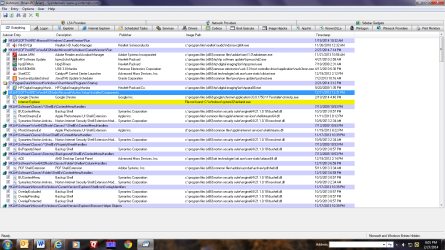
ar.PNG
 

My Computer My Computer

At a glance

W7 Pro SP1 64biti78GBIntel HD Graphics
Computer type
Laptop
Computer Manufacturer/Model Number
Employer provided Dell Latitude
OS
W7 Pro SP1 64bit
CPU
i7
Memory
8GB
Graphics Card(s)
Intel HD Graphics
Hard Drives
crappy SSD
Antivirus
Employer mandated Symantec Endpoint Protection
Browser
Pale Moon 64bit, IE11 64bit & Chrome 64bit
Screenshot of ie error and Antilog32 error in Autoruns

Autoruns ie4uinit.exe Error.png

This is the ie4uinit.exe error in Autoruns. I also have an Antilog32 error further down in autoruns.

Autoruns Antilog32 Error.png

I hope I did this right and THANKS for the HELP!!!
 

My Computer My Computer

At a glance

Windows 7 Professional SP1 64bitIntel i5-2500k8GB DDR-3ASUS HD7770 1GB
Computer type
PC/Desktop
Computer Manufacturer/Model Number
custom build
OS
Windows 7 Professional SP1 64bit
CPU
Intel i5-2500k
Motherboard
Intel 1155 H61BE
Memory
8GB DDR-3
Graphics Card(s)
ASUS HD7770 1GB
Hard Drives
240Gb Extreme SANDISK 3 SSD
1Tb WD SE SATA6 7200RPM 64MB
PSU
Cooler Master GX 750wt 1 Fan 80Plus
Case
Thermaltake Mid Tower V4
Cooling
2-Case Fans
Keyboard
MS Wireless 2000
Mouse
MS Wireless 2000
Internet Speed
35Gb/sec
Antivirus
Norton
Browser
IE 11
Screenshot requested.

Autoruns ie4uinit.exe Error.png

Here is the screenshot of ie4uinit.exe issue. But I do have another Autoruns issue with Antilog32 shown below.

Autoruns Antilog32 Error.png

Thank you SO MUCH for any HELP!!!
 

My Computer My Computer

At a glance

Windows 7 Professional SP1 64bitIntel i5-2500k8GB DDR-3ASUS HD7770 1GB
Computer type
PC/Desktop
Computer Manufacturer/Model Number
custom build
OS
Windows 7 Professional SP1 64bit
CPU
Intel i5-2500k
Motherboard
Intel 1155 H61BE
Memory
8GB DDR-3
Graphics Card(s)
ASUS HD7770 1GB
Hard Drives
240Gb Extreme SANDISK 3 SSD
1Tb WD SE SATA6 7200RPM 64MB
PSU
Cooler Master GX 750wt 1 Fan 80Plus
Case
Thermaltake Mid Tower V4
Cooling
2-Case Fans
Keyboard
MS Wireless 2000
Mouse
MS Wireless 2000
Internet Speed
35Gb/sec
Antivirus
Norton
Browser
IE 11
Autoruns

Hi,

When I run Autoruns as administrator on my machine I see the same "file not found" entry for ie4uinit.exe and I think that must be normal.

I take a look at the file using another method and although the file is seen guess what happens when I want to view file properties? Again - this appears to be normal.

See screenshot:

2014-02-28 02_52_47-PowerTool x64 V1.jpg

If you want to confirm that ie4uinit.exe is present in it's correct location and doing it's job:

Start> Run then type

ie4uinit.exe -ClearIconCache

and you should see your desktop icons being rebuilt/ refreshed without any "file not found" error messages.


As for antilog64.sys - it would appear to be a hidden driver that's installed by Zemana antilogger. If you've uninstalled Zemana antilogger you can search for and remove the driver - otherwise leave it alone.

Follow the threads and links to other threads here for more information on Autoruns "file not found" and why it's not always a problem. Indeed I see the same type of entries when i use in advanced mode:

http://runscanner.net/

Research is needed before deletion.:

http://forum.sysinternals.com/topic4719.html
 

My Computer My Computer

At a glance

Microsoft Windows 7 Home Premium 64-bit 7601 ...AMD C-60 APU with Radeon(tm) HD Graphics4.00 GBAMD Radeon HD 6290 Graphics
Computer type
Laptop
Computer Manufacturer/Model Number
ASUS
OS
Microsoft Windows 7 Home Premium 64-bit 7601 Multiprocessor Free Service Pack 1
CPU
AMD C-60 APU with Radeon(tm) HD Graphics
Motherboard
ASUSTeK COMPUTER INC. X501U
Memory
4.00 GB
Graphics Card(s)
AMD Radeon HD 6290 Graphics
Sound Card
(1) AMD High Definition Audio Device (2) Realtek High Defi
Screen Resolution
1366 x 768 x 32 bits (4294967296 colors) @ 60 Hz
Hard Drives
Hitachi HTS545050A7E380 SATA Disk Device
Antivirus
Comodo CIS & FW, SecureAplus App Whitelisting, Threatfire
Browser
Cyberfox 64bit, Opera 64bit, Airfox
Other Info
Spy-The-Spy, HitmanPro.Alert, Norton Connect Safe, MJRegWatcher, BitDefender TrafficLight, Voodoo Shield, Zemana AntiMalware
CarwashGuru,
Please run...
http://www.sevenforums.com/tutorials/1538-sfc-scannow-command-system-file-checker.html
...and let us know the results.

Please follow Callender's instructions concerning antilog64.sys.


ie4uinit.exe, like many files in \Windows and \system32 is a hardlink:
~~~
...Most likely Autoruns will not show it either.
You are correct (of course :-)

Callender was find enough to discuss this thread via PM with me. We discovered that we are seeing different things from autoruns because we have different versions installed. The tool has changed the way that it parses this info:
Code:
[COLOR=Red]C:\Windows\system32\cmd.exe /D /C start C:\Windows\system32\ie4uinit.exe -ClearIconCache[/COLOR]
Autoruns v11.34 parsed that string and went hunting for the non-existant file named "start". As post #4 shows, autoruns v11.34 can use a hard link for C:\Windows\system32\ie4uinit.exe and show that things are okay because it found the actual file in the WinSxS folder.

Autoruns v11.70 parsed that string, went hunting for ie4uinit.exe but failed to resolve the hard link.
 
Last edited:

My Computer My Computer

At a glance

W7 Pro SP1 64biti78GBIntel HD Graphics
Computer type
Laptop
Computer Manufacturer/Model Number
Employer provided Dell Latitude
OS
W7 Pro SP1 64bit
CPU
i7
Memory
8GB
Graphics Card(s)
Intel HD Graphics
Hard Drives
crappy SSD
Antivirus
Employer mandated Symantec Endpoint Protection
Browser
Pale Moon 64bit, IE11 64bit & Chrome 64bit
Screenshot you wanted and runscanner.log file

sfc results.png

I thought this REALLY could help! Look at all of the missing files at end of log!

View attachment runscanner.log
 

My Computer My Computer

At a glance

Windows 7 Professional SP1 64bitIntel i5-2500k8GB DDR-3ASUS HD7770 1GB
Computer type
PC/Desktop
Computer Manufacturer/Model Number
custom build
OS
Windows 7 Professional SP1 64bit
CPU
Intel i5-2500k
Motherboard
Intel 1155 H61BE
Memory
8GB DDR-3
Graphics Card(s)
ASUS HD7770 1GB
Hard Drives
240Gb Extreme SANDISK 3 SSD
1Tb WD SE SATA6 7200RPM 64MB
PSU
Cooler Master GX 750wt 1 Fan 80Plus
Case
Thermaltake Mid Tower V4
Cooling
2-Case Fans
Keyboard
MS Wireless 2000
Mouse
MS Wireless 2000
Internet Speed
35Gb/sec
Antivirus
Norton
Browser
IE 11
Thanks for running the SFC scan. The results show ie4uinit.exe to be alive and well :-)

Doh! I now see that Callender was passing along some info about how other tools don't always find files that are hard links. I'm not sure that Callender was asking for the results of the scan. I'll let Callender help you with those results.
 

My Computer My Computer

At a glance

W7 Pro SP1 64biti78GBIntel HD Graphics
Computer type
Laptop
Computer Manufacturer/Model Number
Employer provided Dell Latitude
OS
W7 Pro SP1 64bit
CPU
i7
Memory
8GB
Graphics Card(s)
Intel HD Graphics
Hard Drives
crappy SSD
Antivirus
Employer mandated Symantec Endpoint Protection
Browser
Pale Moon 64bit, IE11 64bit & Chrome 64bit

My Computer My Computer

At a glance

Windows 10 Pro X64Intel Quad Core i7-4770 @ 3.4Ghz16.0GB PC3-12800 DDR3 SDRAM 1600 MHzIntel Integrated HD Graphics
Computer type
PC/Desktop
Computer Manufacturer/Model Number
Lenovo IdeaCenter 450
OS
Windows 10 Pro X64
CPU
Intel Quad Core i7-4770 @ 3.4Ghz
Memory
16.0GB PC3-12800 DDR3 SDRAM 1600 MHz
Graphics Card(s)
Intel Integrated HD Graphics
Sound Card
Realtek HD Audio
Monitor(s) Displays
HP 22" LCD
Screen Resolution
1680 x 1050
Hard Drives
250GB Samsung EVO SATA-3 SSD
2TB Seagate ST2000DM001 SATA-2
1.5TB Seagate ST3150041AS SATA
Keyboard
Dell USB
Mouse
Lenovo USB
Internet Speed
Cable via Road Runner 3MB Upload, 30MB Download
Antivirus
Windows Defender, MBAM Pro, MBAE
Browser
Seamonkey
Other Info
UEFI/GPT
PLDS DVD-RW DH16AERSH
Ztrucker, did you look at my runscanner log file?

I thought you wanted me to run runscanner. It showed many missing files. Could you look at my log file?View attachment runscanner.log
 

My Computer My Computer

At a glance

Windows 7 Professional SP1 64bitIntel i5-2500k8GB DDR-3ASUS HD7770 1GB
Computer type
PC/Desktop
Computer Manufacturer/Model Number
custom build
OS
Windows 7 Professional SP1 64bit
CPU
Intel i5-2500k
Motherboard
Intel 1155 H61BE
Memory
8GB DDR-3
Graphics Card(s)
ASUS HD7770 1GB
Hard Drives
240Gb Extreme SANDISK 3 SSD
1Tb WD SE SATA6 7200RPM 64MB
PSU
Cooler Master GX 750wt 1 Fan 80Plus
Case
Thermaltake Mid Tower V4
Cooling
2-Case Fans
Keyboard
MS Wireless 2000
Mouse
MS Wireless 2000
Internet Speed
35Gb/sec
Antivirus
Norton
Browser
IE 11
Did you all miss my previous post? http://www.sevenforums.com/general-...autorun-i-have-ie11-not-10-a.html#post2705282

ie4uinit.exe is a hardlink to the real file which is here: \Windows\WinSxS\amd64_microsoft-windows-ie-setup-support_31bf3856ad364e35_10.0.9200.16798_none_64f833a59cebd08d\ie4uinit.exe

Nope. I did not miss it. I quoted from it and said that you were correct.

But I was still left with the puzzle of autoruns finding the file (post #4)...
...and not finding the file (posts 5, 6 and 7). Did you not notice that?
 

My Computer My Computer

At a glance

W7 Pro SP1 64biti78GBIntel HD Graphics
Computer type
Laptop
Computer Manufacturer/Model Number
Employer provided Dell Latitude
OS
W7 Pro SP1 64bit
CPU
i7
Memory
8GB
Graphics Card(s)
Intel HD Graphics
Hard Drives
crappy SSD
Antivirus
Employer mandated Symantec Endpoint Protection
Browser
Pale Moon 64bit, IE11 64bit & Chrome 64bit
Runscanner log

View attachment 308476

I thought this REALLY could help! Look at all of the missing files at end of log!

View attachment 308477


Don't worry about those "missing files" entries in the Runscanner log. They mostly appear to be drivers that don't have a valid image path stored inside the registry. Image path is the foldername plus the filename where the file is located. That doesn't mean that those drivers are missing!

If everything appears to be working okay leave it as it is.

You might like to browse to:

C:\Windows\system32\drivers\AntiLog64.sys

Then if you see this driver - right click on it and choose "properties" then take a look at the digital signature. Does it say Zemana?

Alternatively you can download the portable version of:

System Explorer - Keep Your System Under Control

It doesn't require installation and you can delete the folder at any time to remove it.

Run SystemExplorer.exe with admin rights. Open a new tab and choose "drivers" from the drop down list. Look for antilog.64.sys and check to see if it has started or not. Also highlight the file in the list then click "see more details" near the bottom left of the screen to view a report on that specific file.

EDIT:

It wasn't suggested that you should scan using Runscanner. It was just posted as information to show that the same type of problem (file not found errors) - even though they're not actually errors - also exist when using other scanners that are similar to Autoruns.
 
Last edited:

My Computer My Computer

At a glance

Microsoft Windows 7 Home Premium 64-bit 7601 ...AMD C-60 APU with Radeon(tm) HD Graphics4.00 GBAMD Radeon HD 6290 Graphics
Computer type
Laptop
Computer Manufacturer/Model Number
ASUS
OS
Microsoft Windows 7 Home Premium 64-bit 7601 Multiprocessor Free Service Pack 1
CPU
AMD C-60 APU with Radeon(tm) HD Graphics
Motherboard
ASUSTeK COMPUTER INC. X501U
Memory
4.00 GB
Graphics Card(s)
AMD Radeon HD 6290 Graphics
Sound Card
(1) AMD High Definition Audio Device (2) Realtek High Defi
Screen Resolution
1366 x 768 x 32 bits (4294967296 colors) @ 60 Hz
Hard Drives
Hitachi HTS545050A7E380 SATA Disk Device
Antivirus
Comodo CIS & FW, SecureAplus App Whitelisting, Threatfire
Browser
Cyberfox 64bit, Opera 64bit, Airfox
Other Info
Spy-The-Spy, HitmanPro.Alert, Norton Connect Safe, MJRegWatcher, BitDefender TrafficLight, Voodoo Shield, Zemana AntiMalware
Back
Top