W7 keeps deleting my excel ss desktop icon whenever I update it??

Ukdodger

New member
Member
VIP
Local time
11:41 PM
Messages
178
Location
Surrey England
Whenever I update my Excel speadsheet after first opening it by clicking the desktop icon. It then deletes the desktop icon when I save the sheet. It only does it with this particular icon. If I try copying the ss from another backup location back onto the desktop it says 'this is a duplicate copy'. Can anyone help. Thanks
 

My Computer My Computer

At a glance

Windows 7 home
Computer type
Laptop
OS
Windows 7 home
Hello, just to be sure we understand the problem.

"Whenever I update my Excel speadsheet after first opening it by clicking the desktop icon"

This icon is a shortcut to the Excel program itself, or it is the particular spreadsheet you are working on (updating)?

"It then deletes the desktop icon when I save the sheet."

You save the updated excel spreadsheet, also to the desktop, and no icon at all is now on the desktop?

If I read you correctly, you have a saved spreadsheet on the desktop. After updating it and saving the changed spreadsheet to the desktop, no icon for it is found, and when trying to copy a duplicate to the desktop, it appears as if Windows thinks the saved spreadsheet is indeed already on the desktop, just not visible? Sound right?

Is this a new behavior that started recently, or has this always been the case?

If you navigate to your desktop folder, does the spreadsheet show there?

C:\Users\(User name)\Desktop

Here's something to try if they show in the desktop folder itself. Navigate to

C:\Users\(User name)

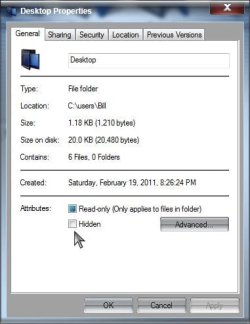
and right click on the Desktop folder> Properties> Under Attributes> Select Hidden and Apply and OK

Now undo that, untick Hidden and Apply and OK, any change?

A Guy

 

My Computer My Computer

At a glance

Windows 10 Home x64INTEL Core i5-750 Quad-Core 3.37GHzHyperX Fury Black Series 8GB (2 x 4GB) 1866MhzEVGA GeForce GTX 750 Superclocked 1GB 128-Bit...
Computer type
PC/Desktop
OS
Windows 10 Home x64
CPU
INTEL Core i5-750 Quad-Core 3.37GHz
Motherboard
ASUS P7P55D
Memory
HyperX Fury Black Series 8GB (2 x 4GB) 1866Mhz
Graphics Card(s)
EVGA GeForce GTX 750 Superclocked 1GB 128-Bit GDDR5
Monitor(s) Displays
LG 32MA68HY 32" IPS
Screen Resolution
1920 x 1080
Hard Drives
Samsung 840 Evo 120GB, SEAGATE 500GB Barracuda® 7200.12, SATA 3 Gb/s, 7200 RPM, 16MB cache
PSU
ANTEC TruePower New TP-550, 80 PLUS, 550W
Case
ANTEC Three Hundred Illusion
Cooling
COOLER MASTER Hyper 212 Plus, 4 x 120mm 1 x 140mm Noctua's
Internet Speed
85 + Mbps
Antivirus
Avast
Browser
Vivaldi
Certainly try what A Guy has suggested & if that fixes your problem that would be great.

If you work on more than one spread Excel spreadsheet from time to time, then the best way is to set up a folder in your documents library called Excel Spreadsheet & then move all your spreadsheets into that folder. Now right click on the Excel Spreadsheet folder in your documents library & select send to the desktop (create shortcut) from the menu.

This will create a shortcut on the desktop that will open the Excel Spreadsheet folder & show all your saved spreadsheets, so you can select any one you want to work on. Once you have opened one you can select any other spreadsheet from that folder from the thumbnail in the task bar to work on at the same time if you wish. I use this method frequently as I can go from one spreadsheet to another very quickly, or have 2 or more open at the same time.

Now if you right click on the new icon on the desktop you can select Properties & then Change Icon & scroll though the icons displayed to select one to your liking for the new desktop icon.
 

My Computer My Computer

At a glance

Windows 7 Home Premium 64 bit sp1Intel i5 3570 3.4Ghz Ivy Bridge SKT 1155 quad...G-Skill Rip Jaws 16Gb (8x2) DDR3 -1600 PC3 12...Gigabyte NVIDIA GT610 1Gb DDR3 810/1200 PCI-E...
Computer type
PC/Desktop
Computer Manufacturer/Model Number
Self built using existing case
OS
Windows 7 Home Premium 64 bit sp1
CPU
Intel i5 3570 3.4Ghz Ivy Bridge SKT 1155 quad core
Motherboard
Gigabyte Z77-HD3 SKT 1155 2xSata 3, 4x USB 3.0
Memory
G-Skill Rip Jaws 16Gb (8x2) DDR3 -1600 PC3 12800 CL 10 red
Graphics Card(s)
Gigabyte NVIDIA GT610 1Gb DDR3 810/1200 PCI-E 2.0 Silent
Sound Card
NVIDIA High Definition & Realtech High Definition Audio
Monitor(s) Displays
2 x Philips 226V4L 16:9 aspect ratio
Screen Resolution
1920 x 1080 HD
Hard Drives
Samsung 840 Pro 256gb SSD, SATA 3.
Hitachi Touro Portable 1tb, USB 3.0 HDD used for image b/ups.
PSU
Corsair VS450
Case
Codeng
Cooling
PSU fan & CPU fan
Keyboard
Logitech
Mouse
Logitech Wireless trackball M570
Internet Speed
Wireless 3G. 3mg down & 550kb up.
Antivirus
Bitdefender Internet Security 2020
Browser
Opera (Current Version) & Firefox
Other Info
MS Office 2013 Pro. Davis weather station software. MGE Nova 600 avr UPS.
Hello, just to be sure we understand the problem.

"Whenever I update my Excel speadsheet after first opening it by clicking the desktop icon"

This icon is a shortcut to the Excel program itself, or it is the particular spreadsheet you are working on (updating)?

"It then deletes the desktop icon when I save the sheet."

You save the updated excel spreadsheet, also to the desktop, and no icon at all is now on the desktop?

If I read you correctly, you have a saved spreadsheet on the desktop. After updating it and saving the changed spreadsheet to the desktop, no icon for it is found, and when trying to copy a duplicate to the desktop, it appears as if Windows thinks the saved spreadsheet is indeed already on the desktop, just not visible? Sound right?

Is this a new behavior that started recently, or has this always been the case?

If you navigate to your desktop folder, does the spreadsheet show there?

C:\Users\(User name)\Desktop

Here's something to try if they show in the desktop folder itself. Navigate to

C:\Users\(User name)

and right click on the Desktop folder> Properties> Under Attributes> Select Hidden and Apply and OK

Now undo that, untick Hidden and Apply and OK, any change?

A Guy


Thanks A Guy. Yes that's exactly right and the ss is in the Desktop. However I can find no 'Attributes' under Desktop folder properties?
 

My Computer My Computer

At a glance

Windows 7 home
Computer type
Laptop
OS
Windows 7 home
Does the spreadsheet show in the Desktop folder?

Attributes.jpg

Towards the bottom of the General tab. No use if the spreadsheet doesn't show in the folder. A Guy
 

My Computer My Computer

At a glance

Windows 10 Home x64INTEL Core i5-750 Quad-Core 3.37GHzHyperX Fury Black Series 8GB (2 x 4GB) 1866MhzEVGA GeForce GTX 750 Superclocked 1GB 128-Bit...
Computer type
PC/Desktop
OS
Windows 10 Home x64
CPU
INTEL Core i5-750 Quad-Core 3.37GHz
Motherboard
ASUS P7P55D
Memory
HyperX Fury Black Series 8GB (2 x 4GB) 1866Mhz
Graphics Card(s)
EVGA GeForce GTX 750 Superclocked 1GB 128-Bit GDDR5
Monitor(s) Displays
LG 32MA68HY 32" IPS
Screen Resolution
1920 x 1080
Hard Drives
Samsung 840 Evo 120GB, SEAGATE 500GB Barracuda® 7200.12, SATA 3 Gb/s, 7200 RPM, 16MB cache
PSU
ANTEC TruePower New TP-550, 80 PLUS, 550W
Case
ANTEC Three Hundred Illusion
Cooling
COOLER MASTER Hyper 212 Plus, 4 x 120mm 1 x 140mm Noctua's
Internet Speed
85 + Mbps
Antivirus
Avast
Browser
Vivaldi
Does the spreadsheet show in the Desktop folder?

View attachment 308686

Towards the bottom of the General tab. No use if the spreadsheet doesn't show in the folder. A Guy

Thanks A Guy. You wouldnt believe how many times I looked at that screen and didnt see 'Attributes' :confused:.

I did that and now the ss shows on the desktop after updating it but it's put it at the top left hand corner and wont allow me to move it. Other icons can be moved but this one goes through the motions ie, it appears on the cursor tip and moves with it to a new position but then goes back to the top left. It's only this icon that does it. Others move where I put them. Perplexing or what.

I can live with it but it's underneath my Nexus taskbar and I dont want to move that. Thanks again.
 

My Computer My Computer

At a glance

Windows 7 home
Computer type
Laptop
OS
Windows 7 home

My Computer My Computer

At a glance

W7 Pro SP1 64biti78GBIntel HD Graphics
Computer type
Laptop
Computer Manufacturer/Model Number
Employer provided Dell Latitude
OS
W7 Pro SP1 64bit
CPU
i7
Memory
8GB
Graphics Card(s)
Intel HD Graphics
Hard Drives
crappy SSD
Antivirus
Employer mandated Symantec Endpoint Protection
Browser
Pale Moon 64bit, IE11 64bit & Chrome 64bit

My Computer My Computer

At a glance

Windows 7 home
Computer type
Laptop
OS
Windows 7 home
Wow. That is interesting.

As you said - you can live with it - but, if you want to play a bit more:
...use the Windows (file) Explorer to move the file to your Documents folder
...create a new text file on your desktop
...move it to the top left position
...restart the computer
(which writes the desktop item locations to the registry)

Now move the spreadsheet file back to the desktop.

Maybe the text file will prevent the spreadsheet from going to the top left position.
 

My Computer My Computer

At a glance

W7 Pro SP1 64biti78GBIntel HD Graphics
Computer type
Laptop
Computer Manufacturer/Model Number
Employer provided Dell Latitude
OS
W7 Pro SP1 64bit
CPU
i7
Memory
8GB
Graphics Card(s)
Intel HD Graphics
Hard Drives
crappy SSD
Antivirus
Employer mandated Symantec Endpoint Protection
Browser
Pale Moon 64bit, IE11 64bit & Chrome 64bit
Wow. That is interesting.

As you said - you can live with it - but, if you want to play a bit more:
...use the Windows (file) Explorer to move the file to your Documents folder
...create a new text file on your desktop
...move it to the top left position
...restart the computer
(which writes the desktop item locations to the registry)

Now move the spreadsheet file back to the desktop.

Maybe the text file will prevent the spreadsheet from going to the top left position.

OK tried that too but still no go. Saving it with the new text file located at top left places the ss to the right of the text file. It will let me move it though BUT after rebooting it goes back to the top left! Damn thing has a life of it's own.
 

My Computer My Computer

At a glance

Windows 7 home
Computer type
Laptop
OS
Windows 7 home
Your right, it sounds like it is alive :-)

I was hoping to restart the computer while the ss was not on the desktop... but I hold out little hope of clearing/changing the errant item position info.

Question: when you reset the folder view settings, did items on the desktop all shift to the left (assuming that you had items elsewhere on the desktop to notice such a shift).


Thanks for playing "Find that spreadsheet".
You win (found the file) and you lose :-(
 

My Computer My Computer

At a glance

W7 Pro SP1 64biti78GBIntel HD Graphics
Computer type
Laptop
Computer Manufacturer/Model Number
Employer provided Dell Latitude
OS
W7 Pro SP1 64bit
CPU
i7
Memory
8GB
Graphics Card(s)
Intel HD Graphics
Hard Drives
crappy SSD
Antivirus
Employer mandated Symantec Endpoint Protection
Browser
Pale Moon 64bit, IE11 64bit & Chrome 64bit
Your right, it sounds like it is alive :-)

I was hoping to restart the computer while the ss was not on the desktop... but I hold out little hope of clearing/changing the errant item position info.

Question: when you reset the folder view settings, did items on the desktop all shift to the left (assuming that you had items elsewhere on the desktop to notice such a shift).


Thanks for playing "Find that spreadsheet".
You win (found the file) and you lose :-(

Lol. Yes they all stacked up on the left.
 

My Computer My Computer

At a glance

Windows 7 home
Computer type
Laptop
OS
Windows 7 home
Two things I would try. First run the System Files Checker. No harm if nothing found.

http://www.sevenforums.com/tutorials/1538-sfc-scannow-command-system-file-checker.html

Second, repair Office

Start> In search box type Programs and features> Enter> Scroll down to Microsoft Office (whatever version you have)> Right click on the listing and choose Repair from the list (Uninstall Change Repair)

See if either make a difference.

A Guy
 

My Computer My Computer

At a glance

Windows 10 Home x64INTEL Core i5-750 Quad-Core 3.37GHzHyperX Fury Black Series 8GB (2 x 4GB) 1866MhzEVGA GeForce GTX 750 Superclocked 1GB 128-Bit...
Computer type
PC/Desktop
OS
Windows 10 Home x64
CPU
INTEL Core i5-750 Quad-Core 3.37GHz
Motherboard
ASUS P7P55D
Memory
HyperX Fury Black Series 8GB (2 x 4GB) 1866Mhz
Graphics Card(s)
EVGA GeForce GTX 750 Superclocked 1GB 128-Bit GDDR5
Monitor(s) Displays
LG 32MA68HY 32" IPS
Screen Resolution
1920 x 1080
Hard Drives
Samsung 840 Evo 120GB, SEAGATE 500GB Barracuda® 7200.12, SATA 3 Gb/s, 7200 RPM, 16MB cache
PSU
ANTEC TruePower New TP-550, 80 PLUS, 550W
Case
ANTEC Three Hundred Illusion
Cooling
COOLER MASTER Hyper 212 Plus, 4 x 120mm 1 x 140mm Noctua's
Internet Speed
85 + Mbps
Antivirus
Avast
Browser
Vivaldi
I am wondering if this problem may be something to do with your Nexus task bar. This is just a stab in the dark as I don't really know anything about the Nexus task bar.
 

My Computer My Computer

At a glance

Windows 7 Home Premium 64 bit sp1Intel i5 3570 3.4Ghz Ivy Bridge SKT 1155 quad...G-Skill Rip Jaws 16Gb (8x2) DDR3 -1600 PC3 12...Gigabyte NVIDIA GT610 1Gb DDR3 810/1200 PCI-E...
Computer type
PC/Desktop
Computer Manufacturer/Model Number
Self built using existing case
OS
Windows 7 Home Premium 64 bit sp1
CPU
Intel i5 3570 3.4Ghz Ivy Bridge SKT 1155 quad core
Motherboard
Gigabyte Z77-HD3 SKT 1155 2xSata 3, 4x USB 3.0
Memory
G-Skill Rip Jaws 16Gb (8x2) DDR3 -1600 PC3 12800 CL 10 red
Graphics Card(s)
Gigabyte NVIDIA GT610 1Gb DDR3 810/1200 PCI-E 2.0 Silent
Sound Card
NVIDIA High Definition & Realtech High Definition Audio
Monitor(s) Displays
2 x Philips 226V4L 16:9 aspect ratio
Screen Resolution
1920 x 1080 HD
Hard Drives
Samsung 840 Pro 256gb SSD, SATA 3.
Hitachi Touro Portable 1tb, USB 3.0 HDD used for image b/ups.
PSU
Corsair VS450
Case
Codeng
Cooling
PSU fan & CPU fan
Keyboard
Logitech
Mouse
Logitech Wireless trackball M570
Internet Speed
Wireless 3G. 3mg down & 550kb up.
Antivirus
Bitdefender Internet Security 2020
Browser
Opera (Current Version) & Firefox
Other Info
MS Office 2013 Pro. Davis weather station software. MGE Nova 600 avr UPS.
Two things I would try. First run the System Files Checker. No harm if nothing found.

http://www.sevenforums.com/tutorials/1538-sfc-scannow-command-system-file-checker.html

Second, repair Office

Start> In search box type Programs and features> Enter> Scroll down to Microsoft Office (whatever version you have)> Right click on the listing and choose Repair from the list (Uninstall Change Repair)

See if either make a difference.

A Guy

Sorry A Guy. No it didnt.

I ran the SFC first but I cant work out whether it found anything or not. According to the instructions it should take a matter of minutes. This took less than a second. It listed some stuff that means nothing to me but nowhere did it mention a problem. It returned to the Command prompt. Cheers for your efforts.
 

My Computer My Computer

At a glance

Windows 7 home
Computer type
Laptop
OS
Windows 7 home
I am wondering if this problem may be something to do with your Nexus task bar. This is just a stab in the dark as I don't really know anything about the Nexus task bar.

I wondered that but it did it before I installed the Nexus Taskbar.

As an aside. It's a very useful freebie. You can find it by searching.

Cheers
 

My Computer My Computer

At a glance

Windows 7 home
Computer type
Laptop
OS
Windows 7 home
In the SFC tute, Option Three shows how to get a sfcdetails.txt. See if that was created. The Office repair also did not help?

I'd be curious what your desktop view settings are, but regardless, you should be able to move icons.

Try booting to safe mode. See if the icon can be moved there.

http://www.sevenforums.com/tutorials/69585-safe-mode.html

Do you have the office installer? It may be helpful to uninstall Office all together, reboot, see if the icon behaves. No matter what effect, then reinstall Office.

A Guy
 

My Computer My Computer

At a glance

Windows 10 Home x64INTEL Core i5-750 Quad-Core 3.37GHzHyperX Fury Black Series 8GB (2 x 4GB) 1866MhzEVGA GeForce GTX 750 Superclocked 1GB 128-Bit...
Computer type
PC/Desktop
OS
Windows 10 Home x64
CPU
INTEL Core i5-750 Quad-Core 3.37GHz
Motherboard
ASUS P7P55D
Memory
HyperX Fury Black Series 8GB (2 x 4GB) 1866Mhz
Graphics Card(s)
EVGA GeForce GTX 750 Superclocked 1GB 128-Bit GDDR5
Monitor(s) Displays
LG 32MA68HY 32" IPS
Screen Resolution
1920 x 1080
Hard Drives
Samsung 840 Evo 120GB, SEAGATE 500GB Barracuda® 7200.12, SATA 3 Gb/s, 7200 RPM, 16MB cache
PSU
ANTEC TruePower New TP-550, 80 PLUS, 550W
Case
ANTEC Three Hundred Illusion
Cooling
COOLER MASTER Hyper 212 Plus, 4 x 120mm 1 x 140mm Noctua's
Internet Speed
85 + Mbps
Antivirus
Avast
Browser
Vivaldi
In the SFC tute, Option Three shows how to get a sfcdetails.txt. See if that was created. The Office repair also did not help?

I'd be curious what your desktop view settings are, but regardless, you should be able to move icons.

Try booting to safe mode. See if the icon can be moved there.

http://www.sevenforums.com/tutorials/69585-safe-mode.html

Do you have the office installer? It may be helpful to uninstall Office all together, reboot, see if the icon behaves. No matter what effect, then reinstall Office.

A Guy

Thanks AG. I saw the sfcdetails.txt but nothing there mentioned a problem and it was done in a split second. I did the repair and it made no difference. The business of it not moving has changed from returning to it's original top left position as soon as I release the cursor to it staying in the new position until I reboot. Then it reappears at the top left. I think I'm gonna have to live with it. :(. But cheers for your efforts and your time.

I dont want to reinstall Office. It's been on a long time and I dont want to blow up all my preferences.
 

My Computer My Computer

At a glance

Windows 7 home
Computer type
Laptop
OS
Windows 7 home
Back
Top