Hello, just to be sure we understand the problem.
"Whenever I update my Excel speadsheet after first opening it by clicking the desktop icon"
This icon is a shortcut to the Excel program itself, or it is the particular spreadsheet you are working on (updating)?
"It then deletes the desktop icon when I save the sheet."
You save the updated excel spreadsheet, also to the desktop, and no icon at all is now on the desktop?
If I read you correctly, you have a saved spreadsheet on the desktop. After updating it and saving the changed spreadsheet to the desktop, no icon for it is found, and when trying to copy a duplicate to the desktop, it appears as if Windows thinks the saved spreadsheet is indeed already on the desktop, just not visible? Sound right?
Is this a new behavior that started recently, or has this always been the case?
If you navigate to your desktop folder, does the spreadsheet show there?
C:\Users\(User name)\Desktop
Here's something to try if they show in the desktop folder itself. Navigate to
C:\Users\(User name)
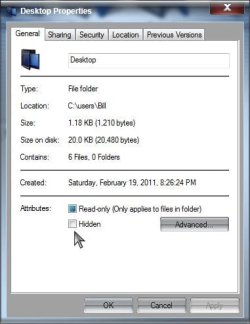
and right click on the Desktop folder> Properties> Under Attributes> Select Hidden and Apply and OK
Now undo that, untick Hidden and Apply and OK, any change?
A Guy



 .
.
 . But cheers for your efforts and your time.