New Build Windows 7 install stopped by HD/MB issues

BallaD123

New member
Local time
9:32 PM
Messages
9
I built a new computer using the following parts:
Mobo- Asus H61M-A/USB3
CPU- Intel i3 3210
HD- Western Digital WD10EZEX 1TB
RAM- 8gb Team Vulcan.

So here is my issue, i can go through the Win7 install process up to the point of "where to install windows" at this point i get a error triangle on the bottom left of the window saying "windows cannot be installed to this disk"


I am not sure where to find the disk controller also to make sure it is enabled while in the bios menu.


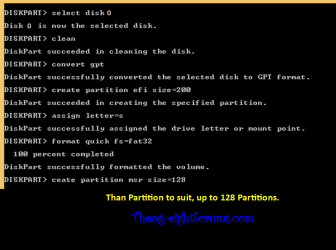
So then i tried doing the diskpart suggestion that i have seen, and i get this....


So it appears to be seen by the system, but just not able to be used?

I have read about people having issues with this HD and they needed to use jumpers, so i tried putting them on both 5&6 as well as 7&8, but to no avail, and i cant find another jumper to try both.... I am kinda at a loss now.

Please any help would be greatly appreciated.
 

My Computer My Computer

At a glance

Win7 Ultimate 64bitIntel i3 32108gb Team Vulcan DDR3 1600
Computer type
PC/Desktop
Computer Manufacturer/Model Number
Custom Build
OS
Win7 Ultimate 64bit
CPU
Intel i3 3210
Motherboard
ASUS H61M-A/USB 3.0
Memory
8gb Team Vulcan DDR3 1600
Hard Drives
WD10ezex 1TB
If you would like to make the partitions in DISKPART.

Diskpart
Select disk 0
Clean
Convert gpt
Create partition efi size=200
Assign letter=s
Format quick fs=FAT32
Create partition msr size=128
Create partition primary
Assign letter=c
Format quick fs=NTFS

UP8-1-007.PNG
 

My Computer My Computer

At a glance

ME/XP/Vista/Win7
OS
ME/XP/Vista/Win7
I have seen the installing with uEFI post before, it is not really much different than ever before. But that does not solve my problem still. Windows is saying that my HD isnt bootable? I am not sure what else to try?
 

My Computer My Computer

At a glance

Win7 Ultimate 64bitIntel i3 32108gb Team Vulcan DDR3 1600
Computer type
PC/Desktop
Computer Manufacturer/Model Number
Custom Build
OS
Win7 Ultimate 64bit
CPU
Intel i3 3210
Motherboard
ASUS H61M-A/USB 3.0
Memory
8gb Team Vulcan DDR3 1600
Hard Drives
WD10ezex 1TB
Error at "convert gpt" same error as above
 

My Computer My Computer

At a glance

Win7 Ultimate 64bitIntel i3 32108gb Team Vulcan DDR3 1600
Computer type
PC/Desktop
Computer Manufacturer/Model Number
Custom Build
OS
Win7 Ultimate 64bit
CPU
Intel i3 3210
Motherboard
ASUS H61M-A/USB 3.0
Memory
8gb Team Vulcan DDR3 1600
Hard Drives
WD10ezex 1TB
You can try downloading the bootable CD version of Partition Wizard to initialize and format the HDD.
The HDD manufacturer may have a bootable drive diagnostics utility.
 

My Computer My Computer

At a glance

Windows 7x64 Home Premium SP1Intel i7 2600kG.Skill Ripjaws (DDR3-1600) 2x4GBNvidia GeForce GTS 450; Intel HD Graphics 300...
Computer type
PC/Desktop
Computer Manufacturer/Model Number
Own build
OS
Windows 7x64 Home Premium SP1
CPU
Intel i7 2600k
Motherboard
ASUS P8Z68 Deluxe
Memory
G.Skill Ripjaws (DDR3-1600) 2x4GB
Graphics Card(s)
Nvidia GeForce GTS 450; Intel HD Graphics 3000(GT2+)
Monitor(s) Displays
Dell Ultrasharp IPS panel U2311H, Samsung SyncMaster P2350
Screen Resolution
1920x1080
Hard Drives
Samsung 850 Pro SSD 256GB, Samsung SSD 840 120GB, Seagates 1TB Barracuda ST31000528AS x2
PSU
Seasonic M12II 520W
Case
Lian Li Lancool PC-K60
Cooling
Case: 1x120mm, 3x140mm CPU: Hyper 212+
Keyboard
Logitech MK520 (wireless)
Mouse
Logitech MK520
Internet Speed
6-7 Mbps
Antivirus
Norton Security Premium, Malwarebytes on 2 (MSE on 3rd PC)
Browser
FireFox
Other Info
Audio: Logitech Z523 2.1
I dont know if it is a partition issue, or more of a compatibility issue. I am just not sure what else to try? Might just buy another new hd and see if that one works. I am at a loss at this point?
 

My Computer My Computer

At a glance

Win7 Ultimate 64bitIntel i3 32108gb Team Vulcan DDR3 1600
Computer type
PC/Desktop
Computer Manufacturer/Model Number
Custom Build
OS
Win7 Ultimate 64bit
CPU
Intel i3 3210
Motherboard
ASUS H61M-A/USB 3.0
Memory
8gb Team Vulcan DDR3 1600
Hard Drives
WD10ezex 1TB
I gave you something else to try.:confused:
 

My Computer My Computer

At a glance

Windows 7x64 Home Premium SP1Intel i7 2600kG.Skill Ripjaws (DDR3-1600) 2x4GBNvidia GeForce GTS 450; Intel HD Graphics 300...
Computer type
PC/Desktop
Computer Manufacturer/Model Number
Own build
OS
Windows 7x64 Home Premium SP1
CPU
Intel i7 2600k
Motherboard
ASUS P8Z68 Deluxe
Memory
G.Skill Ripjaws (DDR3-1600) 2x4GB
Graphics Card(s)
Nvidia GeForce GTS 450; Intel HD Graphics 3000(GT2+)
Monitor(s) Displays
Dell Ultrasharp IPS panel U2311H, Samsung SyncMaster P2350
Screen Resolution
1920x1080
Hard Drives
Samsung 850 Pro SSD 256GB, Samsung SSD 840 120GB, Seagates 1TB Barracuda ST31000528AS x2
PSU
Seasonic M12II 520W
Case
Lian Li Lancool PC-K60
Cooling
Case: 1x120mm, 3x140mm CPU: Hyper 212+
Keyboard
Logitech MK520 (wireless)
Mouse
Logitech MK520
Internet Speed
6-7 Mbps
Antivirus
Norton Security Premium, Malwarebytes on 2 (MSE on 3rd PC)
Browser
FireFox
Other Info
Audio: Logitech Z523 2.1
I dont have another usb stick to use right now. Need to order more.
 

My Computer My Computer

At a glance

Win7 Ultimate 64bitIntel i3 32108gb Team Vulcan DDR3 1600
Computer type
PC/Desktop
Computer Manufacturer/Model Number
Custom Build
OS
Win7 Ultimate 64bit
CPU
Intel i3 3210
Motherboard
ASUS H61M-A/USB 3.0
Memory
8gb Team Vulcan DDR3 1600
Hard Drives
WD10ezex 1TB
You only need a blank CD/DVD.
 

My Computer My Computer

At a glance

Windows 7x64 Home Premium SP1Intel i7 2600kG.Skill Ripjaws (DDR3-1600) 2x4GBNvidia GeForce GTS 450; Intel HD Graphics 300...
Computer type
PC/Desktop
Computer Manufacturer/Model Number
Own build
OS
Windows 7x64 Home Premium SP1
CPU
Intel i7 2600k
Motherboard
ASUS P8Z68 Deluxe
Memory
G.Skill Ripjaws (DDR3-1600) 2x4GB
Graphics Card(s)
Nvidia GeForce GTS 450; Intel HD Graphics 3000(GT2+)
Monitor(s) Displays
Dell Ultrasharp IPS panel U2311H, Samsung SyncMaster P2350
Screen Resolution
1920x1080
Hard Drives
Samsung 850 Pro SSD 256GB, Samsung SSD 840 120GB, Seagates 1TB Barracuda ST31000528AS x2
PSU
Seasonic M12II 520W
Case
Lian Li Lancool PC-K60
Cooling
Case: 1x120mm, 3x140mm CPU: Hyper 212+
Keyboard
Logitech MK520 (wireless)
Mouse
Logitech MK520
Internet Speed
6-7 Mbps
Antivirus
Norton Security Premium, Malwarebytes on 2 (MSE on 3rd PC)
Browser
FireFox
Other Info
Audio: Logitech Z523 2.1
One of the applications you suggested i thought it said was a USB program, i had just assumed it was designed for USB only. But on that note also.... I ran out of blank media also!! I am thinking about just using a different HD as the boot drive and then this one as a secondary storage device. It isnt ideal, but should be a decent band-aid for the issue.
 

My Computer My Computer

At a glance

Win7 Ultimate 64bitIntel i3 32108gb Team Vulcan DDR3 1600
Computer type
PC/Desktop
Computer Manufacturer/Model Number
Custom Build
OS
Win7 Ultimate 64bit
CPU
Intel i3 3210
Motherboard
ASUS H61M-A/USB 3.0
Memory
8gb Team Vulcan DDR3 1600
Hard Drives
WD10ezex 1TB
Well i had a bnib 120gb SSD that was going to be used for another build, but i decided to throw it in here to see if it had same issues.... It did not... It was able to boot (extremely quicker) than the WD HD, and i am now installing windows. So it appears that the uEFI BIOS of the MB and the connection of the HD are not compatible, or at least i am not able to figure it out as of now. Ordering new parts right now to try and troubleshoot it more.
 

My Computer My Computer

At a glance

Win7 Ultimate 64bitIntel i3 32108gb Team Vulcan DDR3 1600
Computer type
PC/Desktop
Computer Manufacturer/Model Number
Custom Build
OS
Win7 Ultimate 64bit
CPU
Intel i3 3210
Motherboard
ASUS H61M-A/USB 3.0
Memory
8gb Team Vulcan DDR3 1600
Hard Drives
WD10ezex 1TB

My Computer My Computer

At a glance

Windows 7x64 Home Premium SP1Intel i7 2600kG.Skill Ripjaws (DDR3-1600) 2x4GBNvidia GeForce GTS 450; Intel HD Graphics 300...
Computer type
PC/Desktop
Computer Manufacturer/Model Number
Own build
OS
Windows 7x64 Home Premium SP1
CPU
Intel i7 2600k
Motherboard
ASUS P8Z68 Deluxe
Memory
G.Skill Ripjaws (DDR3-1600) 2x4GB
Graphics Card(s)
Nvidia GeForce GTS 450; Intel HD Graphics 3000(GT2+)
Monitor(s) Displays
Dell Ultrasharp IPS panel U2311H, Samsung SyncMaster P2350
Screen Resolution
1920x1080
Hard Drives
Samsung 850 Pro SSD 256GB, Samsung SSD 840 120GB, Seagates 1TB Barracuda ST31000528AS x2
PSU
Seasonic M12II 520W
Case
Lian Li Lancool PC-K60
Cooling
Case: 1x120mm, 3x140mm CPU: Hyper 212+
Keyboard
Logitech MK520 (wireless)
Mouse
Logitech MK520
Internet Speed
6-7 Mbps
Antivirus
Norton Security Premium, Malwarebytes on 2 (MSE on 3rd PC)
Browser
FireFox
Other Info
Audio: Logitech Z523 2.1
Well i ordered a new HD that was a 3gb connection, it was not a problem at all. So the new HD worked well with the MB, i am also building a different rig for myself, trying this HD is there as it has 6gb connections and will act as a secondary, my 120gb SSD will be the boot drive. Will update when it is running and firing on all cylinders.
 

My Computer My Computer

At a glance

Win7 Ultimate 64bitIntel i3 32108gb Team Vulcan DDR3 1600
Computer type
PC/Desktop
Computer Manufacturer/Model Number
Custom Build
OS
Win7 Ultimate 64bit
CPU
Intel i3 3210
Motherboard
ASUS H61M-A/USB 3.0
Memory
8gb Team Vulcan DDR3 1600
Hard Drives
WD10ezex 1TB
Unplug all other HD's and peripherals,

Boot into BIOS setup, reset to defaults, set SATA controller to AHCI, Hard Drive first to boot, Save changes and Exit.

If you notice UEFI Boot choices in BIOS Boot Priority menu then proceed with UEFI (Unified Extensible Firmware Interface) - Install Windows 7 with. If you don't want a UEFI install you can Bypass UEFI to Install WIn7. This video can help you decide: UEFI BIOS vs. Legacy BIOS - YouTube

Then boot into Windows 7 installer DVD or flash stick burned or written using tool and latest ISO for your licensed OS version here. I would use a fresh ISO written with tool in Step 2 as yours is in question.

At first installer screen Press Shift + F10, or enter System Recovery Options to open a Command Box, type:

DISKPART
LIST DISK
SELECT DISK 0 (after confirming Windows 7 target HD #)
CLEAN
CREATE PARTITION PRIMARY
FORMAT FS=NTFS LABEL="WINDOWS 7"
ACTIVE
EXIT
EXIT

Next click Install Now, then Custom install to Clean Install Windows 7 to the partition you created. If it fails then report back at which step and the verbatim error message.

In addition read over these steps to understand the tools and methods which work best to get and maintain a perfect Clean Reinstall - Factory OEM Windows 7. The steps are the same for retail.

After install you can adjust partition size or Create new partitions for data, etc. in Disk Mgmt. You are creating the partition here for the purpose of wiping the HD and marking Active which overcomes certain install failures.
 
I did not want to mess with it anymore, so i just ordered a new HD as the boot disk for this rig and it worked beautifully the first time. So i dont really have any "foxes" other than swapping parts.
 

My Computer My Computer

At a glance

Win7 Ultimate 64bitIntel i3 32108gb Team Vulcan DDR3 1600
Computer type
PC/Desktop
Computer Manufacturer/Model Number
Custom Build
OS
Win7 Ultimate 64bit
CPU
Intel i3 3210
Motherboard
ASUS H61M-A/USB 3.0
Memory
8gb Team Vulcan DDR3 1600
Hard Drives
WD10ezex 1TB
Back
Top