I have a number of HP machines and consider anything HP / Hewlett-Packard as bloatware.
The real question is "What do you use?"
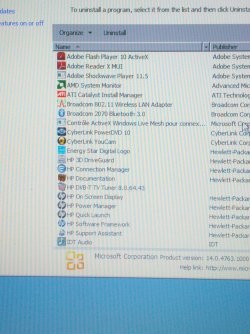
Sort the installed program list by by Publisher and decide if you want to keep the HP software. Most are just front end replacements for standard Windows utilities.
Every user has to decide what is useful to them. If it's easier to use the OEM utilities, then leave them on the system. If you're comforatble finding the Windows feature, then uninstall the OEM "repalcement".
What is on your machine is your choice, take Cyberlink for example. I don't need two movie editors or two burners (actually I do use two burners, one is specialized and one came with Widows)... so I uninstalled Cyberlink software. I played with it for a while to see if it was worth keeping, but decided it was only a fun thing to have. Since I could download it again, I uninstalled it.
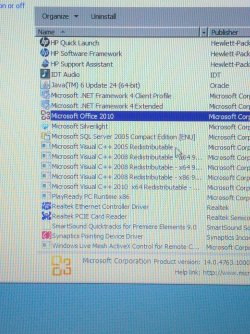
I marked the things I would (did on my system) remove with and asterisk (*)
Energy Star Digital Logo - no clue
* Adobe Shockwave Player - antiquated
3D DriveGuard senses acceleration and parks the heads - you might want to keep that one (I didn't)
* HP Connection Mgr - HP "replacement" for Windows Network and Sharing
HP Documentation - nice to have, but it's big
* HP DVB-T TV Tuner - does no good without a tuner card
* HP On Screen display - HP "replacement" for Windows Ease of Use on screen display
* HP Power Mgr - HP "replacement" for Windows power
* HP Quick Launch - HP "replacement" for Windows task bar
* HP Software Framework is for the HP stuff
*>....(Support Assistant only I think - might be used by other HP apps)
* HP Support Assitant - easy access to HP page for you machine
*>....plus some other front end GUI stuff that isn't really needed.
* Cyberlink PowerDVD - alternative to Windows Movie Maker & Windows Burn
* Cyberlink Youcam - fun movie editor
* Microsoft Silverlight - only used on MS pages as far as I can tell.
*> If you uninstall it, Windows Update will offer it again (5 updates) so I suggest that you hide the update when it is offered.
* Windows Live Mesh Active X Control - no clue,
*> mesh has been removed / replaced in Windows (Live) Essentials 2012
*>You might use this in some application - I don't see Windows (Live) Essentials in the list.