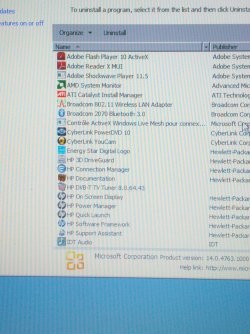
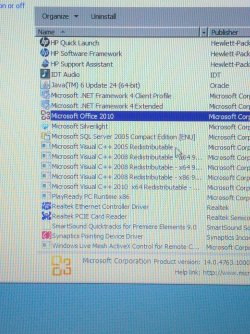
need help safely removing all bloatware, specific list

Brocode

New member
Local time
9:35 PM
Messages
9
I have seen a few threads asking which bloatware is safe to remove from HP laptops, all seem to have different default programs so I figured I'd make a new thread for my specific list of programs which I've attached in the photos. Thanks!
 

Attachments

  • IMG_20140324_100406.jpg
    IMG_20140324_100406.jpg
    634.5 KB · Views: 1
  • IMG_20140324_100415.jpg
    IMG_20140324_100415.jpg
    1 MB · Views: 1

My Computer

Computer type
PC/Desktop
OS
Windows 7 Pro x64
I don't see anything in the lists you posted.
 

My Computer

Computer type
PC/Desktop
Computer Manufacturer/Model Number
My Own Build
OS
Windows 10 64 bit
CPU
Intel i7 6700K
Motherboard
ASUS ROG Maximus VIII Hero
Memory
16GB Corsair Dominator
Graphics Card(s)
Intel CPU Graphics
Sound Card
RealTek
Monitor(s) Displays
27" Dell S2719dgf
Screen Resolution
2560X1440
Hard Drives
1 TB Samsung 850 EVO SSD for Win 10 Pro
500GB Samsung 850 EVO SSD for Win 10 Insider
2 TB drive for backup
PSU
EVGA Supernova 750G2
Case
BeQuiet Silent Base 600
Cooling
Deepcool Captain 120EX
Keyboard
Microsoft Wireless 2000
Mouse
Microsoft wireless
Internet Speed
100 MB/sec (Cable)
Antivirus
Microsoft Defender and Malwarebytes
Browser
Edge/Firefox
Other Info
Cakewalk (Sonar) by BandLab and Studio One 4.1 Pro recording studio software. MOTU 896Mk3 Hybrid recording interface, Frontier Tranzport wireless control unit, Behringer X-Touch Control Surface.
Five USB connected optical drives for CD Audio production using Nero BurningROM
I don't see anything in the lists you posted.
Do you mean to say that the images are not appearing for you or that you don't see any bloatware? I have already removed obvious ones, figured a few more obscure ones were still lingering for sure.
 

My Computer

Computer type
PC/Desktop
OS
Windows 7 Pro x64
I have seen a few threads asking which bloatware is safe to remove from HP laptops, all seem to have different default programs so I figured I'd make a new thread for my specific list of programs which I've attached in the photos. Thanks!


I would turn the ones you don't want, off. because removing bloatware can f**k things up, Microsoft office shouldn't do any harm :)

I would check to see which ones you can remove before doing this :)
 

My Computer

Computer type
Laptop
Computer Manufacturer/Model Number
Compaq ( I want intel :[ )
OS
Windows 7 Home Premium x64
Antivirus
Avast
Browser
Firefox <3
Other Info
if you want a few paid programs for free pm me!
I don't see any bloatware. Many new PC's do not have all the junk they did years ago. I have a new Lenovo laptop and there was nothing on there that was "bloatware".
 

My Computer

Computer type
PC/Desktop
Computer Manufacturer/Model Number
My Own Build
OS
Windows 10 64 bit
CPU
Intel i7 6700K
Motherboard
ASUS ROG Maximus VIII Hero
Memory
16GB Corsair Dominator
Graphics Card(s)
Intel CPU Graphics
Sound Card
RealTek
Monitor(s) Displays
27" Dell S2719dgf
Screen Resolution
2560X1440
Hard Drives
1 TB Samsung 850 EVO SSD for Win 10 Pro
500GB Samsung 850 EVO SSD for Win 10 Insider
2 TB drive for backup
PSU
EVGA Supernova 750G2
Case
BeQuiet Silent Base 600
Cooling
Deepcool Captain 120EX
Keyboard
Microsoft Wireless 2000
Mouse
Microsoft wireless
Internet Speed
100 MB/sec (Cable)
Antivirus
Microsoft Defender and Malwarebytes
Browser
Edge/Firefox
Other Info
Cakewalk (Sonar) by BandLab and Studio One 4.1 Pro recording studio software. MOTU 896Mk3 Hybrid recording interface, Frontier Tranzport wireless control unit, Behringer X-Touch Control Surface.
Five USB connected optical drives for CD Audio production using Nero BurningROM
If you have a custom built system with a oem system builder version of windows; then you should not have any bloatware from the start. however; if you have a manufacturer built system; then yes there could be some bloatware and other utilities that are not needed in which case you can get rid of those.
 

My Computer

Computer type
PC/Desktop
Computer Manufacturer/Model Number
custom built
OS
Windows 7 ultimate 64-bit
CPU
Intel I7 2600K 3.4ghz
Motherboard
Asus Evo P8P67
Memory
Corsair 16gb ddr3 1600mhz
Graphics Card(s)
Nvidia Geforce gt 430
Sound Card
Sound Blaster Titanium x-fi pci express
Monitor(s) Displays
Dell E198WFP
Hard Drives
1 western digital 2TB drive.
PSU
Antec 1200 watt
Case
Inwin Dragon Rider
Cooling
6 case supplied cooling fans
Keyboard
logitech mk700
Mouse
logitech m705
Internet Speed
25-50mbps download; 10mbps upload(i think)
Antivirus
avg free 2014
Browser
mozilla firefox
Other Info
Also have a pretty bad speaker setup which is a klipsch promedia 5.1 surround speaker setup with huge subwoofer and lg blu ray player/writer. Also a hp officejet pro 8600 plus wireless all in one and a logitech s7500 webcam.

My Computer

Computer type
PC/Desktop
Computer Manufacturer/Model Number
Home made Desktop
OS
Windows 10 Pro. 64/ version 1709 Windows 7 Pro/64
CPU
Intel i7-6800K @ 4.3
Motherboard
ASUS X-99 Deluxe II
Memory
Corsair Platinum 16 gig @2400
Graphics Card(s)
EVGA GTX 1070 OC
Monitor(s) Displays
Asus 27" LED LCD/VE278Q
Screen Resolution
1920-1080 or 1280-720 HDMI
Hard Drives
INTEL SSD 730-240 Gb Sata 3.0/
PSU
EVGA Platium 1200W
Case
Phanteks Luxe Tempered Glass 8 fans/ one radiator
Cooling
XSPC/ Water Cooled CPU
Keyboard
Das 4 Professional
Mouse
Logitech M705/MX Anywhere 2-S
Internet Speed
100 mbits
Antivirus
Microsoft Security Essentials/ Malwarebytes Premium 3.0/ SAS
Browser
I.E. 11 default/Firefox/ ISP Time Warner Cable/Spectrum
Other Info
LG BluRay Burner/
Sound system-KLipsch-THX/
Icy Dock ssd Hot Swap bays.
I have a number of HP machines and consider anything HP / Hewlett-Packard as bloatware.
The real question is "What do you use?"

Sort the installed program list by by Publisher and decide if you want to keep the HP software. Most are just front end replacements for standard Windows utilities.

Every user has to decide what is useful to them. If it's easier to use the OEM utilities, then leave them on the system. If you're comforatble finding the Windows feature, then uninstall the OEM "repalcement".

What is on your machine is your choice, take Cyberlink for example. I don't need two movie editors or two burners (actually I do use two burners, one is specialized and one came with Widows)... so I uninstalled Cyberlink software. I played with it for a while to see if it was worth keeping, but decided it was only a fun thing to have. Since I could download it again, I uninstalled it.

I marked the things I would (did on my system) remove with and asterisk (*)


Energy Star Digital Logo - no clue

* Adobe Shockwave Player - antiquated

3D DriveGuard senses acceleration and parks the heads - you might want to keep that one (I didn't)

* HP Connection Mgr - HP "replacement" for Windows Network and Sharing
HP Documentation - nice to have, but it's big
* HP DVB-T TV Tuner - does no good without a tuner card
* HP On Screen display - HP "replacement" for Windows Ease of Use on screen display
* HP Power Mgr - HP "replacement" for Windows power
* HP Quick Launch - HP "replacement" for Windows task bar
* HP Software Framework is for the HP stuff
*>....(Support Assistant only I think - might be used by other HP apps)
* HP Support Assitant - easy access to HP page for you machine
*>....plus some other front end GUI stuff that isn't really needed.

* Cyberlink PowerDVD - alternative to Windows Movie Maker & Windows Burn
* Cyberlink Youcam - fun movie editor

* Microsoft Silverlight - only used on MS pages as far as I can tell.
*> If you uninstall it, Windows Update will offer it again (5 updates) so I suggest that you hide the update when it is offered.

* Windows Live Mesh Active X Control - no clue,
*> mesh has been removed / replaced in Windows (Live) Essentials 2012
*>You might use this in some application - I don't see Windows (Live) Essentials in the list.

 

My Computer

Computer type
Laptop
Computer Manufacturer/Model Number
HP Pavilion dv6-6c10us
OS
x64 (6.3.9600) Win8.1 Pro & soon dual boot x64 (6.1.7601) Win7_SP1 HomePrem
CPU
AMD A6-3420M APU with Radeon(tm) HD Graphics
Motherboard
Hewlett-Packard 1805
Memory
6.00 GB
Graphics Card(s)
AMD Radeon(TM) HD 6520G
Sound Card
(1) AMD High Definition Audio Device (2) IDT High Definiti
Monitor(s) Displays
HP W2072a 20" LCD (1600 x 900) @ 60 Hz
Screen Resolution
1366 x 768 x 32 bits (4294967296 colors) @ 60 Hz
Hard Drives
ST640LM0 00 HM641JI SATA Disk Device
Keyboard
Logitech k520 wireless KB
Mouse
Logitech m320 wireless mouse (bundled with KB)
Internet Speed
15/5 | 54 MB Wireless 'n'
Antivirus
Realtime: Defender or Avast | On-demand: Malwarebytes, ESET
Browser
IE 11 on Win8, IE 10 on win 7
Other Info
Media: [Gimp, Audacity, VLC] || Comm: [WEmail 2012, Skype] || Productivity: [OpenOffice,| Textpad] || Utils: [Sysinternals, cCleaner, Speccy, Defraggler]
Thanks Slartybart great response! Was going to leave it ad is but ended up clearing out at least 6 more things :)
 

My Computer

Computer type
PC/Desktop
OS
Windows 7 Pro x64
You're welcome Bro.

Most OEMs offer their 'special' software as a download on the machine's support page, so it's a no brainer most of the time.
 

My Computer

Computer type
Laptop
Computer Manufacturer/Model Number
HP Pavilion dv6-6c10us
OS
x64 (6.3.9600) Win8.1 Pro & soon dual boot x64 (6.1.7601) Win7_SP1 HomePrem
CPU
AMD A6-3420M APU with Radeon(tm) HD Graphics
Motherboard
Hewlett-Packard 1805
Memory
6.00 GB
Graphics Card(s)
AMD Radeon(TM) HD 6520G
Sound Card
(1) AMD High Definition Audio Device (2) IDT High Definiti
Monitor(s) Displays
HP W2072a 20" LCD (1600 x 900) @ 60 Hz
Screen Resolution
1366 x 768 x 32 bits (4294967296 colors) @ 60 Hz
Hard Drives
ST640LM0 00 HM641JI SATA Disk Device
Keyboard
Logitech k520 wireless KB
Mouse
Logitech m320 wireless mouse (bundled with KB)
Internet Speed
15/5 | 54 MB Wireless 'n'
Antivirus
Realtime: Defender or Avast | On-demand: Malwarebytes, ESET
Browser
IE 11 on Win8, IE 10 on win 7
Other Info
Media: [Gimp, Audacity, VLC] || Comm: [WEmail 2012, Skype] || Productivity: [OpenOffice,| Textpad] || Utils: [Sysinternals, cCleaner, Speccy, Defraggler]
Back
Top