Windows 7 Freezing but not in SafeMode

DonkOPP

New member
Local time
10:28 AM
Messages
18
Hello!

I just installed Windows 7 for the first time last night and let me say, I really enjoy it besides one little problem, it randomly freezes on me. Sometimes it will run a couple minutes other times it will run 20min. Its seemly random. I should note that I can run in SafeMode all day long with no freezing.

I've read a bunch of forums to include yours and tryed many different things to fix this issue to include reinstalling twice.

I really hope I don't have to go back to XP!!:cry:

Thanks for your help in advance.

-Donk
 

My Computer My Computer

At a glance

Windows 7 64bitAMD Athon 64bit Proessor 4000+ 2.41 GHz2.00GBNvidia Geforce 7600 GT x 2
Computer Manufacturer/Model Number
Alienware
OS
Windows 7 64bit
CPU
AMD Athon 64bit Proessor 4000+ 2.41 GHz
Motherboard
Unknown
Memory
2.00GB
Graphics Card(s)
Nvidia Geforce 7600 GT x 2
Sound Card
Creative SB Audigy 4 (WDM)
Hard Drives
WDC WD3200AAKS-00B3A0 ATA Device
PSU
Unknown
Case
Alienware
Cooling
Fans
Perma-froze from what I've noticed. I usually have to reboot. I'll double check that time now.

-Donk
 

My Computer My Computer

At a glance

Windows 7 64bitAMD Athon 64bit Proessor 4000+ 2.41 GHz2.00GBNvidia Geforce 7600 GT x 2
Computer Manufacturer/Model Number
Alienware
OS
Windows 7 64bit
CPU
AMD Athon 64bit Proessor 4000+ 2.41 GHz
Motherboard
Unknown
Memory
2.00GB
Graphics Card(s)
Nvidia Geforce 7600 GT x 2
Sound Card
Creative SB Audigy 4 (WDM)
Hard Drives
WDC WD3200AAKS-00B3A0 ATA Device
PSU
Unknown
Case
Alienware
Cooling
Fans
Hello again,
I went away for about 30-45min and when I returned it was perma froze.

It also ran a CHKDSK when I rebooted.

-Donk

*EDIT* how do I check for splats in my device manager?
 

My Computer My Computer

At a glance

Windows 7 64bitAMD Athon 64bit Proessor 4000+ 2.41 GHz2.00GBNvidia Geforce 7600 GT x 2
Computer Manufacturer/Model Number
Alienware
OS
Windows 7 64bit
CPU
AMD Athon 64bit Proessor 4000+ 2.41 GHz
Motherboard
Unknown
Memory
2.00GB
Graphics Card(s)
Nvidia Geforce 7600 GT x 2
Sound Card
Creative SB Audigy 4 (WDM)
Hard Drives
WDC WD3200AAKS-00B3A0 ATA Device
PSU
Unknown
Case
Alienware
Cooling
Fans
Hi

many posibilities. you're ram starved, what antivirus, what were yu doing last time it froze. what app were you using.

also as Antman suggested go into event viewer (type eventvwr in search) go to the windows log>application tab and tell us what errors are there. Errors have red x's in the left column


Ken
 

My Computer My Computer

At a glance

Win 8 Release candidate 8400[email protected]4 gigsNvidia 9600M
Computer Manufacturer/Model Number
HP Pavillion dv-7 1005 Tx
OS
Win 8 Release candidate 8400
CPU
[email protected]
Memory
4 gigs
Graphics Card(s)
Nvidia 9600M
Sound Card
HD built-in
Monitor(s) Displays
17" Wxga
Screen Resolution
1440x900
Cooling
none
Internet Speed
45Mb down 5Mb up
I was downloading DoW2 from Steam during the last crash. My AntiVirus is BullGuard, but I should mention the crashing was happening before I installed BullGuard.

Errors were:
CAPI2 EventID: 512 Task: None(this happened twice today)
Application Error EventID: 1000 Task: (100)
Security-SPP EventID: 1017 Task: None

Hope this helps. Thanks again for your continued help.

-Donk
 
Last edited:

My Computer My Computer

At a glance

Windows 7 64bitAMD Athon 64bit Proessor 4000+ 2.41 GHz2.00GBNvidia Geforce 7600 GT x 2
Computer Manufacturer/Model Number
Alienware
OS
Windows 7 64bit
CPU
AMD Athon 64bit Proessor 4000+ 2.41 GHz
Motherboard
Unknown
Memory
2.00GB
Graphics Card(s)
Nvidia Geforce 7600 GT x 2
Sound Card
Creative SB Audigy 4 (WDM)
Hard Drives
WDC WD3200AAKS-00B3A0 ATA Device
PSU
Unknown
Case
Alienware
Cooling
Fans
Bump, anyone have any suggestions?
 

My Computer My Computer

At a glance

Windows 7 64bitAMD Athon 64bit Proessor 4000+ 2.41 GHz2.00GBNvidia Geforce 7600 GT x 2
Computer Manufacturer/Model Number
Alienware
OS
Windows 7 64bit
CPU
AMD Athon 64bit Proessor 4000+ 2.41 GHz
Motherboard
Unknown
Memory
2.00GB
Graphics Card(s)
Nvidia Geforce 7600 GT x 2
Sound Card
Creative SB Audigy 4 (WDM)
Hard Drives
WDC WD3200AAKS-00B3A0 ATA Device
PSU
Unknown
Case
Alienware
Cooling
Fans
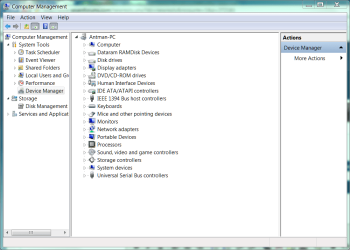
Right click computer
manage

Device Manager

Open (expanded) devices show splats

You can access event viewer from the same Computer Mgmt screen
 

Attachments

  • Capture.PNG
    Capture.PNG
    39.8 KB · Views: 62
I didn't see any Splats (thats assuming I understand the term splat!). Everything looked normal. Only thing that was differnt was my USB audio and i'll post a picture of it. Tryed unplugging it and still froze.

Thanks for your help, i'm a OS dumbie!
-Donk
 

Attachments

  • Splat.jpg
    Splat.jpg
    62.9 KB · Views: 185

My Computer My Computer

At a glance

Windows 7 64bitAMD Athon 64bit Proessor 4000+ 2.41 GHz2.00GBNvidia Geforce 7600 GT x 2
Computer Manufacturer/Model Number
Alienware
OS
Windows 7 64bit
CPU
AMD Athon 64bit Proessor 4000+ 2.41 GHz
Motherboard
Unknown
Memory
2.00GB
Graphics Card(s)
Nvidia Geforce 7600 GT x 2
Sound Card
Creative SB Audigy 4 (WDM)
Hard Drives
WDC WD3200AAKS-00B3A0 ATA Device
PSU
Unknown
Case
Alienware
Cooling
Fans
That's a splat. Back in the day they were yellow.

Remove the device and keep it removed during testing. It IS an issue that no driver is loading for that, but you state a crash occurs without it, so we can proceed.

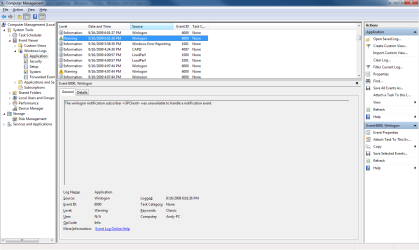
Now, open event viewer (left side of Comp Mgmt) Windows Logs. We will be interested in application and system.

I am one of the people that will tell you that not all warnings and erros are worth fretting about. rom time to time you will see errors reported in these logs that absolutley nothing to do with anything you see or experience. Even right now, I am looking at two SideBySide errors in my apps log referring to a webplayer and moviemaker. Two apps I have not used. Anyway,

Look for the date time on or about the time you froze or crashed. Post.
 
Okay, I have a couple errors and warnings from yesterday and today.

It seems Winlogon is showing up a TON today.

No Errors or Warning in System.

-Donk
 

Attachments

  • Error1.png
    Error1.png
    43.1 KB · Views: 57
  • Warning1.png
    Warning1.png
    41.8 KB · Views: 31
  • Error02.png
    Error02.png
    41.5 KB · Views: 28

My Computer My Computer

At a glance

Windows 7 64bitAMD Athon 64bit Proessor 4000+ 2.41 GHz2.00GBNvidia Geforce 7600 GT x 2
Computer Manufacturer/Model Number
Alienware
OS
Windows 7 64bit
CPU
AMD Athon 64bit Proessor 4000+ 2.41 GHz
Motherboard
Unknown
Memory
2.00GB
Graphics Card(s)
Nvidia Geforce 7600 GT x 2
Sound Card
Creative SB Audigy 4 (WDM)
Hard Drives
WDC WD3200AAKS-00B3A0 ATA Device
PSU
Unknown
Case
Alienware
Cooling
Fans
Are those evnts followed by anything that looks like "Windows recovered from an unxpected shutown"?
 
All I can find is this:
The Windows Management Instrumentation service has detected an inconsistent system shutdown.

-Donk
 

My Computer My Computer

At a glance

Windows 7 64bitAMD Athon 64bit Proessor 4000+ 2.41 GHz2.00GBNvidia Geforce 7600 GT x 2
Computer Manufacturer/Model Number
Alienware
OS
Windows 7 64bit
CPU
AMD Athon 64bit Proessor 4000+ 2.41 GHz
Motherboard
Unknown
Memory
2.00GB
Graphics Card(s)
Nvidia Geforce 7600 GT x 2
Sound Card
Creative SB Audigy 4 (WDM)
Hard Drives
WDC WD3200AAKS-00B3A0 ATA Device
PSU
Unknown
Case
Alienware
Cooling
Fans
Its telling me "The processor detected is not supported. Any other temp testing software I can use?

-Donk
 

My Computer My Computer

At a glance

Windows 7 64bitAMD Athon 64bit Proessor 4000+ 2.41 GHz2.00GBNvidia Geforce 7600 GT x 2
Computer Manufacturer/Model Number
Alienware
OS
Windows 7 64bit
CPU
AMD Athon 64bit Proessor 4000+ 2.41 GHz
Motherboard
Unknown
Memory
2.00GB
Graphics Card(s)
Nvidia Geforce 7600 GT x 2
Sound Card
Creative SB Audigy 4 (WDM)
Hard Drives
WDC WD3200AAKS-00B3A0 ATA Device
PSU
Unknown
Case
Alienware
Cooling
Fans
Does not his first post state the problem.
Windows 7 Freezes but not in Safe Mode. Safe Mode is devout of Drivers. Drivers make Devices work.

So either removal of Devices will also not load Drivers. and this can be accomplished via Selective Startup. or actual removal, or simple DISABLE the DEVICE.

Just offering a suggestion.
 
Snuffy always has our backs

I would go with drivers myself and real temp will run in win 7 in compatiblity mode. there is also everest.

Ken
 

My Computer My Computer

At a glance

Win 8 Release candidate 8400[email protected]4 gigsNvidia 9600M
Computer Manufacturer/Model Number
HP Pavillion dv-7 1005 Tx
OS
Win 8 Release candidate 8400
CPU
[email protected]
Memory
4 gigs
Graphics Card(s)
Nvidia 9600M
Sound Card
HD built-in
Monitor(s) Displays
17" Wxga
Screen Resolution
1440x900
Cooling
none
Internet Speed
45Mb down 5Mb up
Ahoy! Well I found downloaded and ran everest, thats a ton of information!

Also last night i decided I should check for updated drivers from the Nvidia website. Turns out I didn't have the most up to date drivers which I found shocking since Windows was claiming I did.

Since my driver update I've only had one crash (*crosses fingers*) .

If you guys and gals have any more suggestions i'm still open to them!

-Donk
 

My Computer My Computer

At a glance

Windows 7 64bitAMD Athon 64bit Proessor 4000+ 2.41 GHz2.00GBNvidia Geforce 7600 GT x 2
Computer Manufacturer/Model Number
Alienware
OS
Windows 7 64bit
CPU
AMD Athon 64bit Proessor 4000+ 2.41 GHz
Motherboard
Unknown
Memory
2.00GB
Graphics Card(s)
Nvidia Geforce 7600 GT x 2
Sound Card
Creative SB Audigy 4 (WDM)
Hard Drives
WDC WD3200AAKS-00B3A0 ATA Device
PSU
Unknown
Case
Alienware
Cooling
Fans
...If you guys and gals have any more suggestions i'm still open to them!
Lacking any other problems...

Don't take any wooden nickels.
Look both ways before you cross a street.
Use a potato to remove a broken light bulb.
Peanut butter easily removes chewing gum from your child's hair.
Never, ever, feed a gremlin after midnight.
 
Back
Top