Still on Windows XP? Here’s Some Bad Advice

Britton30

R.I.P. 7/09/2014
Guru
VIP
Local time
6:05 PM
Messages
22,813
Location
Mt. Crumpit/Whoville
Still on Windows XP? Here’s Some Bad Advice

Windows XP is dying. On April 8, Microsoft will stop supporting the ancient operating system that was released in 2001 — and at one point was used by 400 million people.

You might think that an operating system that was actually engineered in the late 90s would be fully obsolete and unused by now. After all, since XP came out, Microsoft has released several major replacement versions: Windows Vista, Windows 7, and Windows 8 (recently upgraded to Windows 8.1).
But there’s something about Windows XP. It’s basic, stable, fast enough, and good enough for a lot of people. It’s still running on more than 10 percent of the world’s computers, and it’s huge in China.

Source

untitled.png
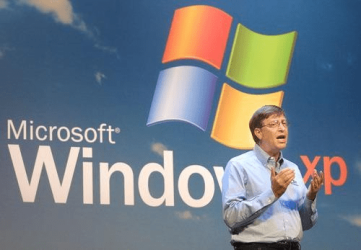
Bill Gates introducing Windows XP in
October, 2001. Photo: Getty Images.
 

My Computer My Computer

At a glance

Windows 7 Ultimate X64 SP1Intel i5-2550K, Differing ~4.4-4.8GHz No buil...16GB G.Skill Sniper 1866MHz @ 2133MHz 2x8GBASUS GTX650TIB-DC2OC-2GD5, (650TI Boost)
Computer type
PC/Desktop
Computer Manufacturer/Model Number
Home Built Desktop By DataTech
OS
Windows 7 Ultimate X64 SP1
CPU
Intel i5-2550K, Differing ~4.4-4.8GHz No built in GPU
Motherboard
ASUS P8Z68-V PRO/GEN3
Memory
16GB G.Skill Sniper 1866MHz @ 2133MHz 2x8GB
Graphics Card(s)
ASUS GTX650TIB-DC2OC-2GD5, (650TI Boost)
Sound Card
Onboard Realtek 5-1
Monitor(s) Displays
Samsung P2570HD
Screen Resolution
1920x1080
Hard Drives
Samsung 840 Pro 256GB SSD for OS, 500GB Seagate Constellation (Enterprise drive) for Data
PSU
Corsair HX650W
Case
Inwin Dragon Rider
Cooling
Hyper 212 EVO w/two Noctua fans, push-pull, @1300 RPM
Keyboard
E-Z Eyes, bright yellow keys with large characters
Mouse
steelseries SENSEI Laser Pro Gaming
Internet Speed
48-51Mbs Mbs down, 11 Mbs up Xfinity Cable
Antivirus
Norton Internet Security 2013
Browser
IE 10, Opera, Pale Moon if needed
Other Info
4 case fans, LG BluRay-RE, ASUS DVD-RW, Mr. Fusion power supply, 1.21 gigawatts.
I've never read so much nonsense in my life!!
Yes don't stay on XP; but to then knock the majority of alternatives as a bad move is just poor advice.
Windows 8 isn't all that bad.
Ubuntu wouldn't be that big a jump for most people if all they do is a bit of internet and some email.
Chromebook...same as Ubuntu (Or most of the mainstream linux distro's)

And the good advice would be ...move to a MAC OS??? Yep pay 3 times the amount for a system that won't run windows software; the main reason the author dismisses Linux and lead you down the expensive upgrade cycle that is Apple.

He also omits the fact that a lot of people on XP still run outdated Internet Explorer; that is the biggest issue with sticking with XP.
 

My Computer My Computer

At a glance

openSUSE 13.1 64biti76gb Gskill matched DDR3Radeon HD4600
Computer type
PC/Desktop
OS
openSUSE 13.1 64bit
CPU
i7
Motherboard
Gigabyte UD5
Memory
6gb Gskill matched DDR3
Graphics Card(s)
Radeon HD4600
Sound Card
All onboard
Monitor(s) Displays
HP 2159v
Hard Drives
120gb Samsung SSD for the OS
2 * 1tb WD Caviar Black for storage
PSU
Corsair 750w
Case
Antec 920
Cooling
Aksas Nero
I'd milk XP as long as I possibly could. Windows 7 isn't bad, but here is the basic difference so far between XP & 7. In Windows 7 Microsoft is trying to wrestle more and more control away from the consumer and make their decisions for them. Microsoft will tell you what you really want--not the other way around. I'm not going to go into the details.
 

My Computer My Computer

At a glance

Windows 7 32-bitIntel E45001GBGeForce 8400 GS
Computer type
PC/Desktop
Computer Manufacturer/Model Number
Systemax
OS
Windows 7 32-bit
CPU
Intel E4500
Motherboard
Asus P5GC
Memory
1GB
Graphics Card(s)
GeForce 8400 GS
Hard Drives
Three
Antivirus
None
Browser
IE11
wow
 

My Computer My Computer

At a glance

Windows 10 ProAMD Ryzen 5 2400G Processor with Radeon RX Ve...G.SKILL Ripjaws V Series 16GB (2 x 8GB) 288-P...2047MB NVIDIA GeForce GTX 1060 6GB (EVGA)
Computer type
PC/Desktop
Computer Manufacturer/Model Number
Custom Built
OS
Windows 10 Pro
CPU
AMD Ryzen 5 2400G Processor with Radeon RX Vega 11 Graphics
Motherboard
ASRock X470 Master SLI/AC AM4 AMD Promontory X470 SATA 6Gb/s
Memory
G.SKILL Ripjaws V Series 16GB (2 x 8GB) 288-Pin DDR4 SDRAM D
Graphics Card(s)
2047MB NVIDIA GeForce GTX 1060 6GB (EVGA)
Sound Card
Motherboard Built in
Monitor(s) Displays
Acer R240HY bidx 23.8-Inch IPS HDMI DVI VGA (1920 x 1080) Wi
Screen Resolution
1920 x 1080
Hard Drives
1TB Sandisk SSD PLUS (Main drive)
500 GB Seagate 7200 RPM (Games)
500 GB Western Digital 7200 RPM (Virtual Machines)
PSU
CORSAIR TX Series TX650M 650W 80+ Gold Modular Power Supply
Case
CORSAIR CARBIDE SPEC-02 Mid-Tower Gaming Case, Red LED Fan
Cooling
220mm, two 120mm, and four 60mm fans
Keyboard
Wired Dell keyboard
Mouse
Wireless Logitech mouse
Internet Speed
250mb down, 30mb up
Antivirus
Panda Cloud Antivirus
Browser
Chrome-ish x64
Other Info
Your awesome for reading this.
i still run Internet Explorer 8 and i have no problems and i honestly hope Internet Explorer 8 and 9 will continue to be suppported until 2020 that would be so nice, but as for running XP they should have retired support for it in 2011 and then people would have been able to upgrade to Windows 7 instead of that trashy Windows 8.1 nobody likes
 

My Computer My Computer

At a glance

Windows 7 Pro 64bitIntel(R) Core(TM) i3-2350M CPU @ 2.30 GHZ4.00 GBIntel HD Graphiics
Computer type
Laptop
Computer Manufacturer/Model Number
Toshiba Satellite C655-S5547
OS
Windows 7 Pro 64bit
CPU
Intel(R) Core(TM) i3-2350M CPU @ 2.30 GHZ
Memory
4.00 GB
Graphics Card(s)
Intel HD Graphiics
Sound Card
Conexant HD Audio
Monitor(s) Displays
Generic PnP Monitor
Screen Resolution
1366 x 768 x 32 bits (4294967296 colors) @ 60 Hz
Hard Drives
TI106321W0B(C:) 450GB
Keyboard
Standard PS/2 Keyboard
Mouse
Synaptics Pointing Device
Internet Speed
51.68 mb/s download and 12.08 mb/s upload as of 6/24/15
Antivirus
Webroot Secure Anywhere
Browser
IE11, Mozilla Firefox 41.1.01, and Google Chrome if I must
MS is a business, and it's not like they didn't set up the end of life date from the beginning. Could a user continue to use it safely? (Hell, do they use it safely now??) It's likely the average user who doesn't surf the dark side, has a layered, up to date security phalanx, could continue to use it safely.

Will anyone even know when new vulnerabilities are discovered? Will only the bad guys know, and actively exploit them? Will security companies continue to monitor that issue and try and mitigate the risk?

It's not unlikely the average user on XP is already infected to varying degrees. Has poor security, and bad habits. Their lives would change very little, same old same old. It is the mom and pop users who have auto updates on, an up to date AV program, and just visit "safe" sites that would conceivably see a change. They can be infected via an as yet unknown new vulnerability via a known "safe" site, because MS didn't/won't patch that vulnerability.

But XP has been out 13 years, and every month they find new vulnerabilities to patch. An assumption can be made that these vulnerabilities have been there 13 years, and were only just discovered. Another assumption can be made that every month new vulnerabilities will exist, and never be patched.

Would you want your Mom/Grandmother using XP in this situation though? ;)

I believe that XP users are already victims in great numbers, but that this number will now increase with no new support. It's not like "Oh well, that's their problem". Insecure PCs can be found everywhere, and security issues affect us all if there is a breach.

All you can basically do is protect yourself as well as possible, and your loved ones as well as you can.

A Guy
 

My Computer My Computer

At a glance

Windows 10 Home x64INTEL Core i5-750 Quad-Core 3.37GHzHyperX Fury Black Series 8GB (2 x 4GB) 1866MhzEVGA GeForce GTX 750 Superclocked 1GB 128-Bit...
Computer type
PC/Desktop
OS
Windows 10 Home x64
CPU
INTEL Core i5-750 Quad-Core 3.37GHz
Motherboard
ASUS P7P55D
Memory
HyperX Fury Black Series 8GB (2 x 4GB) 1866Mhz
Graphics Card(s)
EVGA GeForce GTX 750 Superclocked 1GB 128-Bit GDDR5
Monitor(s) Displays
LG 32MA68HY 32" IPS
Screen Resolution
1920 x 1080
Hard Drives
Samsung 840 Evo 120GB, SEAGATE 500GB Barracuda® 7200.12, SATA 3 Gb/s, 7200 RPM, 16MB cache
PSU
ANTEC TruePower New TP-550, 80 PLUS, 550W
Case
ANTEC Three Hundred Illusion
Cooling
COOLER MASTER Hyper 212 Plus, 4 x 120mm 1 x 140mm Noctua's
Internet Speed
85 + Mbps
Antivirus
Avast
Browser
Vivaldi
I have been running all day with Linux Mint Mate from my USB Flash drive. If I wanted to stay on XP, that's what I would use for all internet work. You can create it with 3 clicks and easily set it up with the help of my tutorial.

There are a few advantages with that approach over e.g. a virtual system:

1. It is very fast, especially for the internet.

2. It uses your whole system and you need not share the RAM between the host and virtual systems. That makes it especially suitable for older modest PCs.

3. It is safe. Few pieces of malware exist for Linux Mint. But I still make images of my stick - just in case.

4. You can access all files of the XP system, So if you need to refer to something, that's easy to do.

I think this is a win/win for the XP users. All it costs is $7 plus change for a 16GB USB flash drive (16GB recommended).

I think I am going to make a tutorial for those guys.
 

My Computer My Computer

At a glance

Vista, Windows7, Mint Mate, Zorin, Windows 8from 1.6GHz Duo to i7
Computer Manufacturer/Model Number
HP, Dell, Gateway, Toshiba - 4 laptops and 2 desktops
OS
Vista, Windows7, Mint Mate, Zorin, Windows 8
CPU
from 1.6GHz Duo to i7
Monitor(s) Displays
2x HP w2207
Hard Drives
5x HDD, 7x SSD, 12x Externals
Keyboard
with trackball - no mices
Mouse
Trackball mice
Internet Speed
DSL 6000
I just thought this was interesting when I read it. Bill (A Guy) makes some good points about some vulnerabilities being out there for maybe 13 years.

If everything after XP was secure we wouldn't have nor need security helpers on forums. w7 regularly has security updates to address some unspecified problem. I find 23 from Mar 11 2014 on my machine, one for Office and two for .NET framework. Maybe these address 13 year old problems too.

I too thought the author's "good plan" was to buy a MAC or Chrome Book. I think to use most applications for Chrome the user has to use it from the net and can't install them locally. That sounds like a great plan.[/sarcasm] (For you Sheldons out there :D )
 

My Computer My Computer

At a glance

Windows 7 Ultimate X64 SP1Intel i5-2550K, Differing ~4.4-4.8GHz No buil...16GB G.Skill Sniper 1866MHz @ 2133MHz 2x8GBASUS GTX650TIB-DC2OC-2GD5, (650TI Boost)
Computer type
PC/Desktop
Computer Manufacturer/Model Number
Home Built Desktop By DataTech
OS
Windows 7 Ultimate X64 SP1
CPU
Intel i5-2550K, Differing ~4.4-4.8GHz No built in GPU
Motherboard
ASUS P8Z68-V PRO/GEN3
Memory
16GB G.Skill Sniper 1866MHz @ 2133MHz 2x8GB
Graphics Card(s)
ASUS GTX650TIB-DC2OC-2GD5, (650TI Boost)
Sound Card
Onboard Realtek 5-1
Monitor(s) Displays
Samsung P2570HD
Screen Resolution
1920x1080
Hard Drives
Samsung 840 Pro 256GB SSD for OS, 500GB Seagate Constellation (Enterprise drive) for Data
PSU
Corsair HX650W
Case
Inwin Dragon Rider
Cooling
Hyper 212 EVO w/two Noctua fans, push-pull, @1300 RPM
Keyboard
E-Z Eyes, bright yellow keys with large characters
Mouse
steelseries SENSEI Laser Pro Gaming
Internet Speed
48-51Mbs Mbs down, 11 Mbs up Xfinity Cable
Antivirus
Norton Internet Security 2013
Browser
IE 10, Opera, Pale Moon if needed
Other Info
4 case fans, LG BluRay-RE, ASUS DVD-RW, Mr. Fusion power supply, 1.21 gigawatts.
I've never read so much nonsense in my life!!
Yes don't stay on XP; but to then knock the majority of alternatives as a bad move is just poor advice.
Windows 8 isn't all that bad.
Ubuntu wouldn't be that big a jump for most people if all they do is a bit of internet and some email.
Chromebook...same as Ubuntu (Or most of the mainstream linux distro's)

And the good advice would be ...move to a MAC OS??? Yep pay 3 times the amount for a system that won't run windows software; the main reason the author dismisses Linux and lead you down the expensive upgrade cycle that is Apple.

He also omits the fact that a lot of people on XP still run outdated Internet Explorer; that is the biggest issue with sticking with XP.

I actually largely agree with the article. Windows 8(.1) is completely alien to XP diehards (it's already alien enough for us Windows 7 users) and Linux is an operating system "for nerds" as the author put it as it is simply not user- or consumer-friendly by any stretch of the imagination.

Besides just keeping XP, which itself isn't actually a bad choice assuming you have the proper justifications, the "better ideas" of upgrading to Windows 7 or OSX have their arguments in sound reasoning. Windows 7 is a proven Windows-family operating system as many here will attest, and Apple software is renowned worldwide for being user friendly.
 

My Computer My Computer

At a glance

Windows 7 Ultimate x64 SP1Intel Core i7 2700K @ 3.5GHz (TurboBoost disa...16GB (4x4GB) Kingston HyperX DDR3 1600MHz @ 1...Nvidia EVGA GeForce GTX 1060 6GB
Computer type
PC/Desktop
Computer Manufacturer/Model Number
N/A (custom-built)
OS
Windows 7 Ultimate x64 SP1
CPU
Intel Core i7 2700K @ 3.5GHz (TurboBoost disabled)
Motherboard
ASUS P8Z68-V/GEN3
Memory
16GB (4x4GB) Kingston HyperX DDR3 1600MHz @ 1333MHz
Graphics Card(s)
Nvidia EVGA GeForce GTX 1060 6GB
Sound Card
Realtek High Definition Audio (motherboard integrated)
Monitor(s) Displays
NEC Multisync EX231W
Screen Resolution
1920x1080 @ 60Hz via DVI-D
Hard Drives
2x Western Digital 1TB SATA3 Caviar Black Internal HDD // 1x WD 500GB USB 3.0 "My Passport Essential" External HDD // 1x WD 1TB USB 3.0 "My Passport Essential" External HDD // 2x WD 2TB USB 3.0 "My Passport Essential" External HDD
PSU
Corsair Professional Series Gold AX850
Case
Antec 300
Cooling
Air-cooling
Keyboard
Steelseries 6Gv2
Mouse
Steelseries Sensei RAW Glossy, Logitech M500
Internet Speed
DSL (AT&T)
Antivirus
Microsoft Security Essentials
Browser
Pale Moon, Mozilla Firefox 12, Opera 12, Chromium, IE9
Other Info
Virtual Machines (VirtualBox):
* Japanese Windows XP Professional SP3
* Japanese Windows 7 Professional SP1

My Computer My Computer

At a glance

Win10 Pro 64-bitAMD Ryzen 7 3800X32 GB Kingston DDR4-2666MSI nVidia GT 710 (2GB)
Computer type
PC/Desktop
Computer Manufacturer/Model Number
Self-Built
OS
Win10 Pro 64-bit
CPU
AMD Ryzen 7 3800X
Motherboard
Gigabyte X570 UD
Memory
32 GB Kingston DDR4-2666
Graphics Card(s)
MSI nVidia GT 710 (2GB)
Sound Card
Creative Audigy FX 5.1
Monitor(s) Displays
ViewSonic VG2439Smh 24"
Screen Resolution
1920x1080
Hard Drives
3xWD1TB; 1xSeagate 1TB... all spinning rust
PSU
EVGA 100-W1-0500-KR (500w)
Case
SilverStone PS10 (modified)
Cooling
CPU:AMD Wraith Prism. Case:3x Noctua 120mm
Keyboard
Compaq Professional PS/2
Mouse
Microsoft Basic Optical Mouse 2.0
Internet Speed
Fiber 1Gbit/sec down/up
Antivirus
Avast Free
Browser
FF, Chrome
Other Info
2x LG GH24NSC0 DVD burners, Mackie CR3 monitor speakers
I think any advice that isn't "W7" or "W8.1" is bad advice for people needing the PC to work.

People that are capable of using Linux probably (or hopefully) don't take advice from such a website. People that use Macs don't really do serious work, and just spend a lot of money....
 

My Computer My Computer

At a glance

W7 Pro 64Intel i3 3220 @ 3.3 GHz2x8GB DDR 3 1600 Kingstononboard
Computer Manufacturer/Model Number
homemade
OS
W7 Pro 64
CPU
Intel i3 3220 @ 3.3 GHz
Motherboard
ASRock H77M
Memory
2x8GB DDR 3 1600 Kingston
Graphics Card(s)
onboard
Sound Card
onboard
Monitor(s) Displays
two 21" LCD
Hard Drives
128 GB Samsung 830
PSU
OCZ400MXSP
Cooling
Stock
Internet Speed
DSL
No idea where you got that from. I sometimes run all day from my Linux in the virtual partition or my Linux from the stick. There is really nothing I cannot do.
 

My Computer My Computer

At a glance

Vista, Windows7, Mint Mate, Zorin, Windows 8from 1.6GHz Duo to i7
Computer Manufacturer/Model Number
HP, Dell, Gateway, Toshiba - 4 laptops and 2 desktops
OS
Vista, Windows7, Mint Mate, Zorin, Windows 8
CPU
from 1.6GHz Duo to i7
Monitor(s) Displays
2x HP w2207
Hard Drives
5x HDD, 7x SSD, 12x Externals
Keyboard
with trackball - no mices
Mouse
Trackball mice
Internet Speed
DSL 6000
I have been running all day with Linux Mint Mate from my USB Flash drive. If I wanted to stay on XP, that's what I would use for all internet work. You can create it with 3 clicks and easily set it up with the help of my tutorial.

There are a few advantages with that approach over e.g. a virtual system:

1. It is very fast, especially for the internet.

2. It uses your whole system and you need not share the RAM between the host and virtual systems. That makes it especially suitable for older modest PCs.

3. It is safe. Few pieces of malware exist for Linux Mint. But I still make images of my stick - just in case.

4. You can access all files of the XP system, So if you need to refer to something, that's easy to do.

I think this is a win/win for the XP users. All it costs is $7 plus change for a 16GB USB flash drive (16GB recommended).

I think I am going to make a tutorial for those guys.

Hi there
It's often MORE than just accessing the XP files -- there are some programs you might need that NEED an XP system to run -- for example I have some VINYL cutting hard and software that needs XP to run.

A Virtual system is actually the best way (under Linux Mate - or any other suitable distro). If you switch to UNITY mode you get all the XP items on your Linux desktop screens so you don't have to keep switching into the VM and out of it again. (Unity mode also works in the LATEST release of VMware player BTW).

I run the whole kybosh from an SSD -- I've got around 15 GB dedicated to the Linux system (single partition) and the rest of the SSD as an NTFS Windows partition which Linux cam access easily. My VM's are on the SSD too -- the response time is actually FASTER than the normal Windows 8 system booted from a typical laptops HDD.

Connect the SSD to the computer via SATA==>USB2/3 adapter or e-sata external connector if you have to.

(Storing the VM's on an SSD NTFS partition means I can also if I need to access the VM's from a WINDOWS Host).

Cheers
jimbo
 

My Computer My Computer

At a glance

Linux CENTOS 7 / various Windows OS'es and se...Intel i7 Intel i58GB, 16GBOn Motherboard
Computer type
PC/Desktop
Computer Manufacturer/Model Number
Custom built, several laptops HP/ASUS
OS
Linux CENTOS 7 / various Windows OS'es and servers
CPU
Intel i7 Intel i5
Memory
8GB, 16GB
Graphics Card(s)
On Motherboard
Sound Card
Realtek HD audio
Monitor(s) Displays
Apple Cinema display, Samsung LCD
Screen Resolution
1920 X 1080
Hard Drives
4 X 1TB SATA
Mouse
Toshiba wireless laser
Internet Speed
> 20MB up
I have 6 VMware partitions on an eSata connected 240GB SSD. Those are 5 Linux and one 8.1. I run them from the Windows 7 host. On my 3 Linux sticks I was only able to install VMware Player on 1 stick. On the other two it would not install (although on of them is an image of the first stick). I have no idea why that did not work on the two other sticks. I (think) I used the exact same procedure which is this:

[FONT=Calibri, serif]sudo apt-get install build-essential linux-headers-`uname -r`[/FONT]

[FONT=Calibri, serif]Now download VMware Player from:[/FONT]

[FONT=Calibri, serif]https://my.vmware.com/web/vmware/free#desktop_end_user_computing/vmware_player/6_0|PLAYER-600-A|product_downloads[/FONT]

[FONT=Calibri, serif]cd /home/mint/Downloads[/FONT]
[FONT=Calibri, serif]gksudo bash ./[/FONT][FONT=Calibri, serif]VMware-Player-6.0.0-1295980.x86_64.bundle[/FONT]

If you have better commands, please let me know. I would like to get it on my 120GB stick because there I have a second 115GB partition on which I could even move the Windows 8 virtual partition. That folder needs about 42GBs. I also have Zorin and some other Mint distros. I guess I am a Mint guy.

PS: This post was sent from my 120GB Mint Mate stick.
 

My Computer My Computer

At a glance

Vista, Windows7, Mint Mate, Zorin, Windows 8from 1.6GHz Duo to i7
Computer Manufacturer/Model Number
HP, Dell, Gateway, Toshiba - 4 laptops and 2 desktops
OS
Vista, Windows7, Mint Mate, Zorin, Windows 8
CPU
from 1.6GHz Duo to i7
Monitor(s) Displays
2x HP w2207
Hard Drives
5x HDD, 7x SSD, 12x Externals
Keyboard
with trackball - no mices
Mouse
Trackball mice
Internet Speed
DSL 6000
I am regularly converting my XP users from IE 8 to Chrome, mostly due to page load or responsiveness problems. I recently serviced an XP machine for a new client which still had IE 6. The owner is on AOL dial-up (!) and, as far as I could tell, the system had not been updated since new (2003?). She had just fallen victim to the Cryptorbit virus. You can just never tell.
 

My Computer My Computer

At a glance

Windows 7 Ultimate x86 and x64
Computer type
PC/Desktop
Computer Manufacturer/Model Number
Dell, HP, Toshiba, Compaq
OS
Windows 7 Ultimate x86 and x64
I think any advice that isn't "W7" or "W8.1" is bad advice for people needing the PC to work.

People that are capable of using Linux probably (or hopefully) don't take advice from such a website. People that use Macs don't really do serious work, and just spend a lot of money....

Macs have long had the reputation of simply being the best tool for the job when it comes to picture and video editting. Sure, if you want Macs to act just like Windows you are barking up the wrong tree, but Macs do have their place and to deny that would be ignorance.

The same can be said for Linux, which is an awesome operating system to be running servers and whatnot, but leaves a lot to be desired in user friendliness and not breaking all the time.
 
Last edited:

My Computer My Computer

At a glance

Windows 7 Ultimate x64 SP1Intel Core i7 2700K @ 3.5GHz (TurboBoost disa...16GB (4x4GB) Kingston HyperX DDR3 1600MHz @ 1...Nvidia EVGA GeForce GTX 1060 6GB
Computer type
PC/Desktop
Computer Manufacturer/Model Number
N/A (custom-built)
OS
Windows 7 Ultimate x64 SP1
CPU
Intel Core i7 2700K @ 3.5GHz (TurboBoost disabled)
Motherboard
ASUS P8Z68-V/GEN3
Memory
16GB (4x4GB) Kingston HyperX DDR3 1600MHz @ 1333MHz
Graphics Card(s)
Nvidia EVGA GeForce GTX 1060 6GB
Sound Card
Realtek High Definition Audio (motherboard integrated)
Monitor(s) Displays
NEC Multisync EX231W
Screen Resolution
1920x1080 @ 60Hz via DVI-D
Hard Drives
2x Western Digital 1TB SATA3 Caviar Black Internal HDD // 1x WD 500GB USB 3.0 "My Passport Essential" External HDD // 1x WD 1TB USB 3.0 "My Passport Essential" External HDD // 2x WD 2TB USB 3.0 "My Passport Essential" External HDD
PSU
Corsair Professional Series Gold AX850
Case
Antec 300
Cooling
Air-cooling
Keyboard
Steelseries 6Gv2
Mouse
Steelseries Sensei RAW Glossy, Logitech M500
Internet Speed
DSL (AT&T)
Antivirus
Microsoft Security Essentials
Browser
Pale Moon, Mozilla Firefox 12, Opera 12, Chromium, IE9
Other Info
Virtual Machines (VirtualBox):
* Japanese Windows XP Professional SP3
* Japanese Windows 7 Professional SP1
Choosing the USB

I have been running all day with Linux Mint Mate from my USB Flash drive. If I wanted to stay on XP, that's what I would use for all internet work. You can create it with 3 clicks and easily set it up with the help of my tutorial.

...

I think this is a win/win for the XP users. All it costs is $7 plus change for a 16GB USB flash drive (16GB recommended).

I think I am going to make a tutorial for those guys.
Make sure to include a section on choosing the correct USB stick. :)

The last time I tried this, the end result was worse than running the OS from my Live CD (Ubuntu 10).
The USB stick would get to the splash screen almost instantly, but from that point on it would get "run down" and overtaken by the Live CD. :shock:

"Microsoft really wants you on Windows 8, obviously. A Microsoft spokesperson took pains to remind me that Windows 8 is more secure, faster, and uses less energy than Windows 7."

Um, that's a fail: Testosterone Pit - Home - LEAKED: German Government Warns Key Entities Not To Use Windows 8 ? Links The NSA
They probably meant something like, "The collected data is encrypted and sent invisibly to the appropriate collection point." ;)
 
Last edited:

My Computer My Computer

At a glance

W7 Ultimate SP1, LM19.2 MATE, W10 Home 1703, ...AMD Phenom II x6 1100T, 3.3 GHz12GB DDR3 1333 G-Skill (4GB x 2), G-Skill (2G...NVIDIA GeForce GTX 660
Computer type
PC/Desktop
Computer Manufacturer/Model Number
n/a
OS
W7 Ultimate SP1, LM19.2 MATE, W10 Home 1703, W10 Pro 1703 VM, #All 64 bit
CPU
AMD Phenom II x6 1100T, 3.3 GHz
Motherboard
ASUS M4A88T-M/USB3 (AM3)
Memory
12GB DDR3 1333 G-Skill (4GB x 2), G-Skill (2GB x 2)
Graphics Card(s)
NVIDIA GeForce GTX 660
Sound Card
Realtek?
Monitor(s) Displays
Samsung S23B350
Screen Resolution
1920x1080
Hard Drives
WD Green 2TB (SATA), WD Green 3TB (SATA), WD Blue 4TB (SATA), WD Blue 6TB (SATA)
PSU
Cooler Master
Case
Antec GX300 Tower
Cooling
3x Antec TRICOOL 120mm Fans
Mouse
Wired Optical
Internet Speed
DSL
Antivirus
Avast
Browser
Pale Moon (64 bit)
Other Info
2018-12-27 Upgraded HDDs
2015-12-10 Upgraded case, graphics card, storage
2015-08-15 Upgraded motherboard & RAM
2015-07-15 Upgraded LM17.1 to LM17.2
Make sure to include a section on choosing the correct USB stick
This is probably a good idea. It is difficult though to judge from the info at Newegg or Amazon because they rarely give you any performance information. I got this one for $49.99 on sale. I also got two 16GB sticks for $7.99 and they work well too.

Ideally you would want this one but that is a lot of money. I am waiting for the day that Newegg is putting it on sale. They also come in 240GB and 480GB, but there you are talking real money. It is probably better to go with a SSD in that case.
 

My Computer My Computer

At a glance

Vista, Windows7, Mint Mate, Zorin, Windows 8from 1.6GHz Duo to i7
Computer Manufacturer/Model Number
HP, Dell, Gateway, Toshiba - 4 laptops and 2 desktops
OS
Vista, Windows7, Mint Mate, Zorin, Windows 8
CPU
from 1.6GHz Duo to i7
Monitor(s) Displays
2x HP w2207
Hard Drives
5x HDD, 7x SSD, 12x Externals
Keyboard
with trackball - no mices
Mouse
Trackball mice
Internet Speed
DSL 6000
Macs have long had the reputation of simply being the best tool for the job when it comes to picture and video editting. Sure, if you want Macs to act just like Windows you are barking up the wrong tree, but Macs do have their place and to deny that would be ignorance.

The same can be said for Linux, which is an awesome operating system to be running servers and whatnot, but leaves a lot to be desired in user friendliness and not breaking all the time.

that reputation was from 20 years ago when some of their hardware may have been better for graphics. But many years ago Macs started using the exact same hardware as PC (with an artificial limitation that can be hacked... so you can install OSX on any PC if you know how). Today where PC and Mac use the same Intel platform, there is not speed difference for the few software that exist for both. And Photoshop , Dreamweaver etc. are the few professional software that actually exist for Mac. 99% of professional software exist for PC only (making nice pictures and websites is not the majority of professional computer work!)
 

My Computer My Computer

At a glance

W7 Pro 64Intel i3 3220 @ 3.3 GHz2x8GB DDR 3 1600 Kingstononboard
Computer Manufacturer/Model Number
homemade
OS
W7 Pro 64
CPU
Intel i3 3220 @ 3.3 GHz
Motherboard
ASRock H77M
Memory
2x8GB DDR 3 1600 Kingston
Graphics Card(s)
onboard
Sound Card
onboard
Monitor(s) Displays
two 21" LCD
Hard Drives
128 GB Samsung 830
PSU
OCZ400MXSP
Cooling
Stock
Internet Speed
DSL
I have been running all day with Linux Mint Mate from my USB Flash drive. If I wanted to stay on XP, that's what I would use for all internet work. You can create it with 3 clicks and easily set it up with the help of my tutorial.

There are a few advantages with that approach over e.g. a virtual system:

1. It is very fast, especially for the internet.

2. It uses your whole system and you need not share the RAM between the host and virtual systems. That makes it especially suitable for older modest PCs.

3. It is safe. Few pieces of malware exist for Linux Mint. But I still make images of my stick - just in case.

4. You can access all files of the XP system, So if you need to refer to something, that's easy to do.

I think this is a win/win for the XP users. All it costs is $7 plus change for a 16GB USB flash drive (16GB recommended).

I think I am going to make a tutorial for those guys.

Hi there
@WHS

My Linuxes usually always use the KDE desktop -- I don't like GNOME at all and with LXDE there's too much hunting around for stuff that "should work straight out of the box". I haven't yet have any problems installing VMware on any of them -- however I'm trying Linux Mint (KDE desktop) today and will see if VMWARE installs on it. XFCE is nice and lightweight but again if you want a decently featured system then again a lot of hunting around too. Most modern hardware is perfectly up to running things like KDE efficiently even from a USB stick - but with Linux -- YOU ALWAYS HAVE A CHOICE.

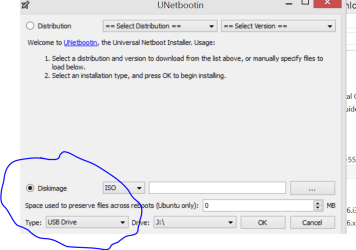
Unetbootin works fine for making USB bootable isos from most distros I've been playing with although click the Bottom section to refer to your downloaded iso -- don't use the defaults at the top. Screenshot shown.

Quite liked the videos but for Tutorials I still think it's easier - especially for "First time" or "Noobie" Linux users to have a "Static" presentation such as a Powerpoint session or even a PDF / HTML / Word doc with pictures.

The problem with Videos and You Tube is that you are forced to go over at the Tutors rate -- with a document (whether on the screen or a printed doc) you can go at your own pace, make notes and easily re-review stuff you might have missed / not understood first time round.

A combination of BOTH would be ideal - so I'd review the Video first then use the "hard copy" docs to perform the tasks.

@HerrKaLeun

Macs / Apple machines have LONG been used almost exclusively in the Professional Press / Publishing / Advertising businesses - don't get me wrong - I'm not an apple user but they certainly are used in some professional industries almost exclusively. Broadcasting is another one -- next time you see a presenter on say SKY NEWS (or is it ARD / ZDF where you are) with a laptop you'll probably see the "Fruit Company's" Logo on it.

Hardware wise these days there's not much in it -- have to admit though Looks wise Apple have it by a universe -- although whether the high price is worth paying for - that's another matter.

Apple machines - even running iOS can run Windows VM's (VMware fusion / parallels) but it's not true (Legally) the other way around although I believe there is a "Hackingtosh" site that tries to get OSX VM's to work on standard PC's.


(sent from W8.1 VM running from Debian Wheezy 7.4 Host running on external SSD from quite an oldish clunky HP laptop which does boot from USB device - not using the internal HDD at all !!).

Cheers
jimbo
 

Attachments

  • uunetboot.png
    uunetboot.png
    27.5 KB · Views: 1
Last edited:

My Computer My Computer

At a glance

Linux CENTOS 7 / various Windows OS'es and se...Intel i7 Intel i58GB, 16GBOn Motherboard
Computer type
PC/Desktop
Computer Manufacturer/Model Number
Custom built, several laptops HP/ASUS
OS
Linux CENTOS 7 / various Windows OS'es and servers
CPU
Intel i7 Intel i5
Memory
8GB, 16GB
Graphics Card(s)
On Motherboard
Sound Card
Realtek HD audio
Monitor(s) Displays
Apple Cinema display, Samsung LCD
Screen Resolution
1920 X 1080
Hard Drives
4 X 1TB SATA
Mouse
Toshiba wireless laser
Internet Speed
> 20MB up
Back
Top