Still on Windows XP? Here’s Some Bad Advice

My Computer My Computer

At a glance

Vista, Windows7, Mint Mate, Zorin, Windows 8from 1.6GHz Duo to i7
Computer Manufacturer/Model Number
HP, Dell, Gateway, Toshiba - 4 laptops and 2 desktops
OS
Vista, Windows7, Mint Mate, Zorin, Windows 8
CPU
from 1.6GHz Duo to i7
Monitor(s) Displays
2x HP w2207
Hard Drives
5x HDD, 7x SSD, 12x Externals
Keyboard
with trackball - no mices
Mouse
Trackball mice
Internet Speed
DSL 6000
I have been running all day with Linux Mint Mate from my USB Flash drive. If I wanted to stay on XP, that's what I would use for all internet work.

I'd have to agree with you. Though, I moved for different reasons. The introduction of Windows 8, Removal of Aero, the focus on "cloud-based" and the cancellation of Technet pushed me on to Linux Mint.

With the exception of two spread sheets I use excel 2010 for, which are almost complete applications in their own right and some media re-encoding, I use Linux mint almost entirely on most of my machines now.

The learning curve was not that big. Perhaps because I ran Linux in the mid - late 90's when I was running a hobby ISP, and it's also a lot more user friendly now than it was 20 years ago. I'd estimate I spent a total of 15 hours re-learning stuff to get the systems behaving the way I wanted.

The simplistic tasks many use XP for could easily be solved by Linux at [almost] no cost.
 

My Computer My Computer

At a glance

Linux Mint 17 Cinnamon | Win 7 Ult x64Intel I7-3770K @ 4.2ghz32GB G-Skill C10QEVGA GTX 670 2GB SC
Computer type
PC/Desktop
Computer Manufacturer/Model Number
Home Made
OS
Linux Mint 17 Cinnamon | Win 7 Ult x64
CPU
Intel I7-3770K @ 4.2ghz
Motherboard
ASRock Extreme 4
Memory
32GB G-Skill C10Q
Graphics Card(s)
EVGA GTX 670 2GB SC
Sound Card
Creative Fatality ExtremeGamer
Monitor(s) Displays
LG E2742V x 2
Screen Resolution
1920x1080
Hard Drives
256GB Vertex 4 SSD
2TB Seagate ST2000DM001
1TB Seagate ST1000DM003
PSU
Corsair HX 650
Case
HAF 932 advanced
Cooling
Corsair H100i liquid cooler
Keyboard
Logitech Wireless
Mouse
Logitech Wireless
Internet Speed
OptusNet NBN 100/40
Antivirus
Malwarebytes
Browser
Firefox 30
Other Info
Router: Sagemcom F@st 3846 Crippled by Optus.
TanyaC: I guess I'm not sure how you deal with the Excel spreadsheets you use? Do you dualboot to a Windows installation when you need to use Excel? I would doubt Mint has an Excel-compatible spreadsheet. If you dualboot, you still need some sort of Windows, which brings you back to square 1 on the endeavour to live without Windows.
Same for Word etc. I realize Linux may have options, but most professionals need to exchange documents, and that is where you depend on Windows.
I'm an engineer and believe 100% of my designsoftware is Windows-only and there is no alternative unless I want to be lonely without the rest of the industry. In addition most employers use Outlook which also has no alternative in corporate world.
I'm not sure a professional firm can live without Windows. ..maybe some webdesign or graphics business could be on Mac, but have real hard time imagining a Linux Firm being succesful.
I'd like to hear someone who works for the City of Munich how they operate, but doubt they do design work etc.
 

My Computer My Computer

At a glance

W7 Pro 64Intel i3 3220 @ 3.3 GHz2x8GB DDR 3 1600 Kingstononboard
Computer Manufacturer/Model Number
homemade
OS
W7 Pro 64
CPU
Intel i3 3220 @ 3.3 GHz
Motherboard
ASRock H77M
Memory
2x8GB DDR 3 1600 Kingston
Graphics Card(s)
onboard
Sound Card
onboard
Monitor(s) Displays
two 21" LCD
Hard Drives
128 GB Samsung 830
PSU
OCZ400MXSP
Cooling
Stock
Internet Speed
DSL
You could just use a Windows VM on a Linux distro (for files like the ones TanyaC mentioned).

My Windows VMs run smoother on Linux Mint 16 MATE (64 bit) using VMware Player, than they do on W7 using VMware Workstation.
 

My Computer My Computer

At a glance

W7 Ultimate SP1, LM19.2 MATE, W10 Home 1703, ...AMD Phenom II x6 1100T, 3.3 GHz12GB DDR3 1333 G-Skill (4GB x 2), G-Skill (2G...NVIDIA GeForce GTX 660
Computer type
PC/Desktop
Computer Manufacturer/Model Number
n/a
OS
W7 Ultimate SP1, LM19.2 MATE, W10 Home 1703, W10 Pro 1703 VM, #All 64 bit
CPU
AMD Phenom II x6 1100T, 3.3 GHz
Motherboard
ASUS M4A88T-M/USB3 (AM3)
Memory
12GB DDR3 1333 G-Skill (4GB x 2), G-Skill (2GB x 2)
Graphics Card(s)
NVIDIA GeForce GTX 660
Sound Card
Realtek?
Monitor(s) Displays
Samsung S23B350
Screen Resolution
1920x1080
Hard Drives
WD Green 2TB (SATA), WD Green 3TB (SATA), WD Blue 4TB (SATA), WD Blue 6TB (SATA)
PSU
Cooler Master
Case
Antec GX300 Tower
Cooling
3x Antec TRICOOL 120mm Fans
Mouse
Wired Optical
Internet Speed
DSL
Antivirus
Avast
Browser
Pale Moon (64 bit)
Other Info
2018-12-27 Upgraded HDDs
2015-12-10 Upgraded case, graphics card, storage
2015-08-15 Upgraded motherboard & RAM
2015-07-15 Upgraded LM17.1 to LM17.2
TanyaC: I guess I'm not sure how you deal with the Excel spreadsheets you use? Do you dualboot to a Windows installation when you need to use Excel?

Yes, I dual Boot. They are fairly complex.

I would doubt Mint has an Excel-compatible spreadsheet.

Depends on what you mean by "compatible". There are several options, Only for extremely complex stuff I still use Excel, but only for as long as I have to.

which brings you back to square 1 on the endeavor to live without Windows.

I accept that. To a point. Of the 11 machines here at home, only 1 is still solely Windows. A year ago they were all Windows. This 1 is my 2008 R2 server. And the only reason is that I just haven't had time to convert it to Linux.

Same for Word etc. I realize Linux may have options, but most professionals need to exchange documents, and that is where you depend on Windows.

I have no problem sharing documents, of any sort, between windows and Linux applications. There are several options available.

But the point was not to live without Windows. For me it was a statement of disgust with Microsoft.

However, this thread is about alternatives to Windows XP. My point was, for the most part, Linux CAN fill most needs. Perhaps not in corporations (Though one company I worked for which is a multinational - they are headed down the Linux path as much as possible).

Compatibility with data is not as big an issue as some would make it out to be.

In terms of cost, Linux might be a better choice than MAC.

Also, if we close our eyes and say "Windows is life, life is Windows", then we will be forever trapped in a paradigm that will have us forking out ever increasing amounts for less and less services in a world where we have less and less control over our own infrastructure, and be manipulated even further into mindless consumerism.:geek:
 

My Computer My Computer

At a glance

Linux Mint 17 Cinnamon | Win 7 Ult x64Intel I7-3770K @ 4.2ghz32GB G-Skill C10QEVGA GTX 670 2GB SC
Computer type
PC/Desktop
Computer Manufacturer/Model Number
Home Made
OS
Linux Mint 17 Cinnamon | Win 7 Ult x64
CPU
Intel I7-3770K @ 4.2ghz
Motherboard
ASRock Extreme 4
Memory
32GB G-Skill C10Q
Graphics Card(s)
EVGA GTX 670 2GB SC
Sound Card
Creative Fatality ExtremeGamer
Monitor(s) Displays
LG E2742V x 2
Screen Resolution
1920x1080
Hard Drives
256GB Vertex 4 SSD
2TB Seagate ST2000DM001
1TB Seagate ST1000DM003
PSU
Corsair HX 650
Case
HAF 932 advanced
Cooling
Corsair H100i liquid cooler
Keyboard
Logitech Wireless
Mouse
Logitech Wireless
Internet Speed
OptusNet NBN 100/40
Antivirus
Malwarebytes
Browser
Firefox 30
Other Info
Router: Sagemcom F@st 3846 Crippled by Optus.
So, what to do? only update?
 

My Computer My Computer

At a glance

Windows 7
Computer type
PC/Desktop
OS
Windows 7
So, what to do? only update?

Yup. Or move to a android tablet since most users browse the web and thats all they do anyway. I would like to say that around 70% of the general public use their computers almost completely for just a web browser. If your like most people and that is all you do, you don't need something complex like windows. Ubuntu or a tablet of some sort suits most people just fine. It's the main reason tablets are so popular. People started to realize the only thing they use their PC for is to browse the web.

Many options out there.

TanyaC: I guess I'm not sure how you deal with the Excel spreadsheets you use? Do you dualboot to a Windows installation when you need to use Excel?

Yes, I dual Boot. They are fairly complex.


Why not just use Wine? Emulates windows software almost perfectly, including office. Why bother with dual booting?
 

My Computer My Computer

At a glance

Windows 10 ProAMD Ryzen 5 2400G Processor with Radeon RX Ve...G.SKILL Ripjaws V Series 16GB (2 x 8GB) 288-P...2047MB NVIDIA GeForce GTX 1060 6GB (EVGA)
Computer type
PC/Desktop
Computer Manufacturer/Model Number
Custom Built
OS
Windows 10 Pro
CPU
AMD Ryzen 5 2400G Processor with Radeon RX Vega 11 Graphics
Motherboard
ASRock X470 Master SLI/AC AM4 AMD Promontory X470 SATA 6Gb/s
Memory
G.SKILL Ripjaws V Series 16GB (2 x 8GB) 288-Pin DDR4 SDRAM D
Graphics Card(s)
2047MB NVIDIA GeForce GTX 1060 6GB (EVGA)
Sound Card
Motherboard Built in
Monitor(s) Displays
Acer R240HY bidx 23.8-Inch IPS HDMI DVI VGA (1920 x 1080) Wi
Screen Resolution
1920 x 1080
Hard Drives
1TB Sandisk SSD PLUS (Main drive)
500 GB Seagate 7200 RPM (Games)
500 GB Western Digital 7200 RPM (Virtual Machines)
PSU
CORSAIR TX Series TX650M 650W 80+ Gold Modular Power Supply
Case
CORSAIR CARBIDE SPEC-02 Mid-Tower Gaming Case, Red LED Fan
Cooling
220mm, two 120mm, and four 60mm fans
Keyboard
Wired Dell keyboard
Mouse
Wireless Logitech mouse
Internet Speed
250mb down, 30mb up
Antivirus
Panda Cloud Antivirus
Browser
Chrome-ish x64
Other Info
Your awesome for reading this.
Hi there
@WHs etc

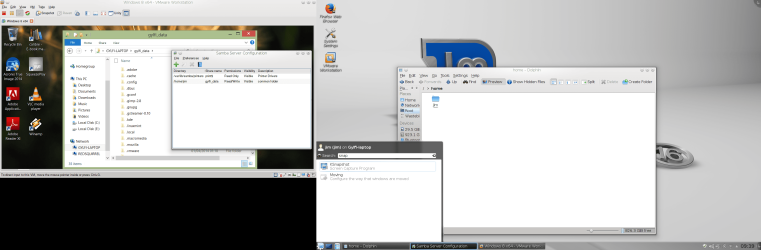
Here's a snapshot of me running Windows 8.1 enterprise as a VM on Linux Mate 16 (petra) running totally on an external USB HDD. I'd removed the laptop's HDD just to be 100% certain I wasn't using ANYTHING on the internal HDD.

I'm running SAMBA server (built in) to share the /HOME Linux file with windows (for Windows to read the data). Samba is built in in Linux mate. You don't even need to configure anything - just install the samba-conf gui and then simply click sharing just like windows -- it does it all for you.

(Windows partitions can be automatically read / written so you don't need to do anything there).
This way you can create say common data folder on Linux and store stuff ANY of your windows VM's might want so you don't have to boot up all the VM's at once. - Networking is a Doddle in Linux compared with windows !!!!!!).

Same works for Windows XP as a VM or anything else. Your Host Linux can access the rest of your network if it has access as well

Seemples !!!!!!

Cheers
jimbo
 

Attachments

  • snapshot1.png
    snapshot1.png
    292.8 KB · Views: 8

My Computer My Computer

At a glance

Linux CENTOS 7 / various Windows OS'es and se...Intel i7 Intel i58GB, 16GBOn Motherboard
Computer type
PC/Desktop
Computer Manufacturer/Model Number
Custom built, several laptops HP/ASUS
OS
Linux CENTOS 7 / various Windows OS'es and servers
CPU
Intel i7 Intel i5
Memory
8GB, 16GB
Graphics Card(s)
On Motherboard
Sound Card
Realtek HD audio
Monitor(s) Displays
Apple Cinema display, Samsung LCD
Screen Resolution
1920 X 1080
Hard Drives
4 X 1TB SATA
Mouse
Toshiba wireless laser
Internet Speed
> 20MB up
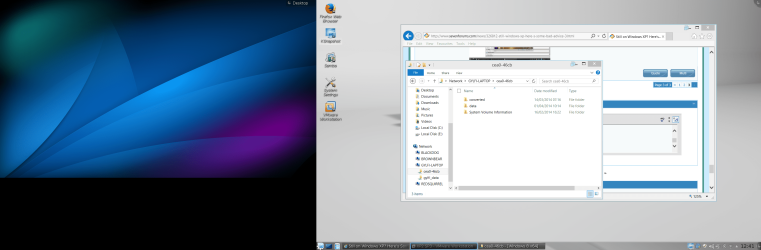
Here's my openSUSE running W8.1 via Oracle Virtual box. I don't use Samba as I don't need the PC networked to any others in the house, so I use the VM network tool to access the required folders on mu SUSE instal and just drag and drop between the OS's. Much cleaner than a dual boot in my opinion as you can run both at the same time.
MS Excel is the only thing that keeps me from going 100% linux due to some of the VB scripts I run. I have the occasional hic cup with Word files; but if you don't over format or try to use custom styles you can overcome this (Use Libre Office). I know one poster said that Linux breaks all the time; but I've had less issues with SUSE than I did with W7 and very rarely get issues. I will concede getting the network adaptor to work was a pain!!


My Computer My Computer

At a glance

openSUSE 13.1 64biti76gb Gskill matched DDR3Radeon HD4600
Computer type
PC/Desktop
OS
openSUSE 13.1 64bit
CPU
i7
Motherboard
Gigabyte UD5
Memory
6gb Gskill matched DDR3
Graphics Card(s)
Radeon HD4600
Sound Card
All onboard
Monitor(s) Displays
HP 2159v
Hard Drives
120gb Samsung SSD for the OS
2 * 1tb WD Caviar Black for storage
PSU
Corsair 750w
Case
Antec 920
Cooling
Aksas Nero
Hi there
Ms office (particularly EXCEL), Photoshop, SKY GO+ Netfix etc (stupid services still need Silverlight and STOOOOOOOPID DRM) and some recoding stuff still producing VINYL for people - often using the Minidisc system for recording at the live gigs - record music via Minidisc / transfer to computer via XP software and then burn to vinyl via XP. Also some older LARGE size printers (A2 at Pro quality and high res scanners etc).

Incidentally a good use for samba is for example if you have an internal SD / Micro Sd reader often XP / Win7 / Win 8 won't find drivers but Linux mint found them - /dev/mmc0nnnnnnn where nnnn is a UUID. By setting this up as a SAMBA share any of my computers on the network (REAL or Virtual machines) can access the micro sd card --it's 64GB so useful storage and FAT32 formatted so you can define Windows partitions as samba shares if these are mounted on te Linux machine.

I'm even more convinced of using Linux as companies are moving into that HIDEOUS SUBSCRIPTION model --office 365 in UK costs inc VAT around 100 GBP a year (EUR 135) or even more -- Office 2010 which is what I'm using cost me now ZERO . Libre Office while good is still not a 100% replacement for Ms Office.

Cheers
jimbo
 

Attachments

  • snapshot3.png
    snapshot3.png
    384.8 KB · Views: 3

My Computer My Computer

At a glance

Linux CENTOS 7 / various Windows OS'es and se...Intel i7 Intel i58GB, 16GBOn Motherboard
Computer type
PC/Desktop
Computer Manufacturer/Model Number
Custom built, several laptops HP/ASUS
OS
Linux CENTOS 7 / various Windows OS'es and servers
CPU
Intel i7 Intel i5
Memory
8GB, 16GB
Graphics Card(s)
On Motherboard
Sound Card
Realtek HD audio
Monitor(s) Displays
Apple Cinema display, Samsung LCD
Screen Resolution
1920 X 1080
Hard Drives
4 X 1TB SATA
Mouse
Toshiba wireless laser
Internet Speed
> 20MB up
You guys are inspiring. I was not so lucky to run virtual systems with VMware Player on my Mint from a 16GB stick. It ran but it was like molasses. The virtual systems are on an external eSata attached 240GB SSD. I have several flavors of Mint, Zorin and Windows 8,1. Running them from my Windows 7 host is no problem. Performance is like a native installation, But from the stick it was too slow.

I am perfecting my 120GB stick now. It has Linux Mint Mate and a data partition on it. I am working on a tutorial to explain this setup. Here is a beta version of the tutorial which is still missing a couple of videos and some fine tuning.
 

My Computer My Computer

At a glance

Vista, Windows7, Mint Mate, Zorin, Windows 8from 1.6GHz Duo to i7
Computer Manufacturer/Model Number
HP, Dell, Gateway, Toshiba - 4 laptops and 2 desktops
OS
Vista, Windows7, Mint Mate, Zorin, Windows 8
CPU
from 1.6GHz Duo to i7
Monitor(s) Displays
2x HP w2207
Hard Drives
5x HDD, 7x SSD, 12x Externals
Keyboard
with trackball - no mices
Mouse
Trackball mice
Internet Speed
DSL 6000
TanyaC: I guess I'm not sure how you deal with the Excel spreadsheets you use? Do you dualboot to a Windows installation when you need to use Excel?

Yes, I dual Boot. They are fairly complex.


Why not just use Wine? Emulates windows software almost perfectly, including office. Why bother with dual booting?

True, but I'd already set my system up for dual boot when I first installed Mint because I wasn't sure if I was going to stay with it. Pure laziness that's all. When I get some time I will give Wine a try.

The spreadsheets are quite complex. They have to be set to manual calculate because of the time it takes to re-calculate. Hopefully performance will be just as good under Wine.
 

My Computer My Computer

At a glance

Linux Mint 17 Cinnamon | Win 7 Ult x64Intel I7-3770K @ 4.2ghz32GB G-Skill C10QEVGA GTX 670 2GB SC
Computer type
PC/Desktop
Computer Manufacturer/Model Number
Home Made
OS
Linux Mint 17 Cinnamon | Win 7 Ult x64
CPU
Intel I7-3770K @ 4.2ghz
Motherboard
ASRock Extreme 4
Memory
32GB G-Skill C10Q
Graphics Card(s)
EVGA GTX 670 2GB SC
Sound Card
Creative Fatality ExtremeGamer
Monitor(s) Displays
LG E2742V x 2
Screen Resolution
1920x1080
Hard Drives
256GB Vertex 4 SSD
2TB Seagate ST2000DM001
1TB Seagate ST1000DM003
PSU
Corsair HX 650
Case
HAF 932 advanced
Cooling
Corsair H100i liquid cooler
Keyboard
Logitech Wireless
Mouse
Logitech Wireless
Internet Speed
OptusNet NBN 100/40
Antivirus
Malwarebytes
Browser
Firefox 30
Other Info
Router: Sagemcom F@st 3846 Crippled by Optus.
Hi there
If you are using a USB stick then you really need a 32GB USB3 stick plugged into a USB3 port -- the difference ibetween running a USB2 stick and USB3 stick makes using one a real pain only to be used in an emergency whereas on a USB3 port it's quite usable.

The best solution of course is to use an SSD -- I was lucky as I had two older 120 SSD's which I'd replaced by 250 GB ones in two laptops - so these were "spare". I now use these as the portable systems and they are fine.

Just being doing final updates of an Eng. and an Isl version of XP before the shutdown in a few days -- although all updates until the shutdown for XP WILL still be available for an unspecified time in the future.

Note also if you use MSE as your XP security package updates will CONTINUE to be provided until May 2015 so you've still got a lot of time left -- Ms kept that one fairly quiet " !!.

@Tanya -EXCEL on Wine - particularly 2010 is rather "iffy" -- it's much easier to use a VM in UNITY mode and simply have a link to EXCEL on your Linux desktop.

Depending on your Linux distro there's several script around for adding the Icon and link to the HOST desktop.

Cheers
jimbo
 

My Computer My Computer

At a glance

Linux CENTOS 7 / various Windows OS'es and se...Intel i7 Intel i58GB, 16GBOn Motherboard
Computer type
PC/Desktop
Computer Manufacturer/Model Number
Custom built, several laptops HP/ASUS
OS
Linux CENTOS 7 / various Windows OS'es and servers
CPU
Intel i7 Intel i5
Memory
8GB, 16GB
Graphics Card(s)
On Motherboard
Sound Card
Realtek HD audio
Monitor(s) Displays
Apple Cinema display, Samsung LCD
Screen Resolution
1920 X 1080
Hard Drives
4 X 1TB SATA
Mouse
Toshiba wireless laser
Internet Speed
> 20MB up
jimbo45 said:
Quite liked the videos but for Tutorials I still think it's easier - especially for "First time" or "Noobie" Linux users to have a "Static" presentation such as a Powerpoint session or even a PDF / HTML / Word doc with pictures.

The problem with Videos and You Tube is that you are forced to go over at the Tutors rate -- with a document (whether on the screen or a printed doc) you can go at your own pace, make notes and easily re-review stuff you might have missed / not understood first time round.

Agreed!
I try to save web pages and even long winded TXT files as PDF. Then add my own bookmarks in the PDF.
PDF allows me to add comments without destroying the original and bookmarks give me instant access to the "bits" I need to review several times.

I use mozilla addon "Print pages to PDF" to save web pages (and emails) and Free "PDF-Xchange" to bookmark and comment out the PDF document.
-----

Two of my AutoCad rigs are standalone XP. No internet connection ever! 11-years and 9-years old.
Neither PC has missed a beat in all those years, the older PC has had a hard life working 15+ hours per day.
For online I am glad I have Win7 ... but recently whs has swayed me over to "Mint Mate"
Experimenting!
-----
.
 

My Computer My Computer

At a glance

XP Pro (x86) | 7 HP (x86) & (x64) | 7 Pro (x64)
Computer type
PC/Desktop
Computer Manufacturer/Model Number
Toshiba, Lenovo (laptops) + 4 rigs
OS
XP Pro (x86) | 7 HP (x86) & (x64) | 7 Pro (x64)
Maybe I'm missing something... but to use Windows in VM you still need a legit license, right? So where is the savings?
And when you say Linux is compatible to Excel files, do you mean you can open and work on an Excel file inc. macros that a company sends you?
And for the applications you have in VM, can you copy&paste between VM and Linux?
As long as you have one single Windows Application it seems more a waste of time than a benefit. No offense if that is your hobby, to each his own. I really wonder what type of jobs you guys have. I can't imagine being at work switching between OS for each application. I work with multiple entities and all use Office.
And what IT department wants to deal with users that hangle between 2 OS? They have enough trouble with us all having one OS and Office with all its associated issues... but throw in Linux and tech people to use VM..... I guess show me one single large company that is succesful with that and I would consider the option. It just doesn't seem to exist outside this Forum :-)
 

My Computer My Computer

At a glance

W7 Pro 64Intel i3 3220 @ 3.3 GHz2x8GB DDR 3 1600 Kingstononboard
Computer Manufacturer/Model Number
homemade
OS
W7 Pro 64
CPU
Intel i3 3220 @ 3.3 GHz
Motherboard
ASRock H77M
Memory
2x8GB DDR 3 1600 Kingston
Graphics Card(s)
onboard
Sound Card
onboard
Monitor(s) Displays
two 21" LCD
Hard Drives
128 GB Samsung 830
PSU
OCZ400MXSP
Cooling
Stock
Internet Speed
DSL
Maybe I'm missing something... but to use Windows in VM you still need a legit license, right? So where is the savings?
When you run e.g. 8.1 in virtual, the virtual system becomes the home. With that virtual system you can go to any PC and run it without problems. So single license but multiple PCs - and completely legal.

There were reports on Cnet that companies run XP now under Linux/VM because they think that protects them from malware. Some clever salesman must have sold them that solution - probably for a lot of money. What they don't know is that this does not protect them at all. As soon as they go on the internet with their virtual XP they are as much exposed as they were with a natively installed XP.

Running a version of Linux for the internet is a completely different story. There you are a LOT less exposed to malware than with Windows.

This post was made with Linux on a stick.
 

My Computer My Computer

At a glance

Vista, Windows7, Mint Mate, Zorin, Windows 8from 1.6GHz Duo to i7
Computer Manufacturer/Model Number
HP, Dell, Gateway, Toshiba - 4 laptops and 2 desktops
OS
Vista, Windows7, Mint Mate, Zorin, Windows 8
CPU
from 1.6GHz Duo to i7
Monitor(s) Displays
2x HP w2207
Hard Drives
5x HDD, 7x SSD, 12x Externals
Keyboard
with trackball - no mices
Mouse
Trackball mice
Internet Speed
DSL 6000
whs;2737379When you run e.g. 8.1 in virtual said:
so a company has 100 employees and 100 PCs.. how do they not still need 100 windows licenses unless they share the stick with the virtual system?
 

My Computer My Computer

At a glance

W7 Pro 64Intel i3 3220 @ 3.3 GHz2x8GB DDR 3 1600 Kingstononboard
Computer Manufacturer/Model Number
homemade
OS
W7 Pro 64
CPU
Intel i3 3220 @ 3.3 GHz
Motherboard
ASRock H77M
Memory
2x8GB DDR 3 1600 Kingston
Graphics Card(s)
onboard
Sound Card
onboard
Monitor(s) Displays
two 21" LCD
Hard Drives
128 GB Samsung 830
PSU
OCZ400MXSP
Cooling
Stock
Internet Speed
DSL
We are not talking about companies. They can afford 100 licenses. We are talking about home users that don't want to make an investment into e.g. Windows 8.

Or about somebody like me who has homes in 3 different locations and carries his virtual systems on a SSD. No need to keep all those operating systems (6) updated 3 times - including all the user files.
 

My Computer My Computer

At a glance

Vista, Windows7, Mint Mate, Zorin, Windows 8from 1.6GHz Duo to i7
Computer Manufacturer/Model Number
HP, Dell, Gateway, Toshiba - 4 laptops and 2 desktops
OS
Vista, Windows7, Mint Mate, Zorin, Windows 8
CPU
from 1.6GHz Duo to i7
Monitor(s) Displays
2x HP w2207
Hard Drives
5x HDD, 7x SSD, 12x Externals
Keyboard
with trackball - no mices
Mouse
Trackball mice
Internet Speed
DSL 6000
We are not talking about companies. They can afford 100 licenses. We are talking about home users that don't want to make an investment into e.g. Windows 8.

Or about somebody like me who has homes in 3 different locations and carries his virtual systems on a SSD. No need to keep all those operating systems (6) updated 3 times - including all the user files.

I'm not sure this discussion covers normal home users... those have one desktop and a tablets etc.
that original articles was advice for people that just have a PC at home and probably barely know how to turn it on. Someone like you who knows much about PCs wasn't really the target audience of that article.

I agree with your use VM may make sense... but this rarely is applicable to normal home users. someone else talked about 11 PCs at home... this clearly is not a topic for people that just use the PC to do stuff, this is a topic for people who use the PC for the sake of doing so :)
 

My Computer My Computer

At a glance

W7 Pro 64Intel i3 3220 @ 3.3 GHz2x8GB DDR 3 1600 Kingstononboard
Computer Manufacturer/Model Number
homemade
OS
W7 Pro 64
CPU
Intel i3 3220 @ 3.3 GHz
Motherboard
ASRock H77M
Memory
2x8GB DDR 3 1600 Kingston
Graphics Card(s)
onboard
Sound Card
onboard
Monitor(s) Displays
two 21" LCD
Hard Drives
128 GB Samsung 830
PSU
OCZ400MXSP
Cooling
Stock
Internet Speed
DSL
Agree, these are fun projects for people who like to discover new things. And sometimes (like in my case) they are useful. But as you say, 90% of PC users struggle finding the start key and would get glazy eyes if you presented projects like that.

I was an instructor at the local computer club (800 members) for several years. I finally gave up because people that had used PCs for 20 years knew nothing - even not the basics. All they were able to do was to click on the 5 icons on their desktop. It was too frustrating to deal with those guys. Every time I was talking about some system function they yelled 'advanced, advanced' as if that was a disease.
 

My Computer My Computer

At a glance

Vista, Windows7, Mint Mate, Zorin, Windows 8from 1.6GHz Duo to i7
Computer Manufacturer/Model Number
HP, Dell, Gateway, Toshiba - 4 laptops and 2 desktops
OS
Vista, Windows7, Mint Mate, Zorin, Windows 8
CPU
from 1.6GHz Duo to i7
Monitor(s) Displays
2x HP w2207
Hard Drives
5x HDD, 7x SSD, 12x Externals
Keyboard
with trackball - no mices
Mouse
Trackball mice
Internet Speed
DSL 6000
Back
Top