Help, I deleted partition needed for booting? Added a new drive

sdowney717

New member
Power User
VIP
Local time
5:38 PM
Messages
705
I put in a new sata drive, went to disk management.
I made a mistake and deleted a small partition from the first drive that apparently windows needed to boot?

I have an install disk, what can I run to fix it?

fixmbr? something else?
 

My Computer My Computer

At a glance

Windows 7 Ultimate x64
OS
Windows 7 Ultimate x64
new sata drive has 1 or more partitions now? None of them has been marked ACTIVE by you?

Boot from the win7 install disk and do the shift+f10 trick. See http://www.sevenforums.com/tutorials/682-command-prompt-startup.html

In that Command Prompt window do:

Code:
diskpart
select disk 0
list part
select disk 1
list part
exit

Is disk 0 or disk 1 the original boot disk?

Also:
Code:
diskpart
list vol
exit

Which volume from the list (C, D, E etc) is the real win7 partition? Look at the label, size.
 

My Computer My Computer

At a glance

Microsoft Windows 7 Home Premium 64-bits 7601...Intel(R) Core(TM) i3 CPU M 370 @ 2.40GHz4,00 GBATI Mobility Radeon HD 5400 Series
Computer type
Laptop
Computer Manufacturer/Model Number
ACER ASPIRE 5742G
OS
Microsoft Windows 7 Home Premium 64-bits 7601 Multiprocessor Free Service Pack 1
CPU
Intel(R) Core(TM) i3 CPU M 370 @ 2.40GHz
Motherboard
Acer Aspire 5742G
Memory
4,00 GB
Graphics Card(s)
ATI Mobility Radeon HD 5400 Series
Sound Card
(1) AMD High Definition Audio Device (2) Realtek High Defi
Screen Resolution
1366 x 768 x 32 bits (4294967296 colors) @ 60 Hz
Hard Drives
WDC WD5000BEVT-22ZAT0

My Computer My Computer

At a glance

Microsoft Windows 7 Home Premium 64-bits 7601...Intel(R) Core(TM) i3 CPU M 370 @ 2.40GHz4,00 GBATI Mobility Radeon HD 5400 Series
Computer type
Laptop
Computer Manufacturer/Model Number
ACER ASPIRE 5742G
OS
Microsoft Windows 7 Home Premium 64-bits 7601 Multiprocessor Free Service Pack 1
CPU
Intel(R) Core(TM) i3 CPU M 370 @ 2.40GHz
Motherboard
Acer Aspire 5742G
Memory
4,00 GB
Graphics Card(s)
ATI Mobility Radeon HD 5400 Series
Sound Card
(1) AMD High Definition Audio Device (2) Realtek High Defi
Screen Resolution
1366 x 768 x 32 bits (4294967296 colors) @ 60 Hz
Hard Drives
WDC WD5000BEVT-22ZAT0
I dont know, it was gone, the reserved partition because I deleted it.:D
I remember seeing it as device e: said was system reserved and was large so deleted it.
Yes, I did, deleted it by clicking and deleting the partition.

I got it fixed by booting cdrom win7 setup.
Drop to command prompt.
ran bootrec /fixboot and bootrec /fixmbr
 

My Computer My Computer

At a glance

Windows 7 Ultimate x64
OS
Windows 7 Ultimate x64
I may have been able to see it and delete it because I had dual booted win7 with ubuntu linux.
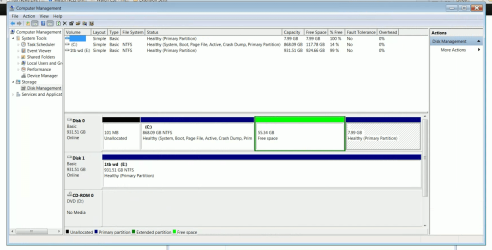
And now have 101mb unallocated at front and 53gb free and oddly 8gb at the end.
Ubuntu was the 53gb free.

before I do anymore damage, that 53.34gb and 7.99gb could be combined right?

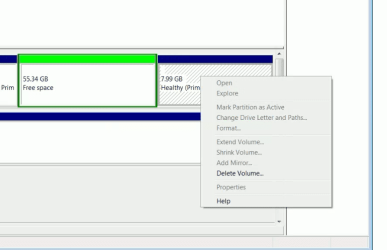
That 8gb at the end confuses me, windows is not using it, no drive letter. And not much info if I right click.
I can remove it but that is all I can do with it. It was I think a system file ubuntu partition. Yes that was it. You can setup ubuntu with separate /home from /root file system.
 

Attachments

  • Screenshot from 2014-04-03 13:47:50.png
    Screenshot from 2014-04-03 13:47:50.png
    147.2 KB · Views: 5
  • Screenshot from 2014-04-03 13:54:16.png
    Screenshot from 2014-04-03 13:54:16.png
    22.9 KB · Views: 0

My Computer My Computer

At a glance

Windows 7 Ultimate x64
OS
Windows 7 Ultimate x64
Since your C partition is active, you can run startup/repair 3 times from the installation/repair disc (reboot after each time). It should repair the bootmgr.
 

My Computer My Computer

At a glance

Vista, Windows7, Mint Mate, Zorin, Windows 8from 1.6GHz Duo to i7
Computer Manufacturer/Model Number
HP, Dell, Gateway, Toshiba - 4 laptops and 2 desktops
OS
Vista, Windows7, Mint Mate, Zorin, Windows 8
CPU
from 1.6GHz Duo to i7
Monitor(s) Displays
2x HP w2207
Hard Drives
5x HDD, 7x SSD, 12x Externals
Keyboard
with trackball - no mices
Mouse
Trackball mice
Internet Speed
DSL 6000

My Computer My Computer

At a glance

Windows 7 Ultimate x64
OS
Windows 7 Ultimate x64
I may have been able to see it and delete it because I had dual booted win7 with ubuntu linux.
And now have 101mb unallocated at front and 53gb free and oddly 8gb at the end.
Ubuntu was the 53gb free.

before I do anymore damage, that 53.34gb and 7.99gb could be combined right?

That 8gb at the end confuses me, windows is not using it, no drive letter. And not much info if I right click.
I can remove it but that is all I can do with it. It was I think a system file ubuntu partition. Yes that was it. You can setup ubuntu with separate /home from /root file system.

I would refer you to the following site for a 3rd party tool to resize a partition;
Best Free Partition Manager Freeware and free partition magic for Windows 7, Windows 8, Windows Vista and Windows XP 32 bit & 64 bit. MiniTool Free Partition Manager Software Home Edition.

After downloading MiniTool Partition Wizard, visit the following link;
How to resize Partition for Windows Server 2000/2003/2008 or Windows XP/7/Vista with partition magic manager software? Move/Resize Partition Help.

HTH
 

My Computer My Computer

At a glance

Windows 7 Professional x64Intel i5 quad processor16 GBRadeon HD 5770
Computer type
PC/Desktop
Computer Manufacturer/Model Number
Custom Built
OS
Windows 7 Professional x64
CPU
Intel i5 quad processor
Motherboard
DP67BG
Memory
16 GB
Graphics Card(s)
Radeon HD 5770
Sound Card
Realtek High Definition Audio
Monitor(s) Displays
Samsung SyncMaster
Screen Resolution
1920X1080
Hard Drives
WD 2TB (SATA Internal)
WD 1TB (USB External)
PSU
Corsair GS800
Case
Tower (Generic)
Cooling
3 Internal Fans
Keyboard
MS Wireless
Mouse
MS Optical Wired
Internet Speed
54 mbps
Antivirus
Emsisoft
Browser
IE-Version 9, Palemoon-Version 24.2.0
Since your C partition is active, you can run startup/repair 3 times from the installation/repair disc (reboot after each time). It should repair the bootmgr.

It is working, boots up ok, do I need to do it 3 times?

What will that do that it does not have right now?

Is something still broken?

I will likely keep the other partitions and reinstall ubuntu Trusty 14.04, I like to dual boot sometimes.
 

My Computer My Computer

At a glance

Windows 7 Ultimate x64
OS
Windows 7 Ultimate x64
Since your C partition is active, you can run startup/repair 3 times from the installation/repair disc (reboot after each time). It should repair the bootmgr.

It is working, boots up ok, do I need to do it 3 times?

What will that do that it does not have right now?

Is something still broken?

I will likely keep the other partitions and reinstall ubuntu Trusty 14.04, I like to dual boot sometimes.
If it boots, you are OK. Just leave the 100MBs alone - it's not worth mucking around for that itty bitty amount of space.

Should you, however, use Partition Wizard to reclaim the space, you have to use the bootable CD version. And make an image of C before you start because I once lost partitions due to a small mistake using Partition Wizard.
 

My Computer My Computer

At a glance

Vista, Windows7, Mint Mate, Zorin, Windows 8from 1.6GHz Duo to i7
Computer Manufacturer/Model Number
HP, Dell, Gateway, Toshiba - 4 laptops and 2 desktops
OS
Vista, Windows7, Mint Mate, Zorin, Windows 8
CPU
from 1.6GHz Duo to i7
Monitor(s) Displays
2x HP w2207
Hard Drives
5x HDD, 7x SSD, 12x Externals
Keyboard
with trackball - no mices
Mouse
Trackball mice
Internet Speed
DSL 6000
I dont know, it was gone, the reserved partition because I deleted it.:D
I remember seeing it as device e: said was system reserved and was large so deleted it.
Yes, I did, deleted it by clicking and deleting the partition.

I got it fixed by booting cdrom win7 setup.
Drop to command prompt.
ran bootrec /fixboot and bootrec /fixmbr
fixmbr fixes the mbr. Totally unrelated to the problem. Now most likely linux doesn't boot... does it?
fixboot fixes the volume bootsector and some other stuff on ACTIVE partition. But you don't have an active partition do you? And who did recreate the win7 boot menu?
 

My Computer My Computer

At a glance

Microsoft Windows 7 Home Premium 64-bits 7601...Intel(R) Core(TM) i3 CPU M 370 @ 2.40GHz4,00 GBATI Mobility Radeon HD 5400 Series
Computer type
Laptop
Computer Manufacturer/Model Number
ACER ASPIRE 5742G
OS
Microsoft Windows 7 Home Premium 64-bits 7601 Multiprocessor Free Service Pack 1
CPU
Intel(R) Core(TM) i3 CPU M 370 @ 2.40GHz
Motherboard
Acer Aspire 5742G
Memory
4,00 GB
Graphics Card(s)
ATI Mobility Radeon HD 5400 Series
Sound Card
(1) AMD High Definition Audio Device (2) Realtek High Defi
Screen Resolution
1366 x 768 x 32 bits (4294967296 colors) @ 60 Hz
Hard Drives
WDC WD5000BEVT-22ZAT0
What you apparently did was move the boot files to C which is now System Active. I'd just leave it there and ignore the 100mb now. Maybe you should ask before you do such destructive things.

The green 55gb Free Space is still green because it had its Logical volume deleted without also deleting the Logical partition container. You'll need to Delete Partition on the green space first in Disk Mgmt, which will change it to Primary Unallocated Space. Then you can create a partition with all of the Unallocated Space.

To borrow/give space to/from any other partition whether it is contiguous or not, save this reference How to extend partition easily with Partition Wizard - video help.
 
Back
Top