Video Always Opens in Small Window, No Matter What

FliGi7

New member
Guru
VIP
Local time
2:28 PM
Messages
1,814
I had this posted over in the Media Center forum but I think that was a bit too narrowly focused for this problem. So, over here we go...

I'm running Windows 7 x64 RTM and I have an Nvidia 8600GTS with the 190.38 drivers. Every video I open from the net or on my comp opens in a small window. If I enlarge it, the video becomes grainy and crappy and the next time it opens it's back to square one. I have installed both x32 and x64 bit versions of the shark007 codec's so I should have everything necessary to properly display video in its native resolution, not some small window. I even tried downloading and using MPC Home Cinema and VLC player to open vids and even those open in small windows. Could it be a specific filter I need to enable/disable to get these to play proper size/height/quality?

Has this happened to anyone else? I've asked this question before and no one really had any answers other than asking what codecs I had and saying they don't know what's going on. :sick:
 

My Computer My Computer

At a glance

XP / Win7 x64 ProIntel Quad-Core Q9450 @ 3.2GHz2x2GB GSkill DDR2NVIDIA GeForce 8600 GTS (EVGA)
OS
XP / Win7 x64 Pro
CPU
Intel Quad-Core Q9450 @ 3.2GHz
Motherboard
Asus P5-E
Memory
2x2GB GSkill DDR2
Graphics Card(s)
NVIDIA GeForce 8600 GTS (EVGA)
Monitor(s) Displays
Dell 2408WFP
Screen Resolution
1920x1200
I had this posted over in the Media Center forum but I think that was a bit too narrowly focused for this problem. So, over here we go...

I'm running Windows 7 x64 RTM and I have an Nvidia 8600GTS with the 190.38 drivers. Every video I open from the net or on my comp opens in a small window. If I enlarge it, the video becomes grainy and crappy and the next time it opens it's back to square one. I have installed both x32 and x64 bit versions of the shark007 codec's so I should have everything necessary to properly display video in its native resolution, not some small window. I even tried downloading and using MPC Home Cinema and VLC player to open vids and even those open in small windows. Could it be a specific filter I need to enable/disable to get these to play proper size/height/quality?

Has this happened to anyone else? I've asked this question before and no one really had any answers other than asking what codecs I had and saying they don't know what's going on. :sick:

Boy do we need alot more info

Could you fill in your system specs (lower left corner) so we know what hardware you have. are you 32bit or 64?, clean install or upgrade? what file type are you playing? what resolution are you using?
 

My Computer My Computer

At a glance

Win 8 Release candidate 8400[email protected]4 gigsNvidia 9600M
Computer Manufacturer/Model Number
HP Pavillion dv-7 1005 Tx
OS
Win 8 Release candidate 8400
CPU
[email protected]
Memory
4 gigs
Graphics Card(s)
Nvidia 9600M
Sound Card
HD built-in
Monitor(s) Displays
17" Wxga
Screen Resolution
1440x900
Cooling
none
Internet Speed
45Mb down 5Mb up
I had this posted over in the Media Center forum but I think that was a bit too narrowly focused for this problem. So, over here we go...

I'm running Windows 7 x64 RTM and I have an Nvidia 8600GTS with the 190.38 drivers. Every video I open from the net or on my comp opens in a small window. If I enlarge it, the video becomes grainy and crappy and the next time it opens it's back to square one. I have installed both x32 and x64 bit versions of the shark007 codec's so I should have everything necessary to properly display video in its native resolution, not some small window. I even tried downloading and using MPC Home Cinema and VLC player to open vids and even those open in small windows. Could it be a specific filter I need to enable/disable to get these to play proper size/height/quality?

Has this happened to anyone else? I've asked this question before and no one really had any answers other than asking what codecs I had and saying they don't know what's going on. :sick:

Boy do we need alot more info

Could you fill in your system specs (lower left corner) so we know what hardware you have. are you 32bit or 64?, clean install or upgrade? what file type are you playing? what resolution are you using?

Sorry about that! I'm running x64 RTM. It's an Intel Q9450 with an Asus P5E Mobo. I did a completely fresh install on a dedicated formatted (DBAN formatted) drive. It doesn't matter what file type it is, whether it's mpg, mpeg, avi.

If you have specific files for me to use to test, I'd be glad to.
 

My Computer My Computer

At a glance

XP / Win7 x64 ProIntel Quad-Core Q9450 @ 3.2GHz2x2GB GSkill DDR2NVIDIA GeForce 8600 GTS (EVGA)
OS
XP / Win7 x64 Pro
CPU
Intel Quad-Core Q9450 @ 3.2GHz
Motherboard
Asus P5-E
Memory
2x2GB GSkill DDR2
Graphics Card(s)
NVIDIA GeForce 8600 GTS (EVGA)
Monitor(s) Displays
Dell 2408WFP
Screen Resolution
1920x1200
Screenshot for what I'm talking about...


This is after clicking on the first mpg on the left. This is the default size it opens as and enlarging the window makes it unwatchable. I know it's not exactly an HD video but I'm certain its default size opens larger on other people's computers.
 

My Computer My Computer

At a glance

XP / Win7 x64 ProIntel Quad-Core Q9450 @ 3.2GHz2x2GB GSkill DDR2NVIDIA GeForce 8600 GTS (EVGA)
OS
XP / Win7 x64 Pro
CPU
Intel Quad-Core Q9450 @ 3.2GHz
Motherboard
Asus P5-E
Memory
2x2GB GSkill DDR2
Graphics Card(s)
NVIDIA GeForce 8600 GTS (EVGA)
Monitor(s) Displays
Dell 2408WFP
Screen Resolution
1920x1200
so two issues then opening in window and bad display.

does it do this with any other player.? does it open in the same size for different extensions(avi, mp4,wmf)?

Kwn
 

My Computer My Computer

At a glance

Win 8 Release candidate 8400[email protected]4 gigsNvidia 9600M
Computer Manufacturer/Model Number
HP Pavillion dv-7 1005 Tx
OS
Win 8 Release candidate 8400
CPU
[email protected]
Memory
4 gigs
Graphics Card(s)
Nvidia 9600M
Sound Card
HD built-in
Monitor(s) Displays
17" Wxga
Screen Resolution
1440x900
Cooling
none
Internet Speed
45Mb down 5Mb up
Forgot to add that I have a Dell 2408wfp at the native 1920x1200 display and everything else looks great (as you can see).

moz-screenshot.png
moz-screenshot-1.png
I went to Dakar Image Bank Image Bank: PICT3555.AVI and clicked on the "download" and opened in two separate players...

AVI in VLC:
aviinvlc.jpg


AVI in WMP:

aviinwmp.jpg
 

My Computer My Computer

At a glance

XP / Win7 x64 ProIntel Quad-Core Q9450 @ 3.2GHz2x2GB GSkill DDR2NVIDIA GeForce 8600 GTS (EVGA)
OS
XP / Win7 x64 Pro
CPU
Intel Quad-Core Q9450 @ 3.2GHz
Motherboard
Asus P5-E
Memory
2x2GB GSkill DDR2
Graphics Card(s)
NVIDIA GeForce 8600 GTS (EVGA)
Monitor(s) Displays
Dell 2408WFP
Screen Resolution
1920x1200
You are using FireFox to watch video?
 

My Computer My Computer

At a glance

...
OS
...
Yea... ?
 

My Computer My Computer

At a glance

XP / Win7 x64 ProIntel Quad-Core Q9450 @ 3.2GHz2x2GB GSkill DDR2NVIDIA GeForce 8600 GTS (EVGA)
OS
XP / Win7 x64 Pro
CPU
Intel Quad-Core Q9450 @ 3.2GHz
Motherboard
Asus P5-E
Memory
2x2GB GSkill DDR2
Graphics Card(s)
NVIDIA GeForce 8600 GTS (EVGA)
Monitor(s) Displays
Dell 2408WFP
Screen Resolution
1920x1200
what size is the movie ???
320 x 240 .

if the movie you are trying to view is 320 x 240
and your screen is set to 1920x1200 then to movie is going to open in a small window. compared to you screen

have you tried a larger size movie like 640 x 480
and does it open also in a small window ??
 

My Computer My Computer

At a glance

windows 7 Enterprise x64duo core 2.664gbati 1950 xtx
Computer Manufacturer/Model Number
custom build
OS
windows 7 Enterprise x64
CPU
duo core 2.66
Motherboard
intel 975
Memory
4gb
Graphics Card(s)
ati 1950 xtx
Sound Card
on motherboard
Monitor(s) Displays
accer 22"
Screen Resolution
1680 x 1050
Hard Drives
250 GB
500 GB
500 GB
500 GB
PSU
750 watts
Case
coolmaster haf 922
Cooling
4 fans
Internet Speed
not as fast as i want

My Computer My Computer

At a glance

XP / Win7 x64 ProIntel Quad-Core Q9450 @ 3.2GHz2x2GB GSkill DDR2NVIDIA GeForce 8600 GTS (EVGA)
OS
XP / Win7 x64 Pro
CPU
Intel Quad-Core Q9450 @ 3.2GHz
Motherboard
Asus P5-E
Memory
2x2GB GSkill DDR2
Graphics Card(s)
NVIDIA GeForce 8600 GTS (EVGA)
Monitor(s) Displays
Dell 2408WFP
Screen Resolution
1920x1200
what size is the movie ???
320 x 240 .

if the movie you are trying to view is 320 x 240
and your screen is set to 1920x1200 then to movie is going to open in a small window. compared to you screen

have you tried a larger size movie like 640 x 480
and does it open also in a small window ??

The bottom line is that everything opens in a smaller window in Win7 than it does in XP. It doesn't matter what size the video is.

So, maybe the scenario is, Win7 is opening them in their native resolution and not upscaling them like XP does to make them open in the same size window most every time (e.g. the last window size that was open). If so, why is this? Why does the video look absolutely terrible if I enlarge it more than a tiny bit from its native very small size?
 

My Computer My Computer

At a glance

XP / Win7 x64 ProIntel Quad-Core Q9450 @ 3.2GHz2x2GB GSkill DDR2NVIDIA GeForce 8600 GTS (EVGA)
OS
XP / Win7 x64 Pro
CPU
Intel Quad-Core Q9450 @ 3.2GHz
Motherboard
Asus P5-E
Memory
2x2GB GSkill DDR2
Graphics Card(s)
NVIDIA GeForce 8600 GTS (EVGA)
Monitor(s) Displays
Dell 2408WFP
Screen Resolution
1920x1200
After doing some searching, it appears a lot of others suffer from this same issue with 8600/8800GTS Nvidia cards. I don't want to use that as a cop out in case it is just coincidence, but I find it weird. Some people have said that setting certain outputs to OpenGL or Haali Splitter or whatever or whatever have helped, but no one has been able to figure this problem out.

I just can't seem to wrap my head around how the same exact video file will open in a large window in XP and look great, but in Win 7 x64 it opens in a small window and looks terrible if enlarged at all. There HAS to be some logic behind this.
 

My Computer My Computer

At a glance

XP / Win7 x64 ProIntel Quad-Core Q9450 @ 3.2GHz2x2GB GSkill DDR2NVIDIA GeForce 8600 GTS (EVGA)
OS
XP / Win7 x64 Pro
CPU
Intel Quad-Core Q9450 @ 3.2GHz
Motherboard
Asus P5-E
Memory
2x2GB GSkill DDR2
Graphics Card(s)
NVIDIA GeForce 8600 GTS (EVGA)
Monitor(s) Displays
Dell 2408WFP
Screen Resolution
1920x1200
Hi FliGi7, try this:

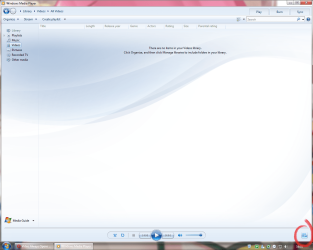
1. Open WMP12 and then go to Now playing.

2.png

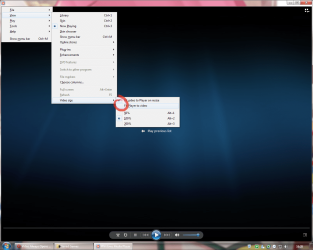
2. Press Alt to bring the menu and select View>Video Size>

3. Now uncheck the "Fit player to video" option.

1.png

4. Now resize the window to your preference.

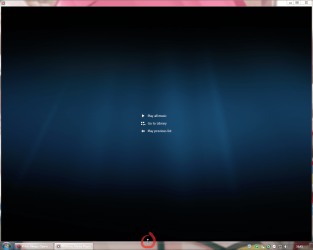
Optional: if you use the "show window stacked" option from the taskbar right click, make sure to touch the 4 borders of the window so they stay in that place after close "only happens in WMP12 a bug i think".

3.png

5. Now close WMP12 and try to open a video, it should now be remain resized.

Hope this solves your problem.
 

My Computer My Computer

At a glance

Windows 7 Ultimate x64Intel Core i5-2500K @4.5Ghzx2 Kingston KHX1600C9D3/4GNVIDIA GeForce GTS 250 - 1024MB
Computer type
PC/Desktop
OS
Windows 7 Ultimate x64
CPU
Intel Core i5-2500K @4.5Ghz
Motherboard
Asus Maximus V GENE
Memory
x2 Kingston KHX1600C9D3/4G
Graphics Card(s)
NVIDIA GeForce GTS 250 - 1024MB
Sound Card
SupremeFX III built-in 8-Channel High Definition Audio
Monitor(s) Displays
Samsung Syncmaster P2270
Screen Resolution
1920x1080
Hard Drives
x1 Seagate Barracuda ST3160811AS
x2 Seagate Barracuda ST380817AS
PSU
Corsair TX750
Case
Cooler Master HAF 922 Side Window Model
Cooling
Stock Intel Cooler + Tuniq TX2
Keyboard
Dell SK-8135
Mouse
Logitech G5
Internet Speed
2 Mbps
Other Info
x2 Xbox 360 Wireless Controller for Windows
Logitech Z-5550
Sennheiser HD555
Thanks, Rjck, but I've tried all variations of those sizing options in WMP12 and it doesn't help. The video still opens small after that.
 

My Computer My Computer

At a glance

XP / Win7 x64 ProIntel Quad-Core Q9450 @ 3.2GHz2x2GB GSkill DDR2NVIDIA GeForce 8600 GTS (EVGA)
OS
XP / Win7 x64 Pro
CPU
Intel Quad-Core Q9450 @ 3.2GHz
Motherboard
Asus P5-E
Memory
2x2GB GSkill DDR2
Graphics Card(s)
NVIDIA GeForce 8600 GTS (EVGA)
Monitor(s) Displays
Dell 2408WFP
Screen Resolution
1920x1200
Too bad that my post doesn't help you FliGi7, would you mind if i take a look on your computer over the internet...

send me a message and i let you know what we need to do.
 

My Computer My Computer

At a glance

Windows 7 Ultimate x64Intel Core i5-2500K @4.5Ghzx2 Kingston KHX1600C9D3/4GNVIDIA GeForce GTS 250 - 1024MB
Computer type
PC/Desktop
OS
Windows 7 Ultimate x64
CPU
Intel Core i5-2500K @4.5Ghz
Motherboard
Asus Maximus V GENE
Memory
x2 Kingston KHX1600C9D3/4G
Graphics Card(s)
NVIDIA GeForce GTS 250 - 1024MB
Sound Card
SupremeFX III built-in 8-Channel High Definition Audio
Monitor(s) Displays
Samsung Syncmaster P2270
Screen Resolution
1920x1080
Hard Drives
x1 Seagate Barracuda ST3160811AS
x2 Seagate Barracuda ST380817AS
PSU
Corsair TX750
Case
Cooler Master HAF 922 Side Window Model
Cooling
Stock Intel Cooler + Tuniq TX2
Keyboard
Dell SK-8135
Mouse
Logitech G5
Internet Speed
2 Mbps
Other Info
x2 Xbox 360 Wireless Controller for Windows
Logitech Z-5550
Sennheiser HD555
Yea, I would mind, actually. I'm not gonna give remote access to my computer, sorry. Other than that, I'm open to any help on this issue.

I have noticed that it not only opens in a small window every time, but it appears that all videos (that aren't some form of HD) open in a relatively same small size window in the same location.
 

My Computer My Computer

At a glance

XP / Win7 x64 ProIntel Quad-Core Q9450 @ 3.2GHz2x2GB GSkill DDR2NVIDIA GeForce 8600 GTS (EVGA)
OS
XP / Win7 x64 Pro
CPU
Intel Quad-Core Q9450 @ 3.2GHz
Motherboard
Asus P5-E
Memory
2x2GB GSkill DDR2
Graphics Card(s)
NVIDIA GeForce 8600 GTS (EVGA)
Monitor(s) Displays
Dell 2408WFP
Screen Resolution
1920x1200
Don't blame you... after all we didn't know each-other, shame... In any case, have you try to open WMP (without a video) after doing the steps i give you above and see if the now playing window stays like you resized before???. If it does, maybe is the WMP 64-bit version the trouble, you can found it under \Program Files\WMP folder no \Program Files(x86), and then do the same steps, then close and check (without a video) if all remains like u want to, if it does, try with a video an see if it work... good luck!!!
 

My Computer My Computer

At a glance

Windows 7 Ultimate x64Intel Core i5-2500K @4.5Ghzx2 Kingston KHX1600C9D3/4GNVIDIA GeForce GTS 250 - 1024MB
Computer type
PC/Desktop
OS
Windows 7 Ultimate x64
CPU
Intel Core i5-2500K @4.5Ghz
Motherboard
Asus Maximus V GENE
Memory
x2 Kingston KHX1600C9D3/4G
Graphics Card(s)
NVIDIA GeForce GTS 250 - 1024MB
Sound Card
SupremeFX III built-in 8-Channel High Definition Audio
Monitor(s) Displays
Samsung Syncmaster P2270
Screen Resolution
1920x1080
Hard Drives
x1 Seagate Barracuda ST3160811AS
x2 Seagate Barracuda ST380817AS
PSU
Corsair TX750
Case
Cooler Master HAF 922 Side Window Model
Cooling
Stock Intel Cooler + Tuniq TX2
Keyboard
Dell SK-8135
Mouse
Logitech G5
Internet Speed
2 Mbps
Other Info
x2 Xbox 360 Wireless Controller for Windows
Logitech Z-5550
Sennheiser HD555
Opening WMP by itself from the task bar launches it in the same size large window every time. It's only when a video is opened that it apparently sees the resolution and plays it at exactly that size no matter what, regardless of the last window size/position and apparently doesn't upscale it at all.
 

My Computer My Computer

At a glance

XP / Win7 x64 ProIntel Quad-Core Q9450 @ 3.2GHz2x2GB GSkill DDR2NVIDIA GeForce 8600 GTS (EVGA)
OS
XP / Win7 x64 Pro
CPU
Intel Quad-Core Q9450 @ 3.2GHz
Motherboard
Asus P5-E
Memory
2x2GB GSkill DDR2
Graphics Card(s)
NVIDIA GeForce 8600 GTS (EVGA)
Monitor(s) Displays
Dell 2408WFP
Screen Resolution
1920x1200
Back
Top