Solved Way to pin different Window Explorer shortcuts to Taskbar

akjudge

New member
Member
Local time
1:33 PM
Messages
48
I have created several Window Explorer shortcuts that open specific folder views -- all different. I did this to avoid scrolling through the left navigation pane in the standard Window Explorer view. I just click on the desired shortcut, and Windows Explorer opens to that particular customized window. Not really rocket science...:geek:

My problem is I would like to pin a couple of these desktop shortcuts to the taskbar for easier access. But it appears that I can only pin one of these Window Shortcuts at a time (have to unpin one to pin another). Anyone know of a way to do this? Note: I can pin multiple ones to the Start Menu, but only one to the Taskbar.
 

My Computer My Computer

At a glance

Windows 7 Professional
Computer type
PC/Desktop
OS
Windows 7 Professional
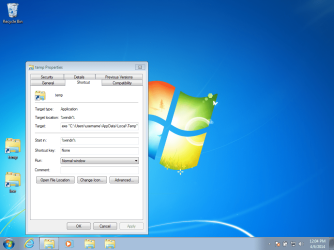
If you create the shortcut with a target like this...
%windir%\explorer.exe "C:\Users\username\AppData\Local\Temp"
...then you should be able to pin those to the task bar.

pinned.png
 

My Computer My Computer

At a glance

W7 Pro SP1 64biti78GBIntel HD Graphics
Computer type
Laptop
Computer Manufacturer/Model Number
Employer provided Dell Latitude
OS
W7 Pro SP1 64bit
CPU
i7
Memory
8GB
Graphics Card(s)
Intel HD Graphics
Hard Drives
crappy SSD
Antivirus
Employer mandated Symantec Endpoint Protection
Browser
Pale Moon 64bit, IE11 64bit & Chrome 64bit
Thanks for the reply UserNameIssues, but I'm no sure how to change the targets to get it to work (different drives)

specifically in my case, here are two examples of two different Window Explorer "shortcuts" that I use:

1st Shortcut Target = c:\windows\EXPLORER.EXE /n, /e, H:\Images\astronomy

2nd Shortcut Target = c:\windows\EXPLORER.EXE /n, /e, G:\Data

I can only pin one of these on the taskbar at a time. Want to pin both of them to the Taskbar.

What would be the correct Target "language" for the two above shortcuts, so I could pin both?
 

My Computer My Computer

At a glance

Windows 7 Professional
Computer type
PC/Desktop
OS
Windows 7 Professional

My Computer My Computer

At a glance

64-bit Windows 11 Pro for WorkstationsIntel i7-8700K OC'd to 5 GHz64 GB (4x16GB) G.SKILL TridentZ RGB DDR4 3600...ASUS ROG-STRIX-GTX1080TI-O11G-GAMING
Computer type
PC/Desktop
Computer Manufacturer/Model Number
Self built custom
OS
64-bit Windows 11 Pro for Workstations
CPU
Intel i7-8700K OC'd to 5 GHz
Motherboard
ASUS ROG Maximus XI Formula Z390
Memory
64 GB (4x16GB) G.SKILL TridentZ RGB DDR4 3600 MHz
Graphics Card(s)
ASUS ROG-STRIX-GTX1080TI-O11G-GAMING
Sound Card
Integrated
Monitor(s) Displays
2 x Samsung Odyssey G7 27"
Screen Resolution
2560x1440
Hard Drives
1TB Samsung 990 PRO M.2,
4TB Samsung 990 PRO PRO M.2,
TerraMaster F8 SSD Plus NAS
PSU
Seasonic Prime Titanium 850W
Case
Thermaltake Core P3
Cooling
Corsair Hydro H115i
Keyboard
Logitech wireless K800
Mouse
Logitech MX Master 4
Internet Speed
2 Gb/s Download and 100 Mb/s Upload
Antivirus
Malwarebyte Anti-Malware Premium
Browser
Google Chrome
Other Info
Logitech Z625 speaker system,
Logitech BRIO 4K Pro webcam,
HP Color LaserJet Pro MFP M477fdn,
APC SMART-UPS RT 1000 XL - SURT1000XLI,
Galaxy S23 Plus phone
Brink,

Option 1 of your Tutorial showed me where my problem was. It was simply a syntax error. (Being new to Windows 7, I just carried over the shortcut target syntax that worked in XP.)

For example, in my desktop shortcuts (that would not Pin to Taskbar) I changed:

c:\windows\EXPLORER.EXE /n, /e, H:\Images\astronomy TO C:\Windows\explorer.exe H:\Images\astronomy

After that the shortcut (and all the others similarly changed) would offer the Pin to Taskbar option upon right click.

So while I don't understand why both syntaxs work as desktop shortcuts, but only the second one can be pinned, I am happy.

Thanks to you and UserNameIssues (who I think was telling me the same thing). Just getting to know Windows 7, your tutorials are a great gift for those of us who need simplified steps...

Jim
 

My Computer My Computer

At a glance

Windows 7 Professional
Computer type
PC/Desktop
OS
Windows 7 Professional
Glad it could help Jim. :)
 

My Computer My Computer

At a glance

64-bit Windows 11 Pro for WorkstationsIntel i7-8700K OC'd to 5 GHz64 GB (4x16GB) G.SKILL TridentZ RGB DDR4 3600...ASUS ROG-STRIX-GTX1080TI-O11G-GAMING
Computer type
PC/Desktop
Computer Manufacturer/Model Number
Self built custom
OS
64-bit Windows 11 Pro for Workstations
CPU
Intel i7-8700K OC'd to 5 GHz
Motherboard
ASUS ROG Maximus XI Formula Z390
Memory
64 GB (4x16GB) G.SKILL TridentZ RGB DDR4 3600 MHz
Graphics Card(s)
ASUS ROG-STRIX-GTX1080TI-O11G-GAMING
Sound Card
Integrated
Monitor(s) Displays
2 x Samsung Odyssey G7 27"
Screen Resolution
2560x1440
Hard Drives
1TB Samsung 990 PRO M.2,
4TB Samsung 990 PRO PRO M.2,
TerraMaster F8 SSD Plus NAS
PSU
Seasonic Prime Titanium 850W
Case
Thermaltake Core P3
Cooling
Corsair Hydro H115i
Keyboard
Logitech wireless K800
Mouse
Logitech MX Master 4
Internet Speed
2 Gb/s Download and 100 Mb/s Upload
Antivirus
Malwarebyte Anti-Malware Premium
Browser
Google Chrome
Other Info
Logitech Z625 speaker system,
Logitech BRIO 4K Pro webcam,
HP Color LaserJet Pro MFP M477fdn,
APC SMART-UPS RT 1000 XL - SURT1000XLI,
Galaxy S23 Plus phone
~~~
Thanks to you and UserNameIssues (who I think was telling me the same thing). Just getting to know Windows 7, your tutorials are a great gift for those of us who need simplified steps...

Jim

I tried to get back to you as soon as you made post #3 - but some other threads got in the way. I see that Brink had a tutorial with the answer :-)

I was not positive of the answer - so I tested prior to making post #2. I made two shortcuts on the desktop and drug/pinned them to the task bar. They held thru a restart, so I made the post.

pinned.png

Oddly enough, your syntax worked for me too - but I was testing with local folders. Maybe if the folder of interest was using another drive letter, things might have failed.
 

My Computer My Computer

At a glance

W7 Pro SP1 64biti78GBIntel HD Graphics
Computer type
Laptop
Computer Manufacturer/Model Number
Employer provided Dell Latitude
OS
W7 Pro SP1 64bit
CPU
i7
Memory
8GB
Graphics Card(s)
Intel HD Graphics
Hard Drives
crappy SSD
Antivirus
Employer mandated Symantec Endpoint Protection
Browser
Pale Moon 64bit, IE11 64bit & Chrome 64bit
The wonders of Windows 7 simply baffle me at times...lol

Thanks UsernameIssues for testing my syntax.
 

My Computer My Computer

At a glance

Windows 7 Professional
Computer type
PC/Desktop
OS
Windows 7 Professional
Back
Top