Driver for WDC WD10EZEX not found

OldLaker

New member
Local time
8:46 AM
Messages
8
Hi All,

I thought I was going to have a really simple job today. Take out a WDC WD2500 HDD and replace with a WD10EZEX. Instead I got the "device driver software was not successfully installed". On that first boot it showed the WD10EZEX in device manager but with an exclamation mark. I tried to find driver automatically, nothing found.

So a quick summary of what I've tried so far:
- Swapped SATA cable
- Swapped SATA port
- Swapped power connection
- Rebooted a few times

Finally, I took the 10EZEX out of that desktop (let's call it "A") and put it in what is a near identical machine let's call that one "B" (same o/s, mobo, processor,WDC HDD). It found the driver on that machine and installed the HDD. All looked ok but that's not the machine I want the HDD in sadly! Checking the driver files on "B", they were located in the system32\driver folder. I checked for the same files on "A" they are in the same folder, same date, size etc.

Thanks for reading, any ideas anyone?
 

My Computer My Computer

Computer type
PC/Desktop
Computer Manufacturer/Model Number
Custom
OS
Win7 Pro x64
Motherboard
ASUS P8Z77-V LX2
Hard Drives
SanDisk SSD
WDC WD2500
Check if the following files exist:
> C:\Windows\inf\usbstor.inf
> C:\Windows\inf\usbstor.pnf
> C:\Windows\system32\usbstor.sys

If yes, see my post in another thread about USB Mass Storage Driver Problems
 

My Computer My Computer

Computer type
PC/Desktop
Computer Manufacturer/Model Number
Dell Optiplex 360 and Optiplex 755
OS
Desk 1: Win 7 Pro x32; Desk 2: Windows 10 x64
Hard Drives
500GB Crucial SSD in both Desktops
Other Info
Buffalo 6TB NAS, Raid 1
Thanks ComputerGeek, those 3 files did not exist (they were on the other desktop "B", sure enough).

I tried installing the Intel USB 3.0 drivers from CD onto "A" but got the message one of the drivers could not install. Re-booting, the driver was still not found.

I'd really appreciate some help with the next step.

Thanks!
 

My Computer My Computer

Computer type
PC/Desktop
Computer Manufacturer/Model Number
Custom
OS
Win7 Pro x64
Motherboard
ASUS P8Z77-V LX2
Hard Drives
SanDisk SSD
WDC WD2500

My Computer My Computer

Computer type
PC/Desktop
Computer Manufacturer/Model Number
Dell Optiplex 360 and Optiplex 755
OS
Desk 1: Win 7 Pro x32; Desk 2: Windows 10 x64
Hard Drives
500GB Crucial SSD in both Desktops
Other Info
Buffalo 6TB NAS, Raid 1
Hi. Followed those instructions, said it had removed 17 and kept 2.
Flash memory wouldn't install
 

My Computer My Computer

Computer type
PC/Desktop
Computer Manufacturer/Model Number
Custom
OS
Win7 Pro x64
Motherboard
ASUS P8Z77-V LX2
Hard Drives
SanDisk SSD
WDC WD2500
Either those files you copied aren't correct for A (are A and B both 64 bit machines? IDK if that might make a difference). Or there's an underlying problem with the Windows DriverStore.

If you go look back at my post in other thread (the link earlier in this thread), see my instruction in that thread on looking the files in the DriverStore (post #29) and copying them out of there.
> Check the DriverStore on A
> Do you have a usbstor folder in A's DriverStore? If yes, copy the missing files from usbstor folder with the most recent date.
> Also for usbstor.inf and .sys, right click dev mgr Properties>Driver, and tell me the driver version of each
> Then you can go ahead and re-test the flash drive

If still a problem, show me a snapshot of the usbstor folder names in A machine's DriverStore.

/* EDIT */
You can also try running an sfc (http://www.sevenforums.com/tutorials/1538-sfc-scannow-command-system-file-checker.html) though i don't remember if it includes checking for DriverStore issues.
 

My Computer My Computer

Computer type
PC/Desktop
Computer Manufacturer/Model Number
Dell Optiplex 360 and Optiplex 755
OS
Desk 1: Win 7 Pro x32; Desk 2: Windows 10 x64
Hard Drives
500GB Crucial SSD in both Desktops
Other Info
Buffalo 6TB NAS, Raid 1
"A" is the one with the problem.

I haven't copied any files onto "A", only run the USB 3.0 driver Cd and downloaded the drivecleanup.exe. Did I miss something?

Just so you know, "A" did have a usbstor_inf folder before I ran the driveclean, now it doesn't. It does have a couple of folders called usbstor.inf_amd64_neutral...

"B" is running Win7 64bit too. Are you saying copy the 3 files across from the "B" driverstore onto "A" ?

/EDIT/

"B" doesn't have the usbstor_inf folder either?
But as I said earlier, it does have the .ini .pnf and .sys files in the \inf and \system32 folders

THANKS!
 
Last edited:

My Computer My Computer

Computer type
PC/Desktop
Computer Manufacturer/Model Number
Custom
OS
Win7 Pro x64
Motherboard
ASUS P8Z77-V LX2
Hard Drives
SanDisk SSD
WDC WD2500
Quick summary of where we are:

"A" (problem)
Dev Man has an "Other Devices" line with the ! icon and ATA - Channel 3
Post #3 said the *.inf, pnf and sys files did not exist on "A" but did on "B" - I didn't copy files across to "A", as I wasn't instructed to
Followed instructions from post #4 - inserted memory stick and got 'driver not installed' message
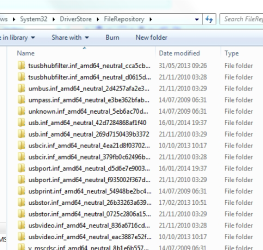
Don't have a usbstor_inf folder but have usbstor.inf.amd64_folder (screen shot)
Ran sfc - result was "no integrity violations"
USB ports don't seem to work any longer (apart from the 2 connected while running drivecleanup.exe, mouse and keyboard)

"B" (working fine)
Is a virtually identical machine
Also doesn't have usbsto_inf folder.
Post #6 says "Also for usbstor.inf and .sys, right click dev mgr Properties>Driver" - I don't get the "dev mgr" can you clarify?

I do have a system image/restore point.

Thanks!
 

Attachments

  • Screen area-001-001.png
    Screen area-001-001.png
    249.1 KB · Views: 0

My Computer My Computer

Computer type
PC/Desktop
Computer Manufacturer/Model Number
Custom
OS
Win7 Pro x64
Motherboard
ASUS P8Z77-V LX2
Hard Drives
SanDisk SSD
WDC WD2500
OK. Sorry for any confusion. my earlier post may not have been clear...

The 3 files i had check you in post #2 if they exist, are part of USB Mass Storage driver. If not there, the USB Mass Storage driver is corrupt. (Mouse/keyboard aren't mass storage devices - so not affected)

So from your snapshot, I want you to open the foldername which starts usbstor.inf_ and is dated 17/02/2013. You should find copies of those 3 files inside that folder. Copy each file to its proper directory.

> The usbstor.inf and .pnf files belong in C:\Windows\inf
> The usbstor.sys file belongs in C:\Windows\system32

Reboot. Try the flash drive again.

p.s. fyi... I'm out of the house and away from my x64 machine... so if i need provide any more detail then i can remember off the top of my head, won't be till tomorrow night or Saturday

/* EDIT */
Just realized, i forgot to mention.... If above doesn't work, try a System Restore next.
 
Last edited:

My Computer My Computer

Computer type
PC/Desktop
Computer Manufacturer/Model Number
Dell Optiplex 360 and Optiplex 755
OS
Desk 1: Win 7 Pro x32; Desk 2: Windows 10 x64
Hard Drives
500GB Crucial SSD in both Desktops
Other Info
Buffalo 6TB NAS, Raid 1
Hi All,

I thought I was going to have a really simple job today. Take out a WDC WD2500 HDD and replace with a WD10EZEX. Instead I got the "device driver software was not successfully installed". On that first boot it showed the WD10EZEX in device manager but with an exclamation mark. I tried to find driver automatically, nothing found.

So a quick summary of what I've tried so far:
- Swapped SATA cable
- Swapped SATA port
- Swapped power connection
- Rebooted a few times

Finally, I took the 10EZEX out of that desktop (let's call it "A") and put it in what is a near identical machine let's call that one "B" (same o/s, mobo, processor,WDC HDD). It found the driver on that machine and installed the HDD. All looked ok but that's not the machine I want the HDD in sadly! Checking the driver files on "B", they were located in the system32\driver folder. I checked for the same files on "A" they are in the same folder, same date, size etc.

Thanks for reading, any ideas anyone?

Check if the following files exist:
> C:\Windows\inf\usbstor.inf
> C:\Windows\inf\usbstor.pnf
> C:\Windows\system32\usbstor.sys

If yes, see my post in another thread about USB Mass Storage Driver Problems
Unless I'm missing a post somewhere, a WD 10EZEX is a SATA 6GB/s internal spinner hard disk drive and not a USB drive. Might I ask what drivers for USB flash drives have to do with a SATA internal hard drive? Thanks.
 

My Computer My Computer

Computer type
PC/Desktop
Computer Manufacturer/Model Number
Self-Built
OS
Win10 Pro 64-bit
CPU
AMD Ryzen 7 3800X
Motherboard
Gigabyte X570 UD
Memory
32 GB Kingston DDR4-2666
Graphics Card(s)
MSI nVidia GT 710 (2GB)
Sound Card
Creative Audigy FX 5.1
Monitor(s) Displays
ViewSonic VG2439Smh 24"
Screen Resolution
1920x1080
Hard Drives
3xWD1TB; 1xSeagate 1TB... all spinning rust
PSU
EVGA 100-W1-0500-KR (500w)
Case
SilverStone PS10 (modified)
Cooling
CPU:AMD Wraith Prism. Case:3x Noctua 120mm
Keyboard
Compaq Professional PS/2
Mouse
Microsoft Basic Optical Mouse 2.0
Internet Speed
Fiber 1Gbit/sec down/up
Antivirus
Avast Free
Browser
FF, Chrome
Other Info
2x LG GH24NSC0 DVD burners, Mackie CR3 monitor speakers
Check if the following files exist:
> C:\Windows\inf\usbstor.inf
> C:\Windows\inf\usbstor.pnf
> C:\Windows\system32\usbstor.sys

If yes, see my post in another thread about USB Mass Storage Driver Problems
Unless I'm missing a post somewhere, a WD 10EZEX is a SATA 6GB/s internal spinner hard disk drive and not a USB drive. Might I ask what drivers for USB flash drives have to do with a SATA internal hard drive? Thanks.
That's an excellent question. And I'm glad you asked.

On the one hand, I must have had USB on the brain from the start as I had just finished working on a USB thread.

On the other hand, when I asked the OP to check if those 3 USB storage driver files exist. The answer should have been "Yes, all the files are there". But the answer came back "No". So, either the answer was incorrect or there's more then one problem here.

Also evidenced by a flash drive didn't install. The driveclean tool uninstalls driver references from the registry. It only deletes registry keys. It doesn't delete files.

Perhaps the OP could clarify? In any case, attempting a System Restore is still a good thing to try.
 
Last edited:

My Computer My Computer

Computer type
PC/Desktop
Computer Manufacturer/Model Number
Dell Optiplex 360 and Optiplex 755
OS
Desk 1: Win 7 Pro x32; Desk 2: Windows 10 x64
Hard Drives
500GB Crucial SSD in both Desktops
Other Info
Buffalo 6TB NAS, Raid 1
Yes, I can clarify that for you ComputerGeek: in Post #2 I said that the three usbstor files were NOT on the machine that I was having problems with but they WERE on another (almost identical) machine in those folders. Like I said in my last post, I didn't copy them across because I wasn't told to.

I've followed the advice so far to the word, anyway let's move on and I can give you an update.

I copied those three files from the 17/02/13 folder like you said, re-booted and tried the memory stick. Wouldn't install, got no messages.

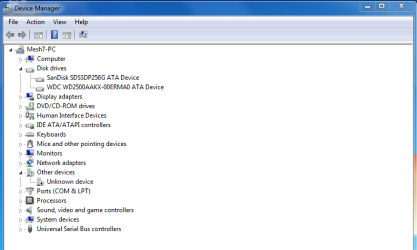
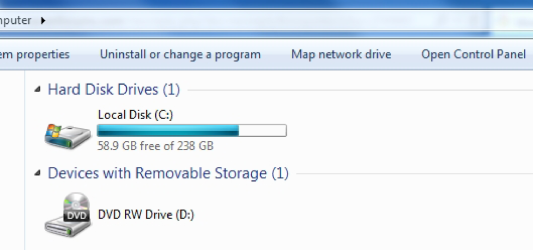
So I reconnected the old WDC drive, intending to do a restore. I've 2 screen prints, it's installed but I can't seem to access it to do the restore.

Just before Post #3, I had no problems accessing that HDD and it's never given me problems before (other than not having enough storage).

Appreciate any help towards getting the original and new issues resolved - thanks.
 

Attachments

  • Dev Mgr-001.png
    Dev Mgr-001.png
    161 KB · Views: 0
  • Computer-001.png
    Computer-001.png
    83 KB · Views: 0

My Computer My Computer

Computer type
PC/Desktop
Computer Manufacturer/Model Number
Custom
OS
Win7 Pro x64
Motherboard
ASUS P8Z77-V LX2
Hard Drives
SanDisk SSD
WDC WD2500
So on one machine, we have no USB drivers, and no drivers for a new hard disk; the old hard disk is recognized when installed and booted up.

I agree with ComputerGeek (and thanks for answering my question)...a System Restore would be a good idea, especially since it seems that the Registry's been altered. I might also suspect that SFC /SCANNOW could be run as well to replace missing Windows files... but I don't think that will fix the Registry.

I really hesitate to suggest a Windows Repair Install...

OldLaker... could you install the NEW WD 10EZEX in the other machine, just to confirm that the new drive is recognized by that computer and isn't DOA?
 

My Computer My Computer

Computer type
PC/Desktop
Computer Manufacturer/Model Number
Self-Built
OS
Win10 Pro 64-bit
CPU
AMD Ryzen 7 3800X
Motherboard
Gigabyte X570 UD
Memory
32 GB Kingston DDR4-2666
Graphics Card(s)
MSI nVidia GT 710 (2GB)
Sound Card
Creative Audigy FX 5.1
Monitor(s) Displays
ViewSonic VG2439Smh 24"
Screen Resolution
1920x1080
Hard Drives
3xWD1TB; 1xSeagate 1TB... all spinning rust
PSU
EVGA 100-W1-0500-KR (500w)
Case
SilverStone PS10 (modified)
Cooling
CPU:AMD Wraith Prism. Case:3x Noctua 120mm
Keyboard
Compaq Professional PS/2
Mouse
Microsoft Basic Optical Mouse 2.0
Internet Speed
Fiber 1Gbit/sec down/up
Antivirus
Avast Free
Browser
FF, Chrome
Other Info
2x LG GH24NSC0 DVD burners, Mackie CR3 monitor speakers
Ok, thanks.

System restored. USBs working and can access the old WD2500AAKX once more.

SFC / SCANNOW run. No integrity violations.

I'd already tested WD10EZEX by installing it on the other machine before posting on the forum (mentioned in #1). It's not DOA. However, if there's something we can learn from doing that again, I'm happy to try it out, let me know.

Looks like the issue is specific to desktop "A".

/ * EDIT * /

I just re-read the WDC specs. I did the upgrade to the WD10EZEX because it was in the same Caviar Blue family as the old 2500AAKX (expecting no surprises). The only differences are: cache (64Mb vs 16 Mb), data transfer rate (host to/from drive 150Mb/s vs 126Mb/s) and the EZ10EZEX needs more power. The only hardware differences between machines "A" and "B" are the backup HDDs, the PSUs and graphics cards.

When WD10EZEX is installed on "B" the driver is showing as 6.1.760.16385 in the Device Properties for the HDD. I have the same driver (name and date) on "A" when WD2500AAKX is installed.
 
Last edited:

My Computer My Computer

Computer type
PC/Desktop
Computer Manufacturer/Model Number
Custom
OS
Win7 Pro x64
Motherboard
ASUS P8Z77-V LX2
Hard Drives
SanDisk SSD
WDC WD2500
Whooopie! We got your USB issue resolved! :)

When WD10EZEX is installed on "B" the driver is showing as 6.1.760.16385 in the Device Properties for the HDD. I have the same driver (name and date) on "A" when WD2500AAKX is installed.
OK. That's good and what i'd expect to see.

Question is: What do you see in Device Manager when the WD10EZEX is installed? I see an Other device in your earlier screen shot (that's disabled). You still have an Other device when WD10EZEX is installed?

Install the drive again
  • Click the Start Orb. Type msinfo32 in the search box, hit Enter
  • When the window opens, click the + sign next to Components to expand it
  • Click Problem Devices. Anything appear?
  • If yes, click on it, Ctrl-A to select all, Ctrl-C to copy it, Ctrl-V to paste into next post
  • On the other hand, if no devices are listed, tell me so
 

My Computer My Computer

Computer type
PC/Desktop
Computer Manufacturer/Model Number
Dell Optiplex 360 and Optiplex 755
OS
Desk 1: Win 7 Pro x32; Desk 2: Windows 10 x64
Hard Drives
500GB Crucial SSD in both Desktops
Other Info
Buffalo 6TB NAS, Raid 1
I'd already tested WD10EZEX by installing it on the other machine before posting on the forum (mentioned in #1). It's not DOA.
Ouch. Missed that. My bad.:o
 

My Computer My Computer

Computer type
PC/Desktop
Computer Manufacturer/Model Number
Self-Built
OS
Win10 Pro 64-bit
CPU
AMD Ryzen 7 3800X
Motherboard
Gigabyte X570 UD
Memory
32 GB Kingston DDR4-2666
Graphics Card(s)
MSI nVidia GT 710 (2GB)
Sound Card
Creative Audigy FX 5.1
Monitor(s) Displays
ViewSonic VG2439Smh 24"
Screen Resolution
1920x1080
Hard Drives
3xWD1TB; 1xSeagate 1TB... all spinning rust
PSU
EVGA 100-W1-0500-KR (500w)
Case
SilverStone PS10 (modified)
Cooling
CPU:AMD Wraith Prism. Case:3x Noctua 120mm
Keyboard
Compaq Professional PS/2
Mouse
Microsoft Basic Optical Mouse 2.0
Internet Speed
Fiber 1Gbit/sec down/up
Antivirus
Avast Free
Browser
FF, Chrome
Other Info
2x LG GH24NSC0 DVD burners, Mackie CR3 monitor speakers
Ok, well thanks I guess, I do appreciate all the time you've taken on this and best endeavours etc.

I've stopped at the point where the restore was done, so I won't mark this as solved. I can say why in full if you want it as a point of record.

The machine is working just fine again and I've decided to juggle around some hardware and will run the new drive on the other machine (where it works) and just be more careful about managing space on this machine where I'd intended it to be used. I'll take care of that myself.

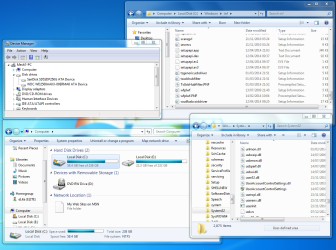
I've provided a screenshot, more so you can reflect on the mystery (if you like) of all this. Those files didn't exist before the hardware upgrade attempt and the machine (with this hardware) runs just fine. The two HDDs (old and new) have been in and out quite frequently, I can assure you that when installing WD2500 (it searched and found the drivers) there is evidently no need for those 3 files. It's odd.
 

Attachments

  • Montage-001.png
    Montage-001.png
    989.6 KB · Views: 2

My Computer My Computer

Computer type
PC/Desktop
Computer Manufacturer/Model Number
Custom
OS
Win7 Pro x64
Motherboard
ASUS P8Z77-V LX2
Hard Drives
SanDisk SSD
WDC WD2500
Back
Top