System partition randomly jump to Backup drive

Runic

New member
Local time
12:22 AM
Messages
5
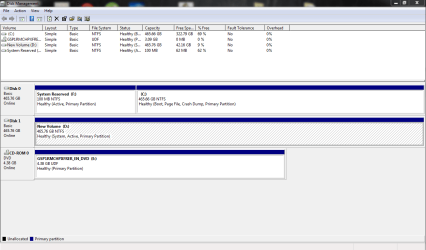
Hi , new user here. Currently i'm having some problems with my window 7 home premium, any ideas how to switch the system partition status back to my system reserved? I tried to set inactive with diskpart for my backup Drive D: but it will cause BOOTMGR IS MISSING.

Another problem is that , after a certain period when the laptop is off, when i power on the laptop, it will cause errors such as oxc000000f.Apprently my drive letter will randomly swap around , for example My window drive C: will swap with my backup/system reserved letter, even switching back to the correct letter and startup repair it , the end result is no os files found on disk. a temporary fixed is to delete the drive,install window 7 then system image restore back again. Any help for this?
 

Attachments
  • backup is system.PNG
    backup is system.PNG
    24.2 KB · Views: 1

My Computer My Computer

Computer type
Laptop
Computer Manufacturer/Model Number
Asus
OS
Windows 7 home premium 64bit.
Memory
8192MB
Graphics Card(s)
geforce gtx 560m
Antivirus
avast
Browser
Firefox
You should only have one HD/SSD drive connected when you install Windows, the drive where you are installing Windows.
My guess is you had two drives connected when you installed Windows and that caused the issues.

To fix your current install you can try this:
- Disconnect the backup drive
- Run Startup Repair (run it 3 times with a reboot after each Repair)

Here's some tutorials about Startup Repair:
http://www.sevenforums.com/tutorials/681-startup-repair.html
http://www.sevenforums.com/tutorials/105541-startup-repair-run-3-separate-times.html
See if Windows will now boot successfully with the backup drive disconnected.

OR, if you're up for another re-install, here's a tutorial for a clean install.
http://www.sevenforums.com/tutorials/219487-clean-reinstall-factory-oem-windows-7-a.html
If you don't want to re-install, read through it and see how it compares to how you installed Windows.

When everything is working correctly with only the one HD connected, reconnect HD two (Backup drive) and remove the active flag

Disclaimer: I'm not an installation guru, so you can wait for others to post with advice.
The tutorials should at least give you something to read through for a better understanding of this ...

Welcome to Seven Forums !
 

My Computer My Computer

Computer type
PC/Desktop
Computer Manufacturer/Model Number
home built
OS
Multi-Boot W7_Pro_x64 W8.1_Pro_x64 W10_Pro_x64 +Linux_VMs +Chromium_VM
CPU
AMD Athlon II x4 620
Motherboard
Gigabyte GA-MA785G-UD3H
Memory
6GB GSkill DDR2 800
Graphics Card(s)
AMD 4670 GPU + AMD 4200 IGP
Sound Card
on board Realtek ALC889A
Monitor(s) Displays
RCA 40" LCD TV, Insignia 32" LCD TV, HP 15" LCD monitor
Screen Resolution
1680 x 1050
Hard Drives
OCZ Vertex 3 120GB,
Samsung F3 1TB (3),
Several others - WD, Seagate, Hitachi, ...
PSU
Corsair 500 W
Case
Rosewill mid tower
Cooling
CM 90mm rifle
Keyboard
Gyration wireless, Logitech wireless, Dell USB wired
Mouse
Gyration wireless, Logitech wireless, V7 USB wired
Internet Speed
Spectrum - 100Mbps D / 10Mbps U
Antivirus
Avast, MBAM3, EMET, WinPatrol
Browser
Pale Moon, Firefox, IE
Other Info
2 multi-boot PC's
Mainly HTPC/Office/Gen purpose (no gaming).
Trendnet USB KVM.
LG DVD burner/Blue Ray Player.
Tray system for removable SATA backup drives.

Not currently OCd, under-volted.
I use Hybrid sleep, rarely re-boot or shutdown.

Hauppauge HD-PVR, Avermedia PCIe TV Tuner, Hauppauge PCI TV Tuner.
Hey thanks !
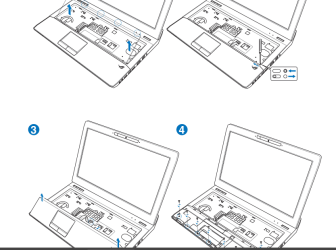
But though I have no idea how to disconnect HD two since its built in inside my laptop.
I did a clean install on my Drive C: however , it doesnt create a system reserved partition which made me confused since installing a window into a unallocated disk will automated create a system served partition.
 

My Computer My Computer

Computer type
Laptop
Computer Manufacturer/Model Number
Asus
OS
Windows 7 home premium 64bit.
Memory
8192MB
Graphics Card(s)
geforce gtx 560m
Antivirus
avast
Browser
Firefox
Laptops often have a removable HD accessed in a "cover" on the bottom of the Laptop.
What is the exact MODEL of your Asus laptop ?
It's best if you include that info in your SF specs.
I'll see if I can find the User Manual with this info ...
 

My Computer My Computer

Computer type
PC/Desktop
Computer Manufacturer/Model Number
home built
OS
Multi-Boot W7_Pro_x64 W8.1_Pro_x64 W10_Pro_x64 +Linux_VMs +Chromium_VM
CPU
AMD Athlon II x4 620
Motherboard
Gigabyte GA-MA785G-UD3H
Memory
6GB GSkill DDR2 800
Graphics Card(s)
AMD 4670 GPU + AMD 4200 IGP
Sound Card
on board Realtek ALC889A
Monitor(s) Displays
RCA 40" LCD TV, Insignia 32" LCD TV, HP 15" LCD monitor
Screen Resolution
1680 x 1050
Hard Drives
OCZ Vertex 3 120GB,
Samsung F3 1TB (3),
Several others - WD, Seagate, Hitachi, ...
PSU
Corsair 500 W
Case
Rosewill mid tower
Cooling
CM 90mm rifle
Keyboard
Gyration wireless, Logitech wireless, Dell USB wired
Mouse
Gyration wireless, Logitech wireless, V7 USB wired
Internet Speed
Spectrum - 100Mbps D / 10Mbps U
Antivirus
Avast, MBAM3, EMET, WinPatrol
Browser
Pale Moon, Firefox, IE
Other Info
2 multi-boot PC's
Mainly HTPC/Office/Gen purpose (no gaming).
Trendnet USB KVM.
LG DVD burner/Blue Ray Player.
Tray system for removable SATA backup drives.

Not currently OCd, under-volted.
I use Hybrid sleep, rarely re-boot or shutdown.

Hauppauge HD-PVR, Avermedia PCIe TV Tuner, Hauppauge PCI TV Tuner.
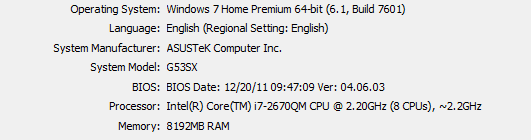
Oh sorry, heres my system spec but do you think if i format both disk , it might work?
 

Attachments

  • sys.PNG
    sys.PNG
    4.2 KB · Views: 12

My Computer My Computer

Computer type
Laptop
Computer Manufacturer/Model Number
Asus
OS
Windows 7 home premium 64bit.
Memory
8192MB
Graphics Card(s)
geforce gtx 560m
Antivirus
avast
Browser
Firefox
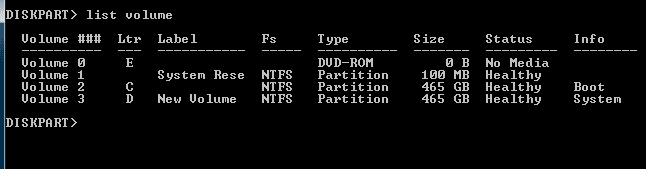
Also the diskpart , the system suppose to be at volume 1, no idea how they swap..
 

Attachments

  • idskpar.PNG
    idskpar.PNG
    2.1 KB · Views: 11

My Computer My Computer

Computer type
Laptop
Computer Manufacturer/Model Number
Asus
OS
Windows 7 home premium 64bit.
Memory
8192MB
Graphics Card(s)
geforce gtx 560m
Antivirus
avast
Browser
Firefox
Last edited:

My Computer My Computer

Computer type
PC/Desktop
Computer Manufacturer/Model Number
home built
OS
Multi-Boot W7_Pro_x64 W8.1_Pro_x64 W10_Pro_x64 +Linux_VMs +Chromium_VM
CPU
AMD Athlon II x4 620
Motherboard
Gigabyte GA-MA785G-UD3H
Memory
6GB GSkill DDR2 800
Graphics Card(s)
AMD 4670 GPU + AMD 4200 IGP
Sound Card
on board Realtek ALC889A
Monitor(s) Displays
RCA 40" LCD TV, Insignia 32" LCD TV, HP 15" LCD monitor
Screen Resolution
1680 x 1050
Hard Drives
OCZ Vertex 3 120GB,
Samsung F3 1TB (3),
Several others - WD, Seagate, Hitachi, ...
PSU
Corsair 500 W
Case
Rosewill mid tower
Cooling
CM 90mm rifle
Keyboard
Gyration wireless, Logitech wireless, Dell USB wired
Mouse
Gyration wireless, Logitech wireless, V7 USB wired
Internet Speed
Spectrum - 100Mbps D / 10Mbps U
Antivirus
Avast, MBAM3, EMET, WinPatrol
Browser
Pale Moon, Firefox, IE
Other Info
2 multi-boot PC's
Mainly HTPC/Office/Gen purpose (no gaming).
Trendnet USB KVM.
LG DVD burner/Blue Ray Player.
Tray system for removable SATA backup drives.

Not currently OCd, under-volted.
I use Hybrid sleep, rarely re-boot or shutdown.

Hauppauge HD-PVR, Avermedia PCIe TV Tuner, Hauppauge PCI TV Tuner.
a temporary fixed is to delete the drive,install window 7 then system image restore back again. Any help for this?

Re-reading your OP (post #1), it sounds like you are re-installing Windows, and then restoring a backup image.
If you restore a backup image after re-installing it will "replace" the re-install ...
:confused:
Am I understanding this correctly?
 

My Computer My Computer

Computer type
PC/Desktop
Computer Manufacturer/Model Number
home built
OS
Multi-Boot W7_Pro_x64 W8.1_Pro_x64 W10_Pro_x64 +Linux_VMs +Chromium_VM
CPU
AMD Athlon II x4 620
Motherboard
Gigabyte GA-MA785G-UD3H
Memory
6GB GSkill DDR2 800
Graphics Card(s)
AMD 4670 GPU + AMD 4200 IGP
Sound Card
on board Realtek ALC889A
Monitor(s) Displays
RCA 40" LCD TV, Insignia 32" LCD TV, HP 15" LCD monitor
Screen Resolution
1680 x 1050
Hard Drives
OCZ Vertex 3 120GB,
Samsung F3 1TB (3),
Several others - WD, Seagate, Hitachi, ...
PSU
Corsair 500 W
Case
Rosewill mid tower
Cooling
CM 90mm rifle
Keyboard
Gyration wireless, Logitech wireless, Dell USB wired
Mouse
Gyration wireless, Logitech wireless, V7 USB wired
Internet Speed
Spectrum - 100Mbps D / 10Mbps U
Antivirus
Avast, MBAM3, EMET, WinPatrol
Browser
Pale Moon, Firefox, IE
Other Info
2 multi-boot PC's
Mainly HTPC/Office/Gen purpose (no gaming).
Trendnet USB KVM.
LG DVD burner/Blue Ray Player.
Tray system for removable SATA backup drives.

Not currently OCd, under-volted.
I use Hybrid sleep, rarely re-boot or shutdown.

Hauppauge HD-PVR, Avermedia PCIe TV Tuner, Hauppauge PCI TV Tuner.
yup , basically reinstall back the windows so that i can restore back my system image. Thanks for your previous post too ! Will update you after i try around some restores thing before attempting the HD removal.
Beside the system partition , still have no idea why my hard drive letters will swap around after a period of time where my laptop is power off. Can't find any solution online q_q
 

My Computer My Computer

Computer type
Laptop
Computer Manufacturer/Model Number
Asus
OS
Windows 7 home premium 64bit.
Memory
8192MB
Graphics Card(s)
geforce gtx 560m
Antivirus
avast
Browser
Firefox
What system imaging utility are you using?
I restore System Backup images but I never re-install Windows before restoring.
If you're using the built in Windows utility, I can't help.
I tried it years ago when Win 7 was released and it didn't work well FOR ME.

3rd party Imaging utilities can restore an image from a bootable optical disc - no re-install needed before the image restore.

Some popular (recommended) free Imaging Programs are Macrium and Aoemi ... I'm sure there are more
(I use Acronis paid)
 

My Computer My Computer

Computer type
PC/Desktop
Computer Manufacturer/Model Number
home built
OS
Multi-Boot W7_Pro_x64 W8.1_Pro_x64 W10_Pro_x64 +Linux_VMs +Chromium_VM
CPU
AMD Athlon II x4 620
Motherboard
Gigabyte GA-MA785G-UD3H
Memory
6GB GSkill DDR2 800
Graphics Card(s)
AMD 4670 GPU + AMD 4200 IGP
Sound Card
on board Realtek ALC889A
Monitor(s) Displays
RCA 40" LCD TV, Insignia 32" LCD TV, HP 15" LCD monitor
Screen Resolution
1680 x 1050
Hard Drives
OCZ Vertex 3 120GB,
Samsung F3 1TB (3),
Several others - WD, Seagate, Hitachi, ...
PSU
Corsair 500 W
Case
Rosewill mid tower
Cooling
CM 90mm rifle
Keyboard
Gyration wireless, Logitech wireless, Dell USB wired
Mouse
Gyration wireless, Logitech wireless, V7 USB wired
Internet Speed
Spectrum - 100Mbps D / 10Mbps U
Antivirus
Avast, MBAM3, EMET, WinPatrol
Browser
Pale Moon, Firefox, IE
Other Info
2 multi-boot PC's
Mainly HTPC/Office/Gen purpose (no gaming).
Trendnet USB KVM.
LG DVD burner/Blue Ray Player.
Tray system for removable SATA backup drives.

Not currently OCd, under-volted.
I use Hybrid sleep, rarely re-boot or shutdown.

Hauppauge HD-PVR, Avermedia PCIe TV Tuner, Hauppauge PCI TV Tuner.
As David says you should be recovering using the image from the application's boot disk. If it's Win7 backup imaging then follow this: System Image Recovery.

As to how to move the System flag to System Reserved, Is this another internal hard drive? See if you can disable the storage drive in BIOS setup before running Startup Repair - Run 3 Separate Times.

If unable to disable or disconnect the storage drive - don't risk ruining your laptop if you're not confident of disassembly - then I would download Partition Wizard CD, burn to CD using Windows Image Burner, boot it to rightclick Storage drive, select Modify>Set to Inactive, OK. Apply step. How to Set Active/Inactive partition -Partition Wizard Video Help.

Next rightclick D to Modify>Set to Logical, OK, Apply. How to set partition as Primary or Logical with Partition Wizard

Now you have a Logical data drive which cannot be used to boot Win7, so confirm System Reserved is still Active, then run Startup Repair - Run 3 Separate Times until Win7 starts and has the System Flag on System Reserved.

Or once Storage drive is safely Logical, you can do a Clean Reinstall - Factory OEM Windows 7 to DISK0, deleting all partitions during the booted install. Make sure not to touch your data drive!
 
Last edited:
If its a windows system image, created with windows backup, reinstalling windows and then going to backup and recovery in control panel, use the option recover system settings or your computer. Then choose advanced recovery methods. Then click use a system image you created earlier to recover your computer. Works flawlessy every time when done that way.
 

My Computer My Computer

Computer type
PC/Desktop
Computer Manufacturer/Model Number
Custom Built
OS
Windows 10 Pro
CPU
AMD Ryzen 5 2400G Processor with Radeon RX Vega 11 Graphics
Motherboard
ASRock X470 Master SLI/AC AM4 AMD Promontory X470 SATA 6Gb/s
Memory
G.SKILL Ripjaws V Series 16GB (2 x 8GB) 288-Pin DDR4 SDRAM D
Graphics Card(s)
2047MB NVIDIA GeForce GTX 1060 6GB (EVGA)
Sound Card
Motherboard Built in
Monitor(s) Displays
Acer R240HY bidx 23.8-Inch IPS HDMI DVI VGA (1920 x 1080) Wi
Screen Resolution
1920 x 1080
Hard Drives
1TB Sandisk SSD PLUS (Main drive)
500 GB Seagate 7200 RPM (Games)
500 GB Western Digital 7200 RPM (Virtual Machines)
PSU
CORSAIR TX Series TX650M 650W 80+ Gold Modular Power Supply
Case
CORSAIR CARBIDE SPEC-02 Mid-Tower Gaming Case, Red LED Fan
Cooling
220mm, two 120mm, and four 60mm fans
Keyboard
Wired Dell keyboard
Mouse
Wireless Logitech mouse
Internet Speed
250mb down, 30mb up
Antivirus
Panda Cloud Antivirus
Browser
Chrome-ish x64
Other Info
Your awesome for reading this.
Back
Top