How can i resolve this Installing/Updating a Driver Issue?

jhayeroe

New member
Local time
2:26 AM
Messages
2
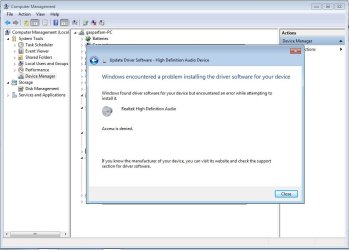
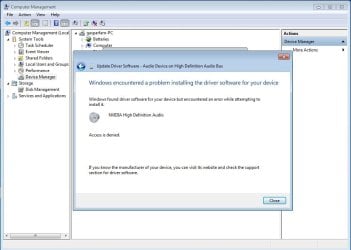
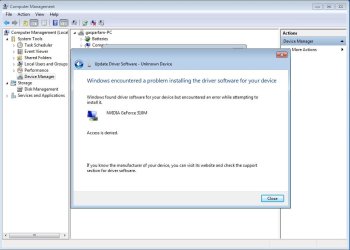
I've been working on the update of driver of my Laptop and it so happen that it does not complete the installation, for it keeps on saying that "windows found driver software for your device but encountered an error while attempting to install it" :(

I want to look for this "ERROR" but i can't detect nor search for the real cause of this error :(

For Now I am just using my Laptop at its Least extent because I cant Maximize its usage for I don't have a Graphics Driver or (Display Driver) and Audio Driver :(

I am really worried for i cant solve this issue which i am presently encountering :(

Can anyone help me to get this thing Up? :)
 

Attachments

  • Audio.jpg
    Audio.jpg
    63.8 KB · Views: 1
  • NVIDIA Audio.jpg
    NVIDIA Audio.jpg
    62.9 KB · Views: 0
  • NVIDIA Graphics Driver.jpg
    NVIDIA Graphics Driver.jpg
    62 KB · Views: 0

My Computer My Computer

At a glance

Windows 7 Ultimate x32
Computer type
Laptop
Computer Manufacturer/Model Number
Acer
OS
Windows 7 Ultimate x32
Antivirus
Avast
Browser
Google Chrome
First of all, if you had no video drivers installed, you would not be seeing a desktop -- so you MUST have some drivers in place already.

Second, why are you using the Computer Management to install drivers instead of Device Manager?
 

My Computer My Computer

At a glance

Win7 Pro 32-bit, Win8 Pro 32-bitAMD Phenom II X6 1090T4GB ddr3 1300AMD HD 4290 onboard
Computer type
PC/Desktop
Computer Manufacturer/Model Number
Custom
OS
Win7 Pro 32-bit, Win8 Pro 32-bit
CPU
AMD Phenom II X6 1090T
Motherboard
Gigabyte
Memory
4GB ddr3 1300
Graphics Card(s)
AMD HD 4290 onboard
Sound Card
Builtin Realtek HD Audio
Monitor(s) Displays
Samsung 24" widescreen, LG 23" widescreen
Screen Resolution
1920x1200/1920x1080
Hard Drives
Kingston 256GB SSD
Keyboard
Logitech Illuminated Keyboard
Mouse
Logitech M705 wireless mouse
Antivirus
Norton Av 2013
Browser
IE v10
Go to each manufacturer and download the latest audio and video drivers for your devices to a Temp Folder. Turn OFF your antivirus and Spyware so it does not interfere with installation. Open the Audio drivers first (from your Temp folder) and right click on the .exe so you can use Run as Administrator. Follow instructions but do not Restart if asked. Do the same thing with the Nvidia (video) drivers and make sure you click on the Full or Clean installation and restart after everything is complete. It should restart and apply all the changes, it may even ask you to restart again after it finishes.

It may go to the Windows Desktop and not tell you that it is finishing installing so DO NOT touch it or launch any other application for a few minutes (5 mins should be more than enough), if it doesn't tell you to restart again, you can then go to Device Manager and check the dates of your drivers, it should say 2014 or at least 2013 and it should not say Microsoft as those are just the Generic Drivers windows mounts.
 

My Computer My Computer

At a glance

Windows 7 x64 (Ultimate)Intel i5-4670K8GBs Ripjaws 2133MhzAsus GTX660 (2GBs)
Computer type
PC/Desktop
Computer Manufacturer/Model Number
Custom Built... Intel/Nvidia/ASRock
OS
Windows 7 x64 (Ultimate)
CPU
Intel i5-4670K
Motherboard
ASRock Z87 Extreme 6
Memory
8GBs Ripjaws 2133Mhz
Graphics Card(s)
Asus GTX660 (2GBs)
Sound Card
Onboard Realtek HD
Monitor(s) Displays
Acer AL2216W
Screen Resolution
1680 x 1050
Hard Drives
Samsung 840 SSD 120GBs
Samsung 750GB 32MB cache
1.5 TB
PSU
PC Cooling 750w Silencer
Case
Thermaltake Spedo Advance
Cooling
Std Cooler
Keyboard
Logitech G15
Mouse
Logitech G9
Internet Speed
Comcast 20Mbit
Antivirus
Avast
Browser
Firefox
First of all, if you had no video drivers installed, you would not be seeing a desktop -- so you MUST have some drivers in place already.

Second, why are you using the Computer Management to install drivers instead of Device Manager?

He is using Device Manager, look at his picture again. ;)
 

My Computer My Computer

At a glance

Windows 10 Pro x64Intel Core i7 6700KGSkill TridentZ RGB 16GB 3600 16-16-16-36EVGA GTX 980 Ti SC x2
Computer type
PC/Desktop
Computer Manufacturer/Model Number
Skylake Special #666
OS
Windows 10 Pro x64
CPU
Intel Core i7 6700K
Motherboard
Asus Sabertooth Z170 Mark 1
Memory
GSkill TridentZ RGB 16GB 3600 16-16-16-36
Graphics Card(s)
EVGA GTX 980 Ti SC x2
Sound Card
Realtek High Definition
Monitor(s) Displays
AOC G2460PG
Screen Resolution
1920 x 1080 144Hz
Hard Drives
Samsung 860 Pro 256GB, Seagate Barracuda 4TB x2
PSU
EVGA 1000 P2, EVGA White Custom Braided Cables
Case
Corsair Vengeance C70 Gunmetal Black
Cooling
Corsair H100i v2, Corsair ML120 x2, Thermal Grizzly Kryonaut
Keyboard
Logitech G910 Orion Spectrum
Mouse
Logitech G700s
Internet Speed
Verizon Fios Quantum Gateway 75/75
Antivirus
Windows Defender, Malwarebytes Free 3.8.3
Browser
Chrome
Other Info
Corsair SP120 x4, LG Blu-ray Drive, Durabrand HT-395 100 Watt Dolby Digital Amp, Corsair H2100 Wireless 7.1 Headset
thank you for all your replies sir I will try those methods and i will post updates to what will happen ^_^

thank you for your accomodation :D
 

My Computer My Computer

At a glance

Windows 7 Ultimate x32
Computer type
Laptop
Computer Manufacturer/Model Number
Acer
OS
Windows 7 Ultimate x32
Antivirus
Avast
Browser
Google Chrome
Back
Top