windows 7 local area connection ipv4 properties greyed out

plumpf

New member
Member
VIP
Local time
7:20 AM
Messages
108
hi
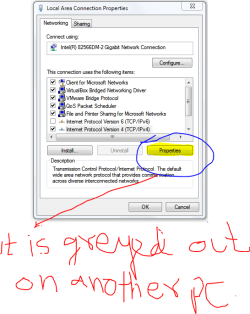
on a wwindows 7 machine the local area connection tcp ip v4 properties button is greyed out.
i have logged in as admininstrator .
it is also greyed out if i login with another account ..

i also get the following error
There are not protocols installed or enabled. You must install and enable at least one protocol for this connection to work. Do you want to select a protocol now?
for refrence i have attached picture from a working computer. just to illustrate the problem.

please help
 

Attachments

  • tcp ip greyed out.PNG
    tcp ip greyed out.PNG
    24.1 KB · Views: 44
Last edited:

My Computer My Computer

At a glance

Windows 7 Ultimate x64E65508GB DDR2
Computer type
PC/Desktop
Computer Manufacturer/Model Number
Dell 755
OS
Windows 7 Ultimate x64
CPU
E6550
Motherboard
Stock Q35 Chipset Based
Memory
8GB DDR2
Hard Drives
1TB
Keyboard
Microsoft Comfort 2000
Mouse
Microsoft
Antivirus
None
Browser
FireFox
So have you tried the Install button?
 
Last edited:

My Computer My Computer

At a glance

Windows 7 Pro 64 bitIntel i58GB KINGSTON DUAL-DDR3 1600MHz2GB AMD RADEON™ R7 250
Computer type
PC/Desktop
Computer Manufacturer/Model Number
PC Specialist Custom
OS
Windows 7 Pro 64 bit
CPU
Intel i5
Motherboard
ASUS® H81M-PLUS
Memory
8GB KINGSTON DUAL-DDR3 1600MHz
Graphics Card(s)
2GB AMD RADEON™ R7 250
Hard Drives
120GB KINGSTON V300 SSD
1TB WD CAVIAR BLACK WD1003FZEX
I tried it but it says could not add the requested feature the error is access is denied.
I have tried with administrator account and other account having admin rights
 

My Computer My Computer

At a glance

Windows 7 Ultimate x64E65508GB DDR2
Computer type
PC/Desktop
Computer Manufacturer/Model Number
Dell 755
OS
Windows 7 Ultimate x64
CPU
E6550
Motherboard
Stock Q35 Chipset Based
Memory
8GB DDR2
Hard Drives
1TB
Keyboard
Microsoft Comfort 2000
Mouse
Microsoft
Antivirus
None
Browser
FireFox
So has this happened suddenly, was OK previously, or what?
 

My Computer My Computer

At a glance

Windows 7 Pro 64 bitIntel i58GB KINGSTON DUAL-DDR3 1600MHz2GB AMD RADEON™ R7 250
Computer type
PC/Desktop
Computer Manufacturer/Model Number
PC Specialist Custom
OS
Windows 7 Pro 64 bit
CPU
Intel i5
Motherboard
ASUS® H81M-PLUS
Memory
8GB KINGSTON DUAL-DDR3 1600MHz
Graphics Card(s)
2GB AMD RADEON™ R7 250
Hard Drives
120GB KINGSTON V300 SSD
1TB WD CAVIAR BLACK WD1003FZEX
Hi, I've the same problem . Did you fix it?
I tried to clear the DNS with the following prompt command : ipconfig/release , but didn't fix the problem

3 or 4 days ago all work well an I was able to change the DNS. Could be something releated the mandatory update came from windows in the last days?

Bye
 
Last edited:

My Computer My Computer

At a glance

windows 7
Computer type
PC/Desktop
OS
windows 7
I tried uninstalling the lan adapter but no result tried few commands to uninstall ipv4 and reinstalled it no luck.
 

My Computer My Computer

At a glance

Windows 7 Ultimate x64E65508GB DDR2
Computer type
PC/Desktop
Computer Manufacturer/Model Number
Dell 755
OS
Windows 7 Ultimate x64
CPU
E6550
Motherboard
Stock Q35 Chipset Based
Memory
8GB DDR2
Hard Drives
1TB
Keyboard
Microsoft Comfort 2000
Mouse
Microsoft
Antivirus
None
Browser
FireFox
I would think about running a system file scan using the sfc /scannow command typed or copied into an elevated command prompt.

It may take a few scans with reboots between each scan in order to fix any system file problems.

Something is messed up with the system files I'd say. A virus scan would also help.

Code:
sfc /scannow
 

My Computer My Computer

At a glance

Windows 7 Ult, Windows 8.1 Pro,Q9650-4.275GHz, E8600 4.5GHz, E6750-3.8GHzG.Skill PC2 9600 1200Mhz 5 5 5 15 2TGTX480
Computer type
PC/Desktop
Computer Manufacturer/Model Number
Home built
OS
Windows 7 Ult, Windows 8.1 Pro,
CPU
Q9650-4.275GHz, E8600 4.5GHz, E6750-3.8GHz
Motherboard
Evga 780i FTW
Memory
G.Skill PC2 9600 1200Mhz 5 5 5 15 2T
Graphics Card(s)
GTX480
Sound Card
Asus Xonar D2
Monitor(s) Displays
HannsG
Screen Resolution
1680X1050
Hard Drives
GSkill Phoenix Pro 120GB SSD
PSU
ThermalTake Toughpower 1000Watt modular
Case
ThermalTake XaserV
Cooling
Xigmatek S1283
Keyboard
Logitech G15
Mouse
Logitech G9
Internet Speed
T1
Hi , yesterday I tried to start windows in "safe mode" loading the base function and the network. All ran Ok and I was able to modify the DNS.
I restarted the machine in normal mode and the problem still present.

I'll try to run the command suggested by Chev65. I'll post the result this evening italian time
 

My Computer My Computer

At a glance

windows 7
Computer type
PC/Desktop
OS
windows 7
Sfc found nothibg
Repair installation didn't fixed it
So did a format and installed new windows and issue resolved.
Very sad
 

My Computer My Computer

At a glance

Windows 7 Ultimate x64E65508GB DDR2
Computer type
PC/Desktop
Computer Manufacturer/Model Number
Dell 755
OS
Windows 7 Ultimate x64
CPU
E6550
Motherboard
Stock Q35 Chipset Based
Memory
8GB DDR2
Hard Drives
1TB
Keyboard
Microsoft Comfort 2000
Mouse
Microsoft
Antivirus
None
Browser
FireFox
bad news, I ran the sfc scannow but nothing was found and the problem still present. I tried to replace the file TCPIP.sys in the Windows\system32\drivers with another copied from one pc that is running well , but nothing is changed, the problem still present.

Any other suggestion?
 

My Computer My Computer

At a glance

windows 7
Computer type
PC/Desktop
OS
windows 7
bad news, I ran the sfc scannow but nothing was found and the problem still present. I tried to replace the file TCPIP.sys in the Windows\system32\drivers with another copied from one pc that is running well , but nothing is changed, the problem still present.

Any other suggestion?

it is interesting problem ..
unfortunately i ran short of time so had to format c and install clean windows.

i wish to see a proper least destructive solution to it.

have you replaced it with same version of windows ? i.e 32bit/64bit ?
 

My Computer My Computer

At a glance

Windows 7 Ultimate x64E65508GB DDR2
Computer type
PC/Desktop
Computer Manufacturer/Model Number
Dell 755
OS
Windows 7 Ultimate x64
CPU
E6550
Motherboard
Stock Q35 Chipset Based
Memory
8GB DDR2
Hard Drives
1TB
Keyboard
Microsoft Comfort 2000
Mouse
Microsoft
Antivirus
None
Browser
FireFox
have you tried last known good configuration option ?
 

My Computer My Computer

At a glance

Windows 7 Ultimate x64E65508GB DDR2
Computer type
PC/Desktop
Computer Manufacturer/Model Number
Dell 755
OS
Windows 7 Ultimate x64
CPU
E6550
Motherboard
Stock Q35 Chipset Based
Memory
8GB DDR2
Hard Drives
1TB
Keyboard
Microsoft Comfort 2000
Mouse
Microsoft
Antivirus
None
Browser
FireFox
The fact of the matter is that the only way this problem can occur if it's the machine is infected with malware, virus etc.

Less destructive fix would involve not becoming infected in the first place. It's not a Windows created problem IE, something did this, no doubt the registry was involved as well.
 

My Computer My Computer

At a glance

Windows 7 Ult, Windows 8.1 Pro,Q9650-4.275GHz, E8600 4.5GHz, E6750-3.8GHzG.Skill PC2 9600 1200Mhz 5 5 5 15 2TGTX480
Computer type
PC/Desktop
Computer Manufacturer/Model Number
Home built
OS
Windows 7 Ult, Windows 8.1 Pro,
CPU
Q9650-4.275GHz, E8600 4.5GHz, E6750-3.8GHz
Motherboard
Evga 780i FTW
Memory
G.Skill PC2 9600 1200Mhz 5 5 5 15 2T
Graphics Card(s)
GTX480
Sound Card
Asus Xonar D2
Monitor(s) Displays
HannsG
Screen Resolution
1680X1050
Hard Drives
GSkill Phoenix Pro 120GB SSD
PSU
ThermalTake Toughpower 1000Watt modular
Case
ThermalTake XaserV
Cooling
Xigmatek S1283
Keyboard
Logitech G15
Mouse
Logitech G9
Internet Speed
T1
That particular laptop has system Center 2012 end point protection installed and updated. Windows also was updated till that day . it fire wall was on. It was used inside the office environment which is behind tmg. Access to internet is also very restricted.
 

My Computer My Computer

At a glance

Windows 7 Ultimate x64E65508GB DDR2
Computer type
PC/Desktop
Computer Manufacturer/Model Number
Dell 755
OS
Windows 7 Ultimate x64
CPU
E6550
Motherboard
Stock Q35 Chipset Based
Memory
8GB DDR2
Hard Drives
1TB
Keyboard
Microsoft Comfort 2000
Mouse
Microsoft
Antivirus
None
Browser
FireFox
I tried to load the previous configuration , but no luck, the problem still present.
I ran various antimalware program but nothing has been found.
As I said in the previous post I replaced the TCIIP.sys file because in another post/forum someone have fixed the problem with this action.
In my situation unfortunately no.

Honestly I think that the solution will be to format disk and reinstall the windows.
 

My Computer My Computer

At a glance

windows 7
Computer type
PC/Desktop
OS
windows 7
GOOOD news, I fixed the problem running a news free antimalware "Malwarebytes anti-malware. It detected new malware not discovered by the previous one.
CHEV65 was right , IT was a malware that had introduced the problem.

Thank to everyone for your support.

Ciao
 

My Computer My Computer

At a glance

windows 7
Computer type
PC/Desktop
OS
windows 7
GOOOD news, I fixed the problem running a news free antimalware "Malwarebytes anti-malware. It detected new malware not discovered by the previous one.
CHEV65 was right , IT was a malware that had introduced the problem.

Thank to everyone for your support.

Ciao

You are welcome for the help Mareag, I'm glad you decided to heed my advice. :)

I can tell when system files or the registry has been tampered with.

Plumpf's comment, was not very well informed. I've been doing this a long time. Anything exposed to the internet is as risk, system center 2012 is no better than the rest. These types of problem's can't possible occur on their own.

Suggest Plumfp try another scanning engine or two, the link below may be helpful for fixing this problem.
http://malwaretips.com/blogs/malware-removal-guide-for-windows/

Since Malware Bytes seems to find the culprit try it first.
http://www.malwarebytes.org/

This problem has been around for a long time and in every instance it's been caused by malware or viruses etc.
 
Last edited:

My Computer My Computer

At a glance

Windows 7 Ult, Windows 8.1 Pro,Q9650-4.275GHz, E8600 4.5GHz, E6750-3.8GHzG.Skill PC2 9600 1200Mhz 5 5 5 15 2TGTX480
Computer type
PC/Desktop
Computer Manufacturer/Model Number
Home built
OS
Windows 7 Ult, Windows 8.1 Pro,
CPU
Q9650-4.275GHz, E8600 4.5GHz, E6750-3.8GHz
Motherboard
Evga 780i FTW
Memory
G.Skill PC2 9600 1200Mhz 5 5 5 15 2T
Graphics Card(s)
GTX480
Sound Card
Asus Xonar D2
Monitor(s) Displays
HannsG
Screen Resolution
1680X1050
Hard Drives
GSkill Phoenix Pro 120GB SSD
PSU
ThermalTake Toughpower 1000Watt modular
Case
ThermalTake XaserV
Cooling
Xigmatek S1283
Keyboard
Logitech G15
Mouse
Logitech G9
Internet Speed
T1
Thanks Chev.
My sons laptop having exactly the same issue meaning he was unable to share his wireless connection with his Xbox. Ran malware bytes free version- found 300+ items which were quarantined and now all works perfectly!

Thanks so much
 

My Computer My Computer

At a glance

Windows 7 home premium 32 bit
Computer type
PC/Desktop
OS
Windows 7 home premium 32 bit
Thanks Chev.
My sons laptop having exactly the same issue meaning he was unable to share his wireless connection with his Xbox. Ran malware bytes free version- found 300+ items which were quarantined and now all works perfectly!

Thanks so much

300 plus infections LOL, typical kid machine because they click on every thing they see and the result is what you see here.

I really should mark this thread as solved because basically it is.

Plumpf should have probably followed my advice more closely, luckily some of you ran the scan's as advised and had success.

Glad you are up and running again. :)
 

My Computer My Computer

At a glance

Windows 7 Ult, Windows 8.1 Pro,Q9650-4.275GHz, E8600 4.5GHz, E6750-3.8GHzG.Skill PC2 9600 1200Mhz 5 5 5 15 2TGTX480
Computer type
PC/Desktop
Computer Manufacturer/Model Number
Home built
OS
Windows 7 Ult, Windows 8.1 Pro,
CPU
Q9650-4.275GHz, E8600 4.5GHz, E6750-3.8GHz
Motherboard
Evga 780i FTW
Memory
G.Skill PC2 9600 1200Mhz 5 5 5 15 2T
Graphics Card(s)
GTX480
Sound Card
Asus Xonar D2
Monitor(s) Displays
HannsG
Screen Resolution
1680X1050
Hard Drives
GSkill Phoenix Pro 120GB SSD
PSU
ThermalTake Toughpower 1000Watt modular
Case
ThermalTake XaserV
Cooling
Xigmatek S1283
Keyboard
Logitech G15
Mouse
Logitech G9
Internet Speed
T1
It's great that it worked for you. I have seen few more such cases but malware bytes anti malware free though found few malwares but the properties were still greyed out.
Seems there are some variants of this malware
 

My Computer My Computer

At a glance

Windows 7 Ultimate x64E65508GB DDR2
Computer type
PC/Desktop
Computer Manufacturer/Model Number
Dell 755
OS
Windows 7 Ultimate x64
CPU
E6550
Motherboard
Stock Q35 Chipset Based
Memory
8GB DDR2
Hard Drives
1TB
Keyboard
Microsoft Comfort 2000
Mouse
Microsoft
Antivirus
None
Browser
FireFox
Back
Top