Uncertain About Best Way to Activate

baumgrenze

New member
Member
VIP
Local time
2:51 AM
Messages
300
Location
Charlottesville, VA
I started my upgrade from XP/Pro to Win7/Pro by purchasing a copy of Microsoft Windows 7 Professional Upgrade [Old Version] SKU 882224883443.

Then I searched, posted, and read a lot and concluded that my life would be simpler if I downloaded a comparable ISO from DigitalRiver. I found a link with a list

Windows 7 Direct Download Links, Official Disk Images from Digital River

and I downloaded this file and eventually learned to burn it on a USB thumb drive from which I successfully installed it.

Windows 7 Professional x64 SP1 (old) X17-24281.iso

I did a clean install on a new 120 Gb SSD. The XP installation was done in 2008 by a custom builder. It is on a different drive.

The builder placed a product key sticker inside the door of my case. The product I purchased has a key inside the plastic case.

I got the sense from reading posts and tutorials that I should activate by telephone instead of using the automated "call home to MS" link presented to me during the installation.

1) Given my story, should I try to make contact with a live activation operator at MS to activate this installation?

2) How do I satisfy MS that I am no longer using the XP OS that was/is on my old HDD?

3) Can I delete certain directories on the old HDD so that XP is no longer bootable and still allow myself access to some data that is on that drive?

Thanks,

baumgrenze
 

My Computer My Computer

At a glance

Win 7 Pro 64Intel Core 2 Quad Q6600 (2.4 GHz) Quad Core2 x Crucial 4GB Kit (2GBx2) DDR2 CT2KIT25664A...Sapphire Radeon HD 3870 PCIe 512 Mb
Computer type
PC/Desktop
Computer Manufacturer/Model Number
Custom built by GamePC/Solid Electric - Palo Alto - on 03/10/08
OS
Win 7 Pro 64
CPU
Intel Core 2 Quad Q6600 (2.4 GHz) Quad Core
Motherboard
Gigabyte GA-P35-DS3P Intel P35 ATX (rev. 2.1)
Memory
2 x Crucial 4GB Kit (2GBx2) DDR2 CT2KIT25664AA800
Graphics Card(s)
Sapphire Radeon HD 3870 PCIe 512 Mb
Sound Card
RealTek audio on MOBO + EDIROL UA-1EX
Monitor(s) Displays
Samsung S24A450BW 24" LED monitor
Screen Resolution
1600 x 1200 at 75 Hz
Hard Drives
2 Crucial 128 Gb SSD (CT128M550SSD1)
one mounted and running Win7/Pro x64
one disconnected containing only Win10/Pro upgrade - in process
1 1TB WD Caviar Black (WD1003FZEX-00MK2A0) (Data drive)
1 2TB Seagate 2TB (PN/ 9JB1N3-576 - ST2000DM001-1ER
PSU
Seasonic S12-HT 650W 80% Efficiency Power Supply
Case
Lian Li PC-B25B
Cooling
Gigabyte Silent-Pipe
Keyboard
Dell MS Comfort
Mouse
HP x4000 wireless
Internet Speed
Sonic FTTN @ 23 Mbps
Antivirus
Avast
Browser
SeaMonkey
Other Info
BIOS: Award Software International, Inc. F6 06/18/2009

System Specs - Updated on 09//16/19
It doesn't matter about XP since you purchased a upgrade copy of Windows 7. Just use the auto9mated activation over the internet. If it fails then you can use the phone method but you shouldn't have any problem.
 

My Computer My Computer

At a glance

Windows 10 Pro X64Intel Quad Core i7-4770 @ 3.4Ghz16.0GB PC3-12800 DDR3 SDRAM 1600 MHzIntel Integrated HD Graphics
Computer type
PC/Desktop
Computer Manufacturer/Model Number
Lenovo IdeaCenter 450
OS
Windows 10 Pro X64
CPU
Intel Quad Core i7-4770 @ 3.4Ghz
Memory
16.0GB PC3-12800 DDR3 SDRAM 1600 MHz
Graphics Card(s)
Intel Integrated HD Graphics
Sound Card
Realtek HD Audio
Monitor(s) Displays
HP 22" LCD
Screen Resolution
1680 x 1050
Hard Drives
250GB Samsung EVO SATA-3 SSD
2TB Seagate ST2000DM001 SATA-2
1.5TB Seagate ST3150041AS SATA
Keyboard
Dell USB
Mouse
Lenovo USB
Internet Speed
Cable via Road Runner 3MB Upload, 30MB Download
Antivirus
Windows Defender, MBAM Pro, MBAE
Browser
Seamonkey
Other Info
UEFI/GPT
PLDS DVD-RW DH16AERSH
Thanks Rich,

Somewhere in this long installation story I got the idea that I could not upgrade from XP to Win7 without ceasing the use of or uninstalling the XP operating system on the same machine.

What happens if I inadvertently boot my machine and I have a bootable version of Win7 on one drive and a bootable version of XP on a second and both are connected to the motherboard. Which version boots or does the machine become a brick?

thanks

baumgrenze
 

My Computer My Computer

At a glance

Win 7 Pro 64Intel Core 2 Quad Q6600 (2.4 GHz) Quad Core2 x Crucial 4GB Kit (2GBx2) DDR2 CT2KIT25664A...Sapphire Radeon HD 3870 PCIe 512 Mb
Computer type
PC/Desktop
Computer Manufacturer/Model Number
Custom built by GamePC/Solid Electric - Palo Alto - on 03/10/08
OS
Win 7 Pro 64
CPU
Intel Core 2 Quad Q6600 (2.4 GHz) Quad Core
Motherboard
Gigabyte GA-P35-DS3P Intel P35 ATX (rev. 2.1)
Memory
2 x Crucial 4GB Kit (2GBx2) DDR2 CT2KIT25664AA800
Graphics Card(s)
Sapphire Radeon HD 3870 PCIe 512 Mb
Sound Card
RealTek audio on MOBO + EDIROL UA-1EX
Monitor(s) Displays
Samsung S24A450BW 24" LED monitor
Screen Resolution
1600 x 1200 at 75 Hz
Hard Drives
2 Crucial 128 Gb SSD (CT128M550SSD1)
one mounted and running Win7/Pro x64
one disconnected containing only Win10/Pro upgrade - in process
1 1TB WD Caviar Black (WD1003FZEX-00MK2A0) (Data drive)
1 2TB Seagate 2TB (PN/ 9JB1N3-576 - ST2000DM001-1ER
PSU
Seasonic S12-HT 650W 80% Efficiency Power Supply
Case
Lian Li PC-B25B
Cooling
Gigabyte Silent-Pipe
Keyboard
Dell MS Comfort
Mouse
HP x4000 wireless
Internet Speed
Sonic FTTN @ 23 Mbps
Antivirus
Avast
Browser
SeaMonkey
Other Info
BIOS: Award Software International, Inc. F6 06/18/2009

System Specs - Updated on 09//16/19
The machine will not become a brick, if you`re done with XP then just format that hard drive and start using it for storage.

Of course, get your data off first.
 

My Computer My Computer

At a glance

Windows 10 Pro x64Intel Core i7 6700KGSkill TridentZ RGB 16GB 3600 16-16-16-36EVGA GTX 980 Ti SC x2
Computer type
PC/Desktop
Computer Manufacturer/Model Number
Skylake Special #666
OS
Windows 10 Pro x64
CPU
Intel Core i7 6700K
Motherboard
Asus Sabertooth Z170 Mark 1
Memory
GSkill TridentZ RGB 16GB 3600 16-16-16-36
Graphics Card(s)
EVGA GTX 980 Ti SC x2
Sound Card
Realtek High Definition
Monitor(s) Displays
AOC G2460PG
Screen Resolution
1920 x 1080 144Hz
Hard Drives
Samsung 860 Pro 256GB, Seagate Barracuda 4TB x2
PSU
EVGA 1000 P2, EVGA White Custom Braided Cables
Case
Corsair Vengeance C70 Gunmetal Black
Cooling
Corsair H100i v2, Corsair ML120 x2, Thermal Grizzly Kryonaut
Keyboard
Logitech G910 Orion Spectrum
Mouse
Logitech G700s
Internet Speed
Verizon Fios Quantum Gateway 75/75
Antivirus
Windows Defender, Malwarebytes Free 3.8.3
Browser
Chrome
Other Info
Corsair SP120 x4, LG Blu-ray Drive, Durabrand HT-395 100 Watt Dolby Digital Amp, Corsair H2100 Wireless 7.1 Headset
I will reformat the drive when I'm done checking for useful information on it. If I can save a 2-step transfer process and just include it as a drive that is accessible in Windows Explorer on My Computer I'd rather use that option.

If someone know, I'd appreciate learning how the computer device knows which operating system to install on boot.

thanks,

baumgrenze
 

My Computer My Computer

At a glance

Win 7 Pro 64Intel Core 2 Quad Q6600 (2.4 GHz) Quad Core2 x Crucial 4GB Kit (2GBx2) DDR2 CT2KIT25664A...Sapphire Radeon HD 3870 PCIe 512 Mb
Computer type
PC/Desktop
Computer Manufacturer/Model Number
Custom built by GamePC/Solid Electric - Palo Alto - on 03/10/08
OS
Win 7 Pro 64
CPU
Intel Core 2 Quad Q6600 (2.4 GHz) Quad Core
Motherboard
Gigabyte GA-P35-DS3P Intel P35 ATX (rev. 2.1)
Memory
2 x Crucial 4GB Kit (2GBx2) DDR2 CT2KIT25664AA800
Graphics Card(s)
Sapphire Radeon HD 3870 PCIe 512 Mb
Sound Card
RealTek audio on MOBO + EDIROL UA-1EX
Monitor(s) Displays
Samsung S24A450BW 24" LED monitor
Screen Resolution
1600 x 1200 at 75 Hz
Hard Drives
2 Crucial 128 Gb SSD (CT128M550SSD1)
one mounted and running Win7/Pro x64
one disconnected containing only Win10/Pro upgrade - in process
1 1TB WD Caviar Black (WD1003FZEX-00MK2A0) (Data drive)
1 2TB Seagate 2TB (PN/ 9JB1N3-576 - ST2000DM001-1ER
PSU
Seasonic S12-HT 650W 80% Efficiency Power Supply
Case
Lian Li PC-B25B
Cooling
Gigabyte Silent-Pipe
Keyboard
Dell MS Comfort
Mouse
HP x4000 wireless
Internet Speed
Sonic FTTN @ 23 Mbps
Antivirus
Avast
Browser
SeaMonkey
Other Info
BIOS: Award Software International, Inc. F6 06/18/2009

System Specs - Updated on 09//16/19
If you installed Win 7 with the XP disk connected, you might need to keep the XP disk connected or Win 7 won't be able to boot.
Some system files might have been written to the XP disk during the Win 7 installation.
It's best to disconnect all HDs/SSDs when installing Windows except the HD/SSD where Windows is being installed.
Was the XP disk connected when you installed Win 7 ?

For the best help from the experts (not me :(), you should post a screen print of your Disk Management when booted in Win 7.
http://www.sevenforums.com/tutorials/274797-disk-management-post-screen-capture-image.html
 

My Computer My Computer

At a glance

Multi-Boot W7_Pro_x64 W8.1_Pro_x64 W10_Pro_x6...AMD Athlon II x4 6206GB GSkill DDR2 800AMD 4670 GPU + AMD 4200 IGP
Computer type
PC/Desktop
Computer Manufacturer/Model Number
home built
OS
Multi-Boot W7_Pro_x64 W8.1_Pro_x64 W10_Pro_x64 +Linux_VMs +Chromium_VM
CPU
AMD Athlon II x4 620
Motherboard
Gigabyte GA-MA785G-UD3H
Memory
6GB GSkill DDR2 800
Graphics Card(s)
AMD 4670 GPU + AMD 4200 IGP
Sound Card
on board Realtek ALC889A
Monitor(s) Displays
RCA 40" LCD TV, Insignia 32" LCD TV, HP 15" LCD monitor
Screen Resolution
1680 x 1050
Hard Drives
OCZ Vertex 3 120GB,
Samsung F3 1TB (3),
Several others - WD, Seagate, Hitachi, ...
PSU
Corsair 500 W
Case
Rosewill mid tower
Cooling
CM 90mm rifle
Keyboard
Gyration wireless, Logitech wireless, Dell USB wired
Mouse
Gyration wireless, Logitech wireless, V7 USB wired
Internet Speed
Spectrum - 100Mbps D / 10Mbps U
Antivirus
Avast, MBAM3, EMET, WinPatrol
Browser
Pale Moon, Firefox, IE
Other Info
2 multi-boot PC's
Mainly HTPC/Office/Gen purpose (no gaming).
Trendnet USB KVM.
LG DVD burner/Blue Ray Player.
Tray system for removable SATA backup drives.

Not currently OCd, under-volted.
I use Hybrid sleep, rarely re-boot or shutdown.

Hauppauge HD-PVR, Avermedia PCIe TV Tuner, Hauppauge PCI TV Tuner.
Windows 7 Direct Download Links, Official Disk Images from Digital River

and I downloaded this file and eventually learned to burn it on a USB thumb drive from which I successfully installed it.

Windows 7 Professional x64 SP1 (old) X17-24281.iso

I did a clean install on a new 120 Gb SSD. The XP installation was done in 2008 by a custom builder. It is on a different drive.

The builder placed a product key sticker inside the door of my case. The product I purchased has a key inside the plastic case.

I got the sense from reading posts and tutorials that I should activate by telephone instead of using the automated "call home to MS" link presented to me during the installation.

1) Given my story, should I try to make contact with a live activation operator at MS to activate this installation?

2) How do I satisfy MS that I am no longer using the XP OS that was/is on my old HDD?

3) Can I delete certain directories on the old HDD so that XP is no longer bootable and still allow myself access to some data that is on that drive?

Thanks,

baumgrenze

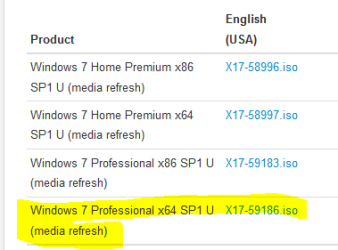
I think you downloaded the wrong file. It should be this one. I would like some one to confirm this before you make any changes.

Try putting in the Product Key before you make the call. If it works, you are OK. If it does not work, a phone number will popup for you to call. It will probably be a recording. It just asks a couple questions. You probably won't have to call though.

You can have both XP and Win 7 on your PC at one time with no problem.
 

Attachments

  • ISO.PNG
    ISO.PNG
    4.5 KB · Views: 38

My Computer My Computer

At a glance

Windows 7 Home Premium 32-Bit - Build 7600 SP1Intel Core i3-2120 3.30GhzKingston 4 GB DDR3 1333 mhzAMD Radeon HD6670
Computer type
PC/Desktop
Computer Manufacturer/Model Number
Custom Build
OS
Windows 7 Home Premium 32-Bit - Build 7600 SP1
CPU
Intel Core i3-2120 3.30Ghz
Motherboard
Asus P8Z68-V LX Intel Z68 Socket H2 ATX
Memory
Kingston 4 GB DDR3 1333 mhz
Graphics Card(s)
AMD Radeon HD6670
Sound Card
Sound Blaster Audigy SE 24-Bit
Monitor(s) Displays
Asus VE228
Screen Resolution
1440 X 900
Hard Drives
OCZ Vertex 3 120 GB Sata 3 SSD ==
Kingston SH103/S3 120 G Hyper X 120 GB SSD ==
Western Digital 500 GB Caviar Green 7200 RPM ==
PSU
Corsair CX600M == 600 Watt
Case
NZXT Apollo - Silver with Clear Side Panel
Cooling
Three 120 mm Fans
Keyboard
Microsoft Natural 4000
Mouse
Microsoft Custom Optical 3000
Internet Speed
AT&T Fiber Optic Wireless Network
Antivirus
Microsoft Security Essentials
Browser
Chrome
Other Info
120 mm Blue LED Fan -- Three Blue LED Lazer Light Sticks
Thank you for the concern.

I followed instructions and had the absolute minimum connected to the motherboard when I ran the installation. My reading suggested that otherwise I ran the risk that the installation software might elect to wipe the old OS/Programs disk and install there. The best way to avoid that was to physically block access.

I'm glad I did. I needed to swap between booting from Win7 and/or XP until I got several questions answered.

thanks,

baumgrenze

If you installed Win 7 with the XP disk connected, you might need to keep the XP disk connected or Win 7 won't be able to boot.
Some system files might have been written to the XP disk during the Win 7 installation.
It's best to disconnect all HDs/SSDs when installing Windows except the HD/SSD where Windows is being installed.
Was the XP disk connected when you installed Win 7 ?

For the best help from the experts (not me :(), you should post a screen print of your Disk Management when booted in Win 7.
http://www.sevenforums.com/tutorials/274797-disk-management-post-screen-capture-image.html
 

My Computer My Computer

At a glance

Win 7 Pro 64Intel Core 2 Quad Q6600 (2.4 GHz) Quad Core2 x Crucial 4GB Kit (2GBx2) DDR2 CT2KIT25664A...Sapphire Radeon HD 3870 PCIe 512 Mb
Computer type
PC/Desktop
Computer Manufacturer/Model Number
Custom built by GamePC/Solid Electric - Palo Alto - on 03/10/08
OS
Win 7 Pro 64
CPU
Intel Core 2 Quad Q6600 (2.4 GHz) Quad Core
Motherboard
Gigabyte GA-P35-DS3P Intel P35 ATX (rev. 2.1)
Memory
2 x Crucial 4GB Kit (2GBx2) DDR2 CT2KIT25664AA800
Graphics Card(s)
Sapphire Radeon HD 3870 PCIe 512 Mb
Sound Card
RealTek audio on MOBO + EDIROL UA-1EX
Monitor(s) Displays
Samsung S24A450BW 24" LED monitor
Screen Resolution
1600 x 1200 at 75 Hz
Hard Drives
2 Crucial 128 Gb SSD (CT128M550SSD1)
one mounted and running Win7/Pro x64
one disconnected containing only Win10/Pro upgrade - in process
1 1TB WD Caviar Black (WD1003FZEX-00MK2A0) (Data drive)
1 2TB Seagate 2TB (PN/ 9JB1N3-576 - ST2000DM001-1ER
PSU
Seasonic S12-HT 650W 80% Efficiency Power Supply
Case
Lian Li PC-B25B
Cooling
Gigabyte Silent-Pipe
Keyboard
Dell MS Comfort
Mouse
HP x4000 wireless
Internet Speed
Sonic FTTN @ 23 Mbps
Antivirus
Avast
Browser
SeaMonkey
Other Info
BIOS: Award Software International, Inc. F6 06/18/2009

System Specs - Updated on 09//16/19
As long as you choose the ssd for the install, nothing else will be affected, but......

as stated, unplug any other hard drives before you start an install.
 

My Computer My Computer

At a glance

Windows 10 Pro x64Intel Core i7 6700KGSkill TridentZ RGB 16GB 3600 16-16-16-36EVGA GTX 980 Ti SC x2
Computer type
PC/Desktop
Computer Manufacturer/Model Number
Skylake Special #666
OS
Windows 10 Pro x64
CPU
Intel Core i7 6700K
Motherboard
Asus Sabertooth Z170 Mark 1
Memory
GSkill TridentZ RGB 16GB 3600 16-16-16-36
Graphics Card(s)
EVGA GTX 980 Ti SC x2
Sound Card
Realtek High Definition
Monitor(s) Displays
AOC G2460PG
Screen Resolution
1920 x 1080 144Hz
Hard Drives
Samsung 860 Pro 256GB, Seagate Barracuda 4TB x2
PSU
EVGA 1000 P2, EVGA White Custom Braided Cables
Case
Corsair Vengeance C70 Gunmetal Black
Cooling
Corsair H100i v2, Corsair ML120 x2, Thermal Grizzly Kryonaut
Keyboard
Logitech G910 Orion Spectrum
Mouse
Logitech G700s
Internet Speed
Verizon Fios Quantum Gateway 75/75
Antivirus
Windows Defender, Malwarebytes Free 3.8.3
Browser
Chrome
Other Info
Corsair SP120 x4, LG Blu-ray Drive, Durabrand HT-395 100 Watt Dolby Digital Amp, Corsair H2100 Wireless 7.1 Headset
Thanks to everyone who has responded to this post.

I still have a couple of questions:

1) Is there a link where I can see which versions of Windows 7 match which DigitalRiver ISO downloads? I'd like to 'see any differences' for myself.

2) If I encounter an activation problem (if the ISO I used is a mismatch for the 'upgrade version - Old Version' will this be tracked by some Microsoft database that will make activation more difficult next time I try? (I'm sorry, but Redmond's paranoia about my trustworthiness is infectious and, as an honest customer trying to arrive at an honest license to use their software, I don't want to do anything that might upset their self-protection scheme.

3) How does the 'manual' activation process differ from the "automatic" activation process that can take place during the installation?

I have read Shawn's "Clean Install" tutorial and it clearly instructs me to "manually activate" my copy.

http://www.sevenforums.com/tutorials/31402-clean-install-upgrade-windows-7-version.html

And I've read his "How to Activate..." tutorial, too.

http://www.sevenforums.com/tutorials/3408-activate-windows-7-online.html

Perhaps I didn't read carefully enough, but how can these approaches result in different results? Perhaps it is enough to know that they can, and that only Redmond really understands the difference?

Thanks,

baumgrenze


I started my upgrade from XP/Pro to Win7/Pro by purchasing a copy of Microsoft Windows 7 Professional Upgrade [Old Version] SKU 882224883443.

Then I searched, posted, and read a lot and concluded that my life would be simpler if I downloaded a comparable ISO from DigitalRiver. I found a link with a list

Windows 7 Direct Download Links, Official Disk Images from Digital River

and I downloaded this file and eventually learned to burn it on a USB thumb drive from which I successfully installed it.

Windows 7 Professional x64 SP1 (old) X17-24281.iso

I did a clean install on a new 120 Gb SSD. The XP installation was done in 2008 by a custom builder. It is on a different drive.

The builder placed a product key sticker inside the door of my case. The product I purchased has a key inside the plastic case.

I got the sense from reading posts and tutorials that I should activate by telephone instead of using the automated "call home to MS" link presented to me during the installation.

1) Given my story, should I try to make contact with a live activation operator at MS to activate this installation?

2) How do I satisfy MS that I am no longer using the XP OS that was/is on my old HDD?

3) Can I delete certain directories on the old HDD so that XP is no longer bootable and still allow myself access to some data that is on that drive?

Thanks,

baumgrenze
 

My Computer My Computer

At a glance

Win 7 Pro 64Intel Core 2 Quad Q6600 (2.4 GHz) Quad Core2 x Crucial 4GB Kit (2GBx2) DDR2 CT2KIT25664A...Sapphire Radeon HD 3870 PCIe 512 Mb
Computer type
PC/Desktop
Computer Manufacturer/Model Number
Custom built by GamePC/Solid Electric - Palo Alto - on 03/10/08
OS
Win 7 Pro 64
CPU
Intel Core 2 Quad Q6600 (2.4 GHz) Quad Core
Motherboard
Gigabyte GA-P35-DS3P Intel P35 ATX (rev. 2.1)
Memory
2 x Crucial 4GB Kit (2GBx2) DDR2 CT2KIT25664AA800
Graphics Card(s)
Sapphire Radeon HD 3870 PCIe 512 Mb
Sound Card
RealTek audio on MOBO + EDIROL UA-1EX
Monitor(s) Displays
Samsung S24A450BW 24" LED monitor
Screen Resolution
1600 x 1200 at 75 Hz
Hard Drives
2 Crucial 128 Gb SSD (CT128M550SSD1)
one mounted and running Win7/Pro x64
one disconnected containing only Win10/Pro upgrade - in process
1 1TB WD Caviar Black (WD1003FZEX-00MK2A0) (Data drive)
1 2TB Seagate 2TB (PN/ 9JB1N3-576 - ST2000DM001-1ER
PSU
Seasonic S12-HT 650W 80% Efficiency Power Supply
Case
Lian Li PC-B25B
Cooling
Gigabyte Silent-Pipe
Keyboard
Dell MS Comfort
Mouse
HP x4000 wireless
Internet Speed
Sonic FTTN @ 23 Mbps
Antivirus
Avast
Browser
SeaMonkey
Other Info
BIOS: Award Software International, Inc. F6 06/18/2009

System Specs - Updated on 09//16/19
See my answers in your quote.

Thanks to everyone who has responded to this post.

I still have a couple of questions:

1) Is there a link where I can see which versions of Windows 7 match which DigitalRiver ISO downloads? I'd like to 'see any differences' for myself.

See if this answers the questions on comparing versions. http://www.sevenforums.com/tutorials/14422-compare-windows-7-editions.html

2) If I encounter an activation problem (if the ISO I used is a mismatch for the 'upgrade version - Old Version' will this be tracked by some Microsoft database that will make activation more difficult next time I try? (I'm sorry, but Redmond's paranoia about my trustworthiness is infectious and, as an honest customer trying to arrive at an honest license to use their software, I don't want to do anything that might upset their self-protection scheme.

When you have installed Win 7 and played with it for a couple days and are happy with the install, you can activate (you have 30 days to do so). "Manually activate" by typing in your Product Key. If it is accepted, you are OK. If not a phone number will popup and you will call Microsoft. It is usually a recording that asks a few questions and if they are satisfied (almost always) they will give you a number to input.

3) How does the 'manual' activation process differ from the "automatic" activation process that can take place during the installation?

I am not sure what you mean "automatic activation". You are going to type in a number either way as I described above.

I have read Shawn's "Clean Install" tutorial and it clearly instructs me to "manually activate" my copy.

http://www.sevenforums.com/tutorials/31402-clean-install-upgrade-windows-7-version.html

And I've read his "How to Activate..." tutorial, too.

http://www.sevenforums.com/tutorials/3408-activate-windows-7-online.html

Perhaps I didn't read carefully enough, but how can these approaches result in different results? Perhaps it is enough to know that they can, and that only Redmond really understands the difference?

Sometimes the Product Key you type in is just not good for Microsoft. In that case you must call. Either way the end result is the same, you copy of Win 7 is activated for use.

Thanks,

baumgrenze
 

My Computer My Computer

At a glance

Windows 7 Home Premium 32-Bit - Build 7600 SP1Intel Core i3-2120 3.30GhzKingston 4 GB DDR3 1333 mhzAMD Radeon HD6670
Computer type
PC/Desktop
Computer Manufacturer/Model Number
Custom Build
OS
Windows 7 Home Premium 32-Bit - Build 7600 SP1
CPU
Intel Core i3-2120 3.30Ghz
Motherboard
Asus P8Z68-V LX Intel Z68 Socket H2 ATX
Memory
Kingston 4 GB DDR3 1333 mhz
Graphics Card(s)
AMD Radeon HD6670
Sound Card
Sound Blaster Audigy SE 24-Bit
Monitor(s) Displays
Asus VE228
Screen Resolution
1440 X 900
Hard Drives
OCZ Vertex 3 120 GB Sata 3 SSD ==
Kingston SH103/S3 120 G Hyper X 120 GB SSD ==
Western Digital 500 GB Caviar Green 7200 RPM ==
PSU
Corsair CX600M == 600 Watt
Case
NZXT Apollo - Silver with Clear Side Panel
Cooling
Three 120 mm Fans
Keyboard
Microsoft Natural 4000
Mouse
Microsoft Custom Optical 3000
Internet Speed
AT&T Fiber Optic Wireless Network
Antivirus
Microsoft Security Essentials
Browser
Chrome
Other Info
120 mm Blue LED Fan -- Three Blue LED Lazer Light Sticks
My thanks to everyone who responded to this thread and reassured me that I'd get there eventually.

I successfully activated my installation and saved a screenshot to remind me.

I had a disconcerting experience this afternoon. I'd reverted to XP (unplug drive with Win7, plug in drive with XP, reset BIOS to 'disabled') and done some PhotoShop work I needed to get done. When I reversed the process and got back on the Win7 drive with the BIOS set to AHCI I encountered a hung boot process at the "Verifying DMI Pool Data ..." I unplugged everything (all other drives and all USB cables), reset the boot order in the BIOS so that only the hard disk option was available (all others disabled), reset the BIOS to AHCI and it booted.

I will download the XP Mode software and install it next so that I can avoid this miserable plugging and unplugging of drives.

Does it make a difference if I us Port 0 for the drive that has the OS installed? If so, I will put a high priority on physically mounting my OS/Programs SSD in the drive cage.

Are SSD's more or are they less susceptible to heat. Would it be better to mount the drives below or above the spinning drives I have. My system is in a Lian Li PC-B25B case (wonderful save for access to the front dust filter for cleaning) so the drives are stacked one above each other with 1/2" clearance and good air flow.

Thanks again to everyone,

baumgrenze
 

My Computer My Computer

At a glance

Win 7 Pro 64Intel Core 2 Quad Q6600 (2.4 GHz) Quad Core2 x Crucial 4GB Kit (2GBx2) DDR2 CT2KIT25664A...Sapphire Radeon HD 3870 PCIe 512 Mb
Computer type
PC/Desktop
Computer Manufacturer/Model Number
Custom built by GamePC/Solid Electric - Palo Alto - on 03/10/08
OS
Win 7 Pro 64
CPU
Intel Core 2 Quad Q6600 (2.4 GHz) Quad Core
Motherboard
Gigabyte GA-P35-DS3P Intel P35 ATX (rev. 2.1)
Memory
2 x Crucial 4GB Kit (2GBx2) DDR2 CT2KIT25664AA800
Graphics Card(s)
Sapphire Radeon HD 3870 PCIe 512 Mb
Sound Card
RealTek audio on MOBO + EDIROL UA-1EX
Monitor(s) Displays
Samsung S24A450BW 24" LED monitor
Screen Resolution
1600 x 1200 at 75 Hz
Hard Drives
2 Crucial 128 Gb SSD (CT128M550SSD1)
one mounted and running Win7/Pro x64
one disconnected containing only Win10/Pro upgrade - in process
1 1TB WD Caviar Black (WD1003FZEX-00MK2A0) (Data drive)
1 2TB Seagate 2TB (PN/ 9JB1N3-576 - ST2000DM001-1ER
PSU
Seasonic S12-HT 650W 80% Efficiency Power Supply
Case
Lian Li PC-B25B
Cooling
Gigabyte Silent-Pipe
Keyboard
Dell MS Comfort
Mouse
HP x4000 wireless
Internet Speed
Sonic FTTN @ 23 Mbps
Antivirus
Avast
Browser
SeaMonkey
Other Info
BIOS: Award Software International, Inc. F6 06/18/2009

System Specs - Updated on 09//16/19
I don't know if SSDs are more or less susceptible to heat, but they should run cooler because they have no moving parts and use less power.
I would mount the SSDs below the HDs so the hotter HDs are not generating heat that affects the SSDs due to natural "hot air rises".
With your cooling, I don't know how much of a difference it will really make.
You could use a free program such as HWMonitor so you can monitor your temps, including HDs and SSDs.
HWMonitor CPUID - System & hardware benchmark, monitoring, reporting

Port 0 for the OS drive is "preferred/recommended" but using a different port works.
If your cabling and mounting locations (cage, etc) make using another port more convenient for you and everything works, it should not cause problems.

It sounds like you have to unplug drives depending on the OS you want to boot because Win 7 uses AHCI and XP uses IDE ?
Am I correct, and that is the reason - you have to set the mode in BIOS before booting "XP vs. Win 7" ?
 

My Computer My Computer

At a glance

Multi-Boot W7_Pro_x64 W8.1_Pro_x64 W10_Pro_x6...AMD Athlon II x4 6206GB GSkill DDR2 800AMD 4670 GPU + AMD 4200 IGP
Computer type
PC/Desktop
Computer Manufacturer/Model Number
home built
OS
Multi-Boot W7_Pro_x64 W8.1_Pro_x64 W10_Pro_x64 +Linux_VMs +Chromium_VM
CPU
AMD Athlon II x4 620
Motherboard
Gigabyte GA-MA785G-UD3H
Memory
6GB GSkill DDR2 800
Graphics Card(s)
AMD 4670 GPU + AMD 4200 IGP
Sound Card
on board Realtek ALC889A
Monitor(s) Displays
RCA 40" LCD TV, Insignia 32" LCD TV, HP 15" LCD monitor
Screen Resolution
1680 x 1050
Hard Drives
OCZ Vertex 3 120GB,
Samsung F3 1TB (3),
Several others - WD, Seagate, Hitachi, ...
PSU
Corsair 500 W
Case
Rosewill mid tower
Cooling
CM 90mm rifle
Keyboard
Gyration wireless, Logitech wireless, Dell USB wired
Mouse
Gyration wireless, Logitech wireless, V7 USB wired
Internet Speed
Spectrum - 100Mbps D / 10Mbps U
Antivirus
Avast, MBAM3, EMET, WinPatrol
Browser
Pale Moon, Firefox, IE
Other Info
2 multi-boot PC's
Mainly HTPC/Office/Gen purpose (no gaming).
Trendnet USB KVM.
LG DVD burner/Blue Ray Player.
Tray system for removable SATA backup drives.

Not currently OCd, under-volted.
I use Hybrid sleep, rarely re-boot or shutdown.

Hauppauge HD-PVR, Avermedia PCIe TV Tuner, Hauppauge PCI TV Tuner.
Thank you for the information about drive heat, monitoring, and 'preferred ports.'

I didn't do anything as complex as what you describe in the remaining quote below.

At present the case is open, the SSD is securely mounted on an adjacent wooden frame which allows access to power and a port (#5 of 0-5).

I was careful to disconnect my original OS/Programs drive before installing. This means I could reconnect it and boot from it (if I had the proper BIOS setting) and use XP. 'Logic' suggested that it would be safest if I disconnected the SSD so that I did not 'confuse' the system regarding which drive to use to load an OS. It is primitive, but it works. I am working on getting XP Mode installed so I can 'graduate' from this approach and get on with properly rearranging the drives in the system and closing up the case.

The BIOS in my system offers as modes "disabled or PATA," AHCI, and RAID. Originally it ran under RAID1 using Intel RST as the basis for the RAID. For a while I could load XP in the AHCI mode, but I must have lost a driver, so it will only load in PATA mode now. Win7 is happy with AHCI. I didn't want to empirically explore the combinations and permutations of to operating systems that required different BIOS modes. I've seen two or three different ways for the boot process to fail. Exploration wasn't worth my time.

Last evening I opened a thread under 'Virtualization.' I see it has had 117 views and no replies. Perhaps I asked a dumb question with an obvious answer. If so, it is unclear to me how to search and find if there is a difference between hardware-assisted virtualization and "Intel Virtualization Technology" which my MOBO manual says controls virtualiation on my system. Perhaps I should ask on the Intel Community boards?

http://www.sevenforums.com/virtualization/331249-hardware-assisted-virtualization-not-enabled.html

I don't want to screw up an otherwise successful installation by trying to run XP Mode without the proper BIOS setting.

Thanks for your help and interest,

baumgrenze

....
It sounds like you have to unplug drives depending on the OS you want to boot because Win 7 uses AHCI and XP uses IDE ?

Am I correct, and that is the reason - you have to set the mode in BIOS before booting "XP vs. Win 7" ?
 

My Computer My Computer

At a glance

Win 7 Pro 64Intel Core 2 Quad Q6600 (2.4 GHz) Quad Core2 x Crucial 4GB Kit (2GBx2) DDR2 CT2KIT25664A...Sapphire Radeon HD 3870 PCIe 512 Mb
Computer type
PC/Desktop
Computer Manufacturer/Model Number
Custom built by GamePC/Solid Electric - Palo Alto - on 03/10/08
OS
Win 7 Pro 64
CPU
Intel Core 2 Quad Q6600 (2.4 GHz) Quad Core
Motherboard
Gigabyte GA-P35-DS3P Intel P35 ATX (rev. 2.1)
Memory
2 x Crucial 4GB Kit (2GBx2) DDR2 CT2KIT25664AA800
Graphics Card(s)
Sapphire Radeon HD 3870 PCIe 512 Mb
Sound Card
RealTek audio on MOBO + EDIROL UA-1EX
Monitor(s) Displays
Samsung S24A450BW 24" LED monitor
Screen Resolution
1600 x 1200 at 75 Hz
Hard Drives
2 Crucial 128 Gb SSD (CT128M550SSD1)
one mounted and running Win7/Pro x64
one disconnected containing only Win10/Pro upgrade - in process
1 1TB WD Caviar Black (WD1003FZEX-00MK2A0) (Data drive)
1 2TB Seagate 2TB (PN/ 9JB1N3-576 - ST2000DM001-1ER
PSU
Seasonic S12-HT 650W 80% Efficiency Power Supply
Case
Lian Li PC-B25B
Cooling
Gigabyte Silent-Pipe
Keyboard
Dell MS Comfort
Mouse
HP x4000 wireless
Internet Speed
Sonic FTTN @ 23 Mbps
Antivirus
Avast
Browser
SeaMonkey
Other Info
BIOS: Award Software International, Inc. F6 06/18/2009

System Specs - Updated on 09//16/19
Back
Top