I started my upgrade from XP/Pro to Win7/Pro by purchasing a copy of Microsoft Windows 7 Professional Upgrade [Old Version] SKU 882224883443.
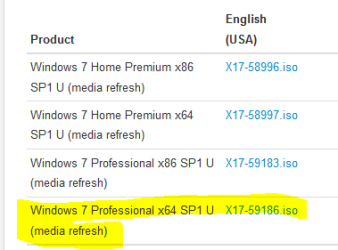
Then I searched, posted, and read a lot and concluded that my life would be simpler if I downloaded a comparable ISO from DigitalRiver. I found a link with a list
Windows 7 Direct Download Links, Official Disk Images from Digital River
and I downloaded this file and eventually learned to burn it on a USB thumb drive from which I successfully installed it.
Windows 7 Professional x64 SP1 (old) X17-24281.iso
I did a clean install on a new 120 Gb SSD. The XP installation was done in 2008 by a custom builder. It is on a different drive.
The builder placed a product key sticker inside the door of my case. The product I purchased has a key inside the plastic case.
I got the sense from reading posts and tutorials that I should activate by telephone instead of using the automated "call home to MS" link presented to me during the installation.
1) Given my story, should I try to make contact with a live activation operator at MS to activate this installation?
2) How do I satisfy MS that I am no longer using the XP OS that was/is on my old HDD?
3) Can I delete certain directories on the old HDD so that XP is no longer bootable and still allow myself access to some data that is on that drive?
Thanks,
baumgrenze
Then I searched, posted, and read a lot and concluded that my life would be simpler if I downloaded a comparable ISO from DigitalRiver. I found a link with a list
Windows 7 Direct Download Links, Official Disk Images from Digital River
and I downloaded this file and eventually learned to burn it on a USB thumb drive from which I successfully installed it.
Windows 7 Professional x64 SP1 (old) X17-24281.iso
I did a clean install on a new 120 Gb SSD. The XP installation was done in 2008 by a custom builder. It is on a different drive.
The builder placed a product key sticker inside the door of my case. The product I purchased has a key inside the plastic case.
I got the sense from reading posts and tutorials that I should activate by telephone instead of using the automated "call home to MS" link presented to me during the installation.
1) Given my story, should I try to make contact with a live activation operator at MS to activate this installation?
2) How do I satisfy MS that I am no longer using the XP OS that was/is on my old HDD?
3) Can I delete certain directories on the old HDD so that XP is no longer bootable and still allow myself access to some data that is on that drive?
Thanks,
baumgrenze
My Computer
At a glance
Win 7 Pro 64Intel Core 2 Quad Q6600 (2.4 GHz) Quad Core2 x Crucial 4GB Kit (2GBx2) DDR2 CT2KIT25664A...Sapphire Radeon HD 3870 PCIe 512 Mb
- Computer type
- PC/Desktop
- Computer Manufacturer/Model Number
- Custom built by GamePC/Solid Electric - Palo Alto - on 03/10/08
- OS
- Win 7 Pro 64
- CPU
- Intel Core 2 Quad Q6600 (2.4 GHz) Quad Core
- Motherboard
- Gigabyte GA-P35-DS3P Intel P35 ATX (rev. 2.1)
- Memory
- 2 x Crucial 4GB Kit (2GBx2) DDR2 CT2KIT25664AA800
- Graphics Card(s)
- Sapphire Radeon HD 3870 PCIe 512 Mb
- Sound Card
- RealTek audio on MOBO + EDIROL UA-1EX
- Monitor(s) Displays
- Samsung S24A450BW 24" LED monitor
- Screen Resolution
- 1600 x 1200 at 75 Hz
- Hard Drives
- 2 Crucial 128 Gb SSD (CT128M550SSD1)
one mounted and running Win7/Pro x64
one disconnected containing only Win10/Pro upgrade - in process
1 1TB WD Caviar Black (WD1003FZEX-00MK2A0) (Data drive)
1 2TB Seagate 2TB (PN/ 9JB1N3-576 - ST2000DM001-1ER
- PSU
- Seasonic S12-HT 650W 80% Efficiency Power Supply
- Case
- Lian Li PC-B25B
- Cooling
- Gigabyte Silent-Pipe
- Keyboard
- Dell MS Comfort
- Mouse
- HP x4000 wireless
- Internet Speed
- Sonic FTTN @ 23 Mbps
- Antivirus
- Avast
- Browser
- SeaMonkey
- Other Info
- BIOS: Award Software International, Inc. F6 06/18/2009
System Specs - Updated on 09//16/19


 ), you should post a screen print of your Disk Management when booted in Win 7.