Solved [Help] Mapped File using half my 8GB RAM, CPU usage by unknown progs

NeitanDoreiku

New member
Local time
1:10 AM
Messages
7
Hello all,
I built this PC a few months back, and reinstalled Windows 7 on 05-13-14 due to weirdness going on. The problems seem to be happening again, even hours after running.

Everything was great on this system, up until I installed my Samsung SSD's drivers, and it changed to AHCI, as well as changed some services to "Maximum Performance" settings.

My CPU seems to be being used by something. Kaspersky used 25% of the CPU during the install of my Asus drivers, for example. But at most other times, the fan just runs loud and alternates speeds. Secondly, when I open my Task Manager, I find about 40-50% of it used, but a second later it drops to below 10%... but my CPU fan is unaffected.

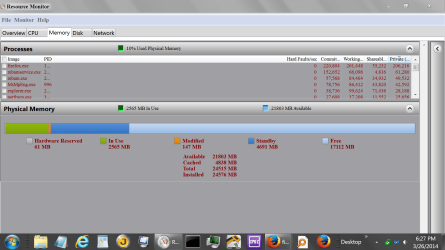
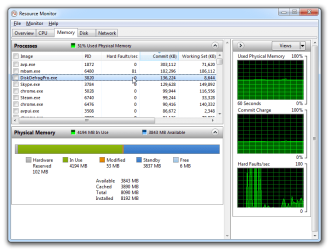
50% of my RAM is filled by the Mapped File cache, Kaspersky is having constant hard faults, harddisk drivers are failing.... I don't know where to start. Any help would be appreciated. Even a pointer to something that could help would be nice... Thank you.

Here is a complete system log:
GetSystemInfo Parser 2.96
(Click on the expert link to view my system information, processes, event viewer logs, and the like.)
 

My Computer My Computer

At a glance

Windows 10 ProIntel i7-4790k @ Stock ClockG.Skill Ripjaws Series 16GB (4 x 4GB) DDR3-1866MSI GTX 1070 Gaming X 8GB
Computer type
PC/Desktop
Computer Manufacturer/Model Number
Custom Build
OS
Windows 10 Pro
CPU
Intel i7-4790k @ Stock Clock
Motherboard
MSI Z97 Gaming X
Memory
G.Skill Ripjaws Series 16GB (4 x 4GB) DDR3-1866
Graphics Card(s)
MSI GTX 1070 Gaming X 8GB
Monitor(s) Displays
ASUS VG248QE Gaming Monitor
Screen Resolution
1920x1080
Hard Drives
Crucial CT250MX200SSD4 (C:)
Samsung 850 EVO (MMO & Online Gaming SSD)
Crucial CT250BX100SSD1 (Alternate Gaming SSD)
Seagate FireCuda ST1000DX002-2DV162 (Emulation and Other Gaming)
Western Digital Blue WD10EZEX-00WN4A0 (User/Home Folders and Storage)
PSU
Corsair CX750M
Case
Cooler Master HAF 912 (Original)
Cooling
Corsair H90 CLC
Keyboard
Logitech G710+ Brown Mechanical Keyboard
Mouse
Logitech G600 MMO Gaming Mouse
Internet Speed
150mbps down 25mbps up
Antivirus
Avira Free Antivirus + Malwarebytes 3.0
Browser
Google Chrome

My Computer My Computer

At a glance

Windows 7 Professional 32-bit/Windows 8 64-bi...Intel Core 2 Quad Q6600/Intel Core i7 4790/In...2GB/16GB/4GBIntel G33/G31 Express(Vostro)/NVIDIA GeForce ...
Computer type
PC/Desktop
Computer Manufacturer/Model Number
Dell Vostro 400/Dell XPS 8700(Slightly Customized for me by Dell)/Toshiba Satellite T135
OS
Windows 7 Professional 32-bit/Windows 8 64-bit/Win7 Pro64-bit
CPU
Intel Core 2 Quad Q6600/Intel Core i7 4790/Intel Pentium
Memory
2GB/16GB/4GB
Graphics Card(s)
Intel G33/G31 Express(Vostro)/NVIDIA GeForce GTX 745(XPS)
Monitor(s) Displays
HP 2009m(Vostro)/ViewSonic VX2250wm-LED(XPS)
Screen Resolution
1600x900(Vostro)/1920x1080(XPS)
Hard Drives
Seagate ST3160815AS(Vostro)/Western Digital Blue(Satellite)
External:
Western Digital My Passport 0748
Samsung HM121HC
Keyboard
Dell L100)(Vostro)/Dell KB2133p(XPS)
Mouse
Dell M-UAV-DEL8(XPS)
Internet Speed
100 Mbit/s(Only when IPTV is plugged out)
Antivirus
Avast, Malwarebytes PRO
Browser
Internet Explorer 11
Other Info
Note: Names with slashes between two different parts mean that the left is my old desktop and the right is my old laptop and the middle is my new desktop.(Unless specified)
Ping is horrible for servers overseas in US and Europe.
New laptop:LG Gram(Not available in US) Processor:Intel Core i3 4th Gen Ultra Low Power RAM:4GB Hard Drive:SK Hynix OEM MSATA or M.2 Graphics:Intel HD
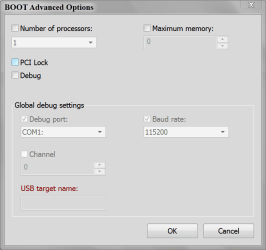
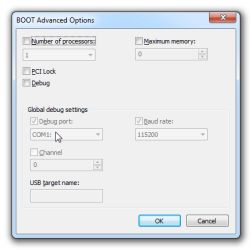
Could you post these?

New ram picture.PNG

Boot Advanced Options..PNG
 

My Computer My Computer

At a glance

Windows 10 Pro. 64/ version 1709 Windows 7 Pr...Intel i7-6800K @ 4.3Corsair Platinum 16 gig @2400EVGA GTX 1070 OC
Computer type
PC/Desktop
Computer Manufacturer/Model Number
Home made Desktop
OS
Windows 10 Pro. 64/ version 1709 Windows 7 Pro/64
CPU
Intel i7-6800K @ 4.3
Motherboard
ASUS X-99 Deluxe II
Memory
Corsair Platinum 16 gig @2400
Graphics Card(s)
EVGA GTX 1070 OC
Monitor(s) Displays
Asus 27" LED LCD/VE278Q
Screen Resolution
1920-1080 or 1280-720 HDMI
Hard Drives
INTEL SSD 730-240 Gb Sata 3.0/
PSU
EVGA Platium 1200W
Case
Phanteks Luxe Tempered Glass 8 fans/ one radiator
Cooling
XSPC/ Water Cooled CPU
Keyboard
Das 4 Professional
Mouse
Logitech M705/MX Anywhere 2-S
Internet Speed
100 mbits
Antivirus
Microsoft Security Essentials/ Malwarebytes Premium 3.0/ SAS
Browser
I.E. 11 default/Firefox/ ISP Time Warner Cable/Spectrum
Other Info
LG BluRay Burner/
Sound system-KLipsch-THX/
Icy Dock ssd Hot Swap bays.
Could you post these?
Sure.

Resource_Monitor_2014-05-15_09-52-35.png

BOOT_Advanced_Options_2014-05-15_14-48-53.png

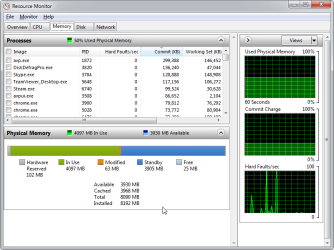
Also, hard faults on the Malwarebytes scan.

Resource_Monitor_2014-05-15_14-54-27.png

Seems to me that the HardDisk driver errors in the Event Logs might be related to this...

Do a threat scan with https://www.malwarebytes.org/getmbam and if it finds something, do a custom scan on all hard drives too to double check.

Nothing found. I figured as much. Installed Kaspersky immediately after reinstall. Plus I rarely get viruses, because I know where to go on the internet. (And Adblock)

Malwarebytes_Anti-Malware_(Free)_2.0.1.1004_2014-05-15_14-58-31.png
 

My Computer My Computer

At a glance

Windows 10 ProIntel i7-4790k @ Stock ClockG.Skill Ripjaws Series 16GB (4 x 4GB) DDR3-1866MSI GTX 1070 Gaming X 8GB
Computer type
PC/Desktop
Computer Manufacturer/Model Number
Custom Build
OS
Windows 10 Pro
CPU
Intel i7-4790k @ Stock Clock
Motherboard
MSI Z97 Gaming X
Memory
G.Skill Ripjaws Series 16GB (4 x 4GB) DDR3-1866
Graphics Card(s)
MSI GTX 1070 Gaming X 8GB
Monitor(s) Displays
ASUS VG248QE Gaming Monitor
Screen Resolution
1920x1080
Hard Drives
Crucial CT250MX200SSD4 (C:)
Samsung 850 EVO (MMO & Online Gaming SSD)
Crucial CT250BX100SSD1 (Alternate Gaming SSD)
Seagate FireCuda ST1000DX002-2DV162 (Emulation and Other Gaming)
Western Digital Blue WD10EZEX-00WN4A0 (User/Home Folders and Storage)
PSU
Corsair CX750M
Case
Cooler Master HAF 912 (Original)
Cooling
Corsair H90 CLC
Keyboard
Logitech G710+ Brown Mechanical Keyboard
Mouse
Logitech G600 MMO Gaming Mouse
Internet Speed
150mbps down 25mbps up
Antivirus
Avira Free Antivirus + Malwarebytes 3.0
Browser
Google Chrome
I would suggest using Windows 7 built in defrag tool and see what happens.

I found that Windows 7 defrag worked as good as 3rd party defrag tool just without all the little lines and squares jumping around.
Some 3rd party defrag tool have also been reported to remove your restore points.
 

My Computer My Computer

At a glance

Windows 10 Pro. 64/ version 1709 Windows 7 Pr...Intel i7-6800K @ 4.3Corsair Platinum 16 gig @2400EVGA GTX 1070 OC
Computer type
PC/Desktop
Computer Manufacturer/Model Number
Home made Desktop
OS
Windows 10 Pro. 64/ version 1709 Windows 7 Pro/64
CPU
Intel i7-6800K @ 4.3
Motherboard
ASUS X-99 Deluxe II
Memory
Corsair Platinum 16 gig @2400
Graphics Card(s)
EVGA GTX 1070 OC
Monitor(s) Displays
Asus 27" LED LCD/VE278Q
Screen Resolution
1920-1080 or 1280-720 HDMI
Hard Drives
INTEL SSD 730-240 Gb Sata 3.0/
PSU
EVGA Platium 1200W
Case
Phanteks Luxe Tempered Glass 8 fans/ one radiator
Cooling
XSPC/ Water Cooled CPU
Keyboard
Das 4 Professional
Mouse
Logitech M705/MX Anywhere 2-S
Internet Speed
100 mbits
Antivirus
Microsoft Security Essentials/ Malwarebytes Premium 3.0/ SAS
Browser
I.E. 11 default/Firefox/ ISP Time Warner Cable/Spectrum
Other Info
LG BluRay Burner/
Sound system-KLipsch-THX/
Icy Dock ssd Hot Swap bays.
Why is disk defrag being run on an SSD anyway?
 

My Computer My Computer

At a glance

Win 10 Pro x64Intel I5-2500K @3.3GHz16GB G.Skill Ripjaws X (4x4GB)EVGA GeForce 750 Ti SC 2GB
Computer type
PC/Desktop
Computer Manufacturer/Model Number
Self Built
OS
Win 10 Pro x64
CPU
Intel I5-2500K @3.3GHz
Motherboard
Asrock P67 Extreme4
Memory
16GB G.Skill Ripjaws X (4x4GB)
Graphics Card(s)
EVGA GeForce 750 Ti SC 2GB
Sound Card
ASUS Xonar DG 5.1 Channels 24-bit 96KHz PCI Interface Sound
Monitor(s) Displays
auria eq2367
Screen Resolution
1920 x 1080
Hard Drives
250GB Samsung 850 EVO SSD
1TB WD Blue
1TB Hitachi
PSU
SeaSonic X 650W 80 Plus Gold
Case
Corsair Obsidian 750D
Cooling
Corsair H60, Three 140mm case fans
Keyboard
Logitech Wireless Keyboard K520
Mouse
Logitech Wireless Mouse M310
Internet Speed
Wave Broadband ~ 100 dn 5 up
Antivirus
Windows Defender, Malwarebytes Premium
Browser
Edge, IE11, Chrome
Other Info
Laptop specs: HP g7-1365dx /
CPU: AMD A6-3420M APU with Radeon(tm) HD Graphics /
RAM: Crucial 8Gb (2x4Gb) /
SSD: Crucial M4-CT128M4SSD2 ATA Device/ FW 000F /
GFX: AMD Radeon HD 6520G /
OS: Windows 10 Pro x64
Good catch Derek. I didn't notice that.

NeitanDoreiku no manufacture of a ssd recommends defragging a ssd that I'm aware of.
 

My Computer My Computer

At a glance

Windows 10 Pro. 64/ version 1709 Windows 7 Pr...Intel i7-6800K @ 4.3Corsair Platinum 16 gig @2400EVGA GTX 1070 OC
Computer type
PC/Desktop
Computer Manufacturer/Model Number
Home made Desktop
OS
Windows 10 Pro. 64/ version 1709 Windows 7 Pro/64
CPU
Intel i7-6800K @ 4.3
Motherboard
ASUS X-99 Deluxe II
Memory
Corsair Platinum 16 gig @2400
Graphics Card(s)
EVGA GTX 1070 OC
Monitor(s) Displays
Asus 27" LED LCD/VE278Q
Screen Resolution
1920-1080 or 1280-720 HDMI
Hard Drives
INTEL SSD 730-240 Gb Sata 3.0/
PSU
EVGA Platium 1200W
Case
Phanteks Luxe Tempered Glass 8 fans/ one radiator
Cooling
XSPC/ Water Cooled CPU
Keyboard
Das 4 Professional
Mouse
Logitech M705/MX Anywhere 2-S
Internet Speed
100 mbits
Antivirus
Microsoft Security Essentials/ Malwarebytes Premium 3.0/ SAS
Browser
I.E. 11 default/Firefox/ ISP Time Warner Cable/Spectrum
Other Info
LG BluRay Burner/
Sound system-KLipsch-THX/
Icy Dock ssd Hot Swap bays.
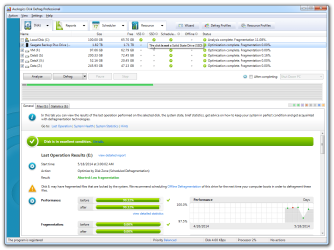
I don't run defrags on my SSD. I have 4 other drives plugged into this computer. One of them is used for all my user files. I like them to be defragged. Also, Auslogics is smart...very smart... and fast.

Could some of my problems be related to Microsoft incorrectly using generic drivers for some of my custom build hardware?

Auslogics_Disk_Defrag_Professional_2014-05-18_13-46-42.png
 

My Computer My Computer

At a glance

Windows 10 ProIntel i7-4790k @ Stock ClockG.Skill Ripjaws Series 16GB (4 x 4GB) DDR3-1866MSI GTX 1070 Gaming X 8GB
Computer type
PC/Desktop
Computer Manufacturer/Model Number
Custom Build
OS
Windows 10 Pro
CPU
Intel i7-4790k @ Stock Clock
Motherboard
MSI Z97 Gaming X
Memory
G.Skill Ripjaws Series 16GB (4 x 4GB) DDR3-1866
Graphics Card(s)
MSI GTX 1070 Gaming X 8GB
Monitor(s) Displays
ASUS VG248QE Gaming Monitor
Screen Resolution
1920x1080
Hard Drives
Crucial CT250MX200SSD4 (C:)
Samsung 850 EVO (MMO & Online Gaming SSD)
Crucial CT250BX100SSD1 (Alternate Gaming SSD)
Seagate FireCuda ST1000DX002-2DV162 (Emulation and Other Gaming)
Western Digital Blue WD10EZEX-00WN4A0 (User/Home Folders and Storage)
PSU
Corsair CX750M
Case
Cooler Master HAF 912 (Original)
Cooling
Corsair H90 CLC
Keyboard
Logitech G710+ Brown Mechanical Keyboard
Mouse
Logitech G600 MMO Gaming Mouse
Internet Speed
150mbps down 25mbps up
Antivirus
Avira Free Antivirus + Malwarebytes 3.0
Browser
Google Chrome

My Computer My Computer

At a glance

Windows 10 ProIntel i7-4790k @ Stock ClockG.Skill Ripjaws Series 16GB (4 x 4GB) DDR3-1866MSI GTX 1070 Gaming X 8GB
Computer type
PC/Desktop
Computer Manufacturer/Model Number
Custom Build
OS
Windows 10 Pro
CPU
Intel i7-4790k @ Stock Clock
Motherboard
MSI Z97 Gaming X
Memory
G.Skill Ripjaws Series 16GB (4 x 4GB) DDR3-1866
Graphics Card(s)
MSI GTX 1070 Gaming X 8GB
Monitor(s) Displays
ASUS VG248QE Gaming Monitor
Screen Resolution
1920x1080
Hard Drives
Crucial CT250MX200SSD4 (C:)
Samsung 850 EVO (MMO & Online Gaming SSD)
Crucial CT250BX100SSD1 (Alternate Gaming SSD)
Seagate FireCuda ST1000DX002-2DV162 (Emulation and Other Gaming)
Western Digital Blue WD10EZEX-00WN4A0 (User/Home Folders and Storage)
PSU
Corsair CX750M
Case
Cooler Master HAF 912 (Original)
Cooling
Corsair H90 CLC
Keyboard
Logitech G710+ Brown Mechanical Keyboard
Mouse
Logitech G600 MMO Gaming Mouse
Internet Speed
150mbps down 25mbps up
Antivirus
Avira Free Antivirus + Malwarebytes 3.0
Browser
Google Chrome
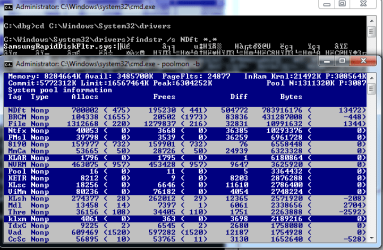
So I believe I may have found the problem, and it was my SSD driver as suspected, among many other things. Proof:
2014-05-20_18-29-02.png

I found how to do this, with instructions, here.

You'd need the WDK (Windows Driver Kit) in order to obtain the poolmon executable. This is sad because the poolmon executable doesn't have any dependencies, so you can copy it to any computer, by itself, and it will work.

Details on what the "SamsungRapidDiskFilter.sys" driver is can be found here. (Most noteably page 5) It is not a leak, but rather related to the "RAPID Mode" option that can be enabled/disabled in the Samsung Magician software. (Samsung's SSD management interface)

Also, the Broadcom wireless driver has a memory leak, which it is reported to have often, based on what I'm finding.
 

My Computer My Computer

At a glance

Windows 10 ProIntel i7-4790k @ Stock ClockG.Skill Ripjaws Series 16GB (4 x 4GB) DDR3-1866MSI GTX 1070 Gaming X 8GB
Computer type
PC/Desktop
Computer Manufacturer/Model Number
Custom Build
OS
Windows 10 Pro
CPU
Intel i7-4790k @ Stock Clock
Motherboard
MSI Z97 Gaming X
Memory
G.Skill Ripjaws Series 16GB (4 x 4GB) DDR3-1866
Graphics Card(s)
MSI GTX 1070 Gaming X 8GB
Monitor(s) Displays
ASUS VG248QE Gaming Monitor
Screen Resolution
1920x1080
Hard Drives
Crucial CT250MX200SSD4 (C:)
Samsung 850 EVO (MMO & Online Gaming SSD)
Crucial CT250BX100SSD1 (Alternate Gaming SSD)
Seagate FireCuda ST1000DX002-2DV162 (Emulation and Other Gaming)
Western Digital Blue WD10EZEX-00WN4A0 (User/Home Folders and Storage)
PSU
Corsair CX750M
Case
Cooler Master HAF 912 (Original)
Cooling
Corsair H90 CLC
Keyboard
Logitech G710+ Brown Mechanical Keyboard
Mouse
Logitech G600 MMO Gaming Mouse
Internet Speed
150mbps down 25mbps up
Antivirus
Avira Free Antivirus + Malwarebytes 3.0
Browser
Google Chrome
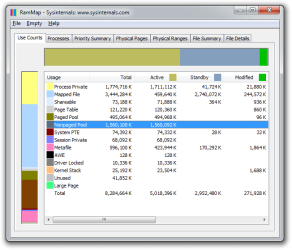
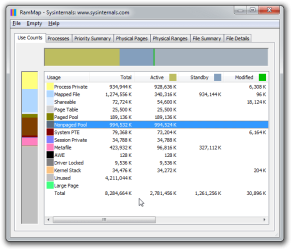
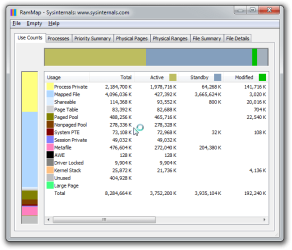
After rebooting, and changing some settings, I seem to be running quite well... MUCH better than before. Awesome.

Disabling the RAPID Mode feature fixed the RAM problem instantly. Both Broadcom and Samsung RAPID drivers no longer use so much ram. In fact, it seems to have stabilized my entire computer ten-fold. IT seems that the RAPID feature heavily affects RAM leakage across all drivers. No wonder this feature was disabled by default, but the feature says underneath it, "Improves overall system performance." Complete BS, at least for my system.

Below are some screenshots of usage:

Administrator_CWindowssystem32cmd.exe_-_poolm_2014-05-22_14-21-12.png

RamMap_-_Sysinternals_www.sysinternals.com_2014-05-22_14-24-03.png
 

My Computer My Computer

At a glance

Windows 10 ProIntel i7-4790k @ Stock ClockG.Skill Ripjaws Series 16GB (4 x 4GB) DDR3-1866MSI GTX 1070 Gaming X 8GB
Computer type
PC/Desktop
Computer Manufacturer/Model Number
Custom Build
OS
Windows 10 Pro
CPU
Intel i7-4790k @ Stock Clock
Motherboard
MSI Z97 Gaming X
Memory
G.Skill Ripjaws Series 16GB (4 x 4GB) DDR3-1866
Graphics Card(s)
MSI GTX 1070 Gaming X 8GB
Monitor(s) Displays
ASUS VG248QE Gaming Monitor
Screen Resolution
1920x1080
Hard Drives
Crucial CT250MX200SSD4 (C:)
Samsung 850 EVO (MMO & Online Gaming SSD)
Crucial CT250BX100SSD1 (Alternate Gaming SSD)
Seagate FireCuda ST1000DX002-2DV162 (Emulation and Other Gaming)
Western Digital Blue WD10EZEX-00WN4A0 (User/Home Folders and Storage)
PSU
Corsair CX750M
Case
Cooler Master HAF 912 (Original)
Cooling
Corsair H90 CLC
Keyboard
Logitech G710+ Brown Mechanical Keyboard
Mouse
Logitech G600 MMO Gaming Mouse
Internet Speed
150mbps down 25mbps up
Antivirus
Avira Free Antivirus + Malwarebytes 3.0
Browser
Google Chrome
Back
Top