Two Win7 PCs in need of networking

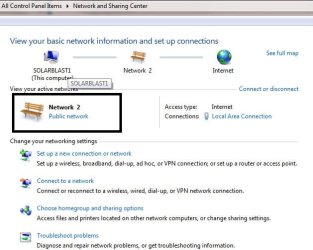
In the box I put around "Network 2" you need to click on Public Network and change it to "Home Network"

You can't have a homegroup while your settings are set to Public Network.
 

Attachments

  • home.jpg
    home.jpg
    39.4 KB · Views: 20

My Computer My Computer

At a glance

Dual Boot: Windows 8.1 & Server 2012r2 VMs: K...A10 7700 Kavari SteamRoller8GB DDR3 SDRAM PC3-85001024MB ATI AMD Radeon R7 Graphics
Computer type
PC/Desktop
Computer Manufacturer/Model Number
Custom
OS
Dual Boot: Windows 8.1 & Server 2012r2 VMs: Kali Linux, Backbox, Matriux, Windows 8.1
CPU
A10 7700 Kavari SteamRoller
Motherboard
ASUS A88XM-PLUS (FM2+ )
Memory
8GB DDR3 SDRAM PC3-8500
Graphics Card(s)
1024MB ATI AMD Radeon R7 Graphics
Sound Card
Realtek High Definition Audio
Monitor(s) Displays
Samsung
Hard Drives
SSD Crucial 120gb
WD VelociRaptor 1tb
PSU
Rosewill Gaming 650w
Case
Rosewill Galaxy 2
Internet Speed
55/12
Antivirus
Malwarebytes, MSE, SAS
Browser
FireFox, Chrome
Can't be any clearer change to Home Network.

Start reading My friend.
 

My Computer My Computer

At a glance

Windows 7 Ultimate x64AMD turion 64x2 TL-64 2.2GhzSodimm DDR2 4GBATI Radeon 1250 128MB IGP
Computer Manufacturer/Model Number
HP Compaq 6715B
OS
Windows 7 Ultimate x64
CPU
AMD turion 64x2 TL-64 2.2Ghz
Motherboard
HC030
Memory
Sodimm DDR2 4GB
Graphics Card(s)
ATI Radeon 1250 128MB IGP
Hard Drives
Fujitsu Siemens 500GB sata 3.0 Gb/s
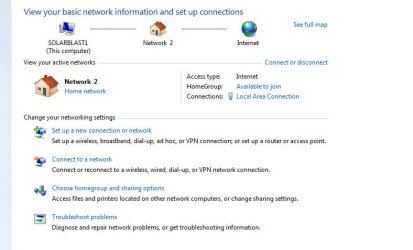
OK, I changed "Home Network" to Public. A dialog appeared shown in the attachment. What am I supposed to do there? Use what's below "Change your network settings"? If I press Public network, it gives me the three choices again, Home, Work, Public.
Select Home then write down the password.

This is the password you will use to connect another computer to your homegroup
http://www.sevenforums.com/tutorials/43972-homegroup-add-computer-join.html
I've seen the link before. It looks like over kill. If I have to deal with, I will pay some $ to a local network guy here.

See attached.
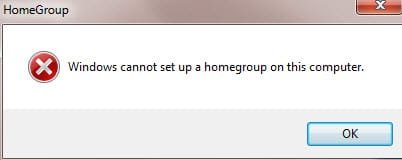
OK, I went back to Home, and clicked a Create Homegroup (documents, printer, in my case). It balked with the msg in the attachment.

My pwds are the same on each PC.
 

Attachments

  • HG_notset.jpg
    HG_notset.jpg
    6.6 KB · Views: 20

My Computer My Computer

At a glance

home premium 64bit
OS
home premium 64bit
Which computers are which?

Remember it is you who asked for help.
 

My Computer My Computer

At a glance

Windows 7 Ultimate x64AMD turion 64x2 TL-64 2.2GhzSodimm DDR2 4GBATI Radeon 1250 128MB IGP
Computer Manufacturer/Model Number
HP Compaq 6715B
OS
Windows 7 Ultimate x64
CPU
AMD turion 64x2 TL-64 2.2Ghz
Motherboard
HC030
Memory
Sodimm DDR2 4GB
Graphics Card(s)
ATI Radeon 1250 128MB IGP
Hard Drives
Fujitsu Siemens 500GB sata 3.0 Gb/s
OK, I changed "Home Network" to Public. A dialog appeared shown in the attachment. What am I supposed to do there? Use what's below "Change your network settings"? If I press Public network, it gives me the three choices again, Home, Work, Public.
Select Home then write down the password.

This is the password you will use to connect another computer to your homegroup
http://www.sevenforums.com/tutorials/43972-homegroup-add-computer-join.html
I've seen the link before. It looks like over kill. If I have to deal with, I will pay some $ to a local network guy here.

See attached.
OK, I went back to Home, and clicked a Create Homegroup (documents, printer, in my case). It balked with the msg in the attachment.

My pwds are the same on each PC.

Can you take another screen shot of the same screen as you did in the first post?

This is a very simple task, if there is a problem, we can fix it but you have to follow the directions.

Paying a network guy to setup your Homegroup is like paying a personal chef to make you a PB&J.
 

My Computer My Computer

At a glance

Dual Boot: Windows 8.1 & Server 2012r2 VMs: K...A10 7700 Kavari SteamRoller8GB DDR3 SDRAM PC3-85001024MB ATI AMD Radeon R7 Graphics
Computer type
PC/Desktop
Computer Manufacturer/Model Number
Custom
OS
Dual Boot: Windows 8.1 & Server 2012r2 VMs: Kali Linux, Backbox, Matriux, Windows 8.1
CPU
A10 7700 Kavari SteamRoller
Motherboard
ASUS A88XM-PLUS (FM2+ )
Memory
8GB DDR3 SDRAM PC3-8500
Graphics Card(s)
1024MB ATI AMD Radeon R7 Graphics
Sound Card
Realtek High Definition Audio
Monitor(s) Displays
Samsung
Hard Drives
SSD Crucial 120gb
WD VelociRaptor 1tb
PSU
Rosewill Gaming 650w
Case
Rosewill Galaxy 2
Internet Speed
55/12
Antivirus
Malwarebytes, MSE, SAS
Browser
FireFox, Chrome
Here is the repeat. Apparently, you cannot see it above.
 

Attachments

  • HGx.jpg
    HGx.jpg
    37.6 KB · Views: 0

My Computer My Computer

At a glance

home premium 64bit
OS
home premium 64bit
Here is the repeat. Apparently, you cannot see it above.

Ok so now that you are setup with a Home Network... Lets start over.

Leave the Homegroup on the PC you created it on
http://www.sevenforums.com/tutorials/43980-homegroup-leave.html?filter

Lets create the Homegroup again
http://www.sevenforums.com/tutorials/43961-homegroup-create.html?filter

Then Join the new Homegroup
http://www.sevenforums.com/tutorials/43972-homegroup-add-computer-join.html?filter

You may need to disable antivirus software

Here is a troubleshooting guide to help
Ultimate Troubleshooting Guide for Windows 7 HomeGroup Connection Issues

These instructions were compiled by Chev nearly 4 years ago, to give credit where its due.
 

My Computer My Computer

At a glance

Dual Boot: Windows 8.1 & Server 2012r2 VMs: K...A10 7700 Kavari SteamRoller8GB DDR3 SDRAM PC3-85001024MB ATI AMD Radeon R7 Graphics
Computer type
PC/Desktop
Computer Manufacturer/Model Number
Custom
OS
Dual Boot: Windows 8.1 & Server 2012r2 VMs: Kali Linux, Backbox, Matriux, Windows 8.1
CPU
A10 7700 Kavari SteamRoller
Motherboard
ASUS A88XM-PLUS (FM2+ )
Memory
8GB DDR3 SDRAM PC3-8500
Graphics Card(s)
1024MB ATI AMD Radeon R7 Graphics
Sound Card
Realtek High Definition Audio
Monitor(s) Displays
Samsung
Hard Drives
SSD Crucial 120gb
WD VelociRaptor 1tb
PSU
Rosewill Gaming 650w
Case
Rosewill Galaxy 2
Internet Speed
55/12
Antivirus
Malwarebytes, MSE, SAS
Browser
FireFox, Chrome
Here is the repeat. Apparently, you cannot see it above.

Ok so now that you are setup with a Home Network... Lets start over.

Leave the Homegroup on the PC you created it on
http://www.sevenforums.com/tutorials/43980-homegroup-leave.html?filter

Lets create the Homegroup again
http://www.sevenforums.com/tutorials/43961-homegroup-create.html?filter

Then Join the new Homegroup
http://www.sevenforums.com/tutorials/43972-homegroup-add-computer-join.html?filter

You may need to disable antivirus software

Here is a troubleshooting guide to help
Ultimate Troubleshooting Guide for Windows 7 HomeGroup Connection Issues

These instructions were compiled by Chev nearly 4 years ago, to give credit where its due.

I don't see why I need to go to the trouble of creating and joining, as described. It's pretty easy. I don't plan to disable the antivirus. The guide looks good, but ...

I happened to bring this problem up to my wife. She's got two Linux machines, which she uses a lot. She has two Win 7 PC, which she casually uses. That surprised me. She told me that she had no trouble getting homegroups on her Win7, networked. Apparently, it just happened the first time she put them on the network. She got very interested in my problem.

We discovered that #2 had a partially severed ethernet cable that stopped #1 and #2 syncing. Second we found an XP PC (#3) and had a name identical to #2. That happened because #3 contains a lot of programs I need in #2, so it made some sense to name #2 the same as #3. She dived into some admin tool, and found three "peer" items, one needed to be changed. It didn't help. Still #1 will not allow homegroups to be installed. Next we checked the firewall, and made a change there. Still no luck. There's something wrong with #1.

We've given up for day.
 

My Computer My Computer

At a glance

home premium 64bit
OS
home premium 64bit
Done. An important ingredient here was Admin Tools on the Control Panel. Click on Services, Scroll down to Homegrouplistener. Double click on it, and set Startup type to automatic. Click Start under Service status. OK.

Scroll down one line to HomegroupProvider. Double click, and do the start per above. Next go to Peer Networking groups, and set as above.

My wife figured it out.
 

My Computer My Computer

At a glance

home premium 64bit
OS
home premium 64bit
Glad you figured it out but we can't get you where you need to be without cooperation. Your initial problem was that you had your network set to public. The best option after that is to redo everything to make sure its a homegroup with no problems.
 

My Computer My Computer

At a glance

Dual Boot: Windows 8.1 & Server 2012r2 VMs: K...A10 7700 Kavari SteamRoller8GB DDR3 SDRAM PC3-85001024MB ATI AMD Radeon R7 Graphics
Computer type
PC/Desktop
Computer Manufacturer/Model Number
Custom
OS
Dual Boot: Windows 8.1 & Server 2012r2 VMs: Kali Linux, Backbox, Matriux, Windows 8.1
CPU
A10 7700 Kavari SteamRoller
Motherboard
ASUS A88XM-PLUS (FM2+ )
Memory
8GB DDR3 SDRAM PC3-8500
Graphics Card(s)
1024MB ATI AMD Radeon R7 Graphics
Sound Card
Realtek High Definition Audio
Monitor(s) Displays
Samsung
Hard Drives
SSD Crucial 120gb
WD VelociRaptor 1tb
PSU
Rosewill Gaming 650w
Case
Rosewill Galaxy 2
Internet Speed
55/12
Antivirus
Malwarebytes, MSE, SAS
Browser
FireFox, Chrome
Glad it is all fixed.

You should thank your wife who gave you the solution.

Can you mark as solved for others to know.
 

My Computer My Computer

At a glance

Windows 7 Ultimate x64AMD turion 64x2 TL-64 2.2GhzSodimm DDR2 4GBATI Radeon 1250 128MB IGP
Computer Manufacturer/Model Number
HP Compaq 6715B
OS
Windows 7 Ultimate x64
CPU
AMD turion 64x2 TL-64 2.2Ghz
Motherboard
HC030
Memory
Sodimm DDR2 4GB
Graphics Card(s)
ATI Radeon 1250 128MB IGP
Hard Drives
Fujitsu Siemens 500GB sata 3.0 Gb/s
Back
Top